Smartsheet
The Smartsheet connector is a Palantir-provided driver for Smartsheet.
To create a new Smartsheet source, follow the standard setup flow for Palantir-provided drivers, then use the sections below for Smartsheet-specific configuration and networking. For the complete property reference, see the official Smartsheet driver documentation ↗.
Configuration
The properties below are mandatory or recommended.
| Property | Required? | Description | Default |
|---|---|---|---|
AuthScheme ↗ |
Recommended | Specifies the authentication method to use when connecting to Smartsheet. | PersonalAccessToken |
InitiateOAuth ↗ |
Recommended | Specifies the process for obtaining or refreshing the OAuth access token, which maintains user access while an authenticated, authorized user is working. | REFRESH |
OAuthClientId ↗ |
Recommended | Specifies the client Id that was assigned when the custom OAuth application was created. (Also known as the consumer key.) This ID registers the custom application with the OAuth authorization server. | — |
OAuthClientSecret ↗ |
Recommended | Specifies the client secret that was assigned when the custom OAuth application was created. (Also known as the consumer secret). This secret registers the custom application with the OAuth authorization server. | — |
PersonalAccessToken ↗ |
Recommended | Specifies the Personal Access Token for authenticating with Smartsheet. This token can be generated through the Smartsheet user interface. | — |
Region ↗ |
Recommended | Specifies the hosting region for your Smartsheet account. | GLOBAL |
Networking
The table below lists the domains that the source needs to be able to access in order to successfully run.
For each domain, add a corresponding egress policy. If the source is hosted on-premises and not directly reachable from Foundry, use an agent proxy egress policy instead; the agent host itself must also be able to reach the listed domains. See using an agent as a proxy for details.
| Domain | Required |
|---|---|
| api.smartsheet.com | If Region=GLOBAL (default) |
| api.smartsheet.eu | If Region=EU |
| api.smartsheetgov.com | If Region=GOV |
| app.smartsheet.com | Only for Authorization URL, If Region=GLOBAL (default) |
| app.smartsheet.eu | Only for Authorization URL, If Region=EU |
| app.smartsheetgov.com | Only for Authorization URL, If Region=GOV |
Connection settings
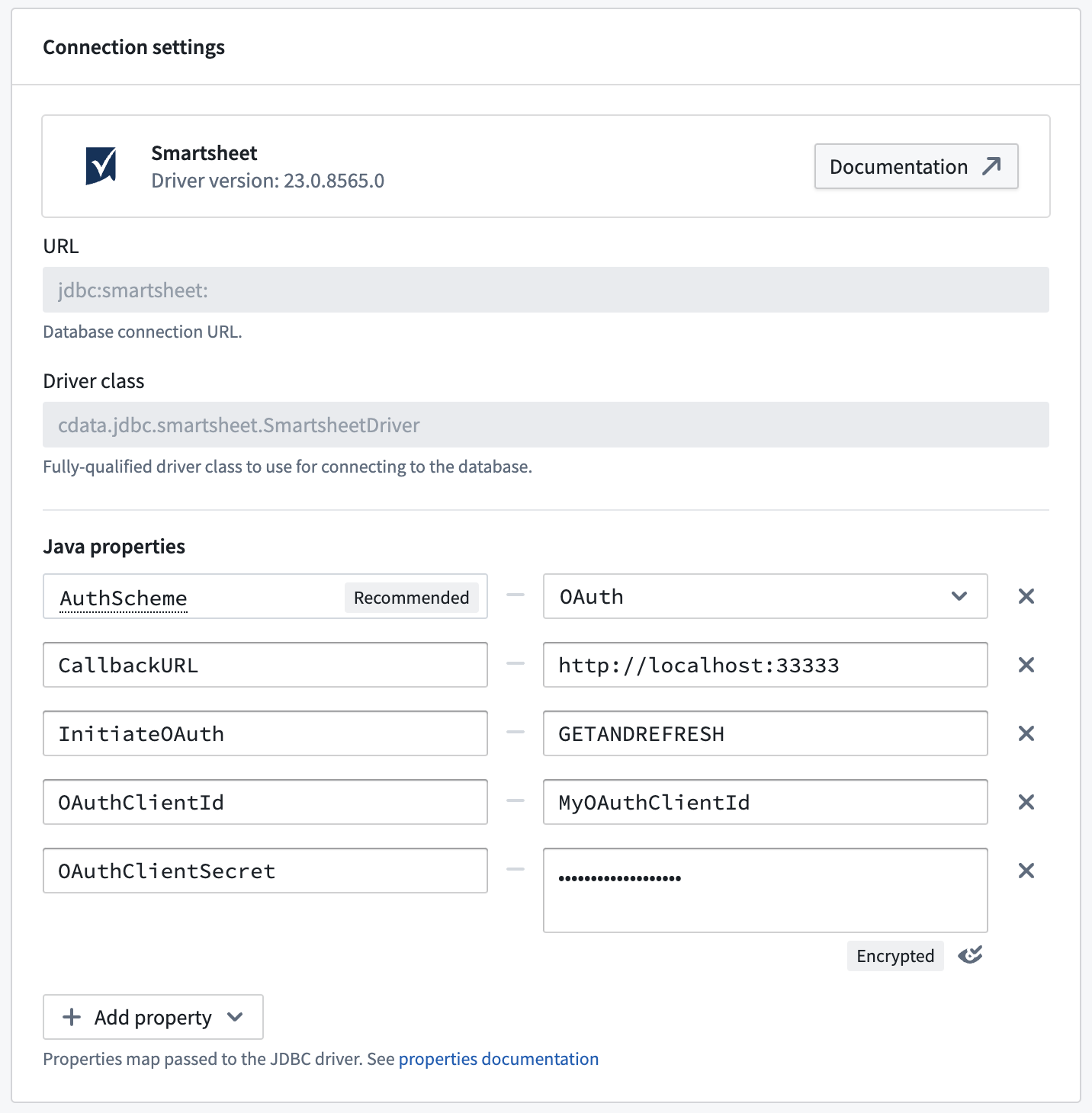
The URL field cannot be modified and is fixed as jdbc:smartsheet:. The JDBC properties section can be used as an alternative to modifying the JDBC URL.
For example, to represent the following JDBC URL:
jdbc:smartsheet:InitiateOAuth=GETANDREFRESH;OAuthClientId=MyOAuthClientId;OAuthClientSecret=MyOAuthClientSecret;CallbackURL=http://localhost:33333;, you can specify the additional properties in the JDBC properties section as follows:
中文翻译
Smartsheet
Smartsheet 连接器是一个 Palantir 提供的驱动程序(Palantir-provided driver),用于连接 Smartsheet。
要创建新的 Smartsheet 数据源,请遵循 Palantir 提供驱动程序的标准设置流程(standard setup flow),然后使用以下各节进行 Smartsheet 特定的配置和网络设置。有关完整的属性参考,请参阅官方 Smartsheet 驱动程序文档(official Smartsheet driver documentation)。
配置
以下属性为必填或推荐项。
| 属性 | 是否必填 | 描述 | 默认值 |
|---|---|---|---|
AuthScheme ↗ |
推荐 | 指定连接到 Smartsheet 时使用的认证方法。 | PersonalAccessToken |
InitiateOAuth ↗ |
推荐 | 指定获取或刷新 OAuth 访问令牌的过程,该令牌用于在已认证授权用户工作时维持其访问权限。 | REFRESH |
OAuthClientId ↗ |
推荐 | 指定创建自定义 OAuth 应用程序时分配的客户端 ID(也称为消费者密钥)。此 ID 用于在 OAuth 授权服务器上注册自定义应用程序。 | — |
OAuthClientSecret ↗ |
推荐 | 指定创建自定义 OAuth 应用程序时分配的客户端密钥(也称为消费者密钥)。此密钥用于在 OAuth 授权服务器上注册自定义应用程序。 | — |
PersonalAccessToken ↗ |
推荐 | 指定用于 Smartsheet 认证的个人访问令牌。该令牌可通过 Smartsheet 用户界面生成。 | — |
Region ↗ |
推荐 | 指定 Smartsheet 账户的托管区域。 | GLOBAL |
网络配置
下表列出了数据源成功运行所需访问的域名。
对于每个域名,请添加相应的出站策略(egress policy)。如果数据源部署在本地且无法直接从 Foundry 访问,请改用代理出站策略(agent proxy egress policy);代理主机本身也必须能够访问所列域名。详情请参阅使用代理作为代理(using an agent as a proxy)。
| 域名 | 是否必需 |
|---|---|
| api.smartsheet.com | 如果 Region=GLOBAL(默认值) |
| api.smartsheet.eu | 如果 Region=EU |
| api.smartsheetgov.com | 如果 Region=GOV |
| app.smartsheet.com | 仅用于授权 URL,如果 Region=GLOBAL(默认值) |
| app.smartsheet.eu | 仅用于授权 URL,如果 Region=EU |
| app.smartsheetgov.com | 仅用于授权 URL,如果 Region=GOV |
连接设置
URL 字段不可修改,固定为 jdbc:smartsheet:。JDBC properties 部分可作为修改 JDBC URL 的替代方案。
例如,要表示以下 JDBC URL:
jdbc:smartsheet:InitiateOAuth=GETANDREFRESH;OAuthClientId=MyOAuthClientId;OAuthClientSecret=MyOAuthClientSecret;CallbackURL=http://localhost:33333;,您可以在 JDBC properties 部分中指定附加属性,如下所示: