Branching and release process(分支与发布流程)
The purpose of this document is to outline both the recommended best practices for branch management and the release process of data pipelines managed through Projects within Code Repositories.
The high level goal is to design a process to strike a balance between quick iteration on new data features / data quality fixes and having a stable and process-compliant change management process.
Scope of release
Before we jump into the internals of the release management process, we need to better define exactly "what is the product" that we are releasing? For our purposes we'll define the product to be the set of assets released as a conceptual unit.
Taking Recommended Project structure as a reference for how we build pipelines in Foundry, we see that the pipeline is defined by multiple projects of different types - datasource, transforms, Ontology and workflow. In most cases, however, we will not manage each project on its own as a product, but instead, each project will define a subset of its resources as one of the following product types:
- The Ontology product: this product is the collection of output datasets created out of the datasource, pipeline and Ontology projects.
- A Use-case product: every use case project represents a given use case that stands on its own. Each of the use cases is defined as a product.
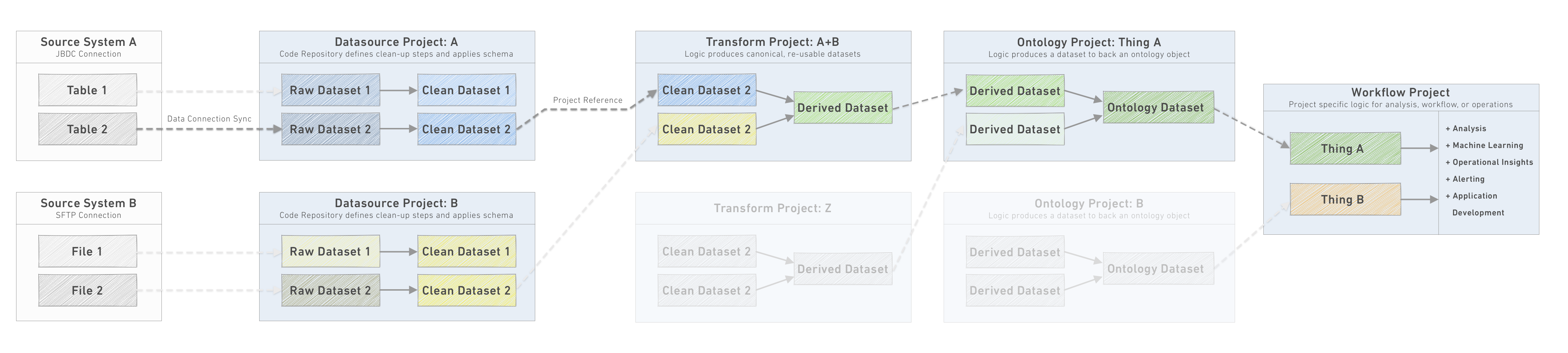
:::callout{theme="neutral"} The definition we give to a product here can cover code which is managed in multiple repositories and other Foundry resources. :::
Product branch management
The following section refers to the branching strategy we want to deploy to manage the release of every product. Learn more about branching in general and how branches work between Code Repositories and datasets.
:::callout{theme="warning" title="Branch naming"} It is highly recommended to have the same branch name across all repositories within the product. This will ensure downstream branches read from the correct upstream branch. :::
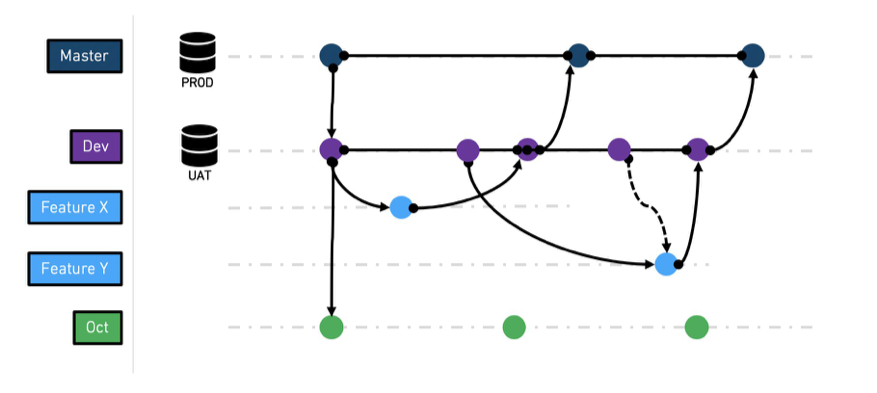
The general branching strategy we recommend following is based on a common practice named GitFlow ↗ with some modification. The main change is a recommendation to skip the release branch. Due to the way artifacts are deployed in Foundry, we can merge changes from dev into master directly after testing.
Common branches
master - this is the production branch. As such, it is a protected branch
and only the release manager role can approve merging a PR to this
branch. It is assumed that the master branch is sourced with production
data.
dev - the dev (aka development) branch is a staging branch, derived
from the master branch. It is mostly relevant when you want to test a
complete feature using testing data. The dev branch can be sourced from
master (this happens automatically through fallback branches) or from a UAT data
source.
feature-[X] - feature branch is where a given feature is being developed
and tested. This branch is derived from dev branch. This is a
short-lived branch, meaning it can be deleted once the branch is being
merged into master. Since the branch is derived from dev it will be
sourced with the same data dev branch has. Note that this remains true as long as the fallback branches don't get reconfigured, and as long as the input datasets don't exist on the feature branch.
Other special branches
major-release-[X] - special branch which
integrates all required changes due to changes in the source system's schema (occurring at a specific cadence).
hot-fix-[X] - special branch used to fix an issue discovered in production
while the code base has moved to a new version. Since we assume
dev and master are in sync (unless there is a feature which is
being actively tested) it is unlikely we need such a branch.
Branch management workflow
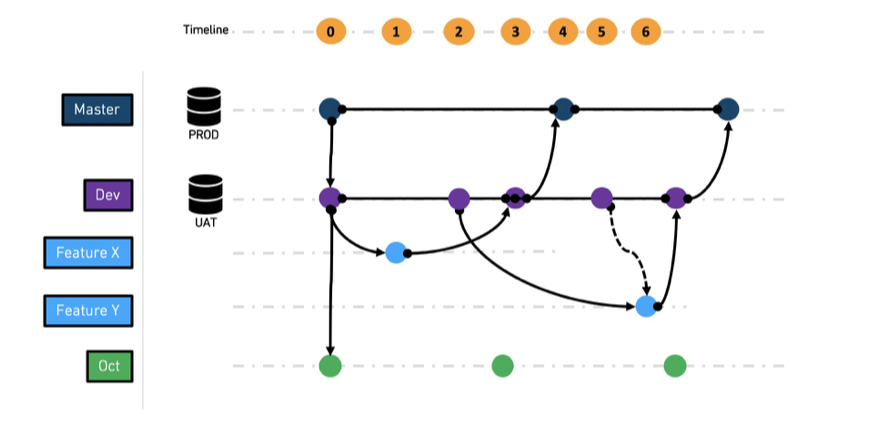
As described above, some branches are permanent while others are short-lived. The following section describes the recommended workflow between branches.
-
At t0,
masteranddevbranches are created. -
At t1,
feature xbranch is created fromdev -
At t2,
feature ybranch is created fromdev -
At t3,
feature xis merged intodev -
At t4,
devis merged intomaster, andfeature xbranch is deleted -
At t5,
devis merged intofeature yto pick up the latest state ofdev -
At t6, feature y is merged into
devand later fromdevtomasteras before
In addition to features developed and released to dev and master , a long lived branch for a major release like major-release-[X] is being developed.
It is recommended to keep merging dev onto major-release-[X] , so the latest features are in sync. We recommend keeping the Ontology schema as stable as possible and to hide the backend schema changes through the transformation in the datasource and transform projects.
Repository upgrades
Repository upgrades are periodic prompts to update the configuration files in a Code Repository. These updates apply fixes or bump versions of language-bundle dependencies and best practice is to stay on top of applying these recommended upgrades.

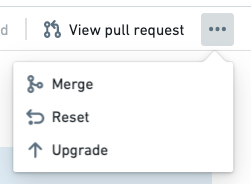
Note that if you miss clicking the "Upgrade" button on the prompt, the button is also available for any branch under the "..." options menu in the upper right corner:
The upgrade process should be treated the same way as a feature development cycle. This means:
-
mastershould be upgraded throughdev. -
When prompted to upgrade
dev, an automated feature branch will be created. You can test the configuration changes by running a build on this branch once CI checks are complete. After confirming the transforms still execute after the upgrade, merge the configuration changes intodev. Oncedevis upgraded, a PR should be used to push these changes to master. -
To upgrade all open feature branches, merge
devback into each branch to include these configuration upgrades.
Maintenance windows
A fast iteration loop from idea to production is common in development practices and critical to the success of projects that depend on end-user feedback to determine the next iteration loop. In order to support such a process, we recommend establishing a pre-defined maintenance window.
For example, once all feature PRs are merged, all datasets get built on the dev branch so that the results can be verified on Wednesday and Friday. During these days, only fixes to problems discovered during verification get merged into dev, until dev finally gets merged into master on Thursday and Monday, the "release days"
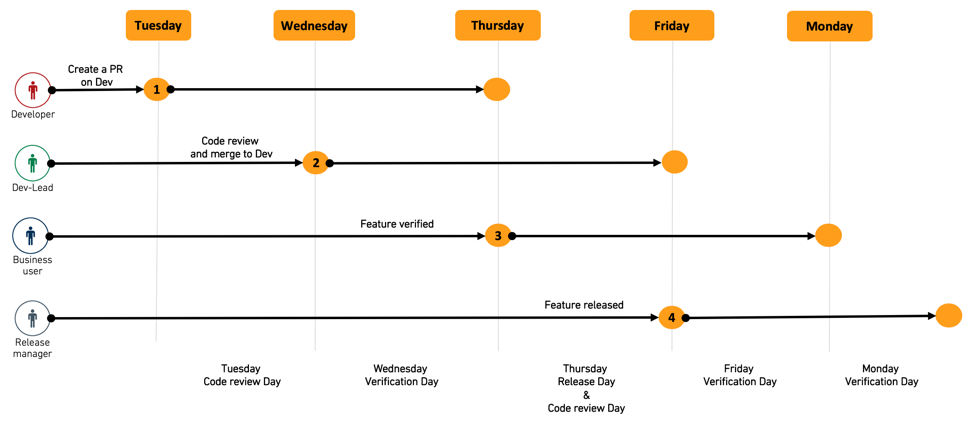
It is recommended to agree on such cadence with all parties involved to make sure they devote enough time during these days to push new features forward.
Feature testing and end user verification
Once feature development is complete it is critical to test and validate both the correctness of the feature outcome and the impact on any dependent resource. In Code Repositories we consider the output datasets as the feature outcome which should be tested.
Based on the branch structure we defined above, when we build the output dataset it will use either data from the input datasets on the same branch of the feature, or through the fallback logic will read from the source branch, master in the simplified version and dev in the other.
The developer-level testing can be done using dataset Health Checks, dependent test datasets, or manually using tools such as Contour.
:::callout{title="Testing methodology"} It is highly discouraged to do this testing via the preview or SQL helper. The preview helper uses only a sample of the data when executing code, which might not reveal all cases - especially in code that involves one or more join operations. The SQL helper tests the correctness of the code but not the output of the build which in some cases could be different. :::
Upon completion of feature development, the new feature code needs to be reviewed before being merged into the dev branch and the feature outcomes need to be verified by the end user for correctness and completeness.
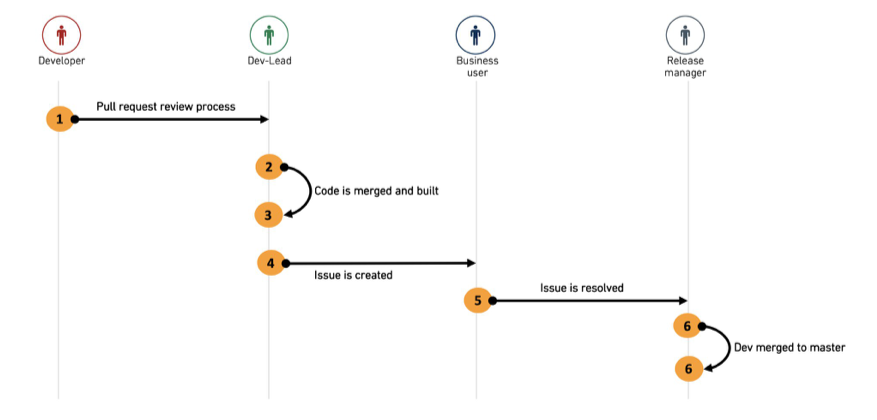
We recommend using a combination of Pull Request reviews for the first and Foundry Issues for the second as explained in the diagram below.
-
The developer creates a pull request from his feature branch to the
devbranch and adds implementation comments. -
The dev-lead reviews the PR, collaborates with the developer on required changes and finally merges the PR into
dev.
:::callout{theme="neutral"} During the pull request review, make sure that you check the changes to the schemas of any affected datasets. Schemas should be treated as your data API, so any changes to column names or columns types is considered a "breaking" change for any consumers. Limit breaks where possible by creating new columns rather than deleting or modifying old ones while announcing a deprecation of the old column and instructions for data consumers (identified through Data Connection) to update to the new column. At the next major release, columns deprecated in the previous major release can be removed.
To review schema changes in a pull request, use schema diff view in the Affected Datasets tab. :::
- The dev-lead runs the build on the
devbranch to create the feature output datasets. - The dev creates a Foundry Issue on the output dataset, documents any testing and verification requests and assigns the issue to the relevant end user for verification.
- The end user receives the issue, with full context and view of the relevant dataset and branch to be tested. They collaborate with the developer on the required changes until the issue is resolved and marked as ready to merge. The issue is then assigned to the release manager.
- The release manager closes the issue and merges
devintomaster. - The release manager deletes the feature branch.
The above workflow allows for a relatively fast collaboration cycle between the parties, without losing context. Closed issues are kept on the platform and can act as audit trail for the change-management process.
Foundry Issues feature review workflow
Below is an example of how a team can use Foundry Issues to track requests for review from other stakeholders, carry out conversations around new features, and control and document the process or merging code to master, so all interested parties remain informed and up-to-date. Consider this directional, rather than proscriptive, and adapt it to existing operational and technical processes as needed.
Example workflow
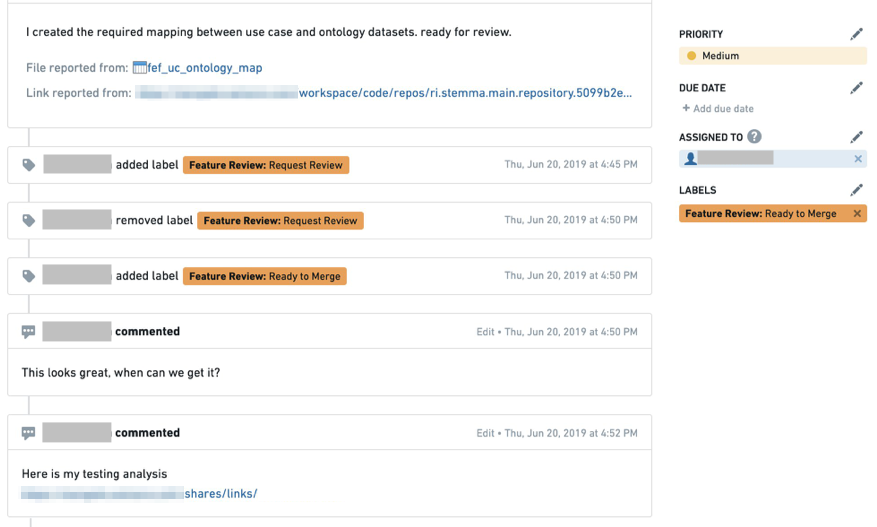
The first time a developer creates a feature review request issue, the issue is assigned with status Feature Review: Request Review. The issue can be attached to the dataset or to a specific column if the feature is specific.
Collaboration with the end user is done through the comment section and by changing the status between Request Change or Ready to Merge and changing the assignee of the issue.
Issues is a great place to store the feature review workflow as end users can also document their verification process (for audit purposes) and attach links to other assets.
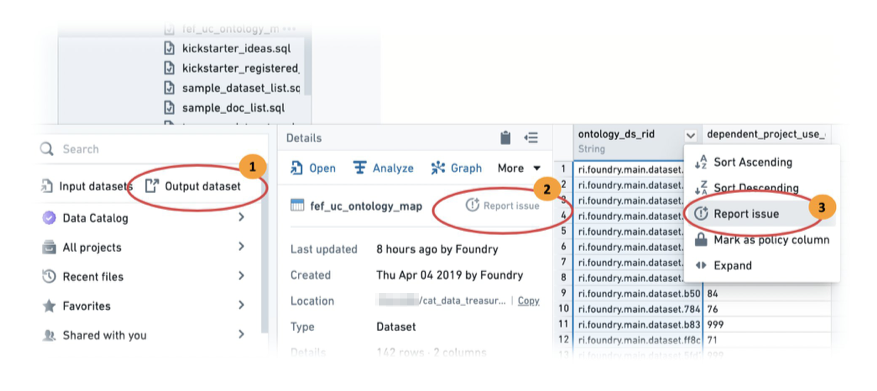
The diagram below shows how an issue is created on the build output dataset.
-
In Foundry Explorer, select Output dataset.
-
Report the issue on the whole dataset by clicking Report Issue.
-
If the feature has to do with a specific column, you can using the column level report issue to provide the reviewer better context of the change you made.
-
Complete the issue fields as prompted by the form.
-
Once the issue is created, make sure to change the label to
Feature Review: Request Review. (If you do not have these labels available, contact your Palantir representative for assistance.)
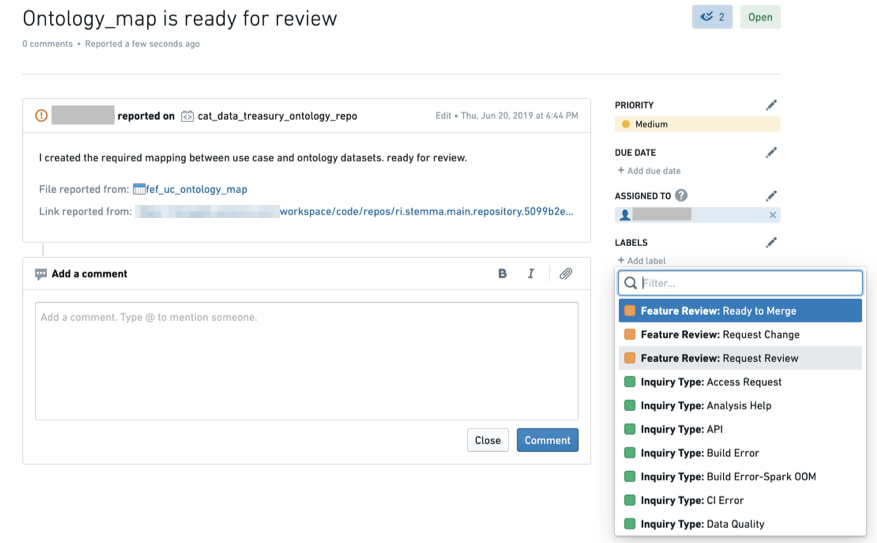
As the review process continues, the collaboration thread including all status changes and verification evidence are stored in the issue.
中文翻译
分支与发布流程
本文档旨在说明分支管理的推荐最佳实践,以及代码仓库(Code Repositories) 中通过项目管理的数据流的发布流程。
总体目标是设计一套流程,在快速迭代新数据功能、修复数据质量问题,和稳定、合规的变更管理流程之间取得平衡。
发布范围
在深入介绍发布管理流程的内部逻辑之前,我们需要先明确定义我们发布的“产品究竟是什么”?就本文而言,我们将产品定义为作为一个概念单元发布的资产集合。
参考推荐项目结构中介绍的Foundry流水线构建方式,可以看到流水线由多种类型的多个项目组成:数据源、转换、本体(Ontology) 和工作流。不过大多数情况下,我们不会将每个项目单独作为一个产品管理,而是每个项目会将其部分资源划分为以下产品类型之一: * 本体产品:该产品是由数据源、流水线和本体项目产出的输出数据集的集合。 * 用例产品:每个用例项目都代表一个独立的特定用例,每个用例都被定义为一个产品。
:::callout{theme="neutral"} 此处定义的产品可以覆盖多个仓库中管理的代码及其他Foundry资源。 :::
产品分支管理
以下内容介绍我们用于管理每个产品发布的分支策略。了解更多分支的通用知识,以及分支在代码仓库与数据集之间的运行机制。
:::callout{theme="warning" title="分支命名"} 强烈建议产品内所有仓库使用相同的分支名,这可以确保下游分支从正确的上游分支读取数据。 :::
我们推荐的通用分支策略基于名为GitFlow ↗的通用实践,并做了部分调整。主要的改动是建议跳过release分支,基于Foundry中构件的部署方式,我们可以在测试完成后直接将dev的变更合并到master。
常用分支
master - 即生产分支,是受保护的分支,只有发布管理员角色可以批准将PR合并到该分支。默认master分支使用生产数据作为数据源。
dev - 即开发(development)分支,是从master分支拉取的预发分支,主要用于当你需要使用测试数据验证完整功能的场景。dev分支的数据源可以是master(这会通过回退分支(Fallback branches) 自动完成),也可以来自UAT数据源。
feature-[X] - 功能分支,用于开发和测试特定功能,从dev分支拉取。这是短期分支,意味着合并到master之后就可以删除。由于该分支从dev拉取,它将使用与dev分支相同的数据源。请注意:只要回退分支没有被重新配置,且功能分支上不存在输入数据集,这个规则就始终生效。
其他特殊分支
major-release-[X] - 特殊分支,用于整合源系统schema变更带来的所有必要修改(按固定周期进行)。
hot-fix-[X] - 特殊分支,用于修复生产环境中发现的问题,尤其是当代码库已经迭代到新版本的场景。由于我们默认dev和master是同步的(除非有功能正在测试中),所以需要这类分支的场景并不多。
分支管理工作流
如上所述,部分分支是永久分支,其他则是短期分支。以下内容介绍推荐的分支间工作流程。
- 在t0时刻,创建
master和dev分支。 - 在t1时刻,从
dev拉取feature x分支。 - 在t2时刻,从
dev拉取feature y分支。 - 在t3时刻,
feature x合并到dev。 - 在t4时刻,
dev合并到master,随后删除feature x分支。 - 在t5时刻,将
dev合并到feature y,拉取dev的最新状态。 - 在t6时刻,
feature y合并到dev,之后按照之前的流程从dev合并到master。
除了开发并发布到dev和master的功能之外,还有类似major-release-[X]这样的长期分支,用于大型版本发布的开发。
建议持续将dev的改动合并到major-release-[X],保证最新功能的同步。我们建议尽可能保持本体schema稳定,通过数据源和转换项目中的转换逻辑隐藏后端schema变更。
仓库升级
仓库升级(Repository upgrades) 是定期弹出的提示,用于更新代码仓库中的配置文件。这些更新会修复问题或提升语言包依赖的版本,最佳实践是及时应用这些推荐的升级。
请注意,如果您错过了点击提示中的“升级”按钮,该按钮也可以在任意分支右上角的“...”选项菜单中找到:
升级流程应该和功能开发周期同等对待,这意味着:
1. master的升级需要通过dev完成。
2. 当收到dev的升级提示时,系统会自动创建一个功能分支。CI检查完成后,你可以在该分支上运行构建来测试配置变更。确认升级后转换仍然可以正常执行后,将配置变更合并到dev。dev升级完成后,应该通过PR将这些改动推送到master。
3. 要升级所有已打开的功能分支,将dev合并到每个分支即可包含这些配置升级。
维护窗口
从想法到上线的快速迭代循环是开发实践中的常见模式,对于需要依赖最终用户反馈确定后续迭代方向的项目来说至关重要。为了支撑这样的流程,我们建议预先定义维护窗口。
例如:所有功能PR合并完成后,所有数据集会在dev分支上完成构建,这样就可以在周三和周五验证结果。在这两天,只有验证过程中发现的问题的修复可以合并到dev,直到dev最终在周四和周一(即“发布日”)合并到master。
建议与所有相关方就该周期达成共识,确保他们在这些日期投入足够的时间推进新功能上线。
功能测试与最终用户验证
功能开发完成后,需要测试验证功能产出的正确性,以及对所有依赖资源的影响,这一步至关重要。在代码仓库中,我们将输出数据集视为需要测试的功能产出。
基于上文定义的分支结构,当我们构建输出数据集时,它要么使用功能所在分支的输入数据集的数据,要么通过回退逻辑从源分支读取,简化版本中是master,其他场景下是dev。
开发者层面的测试可以通过数据集健康检查(Health Checks)、依赖测试数据集完成,也可以使用Contour等工具手动完成。
:::callout{title="测试方法"} 强烈不建议通过预览或SQL助手进行测试。预览助手在执行代码时仅使用数据样本,可能无法覆盖所有场景,尤其是涉及一个或多个连接操作的代码。SQL助手仅测试代码的正确性,不会测试构建的输出,部分情况下两者可能存在差异。 :::
功能开发完成后,新功能代码需要先经过评审才能合并到dev分支,且功能产出需要经过最终用户验证其正确性和完整性。
我们建议结合拉取请求(Pull Request) 评审完成代码审查,结合Foundry问题(Foundry Issues) 完成用户验证,如下图所示:
- 开发者从自己的功能分支创建指向
dev分支的拉取请求,并添加实现说明。 - 开发负责人评审PR,与开发者协作完成必要修改,最终将PR合并到
dev。
:::callout{theme="neutral"} 在拉取请求评审过程中,务必检查所有受影响数据集的schema变更。Schema应当被视为你的数据API,因此任何列名或列类型的变更都会被所有消费方视为“破坏性”变更。请尽可能减少破坏性变更,优先创建新列,而非删除或修改旧列,同时公告旧列的弃用信息,并指导数据消费方(可通过数据连接(Data Connection) 识别)更新为使用新列。在下一个主要版本发布时,可以移除上一个主要版本中弃用的列。
要在拉取请求中评审schema变更,可以使用受影响数据集(Affected Datasets)标签页中的schema差异视图。 :::
- 开发负责人在
dev分支上运行构建,生成功能输出数据集。 - 开发者在输出数据集上创建一个Foundry问题,记录所有测试和验证要求,并将问题分配给相关最终用户进行验证。
- 最终用户收到问题,包含完整上下文,以及待测试的相关数据集和分支的视图。他们会与开发者协作完成必要修改,直到问题解决并标记为可合并,随后问题会被分配给发布管理员。
- 发布管理员关闭问题,并将
dev合并到master。 - 发布管理员删除功能分支。
上述工作流可以实现各方之间相对高效的协作循环,且不会丢失上下文。已关闭的问题会保存在平台上,可作为变更管理流程的审计追踪。
Foundry问题功能评审工作流
以下示例展示了团队如何使用Foundry问题追踪其他利益相关方的评审请求,围绕新功能开展讨论,控制并记录代码合并到master的流程,从而让所有相关方都能及时了解最新情况。该示例仅为方向参考,而非强制要求,可以根据现有运营和技术流程按需调整。
示例工作流
开发者首次创建功能评审请求问题时,将问题状态设置为Feature Review: Request Review。如果功能是针对特定列的,可以将问题关联到数据集或特定列。
与最终用户的协作可以通过评论区完成,在Request Change和Ready to Merge之间切换状态,并修改问题的经办人即可。
问题是存储功能评审工作流的绝佳载体,因为最终用户也可以记录他们的验证流程(用于审计目的),并附上其他资产的链接。
下图展示了如何在构建输出数据集上创建问题:
- 在Foundry资源管理器(Foundry Explorer) 中,选择输出数据集。
- 点击Report Issue提交整个数据集的问题。
- 如果功能和特定列相关,你可以使用列级别的问题提交功能,为评审者提供你所做变更的更准确上下文。
- 按照表单提示填写问题字段。
- 问题创建完成后,务必将标签修改为
Feature Review: Request Review。(如果你没有这些标签,请联系你的Palantir客户代表获取协助。)
随着评审流程推进,包括所有状态变更和验证证据在内的协作线程都会存储在问题中。