External pipelines in Pipeline Builder(Pipeline Builder 中的外部管道(External pipelines))
:::callout{theme="neutral"} If you're new to Pipeline Builder, review how to create a batch pipeline in Pipeline Builder before proceeding. :::
Pipeline Builder now offers external pipelines, which push down compute to external compute engines. This functions in a similar manner as compute pushdown in Python transforms, and allows Foundry's pipeline management, data lineage, and security functionality to be used on top of external data warehouse compute.
As with compute pushdown in Python transforms, all inputs and outputs from external pipelines must be virtual tables.
Tables built with external compute can be composed together with datasets and tables built with Foundry-native compute using Foundry’s scheduling tools, allowing you to orchestrate complex multi-technology pipelines using the exact right compute at every step along the way.
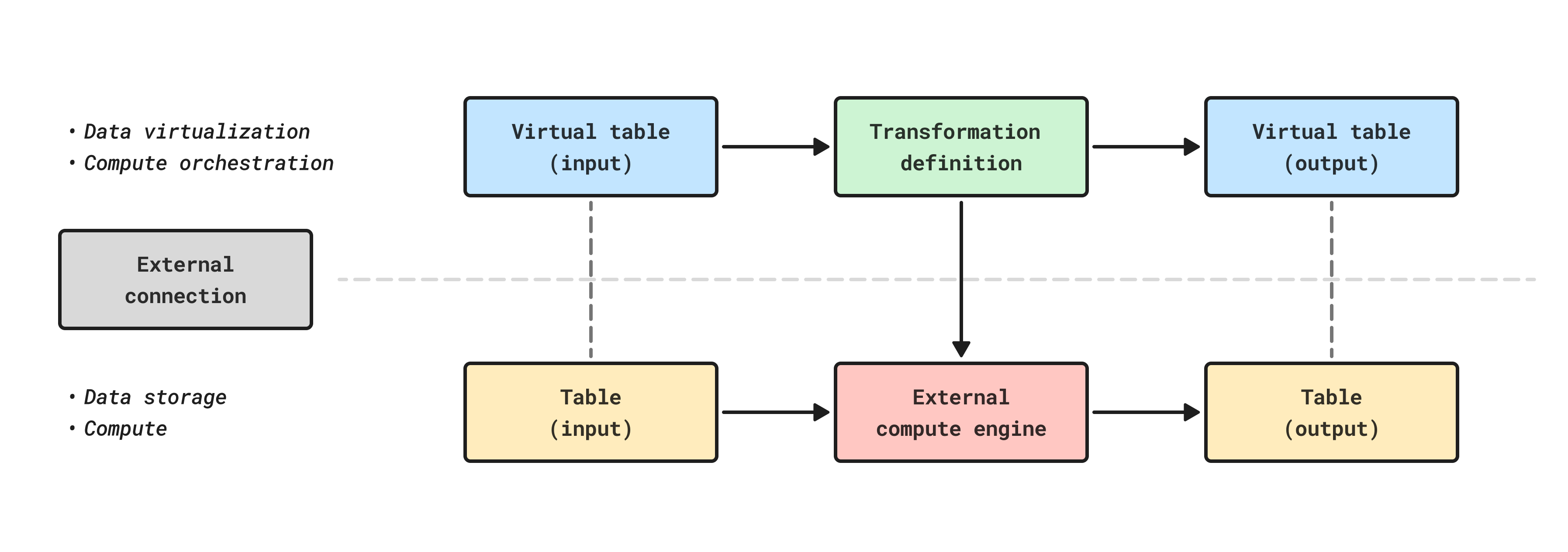
Supported external compute engines for Pipeline Builder
Currently, Databricks and Snowflake are supported external compute engines in Pipeline Builder. To use other external compute engines, such as BigQuery, use transforms with compute pushdown.
| Source type | Status |
|---|---|
| BigQuery | Not available |
| Databricks | Generally available |
| Snowflake | Generally available |
Create a new external pipeline
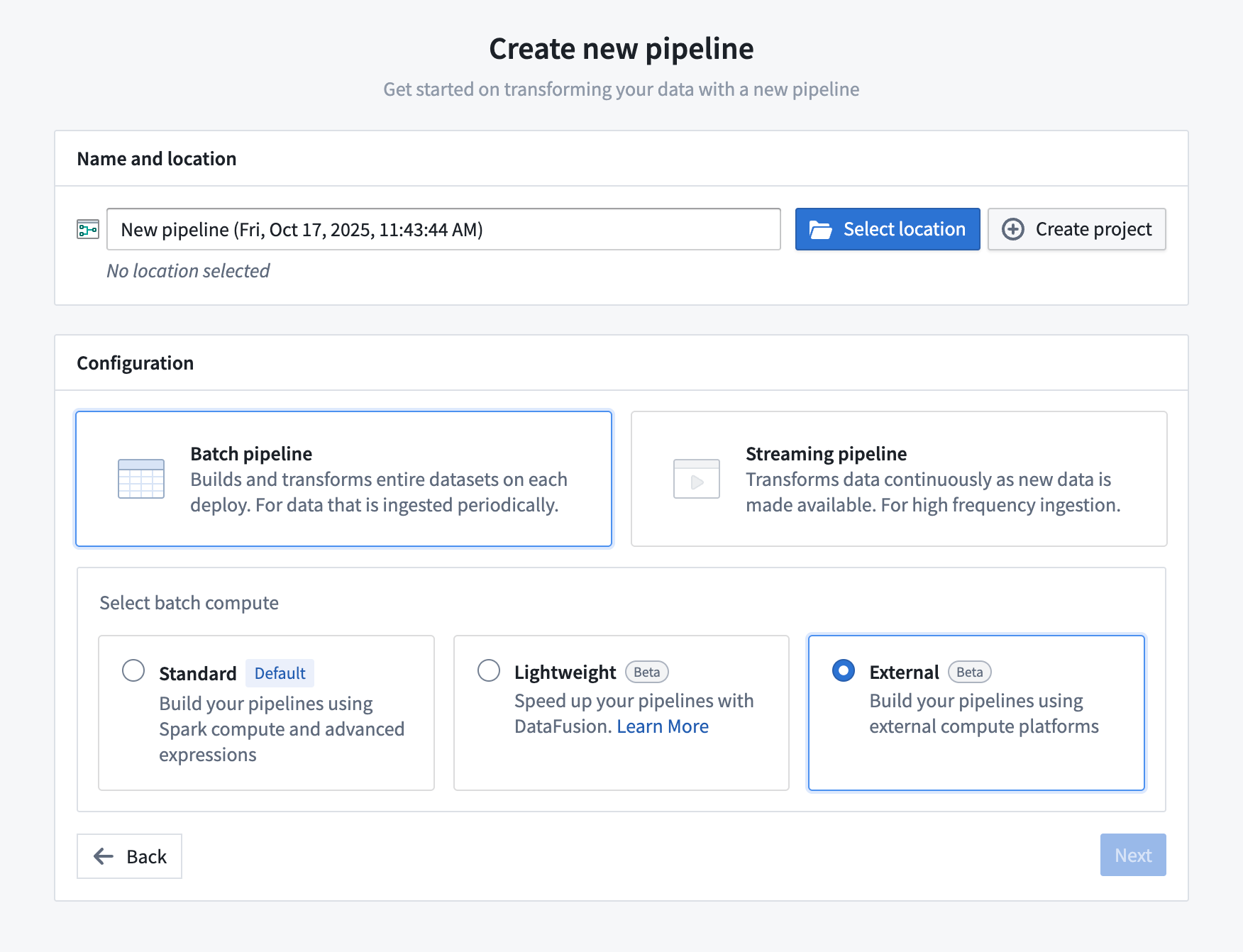
- Open Pipeline Builder and select Create new pipeline.
- After entering a name for your pipeline and the desired location, choose Batch pipeline > External in the configuration settings and select Next.
- Search for and select your supported external source and import it into the pipeline.
- Now you can add virtual tables from that source to the graph and create your pipeline as usual.
- All pipeline outputs will be virtual table outputs in the source.
- When ready to build, save and deploy the pipeline. The pipeline will run using external compute and then output the result as a virtual table with storage in the source system.
:::callout{theme="neutral"} All input and output tables must be virtual tables from the same source you selected as part of the pipeline setup. For Databricks external pipelines, only Databricks tables are supported. For Snowflake external pipelines, only Snowflake virtual tables from the same external volume are supported. Foundry datasets are not supported as inputs or outputs when using external pipelines. :::
Configuring build settings
You can edit your pipeline source and configure source-specific compute options in the build settings panel.

The configuration for external compute is available under the Default compute profile build setting.
| Source type | Compute profile | Description |
|---|---|---|
| Databricks | Serverless | Use serverless compute with Databricks Connect (default). Refer to the official Databricks documentation ↗ for more information on compute options in Databricks Connect. |
| Databricks | Classic compute | Specify the cluster ID of a classic compute cluster. If unspecified, the Spark cluster ID will be derived from the source configuration. Must be provided if the source is configured to use a SQL warehouse. |
| Snowflake | Compute warehouse | Specify the Snowflake warehouse to use for compute. If unspecified, the compute warehouse configured on the source will be used. |
Known limitations
External pipelines do not currently support the same set of transforms and expressions as standard batch pipelines.
Due to the differences between external and batch pipelines, you should always verify results using Preview or by examining build outputs.
Currently unsupported features and expressions include:
- Incremental computation
- LLM features
- Media set operations
- Union
- User-defined functions
- Geospatial operations
中文翻译
Pipeline Builder 中的外部管道(External pipelines)
:::callout{theme="neutral"} 如果您是 Pipeline Builder 的新手,请在继续之前查看如何在 Pipeline Builder 中创建批处理管道。 :::
Pipeline Builder 现在提供外部管道(External pipelines),可将计算下推至外部计算引擎。其功能类似于 Python 转换中的计算下推(Compute pushdown),允许在外部数据仓库计算之上使用 Foundry 的管道管理、数据沿袭(Data lineage)和安全功能。
与 Python 转换中的计算下推一样,外部管道的所有输入和输出必须是虚拟表(Virtual tables)。
使用外部计算构建的表可以与使用 Foundry 原生计算构建的数据集和表组合在一起,借助 Foundry 的调度工具,您可以在每一步使用最合适的计算引擎来编排复杂的多技术管道。
Pipeline Builder 支持的外部计算引擎
目前,Pipeline Builder 支持 Databricks 和 Snowflake 作为外部计算引擎。如需使用其他外部计算引擎(如 BigQuery),请使用带计算下推的转换(Transforms with compute pushdown)。
| 源类型 | 状态 |
|---|---|
| BigQuery | 不可用 |
| Databricks | 正式可用 |
| Snowflake | 正式可用 |
创建新的外部管道
- 打开 Pipeline Builder 并选择创建新管道(Create new pipeline)。
- 为管道输入名称和目标位置后,在配置设置中选择批处理管道(Batch pipeline) > 外部(External),然后选择下一步(Next)。
- 搜索并选择您的支持的外部源,并将其导入管道。
- 现在,您可以向图中添加来自该源的虚拟表,并像往常一样创建管道。
- 所有管道输出都将是该源中的虚拟表输出(Virtual table outputs)。
- 准备就绪后,保存并部署管道。管道将使用外部计算运行,然后将结果输出为虚拟表,并存储在源系统中。
:::callout{theme="neutral"} 所有输入和输出表必须是来自您在管道设置中选择的同一源的虚拟表。对于 Databricks 外部管道,仅支持 Databricks 表。对于 Snowflake 外部管道,仅支持来自同一外部卷(External volume)的 Snowflake 虚拟表。使用外部管道时,不支持将 Foundry 数据集作为输入或输出。 :::
配置构建设置
您可以在构建设置面板中编辑管道源并配置特定于源的计算选项。
外部计算的配置位于默认计算配置文件(Default compute profile)构建设置下。
| 源类型 | 计算配置文件 | 描述 |
|---|---|---|
| Databricks | 无服务器(Serverless) | 使用 Databricks Connect 的无服务器计算(默认)。有关 Databricks Connect 中计算选项的更多信息,请参阅官方 Databricks 文档 ↗。 |
| Databricks | 经典计算(Classic compute) | 指定经典计算集群的集群 ID。如果未指定,Spark 集群 ID 将从源配置中派生。如果源配置为使用 SQL 仓库,则必须提供此参数。 |
| Snowflake | 计算仓库(Compute warehouse) | 指定用于计算的 Snowflake 仓库。如果未指定,将使用源上配置的计算仓库。 |
已知限制
外部管道目前不支持与标准批处理管道相同的转换和表达式集。
由于外部管道和批处理管道之间的差异,您应始终使用预览(Preview)或检查构建输出来验证结果。
当前不支持的功能和表达式包括:
- 增量计算(Incremental computation)
- 大语言模型(LLM)功能
- 媒体集操作(Media set operations)
- 联合(Union)
- 用户自定义函数(User-defined functions)
- 地理空间操作(Geospatial operations)