Faster pipelines in Pipeline Builder(Pipeline Builder 中的快速管道(Faster pipelines))
:::callout{theme="neutral"} Faster pipelines were previously known as lightweight pipelines, as the term "lightweight" referred to the reduced time and compute resources required to execute these pipelines as opposed to the size of the data they handle. The name change reflects that faster pipelines reduce both execution time and compute resource usage, even for large-scale datasets. :::
:::callout{theme="warning"} If you are unfamiliar with creating pipelines in Pipeline Builder, review the documentation on how to create a batch pipeline in Pipeline Builder before proceeding. :::
Pipeline Builder now supports faster pipelines, which can reduce execution times for batch and incremental pipelines. This pipeline uses a backend powered by DataFusion ↗, an open-source query engine written in Rust ↗. Compared to traditional Spark-based pipelines, faster pipelines can substantially accelerate compute processes.
Faster pipelines are specifically engineered to optimize build times and execute low-latency operations efficiently. In particular, pipelines that run in under 15 minutes will benefit most from faster pipeline configuration.
We encourage you to experiment with different pipeline configurations to improve performance. You can explore the capabilities by testing them on a branch or making a copy of an existing pipeline to compare the new performance with your original configuration.
Create a new faster pipeline
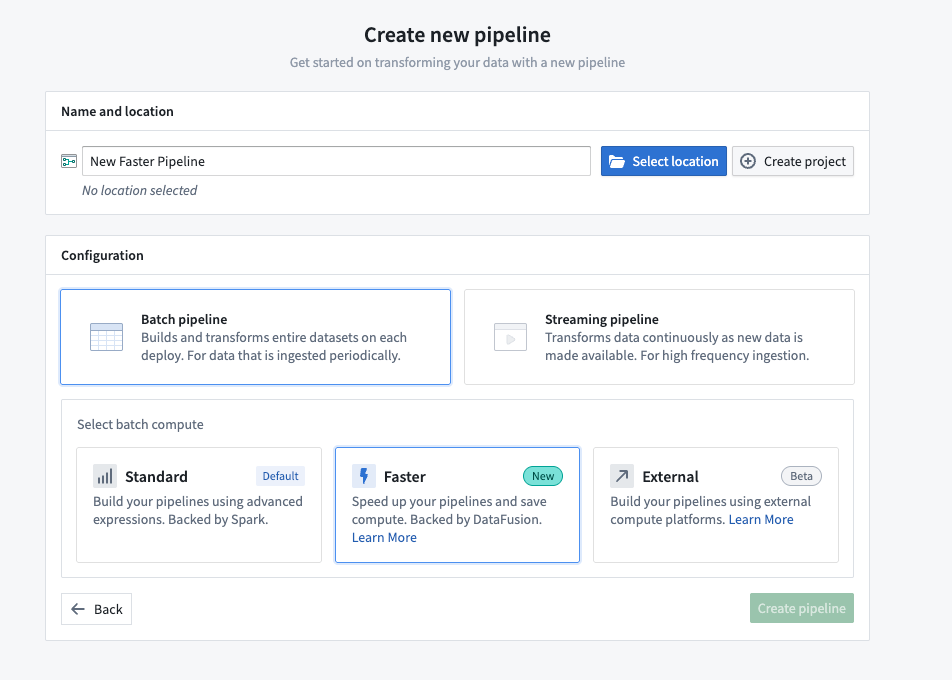
- Open Pipeline Builder and select Create new pipeline.
- After entering a name for your pipeline and the desired location, choose Faster pipeline under Pipeline type.
- Select Create pipeline.
Convert between faster and standard batch pipelines
You can convert between faster and standard batch pipelines, and vice versa, by following the steps below. This conversion can be reversed at any time by repeating the process and selecting the desired options.
- To convert a batch pipeline, go to Settings and select Convert to Faster pipeline.
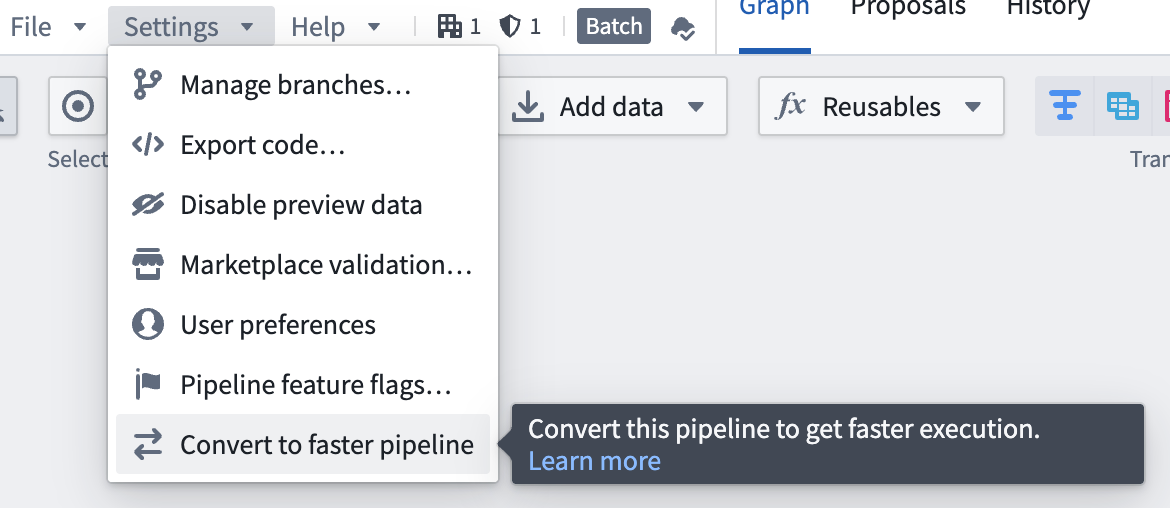
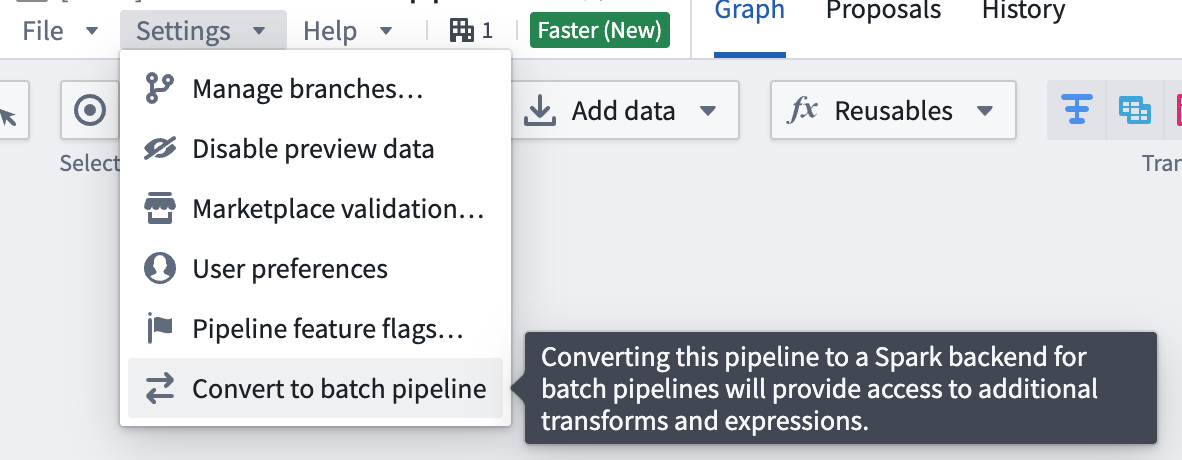
To convert a pipeline back to a batch pipeline, go to Settings and select Convert to Batch pipeline.
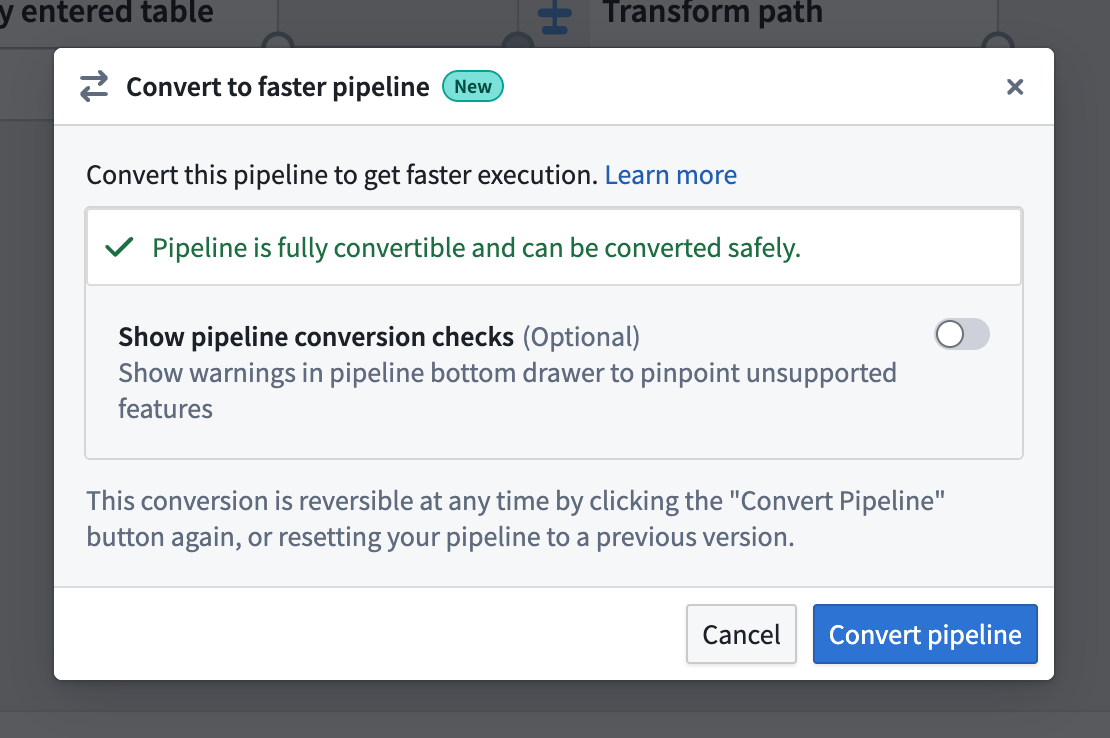
- If the pipeline is compatible with the new pipeline type, you will see a dialog box where you can confirm the conversion.
- If the pipeline is not compatible with the new pipeline type, a warning will appear when you try to convert your pipeline. The warning will list any expressions or transforms that are incompatible with faster pipelines.
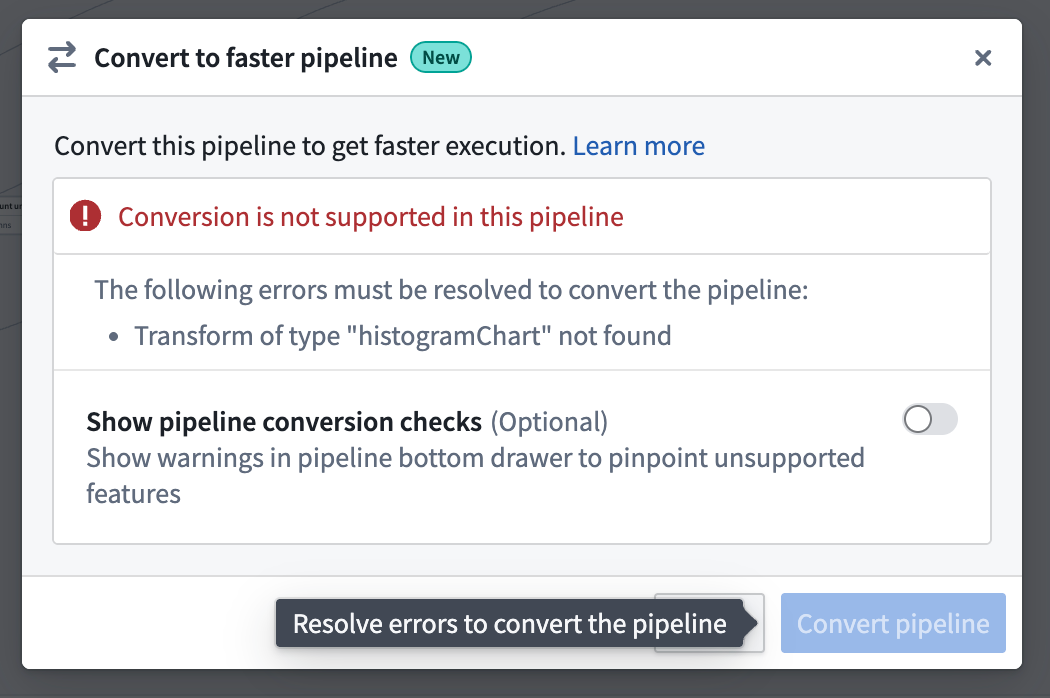
You can toggle on Show pipeline conversion checks at any point to see anything that's not compatiable with the faster pipeline option.
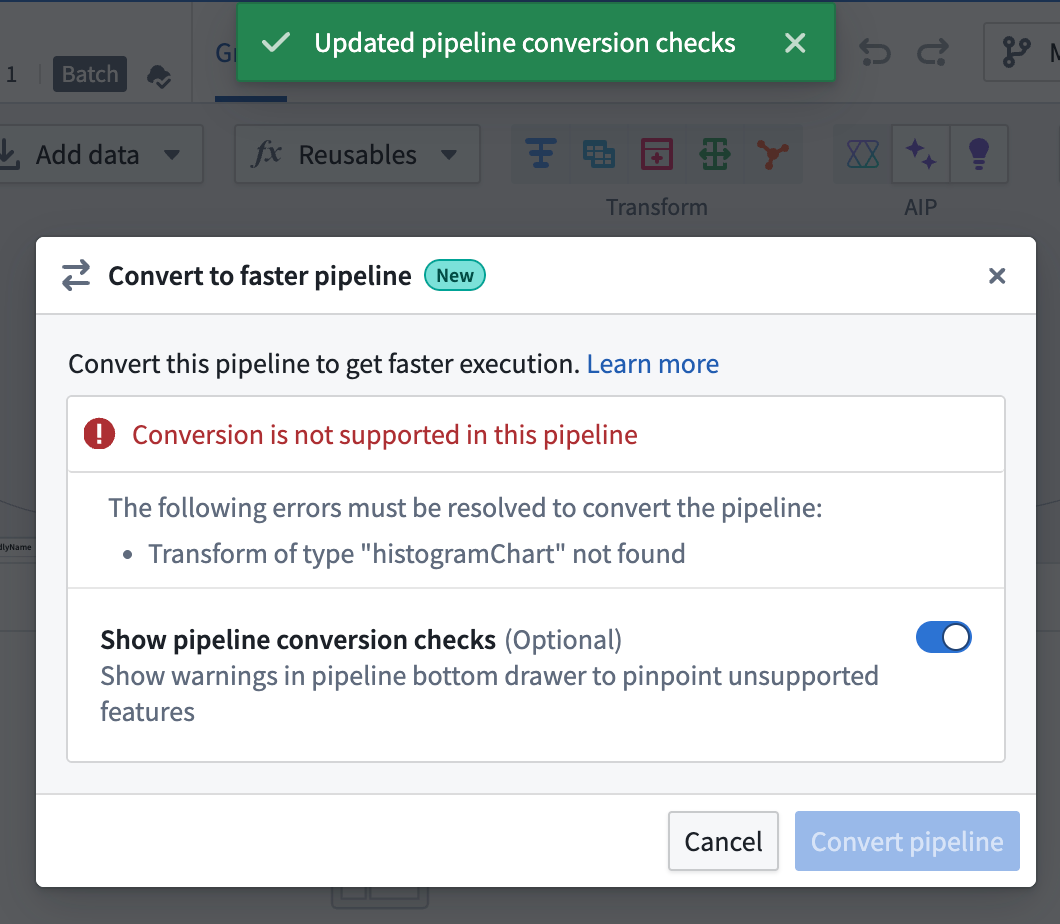
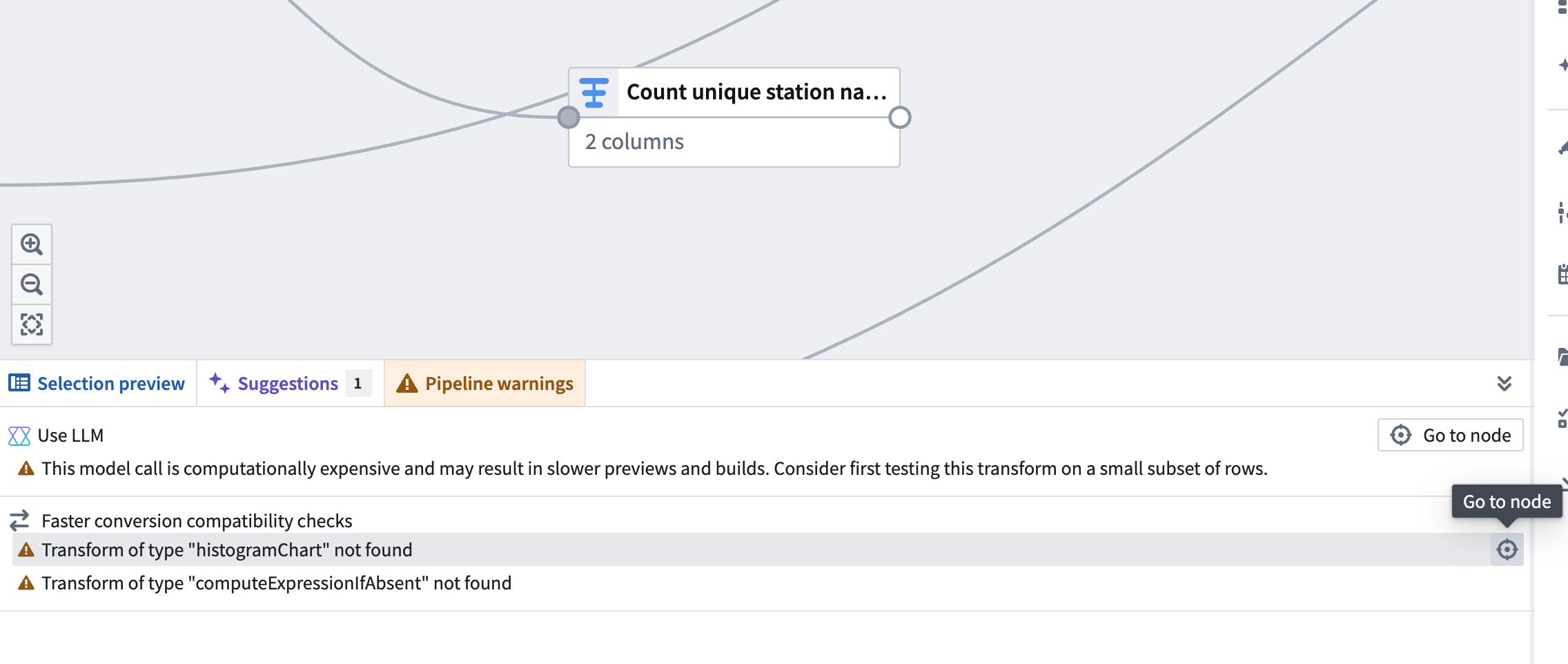
After you toggle on Show pipeline conversion checks, a Faster conversion compatibility checks section will appear in the Pipeline warnings panel at the bottom of the screen. This section lists any transforms and expressions that are not supported with faster pipelines. To quickly locate the node with an unsupported transform, click the Go to node icon on the right side of the corresponding row.
Known limitations
Faster pipelines do not currently support the same set of transforms and expressions as standard batch pipelines. Most notably, unsupported transforms and expressions include LLM features, geospatial functionality, and media set operations.
Due to the differences between faster and batch pipelines, you should always verify results using Preview or by examining build outputs.
Most supported expressions in faster pipelines will behave as their batch equivalents. Known limitations include:
- Floating point results may vary in the last digits.
- Decimal overflow will throw an error instead of outputting a
NULLvalue. - Structs cannot be compared with
<,>,==, etc. powoverflow returnsNULLinstead ofinf.- Cast functionality may have differences for complex types, such as structs, arrays, maps, and their conversions into strings. For example, nulls may be rendered differently when these types are converted to strings.
- Limited format support for
TimestampToString,DateToString,StringToTimestamp, andStringToDate. - Min and max are not supported for complex types, such as structs, arrays, and maps.
- Empty outputs will result in 0 files rather than an empty file.
- Stats, other than row count, are not supported on build.
- Creating time series reference values is not supported.
- Trained model nodes are not supported.
Pipeline type support comparison
:::callout{theme="success"} The size recommendations below are intended as a general rule and do not apply to all queries. For the right types of transforms, the faster lightweight engine can process even terabyte-scale inputs on a single node. :::
If your pipeline does not run into any of the limitations in the section above, we recommend using the faster option first. You can switch to the standard Spark option if your data scale demands it or if there are unsupported transforms and expressions you want to use. You can convert between the different types of pipelines.
| Characteristic | Standard | Faster |
|---|---|---|
| Optimal (uncompressed) data size | > 50GB | 1-50GB |
| Optimal number of rows* | > 200 million | 1-200 million |
| Startup overhead | Significant | Minimal |
| Memory efficiency | Good | Excellent |
| Processing speed (small data) | Slow | Excellent |
| Processing speed (medium data) | Fast | Excellent |
| Processing speed (large data) | Excellent | Variable |
| Parallel execution | Distributed | Single-node |
| Memory spilling | Automatic | Automatic |
* The number of rows tolerable to each query engine will vary depending on the schema. These numbers are given as a general guide for common cases.
中文翻译
Pipeline Builder 中的快速管道(Faster pipelines)
:::callout{theme="neutral"} 快速管道此前被称为轻量级管道(lightweight pipelines),其中"轻量级"指的是执行这些管道所需的时间和计算资源减少,而非其处理的数据量大小。此次更名旨在体现快速管道即使处理大规模数据集,也能减少执行时间和计算资源消耗。 :::
:::callout{theme="warning"} 如果您不熟悉在 Pipeline Builder 中创建管道,请先查阅关于如何在 Pipeline Builder 中创建批处理管道的文档。 :::
Pipeline Builder 现已支持快速管道,可减少批处理和增量管道的执行时间。此类管道采用由 DataFusion ↗ 驱动的后端引擎,该引擎是一个用 Rust ↗ 编写的开源查询引擎。与传统的基于 Spark 的管道相比,快速管道能够显著加速计算过程。
快速管道专为优化构建时间和高效执行低延迟操作而设计。特别是,运行时间在 15 分钟以内的管道将从快速管道配置中获益最多。
我们建议您尝试不同的管道配置以提升性能。您可以在分支上测试其功能,或复制现有管道来比较新配置与原始配置的性能差异。
创建新的快速管道
- 打开 Pipeline Builder,选择创建新管道(Create new pipeline)。
- 输入管道名称和目标位置后,在管道类型(Pipeline type)下选择快速管道(Faster pipeline)。
- 选择创建管道(Create pipeline)。
在快速管道与标准批处理管道之间转换
您可以按照以下步骤在快速管道与标准批处理管道之间相互转换。此转换可随时通过重复操作并选择所需选项来撤销。
- 要转换批处理管道,请前往设置(Settings)并选择转换为快速管道(Convert to Faster pipeline)。
要将管道转换回批处理管道,请前往设置(Settings)并选择转换为批处理管道(Convert to Batch pipeline)。
- 如果管道与新管道类型兼容,您将看到一个对话框,可在其中确认转换。
- 如果管道与新管道类型不兼容,尝试转换时会出现警告。警告将列出与快速管道不兼容的表达式或转换。
您可以随时开启显示管道转换检查(Show pipeline conversion checks),以查看与快速管道选项不兼容的内容。
开启显示管道转换检查(Show pipeline conversion checks)后,屏幕底部的管道警告(Pipeline warnings)面板中将出现快速转换兼容性检查(Faster conversion compatibility checks)部分。该部分列出了快速管道不支持的转换和表达式。要快速定位包含不支持的转换的节点,请点击相应行右侧的转到节点(Go to node)图标。
已知限制
快速管道目前不支持与标准批处理管道相同的转换和表达式集。最值得注意的是,不支持的转换和表达式包括 LLM 功能、地理空间功能和媒体集操作。
由于快速管道与批处理管道之间存在差异,您应始终通过预览(Preview)或检查构建输出来验证结果。
快速管道中大多数受支持的表达式行为与其批处理等效项相同。已知限制包括:
- 浮点结果可能在最后几位有所不同。
- 十进制溢出将抛出错误,而非输出
NULL值。 - 结构体(Structs)无法使用
<、>、==等进行比较。 pow溢出返回NULL而非inf。- 对于复杂类型(如结构体、数组、映射及其转换为字符串),转换功能可能存在差异。例如,将这些类型转换为字符串时,空值(nulls)的呈现方式可能不同。
- 对
TimestampToString、DateToString、StringToTimestamp和StringToDate的格式支持有限。 - 复杂类型(如结构体、数组和映射)不支持最小值和最大值。
- 空输出将生成 0 个文件,而非一个空文件。
- 构建时除行数外的统计信息不受支持。
- 不支持创建时间序列参考值。
- 不支持已训练模型节点。
管道类型支持对比
:::callout{theme="success"} 以下大小建议为通用规则,并非适用于所有查询。对于正确类型的转换,快速轻量级引擎甚至可以在单个节点上处理 TB 级输入。 :::
如果您的管道未遇到上述任何限制,我们建议优先使用快速选项。如果您的数据规模要求更高,或者需要使用不支持的转换和表达式,您可以切换到标准 Spark 选项。您可以在不同类型的管道之间进行转换。
| 特性 | 标准(Standard) | 快速(Faster) |
|---|---|---|
| 最佳(未压缩)数据大小 | > 50GB | 1-50GB |
| 最佳行数* | > 2 亿 | 1-2 亿 |
| 启动开销 | 显著 | 极小 |
| 内存效率 | 良好 | 极佳 |
| 处理速度(小数据) | 慢 | 极佳 |
| 处理速度(中等数据) | 快 | 极佳 |
| 处理速度(大数据) | 极佳 | 可变 |
| 并行执行 | 分布式 | 单节点 |
| 内存溢出 | 自动 | 自动 |
* 每个查询引擎可容忍的行数会因模式(schema)而异。此处给出的数字仅作为常见情况下的通用指南。