Add schedule to a Marketplace product(为 Marketplace 产品添加调度(Schedule))
Use Foundry DevOps to include your schedules in Marketplace products for other users to install and reuse. Learn how to create your first product.
Supported features
We support including schedules in Marketplace products that satisfy the following:
- The schedule is not user-scoped.
- The schedule does not have fallback branches.
- All triggers should be defined for the same branch.
- No triggers or target datasets are Restricted Views.
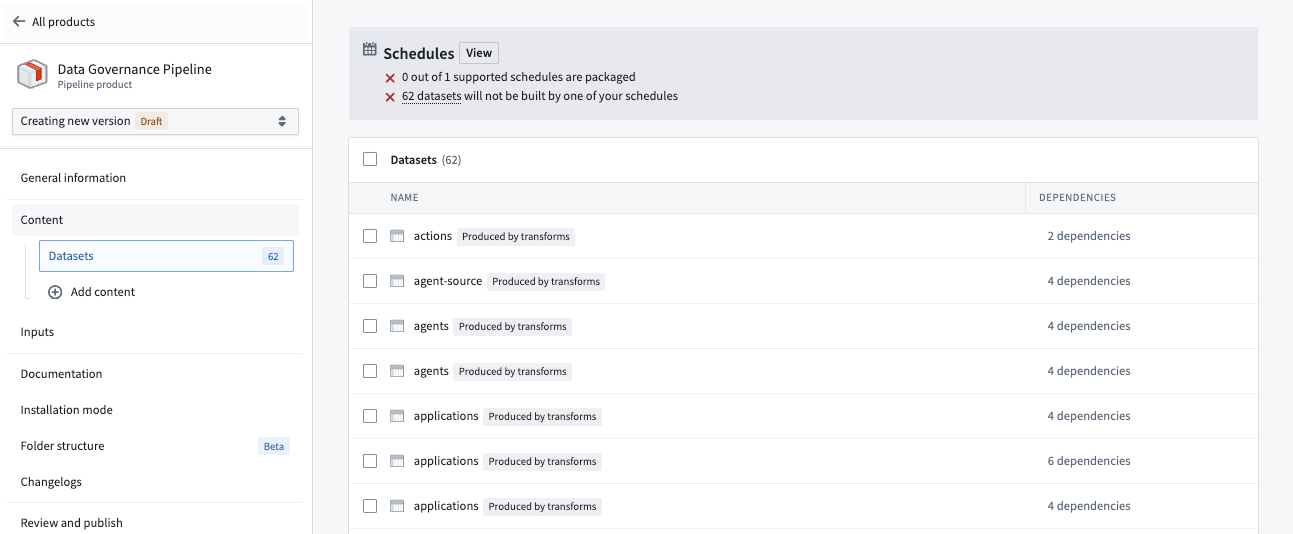
We strongly recommended that all packaged datasets (excluding static datasets) have a corresponding schedule that builds the dataset as a target. If datasets are included without a schedule, the dataset and anything downstream will become stale.
Adding schedules to products
To add a schedule to a product, first create a product, then add outputs. Choose the Schedule output type.
If you have not yet added any pipelines or dataset transformations, you will not have any schedules to select. Given this, we typically recommend adding these resource types first. Once you have added a pipeline or dataset transformation, view the Datasets content type to review which datasets will not be built, and schedules you could add to your product to remedy this.
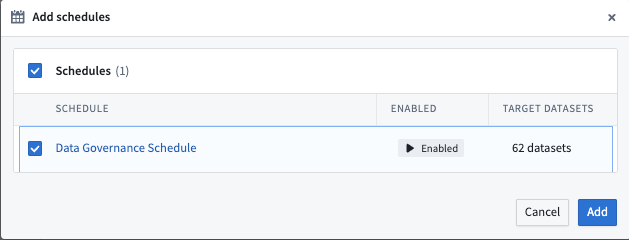
Select any relevant schedules to include with your product. If you don't see any schedules, you should create one with your source datasets and then create a new version of your product.
中文翻译
为 Marketplace 产品添加调度(Schedule)
使用 Foundry DevOps 将您的调度包含在 Marketplace 产品中,供其他用户安装和复用。了解如何创建您的第一个产品。
支持的功能
我们支持在 Marketplace 产品中包含满足以下条件的调度:
- 调度不限定用户范围(user-scoped)。
- 调度没有回退分支(fallback branches)。
- 所有触发器(triggers)应针对同一分支定义。
- 没有任何触发器(triggers)或目标(target)数据集是受限视图(Restricted Views)。
我们强烈建议所有打包的数据集(静态数据集除外)都有对应的调度来构建该数据集作为目标。如果数据集包含在内但没有调度,该数据集及其下游内容将变得过时。
向产品添加调度
要向产品添加调度,首先创建一个产品,然后添加输出(outputs)。选择 调度(Schedule) 输出类型。
如果您尚未添加任何管道(pipelines)或数据集转换(dataset transformations),则不会有任何可供选择的调度。鉴于此,我们通常建议先添加这些资源类型。添加管道或数据集转换后,查看 数据集(Datasets) 内容类型,以检查哪些数据集不会被构建,以及您可以添加到产品中以解决此问题的调度。
选择要包含在产品中的任何相关调度。如果您没有看到任何调度,则应使用源数据集创建一个调度,然后创建产品的新版本。