Recommended Project and team structure(推荐的项目与团队结构)
This page outlines the recommended ways to structure a data pipeline in Foundry using Projects to enable:
- Well-structured permissions across the pipeline
- Effective collaboration across roles
- A legible and maintainable pipeline structure
Additionally, we cover the range of roles and responsibilities that need to be fulfilled for successful pipeline management in production environments.
This provides a conceptual overview of the various pipeline stages and what each is for. For a step-by-step guide for how to set up this structure in Foundry, refer to Securing a data foundation in the Platform Security documentation.
Pipeline stages
These stages define the logical separation of Projects that compose a well-ordered pipeline. We'll go into each in more detail below.
- Data Connection: Syncs land raw data from source systems into a
Datasource Project. - Datasource Project: One
Datasource Projectper logical datasource defines the basic cleanup steps for each raw dataset and applies a consistent schema. - Transform Project: Datasets are imported from one or more
Datasource Projectsand transformed to produce canonical, re-usable datasets. - Ontology Project: Datasets are imported from one or more
Transform Projectsand transformed to produce the canonical tables representing discrete operational objects. A single Ontology Project often groups related sets of objects for a given operational domain for ease of management. - Workflow Project: Workflow Projects import data from Ontology Projects to pursue a specific outcome. Frequently this is an operational workflow, data science investigation, business intelligence analysis and report, or application development Project.
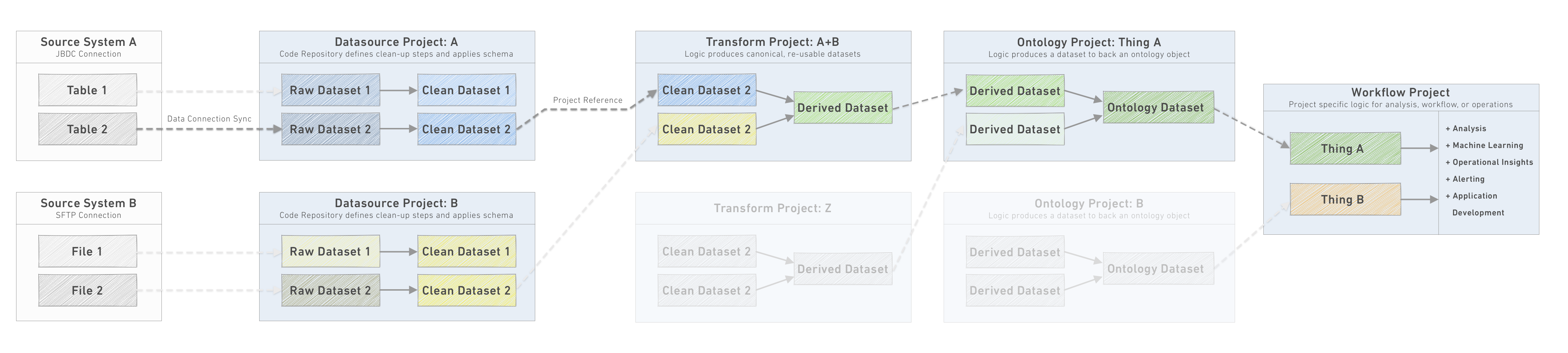
Each pipeline stage is a discrete unit, and the outputs are the datasets made available for downstream Projects to import and use for other use cases, pipeline development, analysis, and so on. Within each Project, the responsible team should, in addition to the implementation of the transformation steps, also manage the stability and integrity of their outputs. This involves managing the build schedules, configuring and monitoring data health checks, and, where relevant writing unit tests or additional data integrity tests.
The sections below will walk through each downstream Project type in more detail to follow the flow of data through the pipeline. In the process of designing a pipeline, instead work backwards from the Ontology layer to determine the necessary source systems to connect and pipeline transformations to implement.
:::callout{theme="neutral"} Projects provide a way of organizing data and code within Foundry. They are the primary unit to manage access and permissions for individuals and teams collaborating around a specific scope of work. In addition, Projects expose functionality for capturing and sharing metadata such as an event log of Project activity, a space for Project documentation, and Project resource consumption and computation metrics.
When thinking about what makes a good Project, consider as an analogy what makes a good microservice: well defined purpose, clear output datasets/API used by downstream dependencies, ownership by a set of people small enough that they can effectively coordinate with each other and set their own standards for project management.
When deciding whether to create a new Project or build in an existing one, consider:
- Projects should be 1:1 with Code Repositories. Larger scope enables deeper collaboration, but introduces more challenging operational requirements to ensure frictionless version control.
- Projects are the level at which you want to impose a file structure and permissions for all the related resources. If a single conceptual "project" has sub-components that will require individual permissions, consider creating multiple Projects in Foundry. :::
1. Data Connection
The data flowing through a pipeline in Foundry normally originates from an external source system. The Data Connection service provides a management interface where source systems are registered. For each source system, one or more individual syncs are configured land data into raw datasets in a Datasource Project.
In order to configure a source system or sync in the first place, an Agent Administrator typically needs to configure a Data Connection agent. Each agent should be stored in a dedicated Project only accessible to Agent Administrators.
Managing the new connection of a new datasource is a multi-disciplinary effort requiring the collaboration of the Datasource Owner, the Agent Administrator, and the Datasource Developer, though it is often necessary for a Compliance/Legal Officer to sign off on the movement of data out of the source system into the new environment.
Once a source system is configured, however, the Datasource Developer is able to work independently to configure individual syncs. This greatly reduces the back-and-forth between teams and ensures connecting a new system is a low, one-off effort.
A critical consideration for each connection is choosing between a SNAPSHOT, which replaces the current data with each sync, and an APPEND, which adds cumulatively to the existing data with each sync. To understand these concepts more fully and the implications for creating efficient, performant pipelines in the Incremental pipelines section.
Further reading
For more on principles, architecture, and configuration of datasources and syncs, visit the Data Connection documentation.
For more thoughts on monitoring your connections and ensuring the data flowing into your pipelines is accurate and within expectations, review the Maintaining pipelines section.
2. Datasource Project
Each source system should land data into a matching Project inside the platform. The normal pattern involves landing data from each sync in as 'raw' a format as possible. The transformation step to a “clean” dataset is defined in the Project Code Repository.
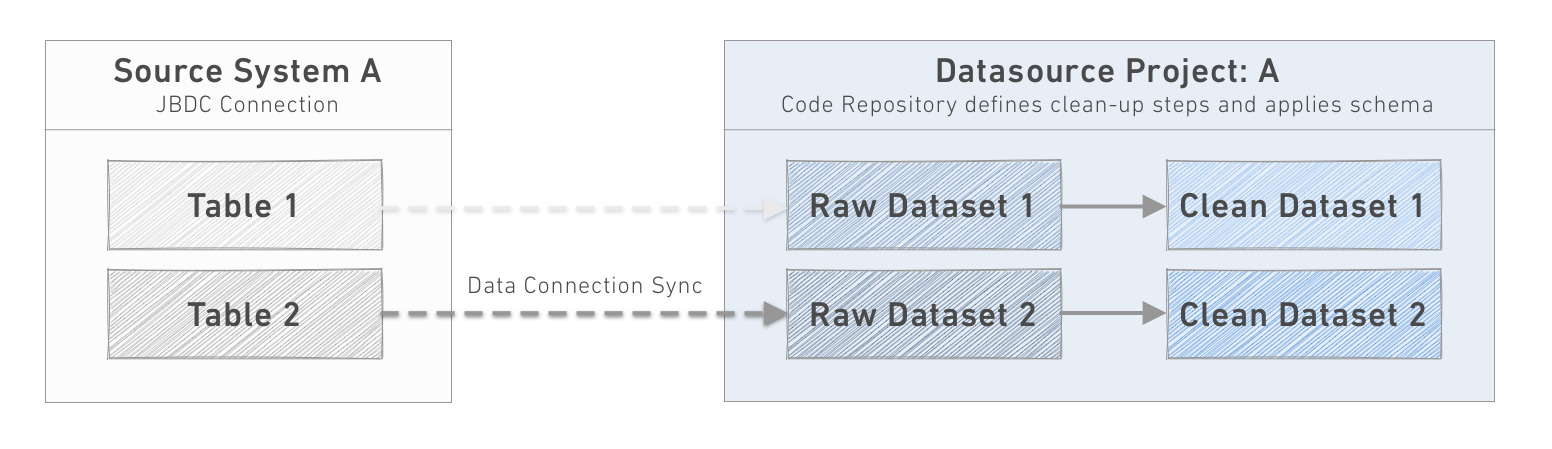
Establishing this Project-per-datasource model has a number of convenient benefits:
- Encourages exploration of new data sources in a consistent location.
- Provides a single location to specify Access Controls to a data source.
- Minimizes the chance of duplicated effort syncing the same data by different teams.
- Code Repositories are small and purpose-built to handle the type and format of source system data.
- Allows anonymization, clean up, and standardization of data before it is accessed by the pipeline layer.
Datasource Project goals
Inside each datasource Project, the goal is to prepare the synced data for consumption by a wide variety of users, use cases, and pipelines across the organization.
The output datasets, and their schema, should be thought of as an API - that is , the goal will be for them to be logically organized and stable over time, as the output datasets from a data source Project are the backbone of all downstream work. The outputs should map 1:1 with the source tables or files; each row in the dataset should have a direct matching row in the source system.
To this end, some typical objectives of the raw → clean transformation include:
- Imposing a consistent column naming scheme.
- Ensuring appropriate types are applied to columns.
- Handling missing, malformed, or mis-typed values.
- Establishing primary Health checks.
- Removing PII (Personally Identifiable Information) or other sensitive data unsuitable for general consumption.
Even where the source system provide column data type information, it is sometimes necessary to bring in values as a STRING type. Pay special attention to DATE, DATETIME, and TIMESTAMP types, which are often represented in source systems in non-standard formats and numeric types, which are occasionally troublesome. If these types do prove to be unreliable in format from the source system, importing as a STRING type provides the option to implement more robust parsing and define logic for handling malformed values or dropping unusable or duplicated rows.
In addition to these programmatic steps, clean datasets should be rigorously documented. A qualitative description of the dataset, the source system provenance, the appropriate contacts and management protocol and, where relevant, per-column metadata describing features of the data will all ensure future developers use the data appropriately.
Implementing a Datasource Project
- A system administrator creates a new Project for the target datasource and adds the appropriate Datasource Developers to a new user group to manage the Project.
- Only members of the datasource developers group for the specific datasource should have permissions to build datasets within the Project.
- The Datasource Owner and Agent Administrator collaborate to deploy a Data Connection agent on the source system and configure the datasource connection in the UI.
- Ensure appropriate permissions are configured so that tables and files in the source system are able to be previewed by the datasource developers.
- The Datasource Developers configure the syncs for one or more raw datasets in the Project, considering the correct sync cadence and sync type, as well as adding appropriate Data Health checks for each raw dataset.
- The Datasource Developers implement the cleanup transformations to produce “clean” datasets ready for use in other Projects.
- Downstream developers request new datasets from the source system, enhancements to the clean datasets, or data quality issues by filing an Issue with the Project or a specific clean dataset.
While every datasource will be somewhat unique, the steps of cleaning and preparing a source system often have shared steps, such as parsing raw string values to a given type and handling errors. When datasources have a number of similar cleanup transforms, it's best practice to define a library in Python to provide a set of consistent tooling and reduce duplicated code.
Recommended folder structure
/raw: For datasets from a data connection sync./processed(optional): File-level transformations to create tabular data from non-tabular files./clean: For datasets that are 1:1 with datasets in/rawbut with cleaning steps applied./analysis: For Resources created to test or document the cleanup transforms and show the shape of the data./scratchpad: Any temporary resources created in the process of building or testing the cleanup transforms./documentation: The Data Lineage graphs that show the pipeline steps for cleanup as well as additional documentation (beyond the top-level Project README) written in Foundry Notepad.
3. Transform Project
The goal of Transform Projects is to encapsulate a shared, semantically meaningful grouping of data and produce canonical views to feed into the Ontology layer.
These projects import the cleaned datasets from one or more Datasource Projects, join them with lookup datasets to expand values, normalize or de-normalize relationships to create object-centric or time-centric datasets, or aggregate data to create standard, shared metrics.
Recommended folder structure
/data/transformed(optional): These datasets are output from intermediate steps in the transform Project./output: These datasets are the "output" of the transform Project and are the only datasets that should be relied on in downstream Ontology Projects./analysis: Resources created to test or document the cleanup transforms and show the shape of the data./scratchpad: Any temporary resources created in the process of building or testing the cleanup transforms./documentation: The Data Lineage graphs that show the pipeline steps for cleanup as well as additional documentation (beyond the top-level Project README) written in Notepad.
4. Ontology Project
The Ontology enforces a shared communication layer - sometimes referred to as the "semantic layer" - across Foundry and the curation of clean, organized, and stable Ontology is the highest order objective to ensure a wide-range of valuable Projects can move forward simultaneously while enriching the common operating picture. For more on the concepts and practicalities of designing and managing your Ontology, reference the Ontology concepts documentation.
An Ontology Project is the center-point of any pipeline and represents the final transformation necessary to produce datasets that conform to the definition of a single or related-group of objects defined in the Ontology. These Projects also (and separately) produce datasets that are synced to back the Object Explorer views.
Since the Ontology datasets represent the canonical truth about the operational object they represent, they form the starting point for all “consuming” Projects. While the provenance and transformation logic of upstream cleaning and pipeline steps are visible, conceptually these steps and intermediate datasets could be a black box for the Project developers, analysts, data scientists, and operational users who consume data only from the Ontology Projects. In this sense, the Ontology layer serves as an API for operational objects.
Implementing an Ontology Project
Similar to Datasource Projects, essential factors in maintaining an Ontology Project are:
- Robust documentation
- Meaningful health checks
- Regular schedules
- Curation in the Data Catalog and appropriate tags
These are discussed in more detail in the Maintaining pipelines and in the callout on documenting projects below.
In addition, as your Ontology grows more robust and more teams contribute to the Ontology layer, maintaining the integrity of the dataset "APIs" becomes more critical. To this end, consider implementing additional checks to ensure that proposed changes preserve the integrity of the output dataset schema. This will be discussed in more depth in additional documentation available soon.
Recommended folder structure
/data/transformed(optional): These datasets are output from intermediate steps in the Ontology Project./ontology: These datasets are the "output" of the Ontology Project and are the only datasets that should be relied on in downstream use case or workflow Projects./analysis: Resources created to test or document the cleanup transforms and show the shape of the data./scratchpad: Any temporary resources created in the process of building or testing the cleanup transforms./documentation: The Data Lineage graphs that show the pipeline steps for cleanup as well as additional documentation (beyond the top-level Project README) written in reports.
5. Workflow Project
Workflow Projects, also known as use case Projects, should be flexibly designed for the context at hand, but usually are built around a single Project or a team to an effective unit of collaboration and delineate the boundaries of responsibility and access.
In general, workflow Projects should reference data from the Ontology Projects, to ensure that operational workflows, business intelligence analysis, and application Projects all share a common view of the world. If, in the course of developing a workflow Project, the datasources available in the Ontology layer aren't sufficient as sources, it's an indication that the Ontology should be enriched and expanded. Avoid referencing data from earlier (or later) in the pipeline as this can fragment the source of truth for a particular type of data.
:::callout{title="Document Projects"} Each Project should be documented thoroughly throughout the development process. Here are a few common patterns and best practices:
- Save one or more Data Lineage graph resources at the root of each Project to capture the most important datasets and pipeline relationships. Different graphs can use different color schemes to highlight relevant features, such as the regularity of data refresh, the grouping of related datasets, or the dataset characteristics, such as size.
- Add a short description to the Project - available directly below the Project title. This will be used in the list view of all Projects. Focus on putting the Project into context for users who may be unfamiliar with it.
- Use the Add Documentation button in the right sidebar of the top-level Project folder to write Markdown ↗ syntax. This is the best place to explain the purpose of the Project, the primary outputs, and any other relevant information for Project consumers.
- Place further global Project documentation in Markdown (.md) files created locally and uploaded to a Documentation folder or in Notepad and link to these from the top level documentation.
- Add a README.md file to the Code Repository for your Project and ensure that each transform file has a description and additional inline code comments. :::
Recommended folder structure
The structure of Workflow Projects will be more varied than other Project types and should focus on making the primary resource(s) immediately accessible and well-documented.
/data/transformed(optional): These datasets are output from intermediate steps in the workflow Project./analysis(optional): These datasets are output from analysis workflows./model_output(optional): These datasets are outputs from model workflows and can then be analyzed to determine model fit./user_data(optional): If your workflow enables users to create their own "slice" of data, store them here in user-specific folders./analysis: Resources and reports created to drive decisions and feedback loops./models: Any models created should be stored here./templates: Any Code Workbook templates shared for Project-specific usage should be stored./applications: Additional workflow applications or sub-applications are stored here. A primary application should be stored at the Project root for prominent access./develop: Applications in development, new features, and templates are stored here./scratchpad: Any temporary resources created in the process of building or testing the cleanup transforms./documentation: The Data Lineage graphs that show the pipeline steps for cleanup as well as additional documentation (beyond the top-level Project README) written in reports.
Pipeline management roles
The roles below are examples of the profiles commonly involved in the scoping, design, implementation, and management of pipelines in Foundry. Not all roles may be necessary in all circumstances, especially in the early stages of Platform development, and individuals might fill more than one role at a time. However, generally considering these role descriptions and how they interact will help create well ordered, effective teams.
The diagram below relates the primary roles to the segments of the pipeline where they're most commonly active.
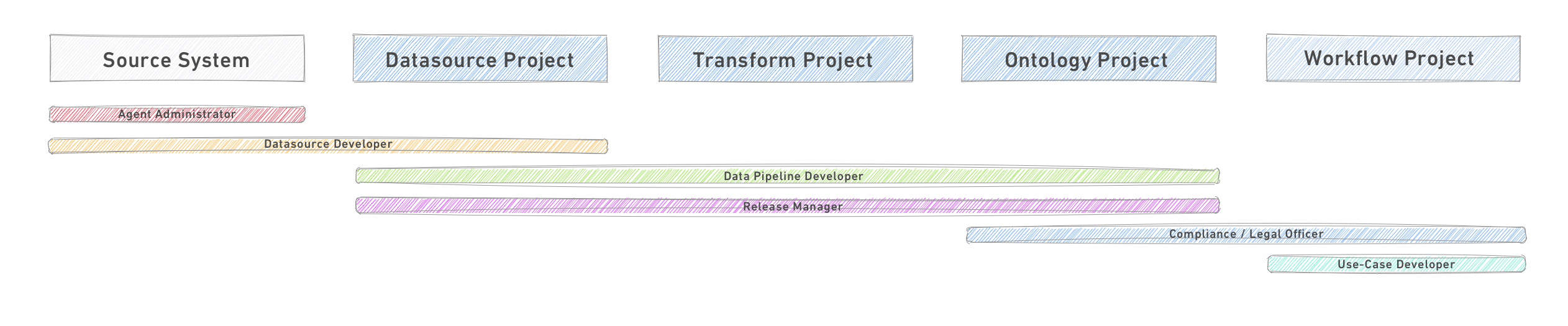
Primary roles
- Agent Administrator: The Agent Administrator is responsible for creation and configuration of a Data Connection agent and sharing it with the relevant datasource owner. This centralizes control of agent installation and configuration for better security and control.
- Datasource Developer: Data source developers are engineers who own the sourcing process for each of the data sources relevant to the data lake. This can be done as a single team or broken out by source systems.
- Each datasource developer owns (1) a Data Connection data source with the technical connection to the data source and (2) a Foundry Project to which the synced data is sourced.
- The output of the datasource Project is a cleaned and prepared dataset, ready for consumption by one or more downstream use case Projects. Datasource developers also define the refresh frequency of each data source they own and work with the Release Manager or Operation Manager to schedule a pipeline build policy.
- Data Pipeline Developer: Data pipeline developers are data engineers responsible for building a common Ontology layer, which provide data assets for use by all use cases. The data pipeline developers are responsible for defining this semantic layer and building the transformations needed from the source structure to the Ontology structure.
- Release Manager: Release managers own the production pipeline and manage the release process to ensure the production pipeline adheres to the organization's standards and executes reliably.
- For code changes to the pipeline, this is usually done through the approval process of pull-requests into master and approval to run the pipeline build on master. For ongoing reliability, the Release Manager monitors the Health Checks defined in conjunction with the pipeline and datasource developers for key datasets.
- Compliance Officer / Legal Officer: A compliance officer is responsible for approving use cases before they are developed. Such approval should take into account: (1) the data that needs to be used, (2) the purpose of the Project, and (3) the users who will have access to the data in light of the data protection regime for their jurisdictions and the organization's own policies.
- Use-Case Developer: Use-case developers are the engineers - software developers and/or data scientists - who own the development of the use case. They use data which is sourced from the Ontology layer and approved to them by the compliance officer.
Other roles
- Operations Manager: This role owns the monitoring of the healthy execution of the production pipeline. They monitor data refresh of the different sources, execution of the build of different pipeline and help triage support requests. This role supports the Release Manager.
- Permissions Owner / Identity Manager: In most cases the assignment of users into groups is managed in the customers identity management system and the information is passed into Foundry through SAML integration. In such cases the permission manager owns that process.
- Data Officer: Responsible for modeling the semantic layer into a user-centric view of the world, owning data quality, and hunting for new data sources which should be integrated to expand the semantic layer. The data officer is also responsible for monitoring enrichments done in the use cases and generalizing them into the semantic layer for better reusability.
- Project Manager: A project manager works with the engineers contributing to a Project to ensure the alignment of technical and business goals, the adherence to best practice standards for development on the platform, and coordination between other Project teams. The project manager is also responsible for documenting the Project.
- Datasource Owner: This is the primary point of contact for the particular source system. They will need to work closely with the Agent Administrator during the configuration of a new data connection, and afterwards assume some level of responsibility for “upstream” issues - either with the agent service running on their server or file system or with the integrity of the data itself.
中文翻译
推荐的项目与团队结构
本文概述了在 Foundry 中,使用项目(Projects)来构建数据管道(Data Pipeline)的推荐方式,以实现以下目标:
- 在管道中建立结构化的权限管理
- 跨角色实现高效协作
- 构建清晰且易于维护的管道结构
此外,我们还将介绍在生产环境中成功管理管道所需履行的角色与职责。
本文提供了各管道阶段的概念性概述及其用途。如需了解如何在 Foundry 中设置此结构的分步指南,请参阅平台安全文档中的保护数据基础(Securing a data foundation)。
管道阶段
这些阶段定义了构成有序管道的项目(Projects)的逻辑划分。下文将详细说明每个阶段。
- 数据连接(Data Connection):将原始数据从源系统同步到
数据源项目(Datasource Project)中。 - 数据源项目(Datasource Project):每个逻辑数据源对应一个
数据源项目(Datasource Project),定义每个原始数据集的基本清理步骤,并应用一致的架构。 - 转换项目(Transform Project):从一个或多个
数据源项目(Datasource Projects)导入数据集,进行转换以生成规范的、可复用的数据集。 - 本体论项目(Ontology Project):从一个或多个
转换项目(Transform Projects)导入数据集,进行转换以生成代表离散操作对象的规范表。单个本体论项目(Ontology Project)通常将特定操作领域的相关对象集分组,以便于管理。 - 工作流项目(Workflow Project):工作流项目(Workflow Projects)从本体论项目(Ontology Projects)导入数据,以实现特定目标。这通常是操作工作流、数据科学研究、商业智能分析和报告或应用程序开发项目。
每个管道阶段都是一个独立的单元,其输出是可供下游项目(Projects)导入并用于其他用例、管道开发、分析等的数据集。在每个项目(Project)内,负责团队除了实施转换步骤外,还应管理其输出的稳定性和完整性。这包括管理构建计划、配置和监控数据健康检查,以及在相关情况下编写单元测试或额外的数据完整性测试。
以下各节将更详细地介绍每种下游项目(Project)类型,以遵循数据在管道中的流动。在设计管道时,应反向从本体论(Ontology)层开始,确定需要连接的源系统和需要实施的管道转换。
:::callout{theme="neutral"} 项目(Projects) 提供了一种在 Foundry 内组织数据和代码的方式。它们是管理围绕特定工作范围进行协作的个人和团队的访问权限的主要单元。此外,项目(Projects)还提供了捕获和共享元数据的功能,例如项目活动的事件日志、项目文档空间以及项目资源消耗和计算指标。
在思考什么构成一个好的项目(Project)时,可以类比什么构成一个好的微服务:定义明确的目的、下游依赖项使用的清晰输出数据集/API、由足够小的一群人拥有,以便他们能够有效地相互协调并为项目管理设定自己的标准。
在决定是创建新项目(Project)还是在现有项目中构建时,请考虑:
- 项目(Projects)应与代码仓库(Code Repositories)一一对应。更大的范围可以实现更深入的协作,但会引入更具挑战性的操作要求,以确保无摩擦的版本控制。
- 项目(Projects)是您希望对所有相关资源施加文件结构和权限的层级。如果一个概念性的"项目"包含需要单独权限的子组件,请考虑在 Foundry 中创建多个项目(Projects)。 :::
1. 数据连接(Data Connection)
在 Foundry 中流经管道的数据通常源自外部源系统。数据连接(Data Connection)服务提供了一个管理界面,用于注册源系统。对于每个源系统,会配置一个或多个单独的同步,将数据导入到数据源项目(Datasource Project)中的raw数据集。
要首次配置源系统或同步,代理管理员(Agent Administrator)通常需要配置一个数据连接(Data Connection)代理(agent)。每个代理应存储在一个仅对代理管理员(Agent Administrators)可访问的专用项目(Project)中。
管理新数据源的连接是一项多学科的工作,需要数据源所有者(Datasource Owner)、代理管理员(Agent Administrator)和数据源开发者(Datasource Developer)的协作,尽管通常需要合规/法律官员(Compliance/Legal Officer)批准将数据从源系统移出到新环境。
然而,一旦源系统配置完成,数据源开发者(Datasource Developer)就可以独立工作来配置各个同步。这大大减少了团队之间的来回沟通,并确保连接新系统是一次性的低工作量工作。
每个连接的一个关键考虑因素是在SNAPSHOT(每次同步替换当前数据)和APPEND(每次同步累积添加到现有数据)之间进行选择。要更全面地理解这些概念及其对创建高效、高性能管道的影响,请参阅增量管道(Incremental pipelines)部分。
延伸阅读
有关数据源和同步的原理、架构和配置的更多信息,请访问数据连接文档(Data Connection documentation)。
有关监控连接并确保流入管道的数据准确且符合预期的更多想法,请查阅维护管道(Maintaining pipelines)部分。
2. 数据源项目(Datasource Project)
每个源系统应将数据导入到平台内匹配的项目(Project)中。通常的模式是尽可能以"原始"格式从每个同步导入数据。转换为"干净"数据集的步骤在项目(Project)代码仓库(Code Repository)中定义。
建立这种每个数据源对应一个项目(Project)的模式有许多便利之处:
- 鼓励在一致的位置探索新的数据源。
- 提供指定数据源访问控制的单一位置。
- 最大限度地减少不同团队同步相同数据的重复工作。
- 代码仓库(Code Repositories)规模小且专为处理源系统数据的类型和格式而构建。
- 允许在管道层访问数据之前对数据进行匿名化、清理和标准化。
数据源项目(Datasource Project)目标
在每个数据源项目(Project)内部,目标是准备同步数据,供组织内各种用户、用例和管道使用。
输出数据集及其架构应被视为一个API——也就是说,目标是使其在逻辑上组织良好且随时间保持稳定,因为数据源项目(Project)的输出数据集是所有下游工作的基础。输出应与源表或文件一一对应;数据集中的每一行都应在源系统中有一个直接匹配的行。
为此,原始→干净转换的一些典型目标包括:
- 实施一致的列命名方案。
- 确保为列应用适当的类型。
- 处理缺失、格式错误或类型错误的值。
- 建立主要的健康检查(Health checks)。
- 移除不适合一般消费的PII(个人身份信息)或其他敏感数据。
即使源系统提供了列数据类型信息,有时也有必要将值作为STRING类型导入。要特别注意DATE、DATETIME和TIMESTAMP类型,这些类型在源系统中通常以非标准格式表示,以及数字类型,这些类型偶尔会有问题。如果这些类型在源系统中的格式确实不可靠,则将其作为STRING类型导入提供了实施更健壮的解析、定义处理格式错误值的逻辑或删除不可用或重复行的选项。
除了这些程序化步骤外,干净的数据集还应进行严格记录。对数据集的定性描述、源系统来源、适当的联系人和管理协议,以及在相关情况下描述数据特征的逐列元数据,都将确保未来的开发者正确使用数据。
实施数据源项目(Datasource Project)
- 系统管理员为目标数据源创建一个新项目(Project),并将适当的数据源开发者(Datasource Developers)添加到一个新的用户组(user group)来管理该项目(Project)。
- 只有特定数据源的数据源开发者组的成员才应拥有在该项目(Project)内构建数据集的权限。
- 数据源所有者(Datasource Owner)和代理管理员(Agent Administrator)协作部署数据连接代理(Data Connection agent)到源系统,并在 UI 中配置数据源连接。
- 确保配置适当的权限,以便数据源开发者能够预览源系统中的表和文件。
- 数据源开发者(Datasource Developers)配置同步到项目(Project)中的一个或多个原始数据集,考虑正确的同步节奏和同步类型,并为每个原始数据集添加适当的数据健康检查。
- 数据源开发者(Datasource Developers)实施清理转换,以生成可供其他项目(Projects)使用的"干净"数据集。
- 下游开发者通过向项目(Project)或特定干净数据集提交问题(Issue),请求从源系统获取新数据集、增强干净数据集或报告数据质量问题。
虽然每个数据源都会有些独特之处,但清理和准备源系统的步骤通常有共同之处,例如将原始字符串值解析为给定类型以及处理错误。当数据源有许多类似的清理转换时,最佳实践是在Python中定义一个库,以提供一组一致的工具并减少重复代码。
推荐文件夹结构
/raw:用于来自数据连接同步的数据集。/processed(可选):从非表格文件创建表格数据的文件级转换。/clean:用于与/raw中的数据集一一对应但应用了清理步骤的数据集。/analysis:用于创建来测试或记录清理转换并展示数据形状的资源。/scratchpad:在构建或测试清理转换过程中创建的任何临时资源。/documentation:显示清理管道步骤的数据沿袭(Data Lineage)图,以及使用Foundry Notepad编写的额外文档(超出顶级项目(Project) README)。
3. 转换项目(Transform Project)
转换项目(Transform Projects)的目标是封装一个共享的、语义上有意义的数据分组,并生成规范视图以馈送到本体论(Ontology)层。
这些项目(Projects)从一个或多个数据源项目(Datasource Projects)导入清理后的数据集,与查找数据集连接以扩展值,规范化或反规范化关系以创建以对象为中心或以时间为中心的数据集,或聚合数据以创建标准的、共享的指标。
推荐文件夹结构
/data/transformed(可选):这些数据集是转换项目(Transform Project)中中间步骤的输出。/output:这些数据集是转换项目(Transform Project)的"输出",是下游本体论项目(Ontology Projects)唯一应依赖的数据集。/analysis:创建来测试或记录清理转换并展示数据形状的资源。/scratchpad:在构建或测试清理转换过程中创建的任何临时资源。/documentation:显示清理管道步骤的数据沿袭(Data Lineage)图,以及使用 Notepad 编写的额外文档(超出顶级项目(Project) README)。
4. 本体论项目(Ontology Project)
本体论(Ontology)在 Foundry 中强制执行一个共享的通信层——有时称为"语义层"——而策划一个干净、组织良好且稳定的本体论(Ontology)是最高级别的目标,以确保广泛的有价值项目(Projects)能够同时推进,同时丰富共同的操作图景。有关设计和管理本体论(Ontology)的概念和实践的更多信息,请参考本体论概念文档(Ontology concepts documentation)。
本体论项目(Ontology Project)是任何管道的中心点,代表了生成符合本体论(Ontology)中定义的单个或相关对象组定义的数据集所需的最终转换。这些项目(Projects)还(单独地)生成同步以支持对象资源管理器(Object Explorer)视图的数据集。
由于本体论(Ontology)数据集代表了它们所代表的操作对象的规范事实,它们构成了所有"消费型"项目(Projects)的起点。虽然上游清理和管道步骤的来源和转换逻辑是可见的,但从概念上讲,这些步骤和中间数据集对于仅从本体论项目(Ontology Projects)消费数据的项目开发者、分析师、数据科学家和操作用户来说可能是一个黑盒。从这个意义上说,本体论(Ontology)层充当了操作对象的API。
实施本体论项目(Ontology Project)
与数据源项目(Datasource Projects)类似,维护本体论项目(Ontology Project)的关键因素是:
- 健壮的文档
- 有意义的健康检查
- 定期计划
- 在数据目录(Data Catalog)中的策展和适当的标签
这些内容在维护管道(Maintaining pipelines)以及下面关于记录项目(Projects)的标注中进行了更详细的讨论。
此外,随着您的本体论(Ontology)变得更加健壮,并且更多团队贡献到本体论(Ontology)层,维护数据集"API"的完整性变得更加关键。为此,请考虑实施额外的检查,以确保提议的更改保留输出数据集架构的完整性。这将在即将提供的额外文档中进行更深入的讨论。
推荐文件夹结构
/data/transformed(可选):这些数据集是本体论项目(Ontology Project)中中间步骤的输出。/ontology:这些数据集是本体论项目(Ontology Project)的"输出",是下游用例或工作流项目(Projects)唯一应依赖的数据集。/analysis:创建来测试或记录清理转换并展示数据形状的资源。/scratchpad:在构建或测试清理转换过程中创建的任何临时资源。/documentation:显示清理管道步骤的数据沿袭(Data Lineage)图,以及在报告中编写的额外文档(超出顶级项目(Project) README)。
5. 工作流项目(Workflow Project)
工作流项目(Workflow Projects),也称为用例项目(use case Projects),应根据具体上下文灵活设计,但通常围绕单个项目(Project)或团队构建,以形成有效的协作单元,并划定责任和访问的边界。
通常,工作流项目(Workflow Projects)应引用本体论项目(Ontology Projects)中的数据,以确保操作工作流、商业智能分析和应用程序项目(Projects)都共享对世界的共同视图。如果在开发工作流项目(Workflow Project)的过程中,本体论(Ontology)层中可用的数据源不足以作为来源,则表明应丰富和扩展本体论(Ontology)。避免引用管道中更早(或更晚)的数据,因为这可能会分散特定类型数据的真实来源。
:::callout{title="记录项目(Document Projects)"} 每个项目(Project)应在整个开发过程中进行彻底记录。以下是一些常见模式和最佳实践:
- 在每个项目(Project)的根目录保存一个或多个数据沿袭(Data Lineage)图资源,以捕获最重要的数据集和管道关系。不同的图可以使用不同的配色方案来突出显示相关特征,例如数据刷新的规律性、相关数据集的分组或数据集特征(如大小)。
- 为项目(Project)添加简短描述——直接位于项目标题下方。这将用于所有项目(Projects)的列表视图。重点是将项目(Project)置于可能不熟悉它的用户的上下文中。
- 使用顶级项目(Project)文件夹右侧边栏中的添加文档(Add Documentation)按钮,使用Markdown ↗语法编写。这是解释项目(Project)目的、主要输出以及项目消费者的任何其他相关信息的最佳位置。
- 将进一步的全局项目文档放置在本地创建并上传到文档(Documentation)文件夹的 Markdown (.md)文件中,或放置在Notepad中,并从顶级文档链接到这些文件。
- 为您的项目(Project)的代码仓库(Code Repository)添加一个 README.md 文件,并确保每个转换文件都有描述和额外的内联代码注释。 :::
推荐文件夹结构
工作流项目(Workflow Projects)的结构将比其他项目类型更加多样化,应侧重于使主要资源易于访问并有良好文档。
/data/transformed(可选):这些数据集是工作流项目(Workflow Project)中中间步骤的输出。/analysis(可选):这些数据集是分析工作流的输出。/model_output(可选):这些数据集是模型工作流的输出,然后可以进行分析以确定模型拟合度。/user_data(可选):如果您的工作流允许用户创建自己的数据"切片",请将其存储在用户特定的文件夹中。/analysis:为驱动决策和反馈循环而创建的报告和资源。/models:创建的任何模型都应存储在此处。/templates:任何为项目特定用途共享的代码工作簿模板(Code Workbook templates)应存储在此处。/applications:额外的工作流应用程序或子应用程序存储在此处。主要应用程序应存储在项目根目录以便突出访问。/develop:正在开发的应用程序、新功能和模板存储在此处。/scratchpad:在构建或测试清理转换过程中创建的任何临时资源。/documentation:显示清理管道步骤的数据沿袭(Data Lineage)图,以及在报告中编写的额外文档(超出顶级项目(Project) README)。
管道管理角色
以下角色是通常参与 Foundry 中管道的范围界定、设计、实施和管理的常见角色示例。并非所有角色在所有情况下都是必需的,尤其是在平台开发的早期阶段,个人可能同时扮演多个角色。然而,通常考虑这些角色描述以及它们如何交互将有助于创建有序、高效的团队。
下图将主要角色与它们最常活跃的管道段相关联。
主要角色
- 代理管理员(Agent Administrator): 代理管理员(Agent Administrator)负责创建和配置数据连接(Data Connection)代理(agent),并与相关的数据源所有者(datasource owner)共享。这集中了对代理安装和配置的控制,以实现更好的安全性和控制。
- 数据源开发者(Datasource Developer): 数据源开发者是工程师,负责拥有与数据湖相关的每个数据源的采购过程。这可以由单个团队完成,也可以按源系统细分。
- 每个数据源开发者拥有 (1) 一个与数据源有技术连接的数据连接(Data Connection)数据源,以及 (2) 一个同步数据被导入到的 Foundry 项目(Project)。
- 数据源项目(Project)的输出是一个经过清理和准备的数据集,可供一个或多个下游用例项目(Projects)使用。数据源开发者还定义他们拥有的每个数据源的刷新频率,并与发布经理(Release Manager)或运营经理(Operation Manager)合作安排管道构建策略(pipeline build policy)。
- 数据管道开发者(Data Pipeline Developer): 数据管道开发者是数据工程师,负责构建公共的本体论(Ontology)层,为所有用例提供数据资产。数据管道开发者负责定义这个语义层,并构建从源结构到本体论(Ontology)结构所需的转换。
- 发布经理(Release Manager): 发布经理拥有生产管道并管理发布过程,以确保生产管道符合组织的标准并可靠执行。
- 对于管道的代码更改,这通常通过批准将拉取请求合并到主分支(master)以及批准在主分支上运行管道构建来完成。对于持续的可靠性,发布经理监控与管道和数据源开发者共同为关键数据集定义的健康检查(Health Checks)。
- 合规官员/法律官员(Compliance Officer / Legal Officer): 合规官员负责在开发用例之前批准用例。此类批准应考虑:(1) 需要使用的数据,(2) 项目(Project)的目的,以及 (3) 根据其司法管辖区的数据保护制度和组织自身政策,将有权访问数据的用户。
- 用例开发者(Use-Case Developer): 用例开发者是工程师——软件开发人员和/或数据科学家——负责用例的开发。他们使用来自本体论(Ontology)层的数据,并已由合规官员批准给他们。
其他角色
- 运营经理(Operations Manager): 此角色负责监控生产管道的健康执行。他们监控不同来源的数据刷新、不同管道构建的执行,并帮助分类支持请求。此角色支持发布经理(Release Manager)。
- 权限所有者/身份管理器(Permissions Owner / Identity Manager): 在大多数情况下,将用户分配到组是在客户的身份管理系统中管理的,信息通过 SAML 集成传递到 Foundry。在这种情况下,权限管理器拥有该过程。
- 数据官员(Data Officer): 负责将语义层建模为用户中心的世界视图,拥有数据质量,并寻找应集成以扩展语义层的新数据源。数据官员还负责监控在用例中完成的丰富化,并将其泛化到语义层以实现更好的可复用性。
- 项目经理(Project Manager): 项目经理与贡献于项目(Project)的工程师合作,确保技术和业务目标的一致性,遵守平台开发的最佳实践标准,并协调其他项目团队之间的合作。项目经理还负责记录项目(Project)。
- 数据源所有者(Datasource Owner): 这是特定源系统的主要联系人。在配置新数据连接期间,他们需要与代理管理员(Agent Administrator)密切合作,之后承担一定程度的"上游"问题责任——无论是关于在其服务器或文件系统上运行的代理服务,还是关于数据本身的完整性。