Remove inherited Markings and Organizations(移除继承的标记(Markings)与组织(Organizations))
Markings and Organizations restrict access to resources based on a user's eligibility.
When restricted content is removed or obfuscated while deriving a dependent resource, users may wish to remove the Marking and/or Organization on that derived resource. This process of removing inherited Markings and Organizations can be done by using the stop_propagating and stop_requiring input transform properties.
stop_propagatingis used to remove inherited Markings (for example, PII).stop_requiringis used to remove inherited Organizations (e.g. Palantir).
Terminology
- Organizations are an access requirement applied to Projects that guarantees strict silos between groups of users and resources. In order to meet access requirements, users must be a member or guest member of at least one Organization applied to a Project.
- Markings are an access requirement applied to resources that restricts access in an all-or-nothing fashion. In order to meet access requirements, a user must be a member of all Markings applied on the resource.
- Roles are a collection of permissions that define the specific workflows a user can perform on a given resource (e.g. Viewer, Editor, etc.).
Important to know
- The
stop propagatingandstop requiringkey phrases only apply to Organizations and Markings and NOT Roles. - The repository needs to have at least one protected branch (for example, main). This branch must also enforce at least one required approver.
- You can only remove Organizations and Markings on protected branches. Mentioning an un-protected branch (e.g.
on_branches=[..., "not-protected-branch"]) will cause the build to fail. - Removal of organizations and Markings is supported in Python, Java, and SQL.
- Special user permissions are necessary to approve the removal of inherited Organizations and Markings. A user will need
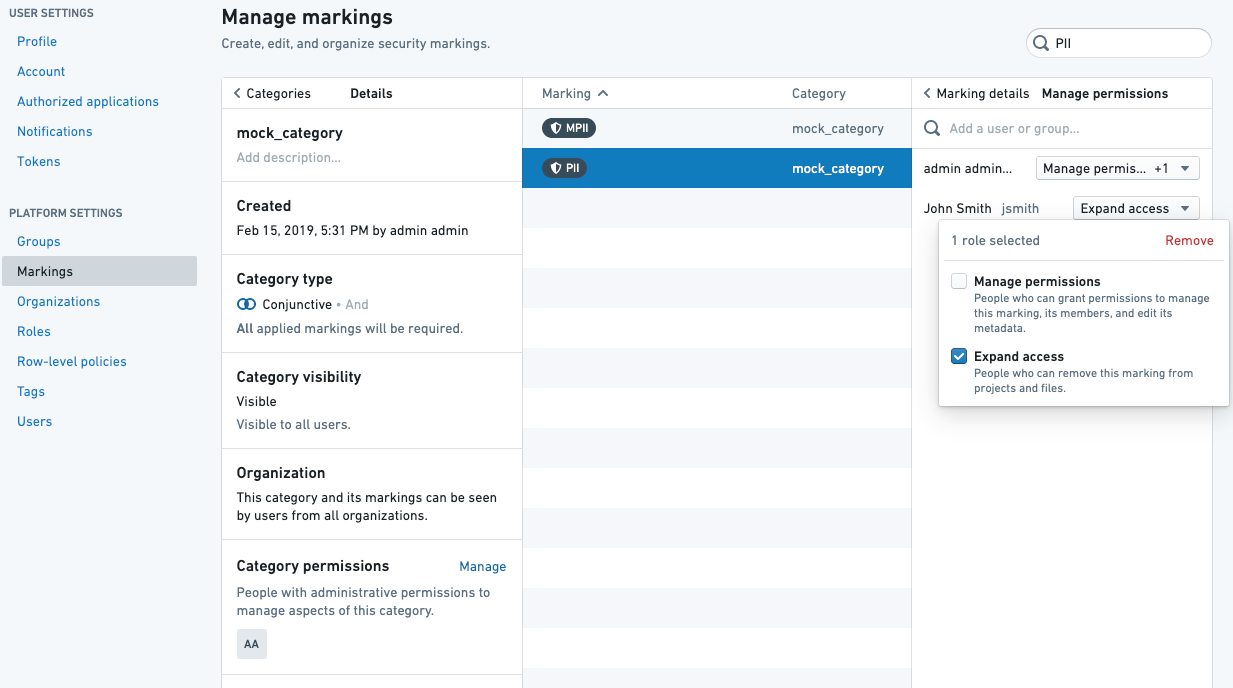
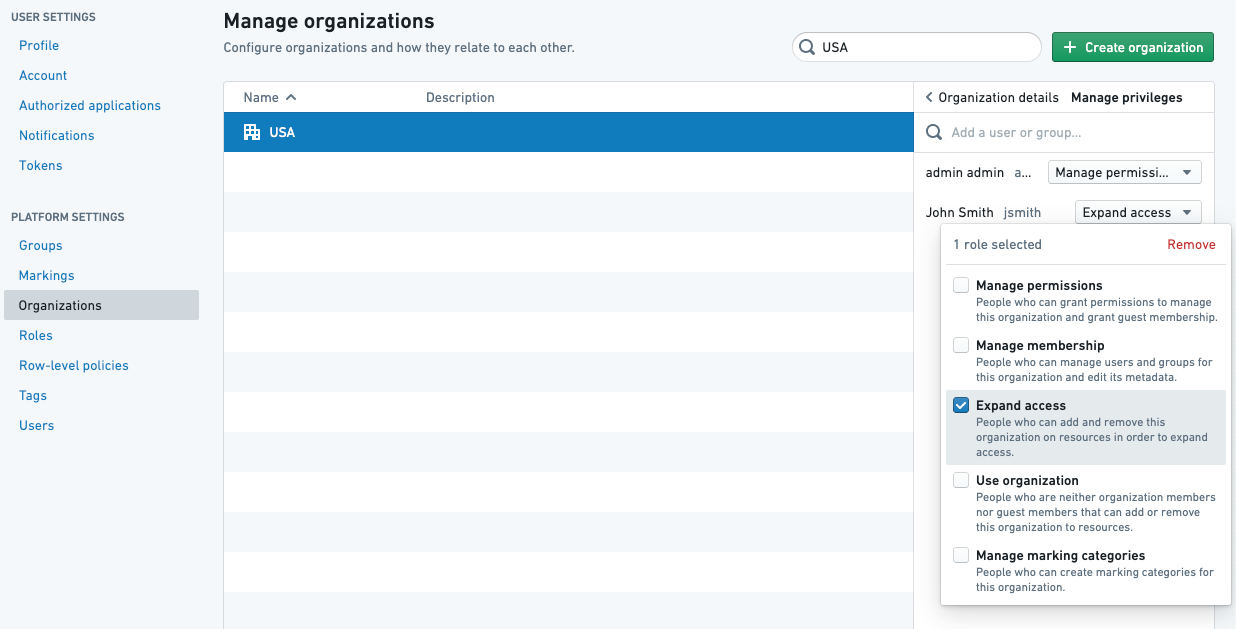
Remove markingpermissions to remove Markings andExpand accesspermissions to remove Organizations.
Basic workflow
:::callout{theme="neutral"} The gray dataset boxes in Project C below highlight the fact that Project References must be added for all the inputs in the destination Project. :::
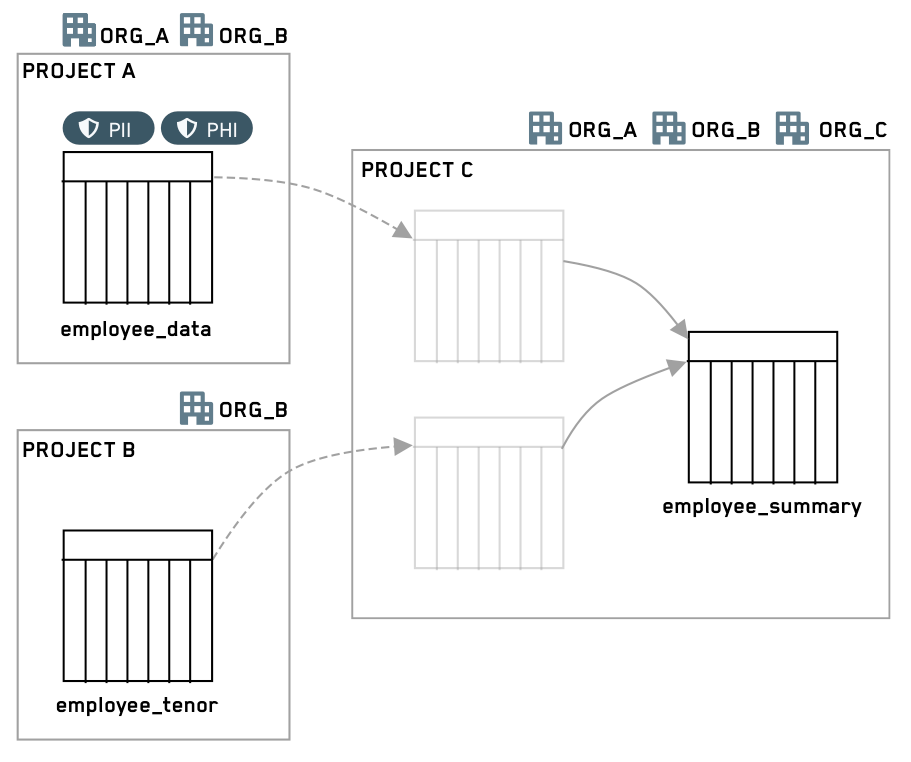
Steps
-
Create a new branch off of a protected branch (for example, main).
-
Add one or both of the
stop_propagatingandstop_requiringproperties to the input transform. For example:
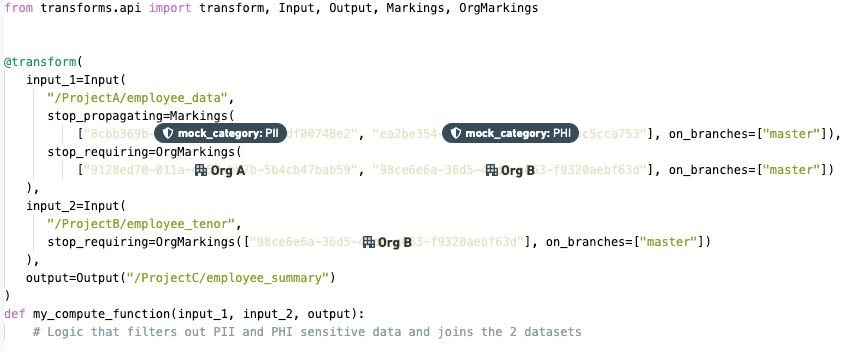
-
Create a pull request to merge this code into a protected branch.
-
A user with either
Remove markingpermissions for Markings orExpand accessfor Organizations can approve or reject the proposed changes. If multiple reviewers are added, rejection by any reviewer will result in rejection of the entire pull request. -
If approved, the code editor merges the PR and builds the output dataset. After the output dataset is built, it will no longer have the propagated Markings and/or Organizations.
:::callout{theme="neutral"}
Internally, Organizations are represented as a slightly different kind of Marking, hence the transforms keyword following stop_requiring is called OrgMarkings.
:::
Input transform property
To remove inherited Markings (e.g. PII), use the stop_propagating keyphrase.
To remove inherited Organizations (e.g. Palantir), use the stop_requiring keyphrase.
Each of these keyphrases must be specified on every input that requires removal of Markings or Organizations. For every removal, you must also specify the protected branches to which the removal should apply. Marking IDs, Organization IDs, and branches should always be specified as quoted strings.
:::callout{theme="neutral"} You need to provide at least one upstream Organization, since users only need to satisfy at least one Organization. Approvals will be required for each listed Organization. The detailed workflow below provides an example illustrating this point. :::
Python
In Python, Marking removal is specified in the input constructor.
@transform(
  input_1=Input("<input_id>",
      stop_propagating=Markings([markingId1, ...], [branch1, ...]),
      stop_requiring=OrgMarkings([orgMarking1, ...], [branch2, ...])),
  output=Output("<output_id>")
  )
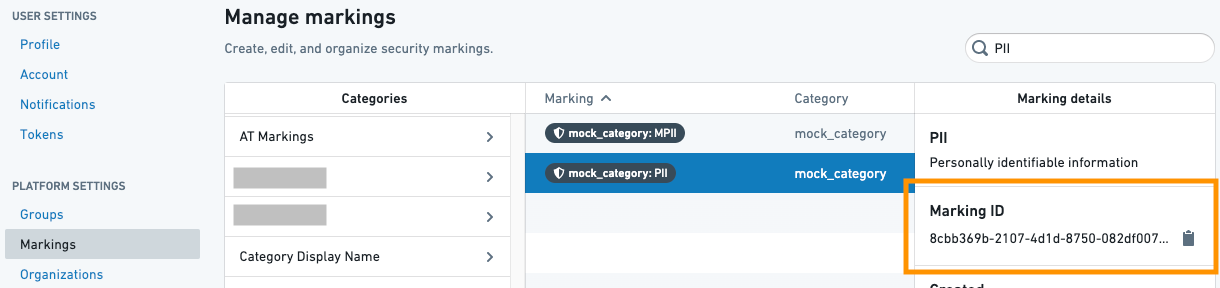
The Markings class takes a list of Marking IDs and a list of protected branches on which to apply the marking removal. Marking IDs can be found in the Markings list on the Settings page.
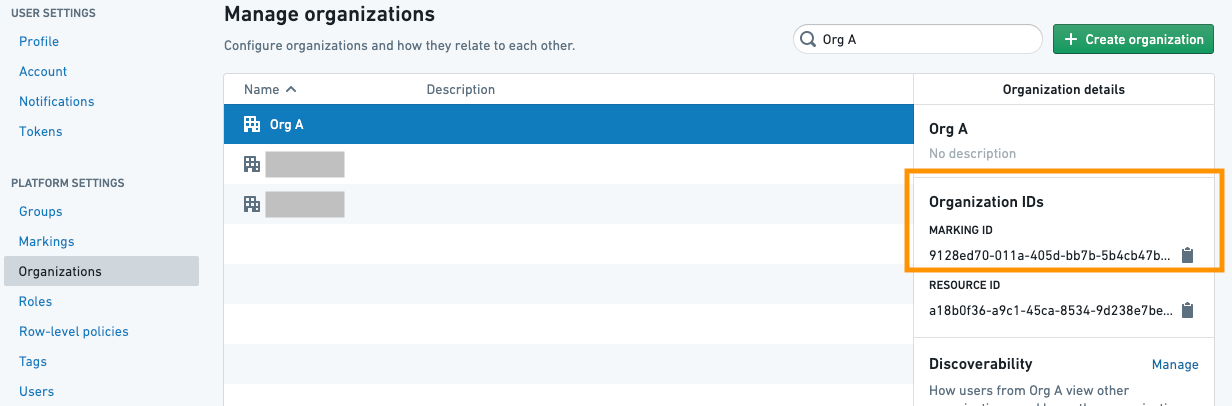
The OrgMarking class takes a list of Organization IDs and a list of protected branches on which to apply the Marking removal. Organization IDs can be found in the Organizations list on the Settings page.
Java
Java automatic registration
In Java, Marking removal is specified via annotations on the inputs for automatically registered transforms.
Syntax:
@Compute
public void myComputation(
  @StopPropagating(markings = {markingId1, ...}, onBranches = {branch1, ...})
  @StopRequiring(orgMarkings = {orgId1, ...}, onBranches = {branch2, ...})
  @Input("<input_id>")
  FoundryInput input,
  @Output("<output_id>")
  FoundryOutput output)
The @StopPropagating and @StopRequiring annotations take a set of Marking IDs and a set of protected branches on which to apply the Marking removal.
When only one Marking or branch is specified you do not need to wrap it in {} (e.g. @StopPropagating(markings = marking1, onBranches = "my-branch")).
Java manual registration
For manually registered Java transforms, we use the following syntax to specify unmarkings during registration in the MyPipelineDefiner.java file.
  @Override
    public void define(Pipeline pipeline) {
        HighLevelTransform highLevelManualTransform = HighLevelTransform.builder()
                .computeFunctionInstance(new HighLevelManualFunction())
                .putParameterToInputAlias("myInput", "/path/to/input/dataset")
                .returnedAlias("/path/to/output/dataset")
                        .desiredUnmarkings(Set.of(
                                    Unmarking.builder()
                                        .branch("branch1")
                                        .input(alias("/input1"))
                                        .output(alias("/output"))
                                        .markingId(MarkingId.valueOf("markingId"))
                                        .build(),
                                    Unmarking.builder()
                                        .branch("branch1")
                                        .input(alias("/input1"))
                                        .output(alias("/output"))
                                        .markingId(MarkingId.valueOf("orgId1"))
                                        .build()
                                    ))
                .build();
        pipeline.register(highLevelManualTransform);
    }
SQL
In SQL, Marking removal is specified by using SparkSQL hint statements:
CREATE TABLE <output_id> AS
  SELECT /*+ foundry_stop_propagating(markingId1, ...) foundry_stop_requiring(orgMarkingId1, ...) foundry_on_branches(branch1, ...) */ *
  FROM <input_id>
Marking and Organization removal in SQL can be added to any SELECT statement. For example:
CREATE TABLE <output_id> AS SELECT * FROM <input_1_id>
  CROSS JOIN (SELECT /*+ foundry_stop_propagating(markingId1) foundry_on_branches("my-branch") */ * FROM <input_2_id>)
Removal permissions
To be able to view code and approve pull requests in general, the
approver must pass any Organizations and Markings on the Project and the
repository itself, as well as having a Role that includes the basic Stemma View Repository workflow (by default, included in the Viewer role). Users must also have permissions on each Organization and Marking to set approval modes or approve pull requests removing those Organizations and Markings. Users do not necessarily need to be members of the Organization or Marking.
:::callout{theme="neutral"}
For a Marking approval, the user approving needs to have the Remove marking role on the Marking.
:::
:::callout{theme="neutral"}
For an Organization approval, the user approving needs to have the Expand access role on the Marking.
:::
Approval modes
For each repository and each Organization and Marking, a data governance user can define which mode should be used to trigger a new approval:
- Require re-approval: This is the default mode for every Organization and Marking. The repo will always require security approvals for any pull request made to a branch where this Organization and Marking has been removed. This mode guards against changes to the logic, thereby ensuring that Organizations and Markings are safely removed.
- Don’t require re-approval: When this Organization and/or Marking is removed on a transform for the first time for a given input, approval is required. Subsequent changes to the logic will not be blocked on security approvals.
Example 1
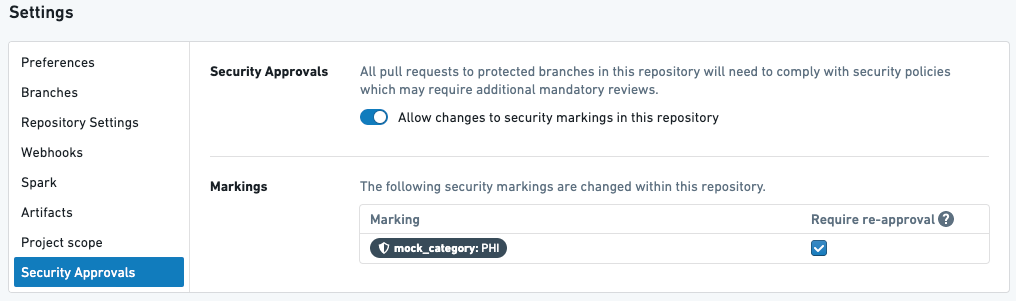

Above is a transform in a repository with one Marking PHI that requires re-approval.
Given the above setup, the following will happen:
- When the user creates their first PR to stop propagating the PHI Marking, they will be required to get approval from a user with the
Removerole on the PHI Marking. - If the user later modifies the transform above in their next PR, they will again be asked to get approval.
- If the user modifies anything in the repository – in this file or any other file – they will again be asked to get approval for PHI Marking.
Example 2
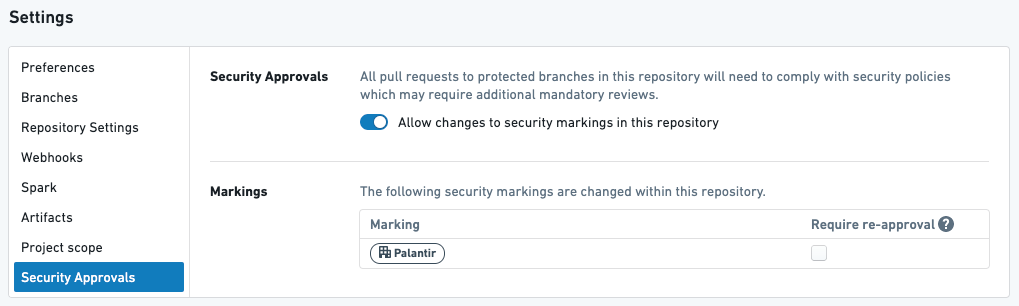

Above is a transform in a repository with one organization, PALANTIR, that does NOT require re-approval.
Given the above setup, the following will happen:
- When the user creates their first pull request to stop requiring the
PALANTIROrganization, they will be required to get approval from someone with theExpand accessrole on thePALANTIROrganization. - If the user later modifies the transform above in their next pull request, they will NOT be asked to get approval.
- If the user subsequently modifies anything in this repository, they will NOT be asked to get approval.
Example 3
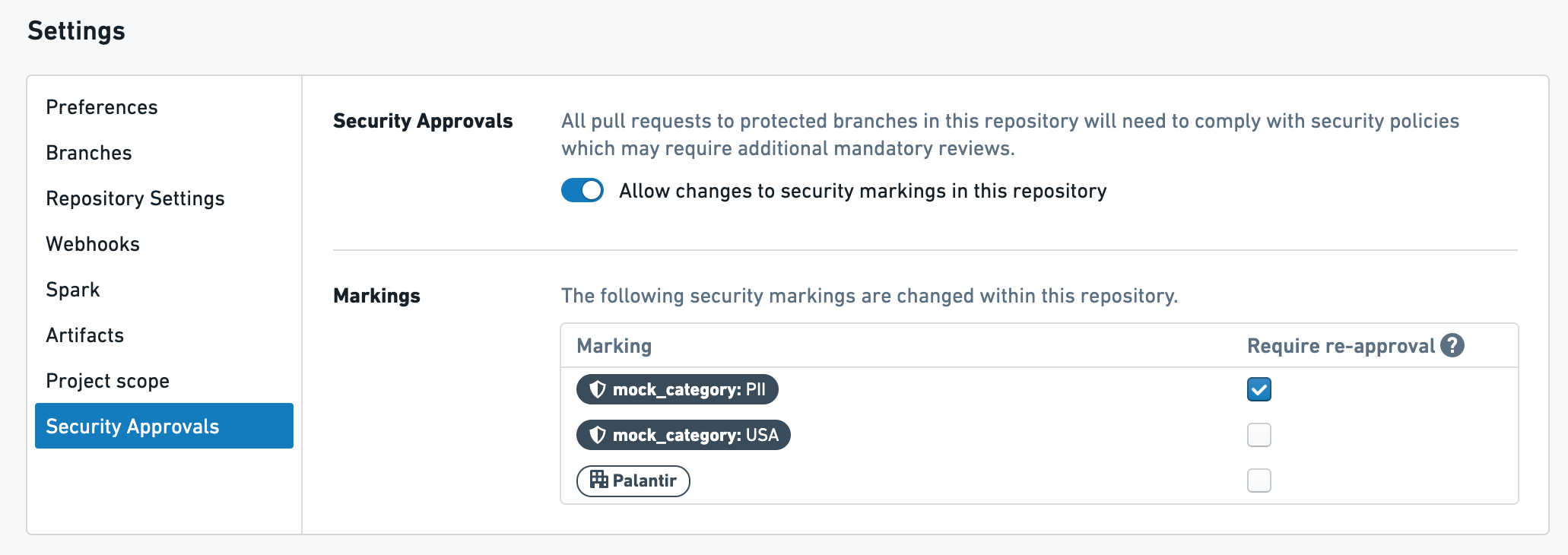

Transform 1: Above is a transform with one Marking, PII, and one Organization, PALANTIR. The PII Marking requires re-approval and the PALANTIR Organization does not require re-approval.

Transform 2: Above is a transform with one Marking, USA, that does NOT require re-approval.
Given the above setup, here's what will happen:
- When the user creates their first pull request in Transform 1, they will be required to get approval from a user with
Remove markingrole on thePIIMarking AND a user withExpand accessrole on thePALANTIROrganization. - If the user later modifies Transform 1 in their next pull request, they will be asked to get approval from ONLY a user with
Remove markingrole. on thePIIMarking. - When the user creates their first pull request for Transform 2, they will be required to get approval from a user with
Remove markingrole on theUSAMarking AND a user withRemove markingrole on thePIIMarking. - If the user later modifies Transform 2 in their next pull request, they will be asked to get approval from ONLY a user with
Remove markingrole on thePIIMarking. - If the user subsequently modifies anything in this repository, they will be asked to get approval from ONLY a user with
Remove markingrole on thePIIMarking.
Detailed workflow
In this example scenario, a code editor wants to use two datasets from a sensitive upstream project, remove certain information, and allow a wider audience to access the resulting dataset. The two datasets, which have two Markings each, have been added as references in the downstream Project. The code editor wants three of the four Markings to stop propagating, such that they do not appear on the output dataset. In addition, the upstream Project is restricted to users from OrgA or OrgB, and the intent is to distribute the downstream data to users from OrgC.
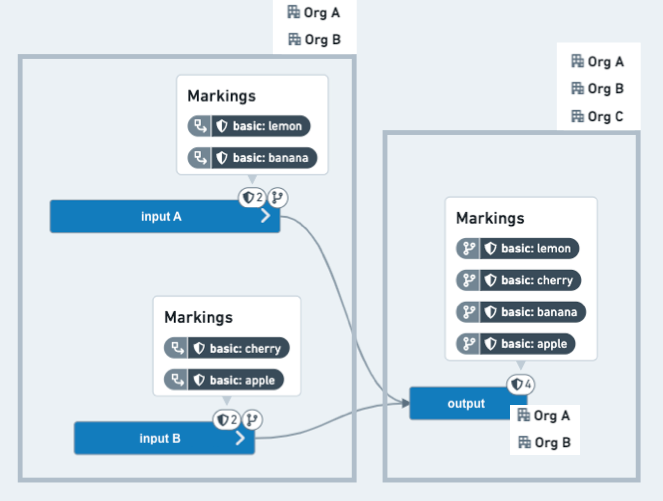
Before: The output dataset on the code editors branch has inherited all four Markings and is still restricted to users from OrgA or OrgB.
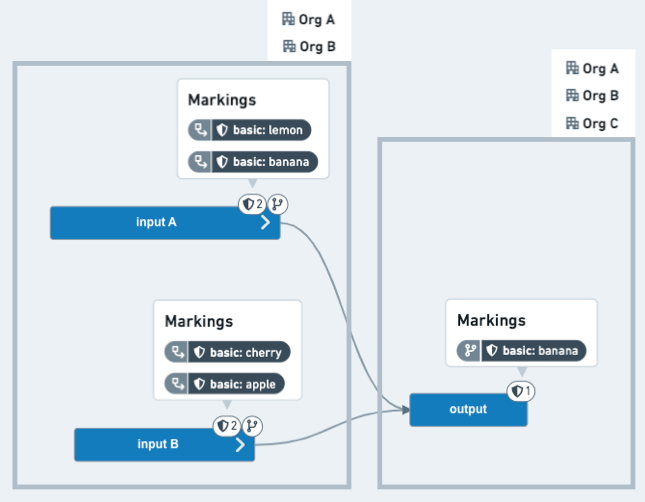
After: The output dataset, once merged into a protected branch (for example, main), now has only one inherited Marking and does not require users to be members of OrgA or OrgB.
Steps
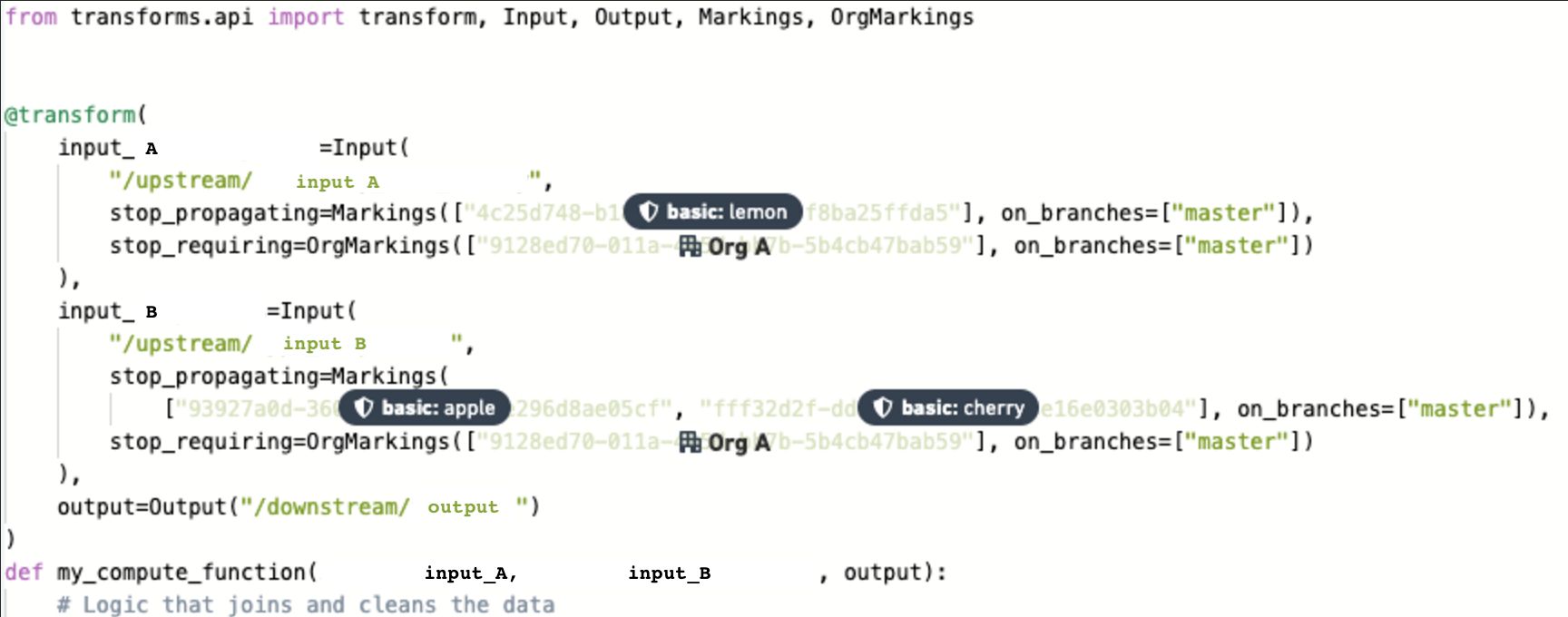
- The code editor writes a new transform on the
feature/clean-databranch of the repository of the downstream Project.
-
Since all the marking changes are being requested for the
masterbranch, no approvals are needed to work onfeature/clean-data. In other words, when the output dataset is built on thefeature/clean-databranch, all the upstream Markings will still be inherited. -
The code editor creates a pull request to the main branch and requests approvals from the data governance users, who manage data restricted by the
lemon,apple, andcherryMarkings. The code editor also requests an approval from anExpand accessOrganization administrator from OrgA, who can approve when OrgA data needs to be shared with other Organizations.
:::callout{theme="neutral"} Expanding access by removing an inherited Organization has the effect of removing all inherited Organizations, but approval is only required from users with the appropriate permissions on the Organizations listed in the transform. If you want to require approval from all of the Organizations, then you need to list all of the IDs in the `stop_requiring` component. In this example, OrgA is primarily responsible for the data in the upstream Project, so the editor chose OrgA for the cross-Organization approval process. As such, the editor only needs approval from an OrgA admin to remove inherited Organizations. Depending on which Organization approvals the editor wants to request, the editor can choose to `stop_requiring` either: (1) OrgA (with approval by an OrgA admin), (2) OrgB (with approval by an OrgB admin), or (3) both OrgA and OrgB (with approval from admins from both Organizations).
The end result is that the output dataset will not inherit any Organizations from the inputs and will only respect the Organizations from the Project in which it is located. :::
-
The data governance users and Organization administrators receive Foundry notifications that their approval has been requested.
-
Assuming the PR is approved, the code editor merges it and builds the output dataset as shown in the After image above.
-
The following week, another code editor makes a change to a different code file and opens a PR to merge to
master.
:::callout{theme="neutral"} If all the Markings do not require re-approval, the PR can be approved without going through a security review. If any of the Markings do require approval, this new PR will require a security review by the data governance or organization administrator who manages that Marking. :::
中文翻译
移除继承的标记(Markings)与组织(Organizations)
标记(Markings) 和 组织(Organizations) 会根据用户的权限资格限制其对资源的访问。
当衍生依赖资源的过程中删除或混淆了受限内容时,用户可能希望移除该衍生资源上的标记和/或组织限制。这种移除继承的标记与组织的操作,可以通过输入转换属性 stop_propagating 和 stop_requiring 实现。
stop_propagating用于移除继承的标记(Markings)(例如 PII)。stop_requiring用于移除继承的组织(Organizations)(例如 Palantir)。
术语
- 组织(Organizations) 是应用于项目的访问要求,可确保用户组与资源组之间严格的权限隔离。要满足访问要求,用户必须是应用于该项目的至少一个组织的成员或访客成员。
- 标记(Markings) 是应用于资源的访问要求,采用「全有或全无」的方式限制访问。要满足访问要求,用户必须拥有资源上应用的所有标记的访问权限。
- 角色(Roles) 是权限的集合,定义了用户可在指定资源上执行的具体操作流(例如 Viewer、Editor 等)。
重要注意事项
stop propagating和stop requiring这两个关键短语仅适用于组织与标记,不适用于角色。- 代码仓库必须至少有一个受保护分支(Protected Branch)(例如 main 分支),且该分支必须要求至少一名审批人。
- 你仅可在受保护分支上移除组织与标记。如果指定了未受保护的分支(例如
on_branches=[..., "not-protected-branch"]),会导致构建失败。 - Python、Java 和 SQL 均支持移除组织与标记的操作。
- 审批移除继承的组织与标记需要特殊的用户权限:移除标记需要用户拥有
Remove marking权限,移除组织需要用户拥有Expand access权限。
基础工作流
:::callout{theme="neutral"} 下方项目 C 中的灰色数据集框表明,你必须为目标项目中的所有输入添加项目引用。 :::
操作步骤
-
从受保护分支(例如 main 分支)创建新分支。
-
为输入转换添加
stop_propagating、stop_requiring属性中的一个或两个。示例如下:
-
创建拉取请求(Pull Request,简称PR),申请将代码合并到受保护分支。
-
拥有标记的
Remove marking权限或组织的Expand access权限的用户可审批或驳回变更申请。如果添加了多名审批人,任意一名审批人驳回都会导致整个拉取请求被驳回。 -
若申请通过,代码编辑者可合并 PR 并构建输出数据集。输出数据集构建完成后,将不再携带继承而来的标记和/或组织限制。
:::callout{theme="neutral"}
在内部实现中,组织是一种略有不同的标记类型,因此stop_requiring后的转换关键字名为OrgMarkings。
:::
输入转换属性
要移除继承的标记(例如 PII),请使用stop_propagating关键字。
要移除继承的组织(例如 Palantir),请使用stop_requiring关键字。
你必须在每个需要移除标记或组织的输入上分别指定上述关键字。每次移除操作还需指定该操作适用的受保护分支。标记 ID、组织 ID 和分支必须始终以带引号的字符串形式指定。
:::callout{theme="neutral"} 你需要至少提供一个上游组织,因为用户仅需满足至少一个组织的访问要求即可,列出的每个组织都需要单独审批。下文的详细工作流提供了说明这一点的示例。 :::
Python
在 Python 中,移除标记的配置在输入构造函数中指定。
@transform(
  input_1=Input("<input_id>",
      stop_propagating=Markings([markingId1, ...], [branch1, ...]),
      stop_requiring=OrgMarkings([orgMarking1, ...], [branch2, ...])),
  output=Output("<output_id>")
  )
Markings类接收两个参数:标记 ID 列表,以及应用该标记移除规则的受保护分支列表。你可以在「设置」页面的Markings列表中找到标记 ID。
OrgMarking类接收两个参数:组织 ID 列表,以及应用该组织移除规则的受保护分支列表。你可以在「设置」页面的Organizations列表中找到组织 ID。
Java
Java 自动注册
在 Java 中,自动注册的转换通过输入上的注解指定标记移除规则。
语法:
@Compute
public void myComputation(
  @StopPropagating(markings = {markingId1, ...}, onBranches = {branch1, ...})
  @StopRequiring(orgMarkings = {orgId1, ...}, onBranches = {branch2, ...})
  @Input("<input_id>")
  FoundryInput input,
  @Output("<output_id>")
  FoundryOutput output)
@StopPropagating 和 @StopRequiring 注解接收标记 ID 集合,以及应用该标记移除规则的受保护分支集合。
当仅指定一个标记或分支时,无需用{}包裹(例如 @StopPropagating(markings = marking1, onBranches = "my-branch"))。
Java 手动注册
对于手动注册的 Java 转换,你需要在MyPipelineDefiner.java文件中注册转换时使用如下语法指定标记移除规则:
  @Override
    public void define(Pipeline pipeline) {
        HighLevelTransform highLevelManualTransform = HighLevelTransform.builder()
                .computeFunctionInstance(new HighLevelManualFunction())
                .putParameterToInputAlias("myInput", "/path/to/input/dataset")
                .returnedAlias("/path/to/output/dataset")
                        .desiredUnmarkings(Set.of(
                                    Unmarking.builder()
                                        .branch("branch1")
                                        .input(alias("/input1"))
                                        .output(alias("/output"))
                                        .markingId(MarkingId.valueOf("markingId"))
                                        .build(),
                                    Unmarking.builder()
                                        .branch("branch1")
                                        .input(alias("/input1"))
                                        .output(alias("/output"))
                                        .markingId(MarkingId.valueOf("orgId1"))
                                        .build()
                                    ))
                .build();
        pipeline.register(highLevelManualTransform);
    }
SQL
在 SQL 中,你可以通过 SparkSQL 提示语句指定标记移除规则:
CREATE TABLE <output_id> AS
  SELECT /*+ foundry_stop_propagating(markingId1, ...) foundry_stop_requiring(orgMarkingId1, ...) foundry_on_branches(branch1, ...) */ *
  FROM <input_id>
SQL 中的标记和组织移除规则可添加到任意SELECT语句中。例如:
CREATE TABLE <output_id> AS SELECT * FROM <input_1_id>
  CROSS JOIN (SELECT /*+ foundry_stop_propagating(markingId1) foundry_on_branches("my-branch") */ * FROM <input_2_id>)
移除权限
通常来说,审批人要查看代码并审批拉取请求,必须满足项目和代码仓库本身的所有组织与标记访问要求,同时拥有包含基础 Stemma「查看仓库(View Repository)」工作流的角色(Roles)(默认情况下,Viewer 角色包含该权限)。用户还必须拥有对应组织和标记的权限,才能设置审批模式或审批移除这些组织与标记的拉取请求,用户不一定需要是该组织或标记的成员。
:::callout{theme="neutral"}
审批标记移除申请的用户需要拥有该标记的Remove marking角色。
:::
:::callout{theme="neutral"}
审批组织移除申请的用户需要拥有该组织的Expand access角色。
:::
审批模式
数据治理人员可为每个代码仓库、每个组织和标记定义触发新审批的模式:
- 要求重新审批: 这是所有组织和标记的默认模式。对于任何移除了该组织或标记、提交到对应分支的拉取请求,代码仓库始终要求安全审批。该模式可防范逻辑变更,确保组织与标记被安全移除。
- 无需重新审批: 首次为指定输入的转换配置该组织和/或标记移除规则时需要审批,后续逻辑变更不会被安全审批流程阻塞。
示例1
上图为代码仓库中的一个转换,该仓库有一个标记PHI,要求重新审批。
基于上述配置,会发生以下情况:
* 用户首次提交 PR 停止传播 PHI 标记时,需要拥有 PHI 标记Remove角色的用户审批。
* 用户后续在 PR 中修改上述转换逻辑时,需要再次提交审批。
* 用户修改代码仓库中的任意内容(无论是该文件还是其他文件),都需要再次提交 PHI 标记的移除审批。
示例2
上图为代码仓库中的一个转换,该仓库有一个组织PALANTIR,不要求重新审批。
基于上述配置,会发生以下情况:
* 用户首次提交 PR 停止要求PALANTIR组织权限时,需要拥有PALANTIR组织Expand access角色的用户审批。
* 用户后续在 PR 中修改上述转换逻辑时,无需再次提交审批。
* 用户后续修改该代码仓库中的任意内容,无需再次提交审批。
示例3
转换1:上图为一个转换,包含一个标记PII和一个组织PALANTIR。其中PII标记要求重新审批,PALANTIR组织无需重新审批。
转换2:上图为一个转换,包含一个标记USA,不要求重新审批。
基于上述配置,会发生以下情况:
* 用户首次为转换1提交 PR 时,需要同时获得拥有PII标记Remove marking角色的用户 和 拥有PALANTIR组织Expand access角色的用户审批。
* 用户后续在 PR 中修改转换1逻辑时,仅需要获得拥有PII标记Remove marking角色的用户审批。
* 用户首次为转换2提交 PR 时,需要同时获得拥有USA标记Remove marking角色的用户 和 拥有PII标记Remove marking角色的用户审批。
* 用户后续在 PR 中修改转换2逻辑时,仅需要获得拥有PII标记Remove marking角色的用户审批。
* 用户后续修改该代码仓库中的任意内容,仅需要获得拥有PII标记Remove marking角色的用户审批。
详细工作流
在这个示例场景中,代码编辑者希望使用来自敏感上游项目的两个数据集,移除特定信息后,让更多用户可以访问生成的数据集。这两个数据集各带有两个标记,已作为引用添加到下游项目中。代码编辑者希望停止传播四个标记中的三个,让输出数据集不携带这些标记。此外,上游项目仅对 OrgA 或 OrgB 的用户开放,目标是将下游数据分发给 OrgC 的用户。
移除前:代码编辑者分支上的输出数据集继承了全部四个标记,仍然仅对 OrgA 或 OrgB 的用户开放。
移除后:合并到受保护分支(例如 main 分支)后的输出数据集仅继承了一个标记,且不再要求用户是OrgA或OrgB的成员。
操作步骤
- 代码编辑者在下游项目代码仓库的
feature/clean-data分支上编写新的转换逻辑。
-
由于所有标记变更都仅申请应用于
master分支,在feature/clean-data分支上开发不需要审批。也就是说,在feature/clean-data分支上构建输出数据集时,仍然会继承所有上游标记。 -
代码编辑者向 main 分支提交拉取请求,向管理
lemon、apple、cherry标记的数据治理人员申请审批,同时向 OrgA 的拥有Expand access权限的组织管理员申请审批(该管理员可审批 OrgA 数据共享给其他组织的申请)。
:::callout{theme="neutral"}
通过移除继承的组织来扩大访问范围会移除所有继承的组织,但仅需要拥有转换中列出的组织对应权限的用户审批。如果你需要所有组织的审批,则需要在stop_requiring配置中列出所有组织的ID。在本示例中,OrgA 是上游项目数据的主要负责方,因此编辑者选择 OrgA 进行跨组织审批流程,仅需要 OrgA 管理员的审批即可移除继承的组织。编辑者可根据需要申请的组织审批,选择在stop_requiring中配置:
(1) 仅 OrgA(需 OrgA 管理员审批),
(2) 仅 OrgB(需 OrgB 管理员审批),
(3) OrgA 和 OrgB(需两个组织的管理员共同审批)。
最终结果是输出数据集不会继承输入的任何组织,仅遵循其所在项目的组织限制。 :::
-
数据治理人员和组织管理员会收到 Foundry 通知,告知其有审批申请待处理。
-
假设 PR 获得审批,代码编辑者合并 PR 并构建输出数据集,效果如上方「移除后」示意图所示。
-
下周,另一名代码编辑者修改了其他代码文件,提交 PR 申请合并到
master分支。
:::callout{theme="neutral"} 如果所有标记都不要求重新审批,则无需经过安全评审即可审批 PR。如果有任意标记要求重新审批,则新 PR 需要管理该标记的数据治理人员或组织管理员进行安全评审。 :::