Scheduling best practices(调度最佳实践)
To ensure schedules of production pipelines can easily be managed, we have developed a set of scheduling guidelines. Use this page to manage the schedules for which you are responsible.
- Each dataset should only be built by one schedule.
- You can see the number of schedules on each dataset in a Data Lineage graph by selecting Schedule count in the node color dropdown.
- You must have one force build schedule for each raw Data Connection sync.
- There should be no force builds on other schedules. Force builds should only be used with Data Connection syncs.
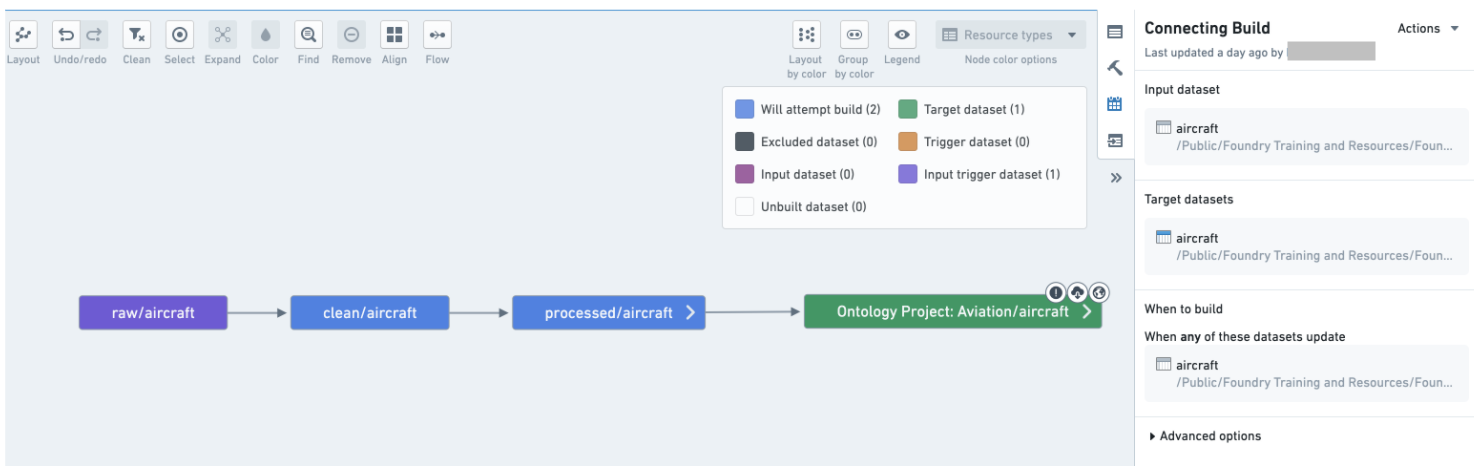
- Try to avoid full builds and use connecting builds instead.
- Your schedule should only build datasets that you own; your schedule should not build datasets that you do not own.
- Trashed datasets should not be built by your schedule. Use the Upgrade Assistant to investigate and remedy your schedules that contain trashed resources.
- Add retries to your schedule (we recommend three retries with an interval between one and three minutes).
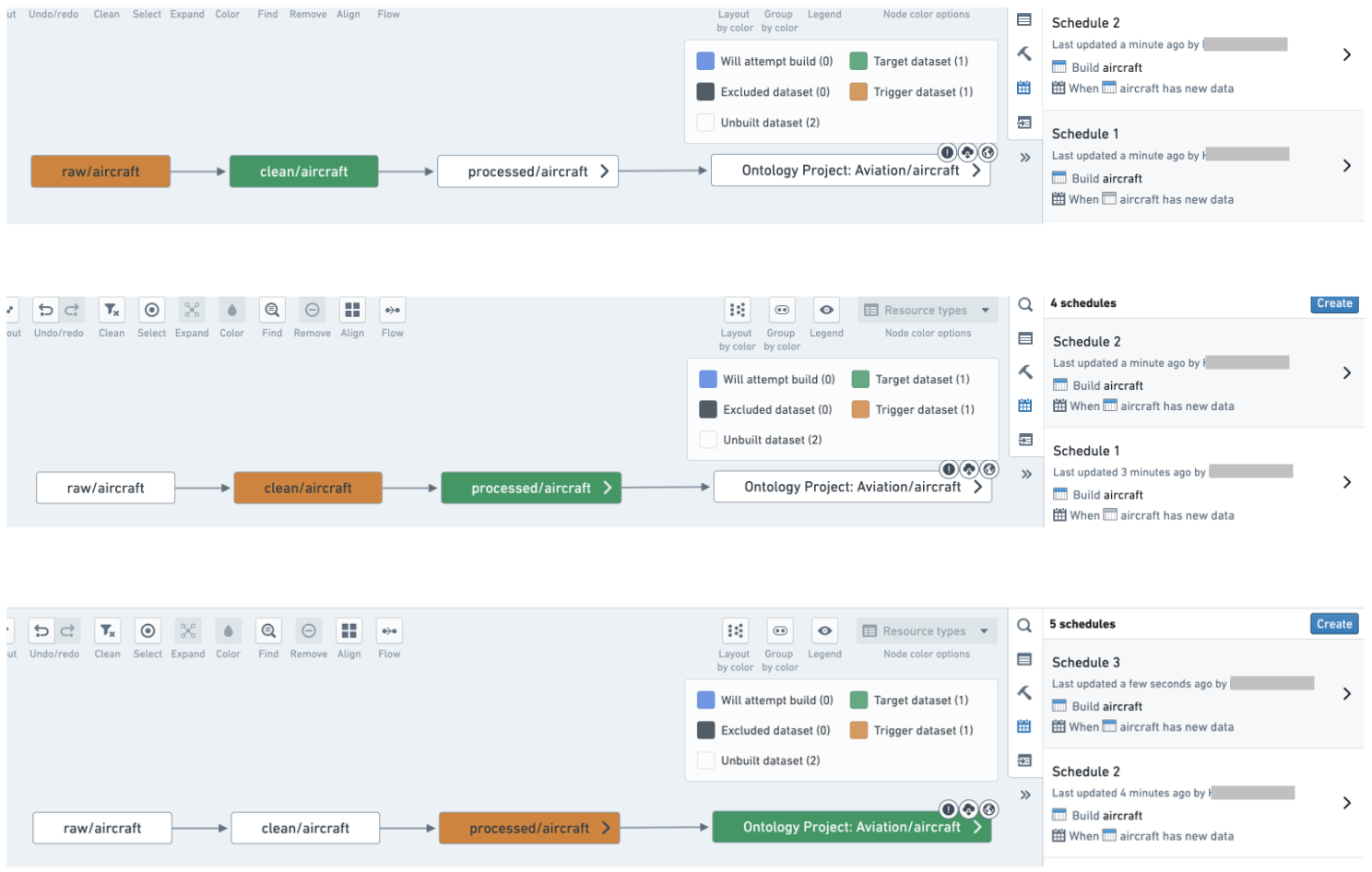
- Avoid having multiple schedules on each step of the pipeline; rather, combine datasets into logical schedules.
Examples
A pipeline with unnecessary schedules that should be combined into one schedule:
Combine datasets into a logical schedule using a connecting build:
Use the guidance below to set up an effective system of schedules for your pipelines.
Best practices
One schedule per pipeline
In most cases, you should only have one schedule per pipeline. In fact, each dataset in your pipeline should only have one scheduled build associated with it. Having a dataset built by two different schedules can lead to queuing and slow down both schedules. Keep your set of schedules simple and uncluttered to clarify the responsibilities of each schedule and make debugging easier if a build fails on a given dataset. It may also help with pipeline maintenance; you only have one place to check or modify when you want to configure the pipeline.
An exception could be made for pipelines that run in multiple sequential steps; some of these examples are described below:
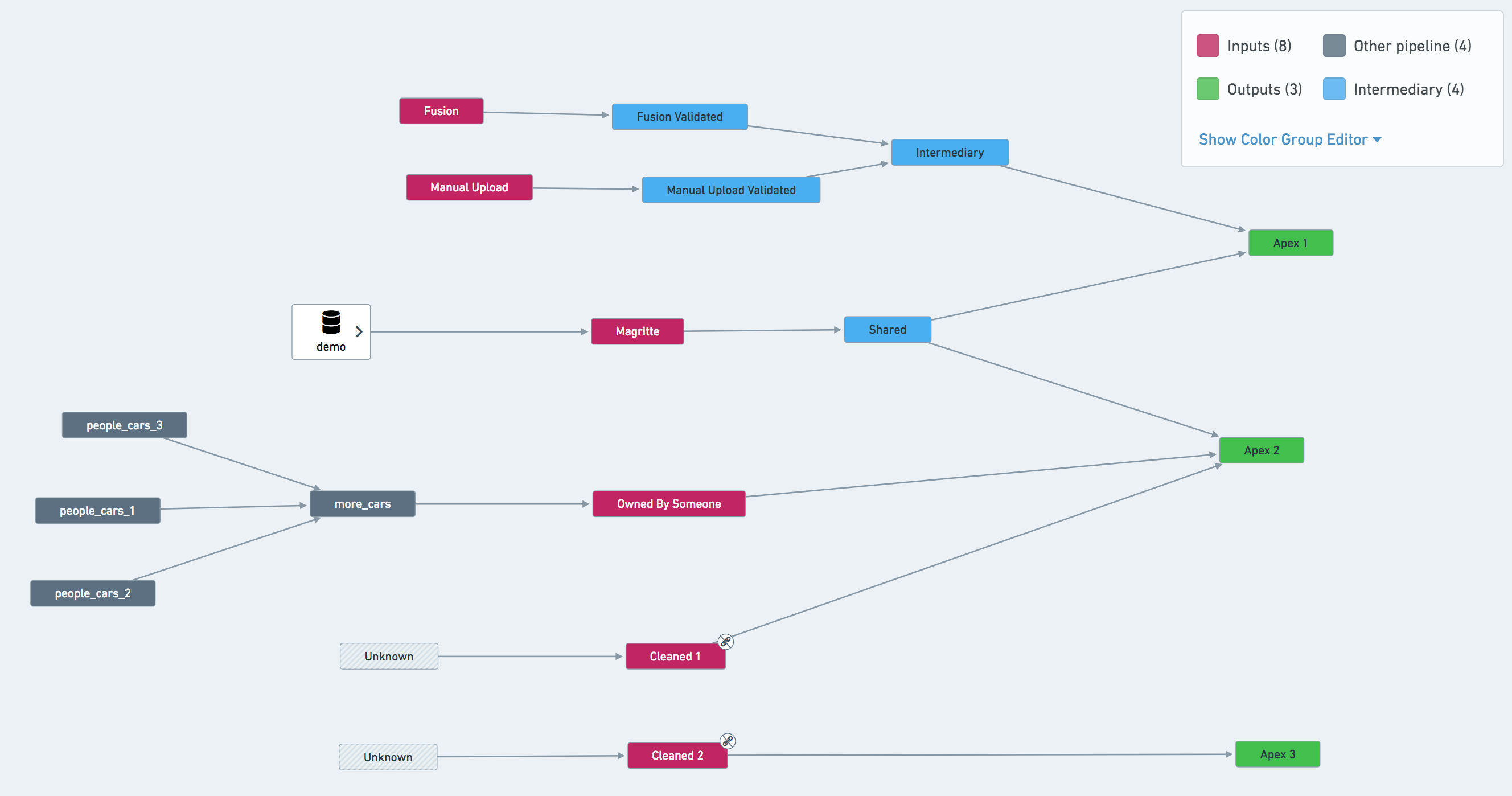
- If a pipeline has multiple terminal nodes, you may consider separate schedules for each node. In the example pipeline shown below, the most natural approach is to set up three schedules: defined on
Apex 1,Apex 2andApex 3. However, it may also be beneficial to create a schedule onSharedand treat this dataset as an input to other pipelines. - If your pipeline makes use of validation tables, you may need separate schedules for them.
- Refer to stability recommendations for more information on how to effectively handle complex pipelines like these.
Project-scoped schedules
All schedules should be Project-scoped when possible so that a schedule's ability to run successfully does not depend on the permissions of a single user (the schedule owner). Otherwise, the schedule owner's permissions could change and prevent the schedule's datasets from building. This is particularly important because ownership of the schedule could change after a schedule edit, since the last user to modify a schedule becomes the schedule's owner.
There are some instances where it is not possible to Project scope schedules:
- Transforms where permissions are severed
- Contour jobs
- Fusion syncs
One owner per schedule for user-scoped schedules
For schedules that cannot be Project-scoped, it is preferable that a single user owns all schedules on a given pipeline. This user is often a “service user” (a special user account not tied to a single person). Alternatively, the single owner could be a team lead with responsibility for all modifications to schedules in the Project.
Having a single user owning the schedules on a pipeline reduces complexity and protects a schedule from being adversely affected by changes in user permissions or team composition.
As mentioned above, it is important to note that the last user to modify a schedule becomes the schedule's owner. If multiple user profiles are managing a schedule and access rights across your team are not uniform, you may end up with permission errors that are difficult to trace if you do not account for ownership changes.
:::callout{theme="neutral"} In addition to helping with permissions consistency, a single owner also makes it easier to track relevant builds in the Builds application, where you can filter all builds on “Started by”. :::
Using retries
Use retries when configuring your schedule. Retries are part of a job; if a job fails with an exception that can be retried, the build orchestration layer will relaunch a new attempt of the same job without failing the build.
We recommend configuring schedules for at least three retries, with at least one minute between retries. This allows the platform to automatically intercept jobs that would be failing and re-trigger them within the same build. The additional gap of one minute gives the platform a chance to recover from transient problems that caused the job to fail the first time.
There are some cases where you might not want to enable retries on your job. For example, pipelines with very tight Service Level Agreements (SLAs) where you want to be alerted as soon as there’s a failure, or transforms that have a non-idempotent side effect. However, note that even if you do not enable retries in your schedule configuration, jobs may still be retried as part of adjudication.
No multi-dataset force builds
Schedules can enable a “force-build” option, where all datasets in the schedule will be built, regardless of their staleness. This option is very useful for Data Connection syncs, since those are always up to date in the platform and thus will never build as part of a scheduled build unless force build is used. However, we discourage having a multi-dataset schedule with the force build option for any derived datasets, since this can be costly in terms of resource usage. Instead, split your schedules so that datasets that must be force-built are in their own schedules.
What to include and what to exclude in a schedule
Be explicit about what is included in your schedule. Explicitly ignore datasets that sit outside your pipeline. Build resolution can be complex, but being explicit about what is included provides more transparency than being implicit.
- In our example pipeline screenshot below,
Owned By Someoneshould be ignored from a schedule defined onApex 2. The same applies forCleaned 1andCleaned 2— triggering a job on either of them would immediately cause the build to fail due to lack of permissions.
In addition, schedules should not depend on or try to build datasets that are:
- Currently in the trash: To remediate existing schedules with trashed resources, use the Upgrade Assistant to investigate the schedules you own to either un-trash or exclude the resource(s) in question from the schedule.
- Produced from Contour: For schedules to be considered “production ready”, we need to be able to review changes to the pipeline and revert to a previous version if something goes wrong. Contour does not support such workflows, and we discourage users from using them in production pipelines.
- Produced from Code Workbook and Code Workspaces: This is less of a strict rule than Contour output datasets, however we discourage the use of Code Workbook and Code Workspaces in production pipelines. Code Workbook and Code Workspaces are excellent for iterating on a solution but are less robust in regard to change management and reverting than Code Repositories. Learn more about differences between Code Workbook, Code Workspaces, and Code Repositories.
All outputs of the pipeline should be tagged as “targets” in your schedule. Schedules can have one or multiple targets, which are the datasets on which the schedule is installed. Schedules can also have one or multiple outputs, which are the final datasets built by the schedule and not used elsewhere in the build. In most cases, target datasets and output datasets will be the same, but in some cases (especially with multi-output builds), a build may have different target and output datasets. As a general rule, all outputs of a pipeline should be defined as targets.
Fail fast
Configure the build to fail immediately once a job fails by ticking the Abort build on failure checkbox in Advanced options). Failing fast will provide you with signal sooner.
Name schedules
All schedules should have a descriptive name. Schedule names can be very helpful as your pipeline grows in complexity and users over time.
Descriptive schedule names provide information about a schedule's intent to those who interact with a schedule; for instance, those with responsibility for fixing problems involving your schedule in the future.
Naming schedules is particularly important if you have multiple ingestion streams, if you expect other users to fork off any paths in your pipeline, or if you anticipate maintenance responsibility to change over time.
中文翻译
调度最佳实践
为确保生产管线的调度易于管理,我们制定了一套调度指南。请使用本页面管理您负责的调度任务。
- 每个数据集应仅由一个调度构建。
- 您可以在数据谱系(Data Lineage)图中,通过节点颜色下拉菜单选择调度计数(Schedule count)来查看每个数据集上的调度数量。
- 每个原始数据连接(Data Connection)同步必须有一个强制构建(force build)调度。
- 其他调度不应使用强制构建。强制构建应仅用于数据连接(Data Connection)同步。
- 尽量避免全量构建(full builds),而应使用连接构建(connecting builds)。
- 您的调度应仅构建您拥有的数据集;不应构建您不拥有的数据集。
- 已废弃(Trashed)的数据集不应由您的调度构建。请使用升级助手(Upgrade Assistant)调查并修复包含已废弃资源的调度。
- 为调度添加重试机制(建议三次重试,间隔一到三分钟)。
- 避免在管线的每个步骤上设置多个调度;而应将数据集合并到逻辑调度中。
示例
一个包含不必要调度、应合并为一个调度的管线:
使用连接构建(connecting build)将数据集合并到逻辑调度中:
使用以下指南为您的管线建立有效的调度系统。
最佳实践
每个管线一个调度
大多数情况下,每个管线应只有一个调度。实际上,管线中的每个数据集应仅关联一个计划构建。由两个不同调度构建同一数据集可能导致排队,并拖慢两个调度。保持调度集简单清晰,有助于明确每个调度的职责,并在某个数据集构建失败时更易于调试。这也有助于管线维护:当您需要配置管线时,只需检查或修改一个地方。
对于分多个顺序步骤运行的管线,可以例外处理;以下是一些示例:
- 如果管线有多个终端节点,您可以考虑为每个节点设置单独的调度。如下方示例管线所示,最自然的方法是设置三个调度:分别定义在
Apex 1、Apex 2和Apex 3上。不过,在Shared上创建调度并将其视为其他管线的输入也可能有益。 - 如果管线使用了验证表(validation tables),您可能需要为它们设置单独的调度。
- 请参考稳定性建议(stability recommendations),了解如何有效处理此类复杂管线的更多信息。
项目范围调度(Project-scoped schedules)
所有调度应尽可能设置为项目范围(Project-scoped),这样调度成功运行的能力就不依赖于单个用户(调度所有者)的权限。否则,调度所有者的权限可能发生变化,从而阻止调度的数据集构建。这一点尤为重要,因为调度编辑后所有权可能发生变化——最后修改调度的用户将成为该调度的所有者。
在某些情况下,无法将调度设置为项目范围(Project-scoped):
- 权限被切断的转换(Transforms)
- Contour作业
- Fusion同步
用户范围调度(User-scoped schedules)的单一所有者
对于无法设置为项目范围(Project-scoped)的调度,最好由单个用户拥有给定管线的所有调度。该用户通常是"服务用户(service user)"(一种不绑定到个人的特殊用户账户)。或者,单一所有者可以是团队负责人,负责项目(Project)中所有调度的修改。
由单个用户拥有管线上的调度可降低复杂性,并保护调度免受用户权限或团队组成变化的不利影响。
如上所述,需要注意的是,最后修改调度的用户将成为该调度的所有者。如果多个用户配置文件正在管理调度,且团队内的访问权限不一致,那么如果不考虑所有权变更,您可能会遇到难以追踪的权限错误。
:::callout{theme="neutral"} 除了有助于权限一致性外,单一所有者还使得在构建(Builds)应用中追踪相关构建更加容易,您可以在其中按"启动者(Started by)"过滤所有构建。 :::
使用重试
在配置调度时使用重试机制。重试是作业的一部分;如果作业因可重试的异常而失败,构建编排层将重新启动同一作业的新尝试,而不会导致构建失败。
我们建议将调度配置为至少三次重试,重试间隔至少一分钟。这允许平台自动拦截可能失败的作业,并在同一构建内重新触发它们。额外的一分钟间隔为平台提供了从导致作业首次失败的临时问题中恢复的机会。
在某些情况下,您可能不希望启用作业重试。例如,具有非常严格服务水平协议(SLA)的管线,您希望在出现故障时立即收到警报,或者具有非幂等副作用的转换(transforms)。但请注意,即使您在调度配置中未启用重试,作业仍可能作为裁定(adjudication)的一部分被重试。
无多数据集强制构建
调度可以启用"强制构建(force-build)"选项,此时调度中的所有数据集都将被构建,无论其是否过时。此选项对数据连接(Data Connection)同步非常有用,因为这些同步在平台中始终是最新的,除非使用强制构建,否则它们永远不会作为计划构建的一部分被构建。但我们不鼓励对任何派生数据集使用多数据集调度并启用强制构建选项,因为这可能在资源使用方面成本高昂。相反,应将调度拆分,使必须强制构建的数据集位于其自己的调度中。
调度中包含和排除的内容
明确调度中包含的内容。明确忽略位于管线外部的数据集。构建解析可能很复杂,但明确包含的内容比隐式包含提供了更高的透明度。
- 在我们下方的示例管线截图中,
Owned By Someone应从定义在Apex 2上的调度中忽略。Cleaned 1和Cleaned 2也是如此——触发其中任何一个的作业都会因权限不足而立即导致构建失败。
此外,调度不应依赖或尝试构建以下数据集:
- 当前在回收站中的数据集: 要修复包含已废弃资源的现有调度,请使用升级助手(Upgrade Assistant)调查您拥有的调度,以取消废弃或从调度中排除相关资源。
- 由Contour生成的数据集: 要使调度被视为"生产就绪(production ready)",我们需要能够审查管线的更改,并在出现问题时回滚到先前版本。Contour不支持此类工作流,我们不鼓励用户在生产线中使用它们。
- 由代码工作簿(Code Workbook)和代码工作区(Code Workspaces)生成的数据集: 这不像Contour输出数据集那样是严格规则,但我们不鼓励在生产线中使用代码工作簿(Code Workbook)和代码工作区(Code Workspaces)。代码工作簿(Code Workbook)和代码工作区(Code Workspaces)非常适合迭代解决方案,但在变更管理和回滚方面不如代码仓库(Code Repositories)稳健。了解更多关于代码工作簿(Code Workbook)、代码工作区(Code Workspaces)和代码仓库(Code Repositories)之间的差异。
管线的所有输出应在调度中标记为"目标(targets)"。调度可以有一个或多个目标,即安装调度的数据集。调度也可以有一个或多个输出,即由调度构建且不在构建中其他地方使用的最终数据集。大多数情况下,目标数据集和输出数据集是相同的,但在某些情况下(尤其是多输出构建),构建可能具有不同的目标和输出数据集。作为一般规则,管线的所有输出都应定义为目标。
快速失败
通过勾选高级选项(Advanced options)中的构建失败时中止(Abort build on failure)复选框,将构建配置为在作业失败时立即失败。快速失败将为您提供更早的信号。
命名调度
所有调度都应具有描述性名称。随着管线复杂度的增加和用户的变化,调度名称会非常有用。
描述性调度名称向与调度交互的人员提供有关调度意图的信息;例如,未来负责修复涉及您的调度问题的人员。
如果您有多个数据摄取流,或者您预计其他用户会从管线的任何路径分支,或者您预计维护责任会随时间变化,那么命名调度尤为重要。