Compute usage with Foundry Streaming(使用 Foundry Streaming 的计算资源)
Foundry Streaming is a high throughput, low latency form of compute that consistently listens for new incoming messages, applies user-defined logic, and pushes them to the next stage in the pipeline.
Foundry streams rely on a distributed parallel worker-based architecture, with parallel workers each having their own resources that are dedicated to their particular streaming job. Stream resource requirements scale with the max throughput of the active stream along with the total number of messages it processes.
How compute is measured
Streaming compute usage is divided into two types:
-
Live processing compute: The process of running user-defined transforms on live data. This source type is called “streaming”.
-
Archiving compute: The process of moving data from the streaming layer to Foundry’s storage layer. Archive compute is a batch process and will appear as a “transform”.
:::callout{theme="neutral"}
Note that when paying for Foundry usage, the default streaming_usage_rate is 0.5. This is the rate at which user-defined transforms run on live data. If you have an enterprise contract with Palantir, contact your Palantir representative before proceeding with compute usage calculations.
:::
The live processing compute of a stream in Foundry is measured by the number of compute-seconds it uses over its full duration in wall-clock time. Therefore, using more computational resources (e.g. vCPUs, memory, parallelization) in a streaming job increases the cost of the job. The longer a job runs, the more compute it uses. Since streams are designed to run persistently to continuously process data, a stream will continue using compute until it is ended by the user.
Streams are statically allocated; they will use a constant number of compute-seconds per wall-clock second while the stream is running. Streams are also often tuned to meet peak demand, meaning compute usage from the stream is unaffected by variable data volume. Streams use compute-seconds even if no data is moving through the stream.
Stream usage can be calculated as the sum of total seconds used by a single job manager and many task managers. Note that each parallel worker will have identical computational resources.
Job manager compute seconds are calculated in the following way:
max(num_vCPU, gib_ram / 7.5) * streaming_usage_rate * stream_duration_seconds
Task manager compute seconds are calculated in the following way:
max(num_vCPU, gib_ram / 7.5) * streaming_usage_rate * stream_duration_seconds * (num_parallel_task_managers + 1)compute_seconds = job_manager compute_seconds + task_manager_compute_seconds
Learn more about values used to calculate compute usage, including memory-to-core ratio.
Archiving jobs are batch processing jobs that run alongside each stream. Archive jobs periodically read from the hot storage layer of the stream and move the data into Foundry storage for robust persistence and historical tracking. As archive jobs do not have the same low latency requirements as the streams themselves, they run on a schedule and only use compute when there is data to be archived.
Archiving job usage is based on a single Spark driver and can be calculated with the following formula:
compute_seconds = max(num_vcpu, gib_ram / 7.5) * num_seconds- Archive jobs are small. The archiver always runs with a minimal profile of 1 vCPU and 4 GiB of RAM.
Investigate Foundry Streaming usage
To view the total usage of streams, first navigate to the Resource Management application. Then, find your stream under the Usage by resource section and select Details to view usage by individual dataset.
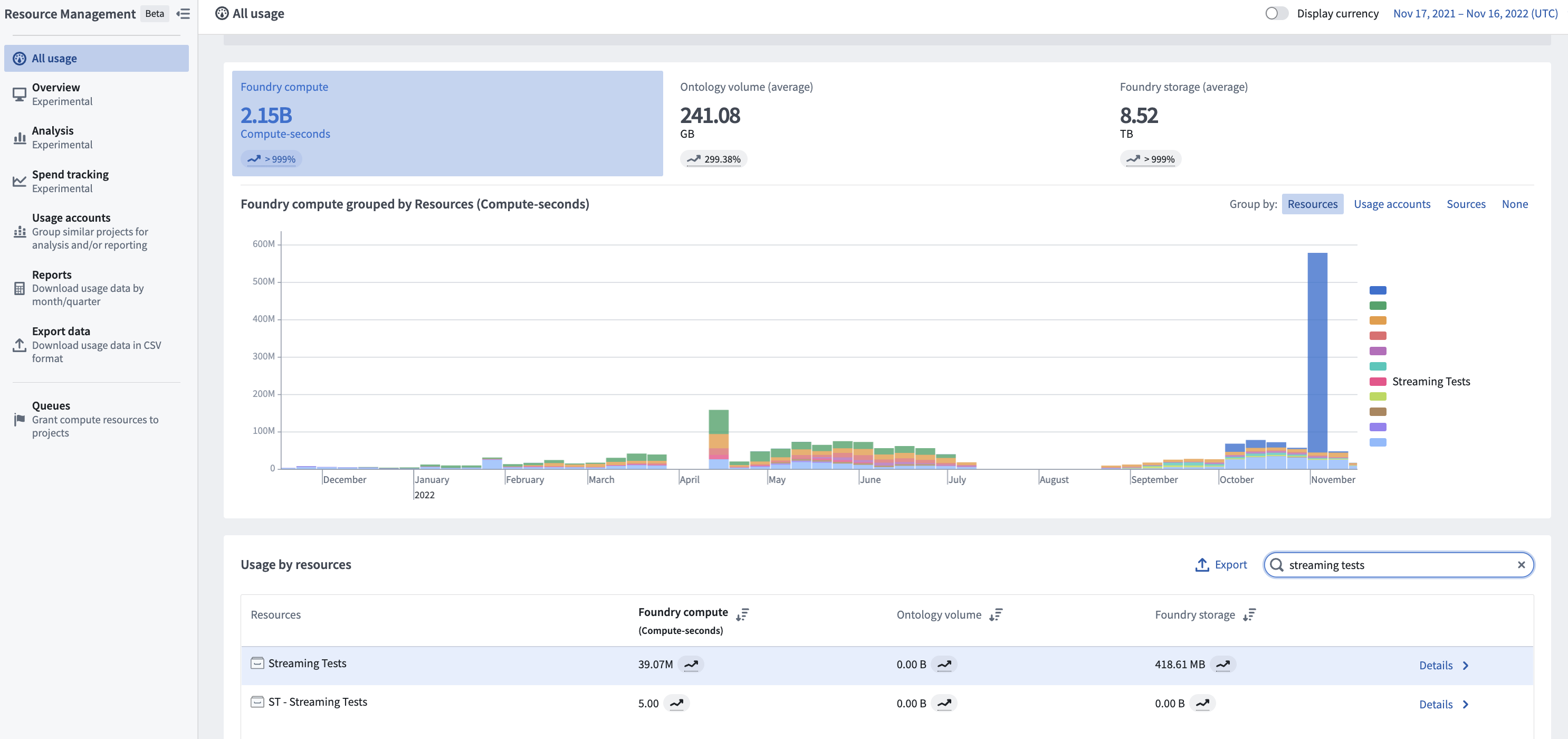
The cost of a stream is attributed to the checkpoint dataset that the stream produces. This dataset serves as the permanent usage record of the processing of that stream. The streaming usage on this dataset falls under the “streaming” category in the Resource Management application.
Each time a stream is ran it will run continuously until stopped by a user. When a user stops a stream, that run will appear under the History tab of the dataset. You can investigate the profile of each individual stream to understand the performance and compute usage of historical stream runs.
Each time a historical archive is ran, it publishes its compute metrics in the Builds application. Use the Builds application to investigate the resource allocation for each archive that was run.
Understand drivers of usage
The main driver of usage for a stream is the computational resource footprint of the stream itself. In this case, the compute resources include the number of vCPUs per task manager, the GiB of RAM per partition, and the number of partitions in the stream. These resources are set in the profile of the stream and persist for the duration of the stream.
- Stream resources should be allocated to meet the peak throughput of the incoming stream. If the volume of incoming messages is too high for the computational resources to effectively service, the stream will fall behind.
- To change the resources used by a stream, you must change the resource profile and restart the stream.
- Archive job compute usage scales with the amount of data coming through the stream. Archive jobs read all data since the last archive. If no data has been streamed, then the archive jobs will use zero compute. Archive jobs run every 10 minutes while a stream is active.
Manage usage with Foundry Streaming
It is important to understand when to choose streaming and when to choose batch for specific workflows. Streaming is designed for workflows that require second-level latency and constant compute. If data can run every few minutes, consider a small micro-batch job which can push the same amount of data as the stream but with a reduced compute-second cost and a significantly higher data latency.
- The size of a stream significantly affects the total compute-seconds used per run. Streams should be configured with enough resources to handle the maximum simultaneous load expected for that stream.
- It is important to choose the size of the stream to ensure that peak load can be served while ensuring it is not over-provisioned. This involves carefully configuring the size of each job (vCPUs and memory) and the total number of task managers for the stream.
- Streams will run until they are stopped. Carefully monitor sources of streaming compute to ensure that streams are only running when needed.
Calculating usage
The following example shows how compute usage is calculated for a hypothetical stream that runs for 10 minutes. Note that most production streams run continuously.
Stream profile
- Job manager vCPUs: 0.5
- Job manager gib_ram: 1
- Task manager vCPUs: 0.5
- Task manager gib_ram: 2g
- Parallelism: 2
- gib_ram: 4
- Duration of stream: 10 minutes (600 seconds)
- streaming_usage_rate: 0.5
Calculation
- Job manager compute seconds = max(vCPUs, gib_ram / 7.5 gib_ram) * streaming_usage_rate * 600s = max(0.5, 0.133) * 0.5 * 600s = 150 compute-seconds
- Alternatively, 0.25 compute-seconds per second or 900 compute-seconds per hour
- Task manager compute seconds = max(vCPUs, gib_ram / 7.5 gib_ram) * (parallelism + 1) * streaming_usage_rate * 600s = max(0.5, 0.267) * 3 * 0.5 * 600s = 450 compute-seconds
- Alternatively, 0.75 compute-seconds per second or 2700 compute-seconds per hour
The total compute usage for this stream running for 10 minutes is 150 job manager compute-seconds and 450 task manager compute-seconds. Learn more about the factors that impact compute usage in Foundry.
中文翻译
使用 Foundry Streaming 的计算资源
Foundry Streaming 是一种高吞吐量、低延迟的计算形式,它持续监听新传入的消息,应用用户定义的逻辑,并将消息推送到流水线中的下一阶段。
Foundry 流依赖于基于分布式并行工作节点的架构,每个并行工作节点拥有专用于其特定流处理作业的资源。流的资源需求会根据活动流的最大吞吐量及其处理的消息总数进行扩展。
计算资源的计量方式
流式计算资源使用分为两种类型:
-
实时处理计算资源: 对实时数据运行用户定义转换的过程。此来源类型称为"流式处理(streaming)"。
-
归档计算资源: 将数据从流处理层移动到 Foundry 存储层的过程。归档计算是一个批处理过程,将显示为"转换(transform)"。
:::callout{theme="neutral"}
请注意,在支付 Foundry 使用费用时,默认的 streaming_usage_rate 为 0.5。这是用户定义转换在实时数据上运行的速率。如果您与 Palantir 签订了企业合同,请在进行计算资源使用量计算之前联系您的 Palantir 代表。
:::
Foundry 中流的实时处理计算资源通过其在挂钟时间(wall-clock time)内使用的计算秒数(compute-seconds)来衡量。因此,在流处理作业中使用更多的计算资源(例如 vCPU、内存、并行度)会增加作业成本。作业运行时间越长,使用的计算资源就越多。由于流被设计为持续运行以连续处理数据,因此流将持续使用计算资源,直到用户将其终止。
流是静态分配的;在流运行期间,它们每挂钟秒将使用恒定数量的计算秒数。流通常也会根据峰值需求进行调整,这意味着流的计算资源使用量不受可变数据量的影响。即使没有数据在流中流动,流也会使用计算秒数。
流的使用量可以计算为单个作业管理器(Job Manager)和多个任务管理器(Task Manager)使用的总秒数之和。请注意,每个并行工作节点将拥有相同的计算资源。
作业管理器计算秒数的计算方式如下:
max(num_vCPU, gib_ram / 7.5) * streaming_usage_rate * stream_duration_seconds
任务管理器计算秒数的计算方式如下:
max(num_vCPU, gib_ram / 7.5) * streaming_usage_rate * stream_duration_seconds * (num_parallel_task_managers + 1)compute_seconds = job_manager compute_seconds + task_manager_compute_seconds
了解更多用于计算计算资源使用量的值,包括内存与核心比率(memory-to-core ratio)。
归档作业是与每个流并行运行的批处理作业。归档作业定期从流的热存储层读取数据,并将其移动到 Foundry 存储中,以实现稳健的持久化和历史追踪。由于归档作业没有与流本身相同的低延迟要求,它们按计划运行,并且仅在有数据需要归档时才使用计算资源。
归档作业的使用量基于单个 Spark 驱动程序(Spark driver),可以使用以下公式计算:
compute_seconds = max(num_vcpu, gib_ram / 7.5) * num_seconds- 归档作业规模较小。归档程序始终以 1 个 vCPU 和 4 GiB 内存的最小配置运行。
调查 Foundry Streaming 使用情况
要查看流的总使用量,首先导航到资源管理应用程序(Resource Management application)。然后,在按资源划分的使用量(Usage by resource)部分找到您的流,并选择详细信息(Details)以查看按单个数据集划分的使用量。
流的成本归因于该流生成的检查点数据集(checkpoint dataset)。该数据集作为该流处理的永久使用记录。此数据集上的流式处理使用量属于资源管理应用程序中的"流式处理(streaming)"类别。
每次运行流时,它将持续运行,直到用户停止。当用户停止流时,该次运行将出现在数据集的历史记录(History)选项卡下。您可以调查每个单独流的配置文件,以了解历史流运行的性能和计算资源使用情况。
每次运行历史归档时,它都会在构建应用程序(Builds application)中发布其计算指标。使用构建应用程序调查每次运行的归档的资源分配情况。
了解使用量的驱动因素
流使用量的主要驱动因素是流本身的计算资源占用。在这种情况下,计算资源包括每个任务管理器的 vCPU 数量、每个分区的 GiB 内存量以及流中的分区数。这些资源在流的配置文件中设置,并在流的整个持续时间内保持不变。
- 应分配流资源以满足传入流的峰值吞吐量。如果传入消息量对于计算资源来说过高而无法有效处理,则流将会落后。
- 要更改流使用的资源,您必须更改资源配置文件并重新启动流。
- 归档作业的计算资源使用量随通过流的数据量而变化。归档作业读取自上次归档以来的所有数据。如果没有数据被流式传输,则归档作业将使用零计算资源。当流处于活动状态时,归档作业每 10 分钟运行一次。
使用 Foundry Streaming 管理使用量
了解何时为特定工作流选择流式处理以及何时选择批处理非常重要。流式处理专为需要秒级延迟和持续计算的工作流而设计。如果数据可以每隔几分钟运行一次,请考虑使用小型微批处理作业(micro-batch job),它可以推送与流相同数量的数据,但计算秒数成本更低,数据延迟则显著更高。
- 流的大小会显著影响每次运行使用的总计算秒数。应配置足够的资源来处理该流预期的最大并发负载。
- 选择流的大小以确保能够满足峰值负载,同时确保不过度配置,这一点很重要。这涉及仔细配置每个作业的大小(vCPU 和内存)以及流的总任务管理器数量。
- 流将一直运行直到被停止。请仔细监控流式计算资源的来源,确保仅在需要时运行流。
计算使用量
以下示例展示了如何计算一个假设运行 10 分钟的流的计算资源使用量。请注意,大多数生产环境中的流是持续运行的。
流配置文件
- 作业管理器 vCPU:0.5
- 作业管理器 gib_ram:1
- 任务管理器 vCPU:0.5
- 任务管理器 gib_ram:2g
- 并行度:2
- gib_ram:4
- 流持续时间:10 分钟(600 秒)
- streaming_usage_rate:0.5
计算过程
- 作业管理器计算秒数 = max(vCPUs, gib_ram / 7.5 gib_ram) * streaming_usage_rate * 600s = max(0.5, 0.133) * 0.5 * 600s = 150 计算秒数
- 或者,每秒 0.25 计算秒数,或每小时 900 计算秒数
- 任务管理器计算秒数 = max(vCPUs, gib_ram / 7.5 gib_ram) * (parallelism + 1) * streaming_usage_rate * 600s = max(0.5, 0.267) * 3 * 0.5 * 600s = 450 计算秒数
- 或者,每秒 0.75 计算秒数,或每小时 2700 计算秒数
此流运行 10 分钟的总计算资源使用量为 150 个作业管理器计算秒数和 450 个任务管理器计算秒数。了解更多影响 Foundry 中计算资源使用量的因素。