Create a branch(创建分支)
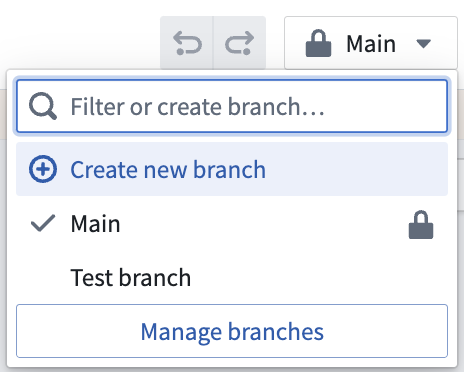
To create a branch, navigate to the top toolbar and click the branch dropdown; you will be in the Main branch by default after creating a new pipeline workflow. In the dropdown, click Create new branch.
In the Create branch window, name your branch and choose to use the autogenerated Global Branch name or to rename it. Dataset inputs will be read using this Global Branch or the main branch if it does not exist.
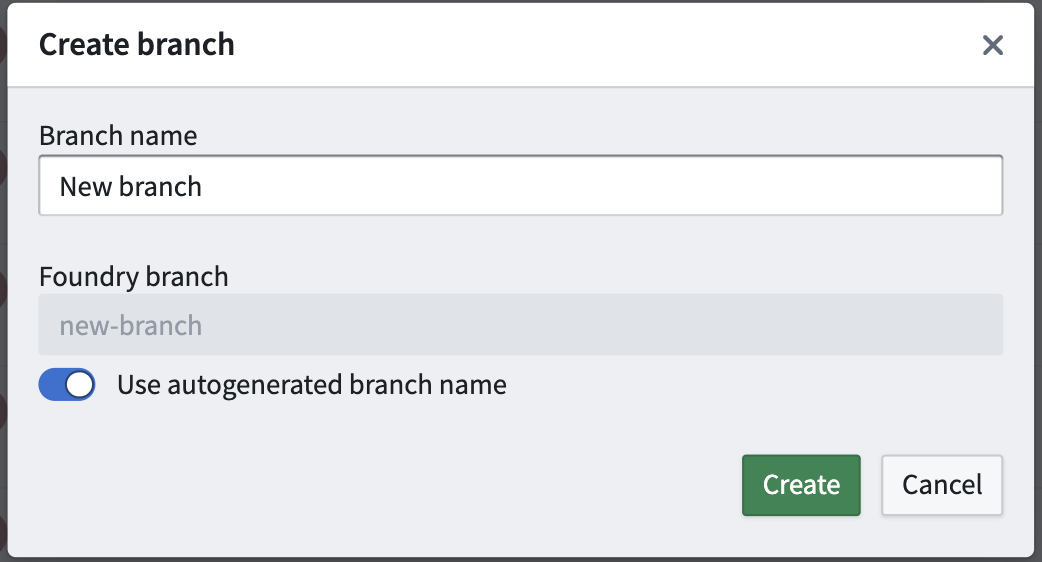
Click Create to copy the current state of the Main branch and work from the new branch. You can navigate to other branches from the branch dropdown.
中文翻译
创建分支
要创建分支,请导航至顶部工具栏并点击分支下拉菜单;在创建新的流水线工作流后,您默认将处于主分支(Main branch)。在下拉菜单中,点击创建新分支(Create new branch)。
在创建分支(Create branch)窗口中,为您的分支命名,并选择使用自动生成的全局分支(Global Branch)名称或对其进行重命名。数据集输入将使用此全局分支进行读取,如果该分支不存在,则使用主分支。
点击创建(Create)以复制主分支(Main branch)的当前状态,并从新分支开始工作。您可以通过分支下拉菜单导航至其他分支。