Branch protection(分支保护(Branch protection))
When there are multiple authors contributing to the same Pipeline Builder instance, or when the pipeline backs critical data assets, you can protect your branch to achieve a greater level of governance and defense against unintentional changes. A protected branch can only be modified with a pull request and must satisfy a predefined set of requirements.
How to protect branches
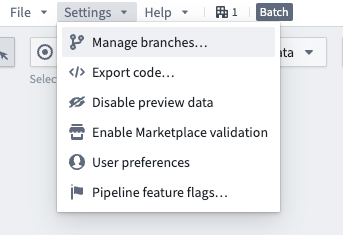
Navigate to the Settings drop down in the top left. Select Manage branches.
Select the Branch protection tab. In this tab, enable Require proposals... to protect the Main branch and any other branches specified in the text box below. Select Save when done.
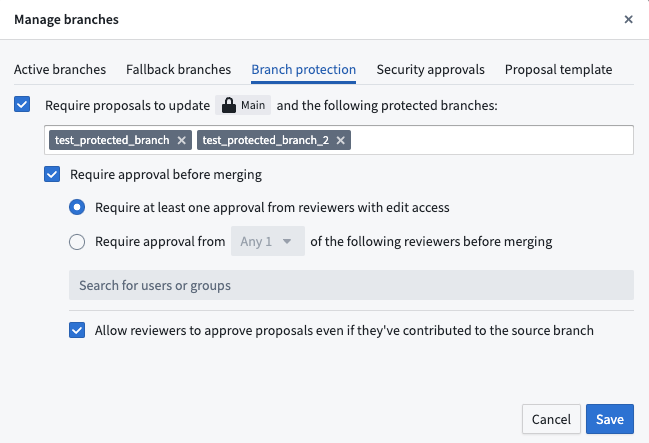
All protected branches require users to make changes on a separate branch before those changes can be merged into protected branches. Currently, all protected branches in Pipeline Builder share the same approval rules.
Enrollment-level branch protection
Administrators can enable default branch protection for the Main branch of all new pipelines on an enrollment. Branch protection enhances the security and integrity of your repository by requiring proposals to be approved before any changes can be made to a protected branch.
:::callout{theme="warning"} Enabling enrollment-level branch protection will not affect existing pipelines. To change the branch protection of existing pipelines, see how to protect branches above. :::
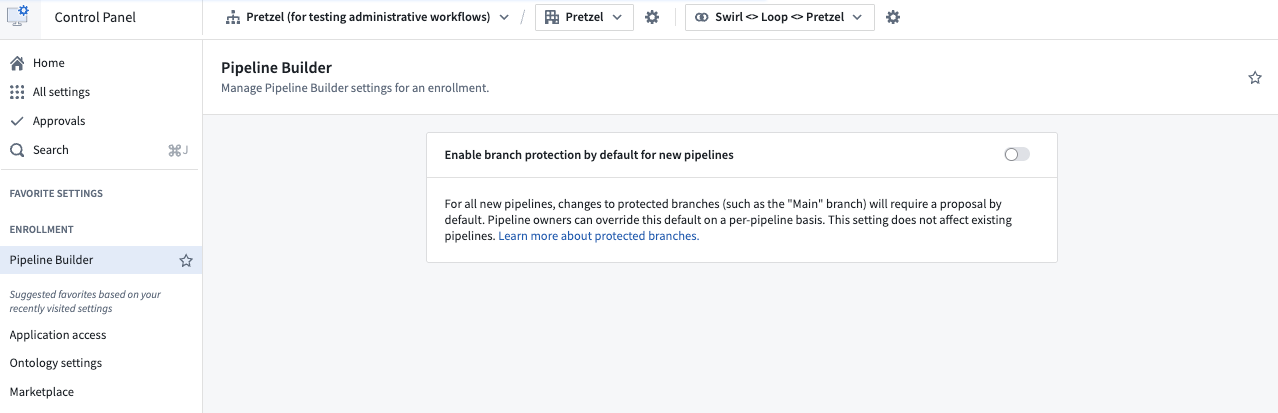
Go to Control Panel and navigate to Pipeline Builder. Then, toggle the setting for Enable branch protection by default for new pipelines. This will make Main branches on new pipelines protected branches, so they will require proposals before changes can be merged.
中文翻译
分支保护(Branch protection)
当多名贡献者在同一个Pipeline Builder实例上协作,或流水线承载关键数据资产时,你可以保护你的分支,实现更完善的治理能力,防范意外变更。受保护分支(protected branch) 仅能通过拉取请求(pull request)修改,且必须满足一组预定义的要求。
如何保护分支(How to protect branches)
导航至左上角的Settings下拉菜单,选择Manage branches。
选择Branch protection标签页,在该页中启用Require proposals...即可保护主分支(Main branch)以及下方文本框中指定的其他所有分支,配置完成后点击Save。
所有受保护分支都要求用户在独立分支上完成变更,才可将变更合并到受保护分支中。当前,Pipeline Builder内的所有受保护分支共用同一套审批规则。
注册实例级分支保护(Enrollment-level branch protection)
管理员可以为单个注册实例下所有新建流水线的Main分支启用默认分支保护。分支保护要求对受保护分支的所有变更必须先经过提案(proposal)审批,以此提升代码仓库的安全性与完整性。
:::callout{theme="warning"} 启用注册实例级分支保护不会影响现有流水线。如需修改现有流水线的分支保护规则,请参考上文如何保护分支。 :::
前往控制面板(Control Panel),导航至Pipeline Builder,然后开启Enable branch protection by default for new pipelines配置项。该配置会将所有新建流水线的Main分支设为受保护分支,因此变更合并前必须先提交提案。