Breaking changes(破坏性变更)
Breaking changes occur when stateful functions are modified in streaming or incremental pipelines. Transforms are either row-level or stateful.
- Row level transform: Only requires data in a single row to produce a result, for example
Multiply numbersorFilter. - Stateful function: A transform that requires data across multiple rows to produce a result.
There are four main stateful functions:
- Aggregate (Aggregate over Window in Streaming)
- Outer caching join (only in streaming)
- Heartbeat detection (only in streaming)
- Time bounded drop duplicates (only in streaming)
- Time bounded event time sort (only in streaming)
When a stateful function is modified, the previous output may no longer be accurate. For example, imagine you are filtering to even numbers and taking the sum of that set. If you change the filter to be all odd numbers, the existing state will be the sum of even numbers, but all new filtered values will be odd. Therefore, what the sum represents is now ambiguous, being the sum of a set of even numbers added to the sum of a set of odd numbers. To refresh the state, you can run a replay.
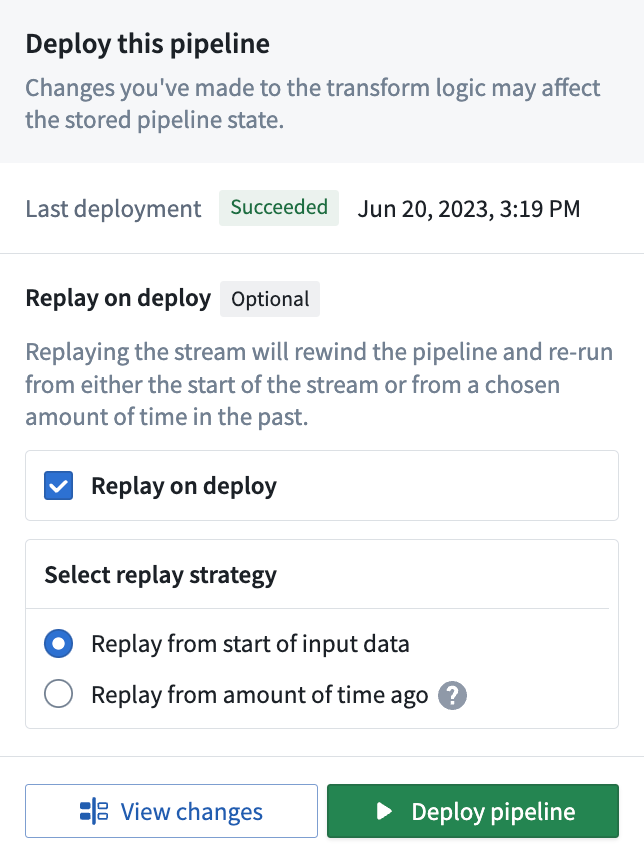
There are two types of replays:
- Replay from start of input data: Replays your pipeline from the start of data, either the start of a stream or the first transaction on an input dataset as determined by whether the input is a stream or an incremental dataset.
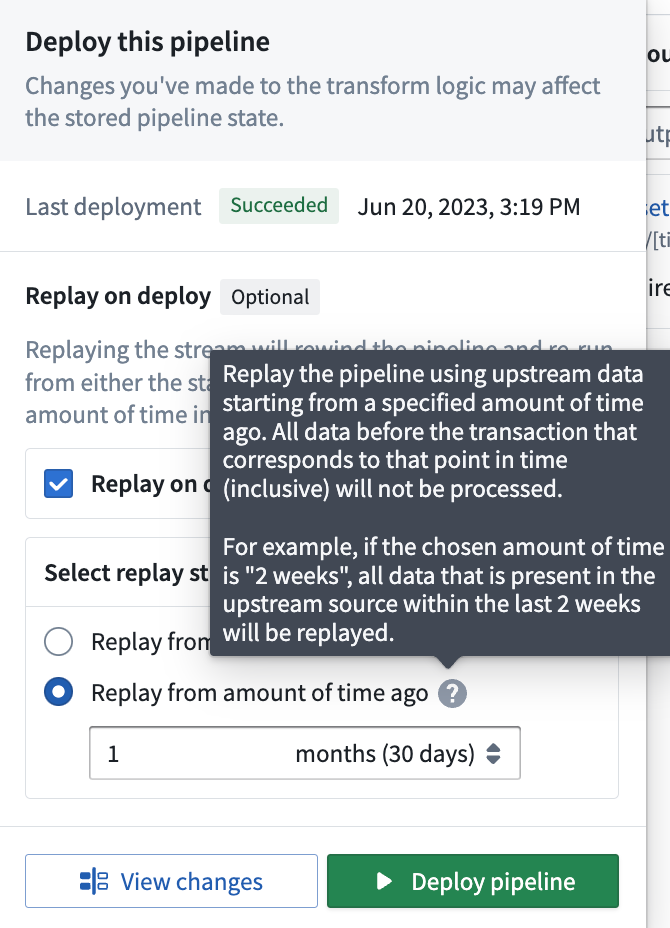
- Replay from amount of time ago (only available for Streaming): Replay the pipeline using upstream data starting from a specified amount of time ago. The granular replay will include all data starting with the first transaction that committed before the time specified, all data before that will not be processed. This means you may get one transaction's worth of data from before the time you specify.
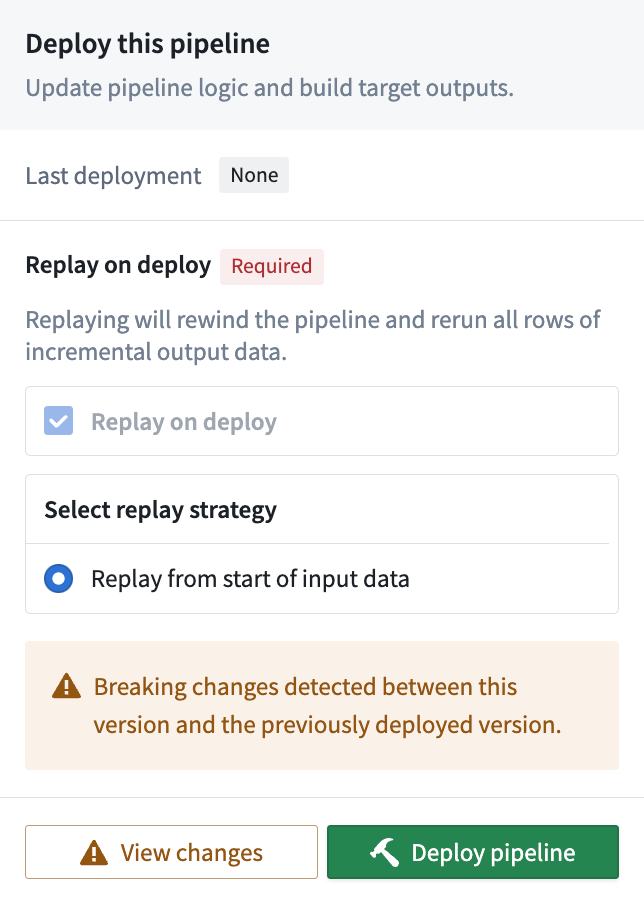
Replays can be optional or required; in the case of breaking changes, Pipeline Builder automatically detects this change and requires a replay on deploy. The image below shows a forced replay in an Incremental pipeline.
:::callout{theme="danger"} Replaying your pipeline could lead to lengthy downtimes, possibly as long as multiple days. When you replay your pipeline, your stream history will be lost and all downstream pipeline consumers will be required to replay. :::
Common causes of state breaks
The following changes commonly result in a state break that requires a full replay. Understanding these scenarios can help you plan pipeline modifications and avoid unexpected downtime.
Stateful transform modifications
Removing or modifying stateful transforms (such as Aggregate, Outer caching join, or Heartbeat detection) requires a full replay. This includes removing inputs that feed into stateful transforms, because the stateful function can no longer produce consistent results without the removed data.
Input changes affecting stateful transforms
Adding or removing inputs triggers a state break that you can acknowledge without a full replay. However, changes to inputs that feed into stateful transforms can break logical consistency with historical data. For example, if a stateful aggregate depends on a particular input and that input is removed or replaced, the existing state no longer accurately reflects the data that the pipeline processes.
:::callout{theme="warning"} Even when Pipeline Builder allows you to acknowledge an input change without a replay, evaluate whether the change affects any stateful transforms later in the pipeline. If it does, a replay may still be necessary to maintain data consistency. :::
Output schema changes
Adding new columns to an output schema does not require a replay. However, removing columns from an output schema is a state break that requires a replay, because the existing output data contains columns that no longer match the updated schema.
Source pipeline changes
Replaying a pipeline that feeds into your current pipeline can require you to replay your pipeline as well. When source data is reprocessed, the data arriving at your pipeline inputs may differ from the data your pipeline originally processed, which can invalidate the current state of stateful transforms.
State-preserving modifications
Pipeline Builder includes features that allow certain pipeline modifications without a replay. These features enable you to continue processing from where you left off, preserving your stream history and avoiding impact to downstream consumers.
Input and output modifications
You can modify a pipeline's inputs and outputs after deployment. The behavior depends on the type of change:
- Adding inputs: New inputs are read from the beginning, while existing inputs continue from their last processed position.
- Removing inputs or outputs: The state associated with removed inputs or outputs is dropped from the processing cluster without requiring a replay.
- Adding outputs: Adding an output results in a state break that requires replay, either from an amount of time ago or from the start of input data.
When Pipeline Builder detects input or output changes, a state-break module prompts you to acknowledge the change. This acknowledgment tells the system to continue processing from where it left off rather than requiring a replay.
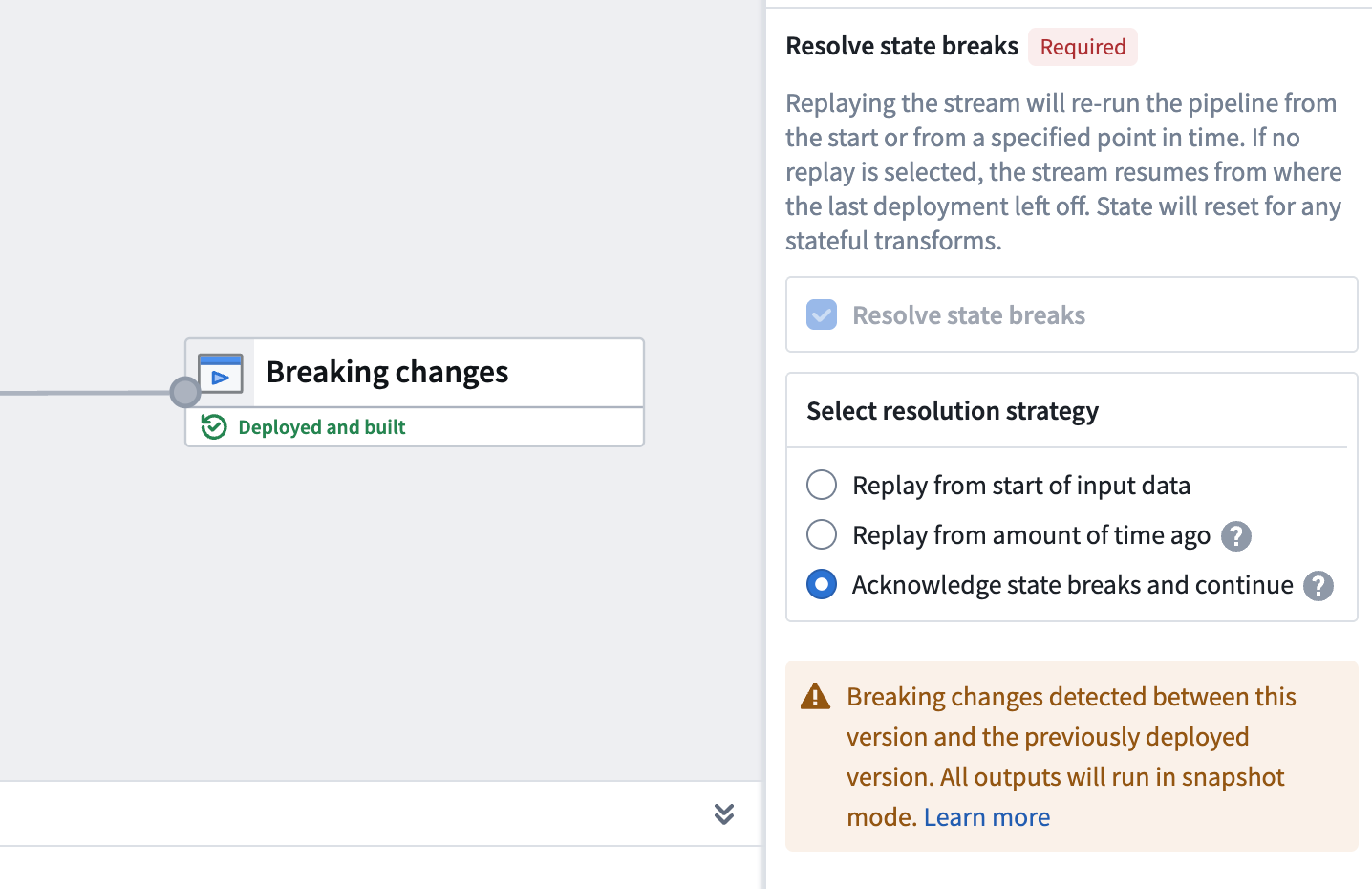
:::callout{theme="warning"} If you remove an input or output that is within a job group, the acknowledge option is not available and requires replay, either from an amount of time ago or from the start of input data. Evaluate whether any changes to inputs or outputs affect stateful transforms later in the pipeline, as a replay may still be necessary to maintain data consistency. :::
Schema changes
Input schemas are pinned when you deploy your pipeline. If an input schema changes, the pipeline continues reading data using the previous schema until you manually redeploy.
For output schemas, adding new columns does not require a replay. However, removing columns from an output schema is a state break that requires a replay.
Selective data re-ingestion
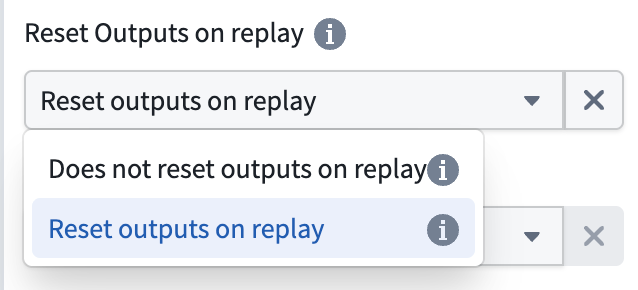
You can re-ingest data from a specific point in time without resetting output views. When you choose to re-ingest, all data present in the outputs at the time of re-ingestion is preserved, allowing you to reprocess historical data while maintaining your existing output state.
To configure this behavior, expand the Advanced section in the deploy panel and disable the Reset Outputs on replay option when replaying your pipeline.
Force incremental behavior for outputs
You can enforce incremental execution in your pipelines using the Require incremental execution setting in Pipeline Builder.
This setting ensures that jobs configured to run incrementally will automatically fail if incremental execution is not possible. This helps prevent unintended snapshot scenarios, such as:
- Accidentally snapshotted inputs
- Forced snapshots due to output schema changes
- Other unexpected full refreshes
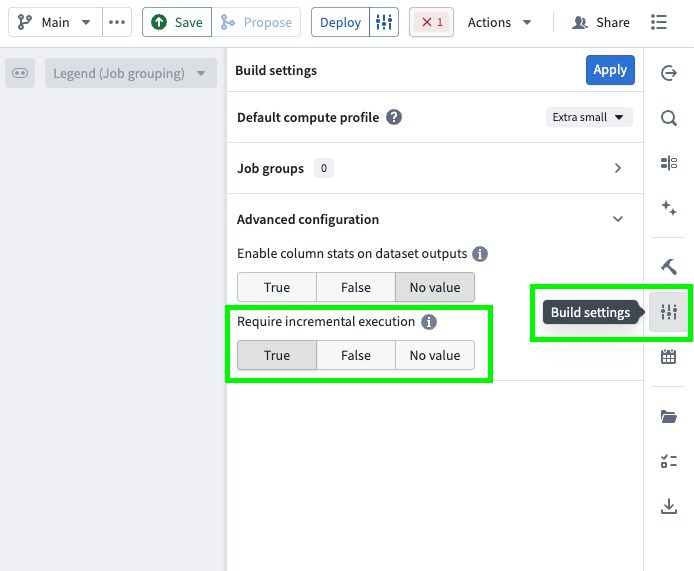
Follow the steps below to configure enforced incremental execution for your pipeline:
- Open your pipeline in Pipeline Builder.
- Select the Build settings sliders icon to the right of the Deploy button or in the right toolbar.
- Scroll down to Advanced configuration.
- Set Require incremental execution to
True. This setting is disabled by default (set toNo value).
Key considerations
- When enabled, all incremental outputs in your pipeline will fail if they cannot run incrementally, regardless of job groupings.
- The Require incremental execution setting can only be set to
Trueif your pipeline has at least one incremental input or output. If not, enabling this option will result in a deployment error. - The only case in which a pipeline configured to require incremental execution can run as a snapshot is when changes to the pipeline require a state break. You will be asked to acknowledge this before running.
:::callout{theme="neutral"}
This feature is also available in PySpark incremental transforms by setting require_incremental=True in the @incremental decorator.
:::
中文翻译
破坏性变更
当在流式或增量管道中修改有状态函数时,就会发生破坏性变更。转换分为行级转换和有状态转换。
- 行级转换: 仅需单行数据即可产生结果,例如"数字相乘"或"筛选"。
- 有状态函数: 需要跨多行数据才能产生结果的转换。
主要有四种有状态函数:
- 聚合(流式中的窗口聚合)
- 外缓存连接(仅限流式)
- 心跳检测(仅限流式)
- 限时去重(仅限流式)
- 限时事件时间排序(仅限流式)
当有状态函数被修改时,先前的输出可能不再准确。例如,假设您正在筛选偶数并计算该集合的总和。如果将筛选条件改为所有奇数,现有状态将是偶数的总和,但所有新筛选的值都将是奇数。因此,总和所代表的意义变得模糊不清——它变成了偶数集合的总和加上奇数集合的总和。要刷新状态,您可以运行重放。
有两种类型的重放:
- 从输入数据起始处重放: 从数据起始处重放管道,即从流的起点或输入数据集的第一个事务开始,具体取决于输入是流还是增量数据集。
- 从指定时间前重放(仅适用于流式): 使用从指定时间前开始的上游数据重放管道。精细重放将包含从指定时间之前提交的第一个事务开始的所有数据,该时间之前的所有数据将不会被处理。这意味着您可能会获得指定时间之前的一个事务的数据。
重放可以是可选的或必需的;在破坏性变更的情况下,管道构建器(Pipeline Builder)会自动检测此变更,并要求在部署时进行重放。下图显示了增量管道中的强制重放。
:::callout{theme="danger"} 重放管道可能导致长时间停机,可能长达数天。当您重放管道时,流历史记录将丢失,所有下游管道消费者都需要进行重放。 :::
状态破坏的常见原因
以下变更通常会导致需要完全重放的状态破坏。了解这些场景可以帮助您规划管道修改并避免意外停机。
有状态转换修改
删除或修改有状态转换(如聚合、外缓存连接或心跳检测)需要完全重放。这包括删除输入到有状态转换的数据,因为缺少这些数据,有状态函数无法再产生一致的结果。
影响有状态转换的输入变更
添加或删除输入会触发状态破坏,您可以在无需完全重放的情况下确认此变更。然而,影响有状态转换的输入变更可能会破坏与历史数据的逻辑一致性。例如,如果有状态聚合依赖于某个特定输入,而该输入被删除或替换,则现有状态不再准确反映管道处理的数据。
:::callout{theme="warning"} 即使管道构建器(Pipeline Builder)允许您在不重放的情况下确认输入变更,也请评估该变更是否会影响管道后续的任何有状态转换。如果确实有影响,则可能仍需重放以保持数据一致性。 :::
输出模式变更
向输出模式添加新列不需要重放。但是,从输出模式中删除列属于状态破坏,需要重放,因为现有输出数据包含不再匹配更新后模式的列。
源管道变更
重放为当前管道提供数据的源管道可能也需要您重放自己的管道。当源数据被重新处理时,到达管道输入的数据可能与管道最初处理的数据不同,这可能会使有状态转换的当前状态失效。
保留状态的修改
管道构建器(Pipeline Builder)包含允许某些管道修改而无需重放的功能。这些功能使您能够从中断处继续处理,保留流历史记录并避免对下游消费者产生影响。
输入和输出修改
您可以在部署后修改管道的输入和输出。具体行为取决于变更类型:
- 添加输入: 新输入从头开始读取,而现有输入则从上次处理的位置继续读取。
- 删除输入或输出: 与已删除输入或输出关联的状态将从处理集群中丢弃,无需重放。
- 添加输出: 添加输出会导致状态破坏,需要从指定时间前或从输入数据起始处进行重放。
当管道构建器(Pipeline Builder)检测到输入或输出变更时,会弹出一个状态破坏模块,提示您确认该变更。此确认告知系统从中断处继续处理,而不是要求重放。
:::callout{theme="warning"} 如果您删除作业组内的输入或输出,则确认选项不可用,需要从指定时间前或从输入数据起始处进行重放。请评估对输入或输出的任何变更是否会影响管道后续的有状态转换,因为可能仍需重放以保持数据一致性。 :::
模式变更
部署管道时,输入模式会被固定。如果输入模式发生变更,管道将继续使用先前的模式读取数据,直到您手动重新部署。
对于输出模式,添加新列不需要重放。但是,从输出模式中删除列属于状态破坏,需要重放。
选择性数据重新摄取
您可以从特定时间点重新摄取数据,而无需重置输出视图。当您选择重新摄取时,重新摄取时输出中存在的所有数据都将被保留,使您能够在维护现有输出状态的同时重新处理历史数据。
要配置此行为,请在部署面板中展开高级部分,并在重放管道时禁用重放时重置输出选项。
强制输出的增量行为
您可以使用管道构建器(Pipeline Builder)中的要求增量执行设置来强制管道进行增量执行。
此设置确保配置为增量运行的作业在无法增量执行时自动失败。这有助于防止意外的快照场景,例如:
- 意外快照的输入
- 因输出模式变更导致的强制快照
- 其他意外的完全刷新
按照以下步骤为管道配置强制增量执行:
- 在管道构建器(Pipeline Builder)中打开管道。
- 选择部署按钮右侧或右侧工具栏中的构建设置滑块图标。
- 向下滚动到高级配置。
- 将要求增量执行设置为
True。此设置默认禁用(设置为无值)。
关键考虑因素
- 启用后,管道中所有增量输出如果无法增量运行都将失败,无论作业分组如何。
- 仅当管道至少有一个增量输入或输出时,要求增量执行设置才能设置为
True。否则,启用此选项将导致部署错误。 - 配置为要求增量执行的管道能够以快照方式运行的唯一情况是,当管道变更需要状态破坏时。系统会在运行前要求您确认此操作。
:::callout{theme="neutral"}
此功能也可在PySpark增量转换中使用,方法是在@incremental装饰器中设置require_incremental=True。
:::