Export pipeline code(导出管道代码)
When building in Pipeline Builder, you can export your pipeline code to an existing Java transforms repository. This export feature is useful in situations where you need access to specific Java libraries.
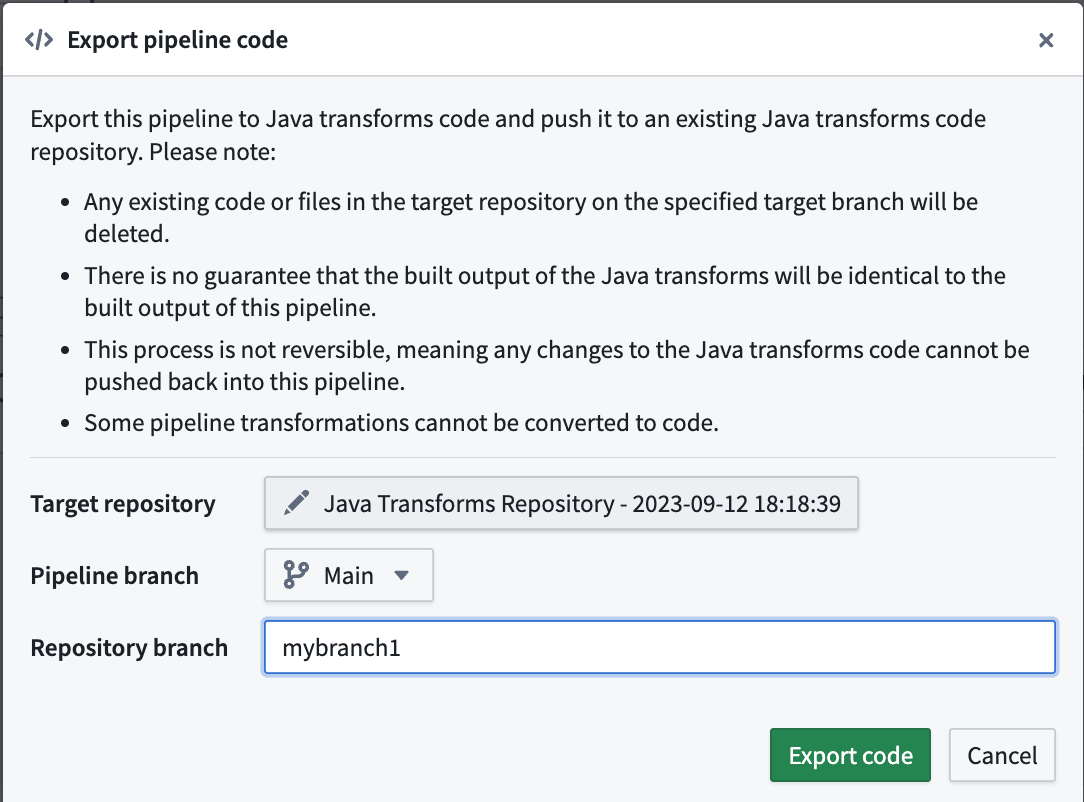
During an export, your pipeline will be converted to Java transform code that will then be pushed to the target repository. Keep the following considerations in mind for this process:
- Any existing code or files on the specified branch of the target repository will be deleted.
- The new output of the Java transform code may not always be identical to the output of the Pipeline Builder pipeline. See Exporting Pipeline Builder to Java transforms for more details.
- This process is irreversible, meaning any changes to the Java transforms code cannot be pushed back into the Pipeline Builder pipeline.
- Some pipeline transformations cannot be converted to code.
Open the pipeline you wish to export and navigate to Settings > Export code. A pop-up window will appear where you can search for and select the existing target Java transforms repository. Then, choose the Pipeline Builder branch the export comes from, and optionally create a new branch to use in the target repository.
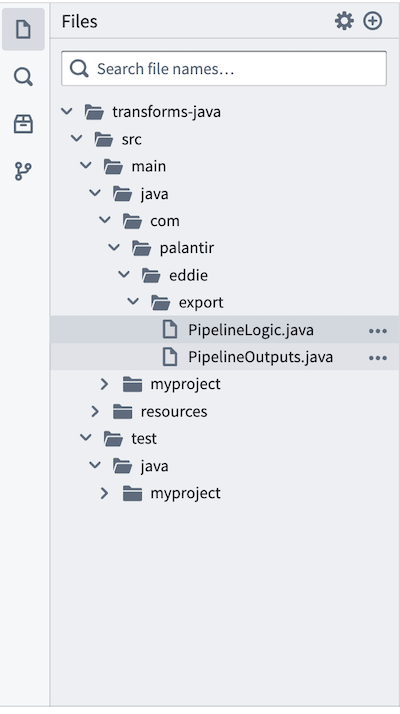
The pipeline export will be available for use in transforms-java/src/main/java/com/ in your repository as PipelineLogic.java and PipelineOutputs.java files.
Exporting Pipeline Builder to Java transforms
When exporting Pipeline Builder pipelines to Java code, it is important to recognize that the new output may not always be identical to the original pipeline output. There are a few reasons for this:
- Code generation limitations: Certain functionalities, such as user-defined functions (UDFs) and LLM calls, are not supported and require manual implementation. This will show up as
todoin the generated code. - Differences from Native Spark: Some expressions in Pipeline Builder have been optimized and implemented differently from native Spark for greater reliability and better error handling. We cannot export these custom optimizations and must revert to native Spark expressions, which may behave differently in these edge cases.
All other supported expressions in code generation are validated against Spark test cases. Exporting to Java transforms should be treated as a starting point that users can manually validate against to ensure complete accuracy.
中文翻译
导出管道代码
在管道构建器(Pipeline Builder)中构建时,您可以将管道代码导出到现有的Java转换仓库。此导出功能在需要访问特定Java库时非常有用。
导出过程中,您的管道将被转换为Java转换代码,然后推送到目标仓库。请考虑以下事项:
- 目标仓库指定分支上的任何现有代码或文件将被删除。
- Java转换代码的新输出可能并不总是与管道构建器管道的输出完全相同。更多详情请参阅将管道构建器导出为Java转换。
- 此过程不可逆,意味着对Java转换代码的任何更改都无法推送回管道构建器管道。
- 某些管道转换无法转换为代码。
打开您要导出的管道,导航至设置 > 导出代码。将出现一个弹出窗口,您可以在其中搜索并选择现有的目标Java转换仓库。然后,选择导出来源的管道构建器分支,并可选择在目标仓库中创建一个新分支。
管道导出将在您的仓库中的transforms-java/src/main/java/com/目录下以PipelineLogic.java和PipelineOutputs.java文件的形式提供使用。
将管道构建器导出为Java转换
将管道构建器管道导出为Java代码时,务必认识到新输出可能并不总是与原始管道输出完全相同。原因如下:
- 代码生成限制:某些功能(如用户自定义函数(UDF)和LLM调用)不受支持,需要手动实现。这将在生成的代码中显示为
todo。 - 与原生Spark的差异:管道构建器中的某些表达式经过优化,其实现方式与原生Spark不同,以提高可靠性和更好的错误处理能力。我们无法导出这些自定义优化,必须回退到原生Spark表达式,这些表达式在这些边缘情况下可能表现不同。
代码生成中所有其他受支持的表达式均已通过Spark测试用例验证。导出为Java转换应视为一个起点,用户可以手动验证以确保完全准确。