Build settings(构建设置)
This page describes build settings in Pipeline Builder that can be used to adjust the performance of your batch and streaming pipelines.
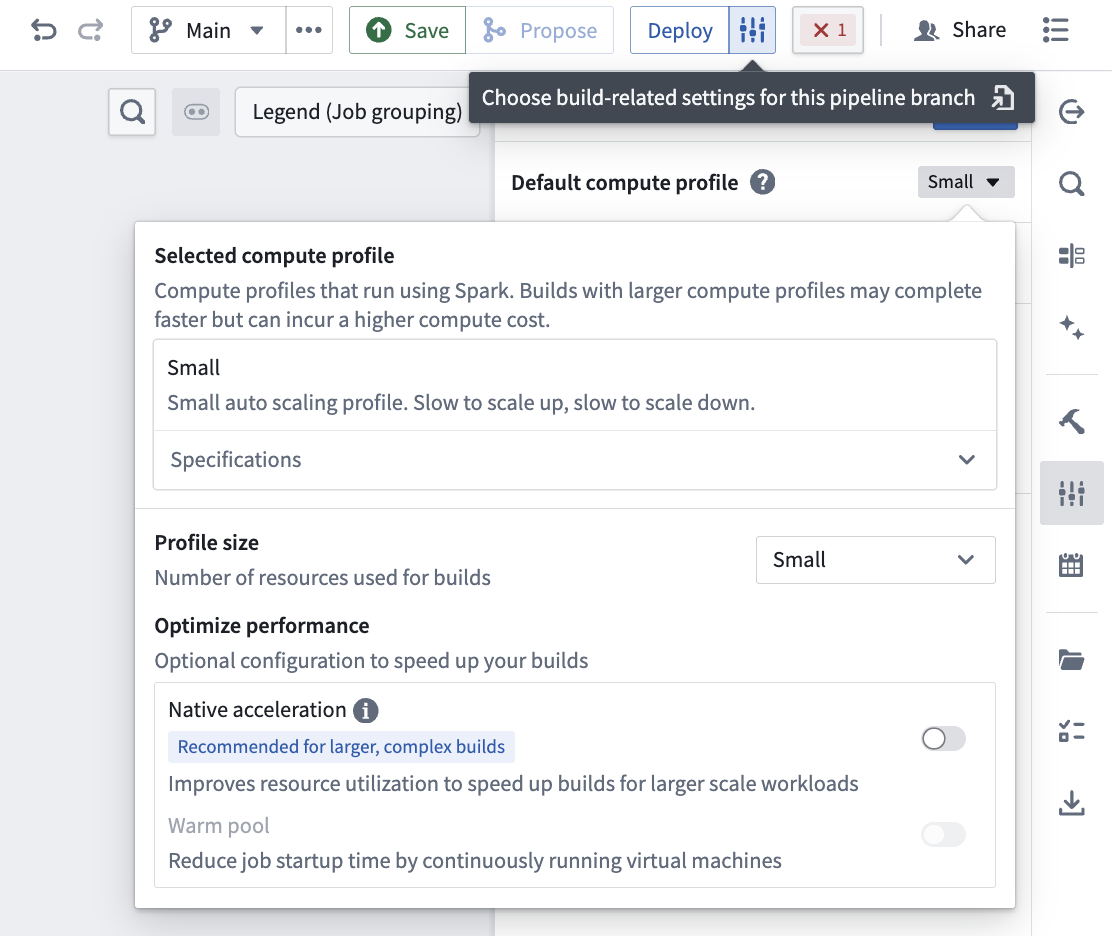
You can edit the Build settings of your pipeline by selecting the settings icon next to Deploy in the top right of your screen.
Batch pipeline
Batch compute profiles
The following batch compute profiles are available to select in Build settings. You can also view these specifications in the Specifications dropdown menu under the selected compute profile.
Standard profiles
| Profile | Driver cores | Driver memory | Dynamic minimum executors | Dynamic maximum executors | Executor cores | Executor memory | Total maximum cores |
|---|---|---|---|---|---|---|---|
| Extra Small | 1 | 4GB | N/A | N/A | N/A | N/A | 1 |
| Small | 1 | 2GB | 1 | 2 | 1 | 3GB | 3 |
| Medium | 1 | 6GB | 2 | 16 | 2 | 6GB | 33 |
| Large | 1 | 13GB | 2 | 32 | 2 | 6GB | 65 |
| Extra Large | 1 | 27GB | 2 | 128 | 2 | 6GB | 257 |
Warm pool profiles
Warm pool profiles use continuously running virtual machines and can run concurrent jobs to reduce job startup latency and resource consumption.
| Profile | Driver cores | Driver memory | Dynamic minimum executors | Dynamic maximum executors | Executor cores | Executor memory | Total maximum cores |
|---|---|---|---|---|---|---|---|
| Warm Pool Extra Small | 3 | 13GB | N/A | N/A | N/A | N/A | 3 |
| Warm Pool Small | 3 | 7GB | 1 | 6 | 1 | 3GB | 9 |
Native acceleration profiles
Native acceleration profiles allocate off-heap memory for native compute to speed up builds for large scale workloads.
| Profile | Driver cores | Driver memory | Dynamic minimum executors | Dynamic maximum executors | Executor cores | Executor memory | Executor off-heap memory | Total maximum cores |
|---|---|---|---|---|---|---|---|---|
| Natively Accelerated Small | 1 | 2GB | 1 | 2 | 1 | 600MB | 2400MB | 3 |
| Natively Accelerated Medium | 1 | 6GB | 2 | 16 | 2 | 1200MB | 4800MB | 33 |
| Natively Accelerated Large | 1 | 13GB | 2 | 32 | 2 | 1200MB | 4800MB | 65 |
| Natively Accelerated Extra Large | 1 | 27GB | 2 | 128 | 2 | 1200MB | 4800MB | 257 |
Faster compute profiles
:::callout{theme="neutral"} Faster compute profiles are only available in Faster batch pipelines. :::
| Profile size | Cores | Memory |
|---|---|---|
| Small | 1 | 7.5GB |
| Medium | 2 | 15GB |
| Large | 4 | 30GB |
| Extra Large | 8 | 60GB |
| Extra Extra Large | 16 | 120GB |
You can also view these specifications in the Specifications dropdown menu under the selected compute profile.
Managed profiles
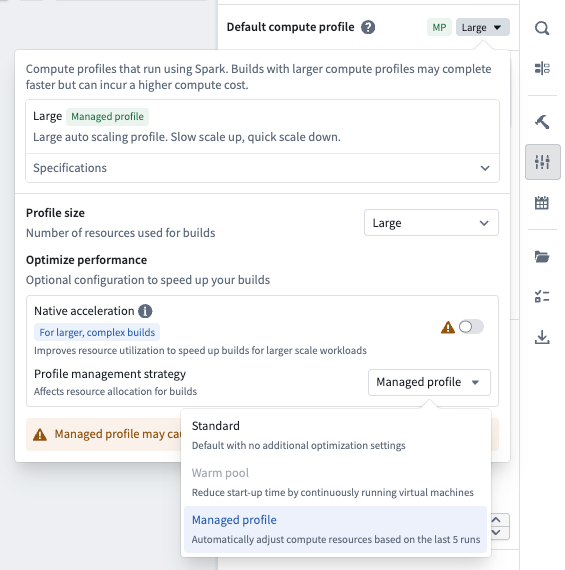
With any of the standard compute profiles, you also have the option to make it a "managed profile". Managed profiles are designed to help optimize your resource usage by automatically scaling down your compute resources if your job consistently uses less than the allocated capacity.
When the managed profile option is enabled, the platform analyzes the resource usage of your last five builds for a given deployment. If your pipeline build is consistently using less compute resources, the compute resources for future builds will automatically be scaled down. Your compute resources will never be increased beyond the original allocation that was selected.
:::callout{theme="neutral"} Adjustments are not limited to the preset profile selected. The managed profile strategy assigns a custom compute level based on your actual usage patterns. :::
Enable managed profiles
To enable managed profiles, open the compute profile dialog in your build settings and select Managed profile under Profile management strategy.
Warm pool
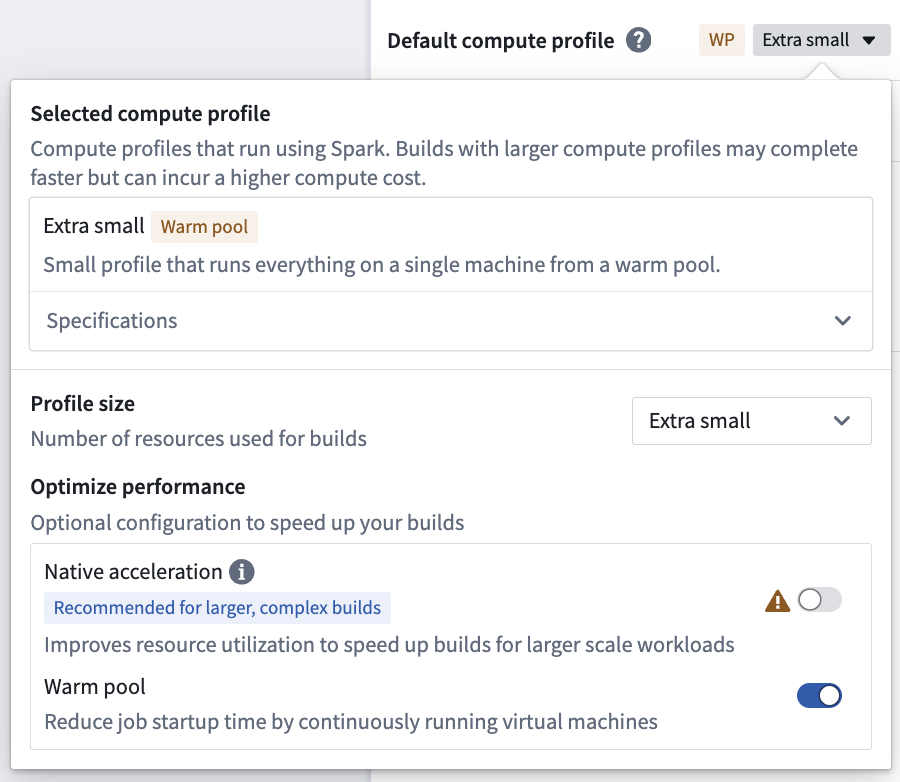
The warm pool compute profile option, available only on Rubix and OpenShift enrollments, is a powerful new type of compute profile designed to speed up your builds in Pipeline Builder. Warm pool speeds up your builds by using an auto-scaling pool of continuously running virtual machines to minimize job startup latency. A maximum of three jobs will run concurrently on a single virtual machine, each of which will consume a share of the total resources available on the virtual Machine.
By leveraging warm pool, jobs can begin processing immediately, speeding up overall build times. It is recommended for smaller scale builds, for example, a job that would take up to 30 minutes on an extra small profile.
Enable warm pool
To enable warm pool, toggle on Warm pool in the compute profile dialog. Larger profiles are currently not support for warm pool.
Native acceleration
You can improve performance by enabling native acceleration of batch pipelines in Pipeline Builder with Velox ↗.
Read more about native acceleration in Foundry.
Enable native acceleration
You can edit the build settings of your pipeline by selecting the settings icon next to Deploy. The settings for native acceleration contain preconfigured profiles for small, medium, and large compute sizes. These align with the default small, medium, and large sizes based on the total memory footprint (there is no local mode). These preconfigured profiles are recommended if you are trying to run a pipeline with native acceleration for the first time.
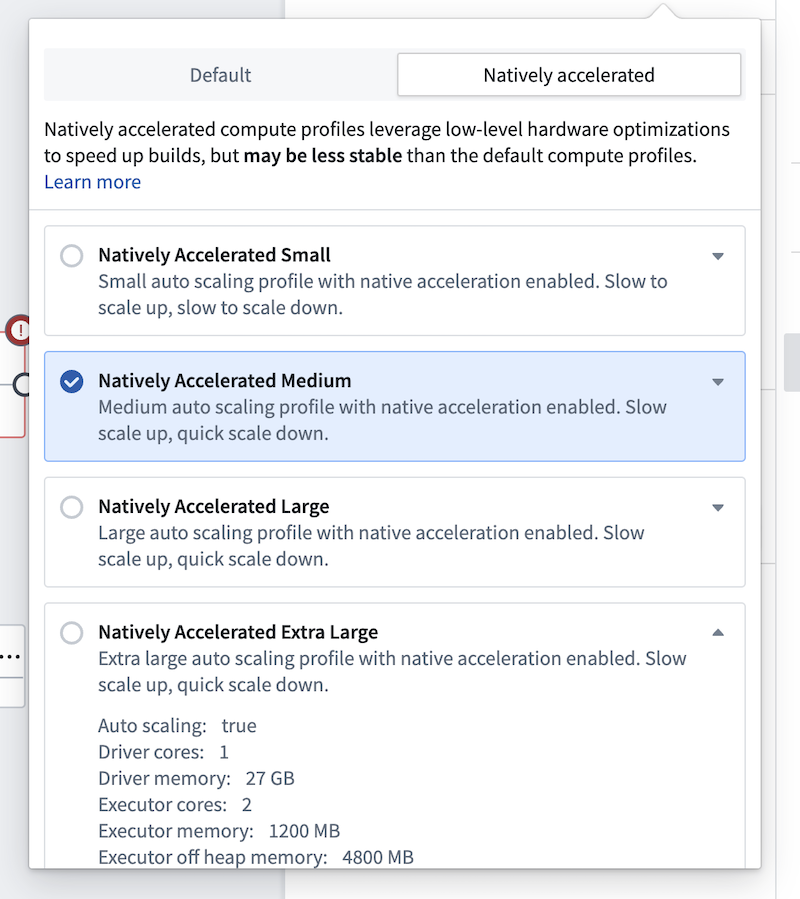
There is also a natively accelerated profile with advanced configuration, allowing you to fully specify the on-heap and off-heap memory ratios, as well as all other resource and compute affecting configurations for the build.
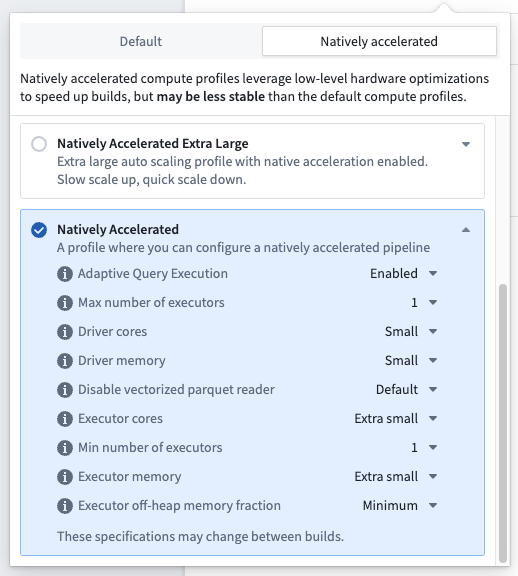
Most of the time, selecting a preconfigured native acceleration profile should be enough to speed up your pipelines. If you encounter OOMs or performance regressions that do not occur in the non-natively accelerated build, the memory configuration is likely suboptimal. Often, adopting the advanced profile and reducing the percentage of memory allocated to off-heap can resolve the issue. If problems persist, it is likely that the pipeline is not well-suited for native acceleration and you should continue using the default run profiles.
Memory configuration considerations for native acceleration
:::callout{theme="warning"} After enabling native acceleration, monitor your builds for any failures. If failures occur, try selecting a custom profile and changing the percentage of memory allocated to off-heap compute. More information is provided below. :::
Running Spark with native acceleration in Foundry requires a slightly different configuration from normal batch pipelines. Spark supports performing some operations with off-heap memory ↗. Off-heap memory is memory that is not managed by the JVM, cutting out GC overhead and leading to better performance.
By default, we do not enable off-heap memory in Foundry, as doing so can introduce additional maintenance costs for pipelines. Enabling off-heap memory is necessary for native acceleration since DataFrames modified by Velox must be off-heap to be accessible by the native process.
Foundry still requires sufficient on-heap memory for everything except Velox data transformations (for instance, orchestration, scheduling, and build management code still run in the JVM), but ideally most work will now be performed off-heap. Configuring a pipeline to use native acceleration introduces additional maintenance costs in balancing on-heap and off-heap memory. Pipeline Builder will offer managed profiles to assist with this, but custom configuration may still be necessary.
Streaming pipeline
Streaming compute profiles
The following compute profiles are available to select in Build settings:
| Profile | Job Manager memory | Parallelism | Task Manager memory |
|---|---|---|---|
| Extra Extra Small | 1GB | 1 | 1GB |
| Extra Small | 1GB | 1 | 1GB |
| Small | 1GB | 2 | 4GB |
| Medium | 1GB | 3 | 6GB |
| Large | 2GB | 4 | 8GB |
| XLarge | 2GB | 8 | 12GB |
中文翻译
构建设置
本文介绍 Pipeline Builder 中的构建设置,可用于调整批处理和流处理管道的性能。
您可以通过点击屏幕右上角 部署 旁边的设置图标来编辑管道的 构建设置。
批处理管道
批处理计算配置文件
以下批处理计算配置文件可在 构建设置 中选择。您也可以在所选计算配置文件下的 规格 下拉菜单中查看这些规格。
标准配置文件
| 配置文件 | 驱动程序核心数 | 驱动程序内存 | 动态最小执行器数 | 动态最大执行器数 | 执行器核心数 | 执行器内存 | 总最大核心数 |
|---|---|---|---|---|---|---|---|
| 超小 | 1 | 4GB | N/A | N/A | N/A | N/A | 1 |
| 小 | 1 | 2GB | 1 | 2 | 1 | 3GB | 3 |
| 中 | 1 | 6GB | 2 | 16 | 2 | 6GB | 33 |
| 大 | 1 | 13GB | 2 | 32 | 2 | 6GB | 65 |
| 超大 | 1 | 27GB | 2 | 128 | 2 | 6GB | 257 |
热池配置文件
热池配置文件使用持续运行的虚拟机,可并发运行作业,以减少作业启动延迟和资源消耗。
| 配置文件 | 驱动程序核心数 | 驱动程序内存 | 动态最小执行器数 | 动态最大执行器数 | 执行器核心数 | 执行器内存 | 总最大核心数 |
|---|---|---|---|---|---|---|---|
| 热池超小 | 3 | 13GB | N/A | N/A | N/A | N/A | 3 |
| 热池小 | 3 | 7GB | 1 | 6 | 1 | 3GB | 9 |
原生加速配置文件
原生加速配置文件为原生计算分配堆外内存,以加速大规模工作负载的构建。
| 配置文件 | 驱动程序核心数 | 驱动程序内存 | 动态最小执行器数 | 动态最大执行器数 | 执行器核心数 | 执行器内存 | 执行器堆外内存 | 总最大核心数 |
|---|---|---|---|---|---|---|---|---|
| 原生加速小 | 1 | 2GB | 1 | 2 | 1 | 600MB | 2400MB | 3 |
| 原生加速中 | 1 | 6GB | 2 | 16 | 2 | 1200MB | 4800MB | 33 |
| 原生加速大 | 1 | 13GB | 2 | 32 | 2 | 1200MB | 4800MB | 65 |
| 原生加速超大 | 1 | 27GB | 2 | 128 | 2 | 1200MB | 4800MB | 257 |
更快计算配置文件
:::callout{theme="neutral"} 更快计算配置文件仅适用于更快批处理管道。 :::
| 配置文件大小 | 核心数 | 内存 |
|---|---|---|
| 小 | 1 | 7.5GB |
| 中 | 2 | 15GB |
| 大 | 4 | 30GB |
| 超大 | 8 | 60GB |
| 超超大 | 16 | 120GB |
您也可以在所选计算配置文件下的 规格 下拉菜单中查看这些规格。
托管配置文件
使用任何标准计算配置文件时,您还可以选择将其设为“托管配置文件”。托管配置文件旨在通过自动缩减计算资源(如果您的作业持续使用低于分配容量)来帮助优化资源使用。
启用托管配置文件选项后,平台会分析您最近五次针对特定部署的构建的资源使用情况。如果您的管道构建持续使用较少的计算资源,未来构建的计算资源将自动缩减。您的计算资源绝不会超过最初选择的分配量。
:::callout{theme="neutral"} 调整不限于预设的配置文件选择。托管配置文件策略会根据您的实际使用模式分配自定义计算级别。 :::
启用托管配置文件
要启用托管配置文件,请打开构建设置中的计算配置文件对话框,然后在 配置文件管理策略 下选择 托管配置文件。
热池
热池计算配置文件选项(仅适用于 Rubix 和 OpenShift 环境)是一种强大的新型计算配置文件,旨在加速 Pipeline Builder 中的构建。热池通过使用自动扩展的持续运行虚拟机池来最小化作业启动延迟,从而加速构建。单个虚拟机上最多可并发运行三个作业,每个作业将消耗虚拟机总可用资源的一部分。
通过利用热池,作业可以立即开始处理,从而加快整体构建时间。建议用于较小规模的构建,例如,在超小配置文件上需要最多 30 分钟的作业。
启用热池
要启用热池,请在计算配置文件对话框中切换 热池 开关。目前不支持为热池使用较大的配置文件。
原生加速
您可以通过在 Pipeline Builder 中启用批处理管道的原生加速(使用 Velox ↗)来提高性能。
启用原生加速
您可以通过点击 部署 旁边的设置图标来编辑管道的构建设置。原生加速的设置包含针对小、中、大计算大小的预配置配置文件。这些配置文件基于总内存占用(无本地模式)与默认的小、中、大尺寸对齐。如果您是首次尝试使用原生加速运行管道,建议使用这些预配置配置文件。
还有一个具有高级配置的原生加速配置文件,允许您完全指定堆内和堆外内存比例,以及构建的所有其他资源和计算相关配置。
大多数情况下,选择预配置的原生加速配置文件就足以加速您的管道。如果您遇到在非原生加速构建中不会出现的 OOM 或性能下降问题,则内存配置可能不理想。通常,采用高级配置文件并减少分配给堆外内存的百分比可以解决此问题。如果问题仍然存在,则管道可能不适合原生加速,您应继续使用默认运行配置文件。
原生加速的内存配置注意事项
:::callout{theme="warning"} 启用原生加速后,请监控您的构建是否有任何失败。如果发生失败,请尝试选择自定义配置文件并更改分配给堆外计算的内存百分比。更多信息如下。 :::
在 Foundry 中使用原生加速运行 Spark 需要与普通批处理管道略有不同的配置。Spark 支持使用 堆外内存 ↗ 执行某些操作。堆外内存是不由 JVM 管理的内存,可减少 GC 开销并带来更好的性能。
默认情况下,我们不在 Foundry 中启用堆外内存,因为这样做可能会给管道带来额外的维护成本。启用堆外内存对于原生加速是必要的,因为由 Velox 修改的 DataFrame 必须位于堆外才能被原生进程访问。
Foundry 仍然需要足够的堆内内存来处理除 Velox 数据转换之外的所有内容(例如,编排、调度和构建管理代码仍在 JVM 中运行),但理想情况下,大部分工作现在将在堆外执行。配置管道使用原生加速会在平衡堆内和堆外内存方面引入额外的维护成本。Pipeline Builder 将提供托管配置文件来协助此操作,但可能仍需要自定义配置。
流处理管道
流处理计算配置文件
以下计算配置文件可在 构建设置 中选择:
| 配置文件 | 作业管理器内存 | 并行度 | 任务管理器内存 |
|---|---|---|---|
| 超超小 | 1GB | 1 | 1GB |
| 超小 | 1GB | 1 | 1GB |
| 小 | 1GB | 2 | 4GB |
| 中 | 1GB | 3 | 6GB |
| 大 | 2GB | 4 | 8GB |
| 超大 | 2GB | 8 | 12GB |