Checkpoints(检查点(Checkpoints))
When building pipelines, you will often use shared transform nodes between multiple outputs. This logic is typically recomputed once for each output. With checkpoints in Pipeline Builder, you can mark transform nodes as "checkpoints" to save intermediate results during your next build. Logic upstream of that checkpoint node will be computed only once for all of its shared outputs, saving compute resources and decreasing build times.
Note that checkpoints can sometimes result in decreased performance. For instance, the cost of writing the data to disk and then reading it again may be lower than recomputing the logic multiple times. Additionally, splitting up the query into multiple parts may reduce the number of optimizations that can be performed on the pipeline.
:::callout{theme="neutral"} Outputs must be in the same job group for checkpoint nodes to improve pipeline efficiency. Learn more about job groups in Pipeline Builder. :::
Add a checkpoint node
Below is an example pipeline that produces two outputs: Attachment and Request. The transform node Checkpoint is shared between the two outputs. In this current state, the logic nodes Clean and Checkpoint would be computed twice, once for each output.
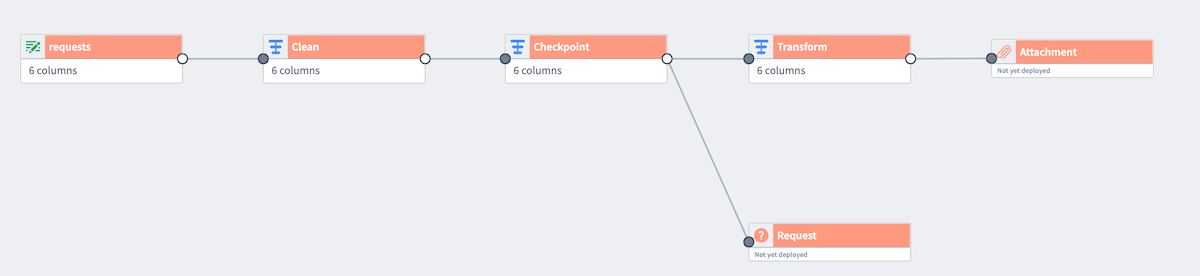
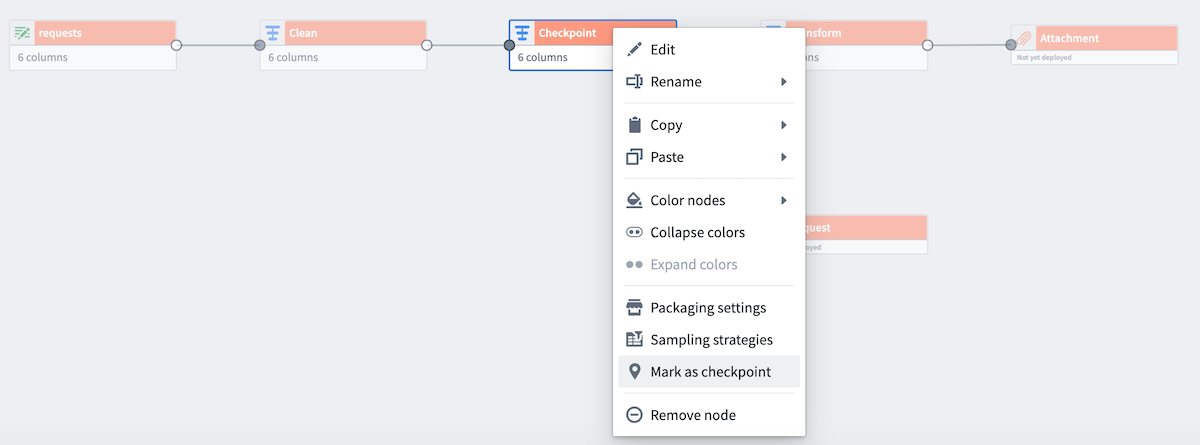
However, we want to only compute Clean and Checkpoint once for both outputs. To do this, right-click on Checkpoint and select Mark as checkpoint.
Checkpoint strategies
There are three types of checkpoint strategies available:
- Save in short-term disk [Default]: Stores every output on disk temporarily. This is the default strategy for nodes marked as checkpoints.
- Save in memory [Fastest]: Stores results temporarily in memory for faster access; this is especially useful for small datasets. Note that this option may fail for larger datasets due to memory limitations.
- Save as output data: Saves the latest transaction of the checkpoint in a dedicated dataset. The dataset is created upon the first deployment of the checkpoint.
:::callout{theme="warning"} The Save in memory checkpoint strategy is not supported for faster pipelines. :::
By default, nodes marked as a checkpoint will use the Save in short-term disk strategy for every output. To configure this, select Checkpoint and then choose Configure strategy.
When a transform has multiple outputs (for example, if the checkpointed node is a Split transform), there is an option to select a checkpoint strategy for each output.
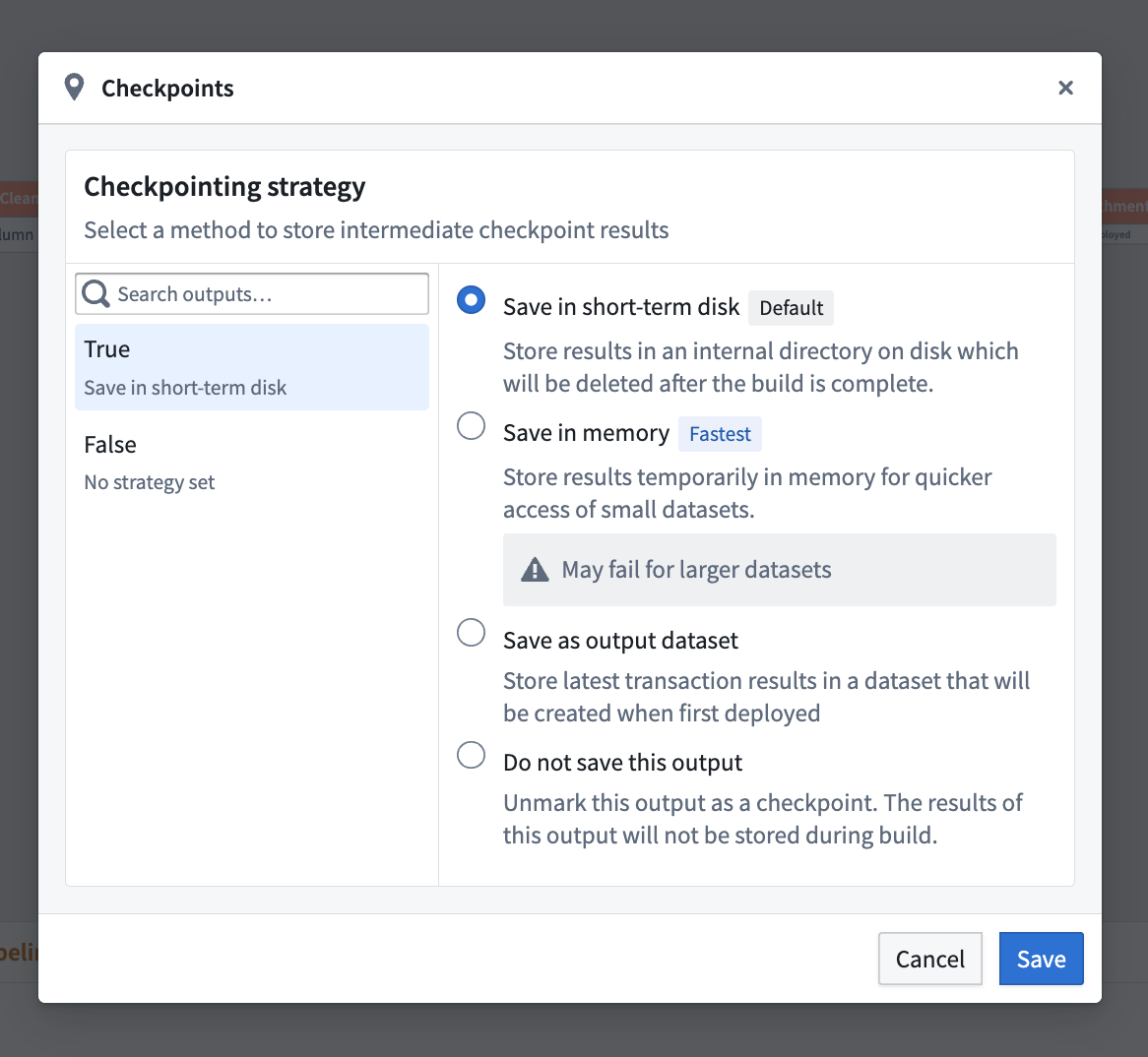
For nodes with only one output, you must select a checkpoint strategy or unmark the node as a checkpoint.
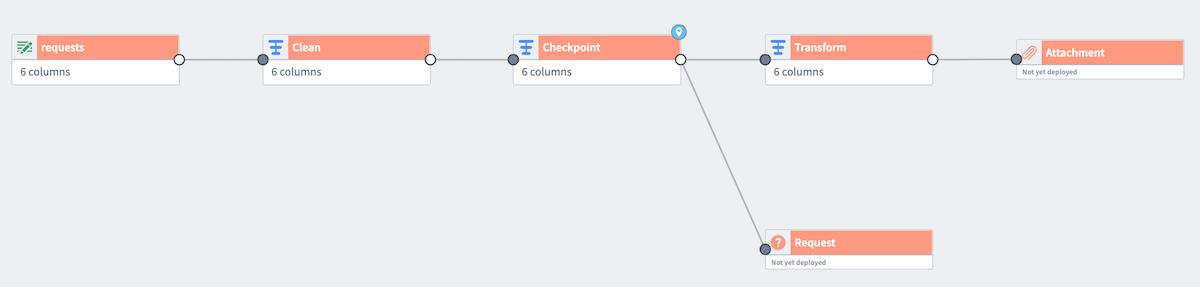
A light blue badge will now appear in the top corner of the Checkpoint node.
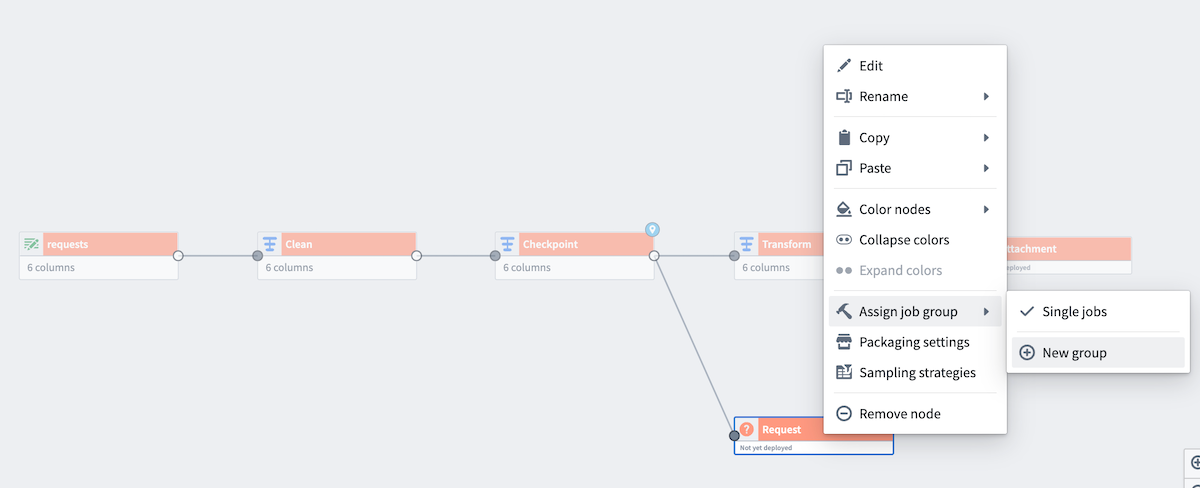
Now, add both outputs to the same job group to verify the checkpoint behavior. Right-click one of the outputs (Request) to Assign job group. Choose New group to open the Build settings panel.
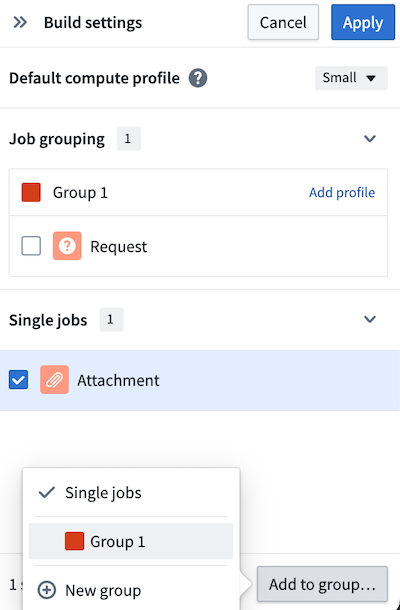
Since the datasets are in different job groupings by default, the checkpoint will be recomputed for each output, negating any benefits. To fix this, add the other output (Attachment) to the same job group by selecting the output, and then selecting Add to group... at the bottom of the panel.
Learn more about configuring nodes in Pipeline Builder with color groups and job groups.
Checkpoint storage costs
For the Save in short-term disk checkpoint strategy, checkpoints push the entire result of a transform to storage, such as to the Hadoop Distributed File System (HDFS). For example, if you checkpoint a join using this strategy, the entire result of the join will be output to storage. This can result in a large amount of data being stored, even if the dataset output is small.
中文翻译
检查点(Checkpoints)
在构建管道时,您通常会在多个输出之间使用共享的转换节点。这些逻辑通常会为每个输出重新计算一次。借助 Pipeline Builder 中的检查点功能,您可以将转换节点标记为"检查点",以便在下次构建时保存中间结果。该检查点节点上游的逻辑将仅为其所有共享输出计算一次,从而节省计算资源并缩短构建时间。
请注意,检查点有时可能导致性能下降。例如,将数据写入磁盘再重新读取的成本可能低于多次重新计算逻辑的成本。此外,将查询拆分为多个部分可能会减少可对管道执行的优化次数。
:::callout{theme="neutral"} 输出必须位于同一作业组(Job Group)中,检查点节点才能提高管道效率。了解更多关于 Pipeline Builder 中的作业组 的信息。 :::
添加检查点节点
以下是一个示例管道,它生成两个输出:Attachment 和 Request。转换节点 Checkpoint 在两个输出之间共享。在当前状态下,逻辑节点 Clean 和 Checkpoint 将被计算两次,每个输出一次。
然而,我们希望仅对两个输出计算一次 Clean 和 Checkpoint。为此,右键单击 Checkpoint 并选择 标记为检查点(Mark as checkpoint)。
检查点策略(Checkpoint strategies)
有三种可用的检查点策略类型:
- 保存到短期磁盘(Save in short-term disk) [默认]: 将每个输出临时存储在磁盘上。这是标记为检查点的节点的默认策略。
- 保存到内存(Save in memory) [最快]: 将结果临时存储在内存中以实现更快的访问;这对于小型数据集特别有用。请注意,对于较大的数据集,由于内存限制,此选项可能会失败。
- 保存为输出数据(Save as output data): 将检查点的最新事务保存在专用数据集中。该数据集在检查点首次部署时创建。
:::callout{theme="warning"} 保存到内存 检查点策略不适用于更快的管道。 :::
默认情况下,标记为检查点的节点将对每个输出使用 保存到短期磁盘 策略。要配置此设置,请选择 检查点(Checkpoint),然后选择 配置策略(Configure strategy)。
当转换有多个输出时(例如,如果检查点节点是拆分转换),可以选择为每个输出选择检查点策略。
对于只有一个输出的节点,您必须选择一种检查点策略,或者取消标记该节点为检查点。
现在,Checkpoint 节点的顶部角落将出现一个浅蓝色徽章。
现在,将两个输出添加到同一作业组以验证检查点行为。右键单击其中一个输出(Request)以 分配作业组(Assign job group)。选择 新建组(New group) 以打开 构建设置(Build settings) 面板。
由于数据集默认位于不同的作业分组中,检查点将为每个输出重新计算,从而抵消任何好处。要解决此问题,请将另一个输出(Attachment)添加到同一作业组,方法是选择该输出,然后在面板底部选择 添加到组(Add to group...)。
了解更多关于在 Pipeline Builder 中使用 颜色组(Color groups) 和 作业组(Job groups) 配置节点的信息。
检查点存储成本(Checkpoint storage costs)
对于 保存到短期磁盘 检查点策略,检查点会将转换的完整结果推送到存储,例如 Hadoop 分布式文件系统(HDFS)。例如,如果您使用此策略对连接操作设置检查点,则连接的完整结果将输出到存储。这可能导致存储大量数据,即使数据集输出很小也是如此。