Add pipeline to a Marketplace product(将管道添加到 Marketplace 产品)
Use Foundry DevOps to include your Pipeline Builder pipelines in Marketplace products for other users to install and reuse. Learn how to create your first product.
Supported features
All Pipeline Builder features are supported by Marketplace products with the exception of:
- Streaming pipelines with time series targets
- Parameters of the following types: struct type constants, complex expressions that are not composed of constants, options, and struct locators.
Check Marketplace compatibility with the Marketplace linter
In Pipeline Builder, you can check whether a pipeline is compatible with Marketplace by using the Marketplace linter. To enable this, navigate to Settings, and select Enable Marketplace validation in your pipeline. This setting is not enabled by default.
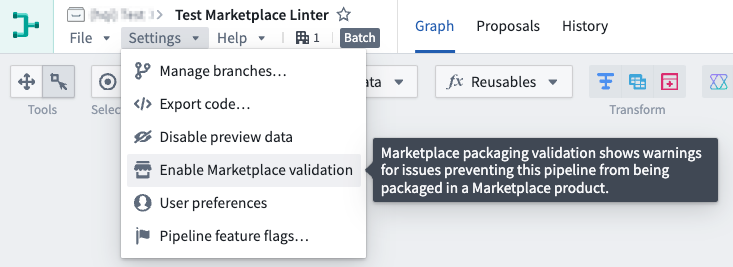
Once enabled, the Pipeline warnings section at the bottom of your pipeline will display any errors preventing your pipeline from being packaged in Marketplace.

If there are no Marketplace incompatibilities, no Marketplace packaging warnings will appear in the errors/warnings drawer. Note that other types of pipeline errors or warnings may still appear.
Adding Pipeline Builder pipelines to products
To add a Pipeline Builder pipeline to a product, first create a product, then add outputs. Choose the Add files option to navigate to the pipeline from within the Compass filesystem and add it to your product.
Pipeline parameters
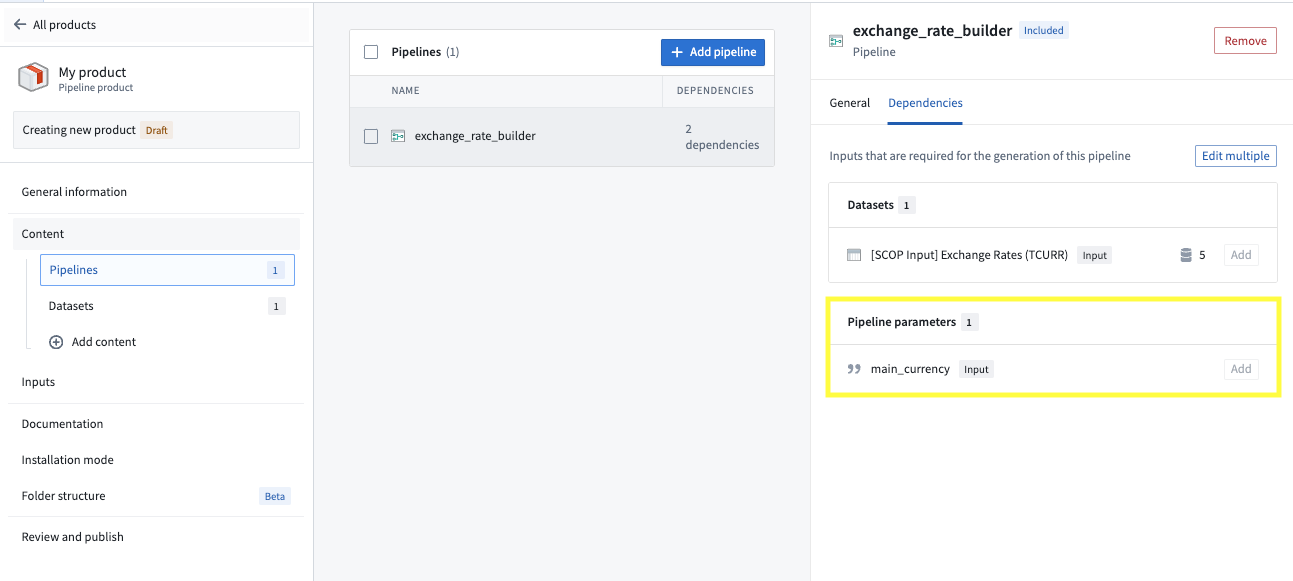
You can use pipeline parameters to give installers the ability to customize their pipeline at installation time. For example, you can use a boolean parameter to follow one branch of a pipeline versus another depending on the installer's input. See supported features for a list of supported parameter types. When you package a pipeline with a parameter, that parameter will be surfaced as a dependency to your pipeline and an input for installers as below.
Packaging settings
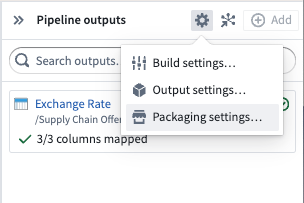
To configure required or optional datasets and columns for installers, navigate to Pipeline outputs panel > Settings to access the Packaging settings.
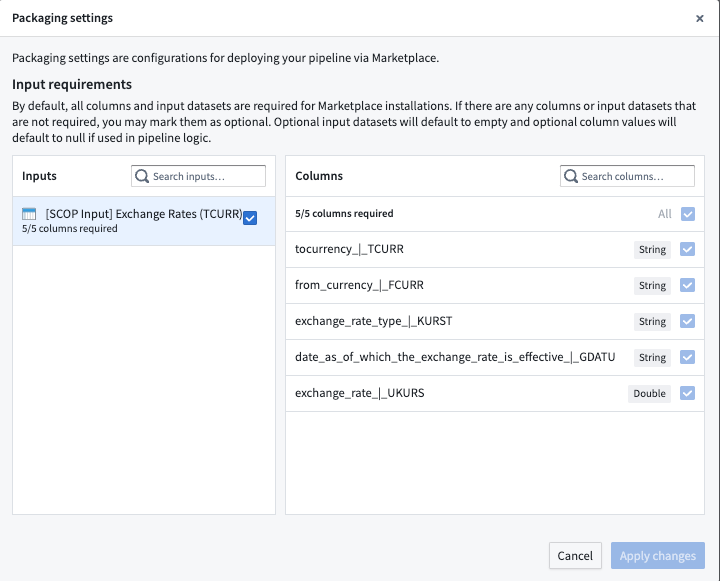
By default, all columns and input datasets are required for Marketplace installations. If there are any columns or input datasets that are not required, you may mark them as optional. Optional input datasets will default to empty and optional column values will default to null if used in pipeline logic.
中文翻译
将管道添加到 Marketplace 产品
使用 Foundry DevOps 将您的 Pipeline Builder 管道包含在 Marketplace 产品中,供其他用户安装和复用。了解如何创建您的第一个产品。
支持的功能
除以下功能外,Marketplace 产品支持所有 Pipeline Builder 功能:
- 具有时间序列目标(Time Series Targets)的流式管道(Streaming Pipelines)
- 以下类型的参数:结构体类型常量(Struct Type Constants)、非由常量组成的复杂表达式(Complex Expressions)、选项(Options)和结构体定位器(Struct Locators)。
使用 Marketplace 检查器检查 Marketplace 兼容性
在 Pipeline Builder 中,您可以使用 Marketplace 检查器(Marketplace Linter)检查管道是否与 Marketplace 兼容。要启用此功能,请导航至 设置(Settings),并在管道中选择 启用 Marketplace 验证(Enable Marketplace validation)。此设置默认未启用。
启用后,管道底部的 管道警告(Pipeline warnings) 部分将显示任何阻止您的管道打包到 Marketplace 中的错误。
如果不存在 Marketplace 不兼容问题,则错误/警告抽屉中不会显示 Marketplace 打包警告(Marketplace packaging warnings)。请注意,其他类型的管道错误或警告仍可能出现。
将 Pipeline Builder 管道添加到产品
要将 Pipeline Builder 管道添加到产品,首先创建一个产品,然后添加输出(Outputs)。选择 添加文件(Add files) 选项,从 Compass 文件系统中导航到该管道,并将其添加到您的产品中。
管道参数
您可以使用管道参数(Pipeline Parameters)让安装者能够在安装时自定义其管道。例如,您可以使用 布尔值(Boolean) 参数,根据安装者的输入选择管道的某一分支。有关支持的参数类型列表,请参阅支持的功能。当您将带有参数的管道打包时,该参数将作为依赖项(Dependency)呈现给您的管道,并作为输入(Input)呈现给安装者,如下所示。
打包设置
要为安装者配置必需或可选的数据集和列,请导航至 管道输出面板(Pipeline outputs panel) > 设置(Settings) 以访问 打包设置(Packaging settings)。
默认情况下,所有列和输入数据集对于 Marketplace 安装都是必需的。如果存在非必需的列或输入数据集,您可以将其标记为可选。可选输入数据集将默认为空,可选列值如果在管道逻辑中使用,将默认为空值(Null)。