Transforms(转换(Transforms))
Pipeline Builder provides a flexible, powerful, and easy-to-use interface for transforming your data in Foundry. Writing data transformations in existing tooling (for example, in Spark or SQL) can be challenging and error-prone, both for non-coders and experienced software developers. In addition, existing tooling is often coupled to one specific execution engine and requires using a code library to express data transformations.
Pipeline Builder uses a general model for describing data transformations. This backend is an intermediate layer between the tools used to write transformations and the execution of said transformations.
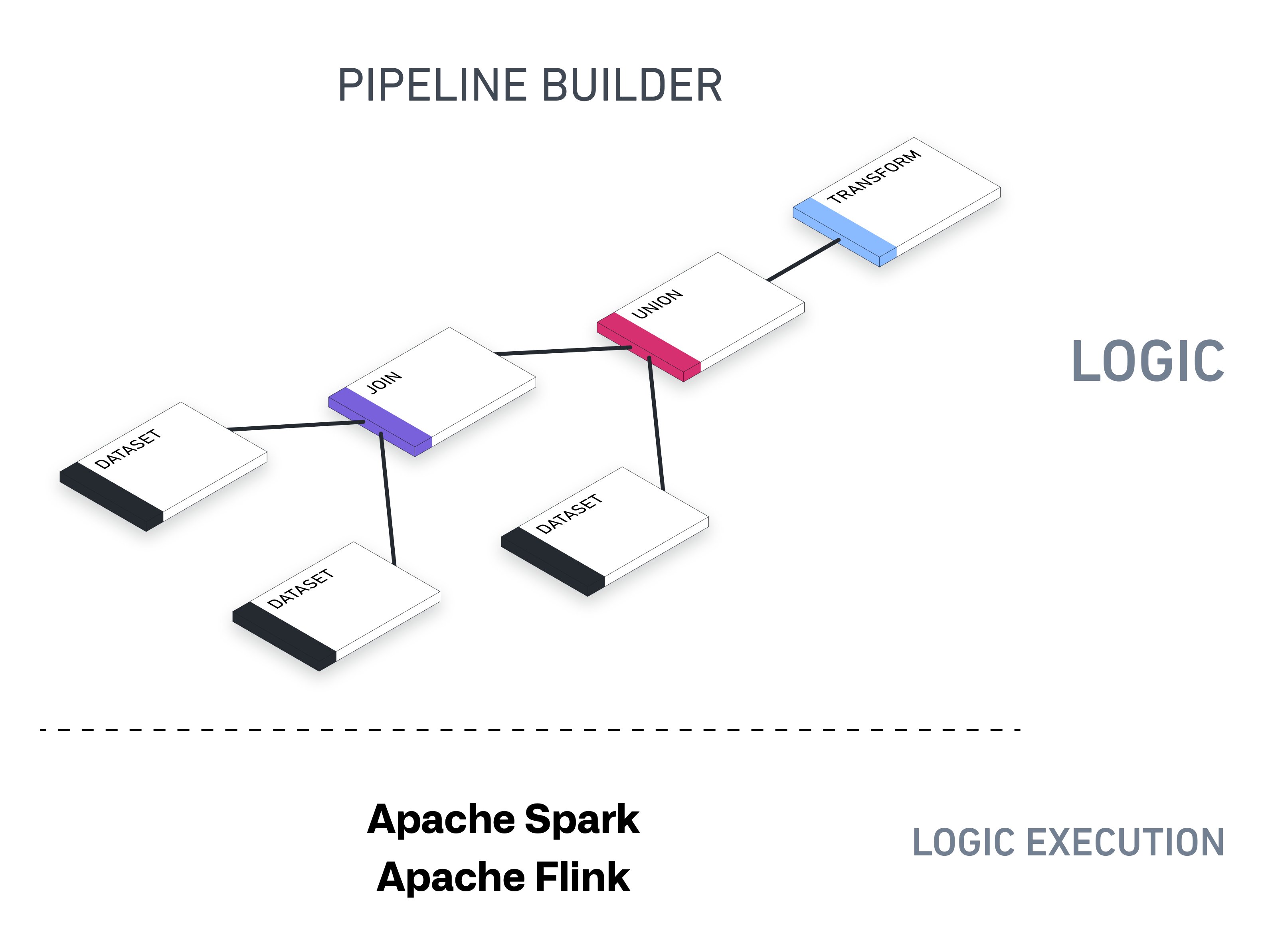
Pipeline Builder's underlying architecture is designed to support all kinds of outputs - datasets, ontological objects, streams, time-series, and exports to external systems. You can run batch pipelines for datasets, object types, link types, or streaming pipelines that correspond to streaming datasets.
Using transforms in Pipeline Builder
In Pipeline Builder, you can use two types of data transformations: expressions and transforms. Expressions take columns from a table as input and output a single column (for example Split string), while transforms take an entire table as input and return an entire table (for example, Pivot or Filter).
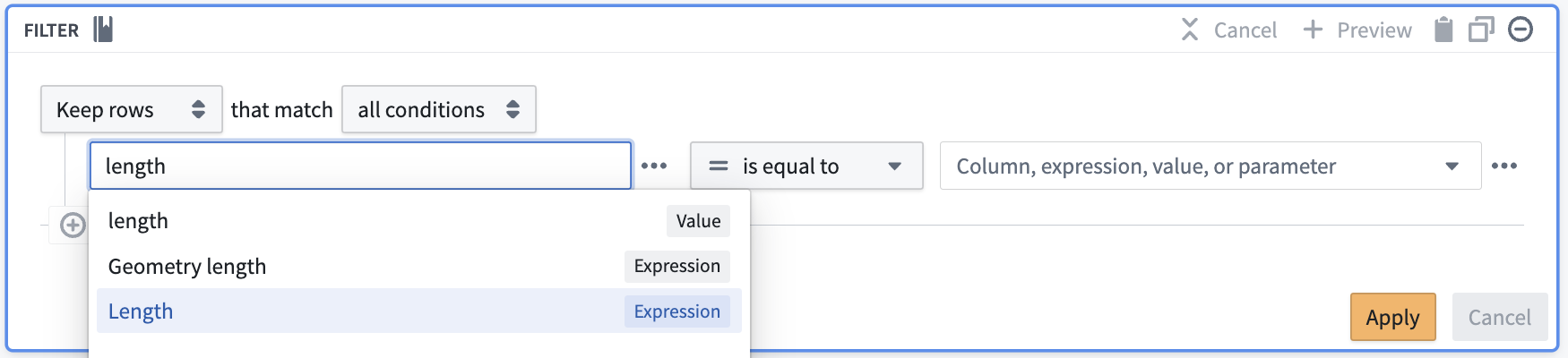
We group expressions and transforms together in the same configuration interface. For example, you can find the Drop columns transform alongside expressions like Cast and Concatenate strings. This allows you to use expressions and transforms together in the same path, and embed expressions within transforms in one configuration form, as shown by inserting the Length expression into the Filter transform below.
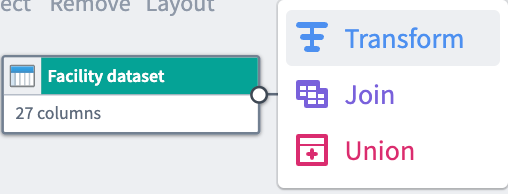
Other data structuring transforms, namely Join and Union, have their own configuration panes and are marked with unique icons in the Pipeline Builder interface.
For simplicity, we typically refer to all types of data transformations as transforms.
Join
A join combines two datasets that have at least one matching column. Depending on the type of join you configure, your join output can combine matching rows and exclude non-matching rows.
Union
A union combines two datasets to include all rows.
The union transform requires all inputs have the same schema. If input schemas do not all match, the union will display an error message with a list of missing columns.
User-defined functions
If you cannot manipulate your data with existing transformation options, or have complex logic that you want to reuse across pipelines, you can create a user-defined function (UDF). User-defined functions let you run custom code in Pipeline Builder that can be versioned and upgraded.
Note: We recommend using Python functions for the best experience. If you need access to specific Java libraries, Java UDFs are also available.
:::callout{theme="warning"} User-defined functions should only be used when necessary. We recommend using the optimized transform boards within Pipeline Builder when possible. :::
Next steps
Learn how to add a transform to your pipeline workflow.
中文翻译
转换(Transforms)
Pipeline Builder 为在 Foundry 中转换数据提供了灵活、强大且易用的界面。无论是非代码开发人员还是经验丰富的软件工程师,使用现有工具(例如Spark或SQL)编写数据转换逻辑时往往难度较高且容易出错。此外,现有工具通常与特定执行引擎绑定,需要使用对应代码库来编写数据转换逻辑。
Pipeline Builder采用通用模型描述数据转换,其后端是位于转换编写工具与转换执行流程之间的中间层。
Pipeline Builder的底层架构支持输出各类产物,包括数据集(dataset)、本体对象(ontological object)、流(stream)、时间序列(time-series),也支持导出到外部系统。你可以为数据集、对象类型(object type)、链接类型(link type)运行批量管道,也可以运行对应流数据集的流式管道。
在Pipeline Builder中使用转换
在Pipeline Builder中可以使用两类数据转换:表达式(expression)和转换(transform)。表达式以表中的列作为输入,输出单个列(例如Split string);而转换以整张表作为输入,返回整张表(例如Pivot或Filter)。
我们将表达式和转换整合在同一个配置界面中,例如你可以在Cast、Concatenate strings等表达式旁找到Drop columns转换。这种设计支持你在同一条处理路径中同时使用表达式和转换,还可以在同一个配置表单中将表达式嵌入转换内,如下文所示将Length表达式插入Filter转换中。
其他数据结构转换,即Join和Union,拥有独立的配置面板,且在Pipeline Builder界面中配有专属图标。
为简便起见,我们通常将所有类型的数据转换统称为转换。
连接(Join)
连接操作用于合并至少存在一个匹配列的两个数据集。根据你配置的连接类型不同,输出结果可以仅保留匹配行,也可以合并匹配行并排除不匹配的行。
并集(Union)
并集操作会合并两个数据集的所有行。 并集转换要求所有输入的模式(schema)完全一致,如果输入模式不匹配,界面会显示错误信息,列出缺失的列。
用户定义函数(User-defined function, UDF)
如果现有转换选项无法满足你的数据处理需求,或者你有需要在多个管道间复用的复杂逻辑,可以创建用户定义函数(User-defined function,简称UDF)。用户定义函数支持你在Pipeline Builder中运行自定义代码,且支持版本管理和升级。
注意: 为获得最佳使用体验,我们推荐使用Python functions。如果你需要使用特定的Java库,也可以使用Java UDF。
:::callout{theme="warning"} 仅在必要时使用用户定义函数,我们建议尽可能使用Pipeline Builder中经过优化的转换面板(transform board)。 :::