Branching(分支(Branching))
Software developers typically use version control systems to coordinate work in a codebase. This enables multiple engineers to contribute to the same code safely.
Within Foundry, we think about data the way software developers think about code: you need a way to allow many people to make changes and interact with the same data without interfering with someone else's work. We took best practices from software development and applied them to writing data pipelines, harnessing a common feature of version control systems called branching.
At a high level, branching allows you to take a fork in the road and work on data in your own branch. Then, once you’re happy with your changes, you can push your changes out of your branch back to the main road.
Branching workflow
How to use a branching workflow to make changes to data pipeline code in Foundry:
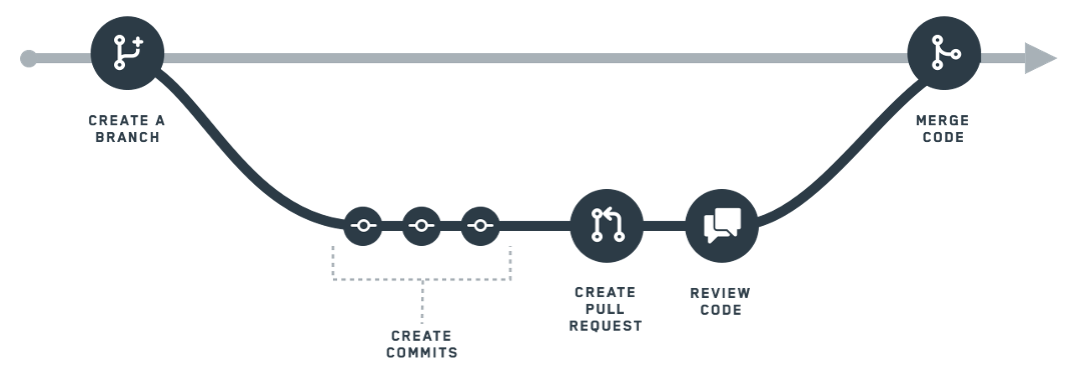
- Create a branch. In Foundry, the
masterbranch refers to the primary data pipeline. When you want to work on your own changes, you create your own branch, which creates an environment for you to experiment and test out ideas without worrying about affecting themasterbranch. - Create commits. Within your branch, you can make changes to data transformations. Changes, which include additions and removals, are called commits. Your commits are tracked so that there’s a clear history of all the changes you’ve done on your branch.
- Create a pull request. Once you’re done working in isolation, you’ll want to push your changes back to the master branch. To start this process, you create a pull request. A pull request signals to your team that you’ve made changes you’d like them to review and validate for the
masterdata pipeline. - Review code. After you create a pull request, your team will have the chance to review your commits. Every organization will have a different process or team for reviewing pull requests.
Foundry branching implements an industry-standard Git-like version control paradigm. As such, the Code Repositories application was designed to have one active developer for each individual branch on a file. If other users are working on your personal branch, your changes may be overwritten. To avoid this, we strongly recommend having each person work in a separate branch.
The rest of this page describes the technical details of how branches work in Foundry. If you are interested in learning how to use branching in practice, follow the tutorial for creating a simple batch pipeline in Pipeline Builder or Code Repositories.
Branching technical details
In Foundry, branching for data is implemented using features at two different levels: branching within an individual dataset, and branching when building datasets.
Dataset branches
As discussed in the page on datasets, datasets have version history in the form of a series of transactions. Conceptually, dataset branches are similar to branches in Git—datasets, branches, and transactions are analogous to Git repositories, branches, and commits.
Similar to branches in Git, dataset branches are simply a pointer to the most recent transaction on that branch. As a result, a branch can be interpreted as a linear sequence of transactions ordered by commit time. When a dataset is changed on a branch by committing a transaction, the transactions and views of all other branches are unaltered. Unlike Git, there is no support for merging dataset branches.
Each dataset branch has exactly one parent branch, unless it is a root branch. In practice, most datasets in Foundry have a single root branch called master, and child branches are created from this single root branch.
Below are all the supported operations related to dataset branches:
- Creating a new branch. A root branch can be created with no parent branch and no transactions.
- Creating a child branch. A child branch can be created from another branch, or from any transaction. The new branch points to the same transaction as the parent branch. Subsequently, transactions can be started on both the parent and child branches, and their transaction pointers will move independently.
- Starting a new transaction on a branch. Starts a transaction and moves the branch pointer to the new transaction.
- Deleting a branch. Deletes the branch pointer, but not any of the transactions on the branch. See the note about parent branches in the guarantees below.
Dataset branch guarantees
Foundry maintains the following guarantees for dataset branches:
- One open transaction per branch. Every branch can have at most one open (as in, opened and neither committed or aborted) transaction, and this transaction is always the latest transaction on the branch. A dataset with one branch can thus have at most one open transaction. If a branch points to an open transaction, then a new branch can be created off of this branch, but no further transactions can be started until the transaction is closed.
- On every branch, transactions are ordered by start and commit time. This guarantee is a consequence of previous constraint. Note, however, that no guarantee is given regarding the temporal order of transactions on different branches.
- Every non-root branch has exactly one parent branch. In case "intermediate" branches—branches with child branches—are deleted, the child branches are re-parented under the deleted branch's parent (or no parent if it was a root branch). Note that no transactions are rearranged in this process; re-parenting merely changes the branch ancestry record.
Branches in builds
Dataset branching provides the foundational semantics for versioning data. Foundry combines dataset branching with Git branching to support branching over logic and data simultaneously, to enable data engineers to safely experiment with changes to data pipelines before introducing them to production.
Tying branches of logic in Git to branches of data in datasets is done through Foundry's build system. Every build runs on a user-specified branch, and the jobs within the build modify datasets on that branch only. As a result, branches in builds provide a way to isolate the changes of different users from each other.
Foundry builds perform two main functions involving branches, as described below:
- First, they compile the build graph by collecting job specifications, or JobSpecs, from appropriate branches.
- Second, they resolve job inputs and outputs with respect to the user-defined build branch and a sequence of fallback branches.
Job graph compilation
When you author data transformations in Foundry in a branch of a Code Repository, committing your code publishes JobSpecs to the appropriate branch of the build system. When a build is run on that branch, the build traverses the JobSpecs and their dependencies on your branch to determine which logic should be executed.
A build usually specifies branch fallbacks that govern from which branch it retrieves JobSpecs in case no JobSpec is set on the build branch. For example, if you run a build on develop with a fallback chain of develop --> master, if there is no published JobSpec for a given output dataset, the JobSpec will be read from the master branch instead.
Dataset icon color provides information about JobSpecs and branching. If a dataset's icon is gray, this indicates that no JobSpec exists on the master branch. If the dataset icon is blue, a JobSpec is defined on the master branch.
Input and output resolution
For all datasets designated as outputs by the JobSpecs in a build, a transaction is opened on the build branch. If this branch does not exist on a dataset, then it is created off the first branch in the fallback chain, or as a root branch if no fallback branch exists. Job inputs are read from the build branch if possible, but otherwise use the first existing branch in the fallback chain.
Example: Building on branches
To understand how branches work in builds, let’s step through an example workflow:
- Suppose that datasets A, B, and C exist on the
masterbranch. - A data engineer creates a branch called
featurein their Code Repository. This creates a branch in the underlying Git repository. - The data engineer modifies the code that produces datasets B and C. When the data engineer commits their code, checks in the repository publish JobSpecs to both datasets on the
featurebranch. - The data engineer initiates a build on the
featurebranch. As thefeaturebranch was created off themasterbranch in the Git repository, the fallback chain for this build isfeature --> master. The JobSpecs published in step (3) is read, and two jobs corresponding to the user’s code are started. Transactions are opened on both datasets B and C on thefeaturebranch. The two jobs execute serially as follows: - Job 1: The
masterbranch of dataset A is used as input because of branch fallbacks. Computation produces new data, which is written to dataset B in the currently open transaction. The transaction is committed. - Job 2: Next, this job begins. The
featurebranch of dataset B is used as input. Computation produces new data, which is written to dataset C in the currently open transaction. The transaction is committed. - Finally, because all jobs in the build succeeded, the build is successful.
After modifying code, committing, and running a build, the data engineer has produced new data on the feature branch of datasets B and C. Notice that dataset A was completely unaffected by this process, and the master branch of datasets B and C is also unaltered.
Build branch guarantees
Builds in Foundry provide the following guarantees for branches:
- Build resolution only succeeds if the specified branch fallback sequence is compatible with the branch ancestries in the involved datasets.
- A build never modifies any dataset branches other than the build branch.
- A build never creates branches on input datasets.
中文翻译
分支(Branching)
软件开发人员通常使用版本控制系统来协调代码库中的工作。这使得多名工程师能够安全地协作同一份代码。
在Foundry中,我们以软件开发人员看待代码的方式来对待数据:你需要一种方式让多人能够修改和操作同一份数据,同时不干扰他人的工作。我们借鉴了软件开发的最佳实践,并将其应用于编写数据管道(Data Pipeline),利用版本控制系统的一个常见特性——分支(Branching)。
从高层次来看,分支(Branching)允许你走一条岔路,在自己的分支(Branch)上处理数据。然后,当你对修改感到满意时,就可以将更改从自己的分支推回主路。
分支工作流(Branching workflow)
如何在Foundry中使用分支工作流对数据管道代码进行修改:
- 创建分支(Create a branch)。在Foundry中,
master分支指的是主数据管道。当你想进行自己的修改时,可以创建自己的分支,这会为你创建一个环境,让你可以放心地实验和测试想法,而不必担心影响master分支。 - 创建提交(Create commits)。在你的分支内,你可以对数据转换(Data Transformation)进行修改。这些修改(包括添加和删除)被称为提交(Commits)。你的提交会被追踪,这样你的分支上所有修改的历史记录就一目了然。
- 创建拉取请求(Create a pull request)。当你独立完成工作后,需要将修改推回master分支。要启动这个过程,你需要创建一个拉取请求(Pull Request)。拉取请求向你的团队表明,你已经完成了修改,希望他们为
master数据管道进行审查和验证。 - 审查代码(Review code)。创建拉取请求后,你的团队将有机会审查你的提交。每个组织审查拉取请求的流程或团队可能有所不同。
Foundry的分支功能实现了行业标准的类Git版本控制范式。因此,代码仓库(Code Repositories)应用被设计为每个文件上的每个独立分支对应一个活跃开发者。如果其他用户正在你的个人分支(personal branch)上工作,你的修改可能会被覆盖。为避免这种情况,我们强烈建议每个人在独立的分支中工作。
本页其余部分描述了分支在Foundry中如何工作的技术细节。如果你想了解如何实际使用分支功能,请按照Pipeline Builder或代码仓库(Code Repositories)中的教程创建简单的批处理管道。
分支技术细节(Branching technical details)
在Foundry中,数据的分支是通过两个不同层级的功能实现的:单个数据集(Dataset)内的分支,以及构建数据集时的分支。
数据集分支(Dataset branches)
正如数据集(Datasets)页面所讨论的,数据集以一系列事务(Transactions)的形式拥有版本历史。从概念上讲,数据集分支类似于Git中的分支——数据集(Datasets)、分支(Branches)和事务(Transactions)分别类比于Git的仓库(Repositories)、分支(Branches)和提交(Commits)。
与Git中的分支类似,数据集分支只是指向该分支上最新事务的指针。因此,一个分支可以被解释为按提交时间排序的一系列线性事务。当通过提交事务在某个分支上修改数据集时,所有其他分支的事务和视图都不会改变。与Git不同的是,数据集分支不支持合并。
每个数据集分支都有且只有一个父分支(Parent Branch),除非它是根分支(Root Branch)。在实践中,Foundry中的大多数数据集都有一个名为master的根分支,子分支都是从这一个根分支创建的。
以下是所有与数据集分支相关的支持操作:
- 创建新分支(Creating a new branch)。可以创建一个没有父分支且没有事务的根分支。
- 创建子分支(Creating a child branch)。可以从另一个分支或任何事务创建子分支。新分支指向与父分支相同的事务。随后,可以在父分支和子分支上启动事务,它们的事务指针将独立移动。
- 在分支上启动新事务(Starting a new transaction on a branch)。启动一个事务并将分支指针移动到新事务。
- 删除分支(Deleting a branch)。删除分支指针,但不会删除该分支上的任何事务。请参见下方保证中关于父分支的说明。
数据集分支保证(Dataset branch guarantees)
Foundry为数据集分支维护以下保证:
- 每个分支最多一个开放事务(One open transaction per branch)。每个分支最多只能有一个开放事务(即已打开但既未提交也未中止的事务),并且该事务始终是该分支上的最新事务。因此,只有一个分支的数据集最多只能有一个开放事务。如果某个分支指向一个开放事务,则可以从此分支创建新分支,但在该事务关闭之前无法启动更多事务。
- 在每个分支上,事务按开始和提交时间排序(On every branch, transactions are ordered by start and commit time)。此保证是前一个约束的结果。但请注意,对于不同分支上的事务,不保证其时间顺序。
- 每个非根分支都有且只有一个父分支(Every non-root branch has exactly one parent branch)。如果删除了"中间"分支(即拥有子分支的分支),则子分支会被重新挂载到被删除分支的父分支下(如果是根分支则没有父分支)。请注意,此过程不会重新排列任何事务;重新挂载仅更改分支的祖先记录。
构建中的分支(Branches in builds)
数据集分支为数据版本控制(Versioning Data)提供了基础语义。Foundry将数据集分支与Git分支相结合,以支持同时对逻辑和数据进行分支,使数据工程师能够在将更改引入生产环境之前安全地进行实验。
通过Foundry的构建(Build)系统,将Git中的逻辑分支与数据集中的数据分支关联起来。每个构建都在用户指定的分支上运行,并且构建中的作业仅在该分支上修改数据集。因此,构建中的分支提供了一种将不同用户的更改相互隔离的方法。
Foundry构建执行两个涉及分支的主要功能,如下所述:
- 首先,它们通过从适当的分支收集作业规范(JobSpecs)来编译构建图。
- 其次,它们根据用户定义的构建分支和一系列回退分支(Fallback Branches)来解析作业的输入和输出。
作业图编译(Job graph compilation)
当你在代码仓库(Code Repository)的分支中编写数据转换时,提交代码会将作业规范(JobSpecs)发布到构建系统的相应分支。当在该分支上运行构建时,构建会遍历你的分支上的作业规范及其依赖项,以确定应执行哪些逻辑。
一个构建通常会指定分支回退(Branch Fallbacks),用于控制在构建分支上未设置作业规范时从哪个分支获取作业规范。例如,如果你在develop分支上运行构建,并设置了develop --> master的回退链,那么如果某个输出数据集没有已发布的作业规范,则会从master分支读取作业规范。
数据集图标颜色提供了关于作业规范和分支的信息。如果数据集的图标是灰色的,表示在master分支上不存在作业规范。如果数据集图标是蓝色的,则表示在master分支上定义了作业规范。
输入和输出解析(Input and output resolution)
对于构建中作业规范指定为输出(Outputs)的所有数据集,会在构建分支上打开一个事务。如果该分支在数据集上不存在,则会从回退链中的第一个分支创建它,或者如果没有回退分支,则作为根分支创建。作业输入会尽可能从构建分支读取,否则使用回退链中第一个存在的分支。
示例:在分支上构建(Example: Building on branches)
为了理解分支在构建中如何工作,让我们逐步了解一个示例工作流:
- 假设数据集A、B和C存在于
master分支上。 - 一位数据工程师在其代码仓库中创建了一个名为
feature的分支。这会在底层Git仓库中创建一个分支。 - 数据工程师修改了生成数据集B和C的代码。当数据工程师提交代码时,仓库中的检查会将作业规范发布到
feature分支上的两个数据集。 - 数据工程师在
feature分支上启动构建。由于feature分支是从Git仓库中的master分支创建的,因此此构建的回退链是feature --> master。读取步骤(3)中发布的作业规范,并启动两个对应于用户代码的作业。在feature分支上的数据集B和C上打开事务。这两个作业按顺序执行如下: - 作业1(Job 1):由于分支回退,使用数据集A的
master分支作为输入。计算产生新数据,这些数据被写入当前开放事务中的数据集B。事务被提交。 - 作业2(Job 2):接下来,此作业开始。使用数据集B的
feature分支作为输入。计算产生新数据,这些数据被写入当前开放事务中的数据集C。事务被提交。 - 最后,由于构建中的所有作业都成功了,构建成功完成。
在修改代码、提交并运行构建后,数据工程师在数据集B和C的feature分支上生成了新数据。请注意,数据集A完全不受此过程影响,并且数据集B和C的master分支也未改变。
构建分支保证(Build branch guarantees)
Foundry中的构建为分支提供以下保证:
- 构建解析仅在指定的分支回退序列与所涉及数据集中的分支祖先关系兼容时才会成功。
- 构建永远不会修改除构建分支之外的任何数据集分支。
- 构建永远不会在输入数据集上创建分支。