Change data capture (CDC)(变更数据捕获 (CDC))
Change data capture ↗ (CDC) is an enterprise data integration pattern often used to stream real-time updates from a relational database to other consumers.
Foundry supports syncing, processing, and storing data from systems that produce change data capture feeds. Components throughout the platform, including data connectors, streams, pipelines, and the Foundry Ontology can all work natively with this changelog data using the metadata configured on the schema of the underlying data.
Change data capture support in Foundry
Foundry offers the following support for change data capture updates:
| Application | CDC support |
|---|---|
| Data Connection | CDC support available for syncs (source-system dependent) |
| Ontology | CDC indexing for batch- and stream-backed objects |
| Pipeline Builder | Full CDC stream processing and partial CDC streams with backfill |
| Streams | Full CDC support for live and archive views |
| Transforms | Append-only incremental for datasets, full changelog incremental available for Iceberg tables |
| Workshop | Auto-refresh available for frequently updating objects |
Changelog metadata
Changelog metadata requires the following attributes on the data:
- One or more primary key columns
- Changelog data will contain many entries with identical primary key columns, as changelogs are meant to convey every individual change that occurred on the record with that primary key. Change data capture is particularly useful for data that is being edited, rather than immutable or append-only data feeds.
- One or more ordering columns
- The ordering column(s) must be numeric and are used to determine the relative order of changes for records with a given set of primary keys. Ordering columns are frequently timestamps represented as longs, however this is not always the case. The largest value is understood to be the most recent, even if the order columns are not timestamps.
- A deletion column
- The deletion column is used to determine if a given update deleted the record with the given set of primary keys. This must be a boolean that is true if the record was deleted, else it should be false.
This changelog metadata is used to specify a resolution strategy to resolve the changelog down to a current view of the data in the source system. The resolution strategy for change data capture works as follows:
- Group the data based on the primary key column(s).
- Find the entry with the largest value in the ordering column(s).
- If this entry has the value
truein the deletion column, remove it.
After these steps, the changelog should now be collapsed down to the same view as you would see in the upstream source system generating the changelog. The changelog metadata and resolution strategy is used in different ways by various Palantir components, as described below.
Change data capture in Data Connection
Sources available in Data Connection may support syncing data from systems as a stream with changelog metadata applied. The ability for a source to implement the capability to sync changelog data is dependent on the ability of the source system to produce log data with the required attributes (primary key column(s), ordering column(s), and a deletion column).
Many commonly used databases including MySQL, PostgreSQL, Oracle, Db2, and SQL Server can produce CDC changelog data. Data connectors in Foundry for these systems may or may not support directly syncing these changelogs. Even if a connector does not currently support CDC syncs, you can still sync data via Kafka or other streaming middleware and use as a changelog once the data arrives in Foundry.
The following source types in Data Connection currently support CDC syncs:
- Db2
- Microsoft SQL Server
- Oracle
- PostgreSQL
If you have changelog-shaped data available from other sources, such as Kafka, Kinesis, Amazon SQS, or push-based integration with streams, read how to manually configure changelog metadata using the key-by board in Pipeline Builder.
Enable change data capture on an external database
To sync changelog feeds from a supported source type, you must have the correct settings enabled for the relevant tables and, in some cases, for the entire database.
For example, to enable change data capture for Microsoft SQL Server, you must run a command to enable CDC on the database:
USE <database>
GO
EXEC sys.sp_cdc_enable_db
GO
Then, run another command on each table that should be recording changelogs:
EXEC sys.sp_cdc_enable_table
    @source_schema = N'<schema>'
  , @source_name = N'<table_name>'
  , @role_name = NULL
  , @capture_instance = NULL
  , @supports_net_changes = 0
  , @filegroup_name = N'PRIMARY';
GO
The above examples provide a high level explanation of what may be required to enable a source system to produce changelog data. Specific information on how to enable change data capture logs for a given system can be found in documentation provided by that system.
Set up a source connection for change data capture
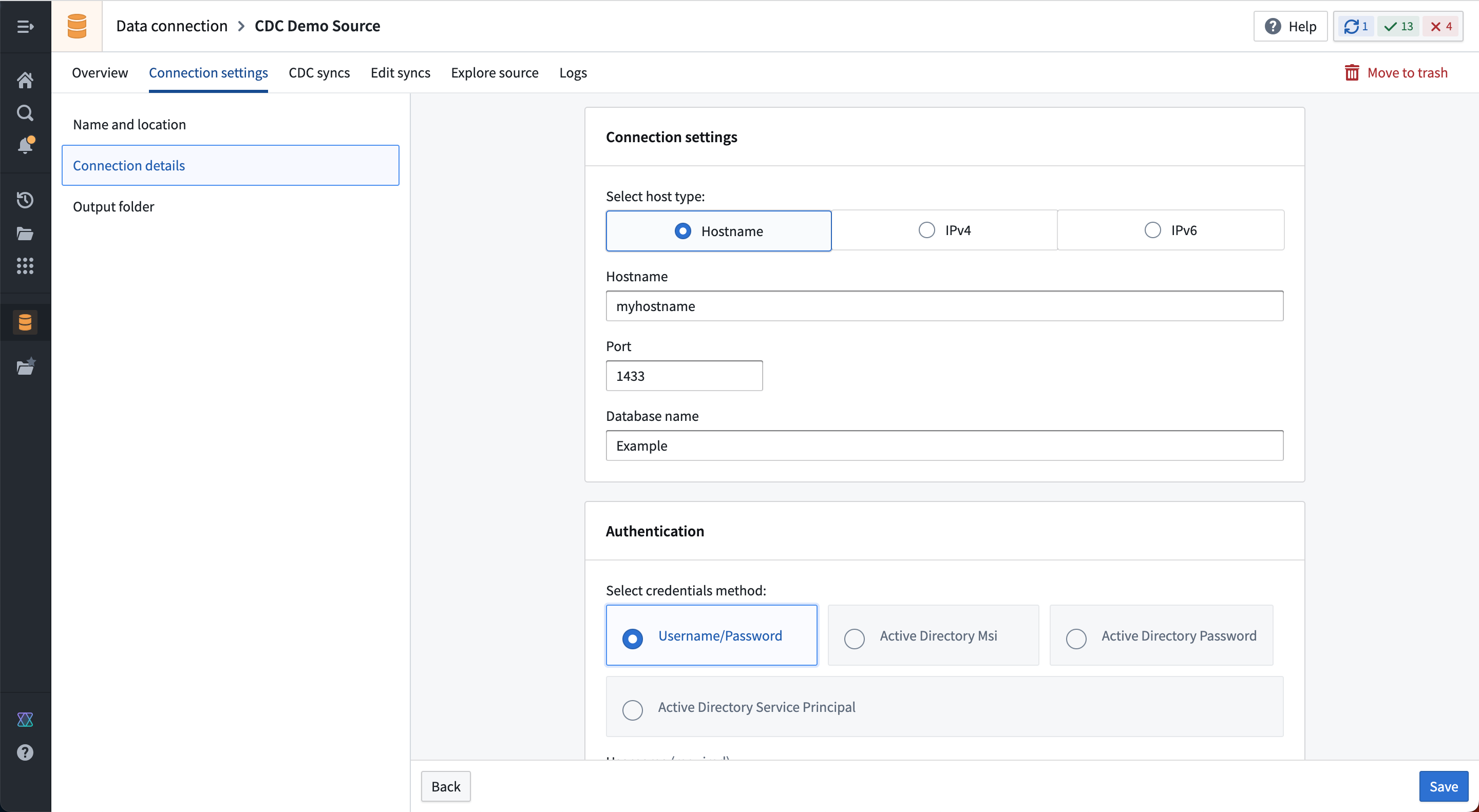
Now, you can configure a source in Data Connection that connects to the system from which you want to capture changelogs. Continuing with our example, set up a connection using the Microsoft SQL Server connector, as shown below:
Create a change data capture sync
On the source overview page, you will find an empty table of CDC Syncs.
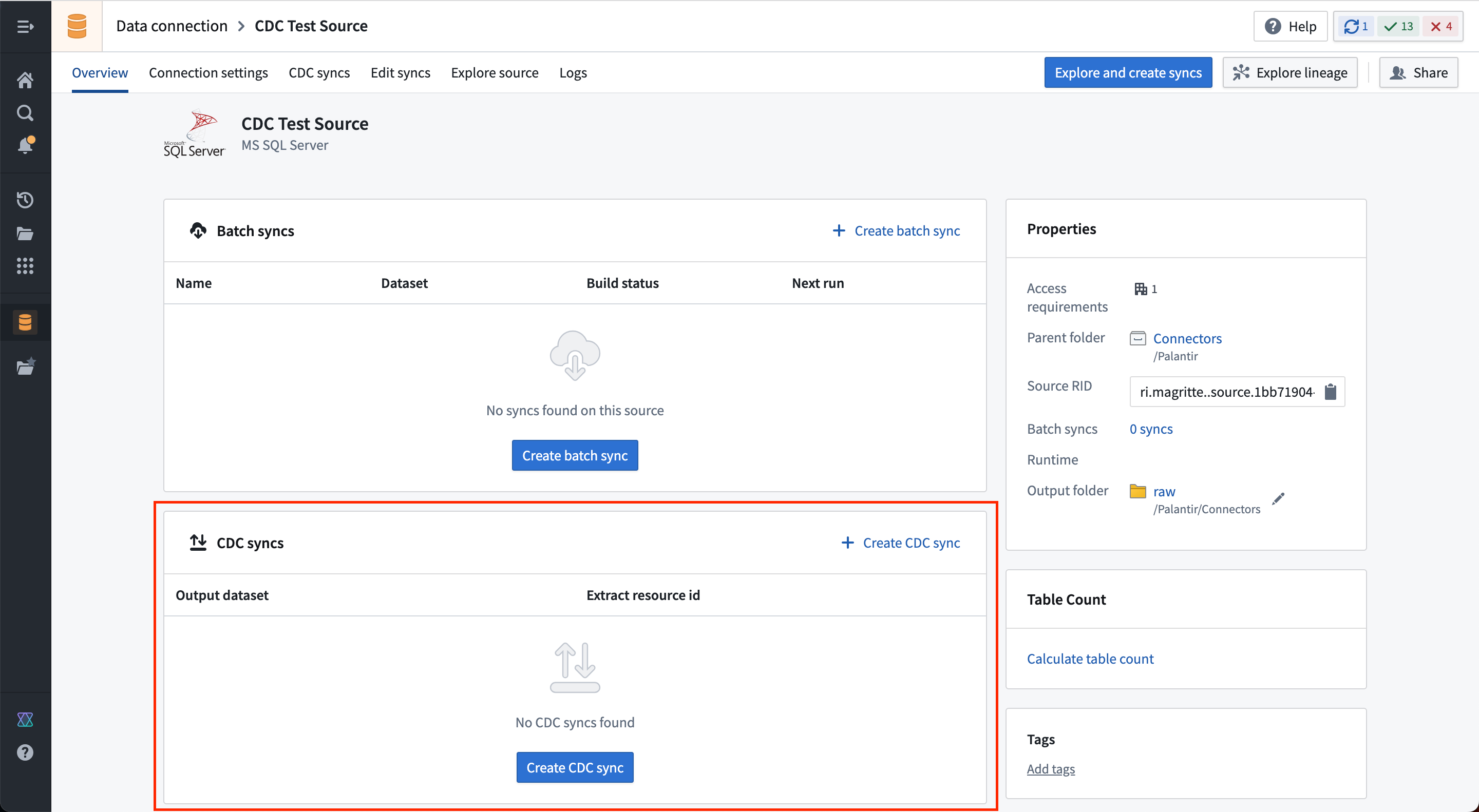
Select Create CDC sync to add a new change data capture sync. Specify the table you wish to sync, and the following information will be automatically derived by the connector:
- The schema for the output streaming dataset.
- Changelog metadata, including primary key columns, ordering columns, and a deletion column.
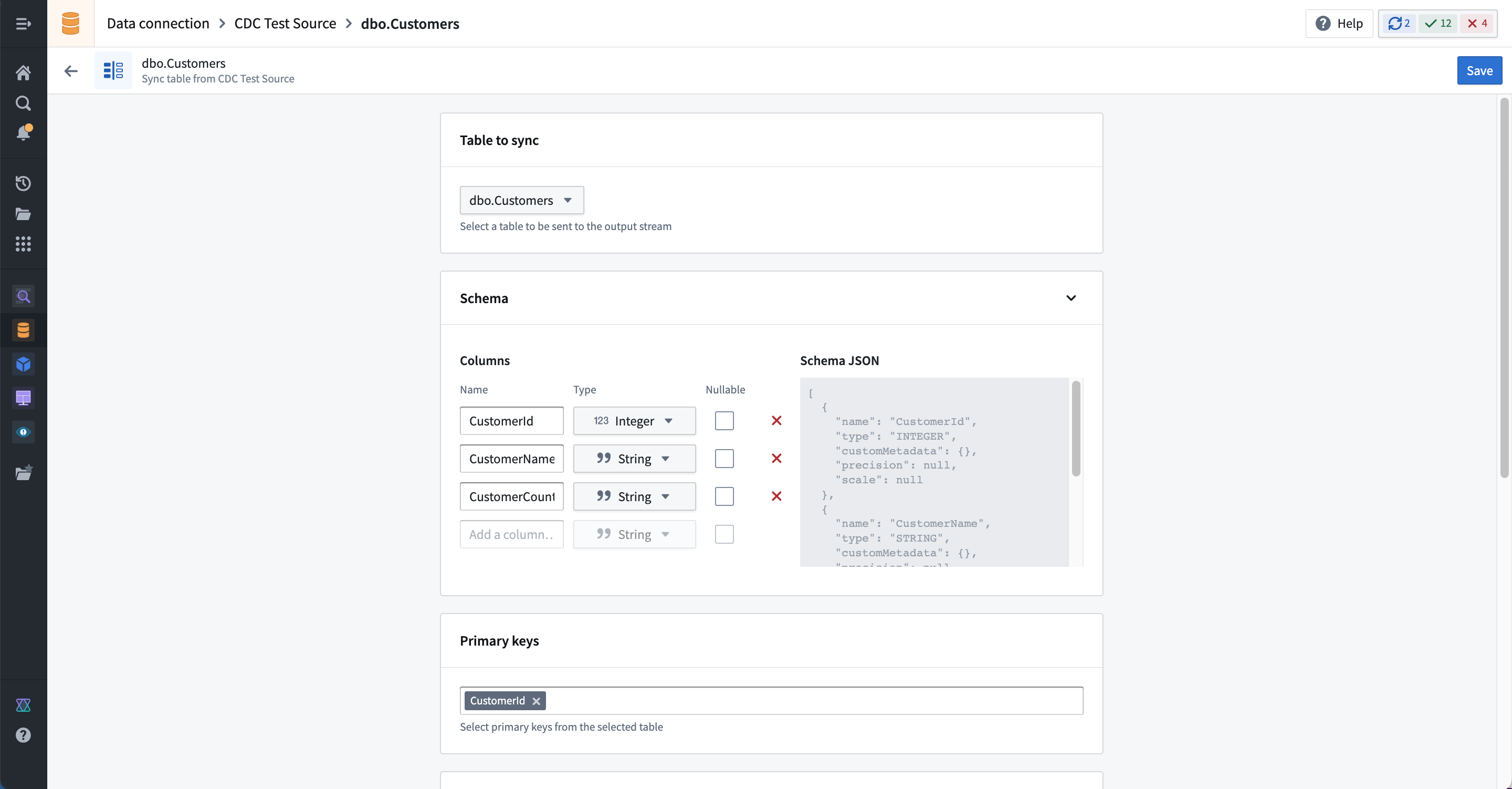
As with other streams, you must specify the expected throughput at creation. The throughput cannot be changed after sync creation; ensure that your stream is configured to support the expected volume of changelog data. The default volume is 5MB/s, which is typically more than required for most change data capture workflows. Since changes in relational databases are often produced at “human scale”, the volume and frequency of changes is much smaller than what is possible with “machine scale” sensor or equipment data.
Save the sync configuration to create a new stream in the specified output location.
:::callout{theme="neutral"} Currently, the CDC job must be manually (re)started after any changes. All CDC syncs run as a single multi-output extract job, meaning that any existing CDC streams from the same source must be briefly stopped whenever a feed is added or removed. The streams will gracefully catch up with any data that was changed while the streaming sync job was stopped. :::
After starting the output stream, changelog data should begin flowing and appear in the live view of the output streaming dataset.
Configure custom CDC settings per source
Foundry's CDC implementation leverages the open-source platform Debezium ↗ to read data source logs. You can configure the Debezium connection and engine properties for an individual source directly from the Data Connection interface. First, navigate to the created source that you want to configure. Then select CDC syncs from the top right. Select the CDC settings section to expand the configuration options.

Foundry’s default CDC configuration is designed to provide a frictionless setup and minimize disruptions on your source systems. However, we strongly recommend reviewing the specific default behaviors for your connector, particularly its snapshot mode, to ensure these defaults align with your data requirements.
Each data source type has recommended configurable settings. For example, the image above shows a Transaction isolation level for the Microsoft SQL Server connector. However, you can also configure arbitrary Debezium properties using the Advanced Debezium configuration option. This flexibility allows you to customize settings to the specific needs of each data source.
Customized CDC settings for data connectors can be useful for a variety of situations, including the following examples:
- High transaction volume: For data connectors experiencing rapid transaction bursts, the default
max.batch.sizesetting may lead to excessive small batch processing, increasing overhead and delaying data propagation. By raising themax.batch.size, you can consolidate changes into larger batches, enhancing efficiency and data flow. - Network instability: For data connectors prone to transient network issues or temporary errors, increasing
error.max.retriesprovides the connector with more opportunities to recover autonomously, reducing the risk of missed data. - Real-time updates: In high-transaction environments where near-real-time updates are crucial, lowering
offset.flush.interval.msensures more frequent offset flushing, minimizing recovery windows and improving change propagation timeliness.
Review Debezium’s documentation ↗ to learn which properties can be configured for each data connector type.
:::callout{theme="warning"} When configuring arbitrary Debezium properties, it is your responsibility to ensure compatibility and functionality. Improper configurations may lead to unexpected behavior or data loss. Proceed with caution and consult the Debezium documentation for guidance. :::
Change data capture in streams
Streams with changelog metadata will display two views into the data:
- A live view showing the fully expanded list of changelog entries.
- An archive view where the data is resolved according to the resolution strategy and collapsed down to the current latest view of the data.
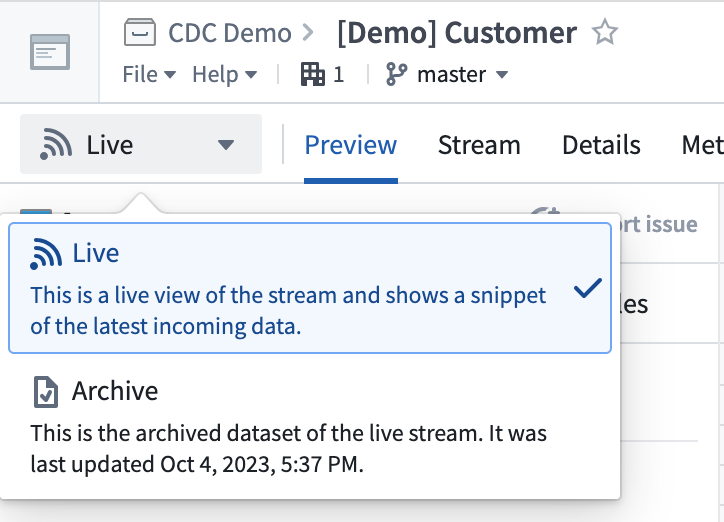
The schema will display changelog metadata as a primary key resolution strategy in the details view.
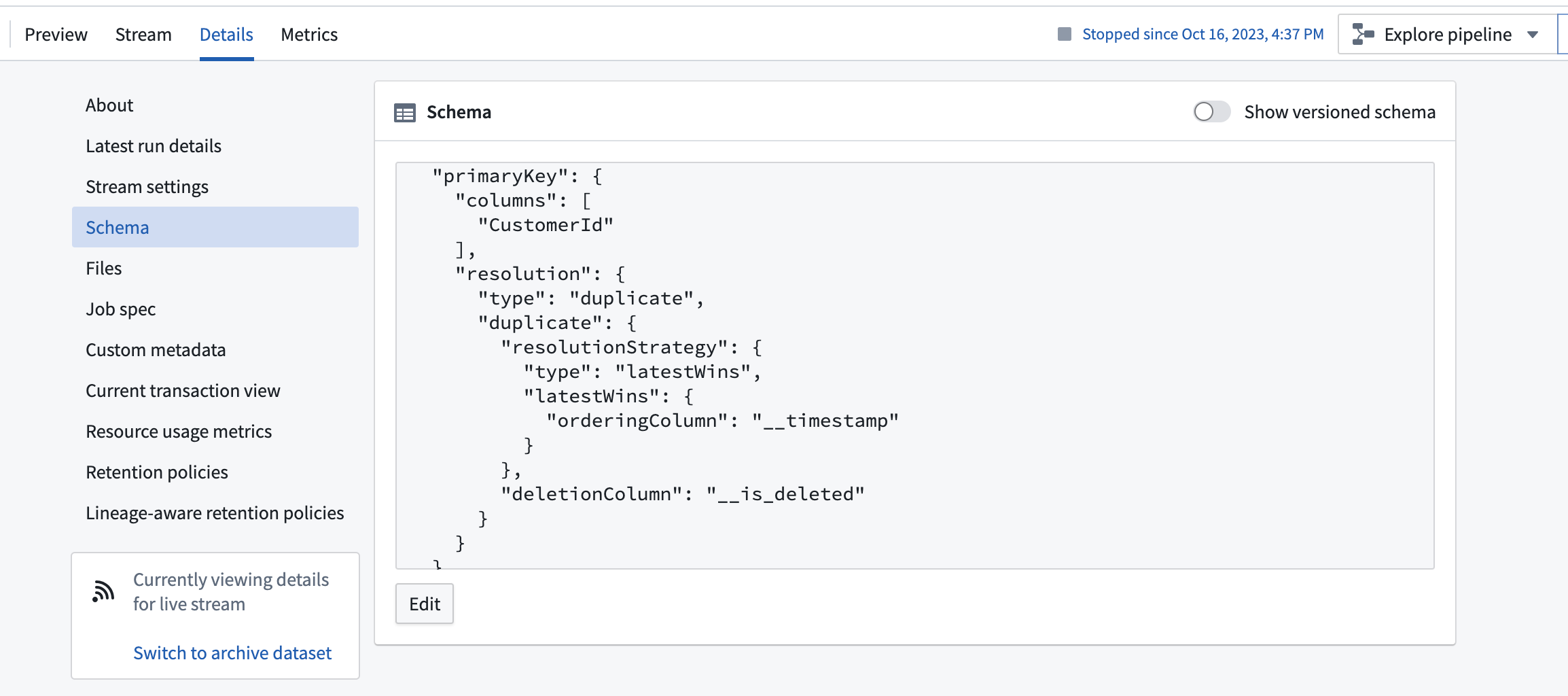
:::callout{theme="neutral"} Streams currently use the ordering column to perform resolution. This means that data will be resolved in the archive according to the provided ordering column, even if the data was received out of order. This behavior differs from the behavior of changelog data in the Foundry Ontology, which indexes data based on the order of arrival in the stream used to back the object type. :::
Change data capture in Pipeline Builder
Pipeline Builder offers powerful capabilities for processing and configuring change data capture (CDC) streams. This section covers two scenarios: working with full CDC streams and handling partial CDC streams that require backfilling.
Process full CDC streams
When working with streaming transformations in Pipeline Builder, you can process changelog data while preserving its metadata. As long as the metadata columns (primary key, ordering, and deletion) remain unmodified during transformations, the changelog metadata will automatically propagate to any outputs.
Configure partial CDC streams with a backfill dataset
In some cases, a CDC stream may not contain all historical data. Instead, it could only contain changes from a specific point in time. To create a complete dataset, you must combine a backfill dataset with the ongoing CDC stream. Use the steps below to achieve this:
- Prepare the backfill dataset:
- Ingest a snapshot of the data using the same Data Connection source used for the CDC stream.
-
Ensure the backfill dataset includes a timestamp column. If not present in the source data, generate one using an SQL function (
CURRENT_TIMESTAMP(), for example). -
Combine the datasets in Pipeline Builder:
-
Use a Union transform to combine the backfill dataset with the ongoing CDC stream.
-
Configure CDC metadata:
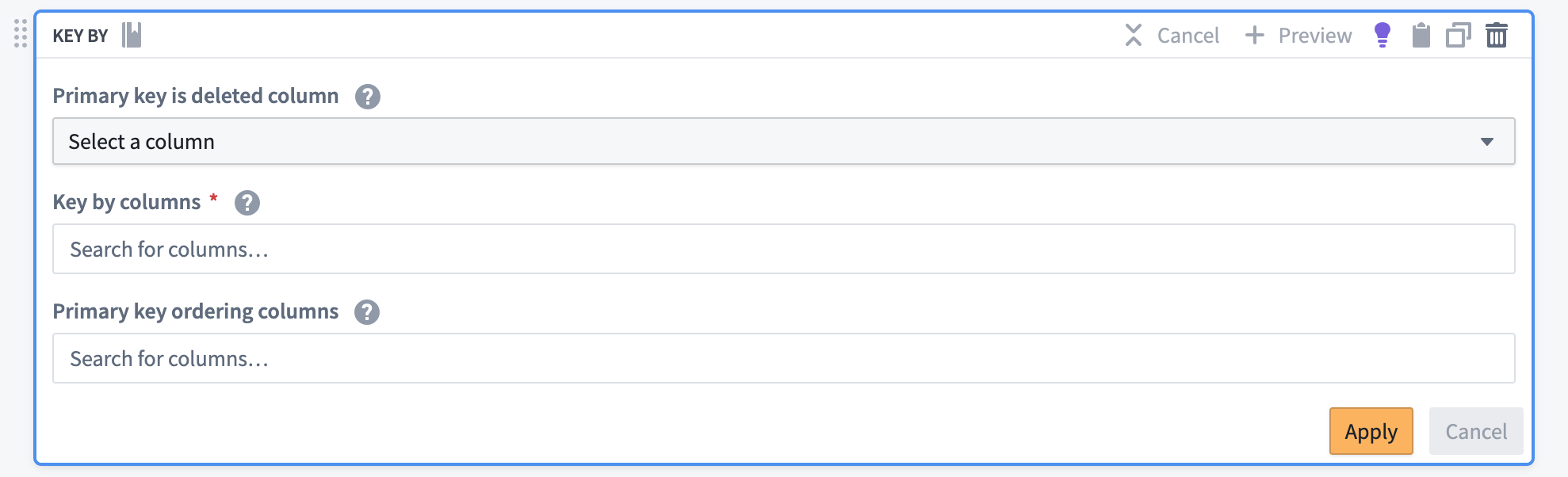
- Use the Key By transform board to prepare the combined data for syncing into the Ontology.
- Set the primary key column(s) to match those in your source system.
- Choose the timestamp column as the ordering column.
-
If applicable, specify the deletion column.
-
Handle deletions and ordering:
- Ensure the Key By board is configured to order the data by the timestamp column.
- If the source data does not include explicit deletion information, you may need to implement logic to infer deletions (for example, by comparing consecutive snapshots).
The Key By transform board will append the necessary CDC metadata to the stream, including the following:
- A primary key resolution strategy
- Ordering column(s)
- A deletion column
This configuration prepares the data for proper resolution when synced to the Ontology, ensuring that the most recent state of each record is maintained based on the timestamp ordering.
Apply CDC metadata to non-CDC data
If your input stream lacks changelog metadata or if the metadata columns were modified during transformations, you can still use the Key By board to apply changelog metadata to your output(s). This allows you to treat any dataset as a CDC stream, enabling powerful data integration and real-time update capabilities.
Change data capture in the Ontology
The Ontology uses changelog metadata to index data into object types in Object Storage V2 that are backed by a streaming data source. The data arriving in the stream is resolved and indexed into a latest current view that is available when querying the Ontology (to display in a Workshop module, for example).
If retention is configured on a data source with changelog metadata, any records that do not receive updates within the retention window time will disappear from the Ontology.
:::callout{theme="warning"}
The Ontology currently ignores the ordering column(s) specified in the changelog metadata. Instead, Object Storage V2 indexes data based on the order it arrives in the backing data source. Concretely, this means that for a given primary key, if a log entry with an ordering value of 2 arrives at t1 and data_column=foo, followed by another log entry with an ordering value of 1 that arrives at t2 with data_column=bar, the record will appear with data_column=bar even though in the source system the most recent value is data_column=foo. This can cause the Ontology to incorrectly reflect the data in the source system if data arrives out of order.
Since connectors used with Palantir are guaranteed to deliver data in order, and Foundry streams maintain ordering, this Ontology behavior will likely only affect custom setups or older streaming changelogs that are manually backfilled and not re-ordered before syncing. If you encounter this situation, we recommend applying a transformation to reorder the data in Pipeline Builder before syncing to the Ontology. :::
Change data capture in Workshop
Workshop supports auto-refresh to display the frequently updating data as soon as it is available in the Ontology. Auto-refresh is compatible with CDC and may be used to ensure that any data streamed in with change data capture is promptly available in Workshop applications.
:::callout{theme="neutral"} Auto-refresh is available for any data that is expected to update frequently while the Workshop module is open. Data is not required to have changelog metadata on the backing data source to use auto-refresh. :::
Considerations when using change data capture
We recommend reviewing the following information on backfills, outages, and other known limitations before using CDC workflows.
Backfill
All changelog syncs are handled on an exclusively "going forward" basis; no automatic backfill is performed.
Often, a full backfill of changelogs is not possible, since most systems do not enable CDC by default. Even if changelogs are enabled, most systems include a retention period, after which changlogs are permanently deleted and no longer recoverable.
If a full backfill is required, we recommend the following:
- Set up a CDC stream on a "going forward" basis.
- Perform a batch sync to extract the desired historical data.
- Convert the historical batch data into a stream of “create” records for each primary key, then merge that stream into the CDC stream.
Backfills may result in data that is out of order, and you may need to manually reorder or replay streams to properly prepare data for syncing to the Ontology.
Outages
You may encounter the following outages when using a CDC workflow:
- Network connectivity between the source database and the Foundry agent
- Network connectivity between the Foundry agent host and Foundry
- Foundry outage
- Database outage
- Agent outage
Outages are handled gracefully if the retention window on replication logs and changelogs in the database are configured to be longer than the maximum expected outage.
For example, if the connection to Foundry goes down for several hours, and the log retention window on Microsoft SQL Server is set to one day, the database will continue recording changelog entries. Foundry will gracefully catch up once it is back online and reconnected to Microsoft SQL Server. Since no new data will flow until the queue of changelog entries is cleared, there may be some lag before changes are again flowing at near real time into Palantir.
Use changelog-shaped data from non-changelog sources
Data does not need to be ingested as a changelog to use CDC workflows. Any streaming data in Palantir may be “keyed” with changelog metadata and then used as CDC data in workflows after syncing to the Ontology.
This means, for example, that push-based ingestion using stream proxy may be used to manually push changelog-shaped records into a stream.
Similarly, if changelog data is available in a Kafka topic, it may be ingested using a standard (non-CDC) sync. Then, it can be “keyed’ using Pipeline Builder and used in the Ontology and beyond.
Remove changelog metadata
Sometimes, it may be useful to remove changelog metadata. For example, you might want to remove metadata to analyze the process flow captured by the changelog. To remove changelog metadata, use one of the following methods:
- Perform any transformation on the metadata columns
- Manually remove the resolution strategy from the schema of the streaming dataset
Enabling access to your CDC tables
When connecting to your source system, you must provide user credentials within Connection Details. These credentials are tied to permissions set at the source. For basic data ingestion, this user will need SELECT permissions for the datasets you plan to ingest. However, CDC connections may require the user to have both SELECT and EXECUTE permissions on the table you wish to ingest from as well as its schema.
Default CDC behavior
Below are some universal default settings for CDC connections:
| Property | Default Value | Notes |
|---|---|---|
tombstones.on.delete |
false |
Tombstone records are not produced when rows are deleted. |
decimal.handling.mode |
string |
Decimal columns are converted to string. |
include.schema.changes |
false |
DDL events (schema changes) are not forwarded into output topics. |
offset.flush.interval.ms |
60000 (1 minute) |
Debezium attempts to flush offsets every minute. |
error.max.retries |
5 |
The engine will attempt to recover from transient errors five times before failing. |
Connector-specific defaults
Most database connectors also have default settings for snapshot mode and other parameters. The tables below contain summaries of the most important settings. You can override these configurations from the CDC syncs page. Select Edit in the CDC settings dropdown section, then select Add property under Advanced Debezium configuration.
Oracle
| Property | Default value |
|---|---|
snapshot.mode |
schema_only |
schema.history.internal.store.only.captured.tables.ddl |
true |
internal.log.mining.log.query.max.retries |
10 |
log.mining.strategy |
online_catalog |
log.mining.query.filter.mode |
in |
log.mining.batch.size.default |
50000 |
database.connection.adapter |
logminer |
PostgreSQL
| Property | Default value |
|---|---|
snapshot.mode |
never |
plugin.name |
pgoutput |
Db2
| Property | Default value |
|---|---|
snapshot.mode |
no_data |
snapshot.isolation.mode |
none |
Microsoft SQL Server
| Property | Default value |
|---|---|
snapshot.mode |
schema_only |
offset.flush.interval.ms |
1000 |
Snapshot mode considerations
By default, Foundry configures snapshot.mode to schema_only (Oracle, SQL Server), no_data (Db2), or never (PostgreSQL) to avoid impacting the database’s availability; these configurations avoid locking the tables during the snapshot process, ensuring minimal disruption to ongoing database operations. Although these modes avoid table locking, they still pose a data loss risk if archived logs are purged before Debezium can process them. For example, Oracle may delete older redo logs over time; if Debezium tries to read a deleted log, it cannot recover the missing data without a full snapshot.
Alternative configurations
If you want to protect against log purging or ensure a base dataset, consider a more complete snapshot configuration instead:
recovery- Behavior: Recovers a connector that is already capturing changes if the schema history topic is lost or corrupted; resets and rebuilds the database schema history on restart if no schema changes happened since the last shutdown.
-
Limitation: Requires infinite retention on the schema history topic.
-
always - Behavior: Takes a complete snapshot each time the connector restarts, guaranteeing a fully up-to-date copy of the data.
-
Limitation: May induce table locking and added overhead on every start.
-
when_needed - Behavior: Snapshots only if Debezium cannot detect valid offsets; for example, if the offset does not exist or is expired.
- Limitation: Still may lock tables when a snapshot is triggered.
中文翻译
变更数据捕获 (CDC)
变更数据捕获 ↗ (CDC) 是一种企业数据集成模式,常用于将关系型数据库的实时更新流式传输到其他消费者。
Foundry 支持同步、处理和存储来自产生变更数据捕获数据流的系统的数据。平台中的各个组件,包括数据连接器、数据流、流水线和 Foundry 本体论,都可以利用底层数据的模式上配置的元数据,原生处理这种变更日志数据。
Foundry 中的变更数据捕获支持
Foundry 为变更数据捕获更新提供以下支持:
| 应用 | CDC 支持 |
|---|---|
| 数据连接 | 同步支持 CDC(取决于源系统) |
| 本体论 | 支持批处理和流式支持对象的 CDC 索引 |
| 流水线构建器 | 支持完整 CDC 流处理和带回填的部分 CDC 流 |
| 数据流 | 支持实时视图和归档视图的完整 CDC |
| 转换 | 数据集仅支持追加增量,Iceberg 表支持完整变更日志增量 |
| 工作坊 | 支持频繁更新对象的自动刷新 |
变更日志元数据
变更日志元数据要求数据具有以下属性:
- 一个或多个主键列
- 变更日志数据将包含许多具有相同主键列的条目,因为变更日志旨在传达对该主键记录发生的每一次单独变更。变更数据捕获对于正在编辑的数据特别有用,而不是不可变或仅追加的数据流。
- 一个或多个排序列
- 排序列必须是数值型,用于确定具有给定主键集的记录的变更相对顺序。排序列通常是表示为长整型的时间戳,但并非总是如此。即使排序列不是时间戳,最大的值也被理解为最新的值。
- 一个删除列
- 删除列用于确定给定的更新是否删除了具有给定主键集的记录。如果记录被删除,该列必须为布尔值 true,否则应为 false。
这些变更日志元数据用于指定一种解析策略,将变更日志解析为源系统中数据的当前视图。变更数据捕获的解析策略工作方式如下:
- 根据主键列对数据进行分组。
- 找到排序列中值最大的条目。
- 如果该条目在删除列中的值为
true,则将其移除。
完成这些步骤后,变更日志现在应被折叠为与生成变更日志的上游源系统中看到的相同视图。各种 Palantir 组件以不同方式使用变更日志元数据和解析策略,如下所述。
数据连接中的变更数据捕获
数据连接中可用的源可能支持从系统同步数据作为带有变更日志元数据应用的流。源实现同步变更日志数据的能力取决于源系统能否生成具有所需属性(主键列、排序列和删除列)的日志数据。
许多常用的数据库,包括 MySQL、PostgreSQL、Oracle、Db2 和 SQL Server,都可以生成 CDC 变更日志数据。Foundry 中针对这些系统的数据连接器可能支持也可能不支持直接同步这些变更日志。即使连接器当前不支持 CDC 同步,您仍然可以通过 Kafka 或其他流式中间件同步数据,并在数据到达 Foundry 后将其用作变更日志。
数据连接中当前支持 CDC 同步的源类型如下:
- Db2
- Microsoft SQL Server
- Oracle
- PostgreSQL
如果您从其他来源(如 Kafka、Kinesis、Amazon SQS 或基于推送的流集成)获得了变更日志形式的数据,请阅读如何在流水线构建器中使用 Key By 面板手动配置变更日志元数据。
在外部数据库上启用变更数据捕获
要从支持的源类型同步变更日志流,您必须为相关表以及在某些情况下为整个数据库启用正确的设置。
例如,要为 Microsoft SQL Server 启用变更数据捕获,您必须运行命令在数据库上启用 CDC:
USE <database>
GO
EXEC sys.sp_cdc_enable_db
GO
然后,对每个应记录变更日志的表运行另一个命令:
EXEC sys.sp_cdc_enable_table
    @source_schema = N'<schema>'
  , @source_name = N'<table_name>'
  , @role_name = NULL
  , @capture_instance = NULL
  , @supports_net_changes = 0
  , @filegroup_name = N'PRIMARY';
GO
以上示例提供了启用源系统以生成变更日志数据所需操作的高级说明。关于如何为特定系统启用变更数据捕获日志的具体信息,请参阅该系统提供的文档。
为变更数据捕获设置源连接
现在,您可以在数据连接中配置一个连接到您想要捕获变更日志的系统的源。继续我们的示例,使用 Microsoft SQL Server 连接器设置连接,如下所示:
创建变更数据捕获同步
在源概览页面上,您将找到一个空的 CDC 同步 表。
选择 创建 CDC 同步 以添加新的变更数据捕获同步。指定您要同步的表,连接器将自动推导出以下信息:
- 输出流式数据集的模式。
- 变更日志元数据,包括主键列、排序列和删除列。
与其他数据流一样,您必须在创建时指定预期的吞吐量。同步创建后无法更改吞吐量;请确保您的流配置为支持预期的变更日志数据量。默认容量为 5MB/s,通常超过大多数变更数据捕获工作流的需求。由于关系型数据库中的变更通常以"人类规模"产生,变更的容量和频率远小于"机器规模"的传感器或设备数据。
保存同步配置以在指定的输出位置创建新的数据流。
:::callout{theme="neutral"} 目前,CDC 作业必须在任何更改后手动(重新)启动。所有 CDC 同步都作为单个多输出提取作业运行,这意味着每当添加或移除数据源时,来自同一源的任何现有 CDC 流都必须短暂停止。流将优雅地赶上在流式同步作业停止期间发生的任何数据变更。 :::
启动输出流后,变更日志数据应开始流动并出现在输出流式数据集的实时视图中。
为每个源配置自定义 CDC 设置
Foundry 的 CDC 实现利用开源平台 Debezium ↗ 来读取数据源日志。您可以直接从数据连接界面为单个源配置 Debezium 连接和引擎属性。首先,导航到您要配置的已创建源。然后从右上角选择 CDC 同步。选择 CDC 设置 部分以展开配置选项。
Foundry 的默认 CDC 配置旨在提供无摩擦的设置并最大程度地减少对源系统的干扰。但是,我们强烈建议您查看连接器的特定默认行为,特别是其快照模式,以确保这些默认值符合您的数据需求。
每种数据源类型都有推荐的配置设置。例如,上图显示了 Microsoft SQL Server 连接器的事务隔离级别。但是,您也可以使用高级 Debezium 配置选项来配置任意的 Debezium 属性。这种灵活性允许您根据每个数据源的具体需求自定义设置。
数据连接器的自定义 CDC 设置可用于各种情况,包括以下示例:
- 高事务量: 对于经历快速事务突发的数据连接器,默认的
max.batch.size设置可能导致过多的小批量处理,增加开销并延迟数据传播。通过提高max.batch.size,您可以将变更合并为更大的批次,从而提高效率和数据流。 - 网络不稳定: 对于容易出现临时网络问题或暂时性错误的数据连接器,增加
error.max.retries为连接器提供更多自主恢复的机会,降低数据丢失的风险。 - 实时更新: 在需要近实时更新的高事务环境中,降低
offset.flush.interval.ms可确保更频繁的偏移量刷新,最小化恢复窗口并提高变更传播的及时性。
请查阅 Debezium 的文档 ↗ 以了解可以为每种数据连接器类型配置哪些属性。
:::callout{theme="warning"} 在配置任意的 Debezium 属性时,您有责任确保兼容性和功能性。不正确的配置可能导致意外行为或数据丢失。请谨慎操作并查阅 Debezium 文档以获取指导。 :::
数据流中的变更数据捕获
带有变更日志元数据的数据流将显示数据的两个视图:
- 实时视图,显示完全展开的变更日志条目列表。
- 归档视图,其中数据根据解析策略进行解析并折叠为当前最新的数据视图。
模式将在详细信息视图中将变更日志元数据显示为主键解析策略。
:::callout{theme="neutral"} 数据流当前使用排序列来执行解析。这意味着数据将根据提供的排序列在归档中进行解析,即使数据是乱序接收的。此行为与 Foundry 本体论中变更日志数据的行为不同,本体论根据用于支持对象类型的数据流中的到达顺序来索引数据。 :::
流水线构建器中的变更数据捕获
流水线构建器提供了处理和配置变更数据捕获 (CDC) 流的强大功能。本节涵盖两种场景:处理完整的 CDC 流和处理需要回填的部分 CDC 流。
处理完整的 CDC 流
在流水线构建器中处理流式转换时,您可以在保留其元数据的同时处理变更日志数据。只要元数据列(主键、排序和删除)在转换过程中保持不变,变更日志元数据将自动传播到任何输出。
使用回填数据集配置部分 CDC 流
在某些情况下,CDC 流可能不包含所有历史数据。相反,它可能只包含从特定时间点开始的变更。要创建完整的数据集,您必须将回填数据集与正在进行的 CDC 流结合起来。使用以下步骤实现此目的:
- 准备回填数据集:
- 使用与 CDC 流相同的数据连接源摄取数据的快照。
-
确保回填数据集包含时间戳列。如果源数据中不存在,请使用 SQL 函数(例如
CURRENT_TIMESTAMP())生成一个。 -
在流水线构建器中合并数据集:
-
使用 Union 转换将回填数据集与正在进行的 CDC 流合并。
-
配置 CDC 元数据:
- 使用 Key By 转换面板准备合并后的数据以同步到本体论。
- 设置主键列以匹配源系统中的主键列。
- 选择时间戳列作为排序列。
-
如果适用,指定删除列。
-
处理删除和排序:
- 确保 Key By 面板配置为按时间戳列对数据进行排序。
- 如果源数据不包含显式的删除信息,您可能需要实现逻辑来推断删除(例如,通过比较连续的快照)。
Key By 转换面板将向流追加必要的 CDC 元数据,包括以下内容:
- 主键解析策略
- 排序列
- 删除列
此配置为数据在同步到本体论时进行正确解析做好准备,确保基于时间戳排序维护每个记录的最新状态。
将 CDC 元数据应用于非 CDC 数据
如果您的输入流缺少变更日志元数据,或者元数据列在转换过程中被修改,您仍然可以使用 Key By 面板将变更日志元数据应用于您的输出。这允许您将任何数据集视为 CDC 流,从而实现强大的数据集成和实时更新功能。
本体论中的变更数据捕获
本体论使用变更日志元数据将数据索引到 对象存储 V2 中由流式数据源支持的对象类型中。到达流中的数据被解析并索引为最新的当前视图,该视图在查询本体论时可用(例如,在工作坊模块中显示)。
如果在具有变更日志元数据的数据源上配置了保留,任何在保留窗口期内未收到更新的记录将从本体论中消失。
:::callout{theme="warning"}
本体论当前忽略变更日志元数据中指定的排序列。相反,对象存储 V2 根据数据到达支持数据源的顺序来索引数据。具体来说,这意味着对于给定的主键,如果排序值为 2 的日志条目在 t1 到达且 data_column=foo,随后另一个排序值为 1 的日志条目在 t2 到达且 data_column=bar,则记录将显示为 data_column=bar,即使在源系统中最新值是 data_column=foo。如果数据乱序到达,这可能导致本体论错误地反映源系统中的数据。
由于与 Palantir 一起使用的连接器保证按顺序交付数据,并且 Foundry 数据流保持顺序,因此本体论的这种行为可能只会影响自定义设置或在同步前未重新排序的手动回填的旧流式变更日志。如果您遇到这种情况,我们建议在同步到本体论之前,在流水线构建器中应用转换来重新排序数据。 :::
工作坊中的变更数据捕获
工作坊支持自动刷新,以在频繁更新的数据在本体论中可用时立即显示。自动刷新与 CDC 兼容,可用于确保通过变更数据捕获流式传输的任何数据都能及时在工作坊应用程序中可用。
:::callout{theme="neutral"} 自动刷新适用于任何在工作坊模块打开时预期会频繁更新的数据。数据不需要在支持数据源上具有变更日志元数据即可使用自动刷新。 :::
使用变更数据捕获时的注意事项
我们建议在使用 CDC 工作流之前查看以下关于回填、中断和其他已知限制的信息。
回填
所有变更日志同步都仅在"向前推进"的基础上处理;不执行自动回填。
通常,变更日志的完整回填是不可能的,因为大多数系统默认不启用 CDC。即使启用了变更日志,大多数系统也包含保留期,之后变更日志将被永久删除且无法恢复。
如果需要完整回填,我们建议以下操作:
- 在"向前推进"的基础上设置 CDC 流。
- 执行批处理同步以提取所需的历史数据。
- 将历史批处理数据转换为每个主键的"创建"记录流,然后将该流合并到 CDC 流中。
回填可能导致数据乱序,您可能需要手动重新排序或重放流,以正确准备数据以同步到本体论。
中断
使用 CDC 工作流时,您可能会遇到以下中断:
- 源数据库与 Foundry 代理之间的网络连接
- Foundry 代理主机与 Foundry 之间的网络连接
- Foundry 中断
- 数据库中断
- 代理中断
如果数据库中复制日志和变更日志的保留窗口配置为长于最大预期中断时间,则中断将被优雅地处理。
例如,如果与 Foundry 的连接中断数小时,并且 Microsoft SQL Server 上的日志保留窗口设置为一天,则数据库将继续记录变更日志条目。一旦 Foundry 重新上线并重新连接到 Microsoft SQL Server,它将优雅地赶上。由于在变更日志条目队列被清空之前不会有新数据流动,因此在变更再次以近实时方式流入 Palantir 之前可能会有一些延迟。
使用来自非变更日志源的变更日志形式数据
数据不需要作为变更日志摄取即可使用 CDC 工作流。Palantir 中的任何流式数据都可以使用变更日志元数据进行"键控",然后在同步到本体论后在工作流中用作 CDC 数据。
这意味着,例如,可以使用流代理进行基于推送的摄取,以手动将变更日志形式的记录推送到数据流中。
类似地,如果变更日志数据在 Kafka 主题中可用,则可以使用标准(非 CDC)同步进行摄取。然后,可以使用流水线构建器对其进行"键控",并在本体论及其他地方使用。
移除变更日志元数据
有时,移除变更日志元数据可能很有用。例如,您可能希望移除元数据以分析变更日志捕获的流程。要移除变更日志元数据,请使用以下方法之一:
- 对元数据列执行任何转换
- 从流式数据集的模式中手动移除解析策略
启用对 CDC 表的访问
连接到源系统时,您必须在连接详情中提供用户凭据。这些凭据与在源端设置的权限相关联。对于基本数据摄取,该用户需要对您计划摄取的数据库集具有 SELECT 权限。但是,CDC 连接可能要求用户对您要摄取的表及其模式同时具有 SELECT 和 EXECUTE 权限。
默认 CDC 行为
以下是 CDC 连接的一些通用默认设置:
| 属性 | 默认值 | 备注 |
|---|---|---|
tombstones.on.delete |
false |
删除行时不生成墓碑记录。 |
decimal.handling.mode |
string |
十进制列转换为字符串。 |
include.schema.changes |
false |
DDL 事件(模式更改)不会转发到输出主题。 |
offset.flush.interval.ms |
60000(1 分钟) |
Debezium 尝试每分钟刷新偏移量。 |
error.max.retries |
5 |
引擎将尝试从暂时性错误中恢复五次,然后失败。 |
连接器特定的默认值
大多数数据库连接器也有快照模式和其他参数的默认设置。下表包含最重要设置的摘要。您可以从 CDC 同步 页面覆盖这些配置。在 CDC 设置 下拉部分选择 编辑,然后在 高级 Debezium 配置 下选择 添加属性。
Oracle
| 属性 | 默认值 |
|---|---|
snapshot.mode |
schema_only |
schema.history.internal.store.only.captured.tables.ddl |
true |
internal.log.mining.log.query.max.retries |
10 |
log.mining.strategy |
online_catalog |
log.mining.query.filter.mode |
in |
log.mining.batch.size.default |
50000 |
database.connection.adapter |
logminer |
PostgreSQL
| 属性 | 默认值 |
|---|---|
snapshot.mode |
never |
plugin.name |
pgoutput |
Db2
| 属性 | 默认值 |
|---|---|
snapshot.mode |
no_data |
snapshot.isolation.mode |
none |
Microsoft SQL Server
| 属性 | 默认值 |
|---|---|
snapshot.mode |
schema_only |
offset.flush.interval.ms |
1000 |
快照模式注意事项
默认情况下,Foundry 将 snapshot.mode 配置为 schema_only(Oracle、SQL Server)、no_data(Db2)或 never(PostgreSQL),以避免影响数据库的可用性;这些配置避免了在快照过程中锁定表,确保对正在进行的数据库操作的中断最小化。尽管这些模式避免了表锁定,但如果归档日志在 Debezium 处理之前被清除,它们仍然存在数据丢失的风险。例如,Oracle 可能会随着时间的推移删除较旧的重做日志;如果 Debezium 尝试读取已删除的日志,则无法恢复丢失的数据,除非进行完整快照。
替代配置
如果您希望防止日志清除或确保基础数据集,请考虑使用更完整的快照配置:
recovery- 行为: 如果模式历史主题丢失或损坏,恢复已捕获变更的连接器;如果自上次关闭以来没有发生模式更改,则在重启时重置并重建数据库模式历史。
-
限制: 需要对模式历史主题进行无限期保留。
-
always - 行为: 每次连接器重启时都进行完整快照,保证数据完全最新。
-
限制: 可能在每次启动时导致表锁定和额外开销。
-
when_needed - 行为: 仅当 Debezium 无法检测到有效偏移量时进行快照;例如,如果偏移量不存在或已过期。
- 限制: 触发快照时仍可能锁定表。