Datasets(数据集(Datasets))
A dataset is the most essential representation of data from when it lands in Foundry through when it is mapped into the Ontology. Fundamentally, a dataset is a wrapper around a collection of files which are stored in a backing file system. The benefit of using Foundry datasets is that they provide integrated support for permission management, schema management, version control, and updates over time. We explore the concepts underlying this functionality throughout the rest of this document.
In Foundry's data integration layer, datasets are used to store and represent all types of data—structured, unstructured, and semi-structured:
- Structured (tabular) data consists of files that contain tabular data in an open-source format such as Parquet ↗, along with metadata about the columns in the dataset. This metadata is stored alongside the dataset as a schema.
- Unstructured datasets consist of files such as images, video, or PDFs, but do not have an associated schema.
- Semi-structured datasets contain file formats such as XML or JSON. While it's possible to apply schemas to these file formats, it is preferable to infer a tabular schema in a downstream data transformation for performance and ease of use.
Transactions
Datasets are designed to change over time. When you open a dataset in Foundry and see rows and columns, what you are seeing is actually the latest dataset view.
As an end user, you will typically modify datasets using builds, which allow you to update the contents of a dataset according to logic that you specify. Behind the scenes, however, datasets are updated over time using transactions, which represent modifications to the files within a dataset. A transaction has a simple lifecycle:
- After a transaction is started, it is in an
OPENstate. In this state, files can be opened and written in the dataset's backing file system. - A transaction can be committed, which puts it into a
COMMITTEDstate and any written files are now in the latest dataset view. - A transaction can be aborted, which puts it into an
ABORTEDstate. Any files that were written during the transaction are ignored.
If you are a software engineer, you may be familiar with Git. Dataset transactions are the basis of Foundry’s support for data versioning, sometimes referred to as "Git for data.” A transaction is analogous to a commit in Git: an atomic change to the contents of a dataset.
Transaction types
The way dataset files are modified in a transaction depends on the transaction type. There are four possible transaction types: SNAPSHOT, APPEND, UPDATE, and DELETE.
SNAPSHOT
A SNAPSHOT transaction replaces the current view of the dataset with a completely new set of files.
SNAPSHOT transactions are the simplest transaction type, and are the basis of batch pipelines.
APPEND
An APPEND transaction adds new files to the current dataset view.
An APPEND transaction cannot modify existing files in the current dataset view. If an APPEND transaction is opened and existing files are overwritten, then attempting to commit the transaction will fail.
APPEND transactions are the basis of incremental pipelines. By only syncing new data into Foundry and only processing this new data throughout the pipeline, changes to large datasets can be processed end-to-end in a performant way. However, building and maintaining incremental pipelines comes with additional complexity. Learn more about incremental pipelines.
UPDATE
An UPDATE transaction, like an APPEND, adds new files to a dataset view, but may also overwrite the contents of existing files.
:::callout{theme="warning"}
UPDATE transactions break the append-only requirement for incremental pipelines. If a dataset receives UPDATE transactions, downstream pipelines cannot process data incrementally and must fall back to SNAPSHOT (batch) processing. Only use UPDATE transactions when modifications to existing files are unavoidable. For more details, see incremental transforms and append-only inputs.
:::
When configuring file-based syncs to ingest data from an external system, the transaction type you select determines how data flows through your pipeline. The three common ingestion patterns are:
- Batch mirror (
SNAPSHOT): Each sync run ingests all files and commits aSNAPSHOTtransaction. This is the simplest pattern and is suitable when the full set of files is small enough to reload each run. - Incremental mirror (
APPEND): Each sync run ingests only new files and commits anAPPENDtransaction. This pattern supports end-to-end incremental pipelines and is the recommended approach when files are only added, not modified. - Incremental mirror (
UPDATE): Each sync run ingests new and modified files and commits anUPDATEtransaction. Use this pattern only when the external system modifies existing files, as it prevents downstream incremental processing.
For detailed configuration guidance on these patterns, including filter settings and contradictory options, see file-based syncs.
DELETE
A DELETE transaction removes files that are in the current dataset view.
Note that committing a DELETE transaction does not delete the underlying file from the backing file system—it simply removes the file reference from the dataset view.
In practice, DELETE transactions are mostly used to enable data retention workflows. By deleting files on a dataset based on a retention policy—typically based on the age of the file—data can be removed from Foundry, both to minimize storage costs and to comply with data governance requirements.
Example of transaction types
Imagine the following transaction history for a branch on a dataset, starting from the oldest:
SNAPSHOTcontains filesAandBAPPENDadds fileCUPDATEmodifies fileAto have different contents,A'DELETEremoves fileB
At this point, the current dataset view would contain A' and C. If we added a fifth SNAPSHOT transaction containing file D, the current dataset view would then only contain D (since SNAPSHOT transactions begin new views) and the first four transactions would be in an old view.
Retention
Since a DELETE transaction does not actually remove older data from the backing filesystem, you can use Retention policies to remove data in transactions which are no longer needed.
View retention policies for a dataset [Beta]
:::callout{theme="neutral" title="Beta"} Viewing dataset retention policies is in the beta phase of development and may not be available on your enrollment. Functionality may change during active development. Contact Palantir Support to request access to dataset retention policies. :::
To view the retention policies that currently apply to a given dataset, navigate to the dataset details page.
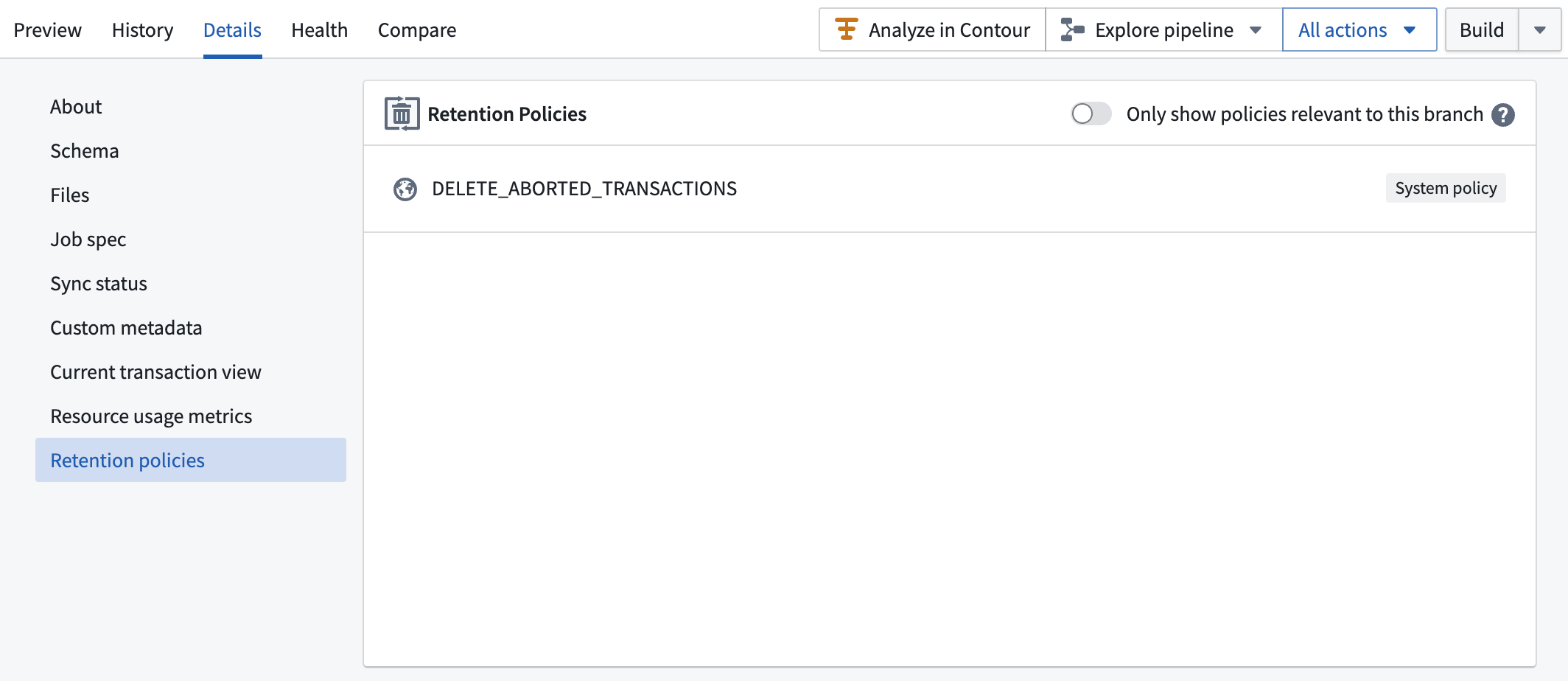
Branches
While dataset transactions are designed to enable a dataset's contents to change over time, additional functionality is needed to enable collaboration —having multiple users experiment with changes to a dataset simultaneously. Branches in a dataset are designed to enable these workflows.
To learn about branching in Foundry, both on individual datasets and across entire pipelines, refer to the Branching concept page.
Dataset views
A dataset view represents the effective file contents of a dataset for a branch at a point in time. Historical views are analogous to historical versions of a dataset. To calculate which files are in a view:
- Start with an empty set of files.
- The view at a given time begins at the latest
SNAPSHOTtransaction before that point in time. If there is noSNAPSHOTtransaction present, then take the earliest transaction for the dataset instead. - For the first transaction in the view, and for each subsequent transaction, do the following:
- For a
SNAPSHOT(which would only be the first transaction) orAPPENDtransaction, add all the transaction's files to the set. - For an
UPDATEtransaction, add all the transaction's files to the set and replace existing files. - For a
DELETEtransaction, remove all files in the transaction from the set.
The resulting set of files constitutes a dataset view.
If a dataset exclusively contains SNAPSHOT transactions, the number of views is equal to the number of transactions. In the case of an incremental dataset, the number of views would be equal to the number of SNAPSHOT transactions.
A view may constitute transactions from multiple branches. For example, given an incremental dataset starting with a SNAPSHOT and some APPEND transactions on the master branch, these transactions will form the start of the dataset view on the branch if subsequent transactions on the branch are also APPEND (or, strictly, not SNAPSHOT) transactions.
Schemas
A schema is metadata on a dataset view that defines how the files within the view should be interpreted. This includes how files in the view should be parsed, and how the columns or fields in the files are named or typed. The most common schemas in Foundry are tabular—they describe the columns in a dataset, including their names and field types.
Note that there is no guarantee that the files in a dataset actually conform to the specified schema. For example, it is possible to apply a Parquet schema to a dataset that contains CSV files. In this case, client applications attempting to read the contents of the dataset would encounter errors caused by the fact that some files do not conform to the schema.
Because schemas are stored on a dataset view, schemas can change over time. This is useful because the contents of a dataset may structurally change over time. For example, a new transaction may introduce a new column to a tabular dataset or change the type of a field.
In Foundry, you can view the schema on any dataset in the Dataset Preview application by navigating to the Details tab and selecting Schema.
Supported field types
Below is a list of field types available for datasets:
BOOLEANBYTESHORTINTEGERLONGFLOATDOUBLEDECIMALSTRINGMAPARRAYSTRUCTBINARYDATETIMESTAMP
Some field types require additional parameters:
DECIMALrequiresprecisionandscale. If you are unsure of what to set for these parameters, a good default isprecision: 38andscale: 18.38is the highest possible precision value.MAPrequiresmapKeyTypeandmapValueType, which are both field types.ARRAYrequiresarraySubType, a field type.STRUCTrequiressubSchemas, a list of field types.
For more information on these field types indicated above, including descriptions and examples, see Spark data types documentation ↗.
Schema options
In the Schema section of the Details tab in Dataset Preview, you can add optional parsing configurations for CSV files in the options block at the bottom of the schema metadata. See the CSV parsing documentation for more information.
File formats
Schemas include information about the underlying storage format of the files in the dataset. The three most widely-used formats are:
- Parquet
- Avro
- Text
The Text file format can be used to represent a wide range of file types, including a variety of CSV formats or JSON files. Additional information about how Text should be parsed is stored in a schema field called customMetadata.
In practice, for non-tabular formats such as JSON or XML, we recommend storing files in an unstructured (schema-less) dataset and applying a schema in a downstream data transformation as described in the schema inference documentation.
Backing filesystem
The files tracked within a dataset are not stored in Foundry itself. Instead, a mapping is maintained between a file's logical path in Foundry and its physical path in a backing file system. The backing filesystem for Foundry is specified by a base directory in a Hadoop FileSystem ↗. This can be a self-hosted HDFS cluster, but is more commonly configured using a cloud storage provider such as Amazon S3. All dataset files are stored in a folder hierarchy below the backing file system's base directory.
中文翻译
数据集(Datasets)
数据集(Dataset) 是数据在进入Foundry并映射到本体论(Ontology)过程中最基本的数据表示形式。从根本上说,数据集是对存储在底层文件系统(backing file system)中的文件(File)集合的封装。使用Foundry数据集的好处在于,它们提供了对权限管理、模式管理、版本控制和随时间更新的集成支持。我们将在本文档的其余部分探讨这些功能背后的概念。
在Foundry的数据集成层中,数据集用于存储和表示所有类型的数据——结构化、非结构化和半结构化数据:
- 结构化(Structured)(表格型)数据包含以开源格式(如Parquet ↗)存储的表格数据文件,以及关于数据集中列的元数据。这些元数据作为模式(Schema)与数据集一起存储。
- 非结构化(Unstructured)数据集包含图像、视频或PDF等文件,但没有关联的模式。
- 半结构化(Semi-structured)数据集包含XML或JSON等文件格式。虽然可以将模式应用于这些文件格式,但为了性能和易用性,更推荐在下游数据转换中推断表格模式(Infer a tabular schema)。
事务(Transactions)
数据集设计为随时间变化。当您在Foundry中打开一个数据集并看到行和列时,您实际看到的是最新的数据集视图(Dataset View)。
作为最终用户,您通常使用构建(Builds)来修改数据集,这允许您根据指定的逻辑更新数据集的内容。然而,在幕后,数据集是通过事务(Transaction)随时间更新的,事务代表对数据集中文件的修改。事务有一个简单的生命周期:
- 事务启动(Started)后,它处于
OPEN状态。在此状态下,可以在数据集的底层文件系统中打开和写入文件。 - 事务可以提交(Committed),使其进入
COMMITTED状态,此时所有写入的文件都出现在最新的数据集视图中。 - 事务可以中止(Aborted),使其进入
ABORTED状态。事务期间写入的任何文件都将被忽略。
如果您是软件工程师,您可能熟悉Git。数据集事务是Foundry支持数据版本控制的基础,有时被称为"数据的Git"。事务类似于Git中的提交(Commit):对数据集内容的原子性更改。
事务类型(Transaction types)
在事务中修改数据集文件的方式取决于事务类型。共有四种可能的事务类型:SNAPSHOT、APPEND、UPDATE和DELETE。
SNAPSHOT
SNAPSHOT事务用一组全新的文件替换当前的数据集视图。
SNAPSHOT事务是最简单的事务类型,是批处理管道(Batch Pipelines)的基础。
APPEND
APPEND事务向当前数据集视图添加新文件。
APPEND事务不能修改当前数据集视图中的现有文件。如果打开了APPEND事务并覆盖了现有文件,则尝试提交该事务将会失败。
APPEND事务是增量管道(Incremental Pipelines)的基础。通过仅将新数据同步到Foundry并在整个管道中仅处理这些新数据,可以高效地端到端处理大型数据集的变更。然而,构建和维护增量管道会带来额外的复杂性。了解更多关于增量管道的信息。
UPDATE
UPDATE事务与APPEND类似,会向数据集视图添加新文件,但也可能覆盖现有文件的内容。
:::callout{theme="warning"}
UPDATE事务打破了增量管道(Incremental Pipelines)的仅追加要求。如果数据集接收UPDATE事务,下游管道无法增量处理数据,必须回退到SNAPSHOT(批处理)处理。仅在无法避免修改现有文件时才使用UPDATE事务。更多详情,请参见增量转换和仅追加输入(Incremental transforms and append-only inputs)。
:::
在配置基于文件的同步(File-based syncs)从外部系统摄取数据时,您选择的事务类型决定了数据在管道中的流动方式。三种常见的摄取模式是:
- 批量镜像(Batch mirror)(
SNAPSHOT): 每次同步运行摄取所有文件并提交一个SNAPSHOT事务。这是最简单的模式,适用于完整文件集足够小、可以在每次运行时重新加载的情况。 - 增量镜像(Incremental mirror)(
APPEND): 每次同步运行仅摄取新文件并提交一个APPEND事务。此模式支持端到端的增量管道,是仅添加文件而不修改文件时的推荐方法。 - 增量镜像(Incremental mirror)(
UPDATE): 每次同步运行摄取新文件和已修改文件并提交一个UPDATE事务。仅当外部系统修改现有文件时才使用此模式,因为它会阻止下游的增量处理。
有关这些模式的详细配置指南,包括过滤器设置和矛盾选项,请参见基于文件的同步(File-based syncs)。
DELETE
DELETE事务移除当前数据集视图中的文件。
请注意,提交DELETE事务并不会从底层文件系统中删除实际文件——它只是从数据集视图中移除文件引用。
在实践中,DELETE事务主要用于实现数据保留工作流。通过基于保留策略(通常基于文件的年龄)删除数据集上的文件,可以从Foundry中移除数据,既是为了最小化存储成本,也是为了遵守数据治理要求。
事务类型示例
假设一个数据集分支上从最旧到最新的事务历史如下:
SNAPSHOT包含文件A和BAPPEND添加文件CUPDATE将文件A修改为不同内容A'DELETE移除文件B
此时,当前数据集视图将包含A'和C。如果我们添加包含文件D的第五个SNAPSHOT事务,当前数据集视图将仅包含D(因为SNAPSHOT事务开始新的视图),而前四个事务将位于旧视图中。
保留(Retention)
由于DELETE事务实际上不会从底层文件系统(Backing filesystem)中移除旧数据,您可以使用保留策略(Retention policies)来移除不再需要的事务中的数据。
查看数据集保留策略 [Beta]
:::callout{theme="neutral" title="Beta"} 查看数据集保留策略处于测试版(Beta)开发阶段,可能在您的环境中不可用。功能在活跃开发期间可能会发生变化。请联系Palantir支持以请求访问数据集保留策略。 :::
要查看当前应用于特定数据集的保留策略,请导航到数据集详情页面(Dataset details page)。
分支(Branches)
虽然数据集事务旨在使数据集的内容随时间变化,但还需要额外的功能来实现协作(Collaboration)——允许多个用户同时试验对数据集的更改。数据集中的分支(Branch)正是为支持这些工作流而设计的。
要了解Foundry中的分支,包括单个数据集和整个管道上的分支,请参考分支(Branching)概念页面。
数据集视图(Dataset views)
数据集视图表示某个时间点上某个分支的数据集的有效文件内容。历史视图类似于数据集的历史版本。要计算视图中的文件:
- 从空文件集开始。
- 给定时间的视图从该时间点之前最新的
SNAPSHOT事务开始。如果没有SNAPSHOT事务,则改为取数据集的最早事务。 - 对于视图中的第一个事务以及每个后续事务,执行以下操作:
- 对于
SNAPSHOT(只能是第一个事务)或APPEND事务,将事务的所有文件添加到集合中。 - 对于
UPDATE事务,将事务的所有文件添加到集合中并替换现有文件。 - 对于
DELETE事务,从集合中移除事务中的所有文件。
得到的文件集构成一个数据集视图。
如果数据集仅包含SNAPSHOT事务,则视图的数量等于事务的数量。对于增量数据集,视图的数量等于SNAPSHOT事务的数量。
一个视图可能包含来自多个分支的事务。例如,给定一个从master分支上的SNAPSHOT和一些APPEND事务开始的增量数据集,如果该分支上的后续事务也是APPEND(严格来说,不是SNAPSHOT)事务,则这些事务将构成该分支上数据集视图的开头。
模式(Schemas)
模式是数据集视图(Dataset View)上的元数据,定义了如何解释视图中的文件。这包括如何解析视图中的文件,以及文件中的列或字段如何命名和类型化。Foundry中最常见的模式是表格型(Tabular)——它们描述数据集中的列,包括列名和字段类型(Field types)。
请注意,不能保证数据集中的文件实际符合指定的模式。例如,可以将Parquet模式应用于包含CSV文件的数据集。在这种情况下,尝试读取数据集内容的客户端应用程序会遇到错误,因为某些文件不符合模式。
由于模式存储在数据集视图上,模式可以随时间变化。这很有用,因为数据集的内容可能在结构上随时间变化。例如,新事务可能向表格数据集引入新列或更改字段的类型。
在Foundry中,您可以在数据集预览(Dataset Preview)应用程序中查看任何数据集上的模式,方法是导航到详情(Details)选项卡并选择模式(Schema)。
支持的字段类型(Supported field types)
以下是数据集可用的字段类型列表:
BOOLEANBYTESHORTINTEGERLONGFLOATDOUBLEDECIMALSTRINGMAPARRAYSTRUCTBINARYDATETIMESTAMP
某些字段类型需要额外参数:
DECIMAL需要precision和scale。如果您不确定如何设置这些参数,一个好的默认值是precision: 38和scale: 18。38是最高可能的精度值。MAP需要mapKeyType和mapValueType,两者都是字段类型。ARRAY需要arraySubType,这是一个字段类型。STRUCT需要subSchemas,这是一个字段类型列表。
有关上述字段类型的更多信息,包括描述和示例,请参见Spark数据类型文档 ↗。
模式选项(Schema options)
在数据集预览的详情(Details)选项卡的模式(Schema)部分,您可以在模式元数据底部的options块中添加CSV文件的可选解析配置。有关更多信息,请参见CSV解析(CSV parsing)文档。
文件格式(File formats)
模式包含关于数据集中文件底层存储格式的信息。三种最广泛使用的格式是:
- Parquet
- Avro
- Text
Text文件格式可用于表示多种文件类型,包括各种CSV格式或JSON文件。关于如何解析Text的附加信息存储在名为customMetadata的模式字段中。
在实践中,对于JSON或XML等非表格格式,我们建议将文件存储在非结构化(无模式)数据集中,并在下游数据转换中应用模式,如模式推断文档(Schema inference documentation)所述。
底层文件系统(Backing filesystem)
数据集中跟踪的文件并不存储在Foundry本身中。相反,文件在Foundry中的逻辑路径(Logical path)与底层文件系统中的物理路径(Physical path)之间维护着映射关系。Foundry的底层文件系统由Hadoop FileSystem ↗中的基目录指定。这可以是自托管的HDFS集群,但更常见的是使用云存储提供商(如Amazon S3)进行配置。所有数据集文件都存储在底层文件系统基目录下的文件夹层次结构中。