Palantir-provided drivers for JDBC sources(Palantir 提供的 JDBC 源驱动程序)
You can connect your Foundry enrollment to various external sources using a JDBC driver that appears as Foundry sources in Data Connection. These sources are wrappers around JDBC drivers that allow for customization, and they come with recommended and required properties and links to official documentation.
If you want to upload your own JDBC driver to Foundry, review the documentation on configuring a custom JDBC driver
Setup
-
Open the Data Connection application and select +New Source in the upper right corner of the screen.
-
Find your specific source from the listed options. View a complete list of Foundry-provided drivers.
-
Choose to run the source capabilities on a Foundry worker or on an agent worker.
-
Select Documentation ↗ to review official documentation for the driver source.

-
Follow the additional configuration prompts to continue the setup of your connector using the information in the sections below.
Configuration options
| Parameter | Required? | Description |
|---|---|---|
URL |
Yes | The JDBC URL that is used by the driver. Comes pre-populated with a template that may need to be modified to ensure correct behavior. Refer to the source system's documentation for the JDBC URL format, and review the Java documentation ↗ for additional information. |
JDBC properties |
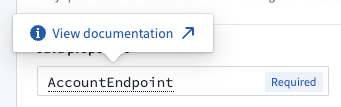
Yes | Lists out all required and recommended properties that the driver needs. Hovering over a required or recommended property will allow you to navigate to the official documentation. You can add any additional properties by choosing the + Add property button. |
JDBC properties
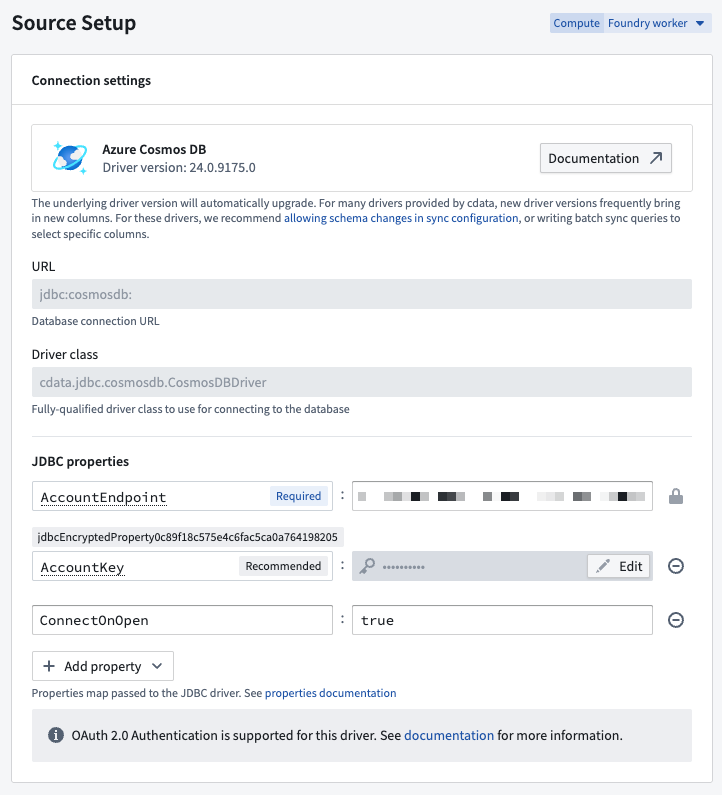
You can add properties ↗ to your JDBC connection to configure behavior. Certain properties are mandatory for a particular driver. These mandatory properties are populated by default and must be set before you can save your source. You can also view recommended properties that you can add by selecting +Add property and viewing the Recommended section.
Hover over the name of a Required or Recommended property to visit the official documentation page for the selected driver.
Configure Foundry-provided driver syncs
SQL queries
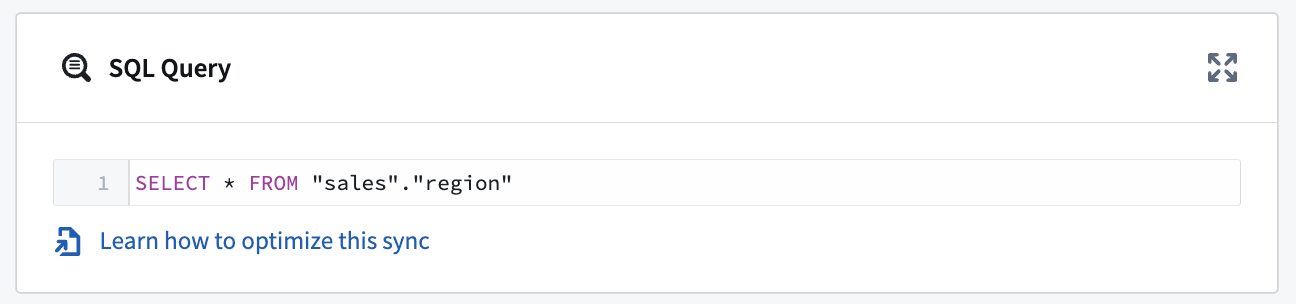
A single SQL query can be executed per sync. This query should produce a table of data as an output, which will be saved to the output dataset in Foundry.
Exceptionally, this query can invoke stored procedures that produce data as a result. Read below for more details.
Configuration options for CData-provided drivers
Many of the Foundry-provided drivers are developed by CData ↗. CData provides full documentation for each driver including, in-depth instructions for generating credentials on the source system. You can navigate to these instructions from the documentation page for any CData driver.
The sections below contain information about CData-specific configuration options that can help you successfully connect to external systems.
Automatically perform test connection on source exploration
By default, CData drivers defer performing the connection until actual queries are made. This can result in mistaken assumptions around source exploration, since the display of static metadata tables stored in the driver may lead you to think that exploration was successful, when in reality the connection to the underlying system was not successful due to missing credentials, missing egress policies, or other issues.
You can force the driver to perform a no-operation test connection, even when only exploring the source, by setting the ConnectOnOpen JDBC property to true. This is recommended to ensure that all connection issues are uncovered when exploring the source.
:::callout{theme="warning"}
ConnectOnOpen: true can not be used alongside OAuth 2.0 authentication.
ConnectOnOpen: true can be the reason the connection fail when the credentials used to connect are very scoped down and are not allowed perform the no-operation command used for the test connection.
:::
Certificate authentication
Many CData drivers support certificate authentication, in particular for Azure-based systems.
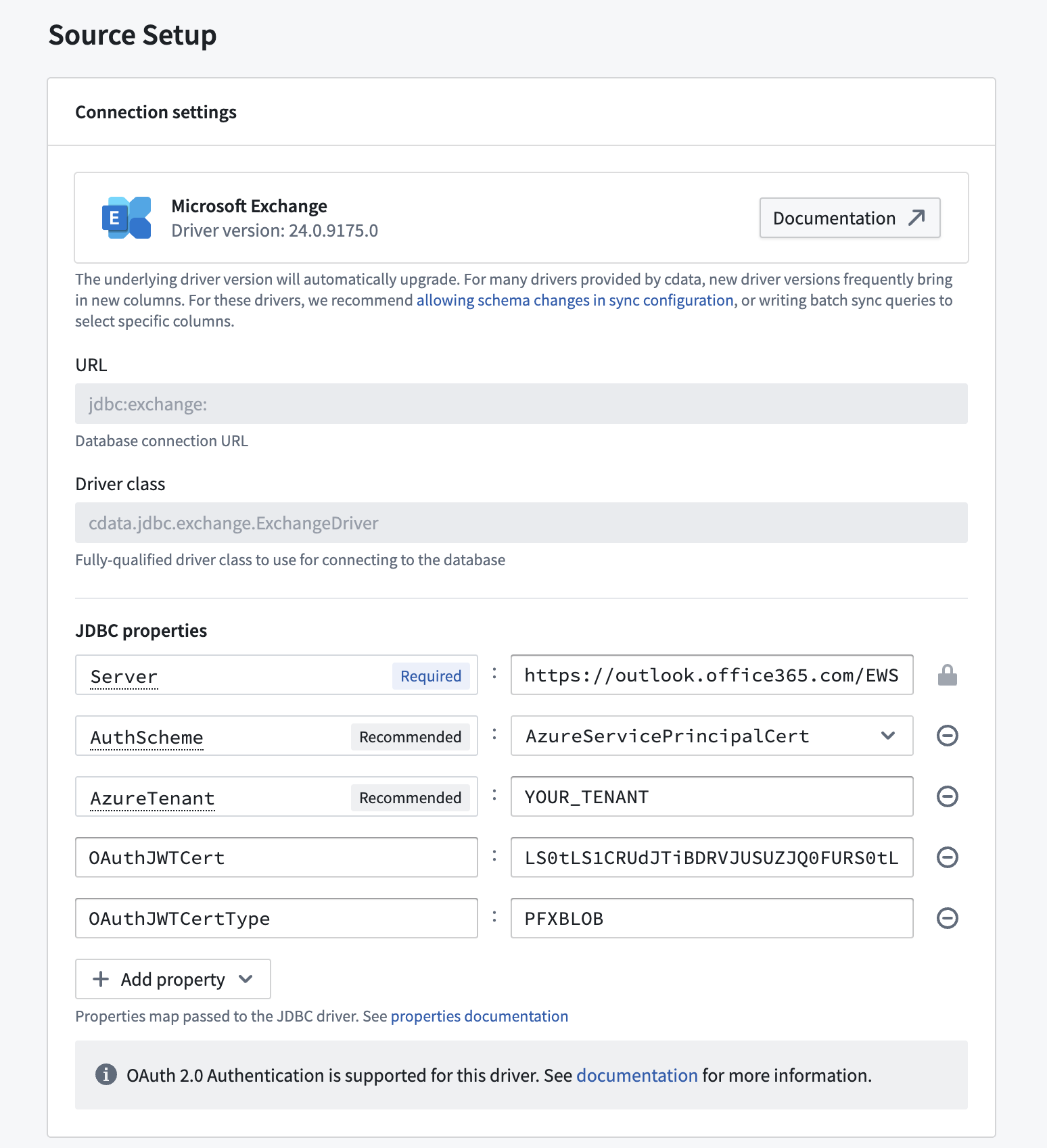
To connect using a certificate, you must define the following JDBC properties in addition to the connection-specific configuration requirements:
- AuthScheme:
AzureServicePrincipalCert - OAuthJWTCertType:
PFXBLOB - OAuthJWTCert:
base64-encoded_cert/pfx/pem_file_content - (Optional) OAuthJWTCertPassword:
password_for_the_cert/pfx/pem_file
To transform the certificate file into Base64 format on a Windows machine, use the following command: [Convert]::ToBase64String([IO.File]::ReadAllBytes("\path\to\file.pfx"))
Stored procedures
Some CData drivers connecting to file-based source systems like Amazon Marketplace or Microsoft OneDrive rely on the ability to invoke stored procedures to ingest data.
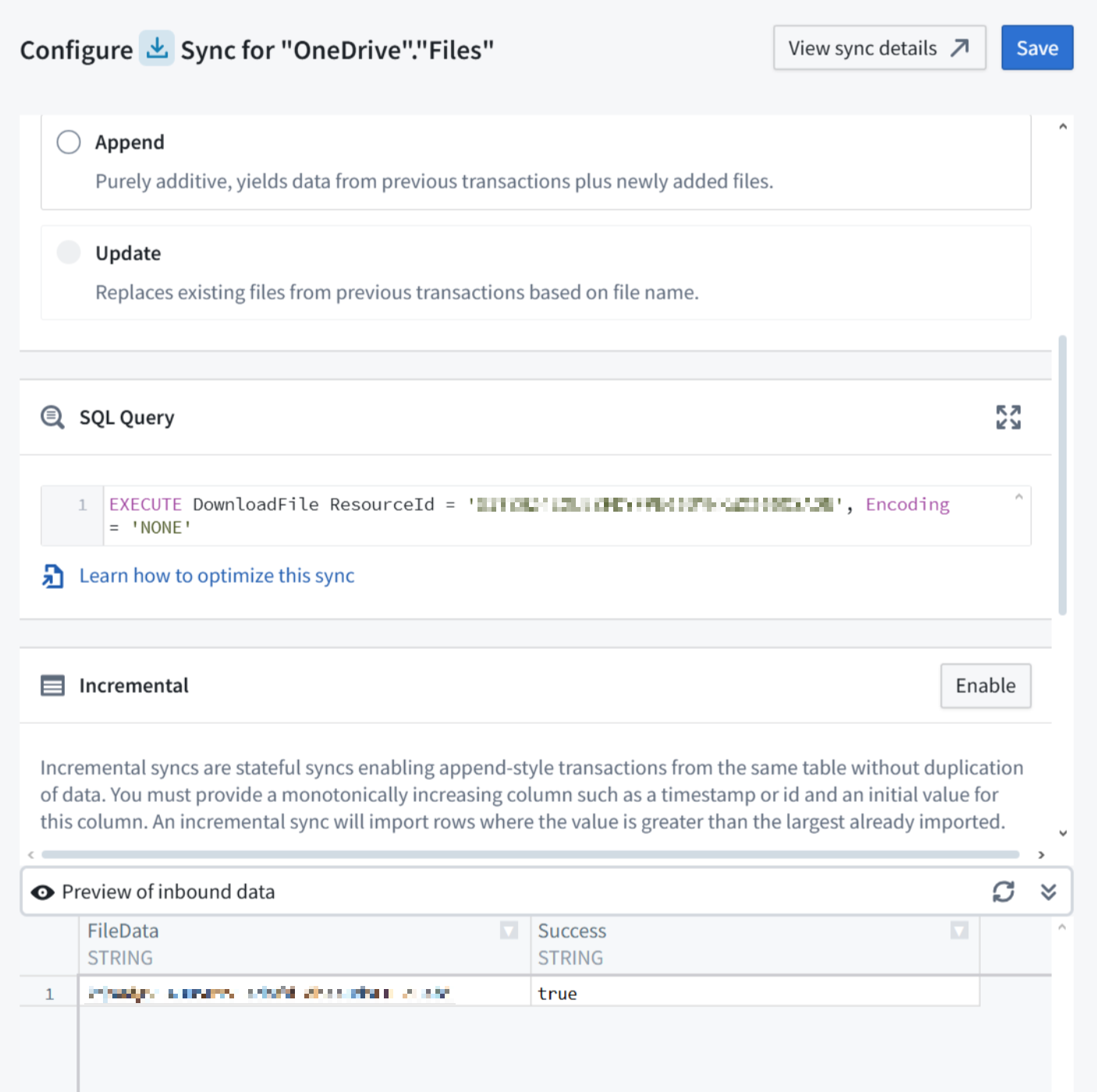
Running the stored procedure will produce a table where the file content is stored as a Base64 encoded string. You can decode it in a downstream data transformation, for example in Pipeline Builder using a Base64 decode board.
OAuth 2.0 authentication
Some CData drivers support OAuth 2.0 ↗ authorization code grant flow. This enables secure connections to external systems by allowing users to authenticate with their own credentials and perform actions on their behalf. The list of available drivers details which ones support OAuth 2.0 authentication.
:::callout{theme="warning"} OAuth 2.0 authentication is only supported when running the source on a Foundry worker. Sources running on an agent worker do not support OAuth 2.0 authentication. :::
To use OAuth 2.0 authentication:
-
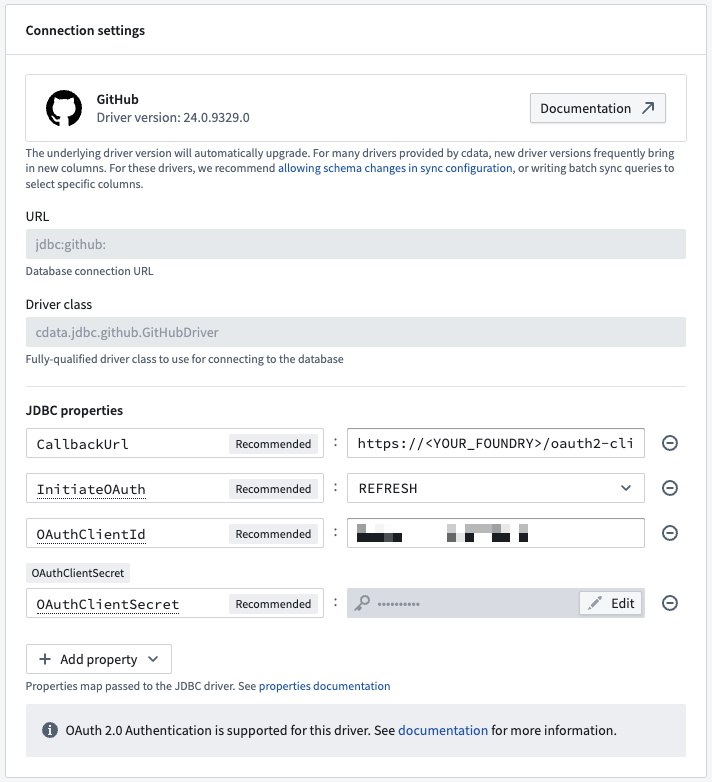
Add the CallbackUrl JDBC property to the source configuration. The property value will auto-fill with a URL of the form
https://<YOUR_FOUNDRY_URL>/workspace/oauth2-clients/callback. -
In the external system, register a custom OAuth application and provide the callback URL.
-
The specifics of how to register a custom OAuth application will depend on each external system. For GitHub ↗, for example, navigate to Settings > Developer Settings > OAuth Apps. Then select New OAuth App.
-
Copy the generated OAuth client id and OAuth client secret and paste them in your source configuration JDBC properties.
-
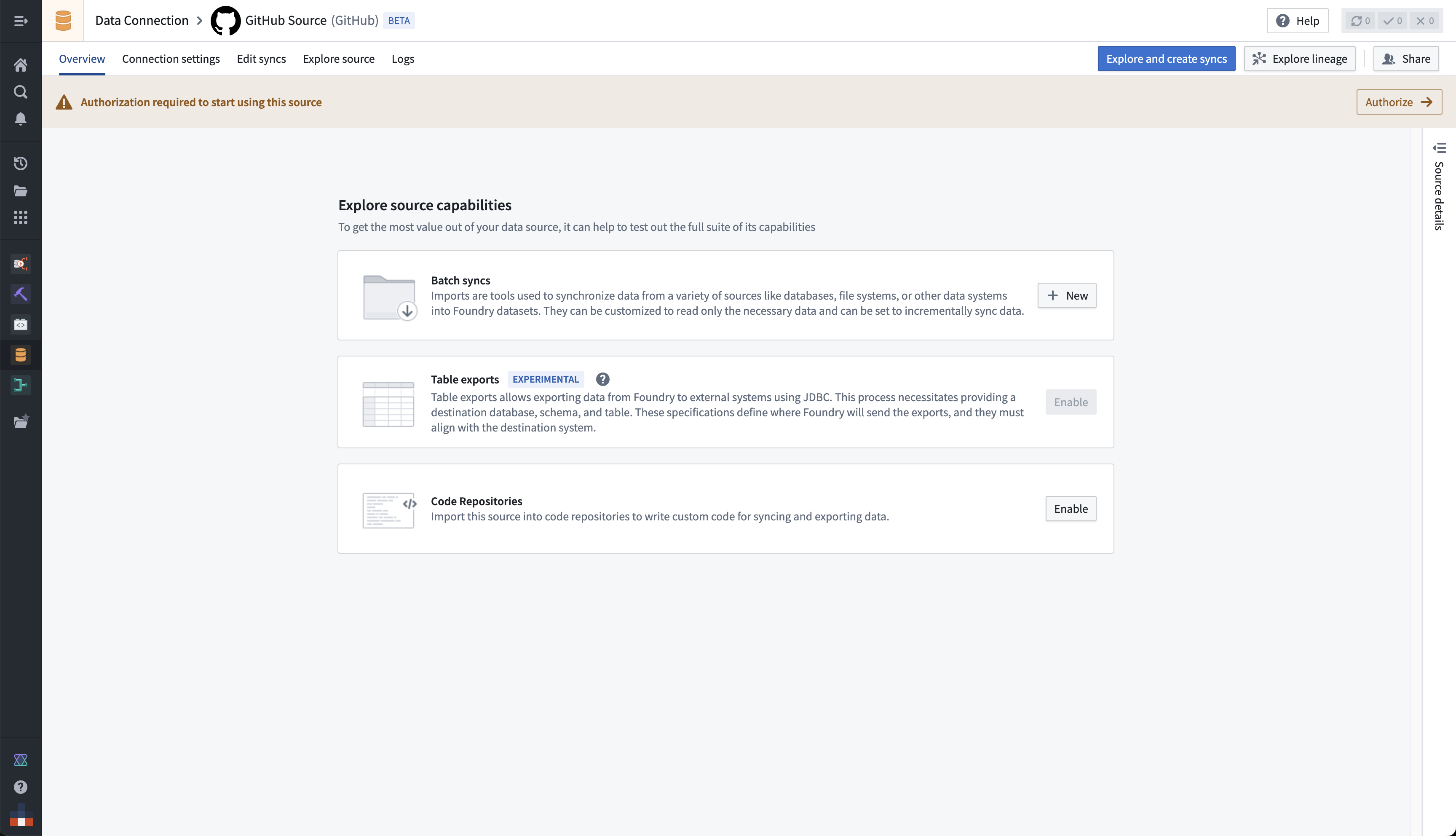
Once the configuration is saved, navigate to the source overview page. Select Authorize in the top banner labeled Authorization required to start using this source to start the OAuth flow.
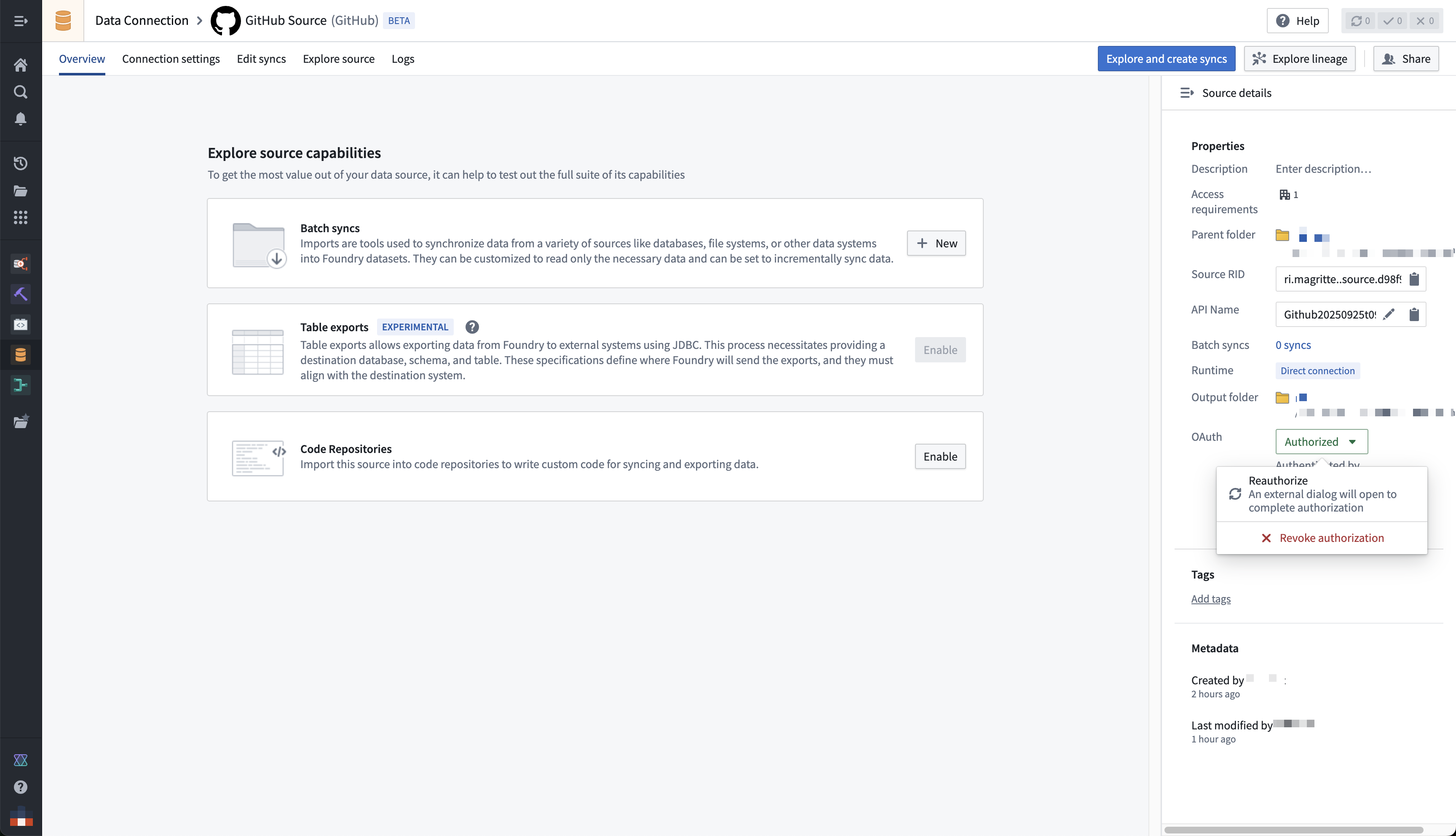
You can renew or revoke authorization from the right-side panel on the source overview page.
:::callout{theme="neutral"}
Starting, renewing, or revoking the OAuth flow requires the Owner role on the source by default. Users with only Viewer or Editor will see a permission denied error when selecting Authorize. If you need to grant these operations without granting full Owner permissions, define a custom role that includes the source administration operations.
:::
Available drivers
中文翻译
Palantir 提供的 JDBC 源驱动程序
您可以使用 JDBC 驱动程序将 Foundry 注册连接到各种外部源,这些驱动程序在 Data Connection 中显示为 Foundry 源。这些源是 JDBC 驱动程序的封装,允许进行自定义,并附带推荐和必需的属性以及官方文档的链接。
如果您想将自己的 JDBC 驱动程序上传到 Foundry,请查看关于配置自定义 JDBC 驱动程序的文档。
设置
-
打开 Data Connection 应用程序,在屏幕右上角选择 +New Source。
-
从列出的选项中找到您的特定源。查看 Foundry 提供的驱动程序的完整列表。
-
选择在 Foundry 工作节点(Foundry worker) 或 代理工作节点(agent worker) 上运行源功能。
-
选择 Documentation ↗ 查看驱动程序源的官方文档。
-
按照其他配置提示,使用以下部分中的信息继续设置您的连接器。
配置选项
| 参数 | 是否必需 | 描述 |
|---|---|---|
URL |
是 | 驱动程序使用的 JDBC URL。预先填充了一个模板,可能需要修改以确保正确行为。请参考源系统的文档了解 JDBC URL 格式,并查看 Java 文档 ↗ 以获取更多信息。 |
JDBC properties |
是 | 列出驱动程序所需的所有必需和推荐属性。将鼠标悬停在必需或推荐属性上,可以导航到官方文档。您可以通过选择 + Add property 按钮添加任何其他属性。 |
JDBC 属性
您可以向 JDBC 连接添加属性 ↗ 来配置行为。某些属性对于特定驱动程序是强制性的。这些强制性属性默认已填充,必须在保存源之前设置。您还可以通过选择 +Add property 并查看 Recommended 部分来添加推荐属性。
将鼠标悬停在 Required 或 Recommended 属性的名称上,可以访问所选驱动程序的官方文档页面。
配置 Foundry 提供的驱动程序同步
SQL 查询
每次同步可以执行一个 SQL 查询。此查询应生成一个数据表作为输出,该输出将保存到 Foundry 中的输出数据集。
在特殊情况下,此查询可以调用产生数据结果的存储过程。更多详情请阅读下文。
CData 提供的驱动程序的配置选项
许多 Foundry 提供的驱动程序由 CData ↗ 开发。CData 为每个驱动程序提供完整的文档,包括在源系统上生成凭据的详细说明。您可以从任何 CData 驱动程序的文档页面导航到这些说明。
以下部分包含有关 CData 特定配置选项的信息,这些选项可以帮助您成功连接到外部系统。
在源探索时自动执行测试连接
默认情况下,CData 驱动程序会延迟执行连接,直到实际进行查询。这可能导致对源探索的错误假设,因为驱动程序中存储的静态元数据表的显示可能会让您认为探索成功,而实际上由于缺少凭据、缺少出口策略或其他问题,与底层系统的连接并未成功。
您可以通过将 ConnectOnOpen JDBC 属性设置为 true,强制驱动程序即使在仅探索源时也执行无操作测试连接。建议这样做,以确保在探索源时发现所有连接问题。
:::callout{theme="warning"}
ConnectOnOpen: true 不能与 OAuth 2.0 身份验证 一起使用。
当用于连接的凭据范围非常有限,并且不允许执行用于测试连接的无操作命令时,ConnectOnOpen: true 可能是连接失败的原因。
:::
证书身份验证
许多 CData 驱动程序支持证书身份验证,特别是对于基于 Azure 的系统。
要使用证书进行连接,除了连接特定的配置要求外,您还必须定义以下 JDBC 属性:
- AuthScheme:
AzureServicePrincipalCert - OAuthJWTCertType:
PFXBLOB - OAuthJWTCert:
base64-encoded_cert/pfx/pem_file_content - (可选) OAuthJWTCertPassword:
password_for_the_cert/pfx/pem_file
要在 Windows 机器上将证书文件转换为 Base64 格式,请使用以下命令:[Convert]::ToBase64String([IO.File]::ReadAllBytes("\path\to\file.pfx"))
存储过程
一些连接到基于文件的源系统(如 Amazon Marketplace 或 Microsoft OneDrive)的 CData 驱动程序依赖于调用存储过程来摄取数据。
运行存储过程将生成一个表,其中文件内容存储为 Base64 编码的字符串。您可以在下游数据转换中对其进行解码,例如在 Pipeline Builder 中使用 Base64 解码(Base64 decode) 模块。
OAuth 2.0 身份验证
一些 CData 驱动程序支持 OAuth 2.0 ↗ 授权码授予流程。这允许用户使用自己的凭据进行身份验证并代表他们执行操作,从而实现对外部系统的安全连接。可用驱动程序列表详细说明了哪些驱动程序支持 OAuth 2.0 身份验证。
:::callout{theme="warning"} OAuth 2.0 身份验证仅在源运行在 Foundry 工作节点(Foundry worker) 上时受支持。在 代理工作节点(agent worker) 上运行的源不支持 OAuth 2.0 身份验证。 :::
要使用 OAuth 2.0 身份验证:
-
将 CallbackUrl JDBC 属性添加到源配置中。属性值将自动填充为
https://<YOUR_FOUNDRY_URL>/workspace/oauth2-clients/callback形式的 URL。 -
在外部系统中,注册一个自定义 OAuth 应用程序并提供回调 URL。
-
注册自定义 OAuth 应用程序的具体方法取决于每个外部系统。例如,对于 GitHub ↗,请导航到 Settings > Developer Settings > OAuth Apps。然后选择 New OAuth App。
-
复制生成的 OAuth client id 和 OAuth client secret,并将它们粘贴到您的源配置 JDBC 属性中。
-
保存配置后,导航到源概览页面。在标有 Authorization required to start using this source 的顶部横幅中选择 Authorize 以启动 OAuth 流程。
您可以从源概览页面的右侧面板更新或撤销授权。
:::callout{theme="neutral"}
默认情况下,启动、更新或撤销 OAuth 流程需要源上的 Owner 角色。只有 Viewer 或 Editor 角色的用户在选择 Authorize 时会看到权限拒绝错误。如果您需要授予这些操作而不授予完整的 Owner 权限,请定义一个包含源管理操作的自定义角色。
:::