Streams(流(Streams))
Similar to a dataset, a stream is a representation of data from when it lands in Foundry through when it is processed by a downstream system. A stream is a wrapper around a collection of rows which are stored by both a persistent “hot buffer” and “cold storage” backed by a file system. The benefit of using Foundry streams is they provide the same primitives as a Foundry dataset (branching, version control, permission management, schema management, etc) while also providing a low latency view of the data.
Streams are inherently tabular and, therefore, inherently structured. They are stored in open source formats such as Avro ↗, along with metadata about the columns themselves. This metadata is stored alongside the stream as a schema.
Stream storage
Hot buffer
As records flow into a Foundry stream, they are stored in a hot buffer that is available in low latency for all downstream applications that support reading streams. This hot buffer is critical for enabling low latency transforms and availability. It provides at-least-once semantics for data ingestion and optional exactly-once semantics for data processing in platform.
Cold buffer
All data from within a Foundry stream is transferred from the hot buffer to the cold storage every few minutes. We call this process "archiving", and it makes the data available as a standard Foundry dataset. This means that any Foundry application can operate on streaming data, even if it doesn’t process data in real-time from the hot buffer. The dataset view of a Foundry stream behaves exactly as a standard Foundry dataset in the platform.
Stream processing
Read data from a stream
Foundry products with low latency enabled are able to read a hybrid view of the data. By reading data from both the hot and cold storage layers, products can provide a complete view of the data. This view gives products access to the low latency records still in hot storage and older data that has been transferred to cold storage. In this way, a Foundry stream can have the benefits of both the low latency of hot storage and the lower storage costs of cold storage.
Transactions
Unlike standard Foundry datasets, streams do not have transaction boundaries inherent in the stream themselves. Instead, each row is treated as its own transaction, and state is tracked on a per row basis. This allows a stream to be read at a granular level so Foundry can support push-based transformations without requiring batching or polling.
Stream types
You can configure stream types for each of your streams based on its throughput needs. These stream type settings apply to how streams write data to the hot buffer storage mentioned above. You should only need to modify the stream type settings if stream metrics indicate the stream is being bottlenecked when writing to the hot buffer storage. Latency and throughput are tradeoffs, so only set high throughput/compressed stream types after inspecting stream metrics. We support the following stream configurations:
- High Throughput: This is best for streams that send large amounts of data every second. Enabling this stream type might introduce some non-zero latency at the expense of a higher throughput. Therefore, before you enable it you should inspect stream metrics. If the average batch size is equal to the max batch size or if the job fails because of Kafka producer batches expiring, you might need to enable the high throughput setting.
- Compressed: Enabling this configuration compresses message batches when producing data to the hot storage buffer. Compression helps reduce the size of the data being sent, resulting in lower network usage and storage, at the cost of some additional CPU usage for compression and decompression. We only recommend enabling this stream type if your stream contains a high volume of repetitive strings and is experiencing poor network bandwidth symptoms like non-zero lag, lower than expected throughput, or dropped records.
You can set stream types when creating a new stream on the Define page. You can also update stream types in stream settings for an existing stream. For this, navigate to your streaming dataset in Foundry and select Details in the toolbar. Then, go to Stream Settings. You can change the stream type and enable/disable compression here.
Partitions
To maintain high throughput, Foundry breaks the input stream into multiple partitions for parallel processing. When creating a stream, you can control the number of partitions we create through the throughput slider. Note that although the data is partitioned, all reads and writes to the stream operate as if there is a single partition. This behavior provides design transparency to consumers and producers of Foundry streams.
Each additional partition for a given stream increases the max throughput the stream can process. A good heuristic is that each partition increases the throughput by approximately 5mb/s.
Supported field types
Foundry streams support the same data types as a Foundry dataset, including:
BOOLEANBYTESHORTINTEGERLONGFLOATDOUBLEDECIMALSTRINGMAPARRAYSTRUCTBINARYDATETIMESTAMP
Streaming Jobs
All streaming jobs are represented internally as job graphs, which provide a visual representation of your streaming pipeline. As data is processed, it flows through the job graph according to the directed edges until reaching a data sink.
Checkpointing
Foundry streaming provides fault tolerance while processing data by storing both the active state and current processing location in a checkpoint.
Checkpoints are periodically produced by data sources and flow through the job graph alongside the data from the source. Once a checkpoint has reached all data sinks at the end of the job graph, all rows emitted before that checkpoint by the source must have also reached the sink.
Checkpoints allow a streaming job to be restarted from the point of the latest checkpoint, rather than reprocessing already-seen data. Checkpoints store the state of each operator in your job graph, plus the last-processed data point in the stream. On your streaming job's Job Details page, you can see the status, size, and duration of your stream's last few checkpoints in real-time.
Streaming consistency guarantees
Streaming in Foundry operates with two consistency guarantees: AT_LEAST_ONCE and EXACTLY_ONCE.
AT_LEAST_ONCE semantics
AT_LEAST_ONCE semantics guarantee that a message will be delivered downstream at least once, but a message may be delivered multiple times in case of checkpointing failures or retries. This means that duplicates may occur, and the consuming application should be designed to handle or tolerate duplicate messages.
Benefits of AT_LEAST_ONCE semantics
- Ensures that no messages are lost, providing a high level of message durability.
- Generally offers lower latency compared to
EXACTLY_ONCEsemantics, as messages can be delivered without blocking on the bookkeeping of records.
Drawbacks of AT_LEAST_ONCE semantics
- Requires the downstream consuming application to be able to handle duplicate messages.
EXACTLY_ONCE semantics
EXACTLY_ONCE semantics guarantee that each message will be delivered and processed exactly once, ensuring that there are no duplicates or missing messages. This is the strongest level of message delivery guarantee and can greatly simplify the design of the consuming application.
Benefits of EXACTLY_ONCE semantics
- Ensures that no messages are lost, providing a high level of message durability.
- Eliminates the need for the consuming application to handle duplicate messages or implement idempotent processing.
- Ensures consistency in processing results, as each message is processed exactly once.
Drawbacks of EXACTLY_ONCE semantics
- Typically introduces higher latency compared to
AT_LEAST_ONCEsemantics, due to the additional coordination and tracking required to ensure that messages are not duplicated. Foundry streaming solves this problem through checkpointing.
Latency trade-offs
Choosing between AT_LEAST_ONCE and EXACTLY_ONCE semantics often involves a trade-off between latency and processing complexity. AT_LEAST_ONCE semantics generally provide lower latency because they do not require complex coordination or tracking mechanisms, but they place more responsibility on the consuming application to handle duplicates and maintain consistency. When EXACTLY_ONCE is enabled, records are only visible downstream after each checkpoint has completed (default is two seconds). Notably, the records are still being processed at streaming speeds but only show up downstream when "finalized".
On the other hand, EXACTLY_ONCE semantics provide stronger guarantees and can simplify the design of the consuming application by ensuring that each message is processed exactly once. However, this guarantee comes at the cost of higher latency due to the additional overhead required.
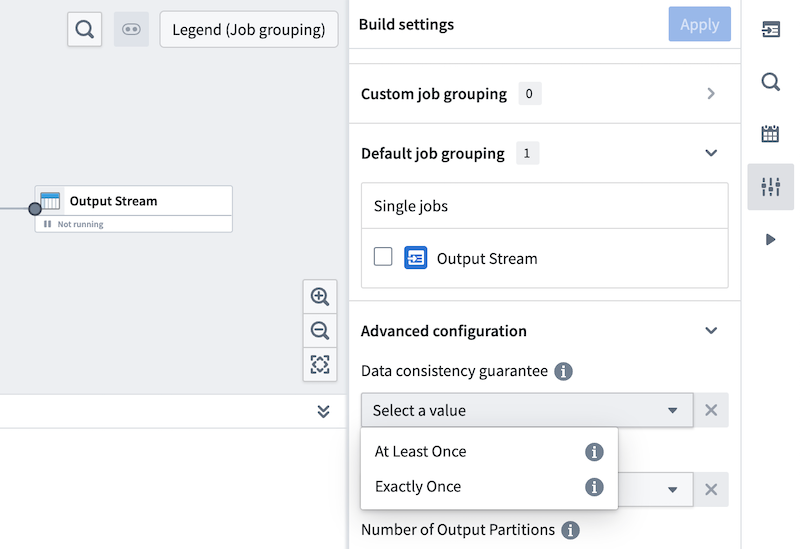
Streaming sources in Foundry currently only support AT_LEAST_ONCE semantics for extracts and exports. Streaming pipelines do support both AT_LEAST_ONCE and EXACTLY_ONCE semantics, and this is configurable under the Build settings section of Pipeline Builder.
中文翻译
流(Streams)
与数据集(dataset)类似,流(stream)是一种数据表示形式,涵盖数据从进入Foundry到被下游系统处理的整个过程。流(stream)是对一组行(row)的封装,这些行同时存储在持久化的"热缓冲区(hot buffer)"和由文件系统支持的"冷存储(cold storage)"中。使用Foundry流(stream)的优势在于,它们提供了与Foundry数据集(dataset)相同的基本功能(分支、版本控制、权限管理、模式管理等),同时还提供了低延迟的数据视图。
流(stream)本质上是表格形式的,因此也是结构化的。它们以开源格式(如Avro ↗)存储,并附带关于列本身的元数据。这些元数据作为模式(schema)与流(stream)一起存储。
流存储(Stream storage)
热缓冲区(Hot buffer)
当记录流入Foundry流(stream)时,它们会被存储在热缓冲区(hot buffer)中,所有支持读取流(stream)的下游应用都可以以低延迟访问该缓冲区。这个热缓冲区(hot buffer)对于实现低延迟转换和可用性至关重要。它为数据摄取提供至少一次(at-least-once)语义,并为平台内的数据处理提供可选的精确一次(exactly-once)语义。
冷缓冲区(Cold buffer)
每隔几分钟,Foundry流(stream)中的所有数据都会从热缓冲区(hot buffer)传输到冷存储(cold storage)。我们将此过程称为"归档(archiving)",它使数据可以作为标准的Foundry数据集(dataset)使用。这意味着任何Foundry应用程序都可以操作流式数据,即使它不实时处理来自热缓冲区(hot buffer)的数据。Foundry流(stream)的数据集视图(dataset view)在平台中的行为与标准Foundry数据集(dataset)完全相同。
流处理(Stream processing)
从流(stream)中读取数据
具有低延迟功能的Foundry产品能够读取数据的混合视图。通过同时从热存储(hot storage)和冷存储(cold storage)层读取数据,产品可以提供完整的数据视图。这种视图使产品能够访问仍在热存储(hot storage)中的低延迟记录以及已传输到冷存储(cold storage)的旧数据。通过这种方式,Foundry流(stream)可以兼具热存储(hot storage)的低延迟优势和冷存储(cold storage)的低存储成本优势。
事务(Transactions)
与标准的Foundry数据集(datasets)不同,流(stream)本身没有固有的事务边界。相反,每一行都被视为其自己的事务,并且状态是基于每行进行跟踪的。这使得流(stream)可以在细粒度级别被读取,从而让Foundry能够支持基于推送的转换,而无需批处理或轮询。
流类型(Stream types)
您可以根据吞吐量需求为每个流(stream)配置流类型(stream types)。这些流类型(stream type)设置适用于流(stream)如何将数据写入上述的热缓冲区(hot buffer)存储。仅当流指标(stream metrics)表明流(stream)在写入热缓冲区(hot buffer)存储时遇到瓶颈时,您才需要修改流类型(stream type)设置。延迟和吞吐量是相互权衡的,因此只有在检查流指标(stream metrics)后才能设置高吞吐量/压缩流类型(stream types)。 我们支持以下流配置(stream configurations):
- 高吞吐量(High Throughput): 这最适合每秒发送大量数据的流(stream)。启用此流类型(stream type)可能会引入一些非零延迟,但会以更高的吞吐量为代价。因此,在启用之前,您应该检查流指标(stream metrics)。如果平均批处理大小等于最大批处理大小,或者由于Kafka生产者批次过期而导致作业失败,您可能需要启用高吞吐量设置。
- 压缩(Compressed): 启用此配置会在将数据生成到热存储缓冲区(hot storage buffer)时压缩消息批次。压缩有助于减小发送数据的大小,从而降低网络使用和存储成本,但代价是增加一些用于压缩和解压缩的CPU使用。我们仅建议在您的流(stream)包含大量重复字符串并且遇到网络带宽不足的症状(如非零延迟、吞吐量低于预期或记录丢失)时启用此流类型(stream type)。
您可以在定义(Define)页面上创建新流(stream)时设置流类型(stream types)。您也可以在现有流(stream)的流设置(stream settings)中更新流类型(stream types)。为此,请在Foundry中导航到您的流式数据集(streaming dataset),然后在工具栏中选择详细信息(Details)。然后,转到流设置(Stream Settings)。您可以在此处更改流类型(stream type)并启用/禁用压缩。
分区(Partitions)
为了保持高吞吐量,Foundry将输入流(input stream)分成多个分区(partitions)以进行并行处理。创建流(stream)时,您可以通过吞吐量滑块控制我们创建的分区(partitions)数量。请注意,尽管数据被分区,但对流(stream)的所有读取和写入操作都像只有一个分区(partition)一样。这种行为为Foundry流(stream)的消费者和生产者提供了设计透明性。
对于给定的流(stream),每增加一个分区(partition)都会提高该流(stream)可以处理的最大吞吐量。一个很好的经验法则是,每个分区(partition)大约增加5mb/s的吞吐量。
支持的字段类型(Supported field types)
Foundry流(streams)支持与Foundry数据集(dataset)相同的数据类型,包括:
BOOLEANBYTESHORTINTEGERLONGFLOATDOUBLEDECIMALSTRINGMAPARRAYSTRUCTBINARYDATETIMESTAMP
流式作业(Streaming Jobs)
所有流式作业(streaming jobs)在内部都表示为作业图(job graphs),它提供了流式管道(streaming pipeline)的可视化表示。当数据被处理时,它会根据有向边流过作业图(job graph),直到到达数据接收器(data sink)。
检查点(Checkpointing)
Foundry流式处理(streaming)通过将活动状态和当前处理位置存储在检查点(checkpoint)中,在处理数据时提供容错能力。
检查点(checkpoints)由数据源定期生成,并沿着作业图(job graph)与来自源的数据一起流动。 一旦检查点(checkpoint)到达作业图(job graph)末尾的所有数据接收器(data sinks),则该检查点(checkpoint)之前由源发出的所有行也必须已到达接收器。
检查点(checkpoints)允许流式作业(streaming job)从最新检查点(checkpoint)的位置重新启动,而不是重新处理已经看过的数据。检查点(checkpoints)存储作业图(job graph)中每个操作符的状态,以及流(stream)中最后处理的数据点。在流式作业(streaming job)的作业详细信息(Job Details)页面上,您可以实时查看流(stream)最近几个检查点(checkpoints)的状态、大小和持续时间。
流式一致性保证(Streaming consistency guarantees)
Foundry中的流式处理(Streaming)有两种一致性保证:AT_LEAST_ONCE 和 EXACTLY_ONCE。
AT_LEAST_ONCE 语义
AT_LEAST_ONCE 语义保证消息至少会被传递到下游一次,但在检查点(checkpointing)失败或重试的情况下,消息可能会被传递多次。这意味着可能会发生重复,并且消费应用程序应设计为能够处理或容忍重复消息。
AT_LEAST_ONCE 语义的优势
- 确保没有消息丢失,提供高水平的消息持久性。
- 通常比
EXACTLY_ONCE语义提供更低的延迟,因为消息可以在不阻塞记录记账的情况下传递。
AT_LEAST_ONCE 语义的缺点
- 要求下游消费应用程序能够处理重复消息。
EXACTLY_ONCE 语义
EXACTLY_ONCE 语义保证每条消息将被精确传递和处理一次,确保没有重复或丢失的消息。这是最强级别的消息传递保证,可以大大简化消费应用程序的设计。
EXACTLY_ONCE 语义的优势
- 确保没有消息丢失,提供高水平的消息持久性。
- 消除了消费应用程序处理重复消息或实现幂等处理的需要。
- 确保处理结果的一致性,因为每条消息都被精确处理一次。
EXACTLY_ONCE 语义的缺点
- 通常比
AT_LEAST_ONCE语义引入更高的延迟,因为需要额外的协调和跟踪来确保消息不被重复。Foundry流式处理(streaming)通过检查点(checkpointing)解决了这个问题。
延迟权衡(Latency trade-offs)
在 AT_LEAST_ONCE 和 EXACTLY_ONCE 语义之间进行选择通常涉及延迟和处理复杂性之间的权衡。AT_LEAST_ONCE 语义通常提供更低的延迟,因为它们不需要复杂的协调或跟踪机制,但它们将更多的责任放在消费应用程序上,以处理重复并保持一致性。当启用 EXACTLY_ONCE 时,记录只有在每个检查点(checkpoint)完成后(默认为两秒)才对下游可见。值得注意的是,记录仍然以流式速度进行处理,但只有在"最终确定(finalized)"后才在下游出现。
另一方面,EXACTLY_ONCE 语义提供了更强的保证,并通过确保每条消息被精确处理一次来简化消费应用程序的设计。然而,这种保证是以更高的延迟为代价的,因为需要额外的开销。
Foundry中的流式源(Streaming sources)目前仅支持提取和导出的 AT_LEAST_ONCE 语义。流式管道(Streaming pipelines) 确实 支持 AT_LEAST_ONCE 和 EXACTLY_ONCE 两种语义,这可以在管道构建器(Pipeline Builder)的构建设置(Build settings)部分进行配置。