Virtual tables(虚拟表(Virtual tables))
Virtual tables allow you to query tables in supported data platforms without first storing the data in a Foundry dataset.
A virtual table acts as a pointer to a table in a source system outside of Foundry. Virtual tables abstract away the underlying source system and storage formats, enabling you to build workflows that combine data from different source systems seamlessly. Virtual tables can also be combined with datasets stored in Foundry as part of a flexible architecture where data need not be consolidated in one place. You can also create new virtual tables as outputs from Foundry data transformations, enabling workflows where storage is fully external and Foundry handles orchestration, security, and other functions.
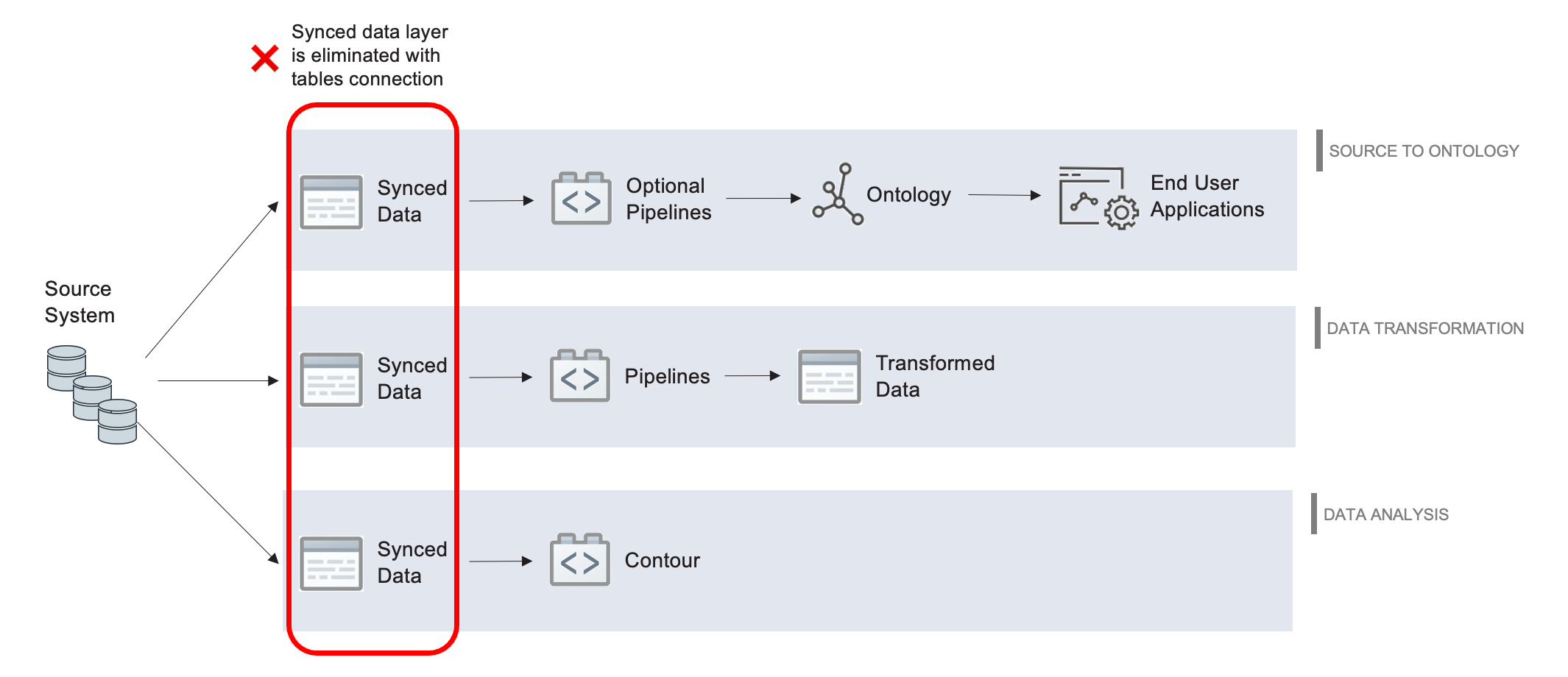
A virtual table is defined by:
- A connection to the source storage system (for example, a source URL or credentials). This connection is established by setting up a source in Foundry's data connection application.
- A locator which identifies the table in the source system (for example, the database, schema, and table name).
As with any resource in Foundry, virtual tables are governed by Foundry's security and permissions model and can be opened or used in various Foundry applications.
Supported sources
The following sources support virtual tables. Refer to the source documentation for more details on how to configure the connection as well as the supported capabilities.
| Source | Status | Supported Formats | Manual Registration | Automatic Registration |
|---|---|---|---|---|
| Amazon S3 | 🟢 Generally available | Avro ↗, Delta ↗, Iceberg ↗, Parquet ↗ | ✔️ | |
| OneLake and Azure Data Lake Storage Gen2 (Azure Blob Storage) | 🟢 Generally available | Avro ↗, Delta ↗, Iceberg ↗, Parquet ↗ | ✔️ | |
| BigQuery | 🟢 Generally available | Table, View, Materialized View | ✔️ | ✔️ |
| Databricks | 🟢 Generally available | Table, View, Materialized View | ✔️ | ✔️ |
| Foundry | 🟡 Beta | Only managed Iceberg | ✔️ | |
| Google Cloud Storage | 🟢 Generally available | Avro ↗, Delta ↗, Iceberg ↗, Parquet ↗ | ✔️ | |
| Snowflake | 🟢 Generally available | Table, View, Materialized View | ✔️ | ✔️ |
Iceberg catalogs
An Iceberg catalog is required to load virtual tables backed by an Apache Iceberg table. To learn more about Iceberg catalogs, see the Apache Iceberg documentation ↗. Virtual tables support different catalogs depending on the source being used. The table below highlights the supported catalogs. Refer to the source documentation for more details on how to configure each catalog and use Iceberg tables from the source.
| Source | AWS Glue | Horizon Catalog | Object Storage | Polaris | Unity Catalog |
|---|---|---|---|---|---|
| Amazon S3 | 🟢 Generally available | 🔴 Not available | 🟢 Generally available | 🟢 Generally available | 🟡 Legacy: recommended to use Databricks source. |
| Databricks | - | - | - | - | 🟢 Generally available |
| Google Cloud Storage | 🔴 Not available | 🔴 Not available | 🟢 Generally available | 🔴 Not available | 🔴 Not available |
| OneLake and Azure Data Lake Storage Gen2 (Azure Blob Storage) | 🔴 Not available | 🔴 Not available | 🟢 Generally available | 🟢 Generally available | 🟡 Legacy: recommended to use Databricks source. |
| Snowflake | - | 🟢 Generally available | - | - | - |
Supported Foundry workflows
Virtual tables are supported as inputs in the below applications and workflows, and as outputs in Pipeline Builder and Code Repositories.
| Supported application | Supported workflow | Not supported |
|---|---|---|
| Data Connection | Configure source Register virtual tables |
Agent-based connections |
| Contour | Analyze in Contour | Save as dataset |
| Ontology | Object creation via Ontology Manager Object creation via Pipeline Builder |
|
| Data Lineage | View Foundry lineage | |
| Pipeline Builder | Pipeline input Pipeline output Snapshot builds Incremental builds (append-only) External pipeline (compute pushdown) |
Streaming builds Faster pipelines |
| Code Repositories | Python Transforms Java Transforms SQL Transforms Snapshot builds Incremental builds (append-only) Compute pushdown |
|
| Observability | Health checks supported for virtual tables Data expectations in Pipeline Builder Data expectations in Code Repositories |
In single-node transforms, setting on_error='FAIL' to abort jobs on failed expectations is not supported for virtual table outputs. However, it is supported for virtual table inputs, Foundry-managed Iceberg tables, and generally in Spark transforms. |
| Code Workspaces | JupyterLab® VS Code |
:::callout{theme="neutral"} Note that some source types may not support all these capabilities. Refer to the source-specific documentation for more details. Learn more about how to configure a source when using virtual tables in Code Repositories. :::
In general, virtual tables can be used to back most common Foundry workflows by either:
- Directly interacting with the virtual table as described above, or
- Creating a transformation pipeline backed by a virtual table that outputs Foundry datasets or objects. These outputs can be used as normal in the platform.
Virtual table compatibility matrix by source & table type
The matrix below provides an overview of the key capabilities available for virtual tables, broken down by data source and table type. For full details, including any source-specific limitations or advanced features, refer to the source-specific documentation.
| Source | Table type | Capability | Foundry compute | Compute pushdown* |
|---|---|---|---|---|
| BigQuery | Tables, Views, Materialized Views, Other | ✅ Read ✅ Write |
✅ Python: Single-node ✅ Python: Spark ❌ Pipeline Builder: Single-node ✅ Pipeline Builder: Spark |
✅ Python (Ibis) ❌ Pipeline Builder |
| Databricks | External Delta, Managed Iceberg | ✅ Read ✅ Write |
✅ Python: Single-node ✅ Python: Spark ❌ Pipeline Builder: Single-node ✅ Pipeline Builder: Spark |
✅ Python (PySpark) ✅ Pipeline Builder |
| Databricks | Managed Delta | ✅ Read ❌ Write |
✅ Python: Single-node ✅ Python: Spark ❌ Pipeline Builder: Single-node ✅ Pipeline Builder: Spark |
✅ Python (PySpark) ✅ Pipeline Builder |
| Databricks | Views, Materialized Views, Other | ✅ Read ❌ Write |
✅ Python: Single-node ✅ Python: Spark ❌ Pipeline Builder: Single-node ✅ Pipeline Builder: Spark |
✅ Python (PySpark) ✅ Pipeline Builder |
| Snowflake | Tables, Views, Materialized Views, Other | ✅ Read ✅ Write |
✅ Python: Single-node ✅ Python: Spark ❌ Pipeline Builder: Single-node ✅ Pipeline Builder: Spark |
✅ Python (Snowpark) ✅ Pipeline Builder |
| Snowflake | Managed Iceberg | ✅ Read ❌ Write |
❌ Python: Single-node ✅ Python: Spark ❌ Pipeline Builder: Single-node ✅ Pipeline Builder: Spark |
✅ Python (Snowpark) ✅ Pipeline Builder |
| AWS S3 | Parquet, Avro, CSV, Delta | ✅ Read ✅ Write |
❌ Python ❌ Pipeline Builder |
NA |
| Azure ADLS | Parquet, Avro, CSV, Delta | ✅ Read ✅ Write |
❌ Python ❌ Pipeline Builder |
NA |
| Google Cloud Storage | Parquet, Avro, CSV, Delta | ✅ Read ✅ Write |
❌ Python ❌ Pipeline Builder |
NA |
* Compute pushdown refers to using the native compute engine of the source system.
Set up a connection for a virtual table
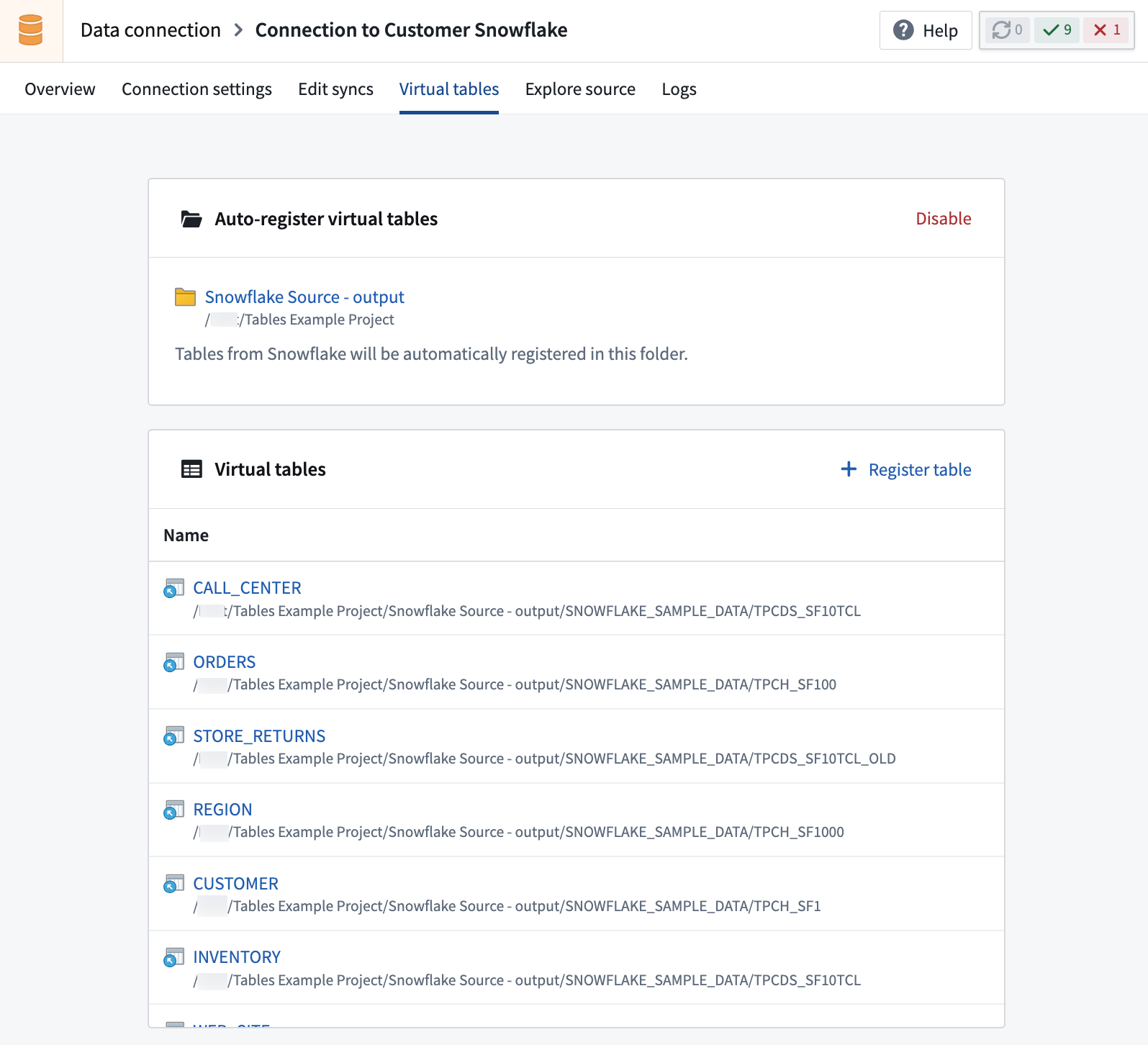
Sources supporting virtual tables are set up in the Data Connection application. Select the source that you want to use, then navigate to the Virtual tables tab in the source configuration. Follow the source-documentation and any requirements listed there for using virtual tables.
Create virtual tables
:::callout{theme="neutral"} All supported sources allow you register individual tables from the source system in Foundry. Tabular source types also support bulk registration of multiple virtual tables at once. Some sources additionally support automatic registration, which will periodically register all tables in the source that are accessible to the configured credentials in a designated project. :::
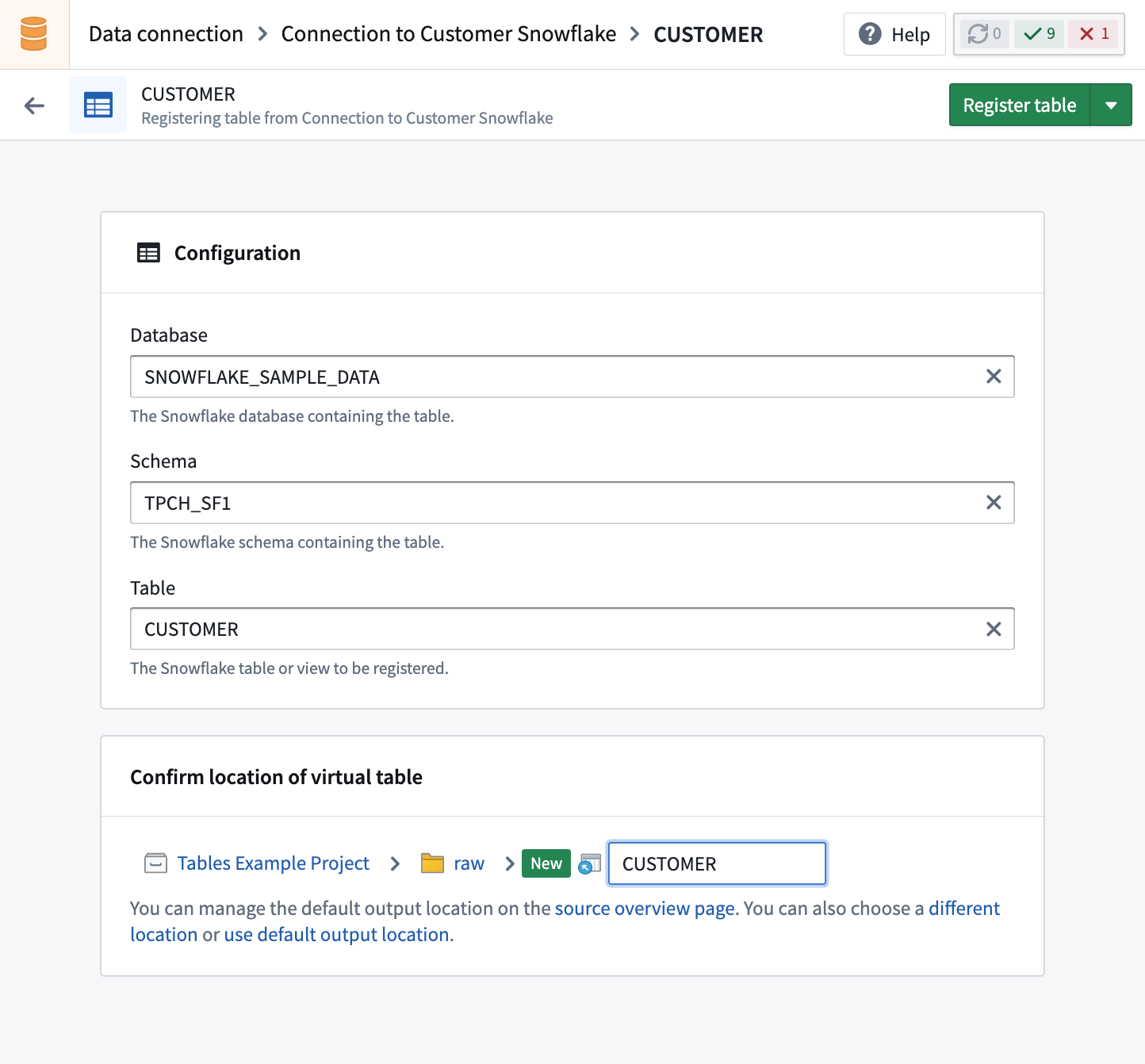
To register a virtual table, select Create virtual table in the Virtual tables tab in the source. Browse available tables and select the table to register. Unless you choose a different location, the virtual table will be created in the default output folder of the source.
Bulk registration
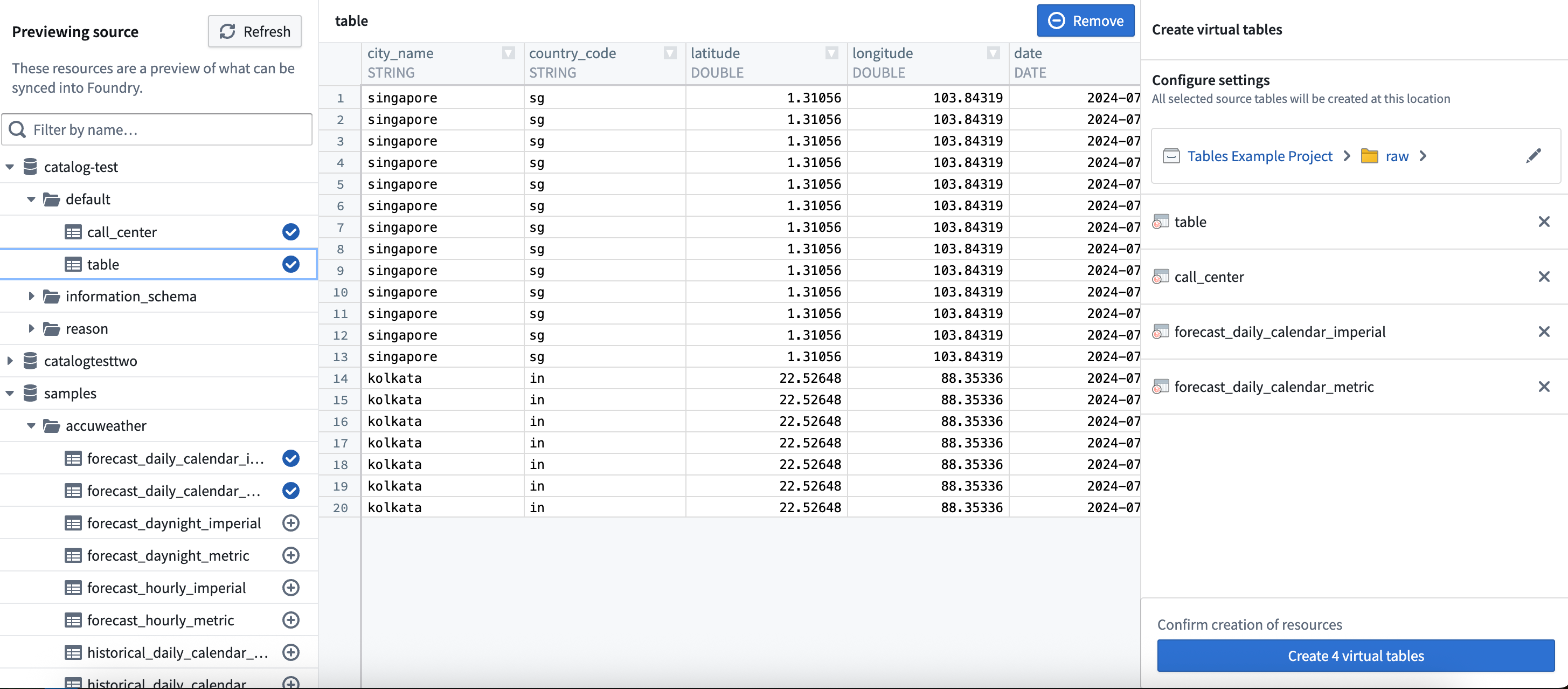
When working with tabular source types such as Databricks, BigQuery, and Snowflake, you will be able to bulk register multiple virtual tables at once. To begin, select one or more external tables from the left panel. Use the right panel to change where your new virtual tables will be saved, or update their names. Note that changing the name of a virtual table in Foundry does not change the table name in the source.
Auto-registration
When enabling auto-registration, you create a new Foundry project where virtual tables will be created automatically. The folder hierarchy in this project will mirror the structure of the source system, and be periodically updated as new tables are created in the source. When source tables are deleted, related virtual tables won't be auto-deleted in the project, but accessing them won't load any data.
To enable auto-registration, you must have project creation permissions in Foundry.
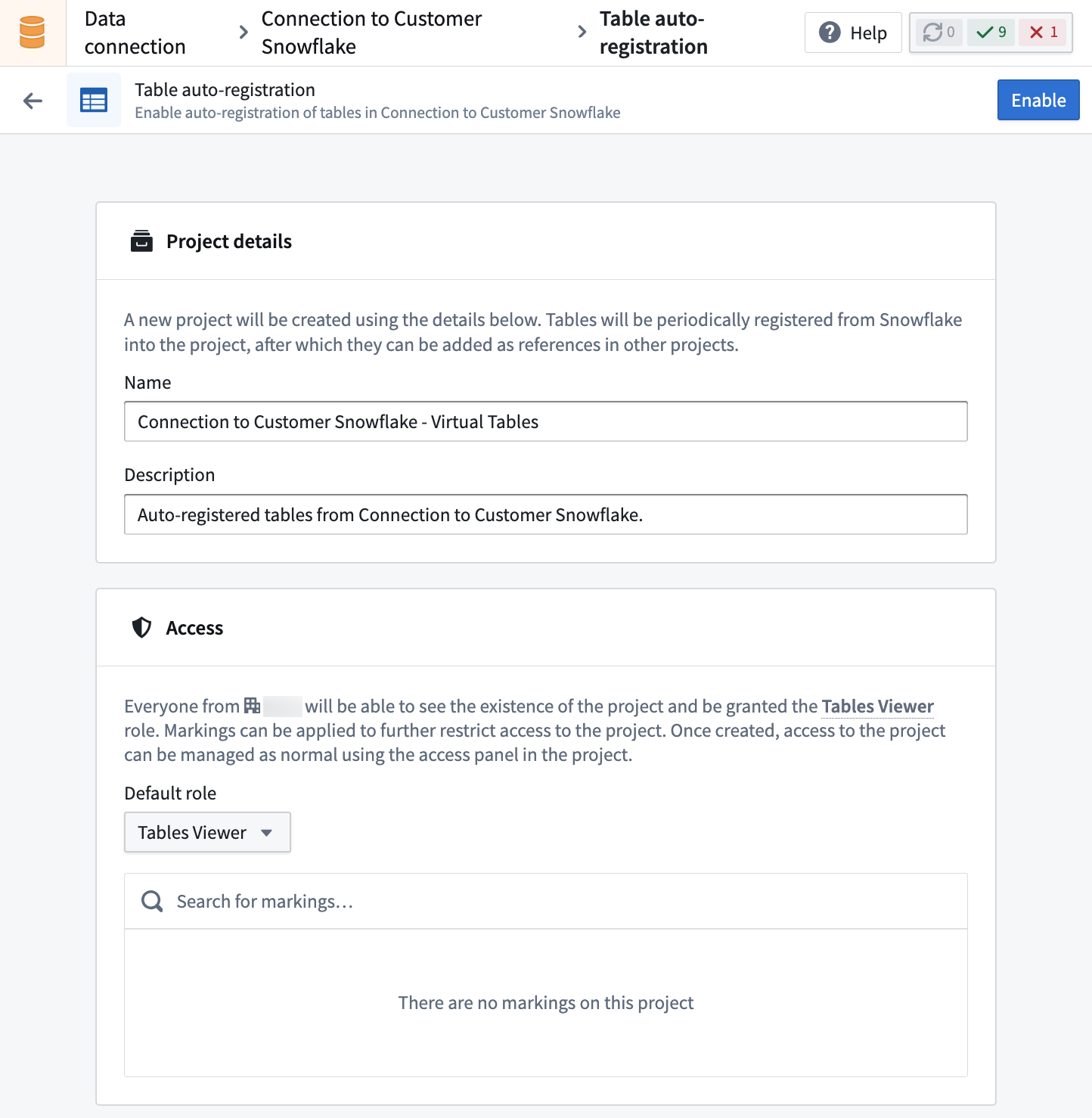
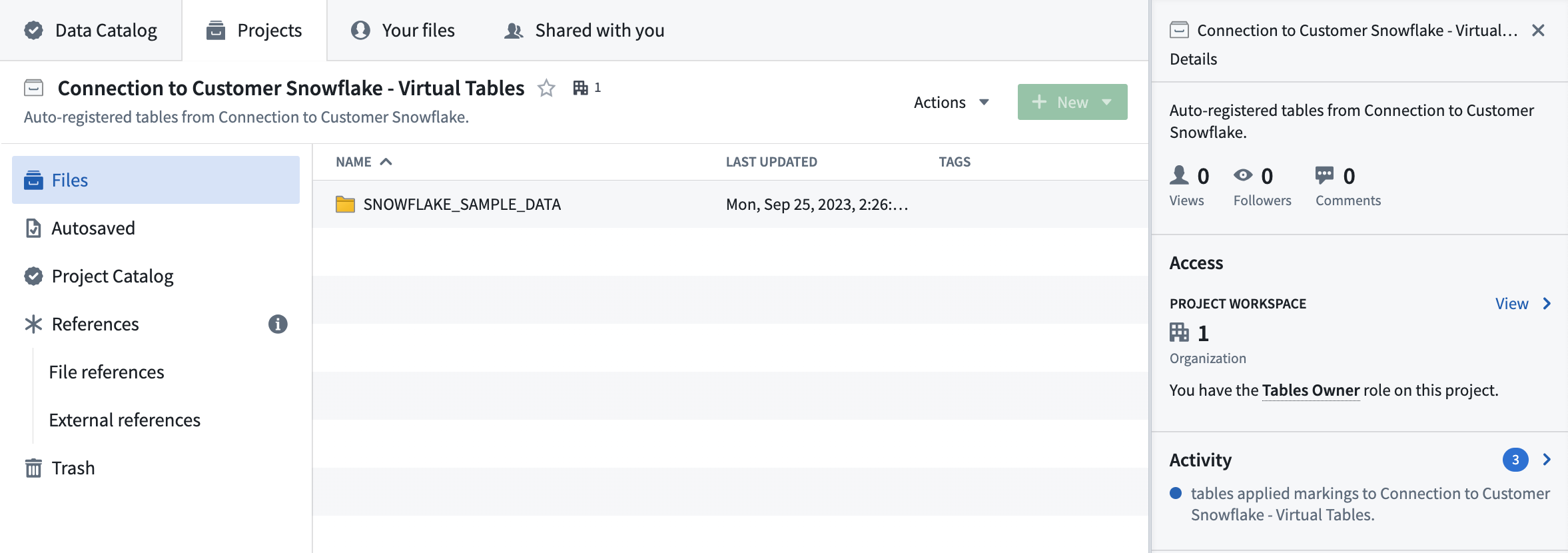
The project is managed by Foundry, and users cannot manually create or update resources in it. Virtual tables registered in this project can be imported into other projects for use in workflow development.
Enabling auto-registration allows setting permissions and access to the project, which can later be managed by the project owner using the access sidebar.
Tag filtering for Databricks sources
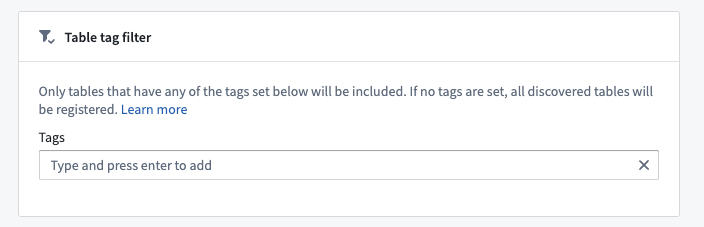
When configuring auto-registration for Databricks sources, you have the option of specifying a list of table tags to filter by. Only tables that have at least one of these tags set in the Databricks TABLE_TAGS ↗ system table will be registered.
Virtual tables in Code Repositories
When virtual tables are used in Code Repositories, the transforms consuming them will automatically obtain network egress based on the egress policies configured on the source. The credentials configured on the source will necessarily be made available to connect to the source. This is similar behavior to External Transforms.
The following settings must be enabled on the source:
- Code imports: This allows the source to be imported and used in a code repository. Further details of this setting and how to enable it can be found here.
- Export controls: This controls which security markings and organizations will be allowed on inputs to a Python Transform using a virtual table. Further details of this setting and how to enable it can be found here.
Once a source has been configured and imported into a code repository, virtual tables can be used as inputs to Python Transforms in the same way a dataset would be used, using transforms.api.Input. Incremental computation has a consistent API to that of datasets and is supported by a subset of sources. Refer to the source-specific documentation for more information.
In general, virtual tables are supported as inputs to Python, SQL, and Java Transforms. Only Python Transforms support creating a new virtual table as a transform output, while SQL and Java Transforms support writing to existing virtual tables.
Learn more about creating new virtual tables via Python Transforms.
Viewing virtual table details
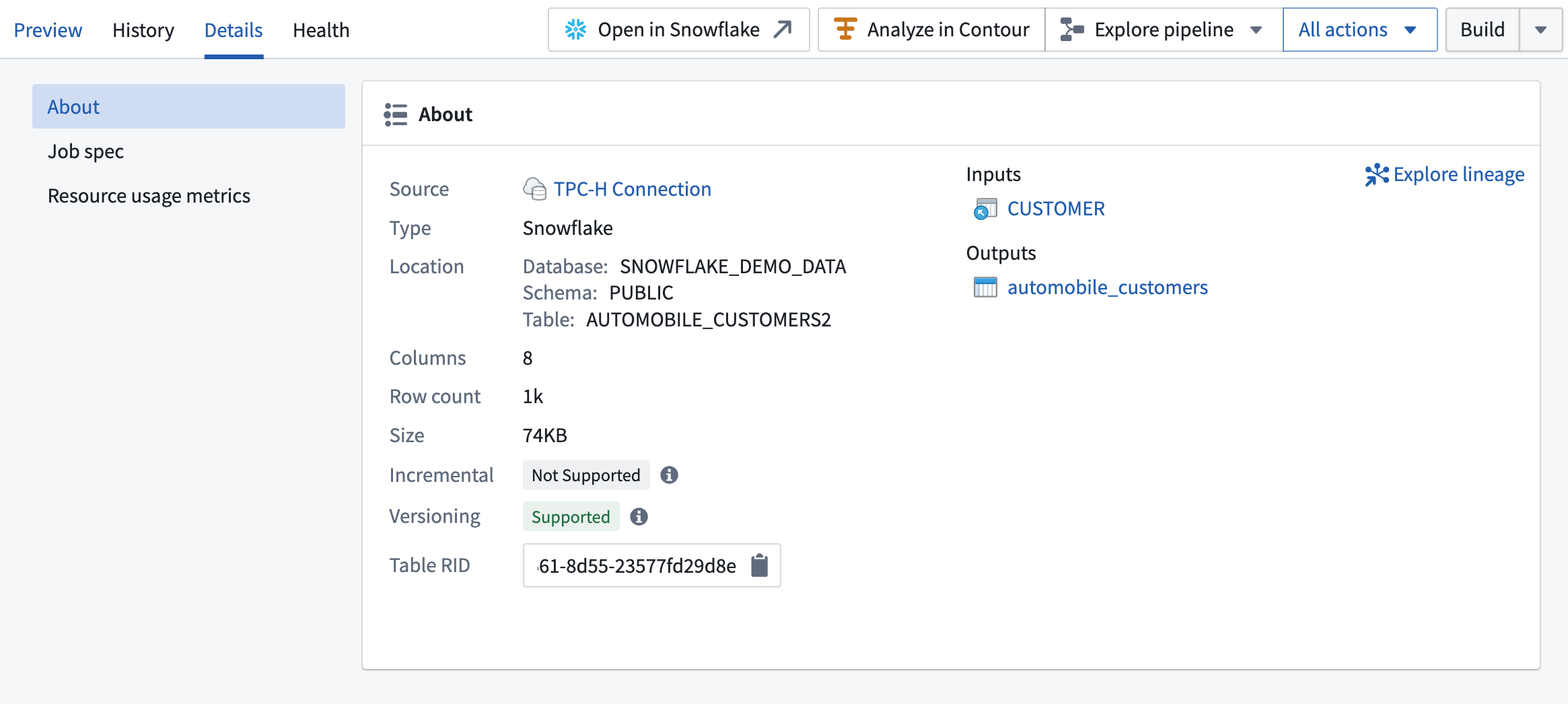
You can access key information about virtual tables in the Details panel of Dataset preview.
This includes:
- Incremental: If supported, you can configure incremental pipelines with the table, so downstream builds process only new or changed data instead of reprocessing all rows.
- Versioning: If supported, the table provides versioning, allowing Foundry to detect updates and skip unnecessary downstream builds when the data has not changed.
Update detection for virtual table inputs
The update detection feature monitors virtual tables and detects changes to the table in the source system. This allows you to use virtual tables as build triggers for dependent resources, such as pipelines or objects.
:::callout{theme="neutral"} Update detection is only available if your virtual table input has been used to create downstream resources, such as downstream tables, datasets, or objects. :::
Update detection is intended for virtual table inputs, which are tables managed externally and registered in Foundry. Update detection is not necessary for virtual table outputs (created by Foundry pipelines), as Foundry automatically tracks updates for these using pipeline build information.
When update detection is enabled, Foundry regularly polls the source system to check for updates to the table. If the source table format supports versioning (for example, Delta or Iceberg), Foundry can detect changes and only trigger downstream builds when necessary. If versioning is not supported, every poll is treated as a potential update, which may result in unnecessary downstream builds.
You can check whether your virtual table supports versioning by viewing virtual table details.
Enable update detection
To enable update detection for a virtual table input, follow these instructions:
- Open the virtual table in Dataset preview.
- Go to the update detection section in the left panel.
- Enable Update detection and set the desired polling schedule (for example, hourly or daily).
Once enabled, you can use the virtual table input as a schedule trigger for downstream tables and datasets. Any objects backed by the virtual table will reindex automatically when source updates are detected.

Configure objects backed by virtual tables
You can configure objects backed directly by virtual tables in Ontology Manager.
If the backing virtual table is updated outside of Foundry, you should enable update detection on the virtual table to ensure the objects receive regular updates from the source system.
Using virtual tables vs syncing to datasets
The decision to use virtual tables vs. sync to Foundry datasets depends on your architecture goals and the target workflow to be supported. We recommend considering the appropriate integration pattern on a workflow-by-workflow basis. The two approaches can be used in conjunction to complement one another.
Below are some considerations to keep in mind about the potential benefits, drawbacks, and limitations of using virtual tables vs. syncing data to datasets.
Benefits of using virtual tables
Virtual tables provide a number of benefits, including:
- Reduction of duplicate storage by not storing source data in Foundry. Note that Foundry will still store data for any downstream-created resources, such as datasets and objects that are outputs from Foundry pipelines.
- Queries can be pushed down to the source system to limit total data transfer. Note that availability of compute pushdown varies by source system and query type.
- Virtual tables may be especially beneficial for very large tables where duplicative storage costs become material.
- With virtual tables, data is queried directly upon use, without the need to synchronize data or consider potential for data staleness.
- Virtual tables provide optionality to help align Foundry implementation with target architecture patterns.
Drawbacks of using virtual tables
Virtual tables may not be the best choice in all circumstances. Some considerations include:
- Interactive performance may be slower than working with data stored in Foundry datasets.
- Compute usage may increase depending on the types of queries being run on the virtual table. For example, tables that are used as an input into a scheduled pipeline may generate limited compute compared to tables that are frequently accessed interactively in Contour analyses.
- Virtual tables do not benefit from Foundry dataset capabilities such as dataset versioning or branching.
Limitations of using virtual tables
Limitations of virtual tables include:
- Virtual tables are not available for all sources.
- Virtual tables require a Foundry worker source and direct egress policies.
- Connections using self-service private link egress policies are generally not supported. However, private links set up by a Palantir representative are supported.
- Connections using agent proxy policies are not supported.
- Connections using bucket endpoint egress policies are not supported.
- Connections using an agent worker are not supported.
- Not all Foundry applications and features support using virtual tables as inputs. However, any materialized resources created downstream of virtual tables, such as datasets and object outputs from pipelines, are fully supported across the Foundry ecosystem as usual.
- Transforms that use the
use_external_systemsdecorator are currently not compatible with Virtual Tables. Switch to source-based external_transforms or split your transform into multiple transforms, one that uses Virtual Tables as input and one that uses theuse_external_systemsdecorator.
Compute for queries on virtual tables
For queries run directly on virtual tables, compute may be split between Foundry and the source system. The specific behavior depends on the query and the degree of pushdown computation supported by the source system. Refer to the source-specific documentation for more information.
中文翻译
虚拟表(Virtual tables)
虚拟表(Virtual tables) 允许您在支持的数据平台中查询表,而无需先将数据存储在 Foundry 数据集(dataset)中。
虚拟表充当指向 Foundry 外部源系统中表的指针。虚拟表抽象了底层源系统和存储格式,使您能够构建无缝整合来自不同源系统数据的工作流。虚拟表还可以与存储在 Foundry 中的数据集结合使用,形成一种灵活架构,无需将所有数据集中在一个位置。您还可以将新的虚拟表作为 Foundry 数据转换的输出创建,从而支持存储完全外部化、由 Foundry 处理编排、安全和其他功能的工作流。
虚拟表由以下内容定义:
- 指向源存储系统的连接(connection)(例如,源 URL 或凭据)。此连接通过在 Foundry 的数据连接应用中设置源(setting up a source)来建立。
- 用于标识源系统中表的定位器(locator)(例如,数据库、模式和表名)。
与 Foundry 中的任何资源一样,虚拟表受 Foundry 的安全和权限模型管理,并且可以在各种 Foundry 应用中打开或使用。
支持的源(Supported sources)
以下源支持虚拟表。有关如何配置连接以及支持功能的更多详细信息,请参阅源文档(source documentation)。
| 源(Source) | 状态(Status) | 支持的格式(Supported Formats) | 手动注册(Manual Registration) | 自动注册(Automatic Registration) |
|---|---|---|---|---|
| Amazon S3 | 🟢 正式发布(Generally available) | Avro ↗、Delta ↗、Iceberg ↗、Parquet ↗ | ✔️ | |
| OneLake 和 Azure Data Lake Storage Gen2 (Azure Blob Storage) | 🟢 正式发布(Generally available) | Avro ↗、Delta ↗、Iceberg ↗、Parquet ↗ | ✔️ | |
| BigQuery | 🟢 正式发布(Generally available) | 表(Table)、视图(View)、物化视图(Materialized View) | ✔️ | ✔️ |
| Databricks | 🟢 正式发布(Generally available) | 表(Table)、视图(View)、物化视图(Materialized View) | ✔️ | ✔️ |
| Foundry | 🟡 Beta 测试(Beta) | 仅托管 Iceberg(managed Iceberg) | ✔️ | |
| Google Cloud Storage | 🟢 正式发布(Generally available) | Avro ↗、Delta ↗、Iceberg ↗、Parquet ↗ | ✔️ | |
| Snowflake | 🟢 正式发布(Generally available) | 表(Table)、视图(View)、物化视图(Materialized View) | ✔️ | ✔️ |
Iceberg 目录(Iceberg catalogs)
加载由 Apache Iceberg 表支持的虚拟表需要 Iceberg 目录。要了解有关 Iceberg 目录的更多信息,请参阅 Apache Iceberg 文档 ↗。虚拟表根据所使用的源支持不同的目录。下表列出了支持的目录。有关如何配置每个目录以及从源使用 Iceberg 表的更多详细信息,请参阅源文档(source documentation)。
| 源(Source) | AWS Glue | Horizon 目录(Horizon Catalog) | 对象存储(Object Storage) | Polaris | Unity 目录(Unity Catalog) |
|---|---|---|---|---|---|
| Amazon S3 | 🟢 正式发布(Generally available) | 🔴 不可用(Not available) | 🟢 正式发布(Generally available) | 🟢 正式发布(Generally available) | 🟡 旧版(Legacy):建议使用 Databricks 源。 |
| Databricks | - | - | - | - | 🟢 正式发布(Generally available) |
| Google Cloud Storage | 🔴 不可用(Not available) | 🔴 不可用(Not available) | 🟢 正式发布(Generally available) | 🔴 不可用(Not available) | 🔴 不可用(Not available) |
| OneLake 和 Azure Data Lake Storage Gen2 (Azure Blob Storage) | 🔴 不可用(Not available) | 🔴 不可用(Not available) | 🟢 正式发布(Generally available) | 🟢 正式发布(Generally available) | 🟡 旧版(Legacy):建议使用 Databricks 源。 |
| Snowflake | - | 🟢 正式发布(Generally available) | - | - | - |
支持的 Foundry 工作流(Supported Foundry workflows)
虚拟表在以下应用和工作流中作为输入受支持,并在 Pipeline Builder 和代码仓库(Code Repositories)中作为输出受支持。
| 支持的应用(Supported application) | 支持的工作流(Supported workflow) | 不支持(Not supported) |
|---|---|---|
| 数据连接(Data Connection) | 配置源(Configure source) 注册虚拟表(Register virtual tables) |
基于代理的连接(Agent-based connections) |
| Contour | 在 Contour 中分析(Analyze in Contour) | 另存为数据集(Save as dataset) |
| 本体论(Ontology) | 通过本体管理器(Ontology Manager)创建对象 通过 Pipeline Builder 创建对象 |
|
| 数据沿袭(Data Lineage) | 查看 Foundry 沿袭(View Foundry lineage) | |
| Pipeline Builder | 管道输入(Pipeline input) 管道输出(Pipeline output) 快照构建(Snapshot builds) 增量构建(仅追加)(Incremental builds (append-only)) 外部管道(计算下推)(External pipeline (compute pushdown)) |
流式构建(Streaming builds) 更快的管道(Faster pipelines) |
| 代码仓库(Code Repositories) | Python 转换(Python Transforms) Java 转换(Java Transforms) SQL 转换(SQL Transforms) 快照构建(Snapshot builds) 增量构建(仅追加)(Incremental builds (append-only)) 计算下推(Compute pushdown) |
|
| 可观测性(Observability) | 虚拟表支持的健康检查(Health checks supported for virtual tables) Pipeline Builder 中的数据期望(Data expectations in Pipeline Builder) 代码仓库中的数据期望(Data expectations in Code Repositories) |
在单节点转换中,对于虚拟表输出,不支持设置 on_error='FAIL' 以在期望失败时中止作业(abort jobs on failed expectations)。但是,对于虚拟表输入、Foundry 管理的 Iceberg 表以及一般的 Spark 转换,此设置是受支持的。 |
| 代码工作区(Code Workspaces) | JupyterLab® VS Code |
:::callout{theme="neutral"} 请注意,某些源类型可能不支持所有这些功能。有关更多详细信息,请参阅特定于源的文档(source-specific documentation)。了解有关在代码仓库中使用虚拟表时如何配置源的更多信息。 :::
通常,虚拟表可以通过以下任一方式用于支持大多数常见的 Foundry 工作流:
- 直接与上述虚拟表交互,或
- 创建由虚拟表支持的转换管道,该管道输出 Foundry 数据集或对象。这些输出可以像往常一样在平台中使用。
按源和表类型划分的虚拟表兼容性矩阵(Virtual table compatibility matrix by source & table type)
下表概述了虚拟表可用的关键功能,按数据源和表类型细分。有关完整详细信息,包括任何特定于源的限制或高级功能,请参阅特定于源的文档。
| 源(Source) | 表类型(Table type) | 功能(Capability) | Foundry 计算(Foundry compute) | 计算下推(Compute pushdown)* |
|---|---|---|---|---|
| BigQuery | 表(Tables)、视图(Views)、物化视图(Materialized Views)、其他(Other) | ✅ 读取(Read) ✅ 写入(Write) |
✅ Python:单节点(Single-node) ✅ Python:Spark ❌ Pipeline Builder:单节点(Single-node) ✅ Pipeline Builder:Spark |
✅ Python (Ibis) ❌ Pipeline Builder |
| Databricks | 外部 Delta(External Delta)、托管 Iceberg(Managed Iceberg) | ✅ 读取(Read) ✅ 写入(Write) |
✅ Python:单节点(Single-node) ✅ Python:Spark ❌ Pipeline Builder:单节点(Single-node) ✅ Pipeline Builder:Spark |
✅ Python (PySpark) ✅ Pipeline Builder |
| Databricks | 托管 Delta(Managed Delta) | ✅ 读取(Read) ❌ 写入(Write) |
✅ Python:单节点(Single-node) ✅ Python:Spark ❌ Pipeline Builder:单节点(Single-node) ✅ Pipeline Builder:Spark |
✅ Python (PySpark) ✅ Pipeline Builder |
| Databricks | 视图(Views)、物化视图(Materialized Views)、其他(Other) | ✅ 读取(Read) ❌ 写入(Write) |
✅ Python:单节点(Single-node) ✅ Python:Spark ❌ Pipeline Builder:单节点(Single-node) ✅ Pipeline Builder:Spark |
✅ Python (PySpark) ✅ Pipeline Builder |
| Snowflake | 表(Tables)、视图(Views)、物化视图(Materialized Views)、其他(Other) | ✅ 读取(Read) ✅ 写入(Write) |
✅ Python:单节点(Single-node) ✅ Python:Spark ❌ Pipeline Builder:单节点(Single-node) ✅ Pipeline Builder:Spark |
✅ Python (Snowpark) ✅ Pipeline Builder |
| Snowflake | 托管 Iceberg(Managed Iceberg) | ✅ 读取(Read) ❌ 写入(Write) |
❌ Python:单节点(Single-node) ✅ Python:Spark ❌ Pipeline Builder:单节点(Single-node) ✅ Pipeline Builder:Spark |
✅ Python (Snowpark) ✅ Pipeline Builder |
| AWS S3 | Parquet、Avro、CSV、Delta | ✅ 读取(Read) ✅ 写入(Write) |
❌ Python ❌ Pipeline Builder |
不适用(NA) |
| Azure ADLS | Parquet、Avro、CSV、Delta | ✅ 读取(Read) ✅ 写入(Write) |
❌ Python ❌ Pipeline Builder |
不适用(NA) |
| Google Cloud Storage | Parquet、Avro、CSV、Delta | ✅ 读取(Read) ✅ 写入(Write) |
❌ Python ❌ Pipeline Builder |
不适用(NA) |
* 计算下推(Compute pushdown) 指使用源系统的原生计算引擎。
为虚拟表设置连接(Set up a connection for a virtual table)
支持虚拟表的源在数据连接(Data Connection)应用中设置。选择要使用的源,然后导航到源配置中的虚拟表(Virtual tables) 选项卡。请遵循源文档(source-documentation)以及其中列出的使用虚拟表的任何要求。
创建虚拟表(Create virtual tables)
:::callout{theme="neutral"} 所有支持的源都允许您在 Foundry 中注册源系统中的单个表。表格源类型还支持一次批量注册(bulk registration) 多个虚拟表。某些源还支持自动注册(automatic registration),这将定期在指定项目中注册源中配置的凭据可访问的所有表。 :::
要注册虚拟表,请在源的虚拟表(Virtual tables) 选项卡中选择创建虚拟表(Create virtual table)。浏览可用表并选择要注册的表。除非您选择其他位置,否则虚拟表将在源的默认输出文件夹中创建。
批量注册(Bulk registration)
当使用表格源类型(例如 Databricks、BigQuery 和 Snowflake)时,您可以一次批量注册(bulk register) 多个虚拟表。首先,从左侧面板中选择一个或多个外部表。使用右侧面板更改新虚拟表的保存位置或更新其名称。请注意,在 Foundry 中更改虚拟表的名称不会更改源中的表名。
自动注册(Auto-registration)
启用自动注册(auto-registration) 时,您将创建一个新的 Foundry 项目(project),虚拟表将在其中自动创建。此项目中的文件夹层次结构将镜像源系统的结构,并随着源中创建新表而定期更新。当源表被删除时,项目中的相关虚拟表不会自动删除,但访问它们不会加载任何数据。
要启用自动注册,您必须在 Foundry 中拥有项目创建权限(project creation permissions)。
该项目由 Foundry 管理,用户无法手动创建或更新其中的资源。在此项目中注册的虚拟表可以导入到其他项目中,用于工作流开发。
启用自动注册允许设置对项目的权限和访问权限,稍后可由项目所有者使用访问侧边栏进行管理。
Databricks 源的标签过滤(Tag filtering for Databricks sources)
为 Databricks 源配置自动注册时,您可以选择指定一个表标签列表进行过滤。只有在 Databricks TABLE_TAGS ↗ 系统表中设置了至少一个这些标签的表才会被注册。
代码仓库中的虚拟表(Virtual tables in Code Repositories)
当在代码仓库中使用虚拟表时,消费它们的转换将根据源上配置的出口策略(egress policies)自动获取网络出口。源上配置的凭据将必然可用于连接到源。这与外部转换(External Transforms)的行为类似。
必须在源上启用以下设置:
- 代码导入(Code imports): 这允许将源导入并用于代码仓库。有关此设置及其启用方式的更多详细信息,请参见此处。
- 导出控制(Export controls): 这控制哪些安全标记(security markings)和组织将被允许在使用虚拟表的 Python 转换的输入上。有关此设置及其启用方式的更多详细信息,请参见此处。
一旦源配置完毕并导入到代码仓库中,虚拟表就可以作为 Python 转换(Python Transforms) 的输入,使用方式与数据集相同,即使用 transforms.api.Input。增量计算(Incremental computation) 具有与数据集一致的 API,并且受部分源支持。有关更多信息,请参阅特定于源的文档(source-specific documentation)。
通常,虚拟表作为 Python、SQL 和 Java 转换的输入受支持。只有 Python 转换支持创建新的虚拟表作为转换输出,而 SQL 和 Java 转换支持写入现有的虚拟表。
查看虚拟表详情(Viewing virtual table details)
您可以在数据集预览(Dataset preview)的详细信息面板中访问有关虚拟表的关键信息。
这包括:
- 增量(Incremental): 如果支持,您可以使用该表配置增量管道,以便下游构建仅处理新数据或更改的数据,而不是重新处理所有行。
- 版本控制(Versioning): 如果支持,该表提供版本控制,允许 Foundry 检测更新并在数据未更改时跳过不必要的下游构建。
虚拟表输入的更新检测(Update detection for virtual table inputs)
更新检测功能监控虚拟表并检测源系统中表的变化。这允许您将虚拟表用作依赖资源(例如管道或对象)的构建触发器。
:::callout{theme="neutral"} 仅当您的虚拟表输入已用于创建下游资源(如下游表、数据集或对象)时,更新检测才可用。 :::
更新检测适用于虚拟表输入,这些表是外部管理并在 Foundry 中注册的表。对于虚拟表输出(由 Foundry 管道创建),更新检测不是必需的,因为 Foundry 会使用管道构建信息自动跟踪更新。
启用更新检测后,Foundry 会定期轮询源系统以检查表的更新。如果源表格式支持版本控制(例如 Delta 或 Iceberg),Foundry 可以检测更改并仅在必要时触发下游构建。如果不支持版本控制,则每次轮询都被视为潜在更新,这可能导致不必要的下游构建。
您可以通过查看虚拟表详情来检查您的虚拟表是否支持版本控制。
启用更新检测(Enable update detection)
要为虚拟表输入启用更新检测,请按照以下说明操作:
- 在数据集预览(Dataset preview)中打开虚拟表。
- 转到左侧面板中的更新检测部分。
- 启用更新检测(Update detection) 并设置所需的轮询计划(例如,每小时或每天)。
启用后,您可以将虚拟表输入用作下游表和数据集的计划触发器(schedule trigger)。任何由虚拟表支持的对象将在检测到源更新时自动重新索引。
配置由虚拟表支持的对象(Configure objects backed by virtual tables)
您可以在本体管理器(Ontology Manager)中配置直接由虚拟表支持的对象。
如果支持的虚拟表在 Foundry 外部更新,您应该在虚拟表上启用更新检测,以确保对象从源系统接收定期更新。
使用虚拟表与同步到数据集(Using virtual tables vs syncing to datasets)
使用虚拟表还是同步到 Foundry 数据集的决定取决于您的架构目标和要支持的目标工作流。我们建议根据具体工作流考虑适当的集成模式。这两种方法可以结合使用,相互补充。
以下是关于使用虚拟表与将数据同步到数据集相比的潜在优势、劣势和限制的一些考虑因素。
使用虚拟表的优势(Benefits of using virtual tables)
虚拟表提供了许多优势,包括:
- 通过不在 Foundry 中存储源数据来减少重复存储。请注意,Foundry 仍会为任何下游创建的资源(例如作为 Foundry 管道输出的数据集和对象)存储数据。
- 查询可以下推到源系统以限制总数据传输量。请注意,计算下推的可用性因源系统和查询类型而异。
- 对于重复存储成本变得显著的非常大的表,虚拟表可能特别有利。
- 使用虚拟表时,数据在使用时直接查询,无需同步数据或考虑数据过时的可能性。
- 虚拟表提供了可选性,有助于将 Foundry 实施与目标架构模式对齐。
使用虚拟表的劣势(Drawbacks of using virtual tables)
虚拟表并非在所有情况下都是最佳选择。一些考虑因素包括:
- 交互式性能可能比处理存储在 Foundry 数据集中的数据慢。
- 计算使用量可能会增加,具体取决于在虚拟表上运行的查询类型。例如,用作计划管道输入的表与在 Contour 分析中频繁交互访问的表相比,可能产生较少的计算量。
- 虚拟表无法受益于 Foundry 数据集功能,例如数据集版本控制或分支。
使用虚拟表的限制(Limitations of using virtual tables)
虚拟表的限制包括:
- 并非所有源都支持虚拟表。
- 虚拟表需要 Foundry 工作节点(Foundry worker) 源和直接出口策略(direct egress policies)。
- 使用自助服务私有链接出口策略(self-service private link egress policies)的连接通常不受支持。但是,由 Palantir 代表设置的私有链接(private links)受支持。
- 使用代理代理策略(agent proxy policies)的连接不受支持。
- 使用存储桶端点出口策略(bucket endpoint egress policies)的连接不受支持。
- 使用代理工作节点(agent worker)的连接不受支持。
- 并非所有 Foundry 应用和功能都支持将虚拟表用作输入。但是,在虚拟表下游创建的任何物化资源(例如来自管道的数据集和对象输出)在 Foundry 生态系统中都像往常一样完全受支持。
- 使用
use_external_systems装饰器的转换目前与虚拟表不兼容。请切换到基于源的 external_transforms(source-based external_transforms),或将您的转换拆分为多个转换,一个使用虚拟表作为输入,另一个使用use_external_systems装饰器。
虚拟表查询的计算(Compute for queries on virtual tables)
对于直接在虚拟表上运行的查询,计算可能会在 Foundry 和源系统之间分配。具体行为取决于查询以及源系统支持的下推计算程度。有关更多信息,请参阅特定于源的文档(source-specific documentation)。