Project references(项目引用)
In Foundry, Projects define both a conceptual boundary around related work and a security boundary for applying and managing access. Using data across project boundaries must be treated with extra care.
Project references
Project references provide a mechanism for users with higher permissions (typically the owners of a dataset or pipeline) to allow the discovery and use of data in pipelines in other Projects. Project references add an increased layer of scrutiny for persistently moving data between Projects by explicitly acknowledging when a dataset is imported into a Project.
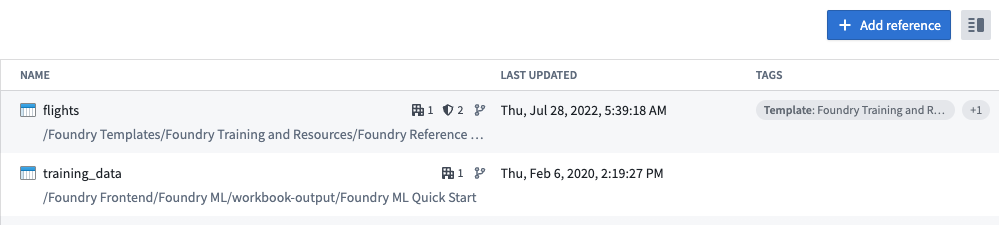
To add a resource reference to a Project, go to the Project details panel at the root level of the Project. Click the +Add reference button to add a reference to a dataset. In the below image, the datasets flights and training_data are added as references in the Project. This means that you can use flights and training_data as inputs to a saved dataset in a preparation.
:::callout{theme="neutral"}
To reference a resource, you must have compass:import-resource-from on the resource (usually expanded from the Viewer role), and compass:import-resource-to on the destination Project (usually expanded from the Editor role). These roles can be customized using custom roles in Control Panel.
:::
Project-scoped preparations
:::callout{theme="neutral"} As of Contour 9.161.0, all new preparations have Project scoping enabled. :::
To save an output dataset in a Project-scoped preparation, the input and output dataset must be in the Project scope.
The input dataset to the preparation must be in the Project scope. This means that the input dataset must be in the same Project as the workbook or added as a reference in the Project.
The output dataset must be in the same Project as the preparation.
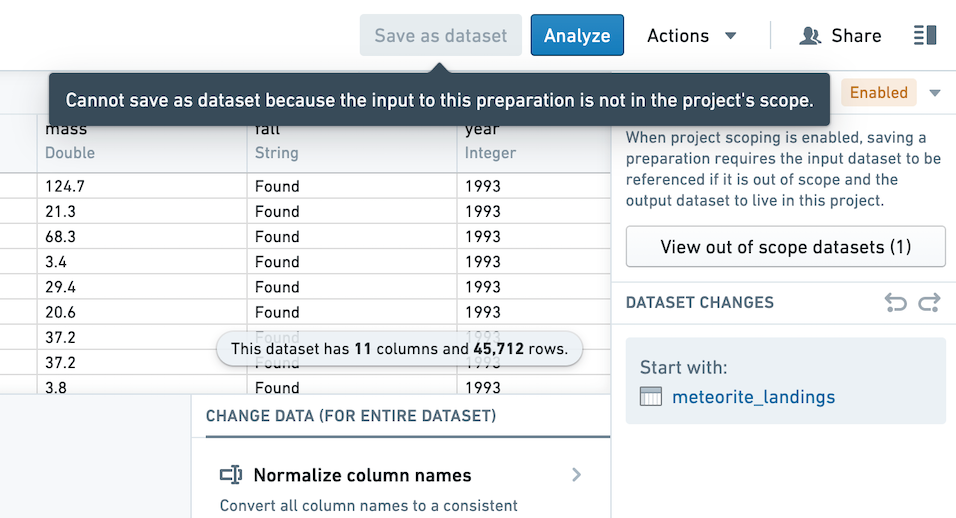
View the Project scope settings for a preparation in the top right corner of the Preparation interface. Any input or output datasets that are out of scope will be listed in the Project scoping dialog. You may choose to add a reference directly from the dialog.
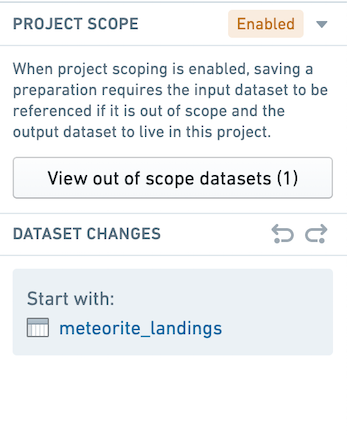
When the input dataset is out of scope, you not be able to save an output dataset.
:::callout{theme="neutral"} You do not need to add a reference to use Preparation on an input dataset if you are not saving a cleaned dataset. :::
Enable Project scoping on your preparation
If you created a preparation before Project scoping was enabled by default, you can enable Project scoping in the top right of your preparation. Before enabling Project scoping, you must address any out of scope inputs by adding a reference to inputs and any out of scope outputs by moving the output to the preparation's Project.
中文翻译
项目引用
在 Foundry 中,项目(Project)既定义了相关工作的概念边界,也构成了应用和管理访问权限的安全边界。跨项目边界使用数据时必须格外谨慎。
项目引用
项目引用(Project reference)为具有更高权限的用户(通常是数据集或管道的所有者)提供了一种机制,使其能够允许其他项目中的管道发现和使用数据。项目引用通过明确确认数据集何时被导入到某个项目中,为在项目间持久移动数据增加了额外的审查层级。
要向项目添加资源引用,请进入项目根级别的项目详情面板(Project details panel)。点击 +添加引用 按钮来添加对数据集的引用。在下图中,数据集 flights 和 training_data 被添加为项目中的引用。这意味着您可以在数据准备(preparation)中将 flights 和 training_data 作为已保存数据集的输入。
:::callout{theme="neutral"}
要引用资源,您需要对该资源拥有 compass:import-resource-from 权限(通常从"查看者角色"扩展而来),并对目标项目拥有 compass:import-resource-to 权限(通常从"编辑者角色"扩展而来)。这些角色可以通过控制面板中的自定义角色(custom roles)进行定制。
:::
项目范围限定的数据准备
:::callout{theme="neutral"} 自 Contour 9.161.0 起,所有新建的数据准备均已启用项目范围限定。 :::
要在项目范围限定的数据准备中保存输出数据集,输入和输出数据集必须位于项目范围内。
数据准备的输入数据集必须在项目范围内。这意味着输入数据集必须与工作簿位于同一项目中,或者已作为引用添加到项目中。
输出数据集必须与数据准备位于同一项目中。
在数据准备界面右上角查看数据准备的项目范围设置。任何超出范围的输入或输出数据集都将列在项目范围限定对话框中。您可以直接从该对话框中选择添加引用。
当输入数据集超出范围时,您将无法保存输出数据集。
:::callout{theme="neutral"} 如果您不保存清洗后的数据集,则无需添加引用即可对输入数据集使用数据准备功能。 :::
为数据准备启用项目范围限定
如果您在项目范围限定默认启用之前创建了数据准备,可以在数据准备界面右上角启用项目范围限定。在启用项目范围限定之前,您必须通过为输入添加引用来处理超出范围的输入,并通过将输出移动到数据准备所在的项目来处理超出范围的输出。