Recommended health checks(推荐的健康检查(Health Checks))
This document provides best practices for setting up health checks to monitor the health of your pipelines. Following these guidelines should allow you to achieve a robust and effective level of monitoring to ensure: data gets in, data gets built, and data gets out.
These best practices will not cover ensuring the quality, accuracy or validity of the content within the datasets. This requires more granular and functional knowledge of the pipeline in order to determine the correct validations to be done within the pipeline.
These guidelines should also help you avoid these common pitfalls with health check set-ups:
- Too many checks leading to noise in volume of checks
- The wrong kinds of checks leading to unhelpful alerts
- Too few checks resulting in a lack of signal when there is an issue
Prerequisite knowledge
These guidelines rely on an understanding of:
- Data Health
- Schedules
- The schedule will be the unit of monitoring, meaning these guidelines will give recommendations on where to install which checks based on what happens to it when the schedule runs.
- Data Lineage
:::callout{theme="neutral"} In this document, references to a schedule's inputs, intermediates, and outputs refer to the resolved schedule, which is not the same as the schedule configuration in the Data Lineage application. :::
Important monitoring concepts
Unit of monitoring: Resolved schedules
A resolved schedule is a mental model to assign roles to the different datasets involved in a schedule. Some datasets will be involved because they can be built by the schedule, meaning they are a part of the dataset selection of the schedule. Other datasets are involved as required inputs needed for a build. Different health checks are recommended depending on the role of a dataset.
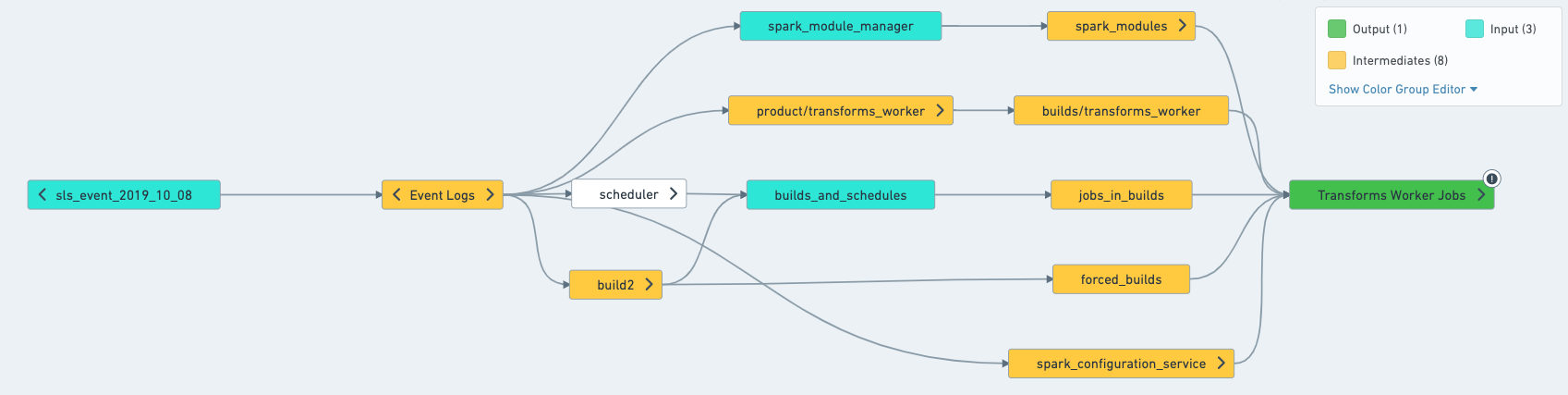
Datasets can have one of the following roles in a schedule:
- Output: A dataset that is the final step of a schedule. They are built by the schedule, but are not used by any other datasets in the schedules
- Intermediates: All datasets built by the schedule that are not outputs of the schedule.
- Inputs: Datasets that are not built by the schedule, but are used by the schedule. The inputs make up the first layer outside of the schedule that is read from; for example, Data Connection syncs and derived datasets that you don't build yourself.
In a concrete example, imagine that a schedule builds the following datasets:
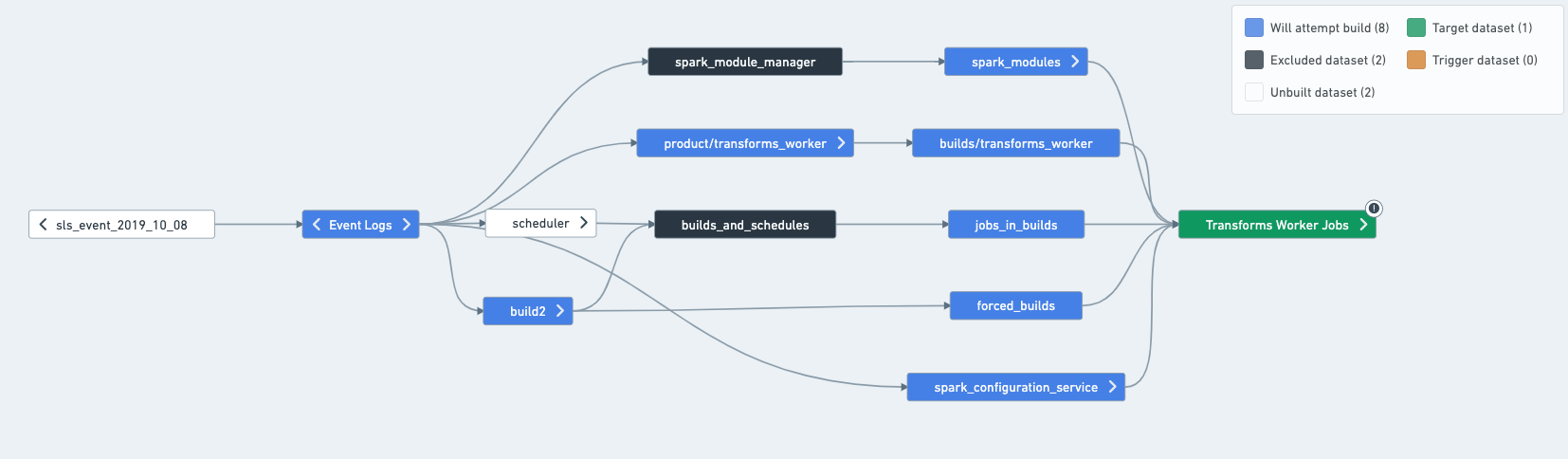
In this case, you can split the schedule as such:
Understand what is built in practice
To determine what the inputs, outputs and intermediates of a schedule are, the easiest way is to open the schedule in Data Lineage. Once in Data Lineage, select the schedule from the sidebar, which will apply schedule coloring to help you understand what the schedule will attempt to build.
- Target: Will attempt building and is usually built by the schedule. One exception is for Data Connection synced datasets, which will only build if "force build" is set on the schedule.
- Excludes: Never built by the schedule.
- Inputs (connecting build only): Not built by the schedule UNLESS they have another input upstream of them.
:::callout{theme="neutral"} A short aside on staleness: In practice, the schedules rarely builds everything in this graph, since some datasets might already be up-to-date, and re-computing them would just waste resources. However, it's still important to understand that resolving a schedule means figuring out everything that the schedule can touch. :::
Target vs. output
Schedules are defined on targets, and those are usually the same as outputs. However, there are cases where targets and outputs can be different:
- A dataset can be an output without being explicitly defined as a target:
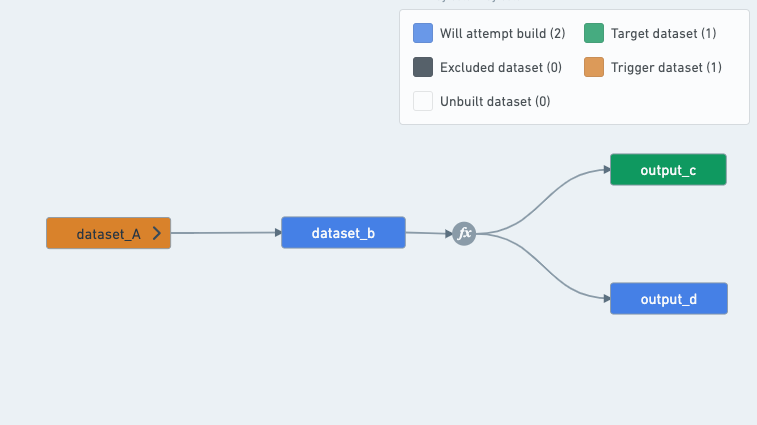
A schedule that builds output_c will always have to build output_d as well, since the transform between B, C and D is a multi-output transform.
Therefore, a schedule that targets output_c will have both output_c and output_d as outputs, since output_d is a dataset built by the schedule that is not used by any other datasets in the schedule.

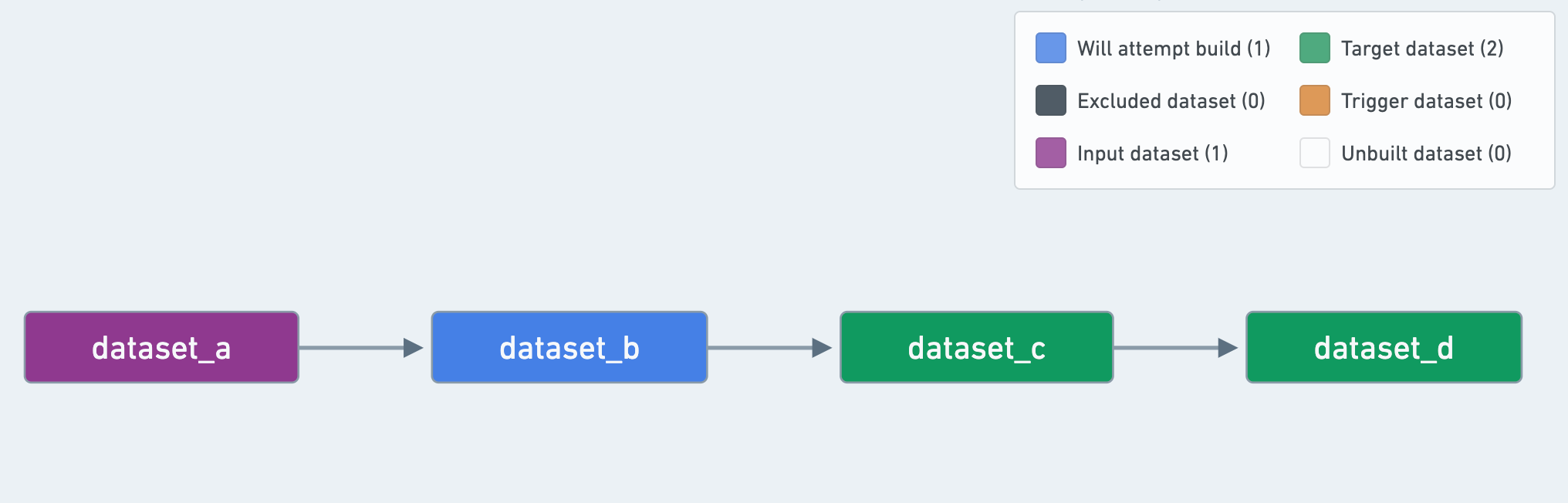
- A dataset can be defined as a "target" and not be an "output":
Even if a dataset is defined as a schedule "target", if it is used by other datasets in the schedule, it is considered an "intermediate" dataset instead of an "output" dataset.
In this example, dataset_c is a schedule "target", but is not considered an "output":
Where should health checks be installed on a schedule?
The following step-by-step guide relies on an understanding of the difference between job status and schedule status checks, and the difference between data freshness and time since last updated checks. If you are not sure about the differences between these checks, refer to the health check types.
:::callout{theme="neutral"} Schedules give us a sensible representation of a pipeline. As they are the recommended unit of monitoring, your monitoring will only be as good as the schedules you set up. Take some time before you start setting up your health checks to make sure your schedules adhere to the best practices outlined here. :::
Checks on schedules
- Schedule status check: This will catch all failures in a pipeline; it is not necessary to put a Job Status Check on each dataset.
- Schedule duration check: Useful for catching possible conflicts or builds that are blocking your pipeline. This check is also useful for detecting problems caused by:
- Abnormal inputs such as joins can take longer when the distribution of keys in an input changes. A failing job having completed all but one task in a stage is a strong signifier of skewed joins.
- Performance degradation introduced by code changes.
Checks on inputs
Install checks on all resolved inputs of your pipelines. If your pipeline fails, it's important to be able to trace down the root cause. Input staleness or schema breaks happen — installing checks on your inputs will help you detect them. Note: for the time being, only one check of a given type can exist on a particular dataset. If a check you wanted to install already exists, just subscribe to it.
- Schema check: This will warn you if columns are added or removed, or column names and types that your pipeline relies on change unexpectedly.
- Time since last updated (TSLU) [Optional]: Allows you to verify that data is delivered on time for the inputs of your pipeline. This can help you perform a root cause analysis when your pipeline does not build on time. It is an optional check and should only be installed if you know exactly what update frequency to expect.
- If there are upstream owners monitoring your input datasets already, you should also avoid applying this check (it is possible you may not even have permissions to add checks on upstream datasets).
- It is recommended to enable the "ignore empty transactions".
- Job or schedule status: Optional, but recommended for Data Connection syncs or datasets where the ownership is not explicitly defined. Schedule Status is recommended, since schedules represent a unit of the pipeline that builds together. Using Schedule Status is recommended over Job Status, as you will get alerted if the input dataset's build fails on an upstream dataset and is cancelled or aborted, resulting in a single job not running.
Checks on outputs
Install checks on all resolved outputs of your pipeline (recall that these are built by the schedule, but are not used by any other datasets in your schedule).
- Time since last updated check (TSLU): Use this check to ensure your pipeline is updating at the required cadence.
- Example: if your pipeline is supposed to run every 24 hours (say, at 9AM every day, the average build taking 1hr), you can either:
- Set the "since last update" threshold to 26 hours (to account for build time and give a bit of leeway) and have the check update automatically.
- Set the threshold to 2 hours and have the check run on a schedule: every day at 11AM in our case. Tip: check the "Automatically resolve" flag, otherwise your pipeline will be considered unhealthy for a full 24 hours in case the build finishes a little bit too late.
- With Schedule Status, Schedule Duration and TSLU checks on output datasets, you get early warnings that something is wrong with schedule status and schedule duration. If the TSLU ends up firing, something is likely wrong and someone should investigate.
- Schema check: Use this check if pipeline outputs are consumed by users in other applications, such as Contour, Slate or Object Explorer. This check will warn you when the output schema breaks, so you can take action if necessary and update downstream applications or let users know.
Optional checks
Optionally, install checks on important intermediate datasets that are consumed by users in another application directly or via syncs:
- Schema check: Similar to outputs, if users are consuming a dataset in any application (be it contour or via syncs), schema changes may require may cause breaks or require manual follow up steps.
- Data freshness: Use this to ensure the content of your dataset meets freshness requirements (if you have an appropriate timestamp column that can tell you when a row was added to the dataset in the source system).
- Time since last updated check: If you have a critical dataset (e.g. one used by many other users) that sits in the middle of your pipeline, it might not update on time due to, for example, delayed upstream. You should hopefully detect it thanks to the pipeline input checks, but adding a TSLU check is a useful addition.
- If there is a sync:
- Sync status check: Should be installed on datasets that are being synced (whether to a Foundry application like Slate or to external systems)
- Sync freshness check: This is especially helpful when assessed with Data Freshness and TSLU as you will quickly be able to determine if the issue is a) the dataset didn't update in time b) the dataset updated but the source system did not provide fresh data or c) the dataset has fresh data but the sync has not refreshed.
Summary Table
The best practices explained above are summarized in this table for quick reference:
| Schema | TSLU | Data Freshness | Sync Freshness | Sync Status | |
|---|---|---|---|---|---|
| Input | ✓ (allow additions) |
||||
| Intermediate | |||||
| Output | ✓ (exact match) | ✓ | |||
| User-facing datasets* | ✓ (exact match) | ✓ | |||
| Synced Datasets* | ✓ (exact match) | ✓ | ✓ | ✓ |
[*] Can be input, intermediate or output dataset. User-facing datasets are datasets consumed by users directly in apps, such as Contour.
中文翻译
推荐的健康检查(Health Checks)
本文档提供了设置健康检查以监控管道(Pipelines)健康状况的最佳实践。遵循这些指南可以帮助您实现稳健有效的监控级别,确保:数据顺利接入、数据成功构建以及数据正常输出。
这些最佳实践不涉及确保数据集内数据的质量、准确性或有效性。这需要更细粒度的管道功能知识,以便确定在管道内应执行的正确验证。
这些指南还应帮助您避免在健康检查设置中常见的以下陷阱:
- 检查过多导致检查量产生噪音
- 检查类型错误导致告警无用
- 检查过少导致出现问题时缺乏信号
先决知识
这些指南基于对以下概念的理解:
- 数据健康(Data Health)
- 计划(Schedules)
- 计划将作为监控单元,这意味着这些指南将根据计划运行时发生的情况,提供关于在何处安装何种检查的建议。
- 数据血缘(Data Lineage)
:::callout{theme="neutral"} 在本文档中,对计划的输入、中间产物和输出的引用均指已解析计划(Resolved Schedule),这与数据血缘应用中的计划配置不同。 :::
重要的监控概念
监控单元:已解析计划
已解析计划是一种思维模型,用于为计划中涉及的不同数据集分配角色。某些数据集被纳入是因为它们可以由该计划构建,即它们是计划数据集选择的一部分。其他数据集则作为构建所需的必要输入被纳入。根据数据集的角色,建议采用不同的健康检查。
数据集在计划中可以具有以下角色之一:
- 输出(Output): 作为计划最终步骤的数据集。它们由计划构建,但不被计划中的任何其他数据集使用。
- 中间产物(Intermediates): 由计划构建的所有非输出数据集。
- 输入(Inputs): 不由计划构建,但被计划使用的数据集。输入构成了计划外部被读取的第一层;例如,Data Connection 同步和您不自行构建的派生数据集。
在一个具体示例中,假设一个计划构建以下数据集:
在这种情况下,您可以这样拆分计划:
了解实际构建内容
要确定计划的输入、输出和中间产物,最简单的方法是在 Data Lineage 中打开该计划。进入 Data Lineage 后,从侧边栏选择该计划,这将应用计划着色,帮助您了解该计划将尝试构建的内容。
- 目标(Target): 将尝试构建且通常由该计划构建。一个例外是 Data Connection 同步的数据集,它们仅在计划上设置了“强制构建”时才会构建。
- 排除(Excludes): 永远不会由该计划构建。
- 输入(仅连接构建)(Inputs (connecting build only)): 不由该计划构建,除非它们在上游有其他输入。
:::callout{theme="neutral"} 关于数据陈旧度(Staleness)的简短说明:在实践中,计划很少会构建此图中的所有内容,因为某些数据集可能已经是最新的,重新计算它们只会浪费资源。然而,理解解析计划意味着弄清楚该计划可能触及的所有内容仍然很重要。 :::
目标与输出
计划是基于目标定义的,这些目标通常与输出相同。但是,在某些情况下,目标和输出可能会有所不同:
- 数据集可以是输出,而无需显式定义为目标:
构建 output_c 的计划将始终必须同时构建 output_d,因为 B、C 和 D 之间的转换是一个多输出转换。
因此,以 output_c 为目标的计划将同时把 output_c 和 output_d 作为输出,因为 output_d 是由该计划构建且不被计划中任何其他数据集使用的数据集。
- 数据集可以被定义为“目标”而不是“输出”:
即使数据集被定义为计划“目标”,如果它被计划中的其他数据集使用,它将被视为“中间产物”数据集,而不是“输出”数据集。
在此示例中,dataset_c 是一个计划“目标”,但不被视为“输出”:
应在计划的何处安装健康检查?
以下分步指南基于对作业状态检查与计划状态检查之间差异,以及数据新鲜度检查与自上次更新以来时间检查之间差异的理解。如果您不确定这些检查之间的区别,请参阅健康检查类型。
:::callout{theme="neutral"} 计划为我们提供了管道的合理表示。由于它们是推荐的监控单元,您的监控效果将取决于您设置的计划质量。在开始设置健康检查之前,请花些时间确保您的计划遵循此处概述的最佳实践。 :::
计划检查
- 计划状态检查(Schedule status check): 这将捕获管道中的所有故障;无需在每个数据集上放置作业状态检查。
- 计划持续时间检查(Schedule duration check): 有助于捕获可能的冲突或阻塞管道的构建。此检查还有助于检测由以下原因引起的问题:
- 异常输入,例如当输入中键的分布发生变化时,连接操作可能会耗时更长。一个失败的作业如果在一个阶段中完成了除一个任务外的所有任务,这是倾斜连接的强烈信号。
- 代码更改引入的性能下降。
输入检查
在管道的所有已解析输入上安装检查。如果您的管道发生故障,能够追踪到根本原因非常重要。输入数据陈旧或 Schema 中断的情况时有发生——在输入上安装检查将帮助您检测到这些问题。注意:目前,特定数据集上只能存在一个给定类型的检查。如果您想安装的检查已经存在,只需订阅它即可。
- Schema 检查(Schema check): 如果添加或删除了列,或者您的管道依赖的列名和类型发生意外更改,这将向您发出警告。
- 自上次更新以来的时间 (TSLU) [可选]: 允许您验证数据是否按时交付给管道的输入。这有助于在管道未按时构建时执行根本原因分析。这是一个可选检查,仅当您确切知道预期的更新频率时才应安装。
- 如果上游所有者已经在监控您的输入数据集,您也应避免应用此检查(您甚至可能没有权限在上游数据集上添加检查)。
- 建议启用“忽略空事务”。
- 作业或计划状态: 可选,但对于 Data Connection 同步或未明确定义所有权的数据集,建议启用。建议使用计划状态,因为计划代表了共同构建的管道单元。建议使用计划状态而不是作业状态,因为如果输入数据集的构建在上游数据集上失败并被取消或中止,导致单个作业未运行,您也会收到警报。
输出检查
在管道的所有已解析输出上安装检查(请注意,这些由计划构建,但不被计划中的任何其他数据集使用)。
- 自上次更新以来的时间检查 (TSLU): 使用此检查确保您的管道按要求的频率更新。
- 示例:如果您的管道应该每 24 小时运行一次(例如,每天上午 9 点,平均构建耗时 1 小时),您可以:
- 将“自上次更新”阈值设置为 26 小时(以考虑构建时间并留有一点余地),并让检查自动更新。
- 将阈值设置为 2 小时,并让检查按计划运行:在我们的示例中为每天上午 11 点。提示:勾选“自动解决”标志,否则如果构建完成得稍微晚了一点,您的管道将被视为不健康长达 24 小时。
- 通过在输出数据集上设置计划状态、计划持续时间和 TSLU 检查,您可以提前收到计划状态和计划持续时间出现问题的警告。如果 TSLU 最终触发,则很可能出现了问题,需要有人进行调查。
- Schema 检查: 如果管道输出被其他应用(如 Contour、Slate 或 Object Explorer)中的用户使用,请使用此检查。当输出 Schema 中断时,此检查将向您发出警告,以便您在必要时采取措施并更新下游应用或通知用户。
可选检查
可选地,在重要的中间产物数据集上安装检查,这些数据集被其他应用中的用户直接消费或通过同步消费:
- Schema 检查: 与输出类似,如果用户在任何应用(无论是 Contour 还是通过同步)中消费数据集,Schema 更改可能会导致中断或需要手动执行后续步骤。
- 数据新鲜度(Data freshness): 使用此检查确保数据集的内容满足新鲜度要求(如果您有一个合适的时间戳列,可以告诉您某行何时被添加到源系统的数据集中)。
- 自上次更新以来的时间检查: 如果您有一个位于管道中间的关键数据集(例如被许多其他用户使用的数据集),它可能无法按时更新,例如由于上游延迟。您应该希望通过管道输入检查检测到这一点,但添加 TSLU 检查是一个有用的补充。
- 如果存在同步:
- 同步状态检查(Sync status check): 应安装在正在同步的数据集上(无论是同步到 Slate 等 Foundry 应用还是外部系统)。
- 同步新鲜度检查(Sync freshness check): 当与数据新鲜度和 TSLU 结合评估时,这特别有用,因为您将能够快速确定问题是 a) 数据集未及时更新 b) 数据集已更新但源系统未提供新鲜数据,还是 c) 数据集有新鲜数据但同步未刷新。
汇总表
上述最佳实践汇总在此表中,以便快速参考:
| Schema | TSLU | 数据新鲜度 | 同步新鲜度 | 同步状态 | |
|---|---|---|---|---|---|
| 输入 | ✓ (允许新增) |
||||
| 中间产物 | |||||
| 输出 | ✓(精确匹配) | ✓ | |||
| 面向用户的数据集* | ✓(精确匹配) | ✓ | |||
| 已同步数据集* | ✓(精确匹配) | ✓ | ✓ | ✓ |
[*] 可以是输入、中间产物或输出数据集。面向用户的数据集是指用户直接在应用(如 Contour)中消费的数据集。