Stability recommendations(稳定性建议)
This page covers key recommendations for creating a resilient and stable pipeline over time.
Version all changes
Every bit of logic that generates a dataset should be versioned. This makes it easier to track regressions and changes that happened to the pipeline. Practically speaking, it boils down to:
- When setting up a production-level pipeline, avoid using Contour or Code Workbook, as tracking modifications in these tools is more challenging. These tools are great for the development phase, but as the pipeline matures functionality should be rewritten in Transforms, ideally in Python or Java.
- Ensure the
masterbranch is locked on all your Code Repositories and all changes require a Pull Request and approval from a code reviewer. - When merging, we recommend you always
Squash and mergeas this leaves a cleaner commit history onmaster.
Isolate common data quality errors
"Sensitive" or "unstable" datasets should be isolated from the rest of the pipeline via a validation step. In particular, datasets created in Fusion, manual data uploads, and other types of upload are prone to data quality issues that can end up affecting your entire pipeline.
In the below example, suppose that dataset called Fusion is often experiencing data quality issues (schema changes, parsing errors, incomplete data, ...) that end up affecting the rest of the pipeline.
The solution is to create a Fusion Validated dataset that copies the data from Fusion if some validation steps pass.
Example Data Lineage Graph with validation datasets on Fusion Sheets and Manual Uploads

# Example validation code
@transform(
    input=Input("/MyProject/Fusion"),
    validated_input=Output("/MyProject/Fusion Validated"),
)
def validate(input, validated_input):
    found_dtypes = input.dataframe().dtypes

    assert len(found_dtypes) >= 8, "Schema break, column count too low"

    assert ("hours", "int") in found_dtypes, "'hours' has to be an int"

    validated_input.write_dataframe(input.dataframe())
Create an event-based schedule to build Fusion Validated whenever Fusion updates.
Treat Fusion Validated as an input to the other pipelines. Ignore it from the builds, and add the relevant health-checks on it. Build status is important, since you may have to contact the people in charge of updating Fusion to let them know of potential errors or issues.
The same reasoning applies to Manual Upload and Manual Upload Validated datasets.
Example Data Lineage Graph highlighting datasets excluded from the build of Apex 1
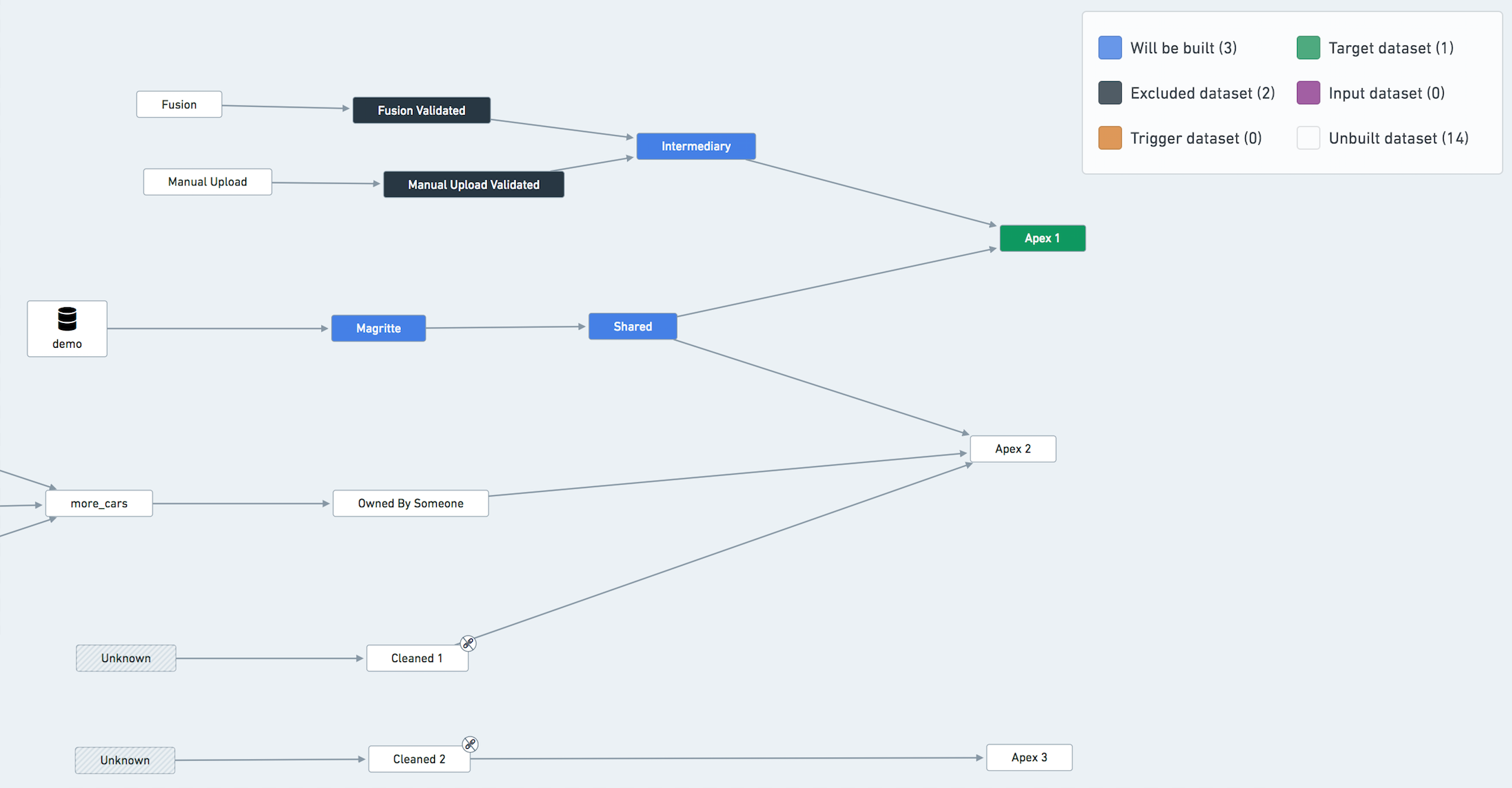
:::callout{theme="neutral"} You don't have to exclude Data Connection syncs from the build explicitly, as they are always considered up-to-date by the orchestration system. The fact that it's colored blue in the graph above does not mean that the ingestion will be triggered. :::
Handling shared resources
You might have a dataset that belongs to many different pipelines in your project. If your builds don't align perfectly, some pipelines might be blocked on building this dataset.
In this case, you should consider creating a new pipeline to build this shared dataset as frequently as needed and have the shared dataset become an input in the other pipelines (ignoring it from the schedules). However, note that such an operation significantly increases the complexity of your pipeline setup. Our recommendation is not to perform it unless absolutely necessary.
Another less invasive way of working around this problem is to build the shared resource in only one pipeline/schedule and treat it as an input in all other pipelines. For example, in the previous diagram, treat Shared as an input of one of the pipelines (i.e. exclude it from all but one schedule).
Avoid partial runs
You should avoid running only part of the pipeline or running 'Full Builds' on datasets.
A pipeline is either up to date or not. If you run only part of the pipeline (e.g. only the export phase) you might end up in an inconsistent state making it harder to assess whether the pipeline is healthy. If you run a 'full build' on a terminal dataset, this build will be missing all the relevant options that the pipeline should be run with (retries, failure strategy, ignores, etc.). Whenever in need of initiating a build manually, you should use the 'Run Schedule Now' button on the Schedule overview page in order to run a build according to the schedule configuration.
中文翻译
稳定性建议
本页介绍了创建长期稳定且具有弹性的数据管道的关键建议。
对所有变更进行版本控制
生成数据集的所有逻辑代码都应进行版本控制。这有助于追踪管道中出现的回归问题和变更。具体实践包括:
- 在搭建生产级管道时,避免使用 Contour 或 Code Workbook,因为这些工具中的修改追踪较为困难。这些工具非常适合开发阶段,但随着管道的成熟,功能应迁移至 Transforms 中实现,理想情况下使用 Python 或 Java。
- 确保所有代码仓库的
master分支已锁定,所有变更必须通过拉取请求(Pull Request)并经过代码审查者批准。 - 合并时,我们建议始终使用"Squash and merge"方式,这样可以在
master分支上保留更清晰的提交历史。
隔离常见数据质量错误
"敏感"或"不稳定"的数据集应通过验证步骤与管道的其他部分隔离。特别是 Fusion 中创建的数据集、手动上传的数据以及其他类型的上传,容易出现数据质量问题,进而影响整个管道。
在以下示例中,假设名为 Fusion 的数据集经常出现数据质量问题(模式变更、解析错误、数据不完整等),这些问题最终会影响管道的其他部分。
解决方案是创建一个 Fusion Validated 数据集,该数据集在通过某些验证步骤后从 Fusion 复制数据。
包含 Fusion Sheets 和手动上传验证数据集的数据血缘图示例
# 验证代码示例
@transform(
    input=Input("/MyProject/Fusion"),
    validated_input=Output("/MyProject/Fusion Validated"),
)
def validate(input, validated_input):
    found_dtypes = input.dataframe().dtypes

    assert len(found_dtypes) >= 8, "Schema break, column count too low"

    assert ("hours", "int") in found_dtypes, "'hours' has to be an int"

    validated_input.write_dataframe(input.dataframe())
创建一个基于事件的调度,每当 Fusion 更新时构建 Fusion Validated。
将 Fusion Validated 视为其他管道的输入。在构建中忽略它,并为其添加相关的健康检查。构建状态很重要,因为您可能需要联系负责更新 Fusion 的人员,告知他们潜在的错误或问题。
同样的逻辑也适用于 Manual Upload 和 Manual Upload Validated 数据集。
突出显示从 Apex 1 构建中排除的数据集的数据血缘图示例
:::callout{theme="neutral"} 您无需显式地将数据连接同步(Data Connection syncs)从构建中排除,因为编排系统始终认为它们是最新的。上图中蓝色标记并不意味着会触发数据摄取。 :::
处理共享资源
您的项目中可能有一个数据集属于多个不同的管道。如果构建时间不完全对齐,某些管道可能会因等待构建该数据集而被阻塞。
在这种情况下,您应考虑创建一个新的管道,按需频繁构建此共享数据集,并将该共享数据集作为其他管道的输入(在调度中忽略它)。但请注意,此类操作会显著增加管道设置的复杂性。我们建议除非绝对必要,否则不要执行此操作。
另一种侵入性较小的解决方法是,仅在一个管道/调度中构建共享资源,并将其视为所有其他管道的输入。例如,在上图中,将 Shared 视为其中一个管道的输入(即仅在一个调度中构建它,其他调度中忽略)。
避免部分运行
您应避免仅运行管道的一部分,或对数据集执行"完整构建"(Full Builds)。
管道要么是最新的,要么不是。如果仅运行管道的一部分(例如仅运行导出阶段),可能会导致状态不一致,从而难以评估管道是否健康。如果对终端数据集执行"完整构建",该构建将缺少管道运行时应具备的所有相关选项(重试、失败策略、忽略项等)。当需要手动启动构建时,应使用调度概览页面上的"立即运行调度"(Run Schedule Now)按钮,以根据调度配置运行构建。