Debug a failing job(调试失败作业(Job))
As you author data transformation code in Foundry, you will likely run into cases where a job fails, either from the beginning or after some time. This page documents a suggested workflow for debugging failing jobs, as well as tools available in Foundry to help you understand why a job may have started failing.
Suggested workflow
The following graph gives a suggested workflow for debugging transforms job failures.
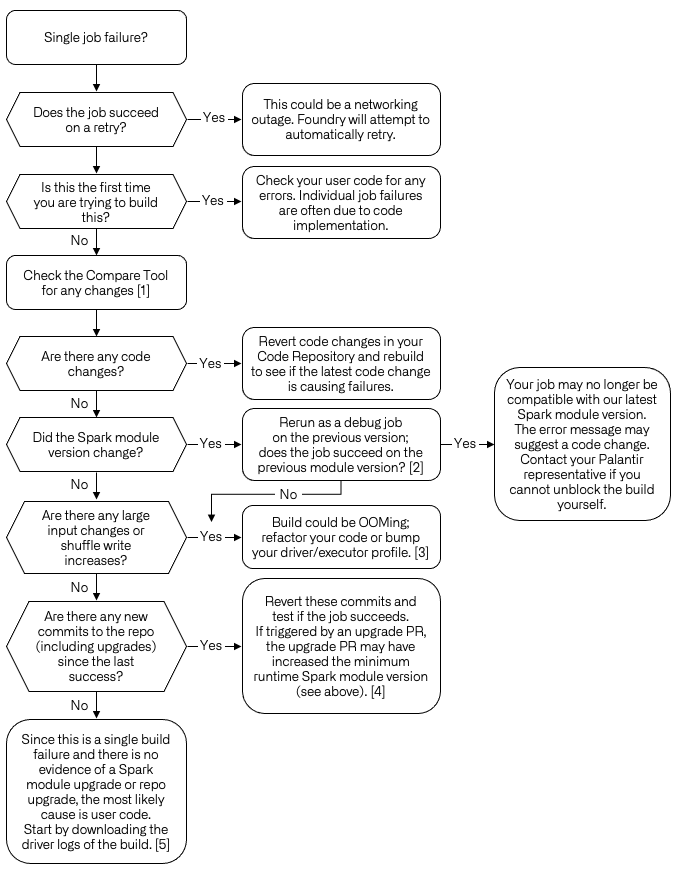
- [1] Using Job Comparison as documented below.
- [2] You can test your build with a specific module version by navigating the job report, then selecting Actions > Rerun as Debug job > Select the module version of the previously successfully build.
- [3] Troubleshooting OOM Errors.
- [4] Repository upgrades.
- [5] You can download driver logs for your job by navigating to the job report and selecting Logs >
_driver.log> Download.
Compare jobs
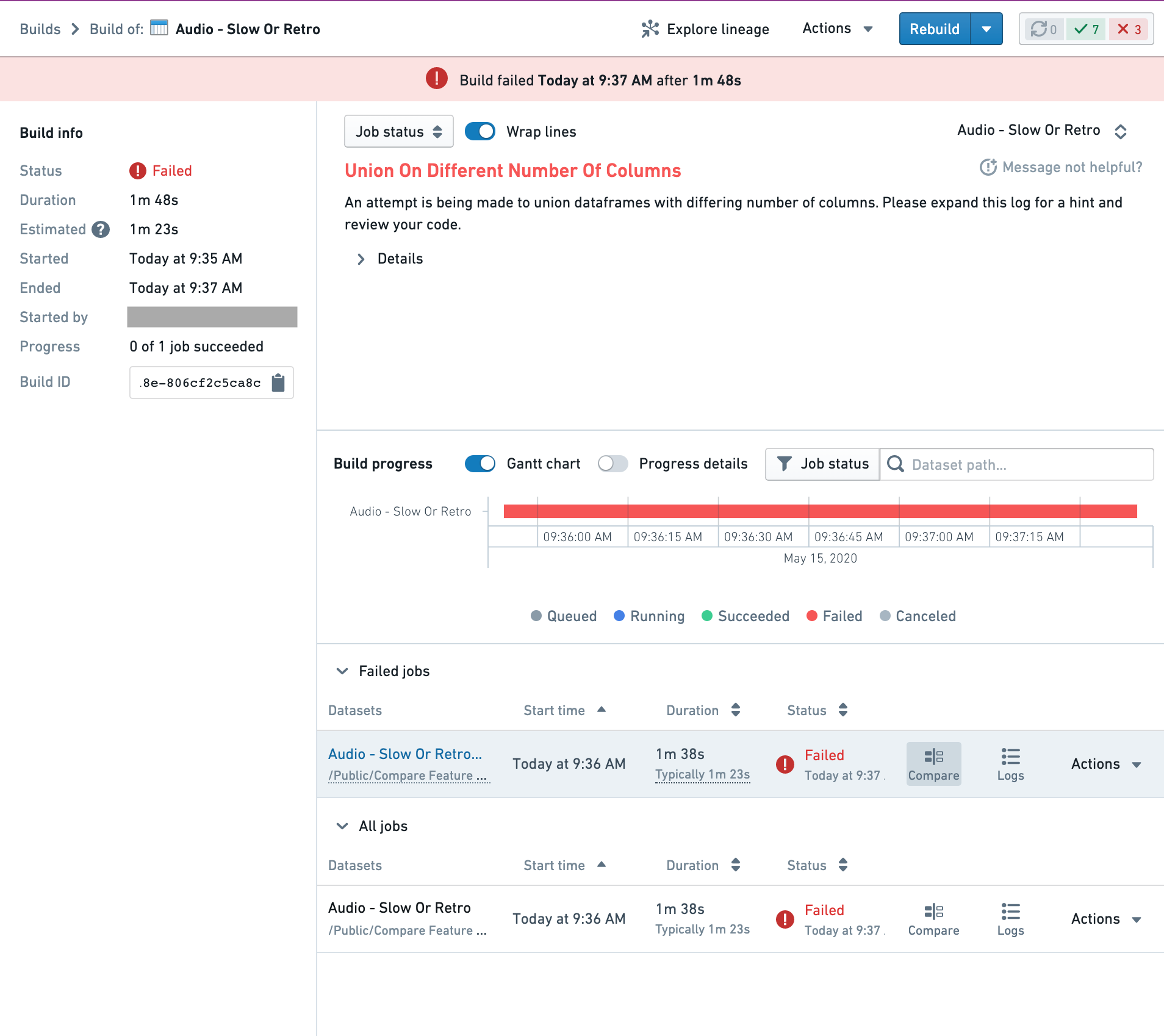
The Job Comparison tool allows you to compare the current job with the previous successful job run. It is useful for investigating change and troubleshooting build issues. It is accessible from the build report page in the Builds application for any job that has output transactions. In order to access the Job Comparison tool, click the "Compare" button on any job row:
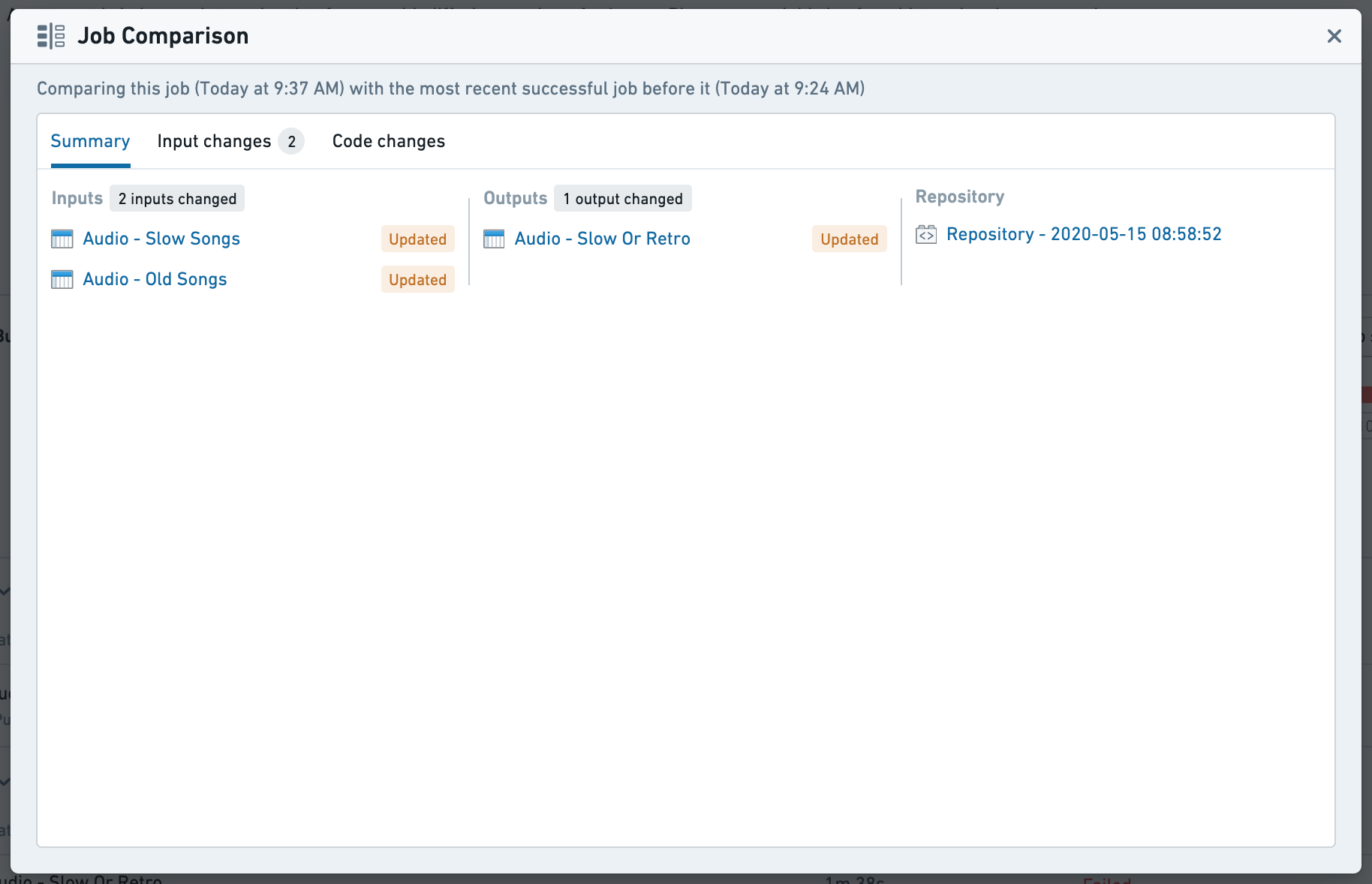
Comparison Summary
This tab provides an overview of the changes that occurred during a job. Clicking any dataset will open a new tab exploring the transactional changes in the Dataset app's Compare tool. Clicking the repository will redirect your browser to the source repository at the commit that the job occurred, allowing exploration of the whole repository rather than just the file associated to the output of this job.
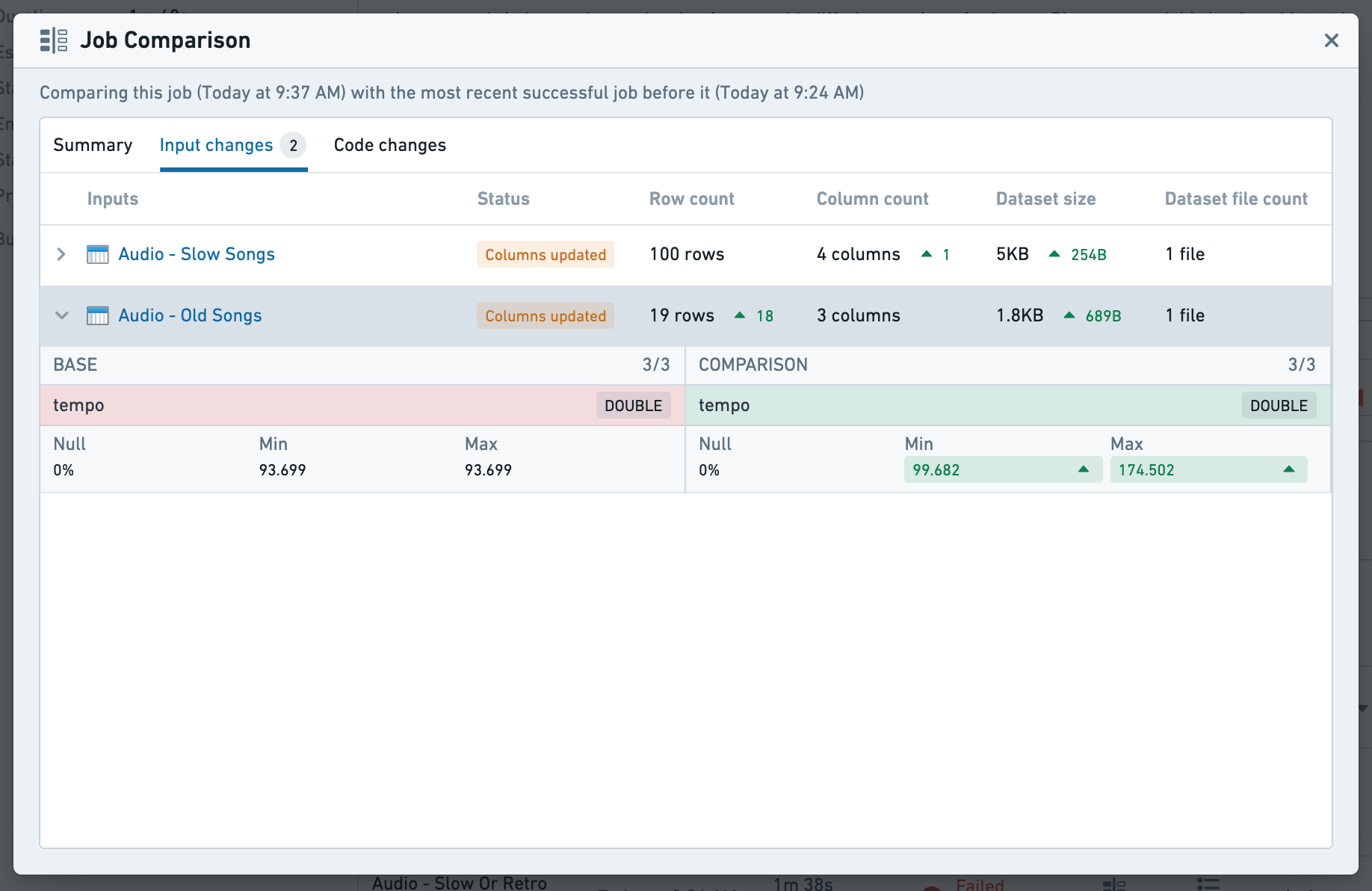
Input Changes
This tab provides a high level overview of the changes in the input datasets, highlighting changes in metadata, schema and statistics. If a dataset has any notable column changes, selecting the row will expand a summary of those changes. To explore changes in detail, selecting any dataset will redirect to the Dataset app for further comparison.
Code Changes
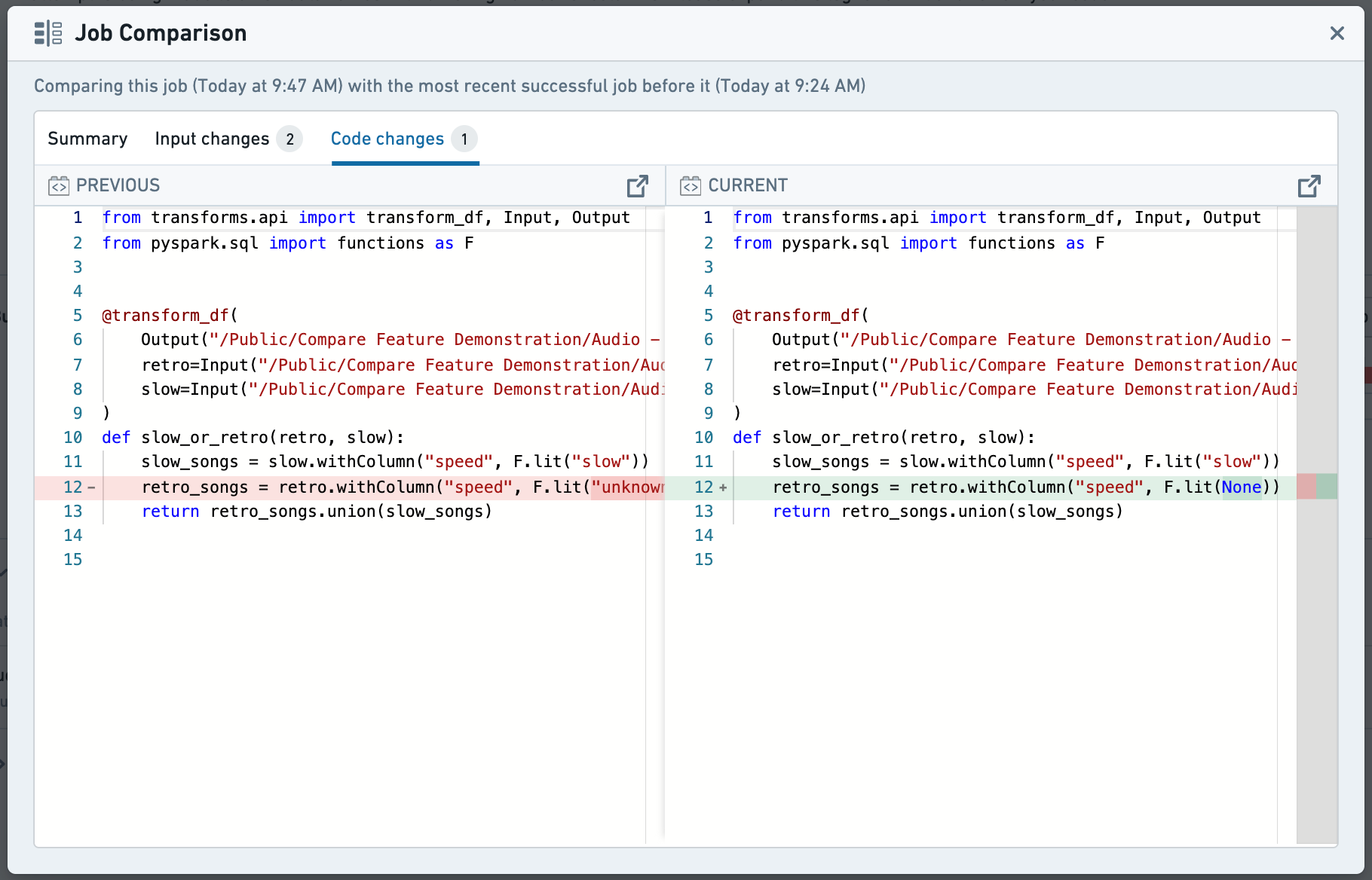
Code changes will highlight any changes in code between this job run and the previous successful run in the file where the outputs are defined. For further detail, buttons are provided to redirect to the source repository at commit (only available when the source is Code repositories). Code differences are available for any job based on a code repository or code workbook.
Hanging builds
If your build is hanging, follow the workflow above. If this is the first time running this job, it is most likely that the build is hanging due to user code.
One important distinction to failed jobs is that Driver logs are lost when builds are cancelled. Download the streamed driver logs before canceling the build by selecting Logs > _driver.log > Download. You can also take a snapshot of a running build in the Spark details, under Executors > Snapshot. These will allow you to troubleshoot the hanging build once it has been canceled.
AI error enhancer (AIP)
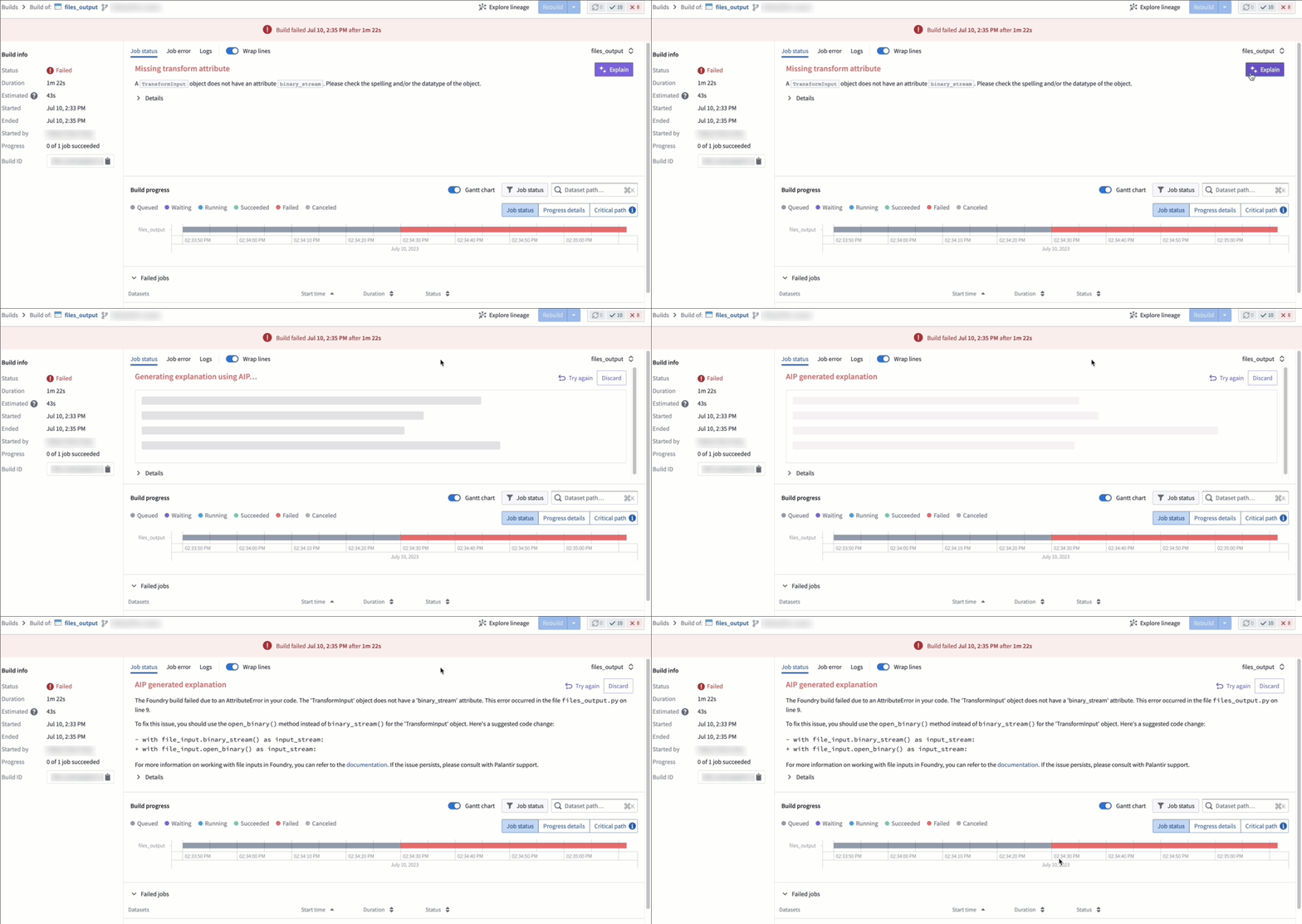
If AIP is enabled on your stack, the AI error enhancer widget complements the detail view of a failed job to help you better understand and resolve issues that arise.
中文翻译
调试失败作业(Job)
当你在Foundry中编写数据转换代码时,很可能会遇到作业运行失败的情况,要么从启动阶段就报错,要么运行一段时间后异常退出。本页介绍了调试失败作业的建议工作流,以及Foundry中可用于排查作业失败原因的相关工具。
建议工作流
下图展示了调试转换作业失败问题的建议工作流。
- [1] 使用下文介绍的作业对比(Job Comparison)工具。
- [2] 你可以使用指定模块版本测试构建:进入作业报告页面,依次选择操作(Actions) > 以调试作业重跑(Rerun as Debug job) > 选择之前构建成功对应的模块版本即可。
- [3] 内存不足(OOM)错误排查。
- [4] 代码仓库升级(Repository upgrades)。
- [5] 你可以进入作业报告页面,依次选择日志(Logs) >
_driver.log> 下载(Download),即可获取作业的驱动程序日志。
作业对比
作业对比工具支持将当前作业与之前运行成功的作业进行比对,对于排查变更和构建问题非常实用。所有存在输出事务的作业,都可以在构建应用(Builds application)的构建报告页面访问该工具。如需使用作业对比工具,点击对应作业行的对比(Compare)按钮即可:
对比摘要(Comparison Summary)
该标签页提供作业运行期间发生的变更概览。点击任意数据集,将打开新标签页,在数据集应用(Dataset app)的对比工具中查看事务变更详情。点击代码仓库,将跳转至本次作业运行对应提交(commit)版本的源代码仓库页面,支持浏览整个仓库的内容,而不仅限于与本次作业输出相关的文件。
输入变更(Input Changes)
该标签页提供输入数据集变更的高层概览,会高亮显示元数据、schema和统计指标的变更。如果某个数据集存在明显的列变更,选中对应行将展开显示这些变更的摘要。如需深入探索变更详情,点击任意数据集将跳转至数据集应用进行进一步比对。
代码变更(Code Changes)
代码变更板块会高亮显示本次作业运行与上一次成功运行之间,输出定义文件内的所有代码变更。如需查看更多详情,可点击提供的按钮跳转至对应提交版本的源代码仓库(仅当源为代码仓库(Code repositories)时可用)。所有基于代码仓库或代码工作簿(Code workbook)的作业都支持查看代码差异。
构建卡顿(Hanging builds)
如果你的构建出现卡顿,请遵循上述工作流排查。如果是首次运行该作业,构建卡顿大概率是由用户编写的代码导致的。
与失败作业的一个重要区别是,构建被取消后驱动日志(Driver logs)会丢失。请在取消构建前,依次选择日志(Logs) > _driver.log > 下载(Download),下载流式输出的驱动日志。你也可以在Spark详情(Spark details)页面的执行器(Executors) > 快照(Snapshot) 下获取运行中构建的快照。这些内容可以帮助你在构建取消后排查卡顿原因。
AI错误增强器(AI error enhancer, AIP)
如果你的栈(Stack)已启用AIP,AI错误增强器组件将作为失败作业详情视图的补充,帮助你更好地理解并解决出现的问题。