Spark concepts(Spark 概念)
Introduction to Spark
What is Spark?
Spark is a distributed computing system that is used within Foundry to run data transformations at scale. It was originally created by a team of researchers at UC Berkeley and was subsequently donated to the Apache Foundation in the late 2000s. Foundry allows you to run SQL, Python, Java, and Mesa transformations (Mesa is a proprietary Java-based DSL) on large amounts of data using Spark as the foundational computation layer.
How does Spark work?
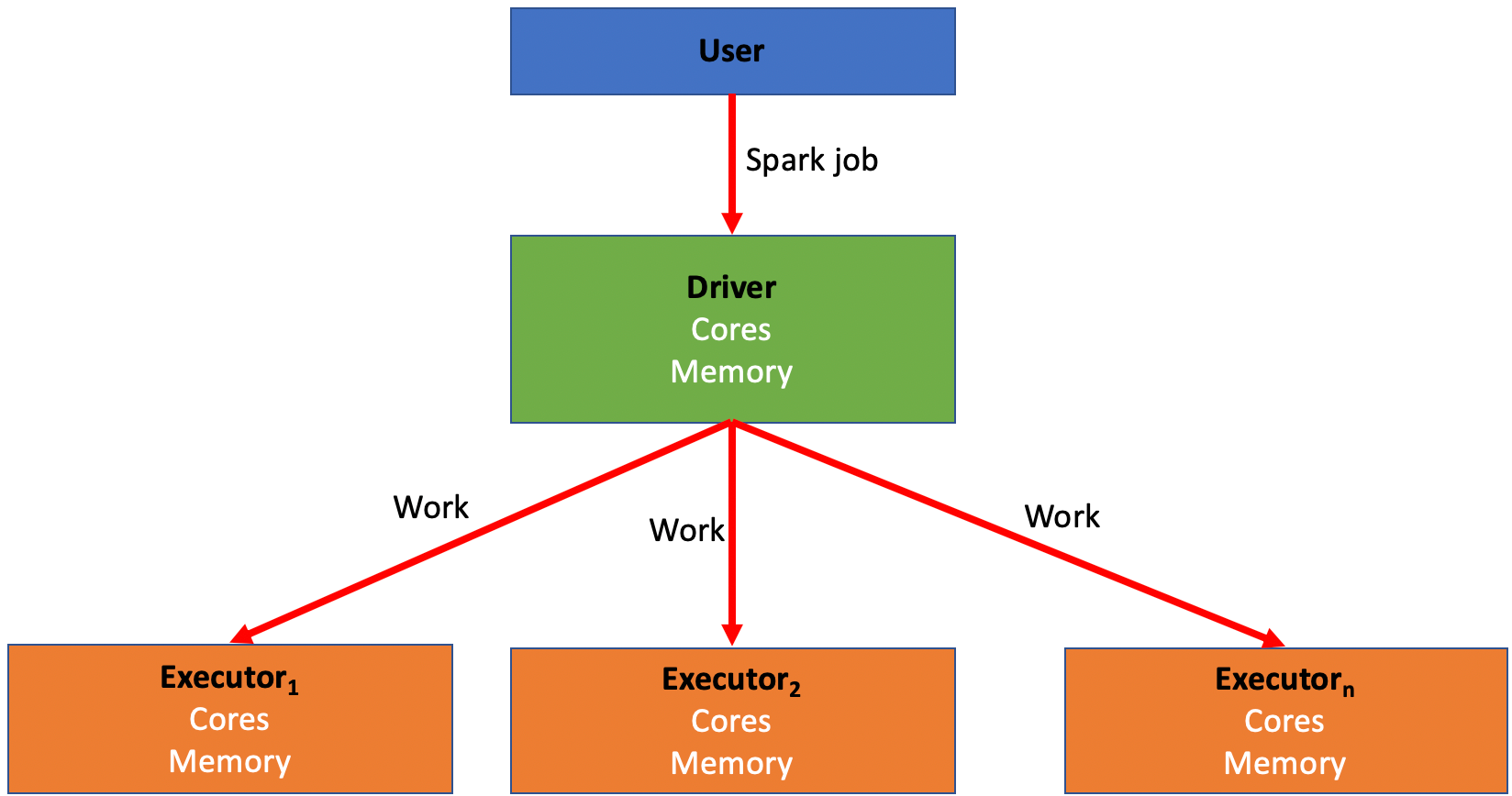
Spark relies on distributing jobs across many computers at once to process data. This process allows for simultaneous jobs to run quickly across users and projects with a method known as MapReduce. These computers are divided into drivers and executors.
- A driver is like the “conductor” for your Spark job. The driver is responsible for distributing the work of a job to the executors.
- An executor is like a “worker bee” for your Spark job. An executor is responsible for performing the computation for the portion of the job allocated to it by the driver. This work is split into a number of “partitions”, and each executor is given some partitions to run your code against. Once the executor completes this task, it will go back to the driver and ask for more work until the job has been completed.
- Every Spark job has a number of variables associated with it that can be manipulated in order to create a Spark profile best suited to run the transform.
- There is a balance that needs to be struck within every Spark job between quickly and easily executing a job and the cost and resources associated with running that job.
- As a rule of thumb, more executors and more memory should decrease running time while also increasing cost.
- Based on the characteristics of the job, some combinations and configurations of drivers and executors perform better than the others. This is discussed in more detail in the section on tuning Spark profiles.
- A Spark profile is the configuration that Foundry will use to configure said distributed compute resources (drivers and executors) with the appropriate amount of CPU cores and memory.
- Five configurable variables are associated with every Spark job:
- Driver cores: Controls how many CPU cores are assigned to a Spark driver.
- Driver memory: Controls how much memory is assigned to the Spark driver.
- Only the JVM memory is controlled. This does not include “off-heap” memory that’s needed for external non-Spark tasks (such as calls to Python libraries)
- Executor cores: Controls how many CPU cores are assigned to each Spark executor, which in turn controls how many tasks are run concurrently in each executor.
- Executor memory: Controls how much memory is assigned to each Spark executor.
- This memory is shared between all tasks running on the executor.
- Number of executors: Controls how many executors are requested to run the job.
- A list of all built-in Spark Profiles can be found in the Spark Profile Reference.
Tuning Spark profiles
- You may encounter issues running transforms which will require you to adjust Spark profiles to create a custom, non-default configuration that enables your specific job. For example:
- Your job may require more memory.
- Your job may run slower than what is needed for the use case.
- You may encounter errors that cause a job to fail entirely.
- To use a non-default Spark profile in Code Repositories, the profile first needs to be imported into the repository containing your transform. This process is described in the documentation on Spark profile usage.
- Once imported, a Spark profile can be assigned to a specific transform following the guidance in the Apply Transforms Profiles documentation.
- The Spark profiles used in Pipeline Builder batch pipelines are controlled via the pipeline's build settings.
When to modify your Spark profile from the default
- As a rule of thumb when editing a Spark profile, only increase one variable at a time and only bump up by one level each time.
- For example, start by only adjusting executor memory and bumping it from
EXECUTOR_MEMORY_SMALLtoEXECUTOR_MEMORY_MEDIUM, then run the job again before adjusting anything else. This helps prevent incurring unnecessary costs by over-allocating resources to your job. - While backend defaults do not always map to specific Spark profiles, they are typically approximated by the built-in profiles labelled
SMALL. - The right defaults (for non-Python Transforms) are
EXECUTOR_CORES_SMALL,EXECUTOR_MEMORY_SMALL,DRIVER_CORES_SMALL,DRIVER_MEMORY_SMALL,NUM_EXECUTORS_2. - Python may need more non-JVM overhead memory when it makes calls to Python libraries that run outside the JVM.
- If you are experiencing any problems with your Spark job, the first step is to optimize your code.
- If you have optimized as much as possible and are still having problems, read on for specific recommendations.
- If your job succeeds but is running slower than needed for your use case:
- Try increasing executor count; increasing executor count increases the number of tasks that can run in parallel, therefore increasing performance (provided the job is parallel enough) while also increasing cost with the use of more resources.
- You can view the Builds application page for a given build for a chart that will help you identify if increasing the executor count can help improve the speed of your job. If the task concurrency does not get close to the executor count, increasing the number of executors is most likely not going to help improve run time.

- If doubling the executor count does not reduce run time by more than 1/3, then you probably have inefficient code (for instance, reading a lot from Catalog or writing a lot to Catalog).
- For example, if you double the executor count for the transform generating a 6 minute job, the job should run in 4 minutes or less.
- If halving your executor count slows your job down by less than 50% (for example, 4 minutes to 6 minutes), you should drop down to the lower executor count to save money unless runtime is critical.
- Limits can be imposed on large profiles (such as 128 or more executors) in order to ensure only approved use cases can use significant resources. If you reach a limit and need to go higher, contact your Palantir representative.
- Executors tend to accrue to a driver at a rate of around 10 per minute during start-up. This means that short jobs with high executor counts should probably use lower executor counts to reduce thrashing in the system. For example, any 64-executor job that takes less than 10 minutes should probably be dropped to 32 executors, as by the time the job has acquired all its computing resources, it is almost finished.
- If your job is failing and you’re receiving OOM (out of memory) errors or a “Shuffle stage failed” error which is not linked to a code-logic-based failure cause:
- Try increasing executor memory from
SMALLtoMEDIUM. This should help if you are processing large amounts of data.- If you think you need to adjust from
MEDIUMtoLARGE, consult an expert for help. Consider simplifying your transform if possible, as described in the troubleshooting guide.
- If you think you need to adjust from
- If collecting large amounts of data back to the driver or performing large broadcast joins:
- Try increasing driver memory.
- If you see errors like “Spark module stopped responding” and the input dataset has many files:
- Try increasing the driver memory first.
- If the error persists after increasing driver memory, increase the number of driver cores to 2.
- If you have transforms that read many files and run into GC (Garbage Collection) problems:
- Try increasing driver cores to 2.
Recommended best practices
For administrators
- When a use case ends, delete all custom profiles that were created for this use case.
- This reduces clutter and avoids creating too many custom profiles that lead to confusion.
- Set up permissions such that resource-intensive profiles are accessible only after an administrator grants explicit permission.
- For example,
NUM_EXECUTORS_32andEXECUTOR_MEMORY_LARGE(and above) should be available only upon request and approval of that request. - All executor core values except
EXECUTOR_CORES_SMALLshould be heavily controlled (because this is a "stealth" way to increase computing power and it is preferable to funnel users toNUM_EXECUTORSprofiles in almost all cases).
For adjusting Spark profiles
- Try to use the default profile (that is, no profile) when possible.
- This will reduce costs and clutter.
- If you cannot use the default profile, try to use the built-in profiles.
- When setting up a new profile configuration, save it with your name or use case’s name.
- This will improve organization and also ensure that this profile is not used by other users or projects without your knowledge.
- Otherwise, you can get a list of too many profiles with no idea which profile was set up for which use.
- When increasing memory, anything that goes beyond 8:1 resources (indicated by a combination of
EXECUTOR_CORES_SMALLandEXECUTOR_MEMORY_MEDIUM) should be approved by an administrator. Block offEXECUTOR_CORES_EXTRA_SMALLandEXECUTOR_MEMORY_LARGE. If a user is asking for these, it usually indicates either subpar optimization or a critical workflow. - Profiles should be separable. Each profile should affect only one Spark variable (or one logical combination of Spark variables).
- For example, in creating a new profile, only change the executor count and then try that out without also changing other variables like executor memory or driver memory.
- Except in special cases when many Spark jobs are running concurrently in the same Spark module, the default configuration for driver cores should not be overridden.
- The default executor cores configuration should rarely be overridden.
- Any job that takes less than 15 minutes to run should not use 64 executors.
- This many executors will spend most of that time simply ramping up.
- Whenever creating a custom profile and running it, check the performance after the fact in Spark details.
- Spark details will track how quickly a job performs and details the concurrent jobs.
中文翻译
Spark 概念
Spark 简介
什么是 Spark?
Spark 是一个分布式计算系统,在 Foundry 中用于大规模运行数据转换。它最初由加州大学伯克利分校的一个研究团队创建,随后在 2000 年代末捐赠给了 Apache 基金会。Foundry 允许您使用 SQL、Python、Java 和 Mesa(Mesa 是一种基于 Java 的专有 DSL)在大量数据上运行转换,并以 Spark 作为基础计算层。
Spark 如何工作?
Spark 依赖将任务同时分发到多台计算机上来处理数据。这个过程通过一种称为 MapReduce 的方法,允许跨用户和项目快速运行并行任务。这些计算机分为驱动程序(driver)和执行器(executor)。
- 驱动程序(driver) 就像 Spark 任务的"指挥者"。驱动程序负责将任务的工作分发给执行器。
- 执行器(executor) 就像 Spark 任务的"工蜂"。执行器负责执行驱动程序分配给它的那部分任务的计算工作。这项工作被分成多个"分区(partition)",每个执行器被分配一些分区来运行您的代码。一旦执行器完成这项任务,它会返回驱动程序请求更多工作,直到任务完成。
- 每个 Spark 任务都有一些与之相关的变量,可以对这些变量进行操作,以创建最适合运行转换的 Spark 配置文件(Spark profile)。
- 每个 Spark 任务都需要在快速轻松执行任务与运行该任务相关的成本和资源之间取得平衡。
- 根据经验,更多的执行器和更大的内存应该会减少运行时间,同时也会增加成本。
- 根据任务的特点,某些驱动程序和执行器的组合和配置比其他组合和配置表现更好。这在关于调整 Spark 配置文件的部分中有更详细的讨论。
- Spark 配置文件(Spark profile)是 Foundry 用来配置所述分布式计算资源(驱动程序和执行器)并分配适当数量的 CPU 核心和内存的配置。
- 每个 Spark 任务都有五个可配置的变量:
- 驱动程序核心数(Driver cores): 控制分配给 Spark 驱动程序的 CPU 核心数量。
- 驱动程序内存(Driver memory): 控制分配给 Spark 驱动程序的内存量。
- 仅控制 JVM 内存。这不包括外部非 Spark 任务(如对 Python 库的调用)所需的"堆外(off-heap)"内存。
- 执行器核心数(Executor cores): 控制分配给每个 Spark 执行器的 CPU 核心数量,进而控制每个执行器中并发运行的任务数量。
- 执行器内存(Executor memory): 控制分配给每个 Spark 执行器的内存量。
- 此内存在执行器上运行的所有任务之间共享。
- 执行器数量(Number of executors): 控制请求运行任务的执行器数量。
- 所有内置 Spark 配置文件的列表可以在 Spark 配置文件参考 中找到。
调整 Spark 配置文件
- 您可能会遇到运行转换的问题,需要调整 Spark 配置文件以创建自定义的非默认配置,从而支持您的特定任务。例如:
- 您的任务可能需要更多内存。
- 您的任务可能运行速度慢于用例所需。
- 您可能会遇到导致任务完全失败的错误。
- 要在代码仓库(Code Repositories)中使用非默认的 Spark 配置文件,首先需要将该配置文件导入到包含您的转换的仓库中。此过程在关于 Spark 配置文件使用 的文档中有描述。
- 导入后,可以按照 应用转换配置文件 文档中的指导,将 Spark 配置文件分配给特定的转换。
- 在 Pipeline Builder 批处理管道中使用的 Spark 配置文件通过管道的构建设置进行控制。
何时修改默认的 Spark 配置文件
- 根据经验,在编辑 Spark 配置文件时,一次只增加一个变量,并且每次只提升一个级别。
- 例如,首先只调整执行器内存,将其从
EXECUTOR_MEMORY_SMALL提升到EXECUTOR_MEMORY_MEDIUM,然后在调整其他任何内容之前再次运行任务。这有助于防止因过度分配资源给任务而产生不必要的成本。 - 虽然后端默认值并不总是映射到特定的 Spark 配置文件,但它们通常近似于标记为
SMALL的内置配置文件。 - 正确的默认值(对于非 Python 转换)是
EXECUTOR_CORES_SMALL、EXECUTOR_MEMORY_SMALL、DRIVER_CORES_SMALL、DRIVER_MEMORY_SMALL、NUM_EXECUTORS_2。 - 当 Python 调用在 JVM 外部运行的 Python 库时,可能需要更多的非 JVM 开销内存。
- 如果您遇到 Spark 任务的任何问题,第一步是优化您的代码。
- 如果您已经尽可能优化但仍然有问题,请继续阅读以获取具体建议。
- 如果您的任务成功但运行速度慢于用例所需:
- 尝试增加执行器数量;增加执行器数量会增加可以并行运行的任务数量,从而提高性能(前提是任务具有足够的并行性),同时也会因使用更多资源而增加成本。
- 您可以查看特定构建的 Builds 应用程序页面上的图表,该图表将帮助您确定增加执行器数量是否有助于提高任务速度。如果任务并发数没有接近执行器数量,那么增加执行器数量很可能无助于改善运行时间。
- 如果执行器数量翻倍并未将运行时间减少超过 1/3,那么您的代码可能效率低下(例如,从 Catalog 读取大量数据或向 Catalog 写入大量数据)。
- 例如,如果您将生成 6 分钟任务的转换的执行器数量翻倍,该任务应该能在 4 分钟或更短时间内运行完成。
- 如果将执行器数量减半,任务速度减慢不到 50%(例如,从 4 分钟变为 6 分钟),您应该降低到较低的执行器数量以节省成本,除非运行时间至关重要。
- 可以对大型配置文件(例如 128 个或更多执行器)施加限制,以确保只有经过批准的用例才能使用大量资源。如果您达到限制并需要更高配置,请联系您的 Palantir 代表。
- 在启动期间,执行器以大约每分钟 10 个的速度累积到驱动程序。这意味着执行器数量高的短任务可能应该使用较低的执行器数量,以减少系统中的抖动。例如,任何耗时少于 10 分钟的 64 执行器任务可能应该减少到 32 个执行器,因为当任务获取其所有计算资源时,它几乎已经完成了。
- 如果您的任务失败,并且收到 OOM(内存不足)错误或与代码逻辑导致的失败原因无关的"Shuffle stage failed"错误:
- 尝试将执行器内存从
SMALL增加到MEDIUM。如果您正在处理大量数据,这应该会有所帮助。- 如果您认为需要从
MEDIUM调整到LARGE,请咨询专家寻求帮助。如果可能,考虑简化您的转换,如故障排除指南中所述。
- 如果您认为需要从
- 如果将大量数据收集回驱动程序或执行大型广播连接(broadcast join):
- 尝试增加驱动程序内存。
- 如果您看到类似"Spark module stopped responding"的错误,并且输入数据集包含许多文件:
- 首先尝试增加驱动程序内存。
- 如果增加驱动程序内存后错误仍然存在,将驱动程序核心数增加到 2。
- 如果您的转换读取许多文件并遇到 GC(垃圾回收)问题:
- 尝试将驱动程序核心数增加到 2。
推荐的最佳实践
对于管理员
- 当用例结束时,删除为该用例创建的所有自定义配置文件。
- 这可以减少混乱,并避免创建过多导致混淆的自定义配置文件。
- 设置权限,使得资源密集型配置文件仅在管理员授予明确权限后才可访问。
- 例如,
NUM_EXECUTORS_32和EXECUTOR_MEMORY_LARGE(及以上)应仅在请求并批准该请求后才可用。 - 除
EXECUTOR_CORES_SMALL之外的所有执行器核心值都应严格控制(因为这是一种增加计算能力的"隐蔽"方式,并且在几乎所有情况下,最好引导用户使用NUM_EXECUTORS配置文件)。
对于调整 Spark 配置文件
- 尽可能尝试使用默认配置文件(即不使用配置文件)。
- 这将降低成本和混乱。
- 如果无法使用默认配置文件,请尝试使用内置配置文件。
- 设置新的配置文件配置时,使用您的姓名或用例名称保存它。
- 这将改善组织性,并确保此配置文件不会在您不知情的情况下被其他用户或项目使用。
- 否则,您可能会得到太多配置文件的列表,却不知道哪个配置文件是为哪个用途设置的。
- 增加内存时,任何超过 8:1 资源比例(由
EXECUTOR_CORES_SMALL和EXECUTOR_MEMORY_MEDIUM的组合指示)的情况都应得到管理员的批准。阻止使用EXECUTOR_CORES_EXTRA_SMALL和EXECUTOR_MEMORY_LARGE。如果用户要求这些,通常表明优化不佳或存在关键工作流。 - 配置文件应该是可分离的。每个配置文件应仅影响一个 Spark 变量(或 Spark 变量的一个逻辑组合)。
- 例如,在创建新配置文件时,只更改执行器数量,然后尝试该配置,而不更改其他变量,如执行器内存或驱动程序内存。
- 除非在特殊情况下(许多 Spark 任务在同一 Spark 模块中并发运行),否则不应覆盖驱动程序核心数的默认配置。
- 执行器核心数的默认配置应很少被覆盖。
- 任何运行时间少于 15 分钟的任务不应使用 64 个执行器。
- 这么多执行器大部分时间只会花在启动上。
- 每当创建自定义配置文件并运行它时,事后在 Spark 详情 中检查性能。
- Spark 详情将跟踪任务执行的速度并详细说明并发任务。