Builds and checks FAQ(构建与检查常见问题解答)
The following are some frequently asked questions about builds and checks.
For general information, view our builds and health checks documentation.
- How do I resolve general errors?
- How do I understand a long or confusing error message?
- Why are my builds "waiting for resources"?
- Why are my builds taking longer to run?
- How do I resolve imbalanced (skewed) joins?
- What does “shrinkwrap” mean when referenced in an error message?
- Seeing “PERMISSION_DENIED” in error message
- How do I resolve the “Waiting for input dependencies to be computed” error message?
- My CI job fails because repository does not own dataset
- Why are my checks failing on timeout?
How do I resolve general errors?
If you are having trouble debugging build errors, here are a few steps to consider:
-
Has the build ever succeeded? If so, have you made changes to the logic generating the dataset? Try rolling those changes back; if the build succeeds, you can likely isolate the problem to the new logic. You can also select Logs in the Datasets pane of the Builds application to review build history.
-
Has the underlying data recently changed? You might see this manifest in a few ways:
- If the scale of the data has increased dramatically, you might see reduced performance or build failures due to compute resource concerns.
- Has the schema of the underlying data changed at all? This can often cause build failures when there is logic that depends on a specific schema. To check, select Compare in Build's Datasets pane to compare differentials with previous transactions.
- Has the logic for any datasets upstream of your failing dataset changed? This might lead to downstream effects of increased data scale or altered schema.
How do I understand a long or confusing error message?
Error messages in Foundry can be long and sometimes difficult to understand. If you run into an error message that is hard to action on, try the steps below.
- Often, the most helpful piece of an error trace is preceded by a key phrase. Look for some of the below phrases in your error message to find potentially valuable guidance for your troubleshooting. Note that the important parts of the message will often appear towards the bottom:
What went wrong:Caused by:Py4JJavaError-
UserCodeError -
If your error references an ErrorInstanceID with little other context, escalate the issue to Palantir Support. ErrorInstanceIDs are shown also for a user's logic errors, so be sure to first check whether this may be the cause of your issue.
-
When contacting Support, always include the following:
- The full error message you are given
- Any troubleshooting steps you have already taken
- The exact time (date, time, timezone) you experienced the error
Why are my builds "waiting for resources"?
Your build is stuck on "Waiting for resources" for longer than typical and not running. This may be caused by increased activity on the platform at the time you are running your builds. The many builds being run at this time may be using up the available resources on the platform, causing your builds to be queued until other builds finish and free resources up. This behavior is a byproduct of the Spark execution model discussed on Spark transforms.
To troubleshoot, perform the following steps:
-
Try running your build at times when the platform is less active and see if that helps improve performance. This will help avoid your build getting queued behind other jobs.
-
If you are scheduling jobs, avoid running jobs at common times such as on the hour or at midnight.
--
Why are my builds taking longer to run?
The performance of a build worsening over time can be caused by one or more of the following: 1) a change in the logic of the transform, 2) a change in input data scale, or, 3) increased computational load on the cluster at the time of the build.
To troubleshoot, perform the following steps:
- Check the logic of your transform - what has changed since this build was last run? Even slight differences in logic can cause discrepancies in build time.
- Check the data scale of the input datasets. If datasets upstream have significantly increased in size, this can cause decreased performance in builds later down the pipeline.
How do I resolve imbalanced (skewed) joins?
Joins that include a large left table with many entries per key and the smaller right table with few entries per key are perfect candidates for a salted join, which evenly distributes data across partitions.
To troubleshoot, perform the following steps:
- Salted joins operate in Spark by splitting the table with many entries per key into smaller portions while exploding the smaller table into an equivalent number of copies. This results in the same-sized output as a normal join, but with smaller task sizes for the larger table and a decreased risk of OOM errors.
- You salt a join by adding a column of random numbers 0 through N to the left table and making N copies of the right table. If you add your new random column to the join, you reduce the largest bucket to 1/N of its previous size.
- The secret is the
EXPLODEfunction.EXPLODEis a cross-product:SELECT 'a' AS test, EXPLODE(ARRAY(1,2,3,4,5)) AS dummy2 - This results in the following:
 test | test2
----------------
  a     |  1
  a     |  2
  a     |  3
  a     |  4
  a     |  5
- Suppose you have a misbehaving join like the following:
SELECT
left.*, right.*
FROM
`/foo/bar/baz` AS left
JOIN
`/foo2/bar2/baz2` AS right
ON
  left.something = right.something
- This join may fail with your build reporting a few tasks taking much longer and shuffling / spilling more data than then other tasks. This is one indication your datasets may be suffering from skew.
- Another way of verifying skew is to open each table in Contour and doing a pivot on the
somethingcolumn and aggregating row count, then joining the left and right table onsomethingand multiplying the aggregate columns. This will output a row count per key ofsomethingwhich is ideally evenly distributed, but when skewed indicates the need for a salted join. - Consider replacing your code with something like the following:
SELECT
    left.*, right.*
  FROM
    (SELECT *, FLOOR(RAND() * 8) AS salt FROM `/foo/bar/baz`) AS left
    JOIN
    (SELECT *, EXPLODE(ARRAY(0,1,2,3,4,5,6,7)) AS salt FROM `/foo2/bar2/baz2`) AS right
    ON
      left.something = right.something AND left.salt = right.salt
- Tuning:
- You should make educated guesses to choose the factor to explode by. Powers of 2 are a good way to find the right estimate: 8, 16, 32, and so on.
- You could use Contour to examine the two datasets you are trying to join. Does histogramming the key on which you are joining show that the largest bucket is X times the size of the next largest? Make the
explodefactor at least X. -
A similar approach is to look at the row count per executor as your unsalted job is running.
-
Be aware of the following:
- Make sure you do not make off-by-one errors when salting a join. That will make you lose a fraction of your records.
-
CEIL(RAND() * N)gives you integers between 1 and N.FLOOR(RAND() * N)gives you numbers between 0 and N — 1. Make sure you explode the correct set of numbers in your salted join. -
Overhead from salting
- Salting a join does not necessarily make your build faster; it simply makes it more likely to succeed.
- If you salt your joins unnecessarily, you may start seeing declines in performance.
What does “shrinkwrap” mean when referenced in an error message?
Each repository contains a “shrinkwrap” file that defines the mapping between each path referenced, the unique ID for the dataset referenced by that path, and the current path for that dataset. This is helpful when a dataset is moved between folders, for instance. The shrinkwrap file in the repository generating that dataset will update; when the build is next run, the dataset is built in the correct location. You might see shrinkwrap errors for a few reasons, such as dataset deletions, renames, or relocations.
To troubleshoot, review the following considerations and associated actions:
-
To find the shrinkwrap file for a given repo:
-
Select the gear icon near the top left of the screen.
- Toggle on Show hidden files and folders
- The
transforms-shrinkwrap.ymlfile should show up as below:
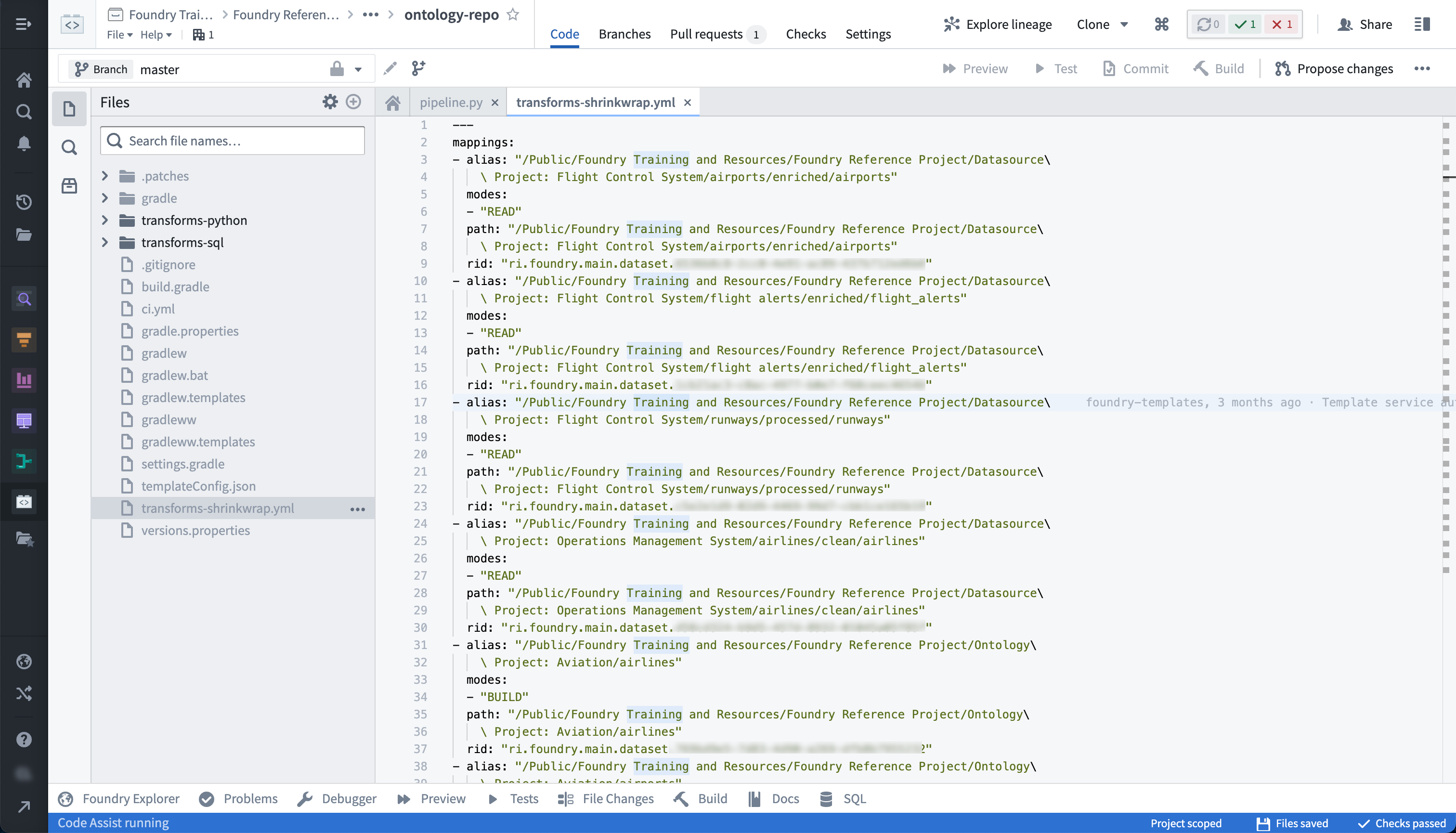
- It may be the case that the dataset referenced in the repository's shrinkwrap file no longer exists. Usually, the shrinkwrap error will tell you which datasets do not exist and where in the repository they are referenced.
-
Check if any datasets referenced in the repository were moved to the trash and restore them.
-
While you were iterating on your branch, a change may have been merged into
masterwhich added a file to the repository and updated the shrinkwrap file. To resolve this, perform the following: - Navigate to the
transforms-shrinkwrap.ymlfile. - Search for changes that were merged to the repository while you were iterating on your branch.
- Choose to accept only your changes, only the incoming changes, or both.
- You can also delete the shrinkwrap file, and it will be regenerated automatically when the checks run.
Seeing “PERMISSION_DENIED” in error message
To run a build, the user who triggers it must have the required permissions. Specifically, the user must be an Editor on the output dataset since running a build is effectively editing the output file.
An easy way to tell what permissions you have on a given dataset is by pulling up the dataset in Data Lineage, enabling the Permissions filter, and selecting Resource Permissions to color the nodes.
How do I resolve the “Waiting for input dependencies to be computed” error message?
This error happens when a dataset failed to build because the schedule that was building it was canceled due to an upstream dataset failing to build.
To troubleshoot, perform the following steps:
- Head to the build report for the failed build.
- Look for the first dataset in this build that failed.
- Attempt to resolve this error message and re-run the build.
My CI job fails because repository does not own dataset
The dataset you are trying to build believes it is controlled by another repository. You can see which repository a dataset is controlled by in the Details tab of the dataset preview page, in the sourceProvenance block of the Job spec section. This happens when multiple repositories are creating the same output dataset.
To troubleshoot, perform the following steps:
- If you want to transfer ownership of the dataset to the current repository:
- Delete the dataset’s existing job spec. To do so, open the dataset, go to Details > Job spec and select Edit > Delete.
- Trigger the CI build from the current repository again.
- Remove the dataset source file from the other repository to prevent confusion in the future.
- If you want to keep the dataset owner as the other repository (the repository the dataset was originally created in):
- Delete the dataset source file in the current repository.
Why are my checks failing on timeout?
Checks can fail on timeout for a variety of reasons, but there are a few common steps you can take that will often unblock you:
- Try re-running your CI check again. Does it consistently fail with the same error?
- Try upgrading your repository and then re-running your CI check. Does it fail with the same error?
- If your CI checks are still failing, select the cog icon at the top of your folder structure and select Show hidden files. In the
ci.ymladd the line—refresh-dependencies.
中文翻译
构建与检查常见问题解答
以下是一些关于构建和检查的常见问题。
- 如何解决一般性错误?
- 如何理解冗长或令人困惑的错误信息?
- 为什么我的构建会"等待资源"?
- 为什么我的构建运行时间变长?
- 如何解决不平衡(倾斜)的连接?
- 错误信息中提到的"shrinkwrap"是什么意思?
- 错误信息中看到"PERMISSION_DENIED"
- 如何解决"等待输入依赖项计算"错误信息?
- 我的CI作业因仓库不拥有数据集而失败
- 为什么我的检查因超时而失败?
如何解决一般性错误?
如果在调试构建错误时遇到困难,可以考虑以下几个步骤:
-
该构建是否曾经成功过?如果是,您是否对生成数据集的逻辑进行了更改?尝试回滚这些更改;如果构建成功,您很可能可以将问题定位到新逻辑。您也可以在构建应用程序的数据集窗格中选择日志来查看构建历史。
-
底层数据最近是否发生了变化?您可能会通过以下几种方式发现这一点:
- 如果数据规模急剧增加,您可能会因计算资源问题而看到性能下降或构建失败。
- 底层数据的模式(schema)是否发生了变化?当逻辑依赖于特定模式时,这通常会导致构建失败。要进行检查,请在构建的数据集窗格中选择比较,以与先前的事务进行差异比较。
- 失败数据集上游的任何数据集的逻辑是否发生了变化?这可能会导致数据规模增加或模式改变的下游影响。
如何理解冗长或令人困惑的错误信息?
Foundry中的错误信息可能很长,有时难以理解。如果您遇到难以处理的错误信息,请尝试以下步骤。
- 通常,错误跟踪中最有帮助的部分前面会有一个关键短语。请在错误信息中查找以下短语,以找到可能对故障排除有价值的指导。请注意,信息的重要部分通常出现在底部:
What went wrong:Caused by:Py4JJavaError-
UserCodeError -
如果您的错误引用了ErrorInstanceID但几乎没有其他上下文,请将问题上报给Palantir支持。ErrorInstanceID也会显示在用户的逻辑错误中,因此请务必先检查这是否可能是您问题的原因。
-
联系支持时,请务必包含以下信息:
- 您收到的完整错误信息
- 您已采取的任何故障排除步骤
- 您遇到错误的确切时间(日期、时间、时区)
为什么我的构建会"等待资源"?
您的构建长时间卡在"等待资源"状态且未运行。这可能是由于您运行构建时平台活动增加所致。此时运行的许多构建可能正在消耗平台上的可用资源,导致您的构建被排队,直到其他构建完成并释放资源。这种行为是Spark转换中讨论的Spark执行模型的副产品。
要进行故障排除,请执行以下步骤:
- 尝试在平台活动较少的时间运行构建,看看是否有助于提高性能。这将有助于避免您的构建被排在其他作业之后。
- 如果您正在调度作业,请避免在常见时间(如整点或午夜)运行作业。
为什么我的构建运行时间变长?
构建性能随时间恶化可能由以下一个或多个原因引起:1)转换逻辑发生变化,2)输入数据规模发生变化,或3)构建时集群计算负载增加。
要进行故障排除,请执行以下步骤:
- 检查转换的逻辑——自上次运行构建以来发生了什么变化?即使是逻辑上的微小差异也可能导致构建时间的差异。
- 检查输入数据集的数据规模。如果上游数据集的大小显著增加,可能会导致下游管道中的构建性能下降。
如何解决不平衡(倾斜)的连接?
当连接包含一个每键有大量条目的大左表和一个每键有少量条目的小右表时,非常适合使用加盐连接(salted join),它可以均匀地将数据分布到各个分区。
要进行故障排除,请执行以下步骤:
- 加盐连接在Spark中的工作原理是将每键条目多的表拆分成更小的部分,同时将较小的表扩展为相同数量的副本。这会产生与普通连接相同大小的输出,但大表的任务规模更小,并降低了OOM错误的风险。
- 您可以通过向左表添加一个0到N的随机数列,并创建N个右表副本来对连接进行加盐。如果将新的随机列添加到连接中,您可以将最大的桶减少到其先前大小的1/N。
- 关键在于
EXPLODE函数。EXPLODE是一个叉积:SELECT 'a' AS test, EXPLODE(ARRAY(1,2,3,4,5)) AS dummy2 - 结果如下:
 test | test2
----------------
  a     |  1
  a     |  2
  a     |  3
  a     |  4
  a     |  5
- 假设您有一个表现不佳的连接,如下所示:
SELECT
left.*, right.*
FROM
`/foo/bar/baz` AS left
JOIN
`/foo2/bar2/baz2` AS right
ON
  left.something = right.something
- 此连接可能会失败,您的构建报告显示少数任务花费的时间比其他任务长得多,并且混洗(shuffling)和溢出(spilling)的数据更多。这是您的数据集可能遭受倾斜的一个迹象。
- 验证倾斜的另一种方法是在Contour中打开每个表,对
something列进行数据透视(pivot)并聚合行数,然后在something列上连接左右表并乘以聚合列。这将输出每个something键的行数,理想情况下应均匀分布,但当出现倾斜时,表明需要进行加盐连接。 - 考虑将您的代码替换为如下内容:
SELECT
    left.*, right.*
  FROM
    (SELECT *, FLOOR(RAND() * 8) AS salt FROM `/foo/bar/baz`) AS left
    JOIN
    (SELECT *, EXPLODE(ARRAY(0,1,2,3,4,5,6,7)) AS salt FROM `/foo2/bar2/baz2`) AS right
    ON
      left.something = right.something AND left.salt = right.salt
- 调优:
- 您应该做出有根据的猜测来选择扩展因子。2的幂次是找到正确估计的好方法:8、16、32等。
- 您可以使用Contour检查要连接的两个数据集。对连接键进行直方图分析是否显示最大的桶是次大桶大小的X倍?将
explode因子至少设为X。 -
类似的方法是在未加盐作业运行时查看每个执行器(executor)的行数。
-
请注意以下事项:
- 确保在对连接加盐时不要出现差一错误(off-by-one error)。这会导致您丢失一部分记录。
-
CEIL(RAND() * N)给出1到N之间的整数。FLOOR(RAND() * N)给出0到N-1之间的数字。确保在加盐连接中扩展正确的数字集。 -
加盐的开销
- 对连接加盐不一定能使您的构建更快;它只是增加了成功的可能性。
- 如果您不必要地对连接加盐,可能会开始看到性能下降。
错误信息中提到的"shrinkwrap"是什么意思?
每个仓库都包含一个"shrinkwrap"文件,该文件定义了每个引用的路径、该路径引用的数据集的唯一ID以及该数据集的当前路径之间的映射。例如,当数据集在文件夹之间移动时,这很有帮助。生成该数据集的仓库中的shrinkwrap文件会更新;下次运行构建时,数据集会在正确的位置构建。您可能会因多种原因看到shrinkwrap错误,例如数据集被删除、重命名或移动。
要进行故障排除,请查看以下注意事项和相关操作:
-
查找给定仓库的shrinkwrap文件:
-
选择屏幕左上角附近的齿轮图标。
- 打开显示隐藏文件和文件夹开关。
transforms-shrinkwrap.yml文件应显示如下:
- 可能是仓库的shrinkwrap文件中引用的数据集不再存在。通常,shrinkwrap错误会告诉您哪些数据集不存在以及它们在仓库中的引用位置。
-
检查仓库中引用的任何数据集是否被移到了回收站,并将其恢复。
-
当您在分支上进行迭代时,可能有一个更改已合并到
master中,该更改向仓库添加了一个文件并更新了shrinkwrap文件。要解决此问题,请执行以下操作: - 导航到
transforms-shrinkwrap.yml文件。 - 搜索在您迭代分支时合并到仓库的更改。
- 选择仅接受您的更改、仅接受传入的更改,或两者都接受。
- 您也可以删除shrinkwrap文件,它会在检查运行时自动重新生成。
错误信息中看到"PERMISSION_DENIED"
要运行构建,触发构建的用户必须拥有所需的权限。具体来说,用户必须是输出数据集的Editor(编辑者),因为运行构建实际上是在编辑输出文件。
判断您对给定数据集拥有哪些权限的简单方法是在数据谱系(Data Lineage)中调出该数据集,启用权限过滤器,然后选择资源权限为节点着色。
如何解决"等待输入依赖项计算"错误信息?
当数据集构建失败,因为正在构建它的调度由于上游数据集构建失败而被取消时,会发生此错误。
要进行故障排除,请执行以下步骤:
- 前往失败构建的构建报告。
- 查找此构建中第一个失败的数据集。
- 尝试解决此错误信息并重新运行构建。
我的CI作业因仓库不拥有数据集而失败
您尝试构建的数据集认为它由另一个仓库控制。您可以在数据集预览页面的详细信息选项卡中,在作业规范部分的sourceProvenance块中查看数据集由哪个仓库控制。当多个仓库创建相同的输出数据集时,会发生这种情况。
要进行故障排除,请执行以下步骤:
- 如果您想将数据集的所有权转移到当前仓库:
- 删除数据集的现有作业规范。为此,请打开数据集,转到详细信息 > 作业规范,然后选择编辑 > 删除。
- 再次从当前仓库触发CI构建。
- 从另一个仓库中删除数据集源文件,以防止将来混淆。
- 如果您希望将数据集所有者保留为另一个仓库(最初创建数据集的仓库):
- 删除当前仓库中的数据集源文件。
为什么我的检查因超时而失败?
检查可能因多种原因超时失败,但您可以采取一些常见步骤,通常可以解决问题:
- 尝试重新运行您的CI检查。它是否始终以相同的错误失败?
- 尝试升级您的仓库,然后重新运行CI检查。它是否以相同的错误失败?
- 如果您的CI检查仍然失败,请选择文件夹结构顶部的齿轮图标,然后选择显示隐藏文件。在
ci.yml中添加一行—refresh-dependencies。