Check schedules(检查计划(Check schedules))
Time-based checks can be configured to evaluate either automatically or on a manual schedule.
Automatically
When configured to run automatically, a check runs at two times:
- When a dataset is updated.
- When a dataset passes the threshold you’ve configured.
A dataset update transaction will trigger the check to evaluate i) the dataset based on the configured check and ii) the elapsed time between the current time and the previously committed transaction. It will also reset the threshold for the next check by adding the time threshold minimum to the current time.
For example, suppose you set the Time Since Last Updated Check threshold to be less than 1 hour (“This check passes when time since last updated is less or equal than 1 hour”).
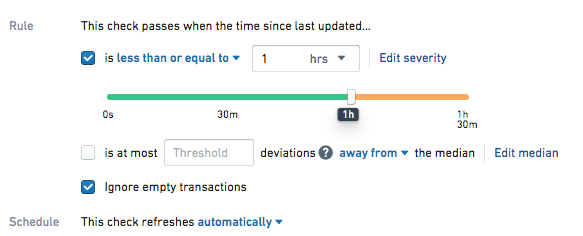
Check Passes
Let's say your dataset gets updated in 58 minutes. At this time, the check will run, producing a 'Passed' result, since it has been less than 60 minutes since the last transaction. The update transaction also caused the threshold for the next check to reset - it will now automatically run again 60 minutes from now to evaluate whether the dataset has been updated.
As long as the dataset continues to update in less than 60 minutes, the check will continue to pass on dataset update, and never reach the threshold you have configured.
Check Fails
This time, let's say your dataset gets updated in 62 minutes. At 60 minutes since the last update, a check will run (as set by the one hour threshold) and fail, since it has been more than 60 minutes since the last transaction. When the dataset is updated at 62 minutes, the check will run again to update the time since last updated value to be the current time and the check will pass. Any watchers of the check will be notified.
Manual Schedules
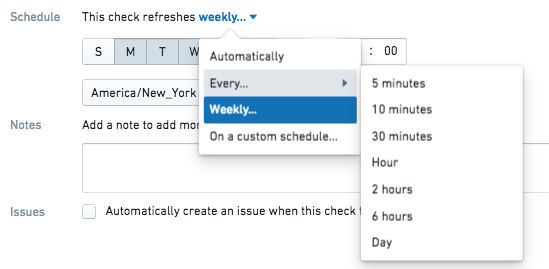
The manual schedule runs checks at a regular interval regardless of when the dataset is built. It can be set to run by minute, hourly, daily, weekly, or on a custom schedule.
中文翻译
检查计划(Check schedules)
基于时间的检查可以配置为自动运行或按手动计划运行。
自动运行
当配置为自动运行时,检查会在两个时间点执行:
- 数据集更新时。
- 数据集达到您配置的阈值时。
数据集更新事务会触发检查评估:i) 基于配置检查的数据集状态,以及 ii) 当前时间与上一次提交事务之间的时间间隔。同时,该事务会将当前时间加上最小时间阈值,从而重置下一次检查的阈值。
例如,假设您将上次更新后的时间检查阈值设置为小于1小时("当上次更新后的时间小于或等于1小时时,此检查通过")。
检查通过
假设您的数据集在58分钟后更新。此时检查将运行并产生"通过"结果,因为距离上次事务不到60分钟。该更新事务还会重置下一次检查的阈值——从现在起60分钟后,检查将自动再次运行,以评估数据集是否已更新。
只要数据集持续在60分钟内更新,检查就会在每次数据集更新时持续通过,永远不会达到您配置的阈值。
检查失败
这次假设您的数据集在62分钟后更新。在上次更新后的第60分钟,检查将运行(根据1小时阈值设定)并失败,因为距离上次事务已超过60分钟。当数据集在第62分钟更新时,检查将再次运行,将上次更新后的时间值更新为当前时间,此时检查将通过。该检查的所有观察者(watchers)将收到通知。
手动计划
手动计划会按固定时间间隔运行检查,无论数据集何时构建。您可以将其设置为按分钟、小时、天、周运行,或按自定义计划运行。