Checkpoint types(检查点类型(Checkpoint types))
A checkpoint type describes a specific type of interaction a user can have with the platform (for example, uploading a dataset or removing a user's access to a Marking).
The checkpoint type selector supports filtering checkpoint types based on their functionality category or related application. Users must select at least one checkpoint type when configuring checkpoint configurations; they can also filter checkpoint configurations and checkpoint records by checkpoint type.
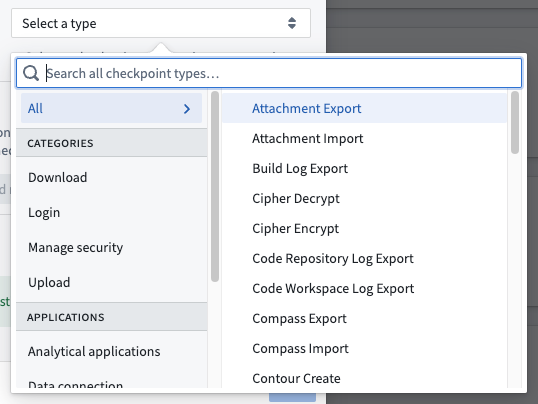
Available checkpoint types
:::callout{theme="neutral"} Some checkpoint types are not available on all Foundry instances and are only available if specific applications are enabled in Foundry. :::
Download
| Checkpoint type | Description | Related application |
|---|---|---|
| AIP Analyst export | Exporting an AIP Analyst session. | AIP Analyst |
| API export | Downloading API metadata from a Developer Console application. | Developer Console |
| API usage metrics export | Downloading API usage metrics for a Developer Console application. | Developer Console |
| Attachment export | Downloading an attachment from a comment or from an object through an action. | Actions |
| Build log export | Downloading a log file from a dataset build or from a FoundryML live deployment. | Builds |
| Chatbot session export | Downloading the contents of a chatbot session. | Chatbot Studio |
| Code Repository log export | Downloading a log file from Code Repositories. | Code Repositories |
| Code Workspace log export | Downloading a log file from Code Workspaces. | Code Workspaces |
| Compass export | Downloading a file or dataset from Foundry. This checkpoint type includes the download of all datasets, files, and images in Compass. | Compass |
| Contour dashboard export | Exporting a Contour dashboard to PDF. | Contour |
| Contour export | Downloading data from Contour, which will trigger this checkpoint. Exporting data from the Contour pivot table board is not considered a Contour export but is instead classified as a frontend export. | Contour |
| Custom Widgets enable allow downloads | Enabling the iframe sandbox allow-downloads attribute value for a custom widget in Workshop. |
Workshop |
| Export from Flow Capture | Exporting a Flow Capture recording to a .zip file. |
Flow Capture |
| Export to Code Workspace | Adding data from Foundry to a code workspace. The Import dataset button in Code Workspaces will trigger this checkpoint. | Code Workspaces |
| Frontend export | Downloading data rendered in the Foundry frontend, such as downloads from the pivot table board in Contour, Code Workbook templates, and Foundry Templates. Contact Palantir Support for a complete list of interactions associated with this checkpoint. | Platform |
| Function-backed export | Downloading data from a Workshop module with a function-backed export. | Workshop |
| Gaia file export | Exporting data to a file in Gaia. This checkpoint is only enabled if Gaia is available on your Foundry and Gotham enrollment. | Gaia |
| Hivemind export | Exporting data from Hivemind. This checkpoint is only available if Hivemind is enabled. | Hivemind |
| Manage Code Workspace dashboard downloads | Enabling or disabling downloads from Code Workspace dashboards. | Code Workspaces |
| Media set export | Exporting a media item from a media set. | Media Sets |
| Model export | Downloading model weights. | Modeling Objectives |
| Notepad export | Downloading a Notepad document. | Notepad |
| Object set export | Downloading an object or object set, or copying it as a string in Object Explorer or Workshop. | Object Explorer, Workshop |
| Peer Manager job update payload export | Downloading a peering job's payload in Peer Manager as an XML file for ingestion by a cross-domain solution. | Peer Manager |
| Peer Manager object type schema export | Downloading object type schemas in Peer Manager as XSD files for use with a cross-domain solution. | Peer Manager |
| Quiver export | Downloading an object or object set as a CSV in Quiver using the Download as CSV action. | Quiver |
| Report export | Downloading a report as a PDF/PPT or copying the content of a report as a Markdown file to the clipboard. | Reports |
| Slate export | Downloading data from a Slate application. | Slate |
| Sync Matrix file export | Exporting data from a Kairos sync matrix to a file. This checkpoint is only enabled if Kairos is available on your Foundry and Gotham enrollment. | Kairos |
| Upgrade Assistant summary export | Downloading a summary of an Upgrade Assistant platform change. | Upgrade Assistant |
| User intake submission export | Downloading a file from a user intake form submission. | User intake forms created in Control Panel |
Upload
| Checkpoint type | Description | Related application |
|---|---|---|
| Attachment import | Uploading an attachment to an object using an action. | Actions |
| Compass import | Uploading a file or dataset into the Foundry filesystem. This checkpoint type includes all frontend imports of Compass resources and the upload of new data into a dataset through the frontend. | Compass |
| Gaia file import | Uploading a file to Gaia. This checkpoint is only enabled if Gaia is available on your Foundry and Gotham enrollment. | Gaia |
| Import from Code Workspace | Saving data to Foundry from a code workspace. The Save to dataset button in Code Workspaces will trigger this checkpoint. | Code Workspaces |
| Media set import | Importing a file to a media set. | Media Sets |
| Notepad media import | Importing media into a Notepad document. | Notepad |
| Upload data to Flow Capture | Importing data into Flow Capture. | Flow Capture |
Manage security
| Checkpoint type | Description | Related application |
|---|---|---|
| Cipher decrypt | Decrypting data with Cipher. This checkpoint is only available if Cipher is enabled. | Cipher |
| Cipher encrypt | Encrypting data with Cipher. This checkpoint is only available if Cipher is enabled. | Cipher |
| Custom Widgets enable camera | Enabling the iframe allow camera attribute value for a custom widget in Workshop. |
Workshop |
| Custom Widgets enable microphone | Enabling the iframe allow microphone attribute value for a custom widget in Workshop. |
Workshop |
| Group member addition | Adding a user or group as a member of a group. | Groups |
| Group member removal | Removing a user or group as a member of a group. | Groups |
| Group membership expiration update | Updating the expiry of a member of a group, including setting an initial expiry, updating the expiry, or removing it. | Groups |
| Marking member addition | Granting a user or group access to resources protected by a marking. | Markings |
| Marking member removal | Removing a user's or group's access to resources protected by a marking. | Markings |
| Notepad lock data | Locking data on a Notepad widget. | Notepad |
| Project marking authorization addition | Adding a marking to the list of allowed markings in project constraints. | Projects |
| Project marking authorization removal | Removing a marking from the list of allowed markings in project constraints. | Projects |
| Project reference addition | Adding a reference to a project. | Projects |
| Project reference removal | Removing a reference from a project. | Projects |
| Reset two-factor authentication method | Resetting a user's two-factor authentication method via Platform Settings. | Platform Settings |
| Role grant addition | Granting a role to a user or group on a project. | Projects |
| Role grant removal | Removing a role from a user or group on a project. | Projects |
| Rotate OAuth client secret | Rotating an OAuth client secret. | Third-party applications |
| Scoped session select | Selecting a scoped session in Gotham. This checkpoint is only available if your enrollment contains Foundry and Gotham with scoped sessions enabled in Gotham. | Gotham |
| Token create | Creating a Multipass token. | Tokens |
| Update group membership expiration config | Updating the configuration of membership expiration of a group. | Groups |
Login
| Checkpoint type | Description | Related application |
|---|---|---|
| Login | Logging in to Foundry. Login checkpoints also require the checkpoints login asynchronous user manager (AUM) to be enabled in Control Panel. | Platform |
Other
| Checkpoint type | Description | Related application |
|---|---|---|
| AIP Analyst application load | Opening AIP Analyst. | AIP Analyst |
| AIP Analyst save analysis | Saving an AIP Analyst analysis resource. | AIP Analyst |
| Code Repository build | Building in Code Repositories. | Code Repositories |
| Code Repository merge pull request | Merging a pull request in Code Repositories. | Code Repositories |
| Code Repository modify approval policy | Creating or updating an approval policy in Code Repositories. | Code Repositories |
| Code Workbook build | Building in a Code Workbook. | Code Workbook |
| Contour create | Creating or duplicating a Contour analysis. Creating an analysis from the New dropdown menu, the Analyze button on a dataset, or by exporting objects to Contour will trigger this checkpoint. Duplicating an analysis from the Open as duplicate analysis action on a Contour analysis or through the File menu will also trigger this checkpoint. | Contour |
| Create issue | Creating a new Issue. | Issues |
| Data Connection sync bulk create | Bulk-creating JDBC Data Connection syncs. | Data Connection |
| Data Connection sync create | Creating a new Data Connection sync. | Data Connection |
| Data Connection sync edit | Editing a Data Connection sync. | Data Connection |
| Deploy pipeline | Deploying a new pipeline in Pipeline Builder. | Pipeline Builder |
| Insight load | Loading the Insight application. | Insight |
| Object Explorer search | Performing a search in Object Explorer. | Object Explorer |
| Pipeline Builder archive branches | Archiving branches in Pipeline Builder. | Pipeline Builder |
| Pipeline Builder merge proposal | Merging proposals in Pipeline Builder. | Pipeline Builder |
| Pipeline Builder modify approval policy | Modifying approval policies in Pipeline Builder. | Pipeline Builder |
| Pipeline Builder modify fallback branches | Modifying fallback branches in Pipeline Builder. | Pipeline Builder |
| Record Flow Capture | Starting a Flow Capture recording. | Flow Capture |
| Retention policy application | Changing which retention policy is applied to a dataset or transaction. | Retention Policies |
| Run build | Running a new build. | Builds |
| Schedule create | Creating a schedule. | Schedules |
| Schedule delete | Deleting a schedule. | Schedules |
| Schedule modify | Modifying a schedule. | Schedules |
| Schedule run | Running a schedule. | Schedules |
| Start walkthrough | Starting a walkthrough. | Walkthroughs |
| Submit action | Submitting actions in the platform. Only applies to actions submitted directly by users in the user interface, such as in Workshop modules, object views, Object Explorer, and Vertex graphs. This does not apply to actions that are submitted asynchronously, such as via Automate or by means other than the user interface, such as via API call or the Ontology SDK. | Actions |
| Virtual table automatic registration | Automatically registering a virtual table. | Virtual tables |
| Virtual table manual registration | Manually registering a virtual table. | Virtual tables |
Legacy checkpoint types
Checkpoints can no longer be configured for these legacy checkpoint types, but historical checkpoint records of these types are still reviewable.
| Checkpoint type | Description | Related application |
|---|---|---|
| Data Connection source share | Sharing a Data Connection source or agent. | Data Connection |
| Hubble export | Downloading an object or object set using the Export as Excel action in Object Explorer or Workshop. This checkpoint type has been replaced by Object set export, which supports a superset of the functionality of Hubble export. All existing Hubble export checkpoint configurations have been automatically migrated to Object set export checkpoint configurations. | Object Explorer, Workshop |
| Package static dataset | Packaging a static dataset in a Marketplace product. This checkpoint type has been removed in favor of new default warnings in DevOps. Formerly known as Package product. | Marketplace |
Rendering for the Submit action checkpoint type
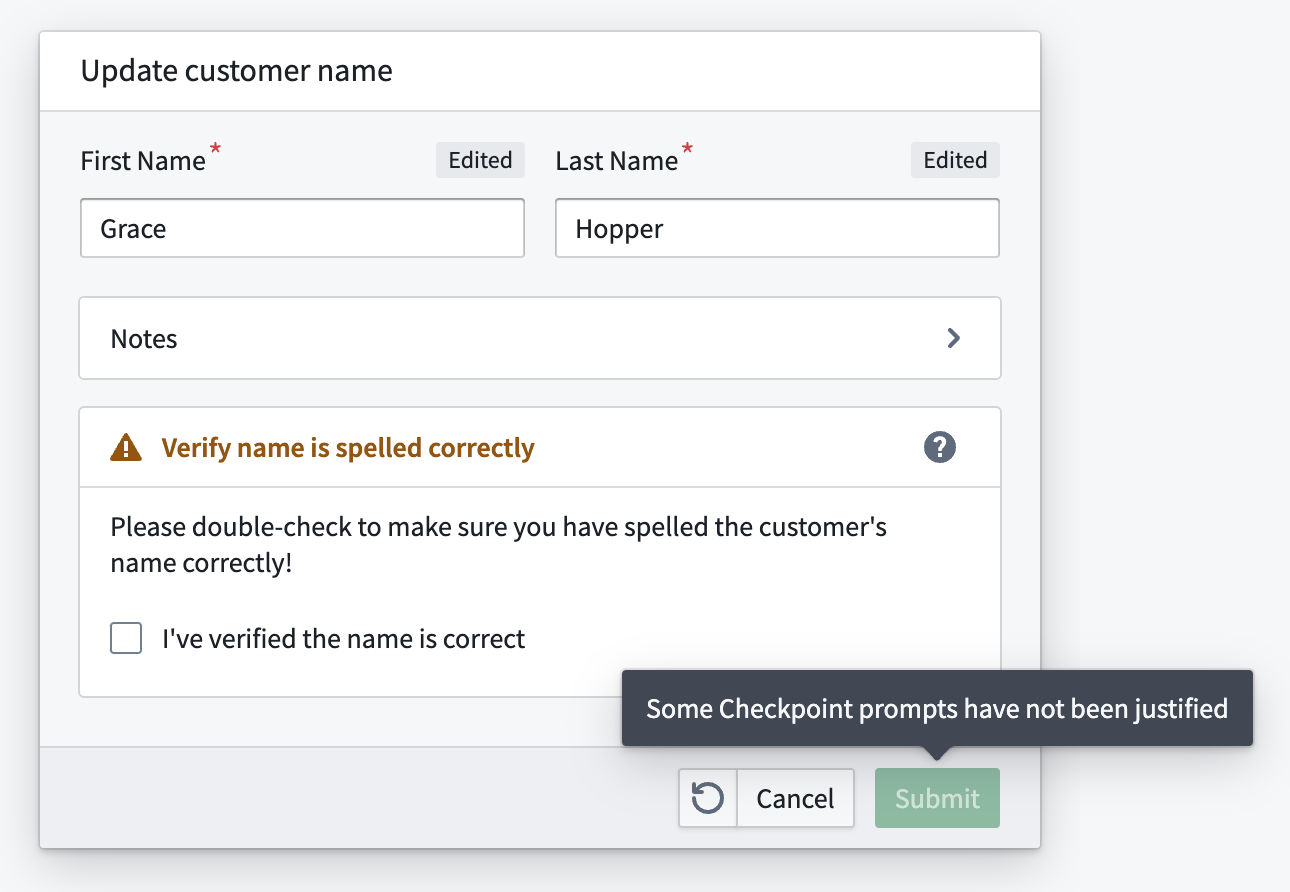
If an Action form is shown, Submit action checkpoint prompts will be rendered as required fields inside the form. If an Action form would not normally be shown for the Action (for example, if the Action is submitted via an inline edit), the Submit action prompt will be shown in a separate dialog.
中文翻译
检查点类型(Checkpoint types)
检查点类型(Checkpoint type) 描述用户可与平台进行的特定交互类型(例如上传数据集(dataset)或移除用户对某个标记(Marking)的访问权限)。
检查点类型选择器支持根据功能类别或关联应用筛选检查点类型。用户在配置检查点配置时必须选择至少一种检查点类型;用户还可以按检查点类型筛选检查点配置(checkpoint configurations)和检查点记录(checkpoint records)。
可用检查点类型
:::callout{theme="neutral"} 部分检查点类型并非在所有Foundry实例中都可用,只有在Foundry中启用了对应特定应用时才会展示。 :::
下载(Download)
| 检查点类型 | 描述 | 关联应用 |
|---|---|---|
| AIP Analyst export | 导出AIP Analyst会话(session)。 | AIP Analyst |
| API export | 从Developer Console应用下载API元数据。 | Developer Console |
| API usage metrics export | 下载Developer Console应用的API使用指标(usage metrics)。 | Developer Console |
| Attachment export | 通过操作(action)从评论或对象中下载附件。 | Actions |
| Build log export | 从数据集构建(build)或FoundryML在线部署中下载日志文件。 | Builds |
| Chatbot session export | 下载对话机器人(chatbot)的会话内容。 | Chatbot Studio |
| Code Repository log export | 从Code Repositories下载日志文件。 | Code Repositories |
| Code Workspace log export | 从Code Workspaces下载日志文件。 | Code Workspaces |
| Compass export | 从Foundry下载文件或数据集,该检查点类型涵盖Compass中所有数据集、文件、图片的下载行为。 | Compass |
| Contour dashboard export | 将Contour看板导出为PDF。 | Contour |
| Contour export | 从Contour下载数据会触发该检查点。从Contour透视表面板导出数据不属于Contour export,会被归类为frontend export。 | Contour |
| Custom Widgets enable allow downloads | 为Workshop中的自定义组件(custom widget)启用iframe沙箱(sandbox)的allow-downloads属性。 |
Workshop |
| Export from Flow Capture | 将Flow Capture录制内容导出为.zip文件。 |
Flow Capture |
| Export to Code Workspace | 将Foundry中的数据添加到代码工作区,Code Workspaces中的Import dataset按钮会触发该检查点。 | Code Workspaces |
| Frontend export | 下载Foundry前端渲染的数据,例如从Contour透视表面板、Code Workbook模板、Foundry Templates发起的下载。如需获取该检查点关联的所有交互完整列表,请联系Palantir支持团队。 | Platform |
| Function-backed export | 从搭载函数支撑导出(function-backed export)的Workshop模块中下载数据。 | Workshop |
| Gaia file export | 将数据导出为Gaia中的文件,仅当你的Foundry和Gotham登记实例中启用了Gaia时,该检查点才会生效。 | Gaia |
| Hivemind export | 从Hivemind导出数据,仅当启用了Hivemind时该检查点可用。 | Hivemind |
| Manage Code Workspace dashboard downloads | 启用或禁用Code Workspace看板的下载功能。 | Code Workspaces |
| Media set export | 从媒体集(media set)导出媒体项。 | Media Sets |
| Model export | 下载模型权重。 | Modeling Objectives |
| Notepad export | 下载Notepad文档。 | Notepad |
| Object set export | 在Object Explorer或Workshop中下载对象、对象集(object set),或将其复制为字符串。 | Object Explorer, Workshop |
| Peer Manager job update payload export | 在Peer Manager中下载对等作业的负载,作为XML文件供跨域解决方案摄入。 | Peer Manager |
| Peer Manager object type schema export | 在Peer Manager中下载对象类型 schema 作为XSD文件,供跨域解决方案使用。 | Peer Manager |
| Quiver export | 在Quiver中使用Download as CSV操作将对象或对象集导出为CSV文件。 | Quiver |
| Report export | 将报告下载为PDF/PPT格式,或将报告内容作为Markdown文件复制到剪贴板。 | Reports |
| Slate export | 从Slate应用下载数据。 | Slate |
| Sync Matrix file export | 将Kairos同步矩阵中的数据导出为文件,仅当你的Foundry和Gotham登记实例中启用了Kairos时,该检查点才会生效。 | Kairos |
| Upgrade Assistant summary export | 下载升级助手(Upgrade Assistant)平台变更的汇总信息。 | Upgrade Assistant |
| User intake submission export | 从用户录入表单(user intake form)提交记录中下载文件。 | User intake forms created in Control Panel |
上传(Upload)
| 检查点类型 | 描述 | 关联应用 |
|---|---|---|
| Attachment import | 使用操作向对象上传附件。 | Actions |
| Compass import | 向Foundry文件系统上传文件或数据集,该检查点类型涵盖所有前端导入Compass资源、以及通过前端向数据集上传新数据的行为。 | Compass |
| Gaia file import | 向Gaia上传文件,仅当你的Foundry和Gotham登记实例中启用了Gaia时,该检查点才会生效。 | Gaia |
| Import from Code Workspace | 将代码工作区中的数据保存到Foundry,Code Workspaces中的Save to dataset按钮会触发该检查点。 | Code Workspaces |
| Media set import | 向媒体集导入文件。 | Media Sets |
| Notepad media import | 向Notepad文档导入媒体资源。 | Notepad |
| Upload data to Flow Capture | 向Flow Capture导入数据。 | Flow Capture |
安全管理(Manage security)
| 检查点类型 | 描述 | 关联应用 |
|---|---|---|
| Cipher decrypt | 使用Cipher解密数据,仅当启用了Cipher时该检查点可用。 | Cipher |
| Cipher encrypt | 使用Cipher加密数据,仅当启用了Cipher时该检查点可用。 | Cipher |
| Custom Widgets enable camera | 为Workshop中的自定义组件启用iframe的camera权限属性。 |
Workshop |
| Custom Widgets enable microphone | 为Workshop中的自定义组件启用iframe的microphone权限属性。 |
Workshop |
| Group member addition | 向用户组添加用户或其他用户组作为成员。 | Groups |
| Group member removal | 从用户组中移除用户或其他用户组成员。 | Groups |
| Group membership expiration update | 更新用户组成员的有效期,包括设置初始有效期、更新有效期、移除有效期设置。 | Groups |
| Marking member addition | 向用户或用户组授予标记保护资源的访问权限。 | Markings |
| Marking member removal | 移除用户或用户组对标记保护资源的访问权限。 | Markings |
| Notepad lock data | 在Notepad组件上锁定数据。 | Notepad |
| Project marking authorization addition | 向项目约束的允许标记列表中添加标记。 | Projects |
| Project marking authorization removal | 从项目约束的允许标记列表中移除标记。 | Projects |
| Project reference addition | 为项目添加引用。 | Projects |
| Project reference removal | 移除项目的引用。 | Projects |
| Reset two-factor authentication method | 通过平台设置重置用户的双因素认证(two-factor authentication)方式。 | Platform Settings |
| Role grant addition | 为项目上的用户或用户组授予角色。 | Projects |
| Role grant removal | 移除项目上用户或用户组的角色。 | Projects |
| Rotate OAuth client secret | 轮换OAuth客户端密钥(OAuth client secret)。 | Third-party applications |
| Scoped session select | 在Gotham中选择范围会话,仅当你的登记实例包含Foundry和Gotham,且Gotham中启用了范围会话时该检查点可用。 | Gotham |
| Token create | 创建Multipass令牌(token)。 | Tokens |
| Update group membership expiration config | 更新用户组成员有效期的配置。 | Groups |
登录(Login)
| 检查点类型 | 描述 | 关联应用 |
|---|---|---|
| Login | 登录Foundry,仅当Control Panel中启用了检查点登录异步用户管理器(AUM)时,才会生成登录检查点。 | Platform |
其他(Other)
| 检查点类型 | 描述 | 关联应用 |
|---|---|---|
| AIP Analyst application load | 打开AIP Analyst。 | AIP Analyst |
| AIP Analyst save analysis | 保存AIP Analyst分析资源。 | AIP Analyst |
| Code Repository build | 在Code Repositories中执行构建。 | Code Repositories |
| Code Repository merge pull request | 在Code Repositories中合并拉取请求(pull request)。 | Code Repositories |
| Code Repository modify approval policy | 在Code Repositories中创建或更新审批策略(approval policy)。 | Code Repositories |
| Code Workbook build | 在Code Workbook中执行构建。 | Code Workbook |
| Contour create | 创建或复制Contour分析。从New下拉菜单、数据集的Analyze按钮创建分析,或将对象导出到Contour都会触发该检查点;从Contour分析的Open as duplicate analysis操作或File菜单复制分析也会触发该检查点。 | Contour |
| Create issue | 创建新的Issue。 | Issues |
| Data Connection sync bulk create | 批量创建JDBC Data Connection同步任务。 | Data Connection |
| Data Connection sync create | 创建新的Data Connection同步任务。 | Data Connection |
| Data Connection sync edit | 编辑Data Connection同步任务。 | Data Connection |
| Deploy pipeline | 在Pipeline Builder中部署新管道(pipeline)。 | Pipeline Builder |
| Insight load | 加载Insight应用。 | Insight |
| Object Explorer search | 在Object Explorer中执行搜索。 | Object Explorer |
| Pipeline Builder archive branches | 在Pipeline Builder中归档分支。 | Pipeline Builder |
| Pipeline Builder merge proposal | 在Pipeline Builder中合并提案。 | Pipeline Builder |
| Pipeline Builder modify approval policy | 在Pipeline Builder中修改审批策略。 | Pipeline Builder |
| Pipeline Builder modify fallback branches | 在Pipeline Builder中修改回退分支。 | Pipeline Builder |
| Record Flow Capture | 启动Flow Capture录制。 | Flow Capture |
| Retention policy application | 修改数据集或事务应用的保留策略(retention policy)。 | Retention Policies |
| Run build | 运行新的构建。 | Builds |
| Schedule create | 创建调度(schedule)。 | Schedules |
| Schedule delete | 删除调度。 | Schedules |
| Schedule modify | 修改调度。 | Schedules |
| Schedule run | 运行调度。 | Schedules |
| Start walkthrough | 启动引导教程(walkthrough)。 | Walkthroughs |
| Submit action | 在平台中提交操作。仅适用于用户在界面中直接提交的操作,例如在Workshop模块、对象视图、Object Explorer和Vertex图谱中提交的操作。不适用于异步提交的操作,例如通过Automate提交,或通过非界面方式提交,例如API调用、Ontology SDK提交。 | Actions |
| Virtual table automatic registration | 自动注册虚拟表(virtual table)。 | Virtual tables |
| Virtual table manual registration | 手动注册虚拟表。 | Virtual tables |
旧版检查点类型(Legacy checkpoint types)
这些旧版检查点类型已不再支持新建配置,但该类型的历史检查点记录仍可查阅。
| 检查点类型 | 描述 | 关联应用 |
|---|---|---|
| Data Connection source share | 共享Data Connection源或代理。 | Data Connection |
| Hubble export | 在Object Explorer或Workshop中使用Export as Excel操作导出对象或对象集。该检查点类型已被Object set export替代,后者涵盖了Hubble export的全部功能,所有现有Hubble export检查点配置已自动迁移为Object set export检查点配置。 | Object Explorer, Workshop |
| Package static dataset | 在Marketplace产品中打包静态数据集,该检查点类型已被移除,改为在DevOps中新增默认告警。曾用名是Package product。 | Marketplace |
Submit action检查点类型的渲染逻辑
如果存在操作表单,Submit action检查点提示会作为必填项渲染在表单内部。如果该操作原本不会展示操作表单(例如通过内联编辑(inline edit)提交操作),则Submit action提示会在独立弹窗(dialog)中展示。