Review checkpoint records(审核检查点记录(Checkpoint Record))
Once created, checkpoint records can be reviewed by various users on the platform. Typically, this may include a data protection officer or other data governance users.
The Checkpoints application enables users to review checkpoint records created on the platform.
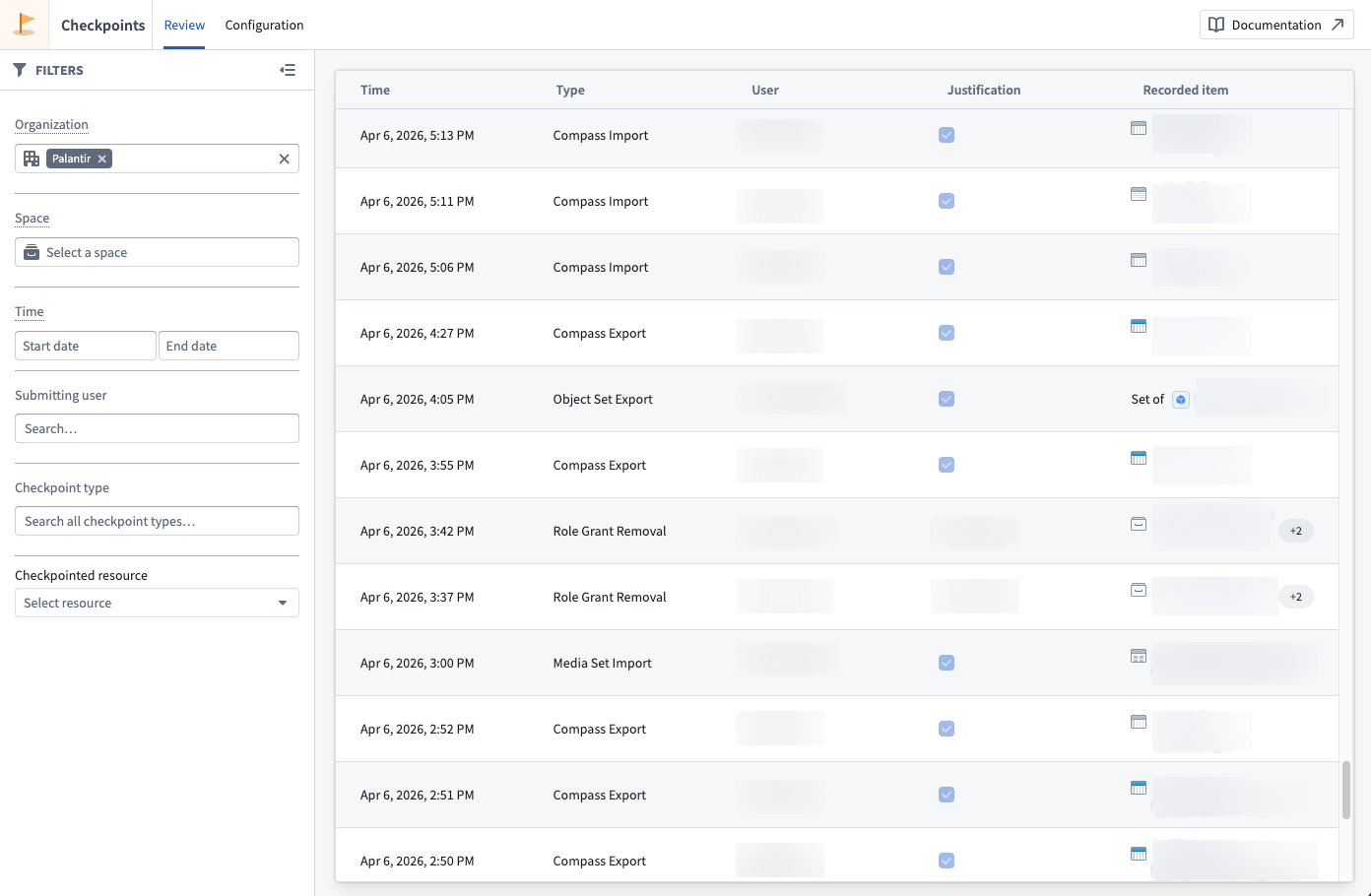
The Review tab of the Checkpoints application presents a table of all records you have permission to view, subject to your current filters. A Details panel reveals additional information stored in the record selected in the table. The following information is available for each record:
- The user who created the record.
- The timestamp of when a record was Created.
- The Checkpoint Type of the record.
- The Checkpoint Language, which includes the Checkpoint Title, Checkpoint Prompt, and Checkpoint Description. These values are inherited from the checkpoint configuration but are static; they always reflect the text shown to a user in the checkpoint and will not be updated if the underlying checkpoint configuration is edited or deleted.
- The Justification a user provided.
- Checkpointed Items for the interaction: For checkpoint types that describe an interaction involving a resource or other entity in the platform, references to those resources or entities will be saved in the record. For example, if you attempt to export a resource and submit a checkpoint generated from a configuration of type Compass export, then the record will contain a checkpointed item reference to this resource. Likewise, if you submit a checkpoint generated from a configuration of type Submit action, then the record will contain a checkpointed item reference to the Action type (including related metadata, like the Action type's Ontology and that Ontology's version at time of submission).
- A Checkpoint RID uniquely identifying each record.
- The Checkpoint Configuration RID uniquely identifying the checkpoint configuration the checkpoint was generated from.
Permissions to view records
To view a checkpoint record, you must meet one of the following criteria:
- Record creator: You created the checkpoint record.
- Review records by resource permission: You have the
Review records by resource(checkpoints:review-records) operation on the checkpointed resource. By default, this operation is not granted to any roles in the default role sets; you will need to create or modify roles to grant this operation. - Space Administrator: You have the
Space Administratorrole on the space containing the checkpointed resource. - Organization Administrator: You have the
Data governance officerrole for the organization in Control Panel, which allows you to review checkpoint records submitted by all users in that organization.
Foundry redacts certain resources or users contained in a record if you do not have the necessary permissions to view that item. Additionally, Foundry will not show any records made by users in an Organization that you cannot discover.
Filtering records
The Review tab provides filters to refine which checkpoint records are displayed. You can use all the filters described below in combination:
- Organization: Show records created by users in a given Organization.
- Space: Show records with checkpointed items located in the specified space at the time of record creation.
- Checkpoint type: Filter records by their checkpoint type.
- User: Filter records based on the submitting user.
- Checkpointed resource: Filter records that reference a specific resource as a checkpointed item.
- Time: Filter records based on when they were created.
中文翻译
审核检查点记录(Checkpoint Record)
检查点记录创建完成后,可由平台内的不同用户进行审核,通常审核人员包括数据保护专员或其他数据治理用户。
检查点应用(Checkpoints application) 支持用户查看平台上生成的检查点记录。
检查点应用的审核标签页会以表格形式展示你有权查看的所有记录,展示范围受当前筛选条件约束。点击表格中的记录后,详情面板会展示该记录存储的额外信息。每条记录包含以下字段:
* 记录创建用户
* 记录创建时间戳
* 记录的检查点类型(Checkpoint Type)
* 检查点语言,包含检查点标题、检查点提示和检查点描述。这些值继承自检查点配置且为静态内容,始终反映检查点当时展示给用户的文本,即使底层检查点配置被编辑或删除,这些字段内容也不会更新。
* 用户提交的理由说明
* 本次交互的检查点关联项:对于涉及平台资源或其他实体交互的检查点类型,这些资源/实体的引用会被保存在记录中。例如,如果你尝试导出某个资源,提交了由Compass export类型配置生成的检查点,那么记录中会包含指向该资源的检查点关联项引用;同理,如果你提交了由Submit action类型配置生成的检查点,记录中会包含指向操作类型(Action Type)的检查点关联项引用(包括相关元数据,例如操作类型所属的本体(Ontology),以及提交时该本体的版本)。
* 唯一标识每条记录的检查点RID(Checkpoint RID)
* 唯一标识生成该检查点的配置的检查点配置RID(Checkpoint Configuration RID)
记录查看权限
要查看检查点记录,你需满足以下任一条件:
* 记录创建者:你是该检查点记录的创建人。
* 按资源审核记录权限:你对检查点关联的资源拥有Review records by resource(checkpoints:review-records)操作权限。默认情况下,默认角色集(Role Set)中的任何角色都不拥有该操作权限,你需要创建或修改角色来授予该权限。
* 空间管理员(Space Administrator):你对检查点关联资源所在的空间(Space)拥有Space Administrator角色。
* 组织管理员(Organization Administrator):你在控制面板中拥有所属组织的Data governance officer角色,该角色允许你审核组织内所有用户提交的检查点记录。
如果你没有查看某条目所需的权限,Foundry会对记录中包含的对应资源或用户信息进行脱敏。此外,对于你无法访问的组织内用户生成的所有记录,Foundry也不会向你展示。
筛选记录
审核标签页提供筛选功能,可精简要展示的检查点记录,你可以组合使用以下所有筛选条件: * 组织:仅展示指定组织内用户创建的记录。 * 空间:仅展示创建记录时,检查点关联项位于指定空间内的记录。 * 检查点类型:按检查点类型筛选记录。 * 用户:按提交记录的用户筛选。 * 检查点关联资源:筛选将特定资源作为检查点关联项引用的记录。 * 时间:按记录创建时间筛选。