Iceberg storage architecture overview(Iceberg 存储架构概述)
Palantir supports using the Iceberg format, both as managed Iceberg tables and as virtual Iceberg tables.
Managed Iceberg tables are managed by Foundry's Iceberg catalog. Virtual Iceberg tables are virtual tables using external storage and are managed by an external Iceberg catalog, such as Glue ↗, Horizon ↗, Polaris ↗, or Unity ↗.
Storage options
Iceberg tables support the following storage configurations:
| Storage | Catalog type | Storage type | Iceberg status |
|---|---|---|---|
| Managed storage | Managed | Managed | Beta |
| Bring-your-own-bucket (AWS, Azure, Google) | Managed | External | Beta |
| Virtual tables | External | External | Beta |
Contact Palantir Support for help setting up bring-your-own-bucket storage.
Architecture overview
The following diagram shows the architecture options for working with Iceberg tables in Foundry, based on the location of the table's storage and the Iceberg catalog responsible for managing it.
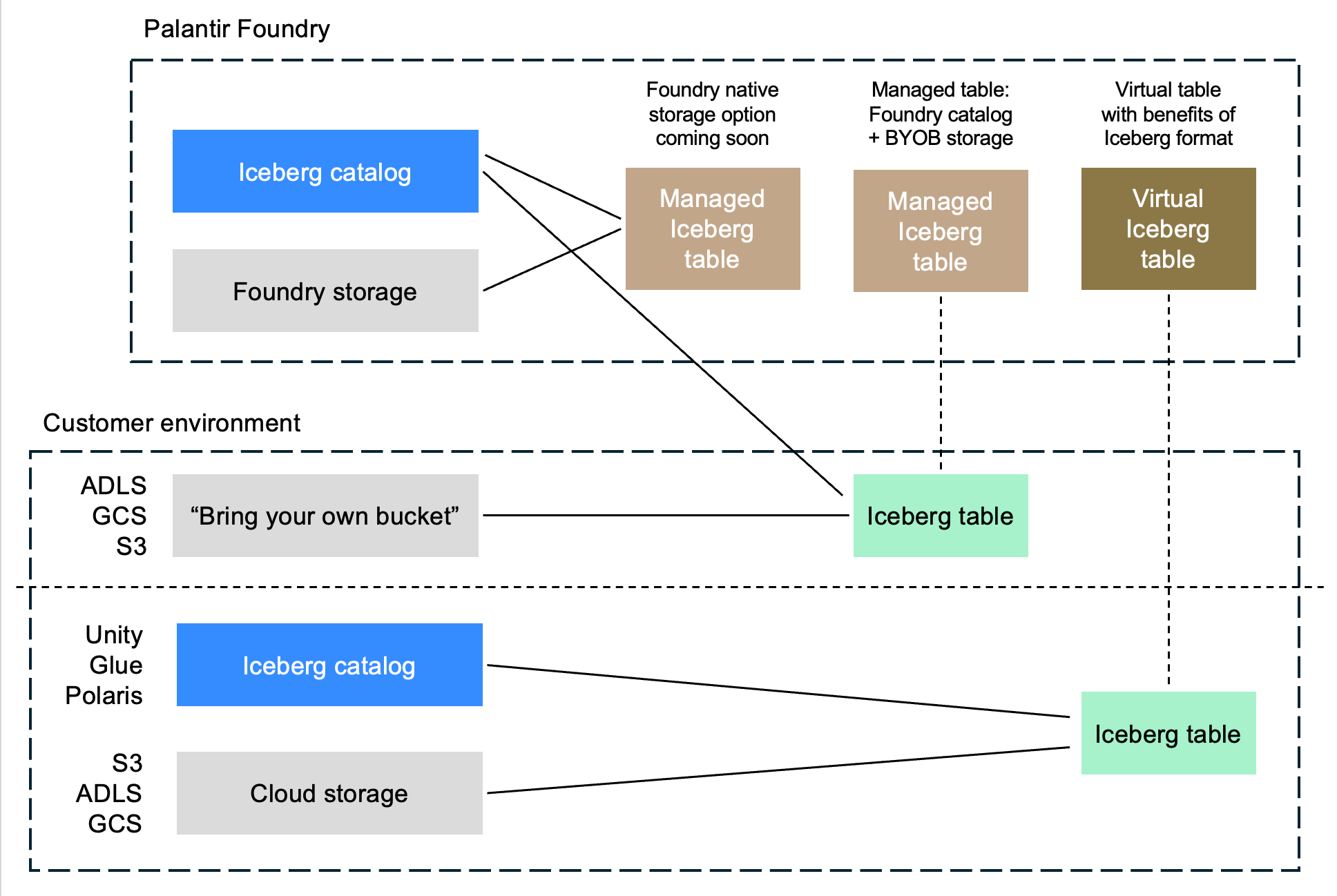
Solid lines represent direct relationships between a table and its associated Iceberg catalog and storage location. Dotted lines indicate that no data is copied between the external storage location and the Foundry table.
Support and features
Managed and virtual Iceberg tables work with most core Foundry features.
For managed Iceberg tables, Foundry administers the table through its implementation of the Iceberg REST catalog. This enables additional functionality in Foundry, such as guided frontends for configuring maintenance operations.
For information on current feature availability, see Foundry functionality not yet available for Iceberg tables.
Encryption settings
This section describes encryption settings and configuration options for Foundry-managed Iceberg tables.
Server-side encryption (SSE)
Server-side encryption (SSE) is mandatory for all tables. For Foundry-managed storage, Palantir enforces the encryption. For customer-provided storage buckets, customer administrators must enforce SSE on the storage bucket.
Client-side encryption (CSE)
Client-side Iceberg table encryption ↗ can be enabled or disabled in Control Panel. Iceberg table encryption encrypts your data within Foundry using client-side encryption (CSE) before it is written to the storage location, providing an additional layer of encryption on top of server-side encryption.
:::callout{theme="neutral"} Client-side Iceberg table encryption is a new and evolving capability that is not yet supported by all Foundry features, external compute engines, or tools that connect to Iceberg tables. Enabling it may limit functionality until broader compatibility is available. Within Foundry, use of Iceberg tables with CSE in single-node transforms and "faster" Pipeline Builder pipelines is not yet supported. :::
Per-project storage settings
Storage location and client-side encryption (CSE) settings can be configured independently and applied at the enrollment "default" level, with the option to override settings for specific projects or namespaces. This allows different storage settings to be applied to different subsets of Iceberg tables as needed. These settings are managed via Control Panel.
中文翻译
Iceberg 存储架构概述
Palantir 支持使用 Iceberg 格式,包括托管式 Iceberg 表(managed Iceberg tables)和虚拟 Iceberg 表(virtual Iceberg tables)。
托管式 Iceberg 表由 Foundry 的 Iceberg 目录 管理。虚拟 Iceberg 表是使用外部存储的虚拟表,由外部 Iceberg 目录管理,例如 Glue ↗、Horizon ↗、Polaris ↗ 或 Unity ↗。
存储选项
Iceberg 表支持以下存储配置:
| 存储类型 | 目录类型 | 存储类型 | Iceberg 状态 |
|---|---|---|---|
| 托管存储(Managed storage) | 托管 | 托管 | Beta |
| 自带存储桶(AWS、Azure、Google) | 托管 | 外部 | Beta |
| 虚拟表 | 外部 | 外部 | Beta |
如需帮助设置自带存储桶存储,请联系 Palantir 支持团队。
架构概述
下图展示了在 Foundry 中使用 Iceberg 表的架构选项,这些选项基于表的存储位置以及负责管理该表的 Iceberg 目录。
实线表示表与其关联的 Iceberg 目录和存储位置之间的直接关系。虚线表示外部存储位置与 Foundry 表之间没有数据复制。
支持与功能
托管式和虚拟 Iceberg 表可与大多数 Foundry 核心功能配合使用。
对于托管式 Iceberg 表,Foundry 通过其 Iceberg REST 目录实现来管理该表。这使 Foundry 能够提供额外功能,例如用于配置维护操作的引导式前端。
有关当前功能可用性的信息,请参阅 Iceberg 表暂未支持的 Foundry 功能。
加密设置
本节介绍 Foundry 管理的 Iceberg 表的加密设置和配置选项。
服务端加密(SSE)
所有表都必须启用服务端加密(SSE)。对于 Foundry 管理的存储,Palantir 会强制执行加密。对于客户提供的存储桶,客户管理员必须在存储桶上强制执行 SSE。
客户端加密(CSE)
可以在控制面板中启用或禁用客户端 Iceberg 表加密 ↗。Iceberg 表加密会在数据写入存储位置之前,在 Foundry 内部使用客户端加密(CSE)对数据进行加密,从而在服务端加密的基础上提供额外的加密层。
:::callout{theme="neutral"} 客户端 Iceberg 表加密是一项新兴且不断演进的功能,尚未得到所有 Foundry 功能、外部计算引擎或连接 Iceberg 表的工具的支持。启用该功能可能会限制某些功能,直到更广泛的兼容性可用为止。在 Foundry 中,在单节点转换和"更快"的 Pipeline Builder 管道中使用启用了 CSE 的 Iceberg 表尚不支持。 :::
按项目存储设置
存储位置和客户端加密(CSE)设置可以独立配置,并应用于注册"默认"级别,同时可以选择为特定项目或命名空间覆盖设置。这样可以根据需要为不同的 Iceberg 表子集应用不同的存储设置。这些设置通过控制面板进行管理。