Troubleshooting guide(故障排除指南)
- My custom environment initializes slowly
- Environment fails to initialize
- Code 1 - Environment resolution error
- Code 137 - Module ran out of memory
- Other Codes
- Default environment initialization speed is inconsistent
- Packages which require both a Conda package and a JAR
- Other issues
My custom environment initializes slowly
Slow initialization generally indicates that the environment definition is too large or too complex. Initialization time tends to increase superlinearly with the number of packages in the environment. Additionally, Foundry will often pre-initialize commonly used environments, so if you created a custom environment based on a default profile, the slowness is likely because you are no longer getting a pre-initialized environment and must wait for a new environment to be created. See Introduction to Environment Creation for more details about the environment creation process.
Try the following:
- Undo - If the environment began initializing slowly after a change was made to its configuration, try reverting the change. Adding even a single package can dramatically increase initialization time in certain cases.
- Simplify - Remove any unneeded packages from the environment definition. Small, specialized environments are much more performant than large, general-purpose ones.
- Pin versions - Add version constraints to some of the packages in the Environment Configuration panel, as discussed in Selecting an Environment. It is most effective to do this for packages with many possible versions like
pythonand for packages with complex dependency graphs likescipy. If adding a particular package caused the environment to become slow, try pinning a version for that package. - Caveat: Adding version pins may cause an environment to become unsatisfiable. If the environment fails to initialize, try relaxing the pin. For example,
python=3.6.10will match only that version, butpython=3.6will match any ofpython 3.6.x, and so is more likely to be satisfiable. - One option is to wait for your environment (with no pins) to resolve, then check which versions were selected (see Viewing Resolved Environment). You can then add pins for those specific versions until initialization performance is sufficiently fast. It is usually optimal to pin versions for packages with many dependencies while leaving all other packages unpinned.
Environment fails to initialize
If your environment fails to initialize, you can view the environment startup error logs to view additional information about what went wrong.
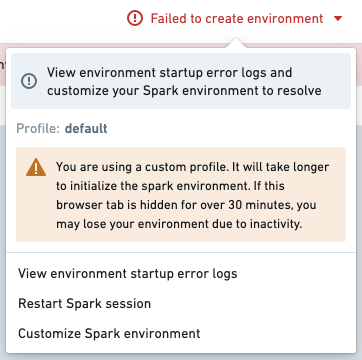
The first line of the log will read Execution failed with non-zero exit code: followed by an integer error code. This error code indicates the specific failure mode.
Code 1 - Environment Resolution Error
This error indicates that some subset of the specified packages (and/or their dependencies) are incompatible or could not be installed. If a recent change in the Environment Configuration panel caused initialization to begin failing, try reverting the change. Below is a list of common environment resolution errors.
New Mamba error messages
Palantir contributed ↗ to the open-source Mamba community by providing better formatting of environment initialization error messages. As of February 2023, Foundry services benefit from errors that more closely represent the dependency tree being infringed by environment failures.
For guidance on understanding those new messages, how to interpret them, and advice on how to remediate them, see New error messages.
Legacy Mamba Error Messages
Find below a list of common error messages from the legacy error messages, before the new Mamba error messages were introduced.
Package not found
In this case, no configured channel provides the package A dependency.
Problem: nothing provides requested A.a.a.a
This can happen if the pinned version of your package does not exist. If this is the case, try relaxing or removing the versioning from your package within the meta.yml; for example, matplotlib 1.1.1 could become matplotlib. Alternatively, this may also mean that the environment manager could not locate the necessary package to install the specified version.
Dependency not found
In this case, package A contains a required dependency B which was not provided by any channel.
Problem: nothing provides B-b.b.b needed by A-a.a.a:
Note that B can be a package the user requested explicitly (in meta.yml/foundry-ml/vector profiles) or it can be a transitive dependency.
This may occur if B is not available for installation on your enrollment; for example, B may have been recalled and therefore is not available for install.
If this is the case, try removing the pinned version of A in case there is a version of A that has all its dependencies available, or contact your Palantir representative to import the necessary package into Foundry.
Duplicate package error
cannot install both X.a.b.c and X.d.e.f
This error occurs if you try to install the same package X and have two different version pinnings for both. For example, you might receive this error if you try to pin both python 3.6.* and python 3.7.* in your meta.yml. You can resolve this issue by removing one of the duplicate package pinnings.
Permission errors
CondaService:ReadRepositoryPermissionDenied
If you receive this error, it may be because some of the assets and packages you need are not available in your enrollment.
Package conflict
In this case, package A has a requirement on the version of package B but this version of B conflicts with other packages:
Problem: package A-a.a.a requires B >=2.2.5,<2.3.0a0, but none of the providers can be installed
Note that the package B could refer to a transitive dependency of A, which you have not explicitly listed as a requirement in your environment. See Resolved Environment documentation for more information on transitive dependencies.
Remediating a Code 1 error
To remediate an environment failure, consider the following steps:
- Check the
STDOUTin the environment startup logs. - Create a minimal example of a failing solve. Remove packages until the environment initializes, and then add packages back in until you have determined which packages are the blockers.
- Try relaxing constraints by removing package pins.
- You can open up multiple workbooks or multiple branches of the same workbook in different windows to make this process faster.
- We recommend using binary search to discover issues. Try removing all constraints in one workbook, removing half of the constraints in another workbook, then the other half in another workbook, and so on.
Code 137 - Module ran out of memory
This error typically indicates that the environment initialization required more memory than was available on the Spark module. If a recent change in the Environment Configuration panel caused initialization to begin failing, try reverting the change. Otherwise, try one or more of the following suggestions:
- Remove unneeded packages from the environment. Memory usage increases superlinearly with the number of packages in an environment, so removing even a few packages may be enough to resolve the problem.
- Add version constraints for some of the packages as described in Step 3 of the Environment initialization is slow section. Each package version that you pin will reduce the complexity of the environment solve, which will in turn reduce the amount of memory required to initialize the environment.
If your environment still fails to initialize after removing all unneeded packages and pinning some of the remaining packages to specific versions, contact your Palantir representative and include details of all debugging steps you tried.
Other codes
If your environment fails to initialize with an error code not listed above and the environment fails again on retry, contact your Palantir representative and include the full text of the error log.
Default environment initialization speed is inconsistent
We expect that default profiles will sometimes initialize quickly and sometimes take longer. In the latter case, you are waiting for Mamba to resolve your environment specification and install it onto the Spark module backing your Workbook. This is the default behavior. In the former case, either you are getting a pre-initialized module or your environment specification matches a resolved environment in the cache that can be installed right away. If many users are opening Workbooks around the same time, you are less likely to get a pre-initialized module and will need to wait for a new one to be spun up.
Packages which require both a Conda package and a JAR
Some packages require both a Conda package and a JAR in order to be available. A common example is the graphframes package. Such packages require a special setup process, and you may experience the following error during build time if this package has not previously been configured for your instance:
o257.loadClass.: java.lang.ClassNotFoundException:<Class>
JAR Files can be added to a profile's configuration in the Advanced section of the Conda Environment configuration tab in Control Panel (see Configure Code Workbook Profiles). Contact your Palantir representative if you need assistance in configuring such packages.
Other issues
If the guidance above is insufficient to resolve your issue, or if you encounter an issue outside the scope of this guide, contact your Palantir representative and include details of any debugging steps you tried.
中文翻译
故障排除指南
我的自定义环境初始化缓慢
初始化缓慢通常表明环境定义过大或过于复杂。初始化时间往往与环境中的包数量呈超线性增长。此外,Foundry 通常会预初始化常用环境,因此如果您基于默认配置文件创建了自定义环境,速度变慢很可能是因为您不再使用预初始化环境,而需要等待创建新环境。有关环境创建过程的更多详情,请参阅环境创建简介。
请尝试以下方法:
- 撤销更改 - 如果环境在修改配置后开始初始化缓慢,请尝试撤销该更改。在某些情况下,即使只添加一个包,也可能显著增加初始化时间。
- 简化环境 - 从环境定义中移除任何不需要的包。小型、专用的环境比大型、通用的环境性能好得多。
- 固定版本 - 在环境配置面板中为某些包添加版本约束,如选择环境中所述。对于像
python这样有多个可能版本的包,以及像scipy这样具有复杂依赖关系图的包,固定版本最为有效。如果添加某个特定包导致环境变慢,请尝试为该包固定一个版本。 - 注意:添加版本固定可能导致环境无法满足依赖关系。如果环境初始化失败,请尝试放宽固定条件。例如,
python=3.6.10只会匹配该特定版本,而python=3.6会匹配任何python 3.6.x版本,因此更有可能满足依赖关系。 - 一种方法是等待环境(无固定版本)解析完成,然后检查选择了哪些版本(请参阅查看已解析环境)。然后,您可以为这些特定版本添加固定条件,直到初始化性能足够快。通常,最佳做法是为具有许多依赖项的包固定版本,同时保持所有其他包不固定。
环境初始化失败
如果您的环境初始化失败,可以查看环境启动错误日志,以获取有关问题的更多信息。
日志的第一行将显示 Execution failed with non-zero exit code:,后跟一个整数错误代码。此错误代码指示具体的失败模式。
代码 1 - 环境解析错误
此错误表示指定的某些包(和/或其依赖项)不兼容或无法安装。如果最近对环境配置面板的更改导致初始化开始失败,请尝试撤销该更改。以下是常见环境解析错误的列表。
新版 Mamba 错误消息
Palantir 贡献 ↗ 了开源 Mamba 社区,提供了更好的环境初始化错误消息格式。自 2023 年 2 月起,Foundry 服务受益于更准确地表示环境失败所违反的依赖关系树的错误信息。
有关理解这些新消息、如何解读它们以及如何修复它们的指导,请参阅新版错误消息。
旧版 Mamba 错误消息
以下是在引入新版 Mamba 错误消息之前,旧版错误消息中常见的错误消息列表。
未找到包
在这种情况下,没有配置的频道提供包 A 的依赖项。
Problem: nothing provides requested A.a.a.a
如果您的包的固定版本不存在,可能会发生这种情况。如果是这种情况,请尝试放宽或移除 meta.yml 中包的版本限制;例如,matplotlib 1.1.1 可以改为 matplotlib。或者,这也可能意味着环境管理器无法找到安装指定版本所需的包。
未找到依赖项
在这种情况下,包 A 包含一个必需的依赖项 B,但任何频道都没有提供该依赖项。
Problem: nothing provides B-b.b.b needed by A-a.a.a:
请注意,B 可以是用户显式请求的包(在 meta.yml/foundry-ml/vector 配置文件中),也可以是传递依赖项。
如果 B 在您的注册中不可用,则可能发生这种情况;例如,B 可能已被召回,因此无法安装。
如果是这种情况,请尝试移除 A 的固定版本,看看是否存在一个所有依赖项都可用的 A 版本,或者联系您的 Palantir 代表以将必要的包导入 Foundry。
重复包错误
cannot install both X.a.b.c and X.d.e.f
如果您尝试安装同一个包 X 并为其固定了两个不同的版本,则会出现此错误。例如,如果您尝试在 meta.yml 中同时固定 python 3.6.* 和 python 3.7.*,则可能会收到此错误。您可以通过移除其中一个重复的包固定来解决此问题。
权限错误
CondaService:ReadRepositoryPermissionDenied
如果您收到此错误,可能是因为您需要的某些资产和包在您的注册中不可用。
包冲突
在这种情况下,包 A 对包 B 的版本有要求,但此版本的 B 与其他包冲突:
Problem: package A-a.a.a requires B >=2.2.5,<2.3.0a0, but none of the providers can be installed
请注意,包 B 可能指的是 A 的传递依赖项,您并未在环境中显式列出该依赖项。有关传递依赖项的更多信息,请参阅已解析环境文档。
修复代码 1 错误
要修复环境失败,请考虑以下步骤:
- 检查环境启动日志中的
STDOUT。 - 创建一个最小化的失败求解示例。移除包直到环境初始化成功,然后逐个添加包,直到确定哪些包是阻塞因素。
- 尝试通过移除包固定来放宽约束。
- 您可以在不同窗口中打开多个工作簿或同一工作簿的多个分支,以加快此过程。
- 我们建议使用二分查找来发现问题。尝试在一个工作簿中移除所有约束,在另一个工作簿中移除一半约束,再在另一个工作簿中移除另一半约束,依此类推。
代码 137 - 模块内存不足
此错误通常表示环境初始化所需的内存超过了 Spark 模块上可用的内存。如果最近对环境配置面板的更改导致初始化开始失败,请尝试撤销该更改。否则,请尝试以下一个或多个建议:
- 从环境中移除不需要的包。内存使用量随环境中的包数量呈超线性增长,因此即使只移除几个包也可能足以解决问题。
- 如环境初始化缓慢部分的步骤 3 所述,为某些包添加版本约束。您固定的每个包版本都会降低环境求解的复杂性,从而减少初始化环境所需的内存量。
如果在移除所有不需要的包并将剩余的一些包固定到特定版本后,您的环境仍然初始化失败,请联系您的 Palantir 代表,并附上您尝试过的所有调试步骤的详细信息。
其他错误代码
如果您的环境初始化失败,错误代码未在上面列出,并且重试后环境仍然失败,请联系您的 Palantir 代表,并附上错误日志的完整文本。
默认环境初始化速度不一致
我们预计默认配置文件有时会快速初始化,有时则需要更长时间。在后一种情况下,您正在等待 Mamba 解析您的环境规范并将其安装到支持您的工作簿的 Spark 模块上。这是默认行为。在前一种情况下,您要么获得了一个预初始化的模块,要么您的环境规范与缓存中已解析的环境匹配,可以立即安装。如果许多用户同时打开工作簿,您获得预初始化模块的可能性较小,并且需要等待启动新模块。
需要同时安装 Conda 包和 JAR 的包
某些包需要同时安装 Conda 包和 JAR 才能使用。一个常见的例子是 graphframes 包。此类包需要特殊的设置过程,如果之前未为您的实例配置此包,则在构建期间可能会遇到以下错误:
o257.loadClass.: java.lang.ClassNotFoundException:<Class>
可以在控制面板的 Conda 环境配置选项卡的高级部分将 JAR 文件添加到配置文件的配置中(请参阅配置代码工作簿配置文件)。如果您需要配置此类包的帮助,请联系您的 Palantir 代表。
其他问题
如果上述指导不足以解决您的问题,或者您遇到了本指南范围之外的问题,请联系您的 Palantir 代表,并附上您尝试过的任何调试步骤的详细信息。