Optional data persistence(可选数据持久化(Optional data persistence))
For each transform in a workbook, users can choose whether to save the result as a dataset.
Choose whether to save as a dataset
By default, new transforms are not saved as datasets. To save them, use the toggle in the logic pane.
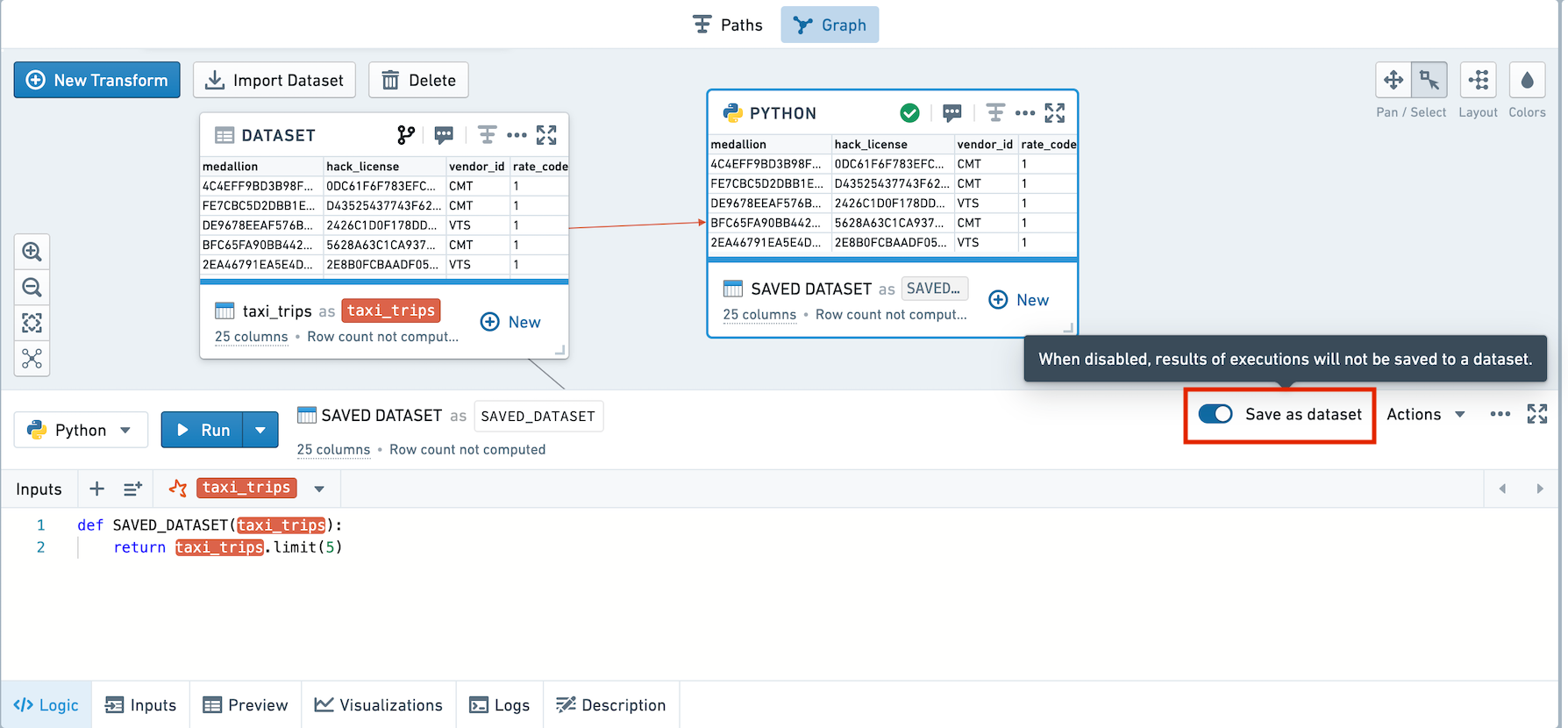
These screenshots use open source data from the NYC Taxi & Limousine Commission ↗.
To change the persistence of multiple transforms at once, use the bulk editor on the left-hand side.
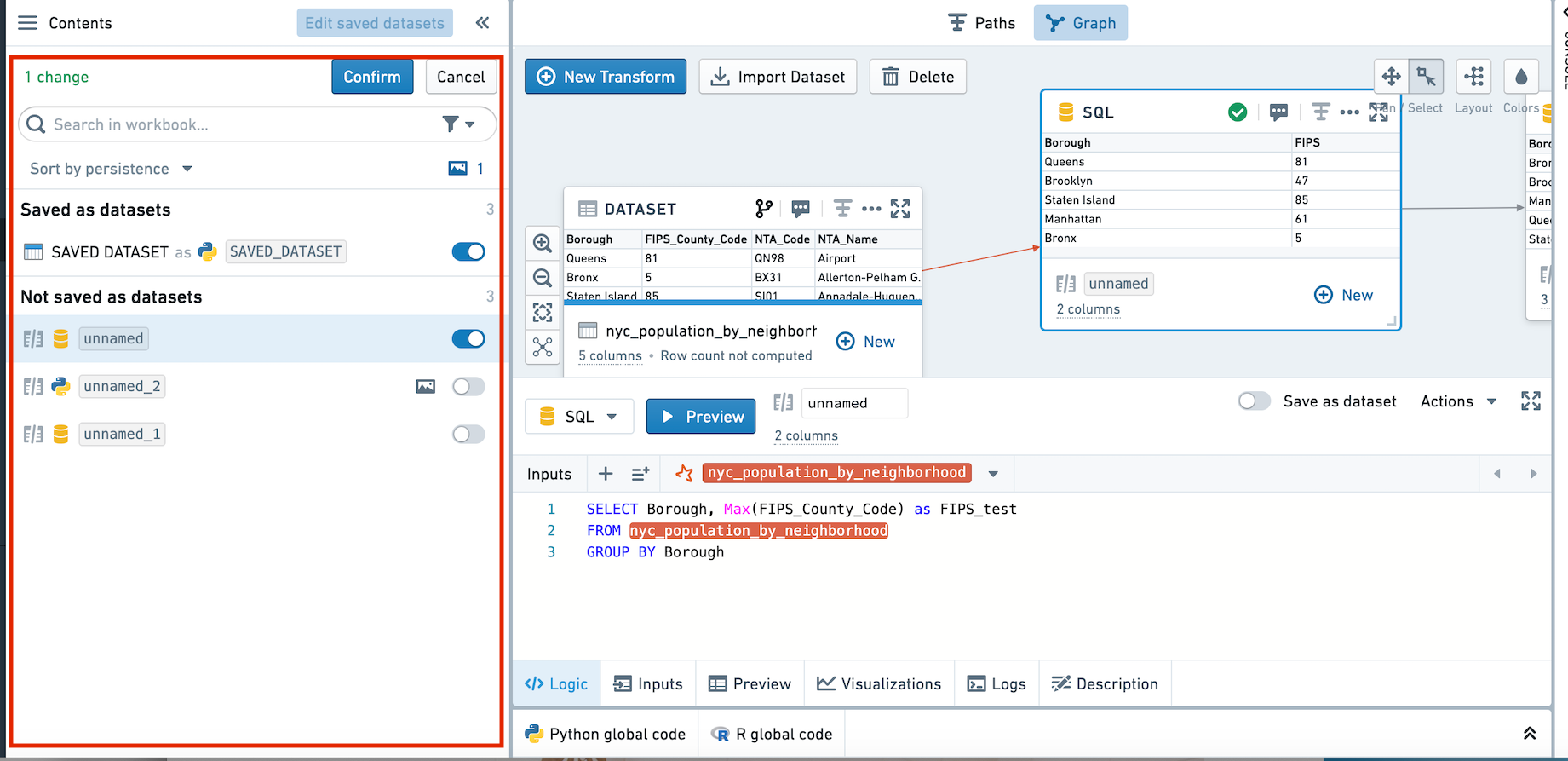
:::callout{theme="neutral"} If you choose to change a transform from not saved to saved, it will re-link to its previous saved dataset. If a previous saved dataset does not exist, a new dataset will be created. :::
Transforms that are saved are denoted with a horizontal blue bar.
Execution Model
When running a node, the logic from all unpersisted nodes upstream of that node will also be run. In the diagram below, when running Saved Transform C, the logic from Unsaved Transform A will also be executed.
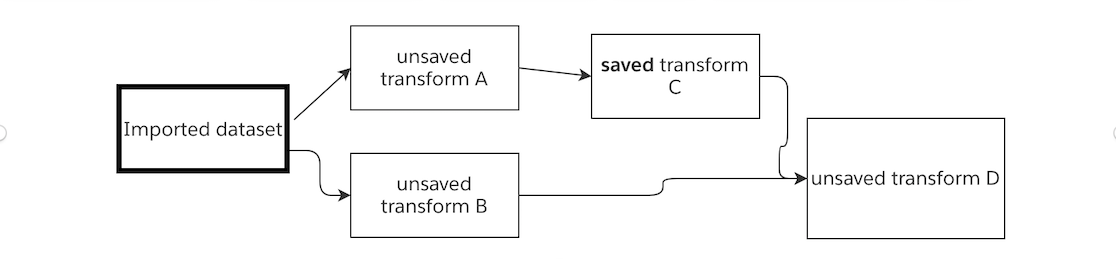
If you change the code in Unsaved Transform A but do not run it, and then run Saved Transform C, the result of Saved Transform C will reflect the change in logic.
On running Unsaved Transform D, Saved Transform C will be read in from the Foundry dataset, and the logic from Unsaved Transform B will be executed.
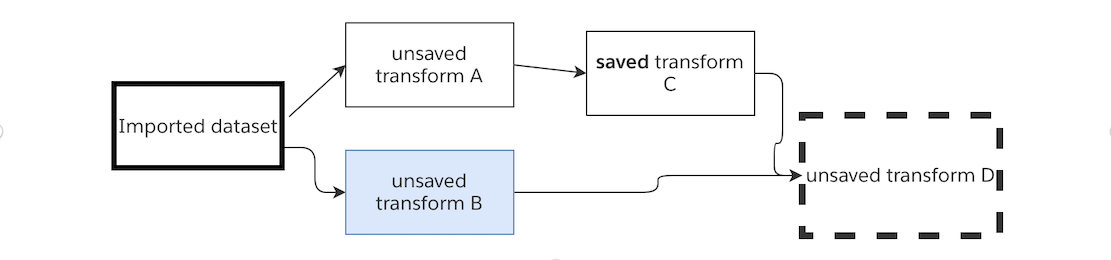
Let's imagine we toggle Saved Transform C so it's no longer saved as a dataset. When running Unsaved Transform D, the logic of all three upstream transforms will be executed.
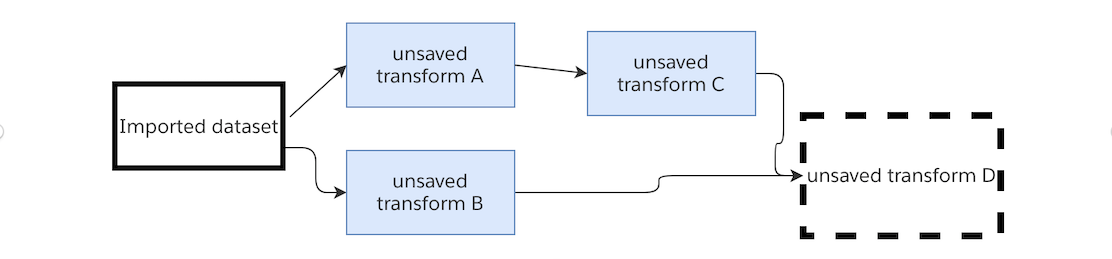
In this case, when running this series of transformations - if my end goal is to view the result in Unsaved Transform D, there is no need to preview the 3 upstream unsaved transforms. By running Unsaved Transform D, the latest logic in all four transforms and the latest transaction for the imported dataset will be used.
FAQ
When should I save a transform as a dataset?
If a transform is very computationally intensive, and is used upstream of many other transforms, you may want to save it as a dataset, to prevent poor performance.
If you want to use the results of a transform outside of workbook (for example, in another Code Workbook or in a Contour analysis), you should save the results of the transform as a dataset.
If a transform computes a function nondeterministically (for example, using a row_number function or a function that calls the current time), you should persist the dataset to Foundry. This will guarantee that downstream transforms will use the exact results that were written to the dataset.
:::callout{theme="success" title="Checkpoint your work"} If your workbook contains long chains of nodes that are unpersisted, it is recommended to periodically checkpoint your workbook by persisting an intermediate node. :::
When should I preview a node?
In general, the preview functionality should be used when creating a series of transforms, to validate their correctness and preview their results. Once a series of transformations is codified, there are fewer reasons to use the preview functionality.
Why don't my unsaved transforms appear in Data Lineage?
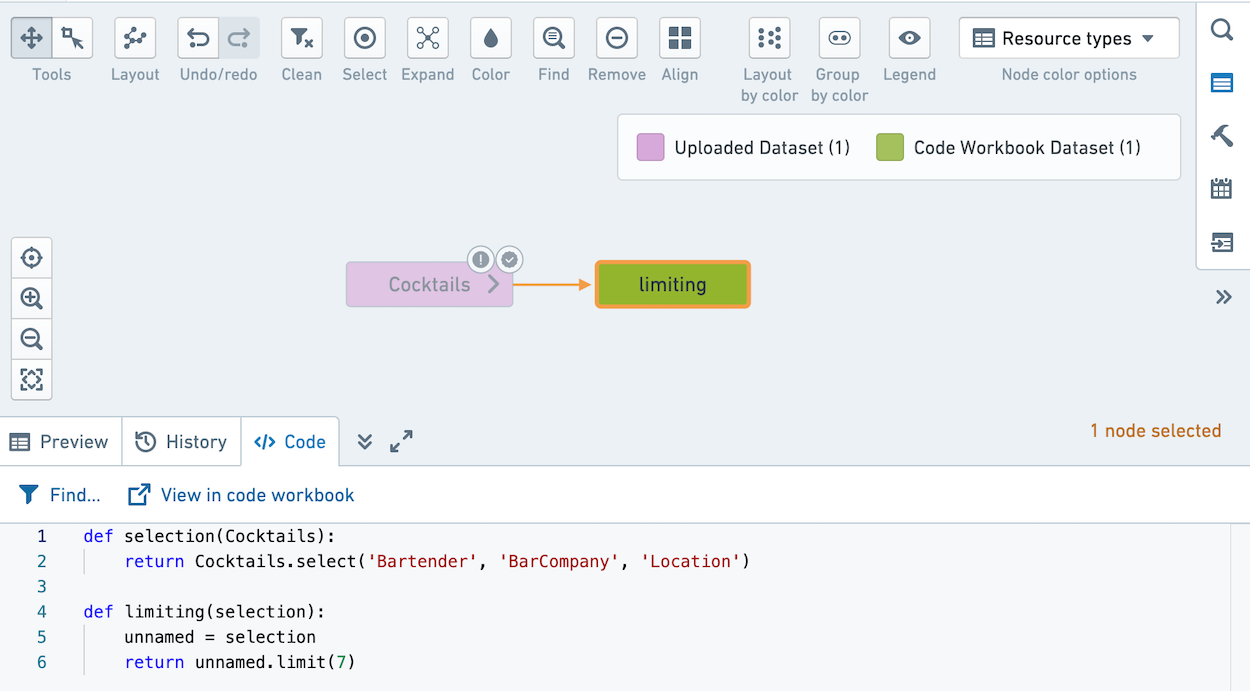
Unsaved transforms in Code Workbook are logical blocks, not resources in a Project. When you Explore Data Lineage, datasets will show all of the code they execute. That includes the code in any unsaved transforms upstream of the saved transform.
For example, this workbook contains one unsaved transform and one saved transform.
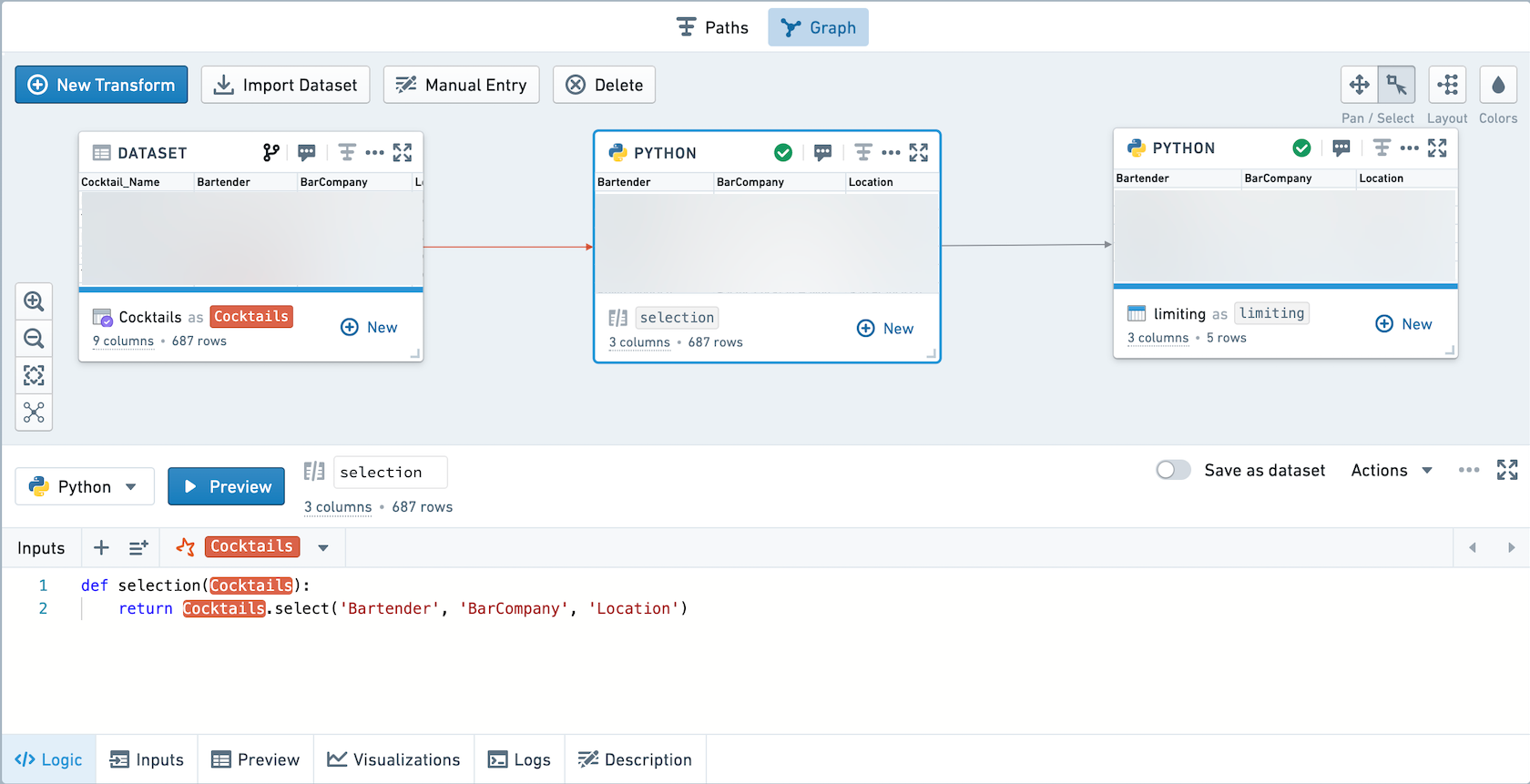
If you click Explore Data Lineage, it will appear as below. Note that the code for the selection transform is prepended to the code in the limiting transform.
What are the performance and resource usage effects of optional data persistence?
Code Workbook originally used an execution model where each transform was saved as a Foundry dataset. The current execution model allows users to choose whether to save transforms as datasets, and there are implications for performance and resource usage.
Scheduled builds
Let's imagine you had a scheduled build running in the previous execution model. In the new execution model, if all transforms remain persisted, the performance will remain identical to before.
If you determine that some intermediate transforms do not need to be saved as Foundry datasets, and choose to unpersist them, there will be strict performance improvements in the speed of the pipeline. This is because the intermediate results of these nodes no longer need to be written to Foundry, and in some cases can help the Spark query planner further optimize downstream computations.
Interactive use
In the interactive case, in the old execution model both the preview result and the write result were computed. With optional persistence, unpersisted nodes compute only a preview, and persisted nodes only compute a write. Thus, no duplicative work is done and running an identical workbook will use less resources in the new execution model than in the previous execution model.
The effects of optional persistence on performance in the interactive case are more nuanced. For workflows with a very computationally intensive transform (for example, a large join), you may want to persist the join to avoid recomputing the large join each time you run a downstream transform.
In all cases, when you decide to unpersist a transform, storage space is saved by not writing to Foundry.
中文翻译
可选数据持久化(Optional data persistence)
对于工作簿(workbook)中的每个转换(transform),用户可选择是否将结果保存为数据集(dataset)。
选择是否保存为数据集
默认情况下,新建的转换不会保存为数据集。如需保存,可使用逻辑面板(logic pane)中的开关。
这些截图使用来自NYC Taxi & Limousine Commission ↗的开源数据。
如需同时修改多个转换的持久化设置,可使用左侧的批量编辑器(bulk editor)。
:::callout{theme="neutral"} 如果将某个转换从「不保存」状态修改为「保存」状态,它将重新关联到之前保存过的数据集。如果不存在之前保存的数据集,则会新建一个数据集。 :::
已保存的转换会以蓝色水平条标记。
执行模型(Execution Model)
运行某个节点(node)时,该节点上游所有未持久化的节点的逻辑也会被执行。在下图中,运行已保存转换C时,未保存转换A的逻辑也会被执行。
如果你修改了未保存转换A的代码但未运行它,接着运行已保存转换C,那么已保存转换C的结果将体现逻辑修改后的内容。
运行未保存转换D时,系统将从Foundry数据集读取已保存转换C的数据,同时执行未保存转换B的逻辑。
假设我们切换已保存转换C的状态,使其不再保存为数据集。那么运行未保存转换D时,所有三个上游转换的逻辑都会被执行。
在这种场景下,如果你运行这一系列转换的最终目的是查看未保存转换D的结果,无需预览上游3个未保存的转换。运行未保存转换D时,系统会自动使用所有四个转换的最新逻辑,以及导入数据集的最新事务(transaction)。
常见问题(FAQ)
什么时候应该将转换保存为数据集?
如果某个转换计算量极高,且是许多其他转换的上游依赖,你可以将其保存为数据集,避免性能变差。
如果你需要在工作簿外使用转换的结果(例如在其他Code Workbook或Contour分析中使用),则应该将转换结果保存为数据集。
如果转换包含非确定性计算逻辑(例如使用row_number函数或者调用当前时间的函数),你应该将数据集持久化到Foundry。这可以保证下游转换将使用写入数据集的准确结果。
:::callout{theme="success" title="为你的工作设置检查点(Checkpoint)"} 如果你的工作簿包含长链路的未持久化节点,建议定期持久化一个中间节点,为工作簿设置检查点。 :::
什么时候应该预览节点?
一般而言,在编写一系列转换时可使用预览功能,验证逻辑正确性并预览结果。当一系列转换编写完成后,就不需要频繁使用预览功能了。
为什么未保存的转换没有出现在数据血缘(Data Lineage)中?
Code Workbook中的未保存转换是逻辑块,不属于项目(Project)中的资源。当你查看数据血缘时,数据集会展示其执行的所有代码,包括已保存转换上游所有未保存转换中的代码。
例如,下图的工作簿包含一个未保存转换和一个已保存转换。
点击「查看数据血缘」后,展示结果如下。请注意selection转换的代码会被添加到limiting转换的代码之前。
可选数据持久化对性能和资源使用有什么影响?
Code Workbook最初采用的执行模型会将每个转换都保存为Foundry数据集。当前的执行模型允许用户选择是否将转换保存为数据集,这会对性能和资源使用产生一定影响。
定时构建(Scheduled builds)
假设你在旧执行模型下运行过定时构建。在新执行模型中,如果所有转换都保持持久化状态,性能将和之前完全一致。
如果你确认某些中间转换不需要保存为Foundry数据集,选择取消其持久化状态,那么流水线的运行速度会有明确的性能提升。这是因为这些节点的中间结果不再需要写入Foundry,在某些场景下还可以帮助Spark查询优化器(query planner)进一步优化下游计算。
交互式使用(Interactive use)
在交互式使用场景下,旧执行模型会同时计算预览结果和写入结果。而在可选持久化机制下,未持久化节点仅计算预览结果,持久化节点仅计算写入结果。因此不会产生重复计算,运行同一个工作簿时,新执行模型比旧执行模型消耗的资源更少。
可选持久化对交互式场景下的性能影响更为复杂。如果工作流包含计算量极高的转换(例如大型关联(Join)操作),你可以持久化该Join结果,避免每次运行下游转换时都重新执行这个大型Join。