Present visualizations(呈现可视化内容)
Once you have created a visualization in Code Workbook, you may want to present it to collaborators outside the context of a Code Workbook.
Add Visualizations to Notepad
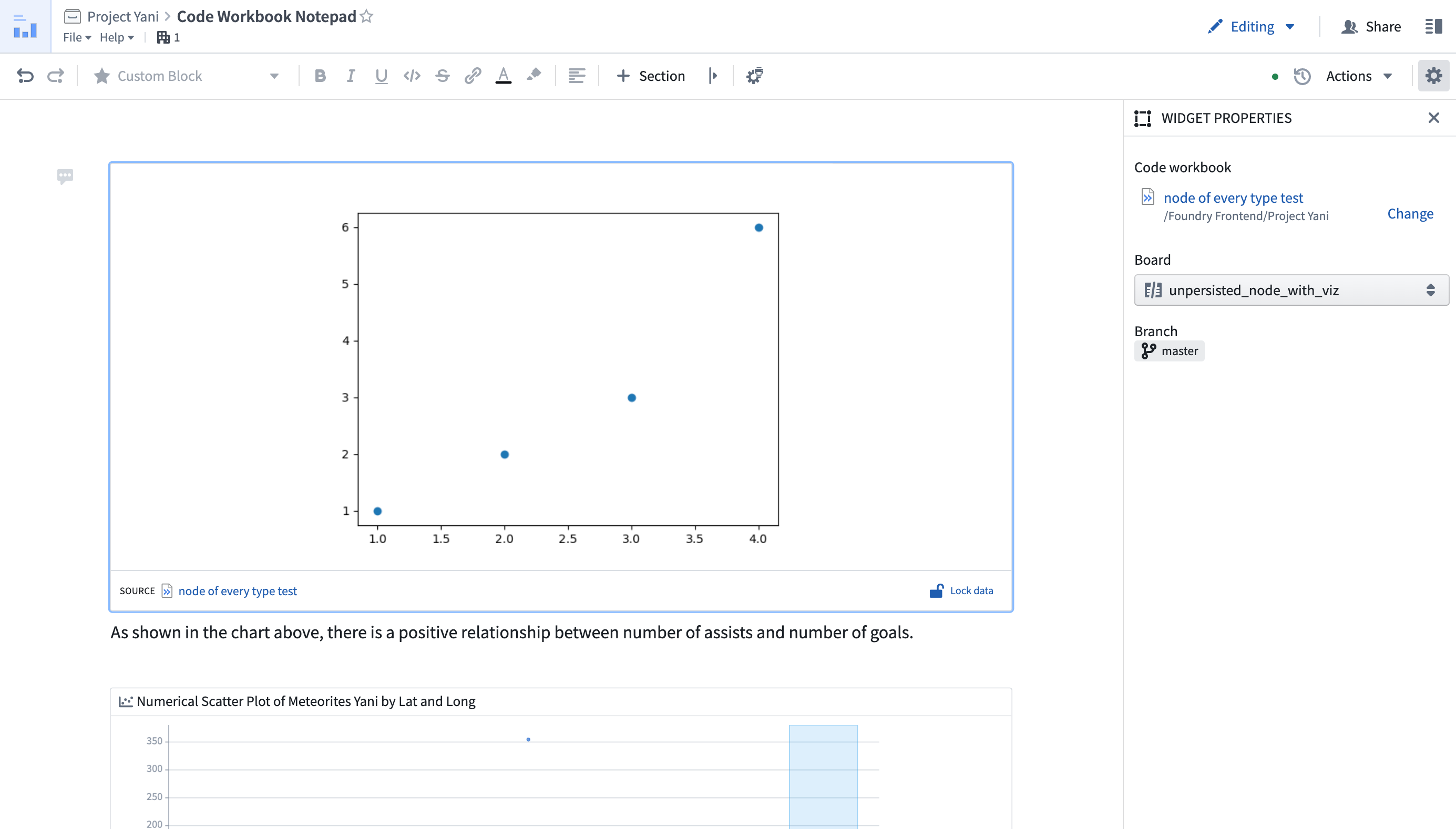
Visualizations generated in a Code Workbook can be presented in a Notepad document. You can embed various resources from across Foundry into a Notepad document, including Contour boards, Quiver canvases, and Code Workbook visualizations, and can annotate the document using text, tables, and images. You can also create Notepad templates, allowing users in a Workshop application to generate new Notepad documents based on a given blueprint. Learn more about Notepad.
You can add a Code Workbook visualization to a Notepad document by right-clicking a node on the graph and clicking Copy for Notepad. Now, the image is copied to your clipboard and can be pasted into any Notepad document.
Adding Visualizations to Reports
:::callout{theme="danger" title="Foundry Reports availability"} As of October 3rd, 2022, Foundry Reports is no longer available to new customers by default. Contact your Palantir representative if you have a use case that requires access to Foundry Reports. For existing users, Foundry Reports is still supported for creating dashboards with visualizations produced in a Code Workbook. :::
Visualizations generated in a Code Workbook can be added to a Foundry Report for presentation and collaboration. You can add a visualization to a Report by opening the Visualizations tab and clicking on Add to Report, or by right-clicking a node on the graph and clicking Add to Report.
中文翻译
呈现可视化内容
在 Code Workbook 中创建可视化内容后,您可能希望将其呈现给 Code Workbook 环境之外的合作者。
将可视化内容添加到 Notepad
在 Code Workbook 中生成的可视化内容可以呈现在 Notepad 文档中。您可以将 Foundry 中的各种资源嵌入到 Notepad 文档中,包括 Contour 面板、Quiver 画布和 Code Workbook 可视化内容,并可以使用文本、表格和图像对文档进行注释。您还可以创建 Notepad 模板,允许 Workshop 应用程序中的用户根据给定的蓝图生成新的 Notepad 文档。了解更多关于 Notepad 的信息。
您可以通过右键单击图表上的节点并点击 Copy for Notepad,将 Code Workbook 可视化内容添加到 Notepad 文档中。此时,图像会被复制到剪贴板,您可以将其粘贴到任何 Notepad 文档中。
将可视化内容添加到 Reports
:::callout{theme="danger" title="Foundry Reports 可用性"} 自 2022 年 10 月 3 日起,Foundry Reports 默认不再向新客户提供。如果您有需要访问 Foundry Reports 的用例,请联系您的 Palantir 代表。对于现有用户,Foundry Reports 仍支持创建包含 Code Workbook 生成的可视化内容的仪表板。 :::
在 Code Workbook 中生成的可视化内容可以添加到 Foundry Report 中,以便进行呈现和协作。您可以通过打开 Visualizations 选项卡并点击 Add to Report,或者右键单击图表上的节点并点击 Add to Report,将可视化内容添加到 Report 中。