Global code(全局代码(Global Code))
The Global Code pane, accessible on the right-hand side of the Workbook interface, allows you to define variables and functions that will be available in all code transforms of that language across the Workbook. For instance, you can use global code to define constants that will be used in multiple transforms or define helper functions you want to use repeatedly.
Example
In this example, we’ll write a simple function based on the titanic_dataset that takes the age of a passenger and returns their age bracket.
Let’s begin by opening the Python Global Code panel at the right of the page, which looks like this:
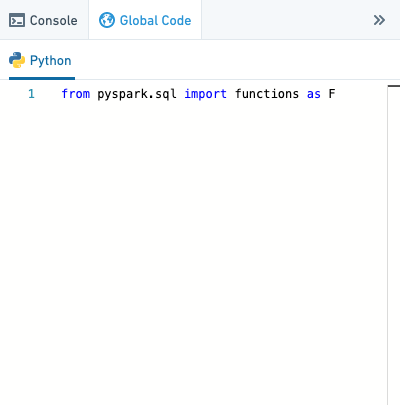
Once the Global Code panel is open, copy-paste the following code into the panel:
def return_age_bracket(age):
  if age is None:
    return 'Not specified'
  elif (age <= 12):
    return '12 and under'
  elif (age >= 13 and age < 19):
    return 'Between 13 and 19'
  elif (age >= 19 and age < 65):
    return 'Between 19 and 65'
  elif (age >= 65):
    return '65 and over'
  else: return 'N/A'
To use this global function, create a new Python transform derived from titanic_dataset and paste the following code into the transform:
def passengers_by_age_bracket_udf(titanic_dataset):
  from pyspark.sql.functions import udf

  input_df = titanic_dataset

  age_bracket_udf = udf(return_age_bracket)

  output_df = input_df.withColumn("age_bracket", age_bracket_udf(input_df.Age))
  output_df = output_df.select(output_df.Name, output_df.age_bracket)

  return output_df
Now run the code. You will see the following output:
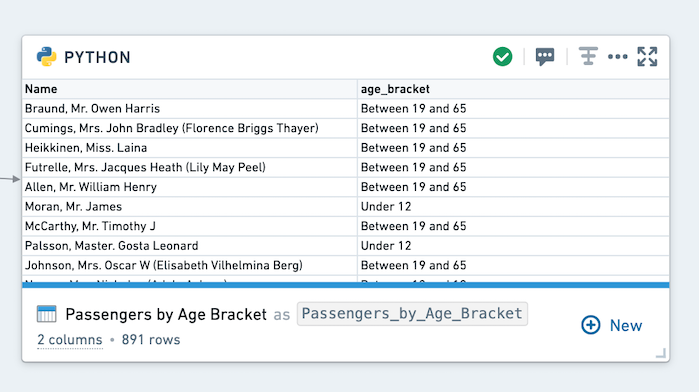
This code may take some time to run since user defined functions (UDFs), especially with loops, can often be inefficient. Using globally defined functions is not always a best practice. For this example, pyspark.functions offers a simpler method: when((condition), result).otherwise(result).
Let’s try to get the same result as above without using a UDF:
def passengers_by_age_bracket(titanic_dataset):
  from pyspark.sql import functions as F

  input_df = titanic_dataset
  output_df = input_df.withColumn("age_bracket", F.when(input_df.Age.isNull(), 'Not specified')\
                                                  .when( input_df.Age <= 12, '12 and under')\
                                                  .when(( (input_df.Age >= 13) & (input_df.Age < 19)), 'Between 13 and 19')\
                                                  .when(( (input_df.Age >= 19) & (input_df.Age < 65)), 'Between 19 and 65')\
                                                  .when(input_df.Age >= 65, '65 and over').otherwise('N/A'))
  output_df = output_df.select('Name','age_bracket')

  return output_df
Under most conditions, the above transformation should run in a few seconds, compared to minutes with a UDF.
Note on reproducibility
Note that in order to ensure that results are reproducible, mutating variables and functions in global code will not propagate to other transforms. For example, in Python, if you define a list in global code like this:
my_list = [1,2,3,4]
And then update the list in your transform:
def my_transform(input_df):
    my_list.append(5)
    print(my_list)
Running my_transform will print [1,2,3,4,5], but other transforms will still receive a value of [1,2,3,4].
中文翻译
全局代码(Global Code)
全局代码(Global Code)面板位于Workbook界面右侧,允许您定义变量和函数,这些变量和函数将在Workbook中该语言的所有代码转换(transform)中可用。例如,您可以使用全局代码定义多个转换中都会用到的常量,或定义需要重复使用的辅助函数。
示例
在本示例中,我们将基于titanic_dataset编写一个简单的函数,该函数接收乘客的年龄并返回其年龄段。
首先,打开页面右侧的Python全局代码(Python Global Code)面板,界面如下所示:
打开全局代码面板后,将以下代码复制粘贴到面板中:
def return_age_bracket(age):
  if age is None:
    return 'Not specified'
  elif (age <= 12):
    return '12 and under'
  elif (age >= 13 and age < 19):
    return 'Between 13 and 19'
  elif (age >= 19 and age < 65):
    return 'Between 19 and 65'
  elif (age >= 65):
    return '65 and over'
  else: return 'N/A'
要使用这个全局函数,请创建一个从titanic_dataset派生的新Python转换,并将以下代码粘贴到转换中:
def passengers_by_age_bracket_udf(titanic_dataset):
  from pyspark.sql.functions import udf

  input_df = titanic_dataset

  age_bracket_udf = udf(return_age_bracket)

  output_df = input_df.withColumn("age_bracket", age_bracket_udf(input_df.Age))
  output_df = output_df.select(output_df.Name, output_df.age_bracket)

  return output_df
现在运行代码。您将看到以下输出:
这段代码可能需要一些时间才能运行,因为用户自定义函数(UDF),特别是包含循环的UDF,通常效率较低。使用全局定义的函数并不总是最佳实践。对于这个示例,pyspark.functions提供了更简单的方法:when((condition), result).otherwise(result)。
让我们尝试不使用UDF来获得与上述相同的结果:
def passengers_by_age_bracket(titanic_dataset):
  from pyspark.sql import functions as F

  input_df = titanic_dataset
  output_df = input_df.withColumn("age_bracket", F.when(input_df.Age.isNull(), 'Not specified')\
                                                  .when( input_df.Age <= 12, '12 and under')\
                                                  .when(( (input_df.Age >= 13) & (input_df.Age < 19)), 'Between 13 and 19')\
                                                  .when(( (input_df.Age >= 19) & (input_df.Age < 65)), 'Between 19 and 65')\
                                                  .when(input_df.Age >= 65, '65 and over').otherwise('N/A'))
  output_df = output_df.select('Name','age_bracket')

  return output_df
在大多数情况下,上述转换应在几秒内运行完成,而使用UDF则需要几分钟。
关于可重现性的说明
请注意,为确保结果可重现,在全局代码中修改变量和函数不会传播到其他转换。例如,在Python中,如果您在全局代码中定义了一个列表:
my_list = [1,2,3,4]
然后在转换中更新该列表:
def my_transform(input_df):
    my_list.append(5)
    print(my_list)
运行my_transform将打印[1,2,3,4,5],但其他转换仍会接收到[1,2,3,4]的值。