Inputs and outputs(输入与输出)
Input types and conversions
Code Workbook allows you to specify the type of each input that a transform will receive. You can set the input type by selecting the dropdown menu under the transform's name:
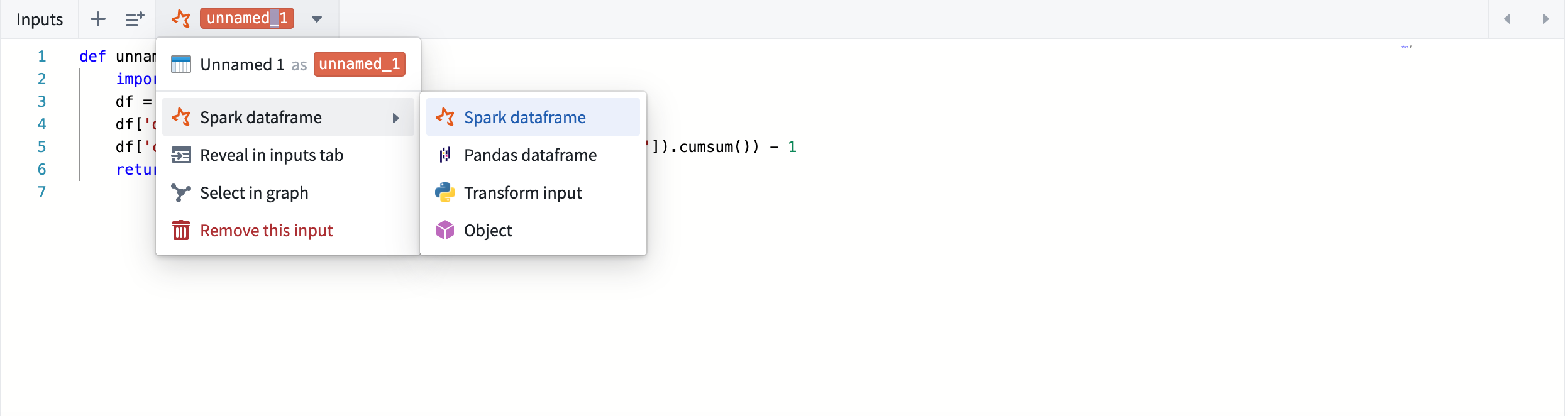
In case the requested input type does not match the type of the actual input coming in, Code Workbook performs the necessary conversions.
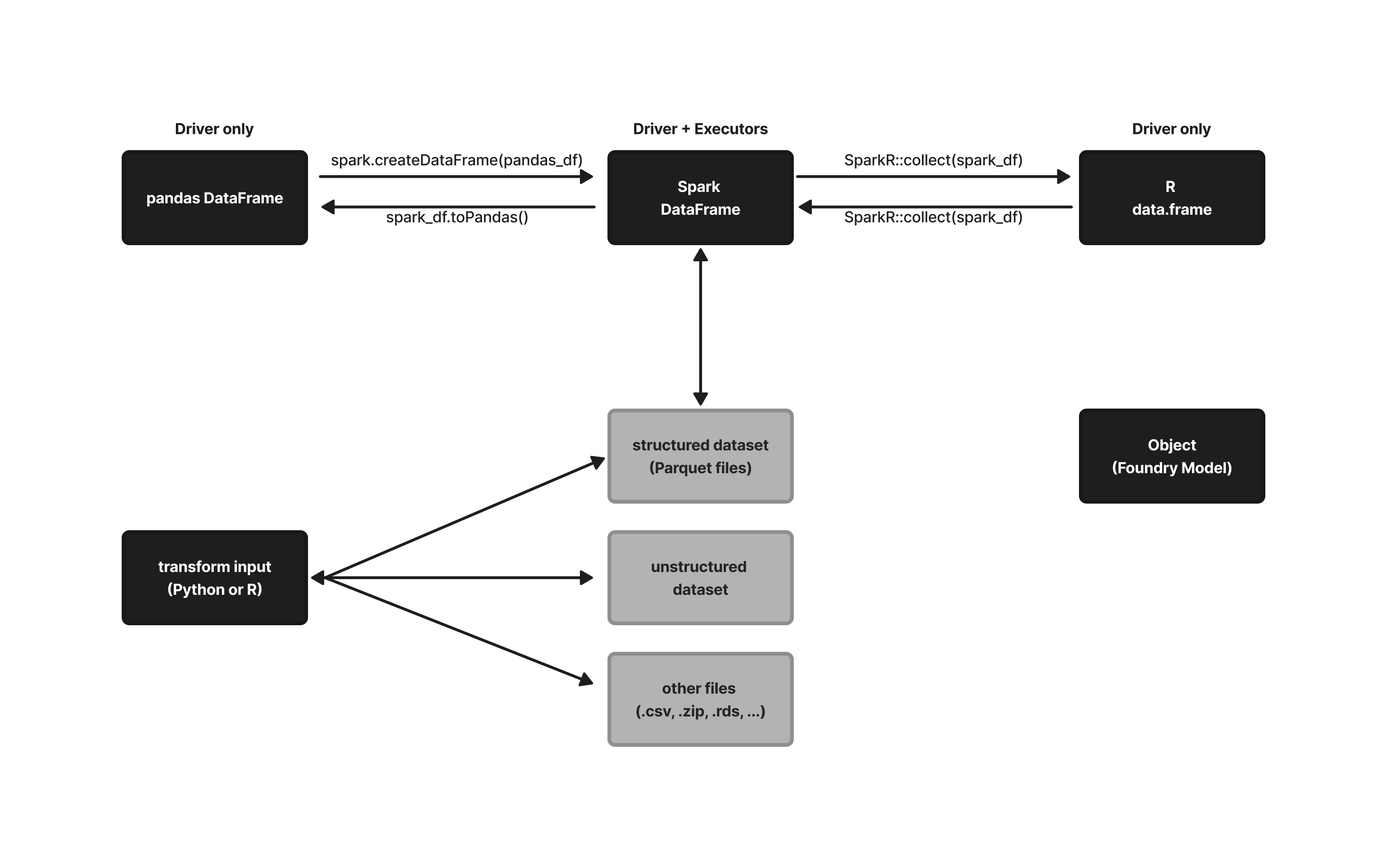
For example: If transform_A's output is a pandas dataframe, and its derived transform transform_B manually sets the input as a Spark dataframe, Code Workbook will convert the pandas dataframe into the requested Spark dataframe. If transform_C's output is a pandas dataframe, and its derived transform_D requests its input to be an R data.frame, Code Workbook will first convert the pandas dataframe back into a Spark dataframe, then into an R data.frame.
The following flowchart provides an overview of how Code Workbook handles conversions between input types:
Input and output restrictions
Output types
A Code Workbook transform can have any amount of inputs, each of which can have a different input type configured. However, a transform can only have a single output. Multiple outputs are not currently supported.
Code Workbook only allows certain types of outputs in its transforms, depending on language:
| Language | Permitted Output Types |
|---|---|
| Python | Spark dataframe, Pandas dataframe, FoundryObject, None |
| R | R data.frame, FoundryObject, NULL |
| SQL | Spark dataframe |
If a transform returns any other type than the ones listed above, Code Workbook will return an unsupported type error.
:::callout{theme="neutral" title="Note on None and NULL output types"} Code Workbook will let you run a transform that has a None/NULL return value, but downstream transforms will not accept None/NULL as an input. :::
Python input types
By default, a python transform will accept its inputs as Spark dataframes. You can set the input type by selecting the dropdown menu under the transform's name, and Code Workbook will take care of converting upstream outputs into the desired input type:
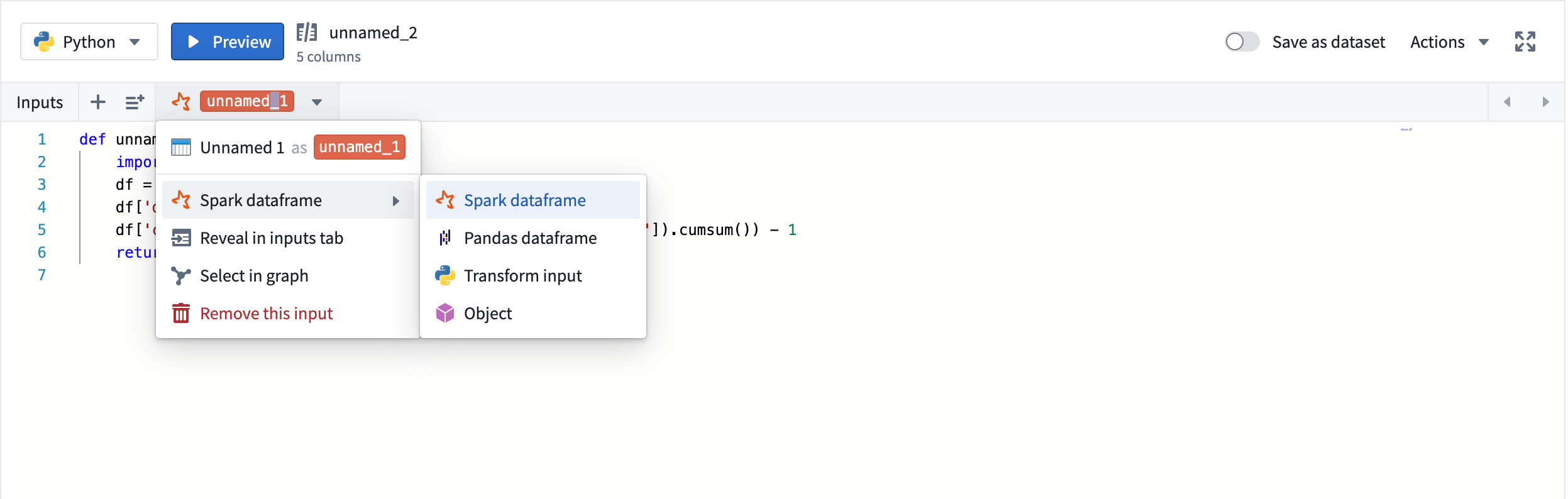
The following input types are supported in Python transforms:
| Input types | Description |
|---|---|
| Spark dataframe (default) | pySpark dataframe of class pyspark.sql.dataframe.DataFrame |
| Pandas dataframe | Pandas dataframe of class pandas.core.frame.DataFrame |
| Python transform input (only available on inputs 'saved as dataset') | A FileSystem object that allows direct file access on the input. See Access unstructured files documentation. |
| Object | A Foundry Model Object allowing you to perform modeling workflows. See Models documentation. |
R input types
By default, an R transform will accept its input(s) as R data.frames. You can set the input type by selecting the dropdown menu under the transform's name, and Code Workbook will convert upstream outputs into the desired input type:
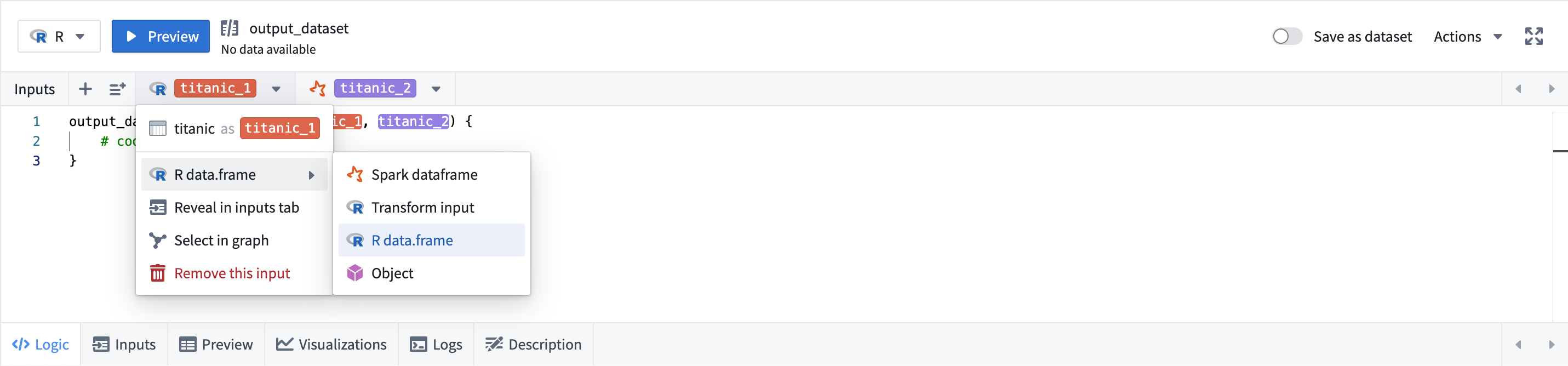
The following input types are supported in R transforms:
| Input types | Description |
|---|---|
| Spark dataframe | SparkR dataframe of class SparkDataFrame |
| R data.frame (default) | R dataframe of class data.frame |
| R transform input (only available on inputs 'saved as dataset') | A FileSystem object that allows direct file access on the input. See Access unstructured files documentation. |
| Object | A Foundry Model Object allowing you to perform modeling workflows. See Models documentation. |
SQL input and output types
The only supported input and output types in SQL transforms are Spark dataframes. The dataframe can be read within SQL as a table.
中文翻译
输入与输出
输入类型与转换
Code Workbook 允许您指定每个转换(transform)将接收的输入类型。您可以通过选择转换名称下的下拉菜单来设置输入类型:
如果请求的输入类型与实际传入的输入类型不匹配,Code Workbook 会执行必要的转换。
例如:如果 transform_A 的输出是 pandas 数据框(dataframe),而其派生转换 transform_B 手动将输入设置为 Spark 数据框,Code Workbook 会将 pandas 数据框转换为请求的 Spark 数据框。如果 transform_C 的输出是 pandas 数据框,而其派生转换 transform_D 请求输入为 R 数据框(data.frame),Code Workbook 会先将 pandas 数据框转换回 Spark 数据框,再转换为 R 数据框。
以下流程图概述了 Code Workbook 如何处理输入类型之间的转换:
输入与输出限制
输出类型
Code Workbook 转换可以有任意数量的输入,每个输入可以配置不同的输入类型。但一个转换只能有一个输出。目前不支持多个输出。
Code Workbook 仅允许在其转换中使用特定类型的输出,具体取决于语言:
| 语言 | 允许的输出类型 |
|---|---|
| Python | Spark 数据框, Pandas 数据框, FoundryObject, None |
| R | R 数据框, FoundryObject, NULL |
| SQL | Spark 数据框 |
如果转换返回的类型超出上述范围,Code Workbook 将返回不支持的类型的错误。
:::callout{theme="neutral" title="关于 None 和 NULL 输出类型的说明"} Code Workbook 允许运行返回 None/NULL 值的转换,但下游转换不会接受 None/NULL 作为输入。 :::
Python 输入类型
默认情况下,Python 转换会将其输入作为 Spark 数据框接收。您可以通过选择转换名称下的下拉菜单来设置输入类型,Code Workbook 会自动将上游输出转换为所需的输入类型:
Python 转换支持以下输入类型:
| 输入类型 | 描述 |
|---|---|
| Spark 数据框(默认) | pySpark 数据框,类为 pyspark.sql.dataframe.DataFrame |
| Pandas 数据框 | Pandas 数据框,类为 pandas.core.frame.DataFrame |
| Python 转换输入(仅适用于"保存为数据集"的输入) | 一个 FileSystem 对象,允许直接访问输入文件。请参阅访问非结构化文件文档。 |
| 对象(Object) | 一个 Foundry 模型对象,允许您执行建模工作流。请参阅模型文档。 |
R 输入类型
默认情况下,R 转换会将其输入作为 R 数据框接收。您可以通过选择转换名称下的下拉菜单来设置输入类型,Code Workbook 会将上游输出转换为所需的输入类型:
R 转换支持以下输入类型:
| 输入类型 | 描述 |
|---|---|
| Spark 数据框 | SparkR 数据框,类为 SparkDataFrame |
| R 数据框(默认) | R 数据框,类为 data.frame |
| R 转换输入(仅适用于"保存为数据集"的输入) | 一个 FileSystem 对象,允许直接访问输入文件。请参阅访问非结构化文件文档。 |
| 对象(Object) | 一个 Foundry 模型对象,允许您执行建模工作流。请参阅模型文档。 |
SQL 输入与输出类型
SQL 转换中唯一支持的输入和输出类型是 Spark 数据框。该数据框可以在 SQL 中作为表进行读取。