AIP features in Code Repositories(代码仓库中的 AIP 功能)
The following is a list of AIP-powered features in Code Repositories.
AIP Assist
Access AIP Assist features through the Ask AIP Assist option, through the editor's right-select menu, or through options inline and enhance your code comprehension using AIP Assist.
The AIP Assist features in Code Repositories can be configured by navigating to Ask AIP Assist > Configure AIP Settings > AIP features.
Code explanation
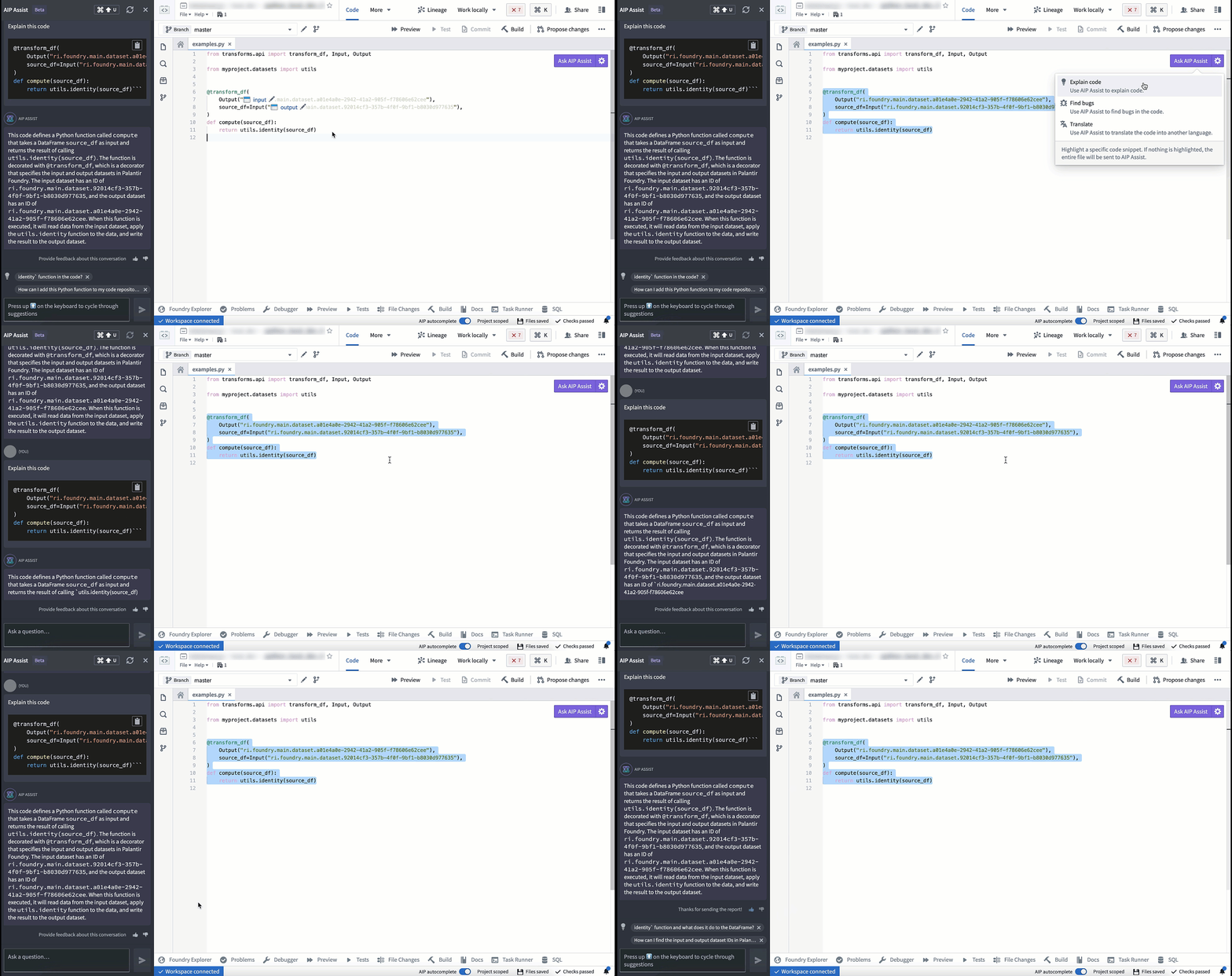
You can now use AIP in Code Repositories to explain the purpose of code snippets or entire files.
Find bugs
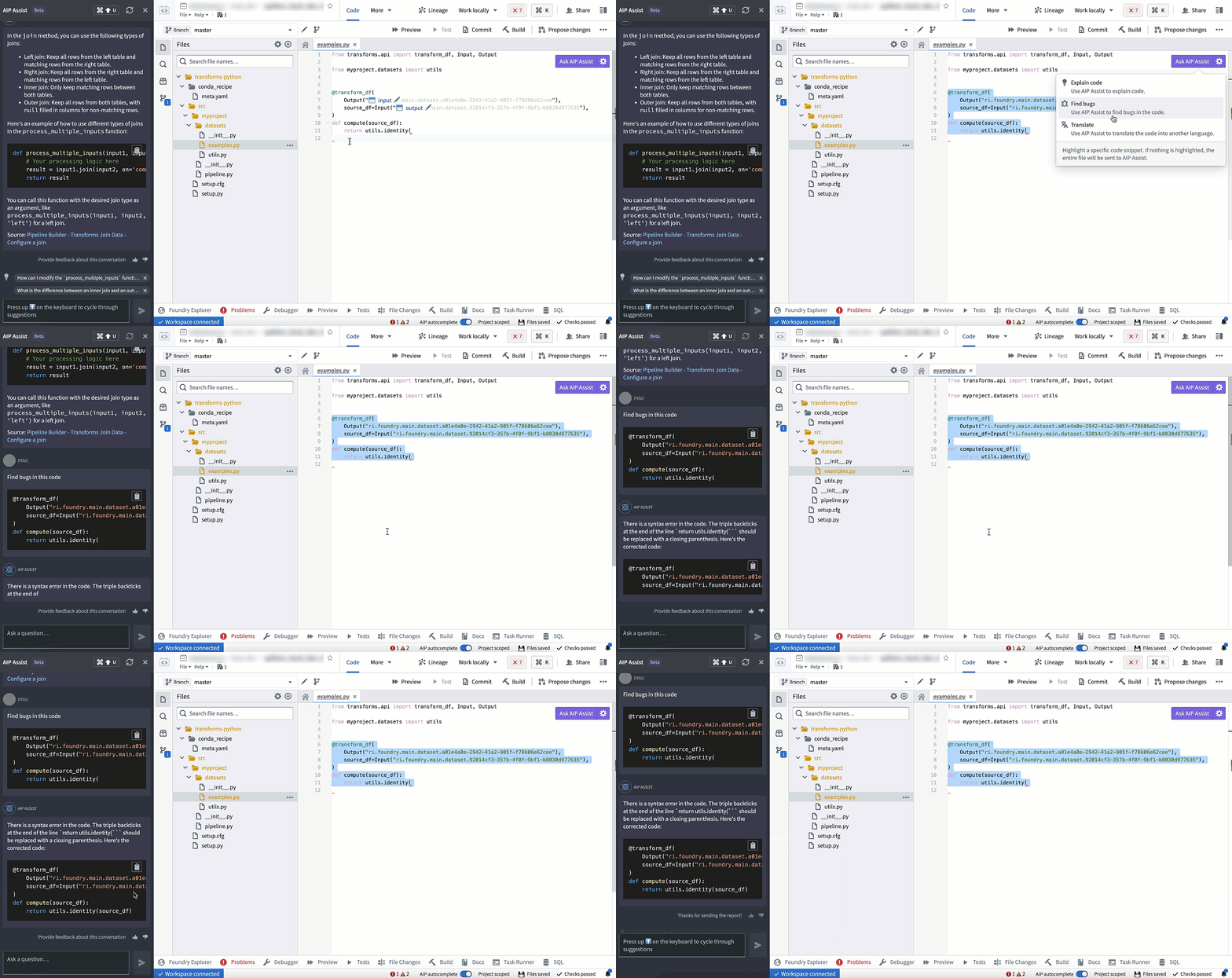
Use AIP in Code Repositories to check and debug your code.
Translate
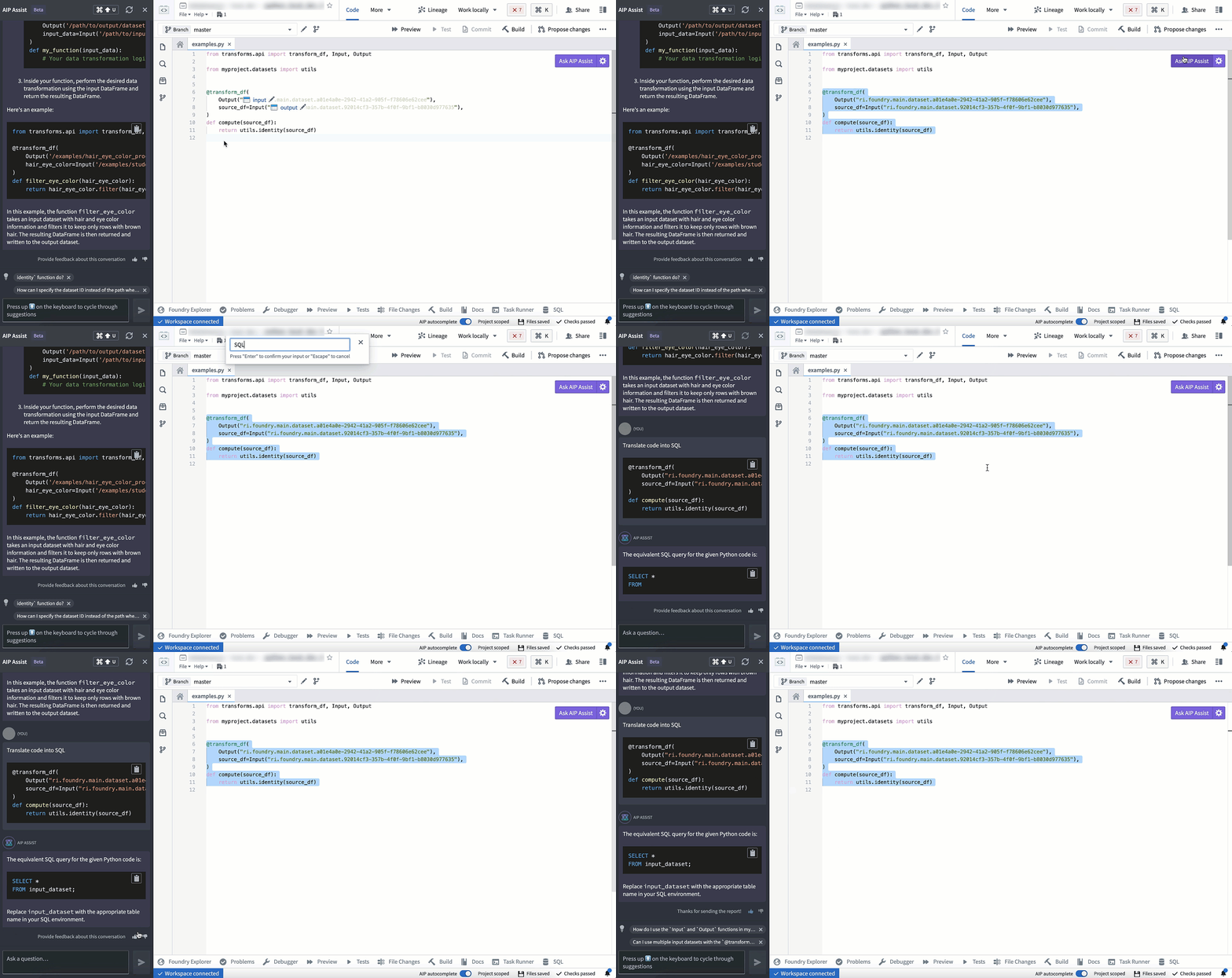
AIP in Code Repositories can convert your code to various languages such as Python, SQL, Mesa, or Java.
Context-aware attachments
Context-aware attachments allow users to attach code snippets, files, and repositories to conversations with AIP Assist. These attachments provide context that enriches AIP Assist knowledge and enables more accurate responses to code-specific questions. You can attach supported resources via the AIP Assist sidebar or from the Ask AIP Assist dropdown.
Code snippets can also be attached by highlighting the desired code, right-clicking, and selecting Attach to AIP Assist from the context menu or directly by using the inline code assistance options that appear above the selected code.
Inline code assistance [Beta]
:::callout{theme="neutral" title="Beta"} Inline code assistance is in the beta phase of development and may not be available on your enrollment. Functionality may change during active development. :::
Code Repositories now features inline code assistance when a code snippet is highlighted. The Explain, Find bugs, and Ask a question options are displayed above the selected code snippet to enable users to access targeted help from AIP Assist directly from code.
This feature can be disabled by opening the Ask AIP Assist dropdown menu in the top right corner of the editor and selecting Configure AIP Settings. In the AIP features section, you can configure the Show AIP Assist actions above selected code option and other AIP features to suit your needs.
You can also access these AIP Assist features from the Ask AIP Assist dropdown menu or by right-clicking a highlighted code snippet and selecting one of the available AIP Assist options from the context menu.
AI error enhancer
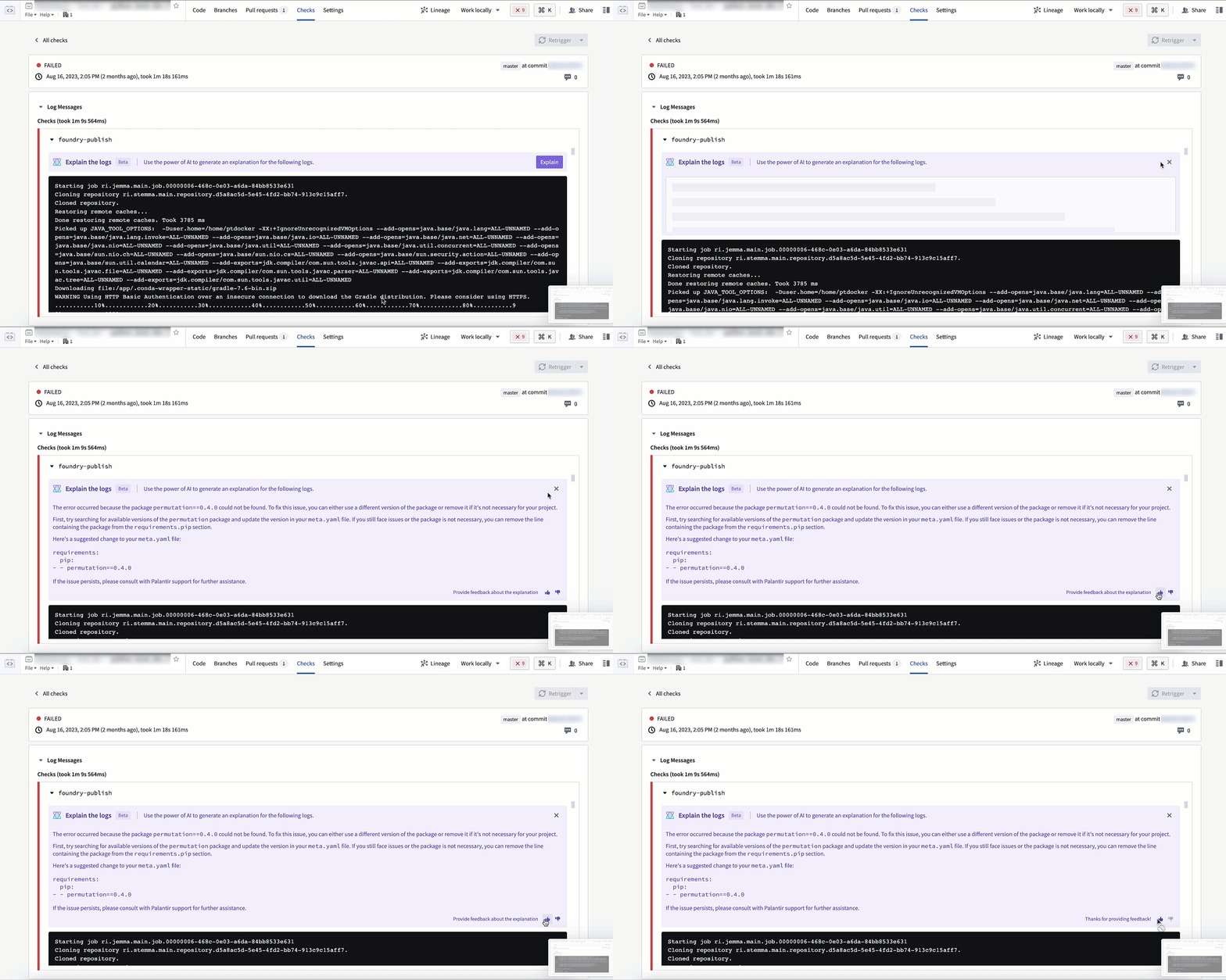
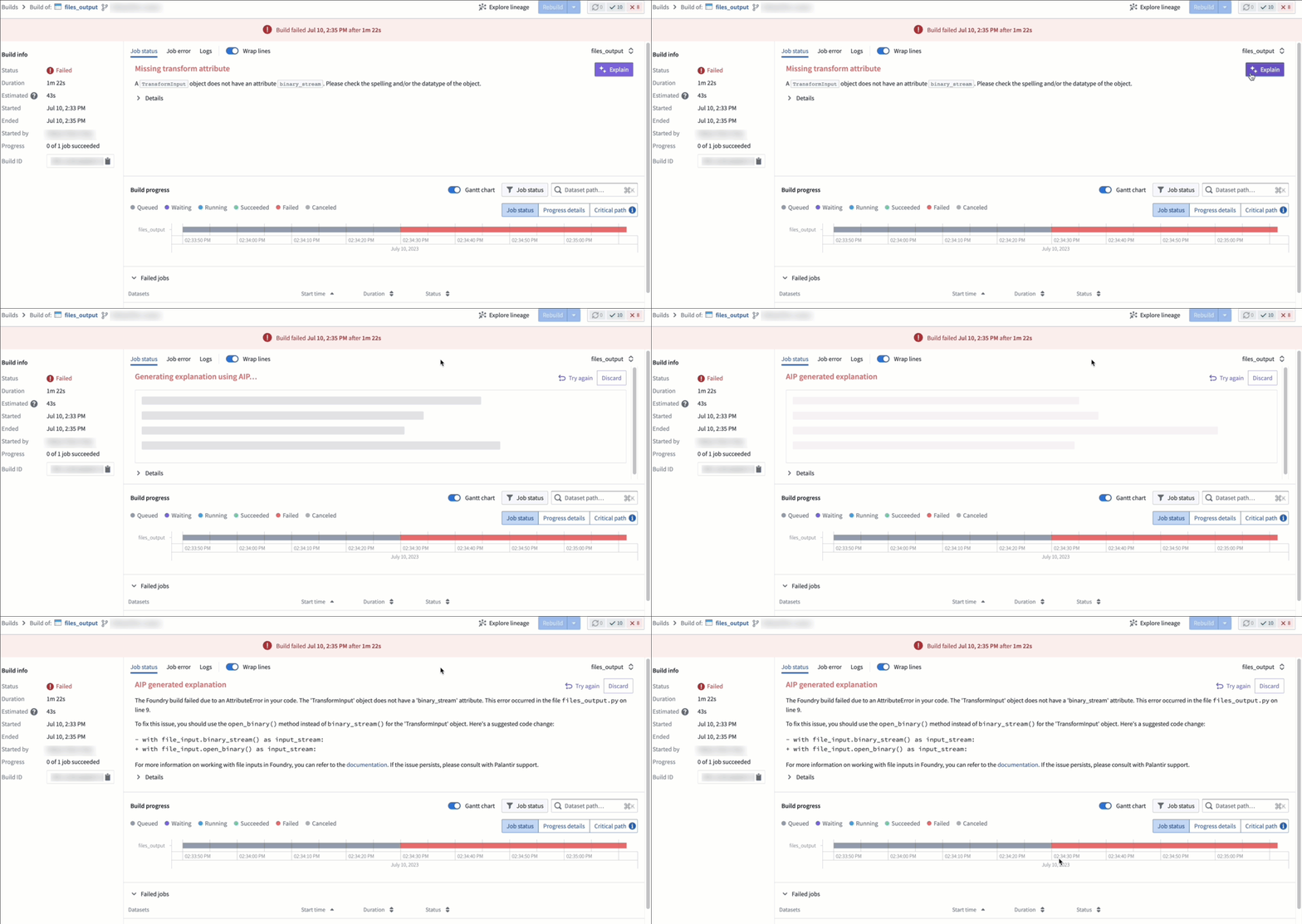
The AI error enhancer provides comprehensive error explanations and suggested code changes where available, along with access to source documents for further information. This feature is available in the Foundry apps listed below:
Code Repositories
In Code Repositories, the feature is shown in the Checks and Preview section.
Builds
In Builds, this feature is found in the Job status menu.
Code autocomplete
:::callout{theme="neutral"} The feature is currently exclusive to Python repositories. :::
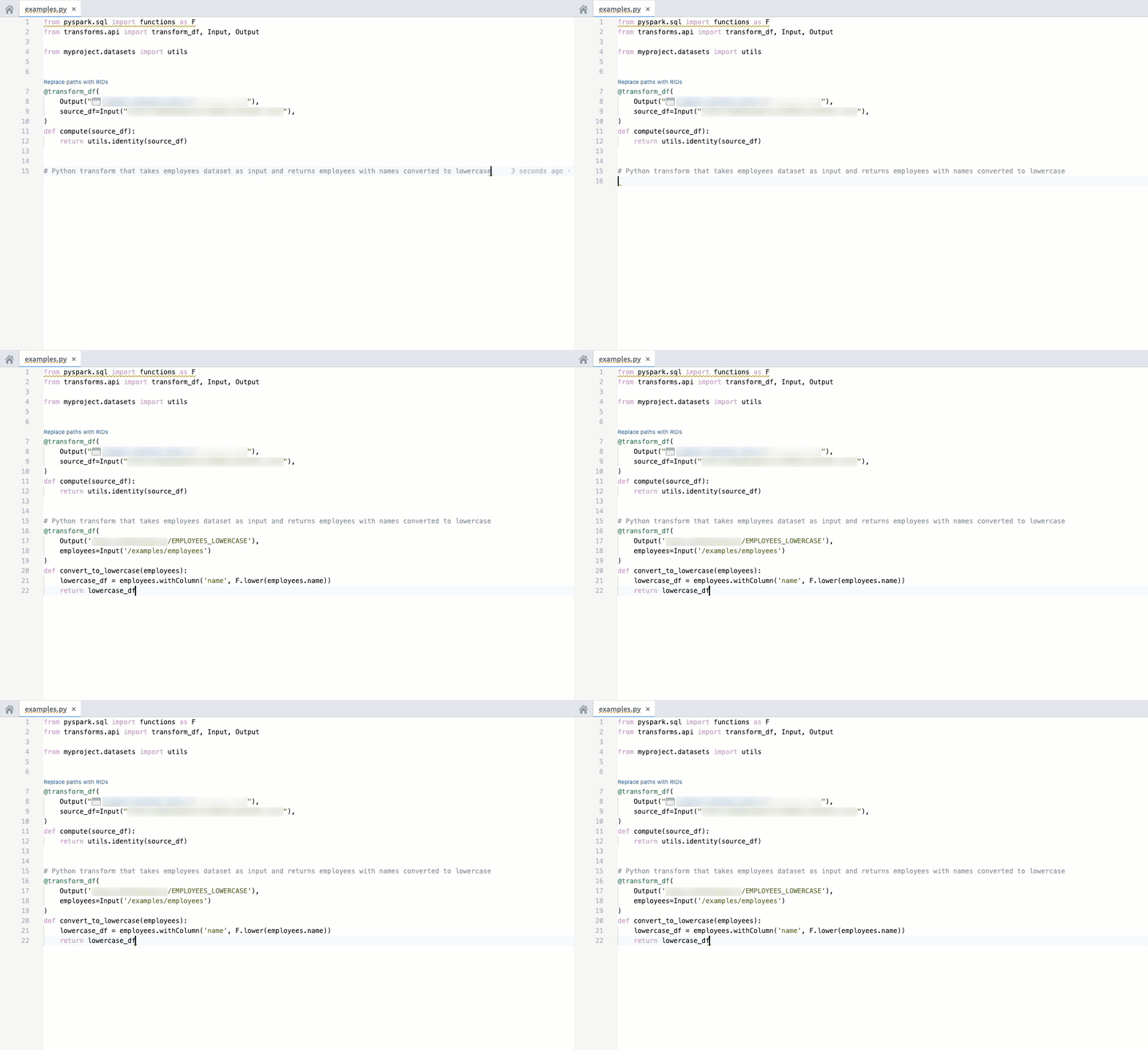
Code autocomplete can help you generate code toward your objective by parsing your currently-opened file to automatically provide the relevant autogenerated code.
- To accept the suggestion, press
tab. - To ignore the suggestion, press
esc, or start typing something else.
Code autocomplete can be toggled on or off directly in the editor status bar at the bottom of the window or by navigating to Settings (purple cog icon) > Preferences > AIP Features.
Note: AIP feature availability is subject to change and may differ between customers.
中文翻译
代码仓库中的 AIP 功能
以下是代码仓库中由 AIP 驱动的功能列表。
AIP Assist
通过 Ask AIP Assist 选项、编辑器的右键菜单或内联选项访问 AIP Assist 功能,并使用 AIP Assist 增强您的代码理解能力。
代码仓库中的 AIP Assist 功能可通过导航至 Ask AIP Assist > Configure AIP Settings > AIP features 进行配置。
代码解释
您现在可以在代码仓库中使用 AIP 来解释代码片段或整个文件的用途。
查找错误
使用代码仓库中的 AIP 来检查和调试您的代码。
翻译
代码仓库中的 AIP 可以将您的代码转换为多种语言,例如 Python、SQL、Mesa 或 Java。
上下文感知附件
上下文感知附件允许用户将代码片段、文件和仓库附加到与 AIP Assist 的对话中。这些附件提供了上下文信息,丰富了 AIP Assist 的知识库,从而能够对代码相关问题给出更准确的回答。您可以通过 AIP Assist 侧边栏或 Ask AIP Assist 下拉菜单附加支持的资源。
您还可以通过高亮所需代码、右键单击并从上下文菜单中选择 Attach to AIP Assist,或直接使用选中代码上方出现的内联代码辅助选项来附加代码片段。
内联代码辅助 [Beta]
:::callout{theme="neutral" title="Beta"} 内联代码辅助正处于 beta 开发阶段,可能不适用于您的环境。功能在活跃开发期间可能会发生变化。 :::
代码仓库现在在代码片段被高亮时提供内联代码辅助功能。解释、查找错误和提问选项会显示在选中的代码片段上方,使用户能够直接从代码中获取 AIP Assist 的针对性帮助。
您可以通过打开编辑器右上角的 Ask AIP Assist 下拉菜单并选择 Configure AIP Settings 来禁用此功能。在 AIP features 部分,您可以根据需要配置 Show AIP Assist actions above selected code 选项及其他 AIP 功能。
您还可以通过 Ask AIP Assist 下拉菜单,或右键单击高亮的代码片段并从上下文菜单中选择可用的 AIP Assist 选项来访问这些功能。
AI 错误增强器
AI 错误增强器提供全面的错误解释和建议的代码更改(如适用),同时提供源文档链接以获取更多信息。此功能在以下 Foundry 应用中可用:
代码仓库
在代码仓库中,该功能显示在 Checks 和 Preview 部分。
构建
在构建中,此功能位于 Job status menu 中。
代码自动补全
:::callout{theme="neutral"} 该功能目前仅适用于 Python 仓库。 :::
代码自动补全可以通过解析您当前打开的文件,自动提供相关的自动生成代码,帮助您朝着目标编写代码。
- 要接受建议,请按
tab键。 - 要忽略建议,请按
esc键,或开始输入其他内容。
代码自动补全可以直接在窗口底部的编辑器状态栏中切换开启或关闭,也可以通过导航至 Settings(紫色齿轮图标)> Preferences > AIP Features 进行设置。
注意:AIP 功能的可用性可能会发生变化,并且可能因客户而异。