Analyze the impact of changes(分析变更影响)
Code edits may result in unexpected changes to dataset content, permissions, and structure. We recommend protecting production branches and requiring a review of proposed changes before merging; these options can be found in the branch settings. The pull request page will then offer various ways to analyze the impact of code changes on the affected datasets.
Stale datasets
Evaluating the impact of changes requires the affected datasets to be built with the most recent code changes. This build is required on both the head branch (development) and the base branch (target):
- Build on head branch (development) to validate that the code builds properly, the outputs appear as expected, and that all Data Expectations are met.
- Build on base branch (target) to compare the outputs to the latest version of the target.
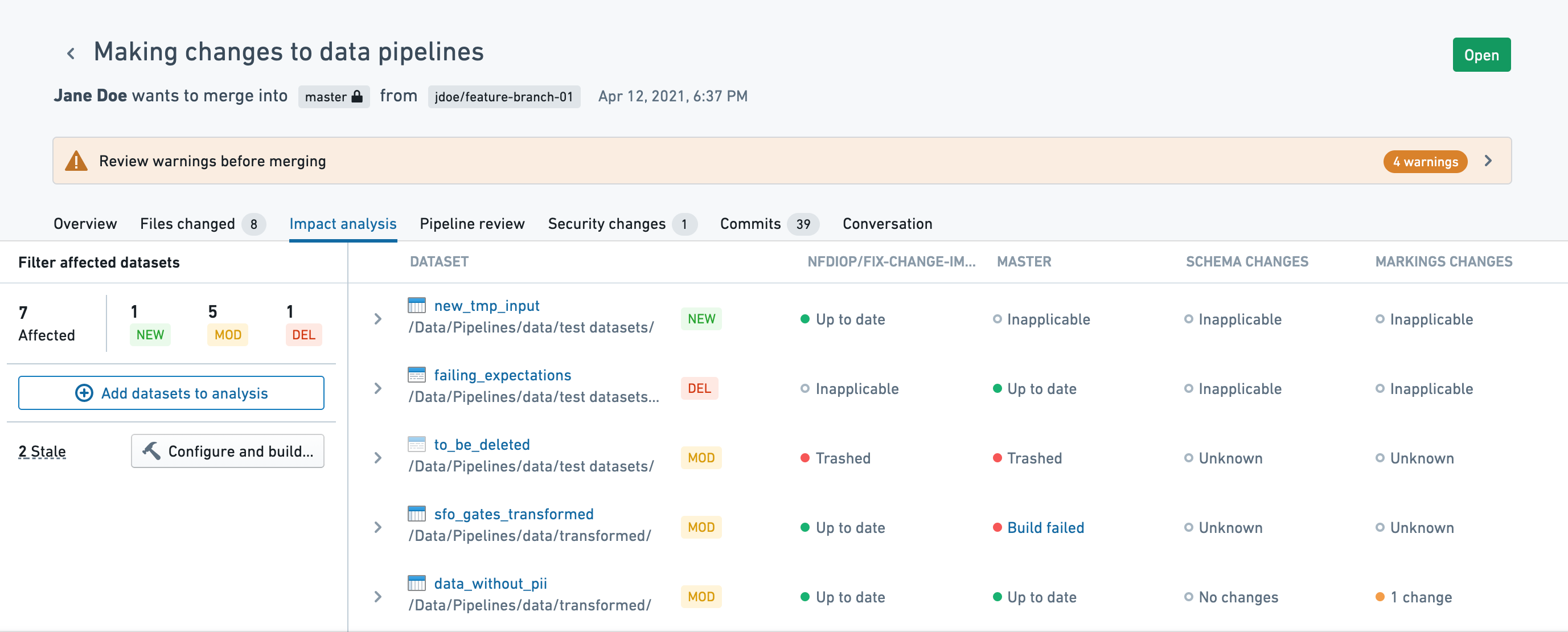
The pull request page will warn you when affected datasets are stale. Clicking on Configure and build will allow you to review the stale datasets and build them on head and base branches.
:::callout{theme="warning" title="Warning"} The pull request page's staleness warning only covers affected datasets within a specific code repository. The pull request page does not warn about stale parent datasets outside of the repository or about uncommitted changes. :::

Impact analysis
The Impact analysis tab provides information on datasets affected by the pull request. By default, it will only show directly affected datasets, excluding derived datasets that may be impacted. You can inspect the impact on additional tables by clicking on Add datasets to analysis.
:::callout{theme="neutral"} Reviewing affected datasets requires access to the data. Inaccessible datasets will be indicated in the UI as inaccessible. :::
:::callout{theme="neutral"} The way a repository determines the list of affected datasets can differ depending on the language you use. Python repositories use Transforms Level Logic Versioning (TLLV) to generate the list. In Java transforms, datasets are considered directly affected if their source file is changed by the pull request. :::
The impact analysis tab shows the following information:
- Code - View changes to the source file (it will not include other files that may be referenced or used).
- Schema - View changes to dataset columns.
- Security - View changes to markings applied to the output dataset.
- Expectations - View the data expectations on the head branch.
- Trashed datasets - Trashed datasets that are updated by the PR will appear faded.
View impact on derived datasets
Clicking on Add datasets to analysis will analyze the pull request's impact on derived datasets. All intermediate datasets between the selected dataset and the affected datasets will be added as well.
The added datasets must not be stale in order to show impact information. Click on Configure and build to view an updated list of stale datasets and trigger a build.
Pipeline review
The pipeline review tab offers a lineage view of the datasets affected by the pull request.
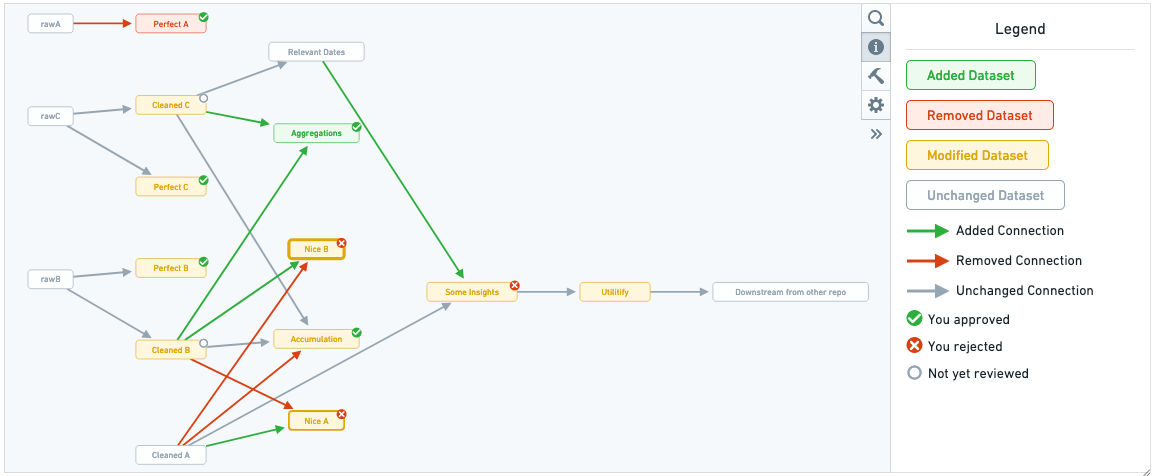
When one of the dataset nodes is selected, the changes to the transforms code file that generates this dataset is displayed along with the schema changes for each dataset generated by that code file. Navigating through the affected datasets in the order of data flow can help you understand how changes to different files and datasets correspond.
To keep track of your progress while reviewing the changes in a pull request, you can approve or reject each file individually. For transform source files, this review status is shown in the pipeline graph as an indicator on the corresponding output dataset nodes.
中文翻译
分析变更影响
代码编辑可能导致数据集内容、权限和结构发生意外变更。我们建议保护生产分支,并要求在合并前对提议的变更进行审查;这些选项可在分支设置中找到。拉取请求页面随后将提供多种方式来分析代码变更对受影响数据集的影响。
过时数据集
评估变更影响需要受影响的数据集使用最新的代码变更进行构建。此构建在头部分支(开发分支)和基础分支(目标分支)上均需执行:
- 在头部分支(开发分支)上构建,以验证代码构建正常、输出符合预期,并且所有数据期望(Data Expectations)均得到满足。
- 在基础分支(目标分支)上构建,以便将输出与目标分支的最新版本进行比较。
当受影响的数据集过时时,拉取请求页面会发出警告。点击配置并构建(Configure and build)将允许您查看过时的数据集,并在头部分支和基础分支上构建它们。
:::callout{theme="warning" title="警告"} 拉取请求页面的过时警告仅涵盖特定代码仓库内的受影响数据集。该页面不会警告仓库外部的过时父数据集,也不会警告未提交的变更。 :::
影响分析
影响分析(Impact analysis)选项卡提供有关受拉取请求影响的数据集的信息。默认情况下,它仅显示直接受影响的数据集,不包括可能受影响的派生数据集。您可以通过点击添加数据集到分析(Add datasets to analysis)来检查对其他表的影响。
:::callout{theme="neutral"} 审查受影响数据集需要具备数据访问权限。无法访问的数据集将在界面中标记为不可访问。 :::
:::callout{theme="neutral"} 仓库确定受影响数据集列表的方式可能因使用的语言而异。Python 仓库使用转换逻辑级别版本控制(TLLV)来生成列表。在 Java 转换(Transforms)中,如果数据集的源文件被拉取请求更改,则该数据集被视为直接受影响。 :::
影响分析选项卡显示以下信息:
- 代码(Code) - 查看源文件的变更(不包括可能被引用或使用的其他文件)。
- 模式(Schema) - 查看数据集列的变更。
- 安全性(Security) - 查看应用于输出数据集标记(markings)的变更。
- 期望(Expectations) - 查看头部分支上的数据期望(Data Expectations)。
- 已删除数据集(Trashed datasets) - 由拉取请求更新的已删除数据集将显示为淡色。
查看对派生数据集的影响
点击添加数据集到分析(Add datasets to analysis)将分析拉取请求对派生数据集的影响。所选数据集与受影响数据集之间的所有中间数据集也将被添加。
添加的数据集必须不是过时的,才能显示影响信息。点击配置并构建(Configure and build)可查看更新后的过时数据集列表并触发构建。
流水线审查
流水线审查选项卡提供受拉取请求影响的数据集的沿袭视图(lineage view)。
当选中某个数据集节点时,将显示生成该数据集的转换代码文件(transforms code file)的变更,以及该代码文件生成的每个数据集的模式变更。按照数据流顺序浏览受影响的数据集,有助于理解不同文件和数据集之间的变更对应关系。
为了在审查拉取请求中的变更时跟踪进度,您可以单独批准或拒绝每个文件。对于转换源文件,此审查状态将在流水线图中以指示符形式显示在相应的输出数据集节点上。