Artifact settings(工件设置(Artifact settings))
:::callout{theme="neutral"} If you are looking to import and use Python libraries, see the section on sharing Python libraries. :::
The Libraries tab contains a list of repositories that can be referenced in your code repository, which we refer to as backing repositories. This is a list of all shared code repositories in your Foundry environment, as well as external or public libraries. You can use the Libraries tab to discover and add backing repositories.
:::callout{theme="neutral"}
Viewing artifact settings requires the artifacts:view-repository permission, and managing artifact settings requires the artifacts:manage-repository permission.
:::
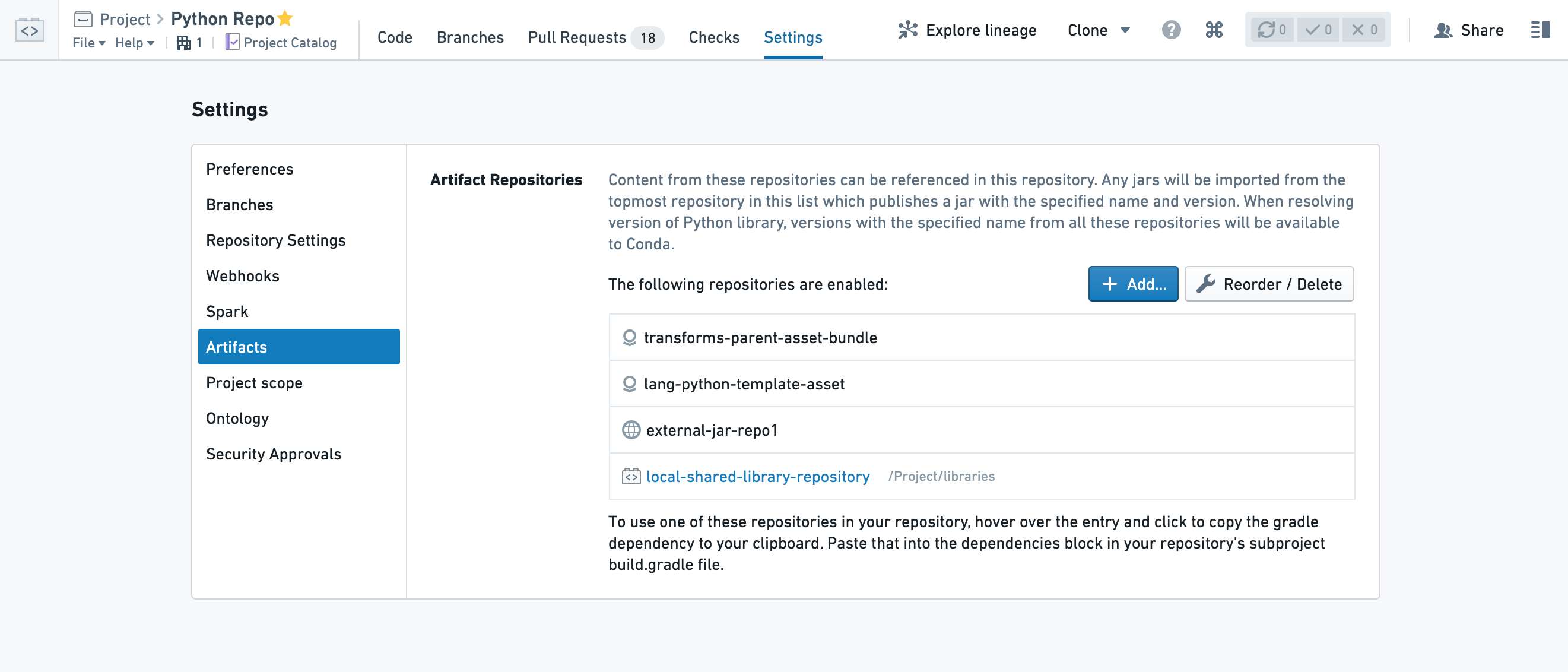
Add a new artifact to your Code Repository
To add a new artifact, select Add and choose one of two types of repositories:
- Local repositories: These are other code repositories in your Foundry environment that were configured as a shared library.
- External repositories: Artifact repositories stored out of your Foundry environment. These could be external Foundry repositories or public artifact repositories that are available in your environment.
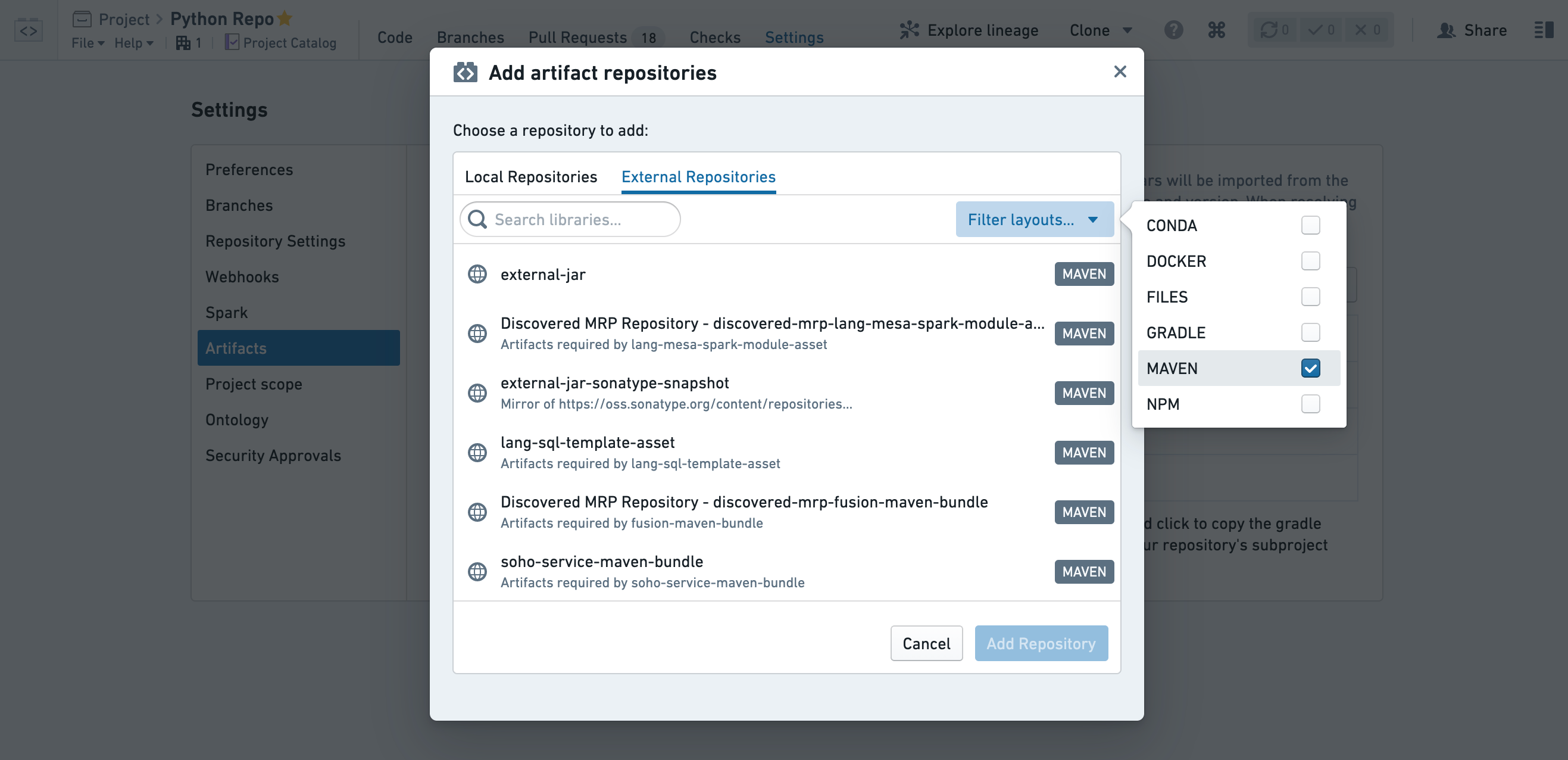
If the added artifact repository contains references to additional repositories, they will be added as well. The same access permissions are required for all the dependencies of the added repository.
:::callout{theme="neutral"}
When adding a local repository from a different project, a project reference to that repository will be added. This requires compass:view-project-imports and compass:import-resource-to on your own code repository and compass:import-resource-from permission on the referenced shared repository.
:::
:::callout{theme="warning"} While it is possible to reorder and delete backing repositories, this might break builds of transforms that use packages from those repositories. Only take this action after considering the possible implications. :::
Beta OSDK generator versions toggle
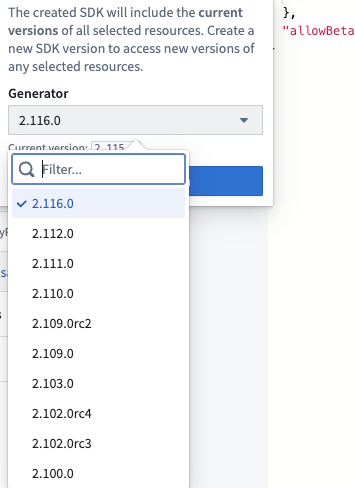
When the Enable beta OSDK versions option is enabled, users can generate beta (release candidate) ontology generator versions. The toggle is off by default.

To enable beta OSDK versions:
- Navigate to the Branches tab and ensure you are on the default branch.
- Inside the repository's functions.json file, add
"allowBetaGeneratorVersions": trueto the file. To discover this file, the Show hidden files toggle may have to be enabled by selecting the cogwheel at the top near the Files header.

- Make sure to commit this change in the Source Control tab; otherwise, it will not be reflected in the settings.
- Navigate to the Libraries Settings enable the Beta OSDK Versions toggle.
- You can now discover beta generator versions in the Generator dropdown when creating a new version in the Functions Imports tab.
中文翻译
工件设置(Artifact settings)
:::callout{theme="neutral"} 如果您希望导入并使用Python库,请参阅关于共享Python库的章节。 :::
库(Libraries) 选项卡包含可在代码仓库中引用的仓库列表,我们将其称为后端仓库(backing repositories)。这是Foundry环境中所有共享代码仓库以及外部或公共库的列表。您可以使用库(Libraries)选项卡来发现和添加后端仓库。
:::callout{theme="neutral"}
查看工件设置需要artifacts:view-repository权限,管理工件设置需要artifacts:manage-repository权限。
:::
向代码仓库添加新工件
要添加新工件,请选择添加(Add),然后选择两种仓库类型之一:
- 本地仓库(Local repositories): 这些是Foundry环境中已配置为共享库的其他代码仓库。
- 外部仓库(External repositories): 存储在Foundry环境外部的工件仓库。这些可以是外部Foundry仓库或环境中可用的公共工件仓库。
如果添加的工件仓库包含对其他仓库的引用,这些引用也会一并添加。添加仓库的所有依赖项都需要相同的访问权限。
:::callout{theme="neutral"}
当从不同项目添加本地仓库时,会添加对该仓库的项目引用。这需要在您的代码仓库上拥有compass:view-project-imports和compass:import-resource-to权限,并在被引用的共享仓库上拥有compass:import-resource-from权限。
:::
:::callout{theme="warning"} 虽然可以重新排序和删除后端仓库,但这可能会破坏使用这些仓库中包(packages)的转换(transforms)的构建。只有在考虑可能的影响后才执行此操作。 :::
Beta版OSDK生成器版本切换
当启用Beta版OSDK版本(Enable beta OSDK versions)选项启用时,用户可以生成beta版(候选发布版)本体论生成器(ontology generator)版本。默认情况下该切换开关处于关闭状态。
要启用Beta版OSDK版本:
- 导航到分支(Branches)选项卡,确保您位于默认分支上。
- 在仓库的functions.json文件中,添加
"allowBetaGeneratorVersions": true。要找到此文件,可能需要通过选择文件(File)标题附近顶部的齿轮图标来启用显示隐藏文件(Show hidden files)切换开关。
- 确保在源代码管理(Source Control)选项卡中提交此更改;否则,它将不会反映在设置中。
- 导航到库设置(Libraries Settings),启用Beta版OSDK版本(Beta OSDK Versions)切换开关。
- 现在,您可以在函数导入(Functions Imports)选项卡中创建新版本时,在生成器(Generator)下拉菜单中发现beta版生成器版本。