Code Repositories FAQ(代码仓库常见问题解答)
The following are some frequently asked questions about Code Repositories.
For general information, view the Code Repositories documentation.
- Can I publish a Python package from the latest commit on a branch without requiring tagging?
- How do I restore previously deleted code in my code repository?
- Can I duplicate my code repository?
- How do I know if I need to upgrade my branch?
- Can my transform dynamically select inputs and outputs whenever a build starts?
- In Code Preview, code works but builds fail
- Code running in Code Workbook but not in Code Repositories
- Checks are failing due to a missing Python library, in a code repository where that library was previously working
Can I publish a Python package from the latest commit on a branch without requiring tagging?
Yes. You can publish the latest commit of a Python package by modifying your package's root build.gradle file to publish the branch. For example, to publish the latest commit on the master branch, modify the build.gradle file as follows:
condaLibraryPublish.onlyIf { versionDetails().branchName == "master" }
How do I restore previously deleted code in my code repository?
If these transforms were built into a dataset, you can use the Compare feature of the resulting Dataset Preview to view the code at that time. From there, you can copy-paste the relevant transforms. Alternatively, you can navigate to Branches in your code repository, open the specific branch, and review the full history of changes there.
Can I duplicate my code repository?
There is no built-in capability to copy code repositories in the platform. You can however, clone the repository to your machine and then push that code to a new code repository. If you do this, remember to add all the inputs as references to the new project. Learn how to clone a repository.
How do I know if I need to upgrade my branch?
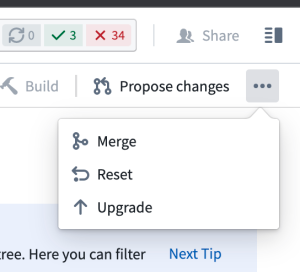
You can confirm your code repository is up-to-date by selecting ... in the top-right corner of the code repository and confirming whether Upgrade appears as an option. If the Upgrade option is not available, then the repository is already up-to-date.
Can my transform dynamically select inputs and outputs whenever a build starts?
This is not supported. Continuous integration (CI) checks define the set of inputs and outputs whenever a new commit is added in the code repository.
In Code Preview, code works but builds fail
Your Code Preview succeeds but your build fails. Code Previews run on a subset of data, which likely means there are data values not in the subset breaking your code when the full build runs.
To troubleshoot, perform the following steps:
- Examine the build error from the failed build. Look for lines starting with “Caused by” and read them carefully. Sometimes they will mention explicit lines of code in your transformation file.
- Try upgrading your code repository. To do this, in the top right corner of your repository, select ... > Upgrade. This will create a PR to upgrade your branch. Be sure to merge in the upgrade PR so that your branch actually gets upgraded. You can upgrade any branch, but merging the upgrade commit into a protected branch requires a review and approval.
Code running in Code Workbook but not in Code Repositories
Sometimes, porting code from a code workbook to a code repository will not work without modifying the code to run in a code repository.
To troubleshoot, perform the following steps:
- Have you verified your transform decorator is correct? That is,
@transformvs.@transform_df? - Have you verified your inputs are all declared and passed as inputs to your compute function?
- Are the names of your dataframes the same as your workbook? Is your code repository actually returning the dataframe?
- Check that the libraries being used in the code workbook code are also available in the code repository.
- Verify the inputs and branches to the code workbook cell are in fact the same datasets used in the code repository.
Review our FAQ on builds and checks errors for more detail.
Checks are failing due to a missing Python library, in a code repository where that library was previously working
Sometimes, a repository that has been working starts encountering a problem where repository checks begin failing with an error indicating that Conda packages could not be obtained. This may be a PackageNotFoundError, or a MD5MismatchError due to a Conda cache getting corrupted.
To troubleshoot, perform the following steps:
- In most cases, the Conda cache can be unstuck by simply creating a new commit in your code repository. Open the repository and make any change (even just an empty new line), and press Commit.
- If the symptoms still appear after performing a new line commit, it is possible that the Conda cache has made a higher-level cache also become corrupt. The following steps will clear your code repository's Gradle cache.
- In your code repository, press the settings (cog wheel) icon, and enable Hidden files.
- Locate
conda-versions.run.linux-64.lockin your Python subproject, delete it, and press Commit. - If the symptoms still appear after clearing both of these caches, contact Palantir Support.
中文翻译
代码仓库常见问题解答
以下是关于代码仓库的一些常见问题解答。
如需了解一般信息,请查看代码仓库文档。
- 我能否在不要求打标签(Tagging)的情况下,从分支的最新提交发布Python包?
- 如何恢复代码仓库中之前删除的代码?
- 我可以复制我的代码仓库吗?
- 如何知道是否需要升级我的分支?
- 我的转换(Transform)能否在每次构建开始时动态选择输入和输出?
- 在代码预览(Code Preview)中代码正常,但构建失败
- 代码在代码工作簿(Code Workbook)中运行正常,但在代码仓库中不行
- 检查失败,提示缺少Python库,而该库在代码仓库中之前一直可用
我能否在不要求打标签(Tagging)的情况下,从分支的最新提交发布Python包?
可以。您可以通过修改包的根目录下的 build.gradle 文件来发布分支,从而发布Python包的最新提交。例如,要发布master分支上的最新提交,请按如下方式修改 build.gradle 文件:
condaLibraryPublish.onlyIf { versionDetails().branchName == "master" }
如何恢复代码仓库中之前删除的代码?
如果这些转换(Transform)已构建到数据集中,您可以使用生成的数据集预览(Preview)中的比较(Compare)功能来查看当时的代码。然后,您可以复制粘贴相关的转换。或者,您也可以导航到代码仓库中的分支(Branches),打开特定分支,查看该分支的完整变更历史。
我可以复制我的代码仓库吗?
平台没有内置的复制代码仓库功能。不过,您可以将仓库克隆到本地机器,然后将代码推送到一个新的代码仓库。如果这样做,请记得将所有输入作为引用添加到新项目中。了解如何克隆仓库。
如何知道是否需要升级我的分支?
您可以通过选择代码仓库右上角的 ... 并确认升级(Upgrade)是否显示为选项,来确认您的代码仓库是否为最新版本。如果升级(Upgrade)选项不可用,则说明仓库已是最新版本。
我的转换(Transform)能否在每次构建开始时动态选择输入和输出?
不支持此功能。持续集成(CI)检查会在代码仓库中添加新提交时定义输入和输出集。
在代码预览(Code Preview)中代码正常,但构建失败
您的代码预览成功,但构建失败。代码预览运行在数据子集上,这很可能意味着存在不在子集中的数据值,导致完整构建运行时代码出错。
要进行故障排除,请执行以下步骤:
- 检查失败构建中的构建错误。查找以"Caused by"开头的行并仔细阅读。有时它们会提到转换文件中的具体代码行。
- 尝试升级您的代码仓库。为此,在仓库右上角选择 ... > 升级(Upgrade)。这将创建一个拉取请求(PR)来升级您的分支。请务必合并升级PR,以便您的分支真正得到升级。您可以升级任何分支,但将升级提交合并到受保护分支需要审核和批准。
代码在代码工作簿(Code Workbook)中运行正常,但在代码仓库中不行
有时,将代码从代码工作簿移植到代码仓库时,如果不修改代码使其在代码仓库中运行,将无法正常工作。
要进行故障排除,请执行以下步骤:
- 您是否验证了转换装饰器(Transform Decorator)是正确的?即
@transform与@transform_df的区别? - 您是否验证了所有输入都已声明并作为输入传递给您的计算函数?
- 数据框(Dataframe)的名称是否与工作簿中的相同?您的代码仓库是否实际返回了数据框?
- 检查代码工作簿代码中使用的库在代码仓库中是否也可用。
- 验证代码工作簿单元格的输入和分支是否与代码仓库中使用的数据集相同。
查看我们关于构建和检查错误的常见问题解答以获取更多详细信息。
检查失败,提示缺少Python库,而该库在代码仓库中之前一直可用
有时,一个一直正常工作的仓库会开始遇到问题,仓库检查开始失败,并显示无法获取Conda包的错误。这可能是 PackageNotFoundError,或者是由于Conda缓存损坏导致的 MD5MismatchError。
要进行故障排除,请执行以下步骤:
- 在大多数情况下,只需在代码仓库中创建一个新的提交即可解除Conda缓存的卡顿。打开仓库,进行任何更改(即使只是一个空的新行),然后点击提交(Commit)。
- 如果执行新行提交后症状仍然出现,可能是Conda缓存导致更高级别的缓存也损坏了。以下步骤将清除代码仓库的Gradle缓存。
- 在代码仓库中,点击设置(齿轮)图标,并启用隐藏文件(Hidden files)。
- 在Python子项目中找到
conda-versions.run.linux-64.lock,将其删除,然后点击提交(Commit)。 - 如果清除这两个缓存后症状仍然出现,请联系Palantir支持。