Add dataset transformation to a Marketplace product(向 Marketplace 产品添加数据集转换)
Use Foundry DevOps to include your dataset transformations in Marketplace products for other users to install and reuse. Learn how to create your first product.
Supported features
When packaging a dataset transformation (along with its producing Code Repository), all required dependencies are stored as part of the product; this guarantees that the transformation is self-contained and can run successfully anywhere. Repositories can bring Maven, PyPI, and Conda dependencies.
Python, Java, and SQL transformations are supported. Transformations must be produced from a repository with a recent template, otherwise packaging errors may occur. To debug, upgrade your repository in the Code Repositories application. If a transformation can be successfully packaged, it will not cause any installation or runtime errors.
:::callout{theme="warning"} The dataset you provide as an input at the time of installation must have column names and variable types that are identical to the source dataset.
This is because all dataset columns from the source input datasets (for example, an airplane dataset used as an input to a dataset transformation, which is then included in a Marketplace product) will be required inputs when installing, whether or not the columns are referenced in the dataset transformation.
:::
Supported features include:
- Incremental transforms
- Unmarking workflows
- Spark profiles
- Telemetry
- Libraries
- External transforms
- Schemaless datasets
Adding dataset transformations to products
To add a dataset transformation to a product, first create a product, then add outputs. Choose the Add files option to navigate to the dataset transformation from within the Compass filesystem and add it to your product.
In some cases, one transformation may produce multiple output datasets. If this is the case, all produced datasets need to be included in the product.
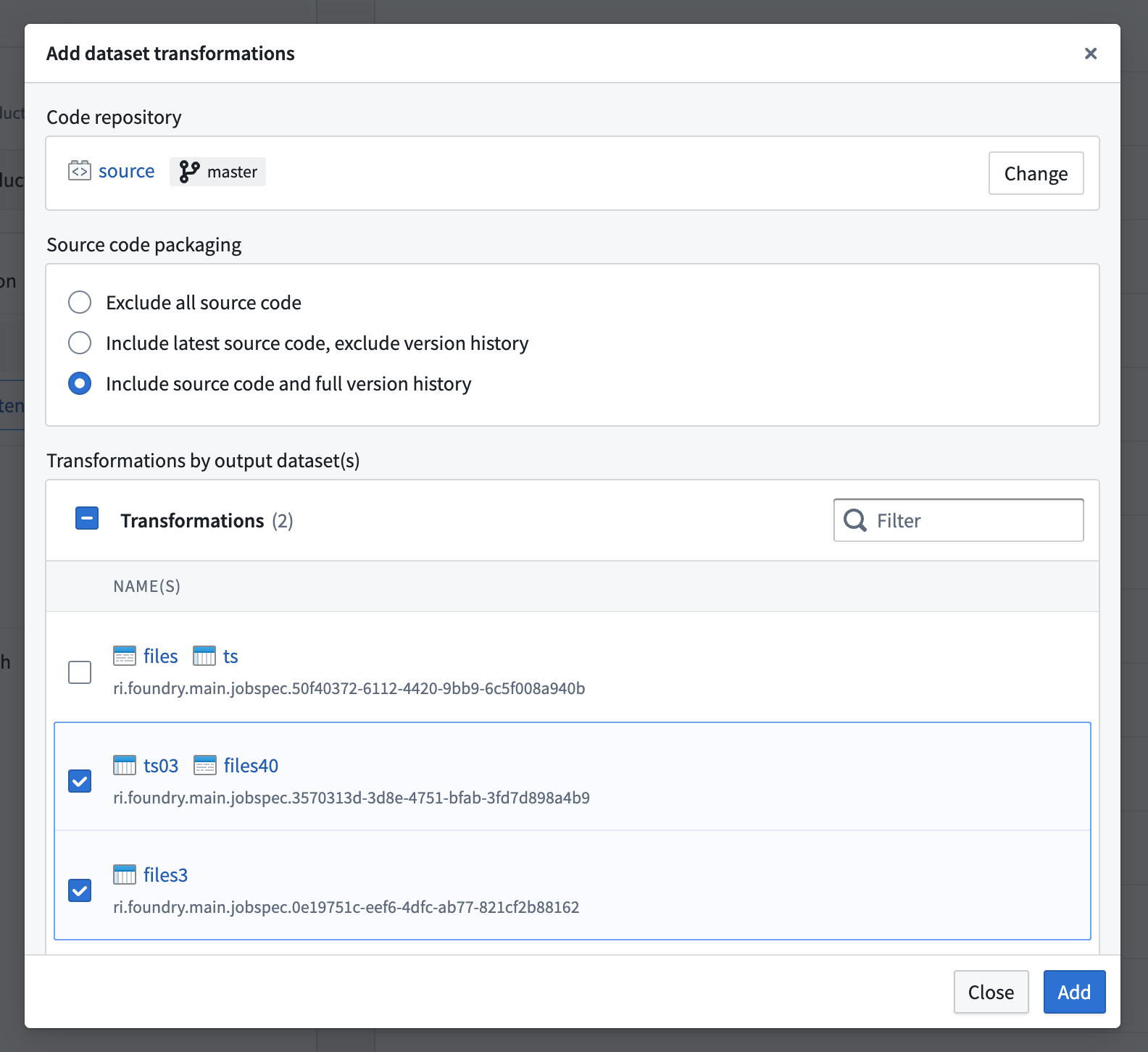
Repository packaging options
There are three ways to package a repository.
- Exclude all source code: The repository is packaged without any source code. The only purpose of the repository is to hold the dependencies required when running the transformation. This method includes the compiled user code and all transitive dependencies.
- Include latest source code, exclude version history: The repository contains both the source code and the necessary artifacts; however, the Git history (including tags) is not persisted. This is the recommended way to ship repositories as read-only documentation.
- Include source code and full version history: The repository is persisted in the product as-is. The entire Git history is saved at packaging time and restored at installation time. This is the only mode which allows you to run checks and rebuild the transformations from within the Code Repositories application after installation.
中文翻译
向 Marketplace 产品添加数据集转换
使用 Foundry DevOps 将您的数据集转换包含在 Marketplace 产品中,供其他用户安装和复用。了解如何创建您的第一个产品。
支持的功能
在打包数据集转换(及其生成代码的代码仓库)时,所有必需的依赖项都会作为产品的一部分存储;这确保了转换是自包含的,并且可以在任何地方成功运行。仓库可以引入 Maven、PyPI 和 Conda 依赖项。
支持 Python、Java 和 SQL 转换。转换必须从使用最新模板的仓库生成,否则可能会出现打包错误。如需调试,请在代码仓库应用程序中升级您的仓库。如果转换可以成功打包,则不会导致任何安装或运行时错误。
:::callout{theme="warning"} 安装时您提供的输入数据集必须与源数据集的列名和变量类型完全相同。
这是因为源输入数据集中的所有数据列(例如,一个 airplane 数据集作为数据集转换的输入,随后被包含在 Marketplace 产品中)在安装时都将成为必需的输入,无论这些列是否在数据集转换中被引用。
:::
支持的功能包括:
- 增量转换
- 取消标记工作流
- Spark 配置文件
- 遥测
- 库
- 外部转换
- 无模式数据集
向产品添加数据集转换
要向产品添加数据集转换,首先创建一个产品,然后添加输出。选择 添加文件 选项,从 Compass 文件系统中导航到数据集转换,并将其添加到您的产品中。
在某些情况下,一个转换可能会生成多个输出数据集。如果是这种情况,所有生成的数据集都需要包含在产品中。
仓库打包选项
有三种打包仓库的方式。
- 排除所有源代码: 仓库打包时不包含任何源代码。仓库的唯一目的是保存运行转换所需的依赖项。此方法包含编译后的用户代码和所有传递依赖项。
- 包含最新源代码,排除版本历史: 仓库包含源代码和必要的工件;但 Git 历史(包括标签)不会被保留。这是将仓库作为只读文档交付的推荐方式。
- 包含源代码和完整版本历史: 仓库按原样保留在产品中。整个 Git 历史在打包时保存,并在安装时恢复。这是唯一允许您在安装后从代码仓库应用程序中运行检查并重建转换的模式。