Prepare datasets for download(准备待下载数据集)
:::callout{theme="warning"} The following export process is an advanced workflow and should only be performed if you are unable to download data directly from the Foundry interface using the Actions menu or export data from another Foundry application. :::
This guide explains how to prepare a CSV for download using transforms in Code Repositories or Pipeline Builder.
Prepare data
The first step in preparing the CSV for download is to create a filtered and cleaned set of data. We recommend performing the following steps:
- Ensure the data sample can be exported and follow data export control rules. Specifically, you should verify that the export adheres to the data governance policies of your Organization.
- Filter the data to be as small as possible to meet the necessary objectives. For optimal performance, the uncompressed size of the data in CSV format should be less than the default HDFS block size (128 MB). To achieve this, you should only select the necessary columns and minimize the number of rows. You can reduce the number of rows by filtering for specific values, or taking a random sample with an arbitrary number of rows (such as 1000). Attempting to create a CSV larger than 128 MB may consume more time and may require additional Spark executor memory to succeed.
- Change column type to
string. Since the CSV format lacks a schema (unenforced types and labels for columns), it is recommended to cast all the columns to string. This is especially important for timestamp columns.
The following sample Python (PySpark) code illustrates some of the above principles as applied to a dataset of taxi trips in New York City.
def prepare_input(my_input_df):
    from pyspark.sql import functions as F

    filter_column = "vendor_id"
    filter_value = "CMT"
    df_filtered = my_input_df.filter(filter_value == F.col(filter_column))

    approx_number_of_rows = 1000
    sample_percent = float(approx_number_of_rows) / df_filtered.count()

    df_sampled = df_filtered.sample(False, sample_percent, seed=0)

    important_columns = ["medallion", "tip_amount"]

    return df_sampled.select([F.col(c).cast(F.StringType()).alias(c) for c in important_columns])
Using similar logic and Spark concepts, you can also implement the preparation in Pipeline Builder or other Spark APIs like SQL or Java.
Reduce to one partition and set output format
Once the data is prepared for export, you need to repartition or coalesce the data to a single partition so that the output will have one file for download. Then, set the output format to CSV or another supported output format such as JSON, ORC, Parquet, or Avro. The below examples show how to repartition data and set an output format in Pipeline Builder, Python, and SQL.
:::callout{theme="neutral"}
Both repartition(1) and coalesce(1) reduce data to a single partition, but coalesce should be avoided when a filter operation is performed as part of the same transform because coalesce collapses upstream tasks, potentially causing the filter operation to run in a non-distributed way.
:::
Pipeline Builder
First, use the Repartition data transform to reduce your data to one partition.
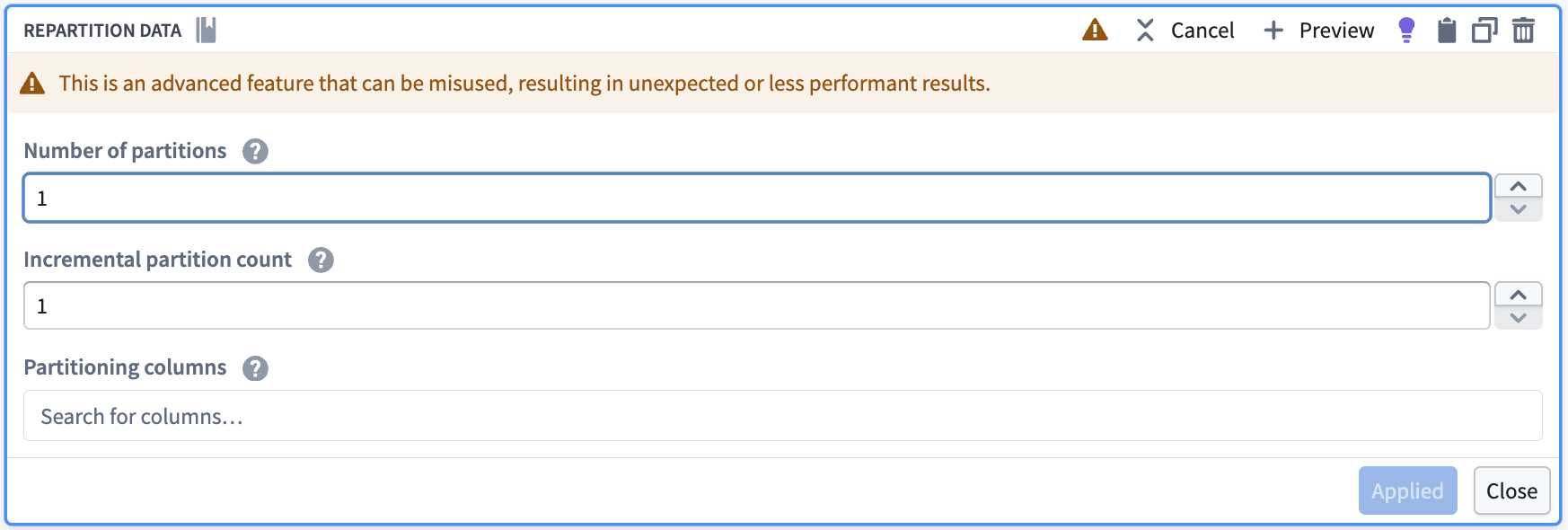
Then, in the pipeline output configuration, configure the write format to CSV (or any other supported format).
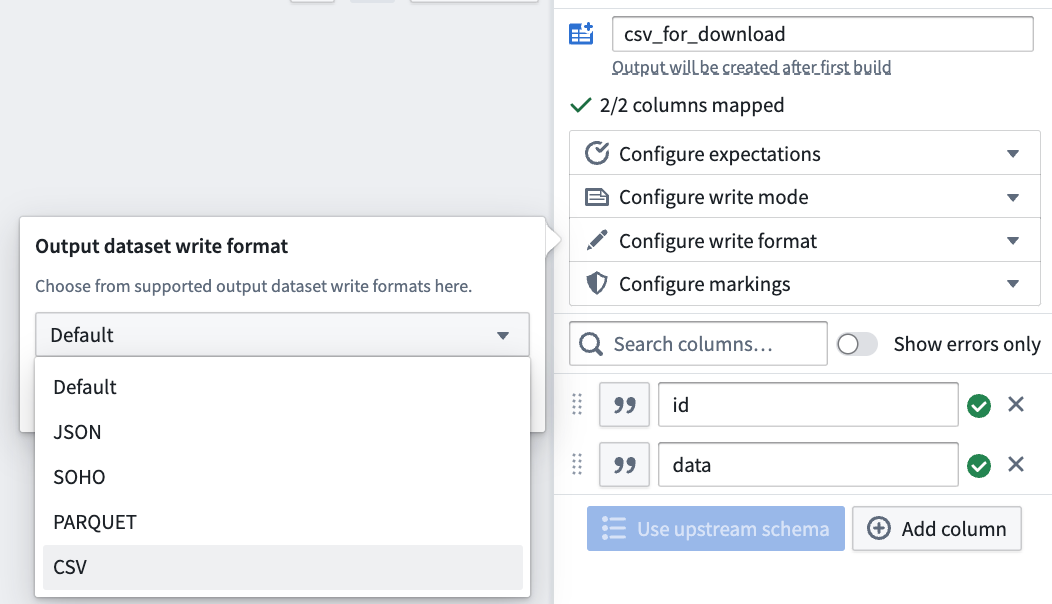
Python
from transforms.api import transform, Input, Output
@transform(
     output=Output("/path/to/python_csv"),
     my_input=Input("/path/to/input")
)
def my_compute_function(output, my_input):
     output.write_dataframe(my_input.dataframe().repartition(1), output_format="csv", options={"header": "true"})
SQL
CREATE TABLE `/path/to/sql_csv` USING CSV AS SELECT /*+ REPARTITION(1) */ * FROM `/path/to/input`
Review official Spark documentation ↗ for additional CSV generation options (note that Pipeline Builder only exposes a subset of these options).
:::callout{theme="neutral"}
In the above examples, we reduce to one partition so that the output dataset has exactly one CSV file for download. As a result, the entirety of the data must be able to fit in the memory of one Spark executor, which is why we recommend filtering or sampling the data first. If filtering or sampling the data is not an option, but the data is too large to fit in one executor's memory, you can increase executor memory using an appropriate Spark profile. Alternatively, you can use a value other than 1 for the partition count. Using repartition with a value greater than 1 will reduce the amount of data that must be held in memory on one executor, but will also entail that the output dataset will have multiple CSV files that need to be downloaded individually instead of one.
:::
Access the file for download
Once the dataset is built, navigate to the Details tab of the dataset page. The CSV should appear as available for download.
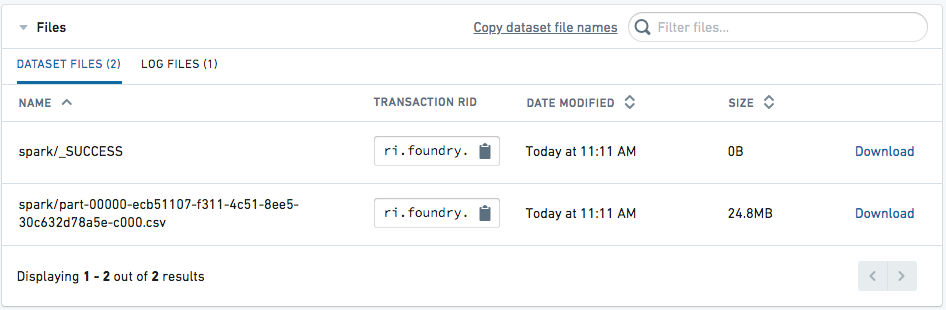
中文翻译
准备待下载数据集
:::callout{theme="warning"} 以下导出流程属于高级工作流,仅当你无法通过操作(Actions) 菜单直接从Foundry界面下载数据,或无法从其他Foundry应用导出数据时才建议使用。 :::
本指南将介绍如何在代码仓库(Code Repositories) 或流水线构建器(Pipeline Builder) 中通过转换操作(transforms) 制备可供下载的CSV文件。
数据准备
制备待下载CSV的第一步是创建经过过滤和清洗的数据集。我们建议执行以下步骤:
- 确保数据样本符合导出要求,遵守数据导出管控规则。你尤其需要核实该导出行为符合所在组织的数据治理政策。
- 尽可能过滤数据,在满足需求的前提下将数据量压缩到最小。为保证最优性能,CSV格式的未压缩数据大小应当低于默认HDFS块大小(128 MB)。要实现这一点,你应当仅选择必要的列,并尽量减少行数:你可以通过过滤特定值、或随机抽取固定行数(例如1000行)的样本来减少行数。尝试创建大于128MB的CSV会消耗更多时间,还可能需要额外的Spark执行器(Spark executor)内存才能完成。
- 将列类型转换为
string。由于CSV格式没有Schema(不会强制约束列的类型和标签),建议将所有列转换为字符串类型,这对时间戳列尤为重要。
以下Python(PySpark)示例代码演示了上述部分原则,示例的适用场景为纽约市出租车行程数据集。
def prepare_input(my_input_df):
    from pyspark.sql import functions as F

    filter_column = "vendor_id"
    filter_value = "CMT"
    df_filtered = my_input_df.filter(filter_value == F.col(filter_column))

    approx_number_of_rows = 1000
    sample_percent = float(approx_number_of_rows) / df_filtered.count()

    df_sampled = df_filtered.sample(False, sample_percent, seed=0)

    important_columns = ["medallion", "tip_amount"]

    return df_sampled.select([F.col(c).cast(F.StringType()).alias(c) for c in important_columns])
你可以套用类似的逻辑和Spark概念,在Pipeline Builder或其他Spark API(如SQL、Java)中实现数据准备逻辑。
合并为单个分区并设置输出格式
数据导出准备完成后,你需要对数据执行重分区(repartition) 或合并(coalesce) 操作,将数据归集到单个分区,这样输出就只有一个可供下载的文件。之后将输出格式设置为CSV,或其他支持的格式,例如JSON、ORC、Parquet、Avro。下文示例将展示如何在Pipeline Builder、Python和SQL中对数据重分区并设置输出格式。
:::callout{theme="neutral"}
repartition(1)和coalesce(1)都可以将数据合并为单个分区,但如果同一个转换操作中包含过滤步骤,应当避免使用coalesce,因为coalesce会合并上游任务,可能导致过滤操作无法分布式运行。
:::
Pipeline Builder
首先,使用重分区数据(Repartition data) 转换将你的数据合并为1个分区。
之后,在流水线输出配置中,将写入格式设置为CSV(或其他任意支持的格式)。
Python
from transforms.api import transform, Input, Output
@transform(
     output=Output("/path/to/python_csv"),
     my_input=Input("/path/to/input")
)
def my_compute_function(output, my_input):
     output.write_dataframe(my_input.dataframe().repartition(1), output_format="csv", options={"header": "true"})
SQL
CREATE TABLE `/path/to/sql_csv` USING CSV AS SELECT /*+ REPARTITION(1) */ * FROM `/path/to/input`
你可以查阅官方Spark文档 ↗获取更多CSV生成选项(请注意Pipeline Builder仅开放了这些选项的子集)。
:::callout{theme="neutral"}
在上述示例中,我们将数据合并为单个分区,因此输出数据集只会生成1个可供下载的CSV文件。这意味着所有数据必须能够放入单个Spark执行器的内存中,这也是我们建议先对数据做过滤或采样的原因。如果无法对数据做过滤或采样,且数据量过大无法放入单个执行器内存,你可以通过合适的Spark配置文件(Spark profile)提高执行器内存。你也可以将分区数设置为大于1的数值:使用大于1的参数执行repartition可以减少单个执行器需要承载的数据量,但这也意味着输出数据集会包含多个CSV文件,你需要分别下载这些文件,而无法下载单个整合文件。
:::
获取可下载文件
数据集构建完成后,跳转到数据集页面的详情(Details) 标签页,即可看到可供下载的CSV文件。