Repository upgrades(仓库升级)
Foundry will occasionally generate upgrade pull requests on active repositories. These upgrades contain important updates to the Transforms template as well as runtime improvements. Upgrade Pull Requests will be opened on a dedicated branch and request a merge to the default branch.
Automatic upgrades
When automatic upgrades are enabled in the repository, Foundry will attempt to merge the upgrade PRs automatically. After the required checks finish successfully, the pull request will be merged and a new merge-commit will appear in the commit history of the default branch. Select Automatic merge of upgrade PRs in the repository settings to enable this feature.
When this option is disabled, or when the PR fails to merge, the repository will present a message when a new upgrade PR is available and require a user with the appropriate permissions to merge it.
:::callout{theme="warning" title="Warning"} Enabling automatic upgrades is strongly recommended in order to keep the repository up-to-date with the latest runtime improvements. :::
There are some cases where automatic repository upgrades will require manual intervention before merging:
- The template type of the repository does not support merging.
- The user committed any changes to the upgrade PR branch after it was opened.
- The upgrade PR overwrites any files that contain user-authored changes (see file overwrites).
- Some datasets directly affected by this pull request have not been built with the latest version of the code (see impact analysis).
- Jobs produced by this repository have not yet been built with the runtime Spark module version introduced in the upgrade pull request (see impact analysis).
- The template version the repository is currently on is too old to support automatic upgrades.
File overwrites
When a repository is created, it is bootstrapped with default template files, which differ depending on the type of template chosen. When a repository is upgraded, some of these default files will be overwritten to match those of the newest template version. This is because the default files are considered to be important for the correct functioning of a repository, and should not be overwritten by users.
Impact analysis
You can use the impact analysis tab of the Repository Upgrade PR to review any potential changes to affected datasets and ensure that the changes are safe before merging. Some upgrades may affect the runtime Spark module version used, which could have an effect on the datasets built by this repository.
Manual branch upgrade
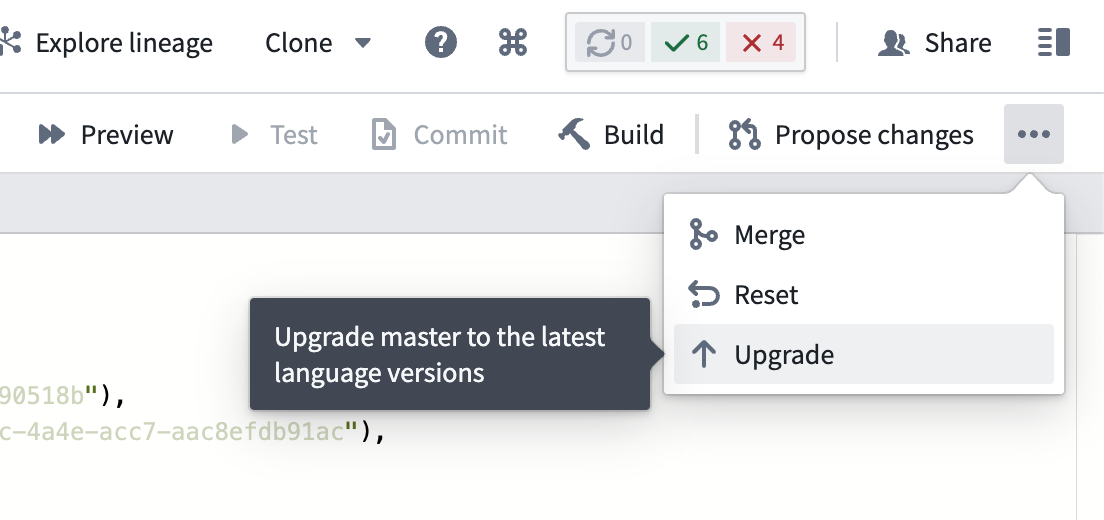
To manually upgrade your branch to the latest language versions, open the ... menu in Code Repositories and select Upgrade as shown in the screenshot below.
:::callout{theme="neutral"} If you move a repository across different projects, the repository must be manually upgraded in the new location before any builds or checks are triggered. This is necessary to update relevant project references in the repository. :::
中文翻译
仓库升级
Foundry 会定期在活跃仓库中生成升级拉取请求(Pull Request)。这些升级包含对 Transforms 模板的重要更新以及运行时改进。升级拉取请求将在专用分支上创建,并请求合并到默认分支。
自动升级
当仓库中启用自动升级时,Foundry 将尝试自动合并升级 PR。在所需检查成功完成后,拉取请求将被合并,默认分支的提交历史中将出现一个新的合并提交。在仓库设置中选择 自动合并升级 PR 即可启用此功能。
当此选项禁用,或 PR 合并失败时,仓库会在有新的升级 PR 可用时显示提示信息,并要求具有适当权限的用户手动合并。
:::callout{theme="warning" title="警告"} 强烈建议启用自动升级,以确保仓库始终使用最新的运行时改进。 :::
在某些情况下,自动仓库升级需要手动干预才能完成合并:
- 仓库的模板类型不支持合并。
- 用户在升级 PR 分支创建后对其进行了任何更改。
- 升级 PR 覆盖了包含用户修改的文件(参见文件覆盖)。
- 此拉取请求直接影响的某些数据集尚未使用最新版本的代码构建(参见影响分析)。
- 此仓库生成的作业尚未使用升级拉取请求中引入的运行时 Spark 模块版本构建(参见影响分析)。
- 仓库当前使用的模板版本过旧,不支持自动升级。
文件覆盖
创建仓库时,系统会使用默认模板文件进行初始化,这些文件根据所选模板类型而有所不同。当仓库升级时,部分默认文件将被覆盖,以匹配最新模板版本。这是因为默认文件对仓库的正常运行至关重要,用户不应覆盖它们。
影响分析
您可以使用仓库升级 PR 的影响分析选项卡,查看受影响数据集的潜在变更,并在合并前确保更改安全。某些升级可能会影响所使用的运行时 Spark 模块版本,进而影响此仓库构建的数据集。
手动分支升级
要手动将分支升级到最新语言版本,请在代码仓库中打开 ... 菜单,然后选择 升级,如下方截图所示。
:::callout{theme="neutral"} 如果将仓库迁移到不同项目,则必须在新的位置手动升级仓库,然后才能触发任何构建或检查。这是为了更新仓库中的相关项目引用。 :::