Use Project references(使用项目引用(Project references))
Project references provide a mechanism for users with higher permissions - typically the owners of a dataset or pipeline - to allow the discovery and use of their data in other Projects. Intermediate Projects can be used as permission boundaries or discovery hubs, wherein the users who own one part of a pipeline can declassify, curate, or otherwise distribute shareable versions of their datasets and make them available to downstream consumers.
Project references add an increased layer of scrutiny for moving data between Projects by explicitly acknowledging when a dataset is exported from or imported to a Project.
Instructions
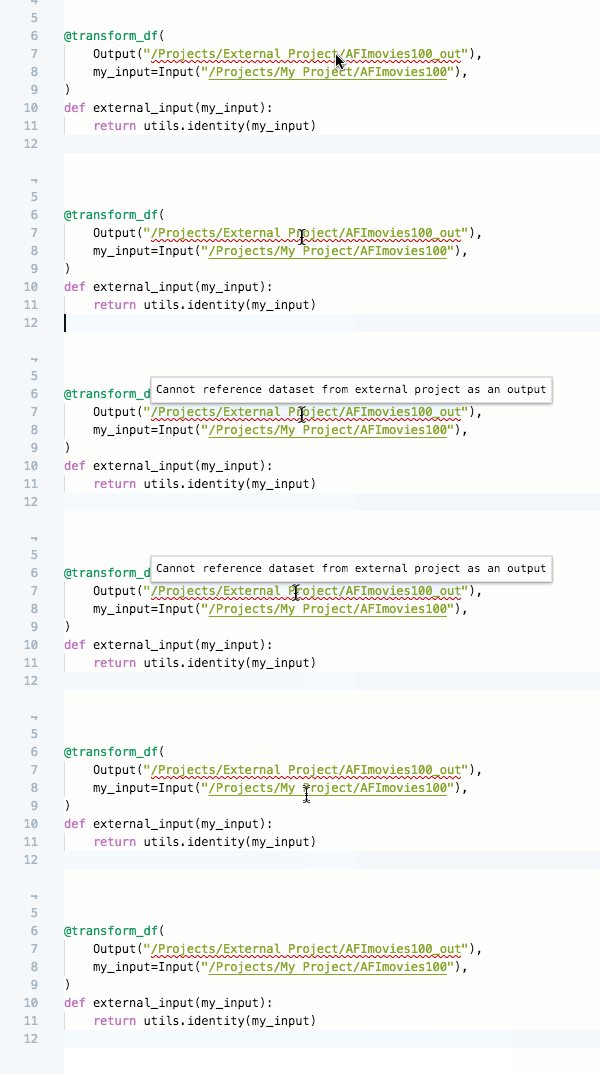
- The code editor informs users that outputs generated from transforms must be within the Project scope of the code repository. For example, if your code repository is in a project called "Data Cleaning Project", the outputs from your code repository can only be in "Data Cleaning Project", not any other project.
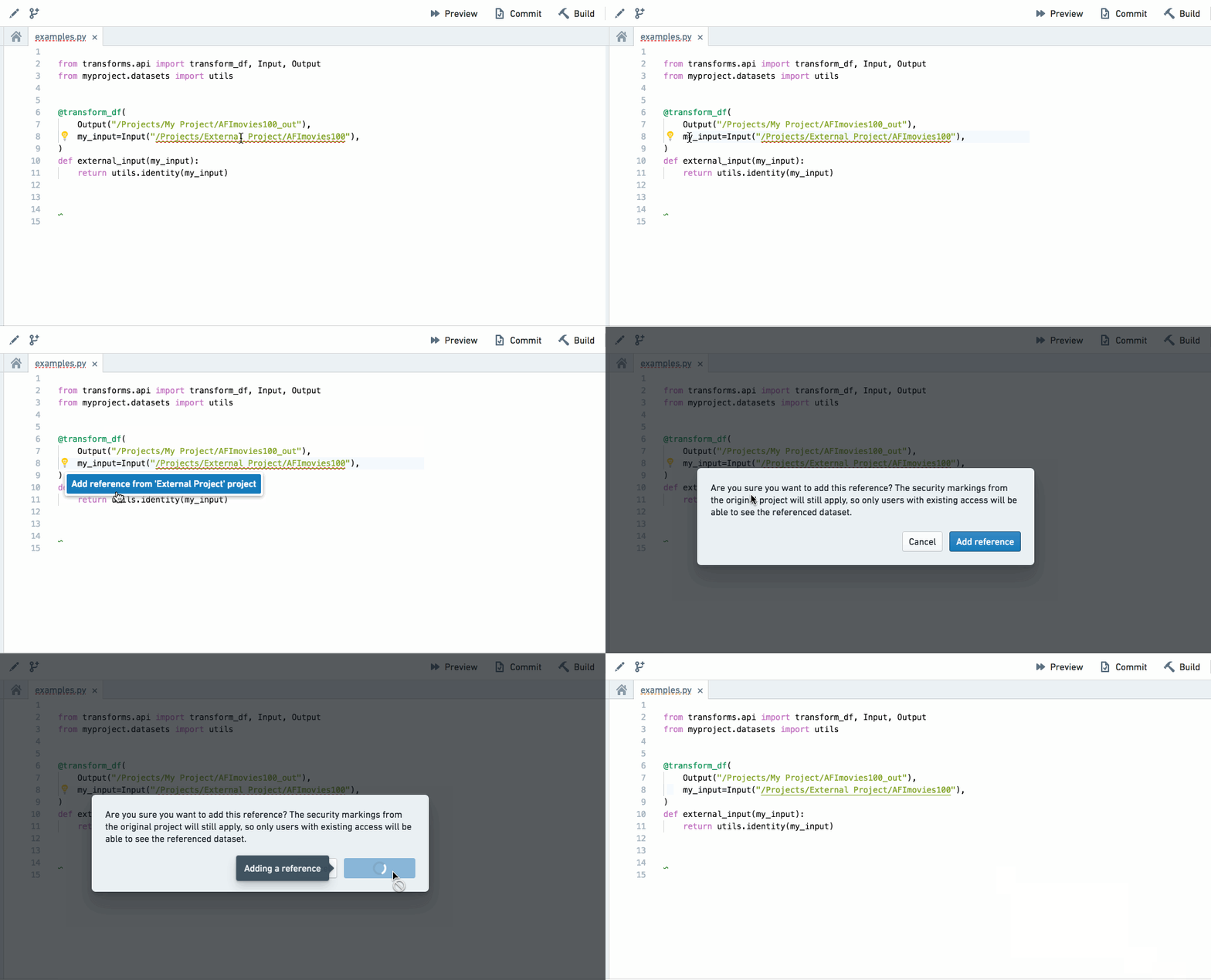
- When there is an input dataset from outside the Project scope, the code editor flags that the dataset must be added as a Project reference. By clicking the light bulb icon, the input dataset can be added as a Project reference.
- References to datasets external to the Project can also be added from Projects & files.
- If the repository's language packages are out of date, it will not be possible to enforce Project scope until they have been updated. Code Repositories will flag that these need to updated and clicking the update button that appears will resolve this.
- You can only add a Project reference to a dataset from outside the Project scope as an input datast, not as an output dataset. Trying to output to a dataset outside of the Project scope will trigger a AccessOutsideProjectDenied error.
Project references and permissions
To reference a resource, you must have compass:import-resource-from on the resource (usually expanded from the Viewer role) and compass:import-resource-to on the destination Project (usually expanded from the Editor role). These permissions can be customized using custom roles.
A user needs access to all Markings related to datasets referenced in a code repository in order to modify code in that repository.
中文翻译
使用项目引用(Project references)
项目引用(Project references) 提供了一种机制,让拥有更高权限的用户(通常是数据集或管道的所有者)能够允许其他项目发现并使用其数据。中间项目(Intermediate Projects)可作为权限边界或发现中心,管道某一部分的所有者可以在其中对数据集进行降密、整理或以其他方式分发可共享版本,供下游消费者使用。
项目引用通过明确标识数据集何时从某个项目导出或导入,为项目间的数据传输增加了额外的审查层级。
操作说明
- 代码编辑器会提示用户,转换(transforms)生成的输出必须位于代码仓库的项目范围内。例如,如果您的代码仓库位于名为"数据清洗项目(Data Cleaning Project)"的项目中,那么代码仓库的输出只能位于"数据清洗项目"中,而不能位于任何其他项目。
- 当存在来自项目范围外部的输入数据集时,代码编辑器会标记该数据集必须作为项目引用添加。通过点击灯泡图标,可以将该输入数据集添加为项目引用。
- 也可以从项目与文件(Projects & files)中添加对项目外部数据集的引用。
- 如果仓库的语言包已过期,则无法强制执行项目范围,直到更新这些语言包。代码仓库会标记需要更新,点击出现的更新按钮即可解决此问题。
- 您只能将项目范围外部的数据集添加为项目引用作为输入数据集,而不能作为输出数据集。尝试输出到项目范围外部的数据集将触发
AccessOutsideProjectDenied错误。
项目引用与权限
要引用某个资源,您必须对该资源拥有compass:import-resource-from权限(通常从查看者角色扩展而来),并对目标项目拥有compass:import-resource-to权限(通常从编辑者角色扩展而来)。这些权限可通过自定义角色进行定制。
用户需要拥有对代码仓库中引用的数据集相关的所有标记(Markings)的访问权限,才能修改该仓库中的代码。