Interact with external systems(与外部系统交互)
Code Workspaces allows you to use Python to interact with external systems that exist outside of the Foundry platform using sources.
Sources allow you to store and access secrets, configure multiple egress policies at once, monitor usage in code across the platform, manage data export controls, and more. Because it is possible to egress Foundry data from within a code workspace to an external system, you must consider some additional security considerations when using sources with Foundry data.
:::callout{theme="warning"} Sources have replaced network egress policies as the preferred method of interacting with external systems for interactive workflows and publishing applications, except for CBAC-enabled environments. Sources are not yet supported for transforms published from a Code Workspace. :::
Setting up a source
To interact with an external system in a Jupyter or RStudio® workspace, first create a source in the Data Connection application, provide an API name, and toggle the setting to allow the source to be imported into code repositories. After you add the source to your workspace and restart your workspace once, you can then interact with the source using Palantir's external-systems Python library.
Sources in a Jupyter workspace
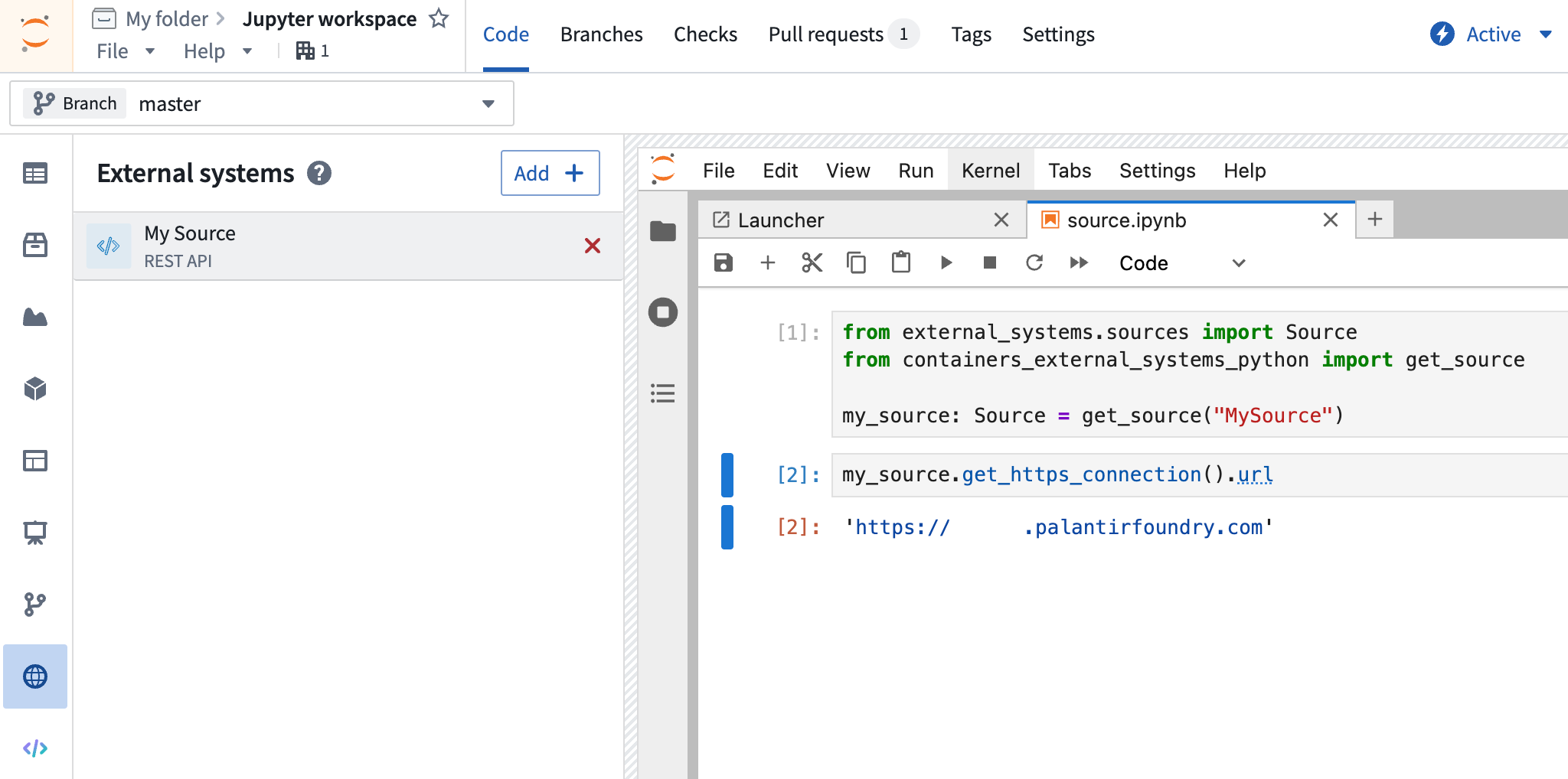
To use a source in a Jupyter workspace, ensure that the containers-external-systems-python library is installed. Then use the code snippets in the external systems side panel to interact with the source, starting with the following code:
from containers_external_systems_python import get_source

my_source = get_source("SourceApiName")
To retrieve credentials from a source in a Jupyter workspace, use the following approach:
some_secret: str = my_source.get_secret("secretName")
Sources in an RStudio® workspace
To use a source in an RStudio® workspace, ensure that the containers-external-systems-python library is installed along with reticulate and python. Then use the provided code snippets in R (using the reticulate adaptation of the Python syntax), such as in the following example:
library(reticulate)

source <- import("containers_external_systems_python")$get_source("SourceApiName")
https_connection <- source$get_https_connection()
client <- https_connection$get_client()
response <- client$get(https_connection$url, timeout=10)

response$ok
To retrieve credentials from a source in an RStudio® workspace, use the following approach:
some_secret <- source$get_secret("secretName)
Sources in published applications
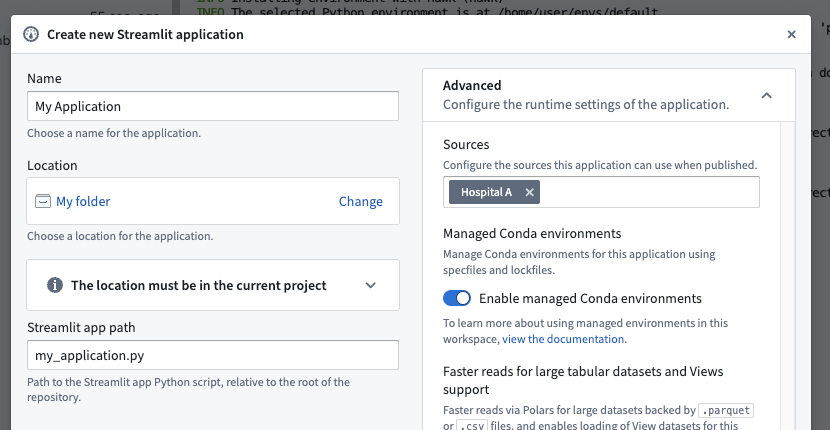
When publishing an application (e.g., Streamlit) that requires a source, you must include that source in the application's "advanced" configuration settings. Users must have access to all included sources or they will not be able to open the application.
Sources and workspace security
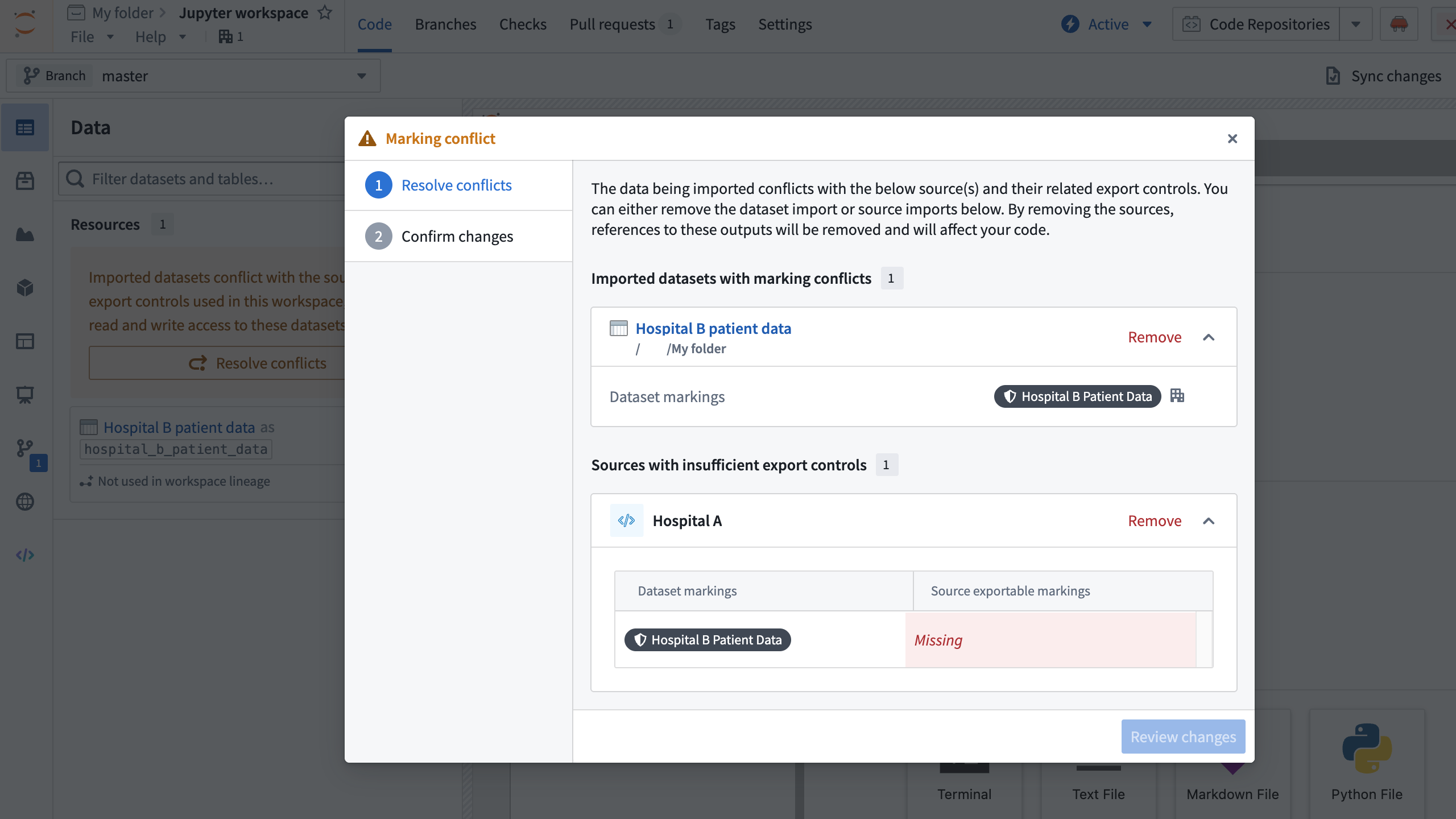
Importing a source with exports enabled enforces additional checks on your workspace's security. Most importantly, a dataset with a marking that is not on a source's exportable markings list cannot be used with that source in the same workspace.
For example, if you had a source for an electronic health record system named Hospital A, you might be permitted to use it to export data with the marking Hospital A Patient Data. But suppose that you also had a dataset with the marking Hospital B Patient Data loaded into your workspace: if you were also using the Hospital A source, without checks you would be able to export disallowed Hospital B Patient Data to the Hospital A external system. Code Workspaces enforces these checks on the level of the entire workspace, also known as the workspace lineage, during workspace startup. That is, the incompatible source and dataset cannot be accessed in the workspace simultaneously.
If you have a source loaded into your workspace with an enforced exportable markings list and add a dataset with a non-exportable marking, the workspace will prevent you from accessing that dataset; for example, Dataset.get() will throw an error.
If you initialize or restart a workspace that includes an incompatible source and dataset, you will be prompted to remove either a source or dataset until the conflict resolves. You must then restart the workspace without a checkpoint to resolve this conflict.
中文翻译
与外部系统交互
代码工作区(Code Workspaces) 支持你使用Python,通过数据源(Sources) 与Foundry平台外的外部系统交互。
数据源支持存储和访问密钥、一次性配置多条出站策略、监控全平台代码中的使用情况、管理数据导出控制等功能。由于你可以在代码工作区中将Foundry数据出站到外部系统,因此结合数据源使用Foundry数据时,需要了解一些额外的安全注意事项。
:::callout{theme="warning"} 数据源已替代网络出站策略(network egress policies),成为交互式工作流和应用发布场景下与外部系统交互的首选方式,但启用CBAC的环境(CBAC-enabled environments) 除外。目前不支持从代码工作区发布的转换(transforms)使用数据源。 :::
配置数据源
要在Jupyter或RStudio®工作区中与外部系统交互,请首先在数据连接(Data Connection) 应用中创建一个数据源,设置API名称,然后开启允许该数据源导入代码仓库的开关。将数据源添加到你的工作区并重启一次工作区后,你就可以使用Palantir的external-systems Python库 与该数据源交互。
Jupyter工作区中的数据源
要在Jupyter工作区中使用数据源,请确保已安装containers-external-systems-python库。随后你可以使用外部系统侧边栏中的代码片段与数据源交互,入门代码如下:
from containers_external_systems_python import get_source

my_source = get_source("SourceApiName")
要在Jupyter工作区中从数据源获取凭证,请使用以下方式:
some_secret: str = my_source.get_secret("secretName")
RStudio®工作区中的数据源
要在RStudio®工作区中使用数据源,请确保已安装containers-external-systems-python库,以及reticulate和python。随后你可以使用提供的R语言代码片段(基于reticulate适配Python语法实现),示例如下:
library(reticulate)

source <- import("containers_external_systems_python")$get_source("SourceApiName")
https_connection <- source$get_https_connection()
client <- https_connection$get_client()
response <- client$get(https_connection$url, timeout=10)

response$ok
要在RStudio®工作区中从数据源获取凭证,请使用以下方式:
some_secret <- source$get_secret("secretName)
已发布应用中的数据源
发布需要使用数据源的应用(例如Streamlit)时,你必须在应用的「高级」配置设置中添加该数据源。用户必须拥有所有关联数据源的访问权限,否则无法打开应用。
数据源与工作区安全
导入已启用导出功能的数据源会对你的工作区安全执行额外检查。最重要的规则是:如果某个数据集的标记(marking)不在数据源的可导出标记列表中,则该数据集无法与对应数据源在同一工作区中使用。
例如,如果你有一个面向电子病历系统Hospital A的数据源,你可能被允许使用它导出带有Hospital A Patient Data标记的数据。但假设你的工作区中还加载了带有Hospital B Patient Data标记的数据集:如果你同时使用Hospital A数据源,没有检查机制的话你就可能将不允许导出的Hospital B Patient Data发送到Hospital A外部系统。代码工作区会在工作区启动时,在整个工作区级别(也称为工作区血缘(workspace lineage))执行这些检查。也就是说,不兼容的数据源和数据集无法在工作区中同时访问。
如果你加载到工作区的数据源配置了强制可导出标记列表,之后又添加了带有不可导出标记的数据集,工作区会阻止你访问该数据集;例如调用Dataset.get()时会抛出错误。
如果你初始化或重启的工作区中包含不兼容的数据源和数据集,系统会提示你移除数据源或数据集直到冲突解决。你需要在不加载检查点(checkpoint)的情况下重启工作区以解决该冲突。