Abort transactions(中止事务(Abort transactions))
Python transforms provides support for aborting a transaction to allow a job to successfully complete if the output dataset is unchanged (where no new data is written to the dataset). This is achieved through using the transform decorator and calling .abort_job() on the ctx object available in the transform.
Aborting transactions can be used if you need to prevent the output datasets and downstream datasets from updating under certain conditions. As soon as your output datasets updates, the downstream datasets will be considered out-of-date (stale), and they will update when they are next built (either manually or through a scheduled build). It provides an alternative to failing the build. This makes it easier to identify when something is actually failing.
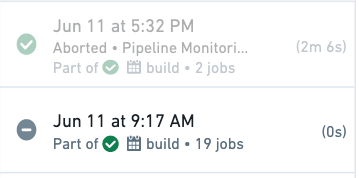
Aborted transactions will appear as grayed-out, successful jobs in your dataset transaction history. This enables you to differentiate at a glance whether a successful build resulted in a committed transaction or not.
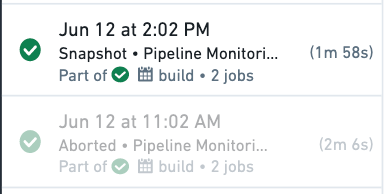
Below are examples of when you may want to abort a transaction:
- You have a custom condition for updating your datasets that is based on the contents of the input datasets.
- Your datasets requires force building because it does not become stale. An example is datasets that fetch data from making API calls instead of input datasets.
- You have a writeback dataset which always updates when it is scheduled (see further below for detailed example).
:::callout{theme="neutral"}
Adding a validation with abort_job() with a dataset that always updates but does not always result in changed output saves compute resources by avoiding unnecessary updates downstream.
:::
Example: Notional custom condition
Below is a basic notional example, where we want to make sure that output datasets are only updated if data for today has arrived in our input dataset.
```python tab="Polars" from transforms.api import transform, Input, Output from datetime import date import polars as pl
@transform.using( holiday_trips=Input('/examples/trips'), processed=Output('/examples/trips_processed') ) def update_daily_trips(ctx, holiday_trips, processed): holiday_trips_df = holiday_trips.polars() todays_trips_df = holiday_trips_df.filter( pl.col("trip_date") == date.today() ) if (todays_trips_df.height == 0): ctx.abort_job() else: processed.write_table(todays_trips_df)
```python tab="DuckDB"
from transforms.api import transform, Input, Output
from datetime import date

@transform.using(
    holiday_trips=Input('/examples/trips'),
    processed=Output('/examples/trips_processed')
)
def update_daily_trips(ctx, holiday_trips, processed):
    conn = ctx.duckdb().conn
    todays_trips_df = conn.sql("SELECT * FROM holiday_trips WHERE trip_date = DATE '{}'".format(date.today())).fetchdf()
    if (todays_trips_df.height == 0):
      ctx.abort_job()
    else:
      processed.write_table(todays_trips_df)
```python tab="Pandas" from transforms.api import transform, Input, Output from datetime import date
@transform.using( holiday_trips=Input('/examples/trips'), processed=Output('/examples/trips_processed') ) def update_daily_trips(ctx, holiday_trips, processed): holiday_trips_df = holiday_trips.pandas() todays_trips_df = holiday_trips_df[holiday_trips_df['trip_date'] == date.today()] if (todays_trips_df.shape[0] == 0): ctx.abort_job() else: processed.write_table(todays_trips_df)
```python tab="PySpark"
from transforms.api import transform, Input, Output
from datetime import date

@transform.spark.using(
    holiday_trips=Input('/examples/trips'),
    processed=Output('/examples/trips_processed')
)
def update_daily_trips(ctx, holiday_trips, processed):
    holiday_trips_df = holiday_trips.dataframe()
    todays_trips_df = holiday_trips_df.filter(holiday_trips_df.trip_date == date.today())
    if (todays_trips_df.count() == 0):
      ctx.abort_job()
    else:
      processed.write_dataframe(todays_trips_df)
:::callout{theme="success" title="Tip"}
Using if (len(todays_trips_df.head(1)) == 0) will usually return a faster result than if (todays_trips_df.count() == 0) as it will only check the existence of at least one row, rather than counting all rows unnecessarily.
:::
How does an aborted transaction differ from an ignored job?
When a job is marked as "ignored" the computation does not run as Foundry determines that the JobSpecs are not stale. When a transaction is aborted, the job does run and it completes successfully, however the output dataset is left unchanged and no transaction is committed.
How do aborted transactions relate to incremental transactions?
Incremental transforms read the dataset view of both the inputs and outputs only using committed transactions. This means they will ignore aborted transactions when performing incremental computation.
When a transaction is explicitly aborted on the whole job for an incremental transform, the next build will read (and therefore reprocess) the inputs as if the aborted transaction never occurred, and thus be able to run incrementally.
:::callout{theme="warning" title="Warning"}
When using PySpark, it is possible to call abort() on individual datasets rather than on the whole job. However, this approach is not recommended practice as it can cause problems with incremental computations.
In particular, if a transaction is only aborted on a subset of the outputs, the build will not be able to run incrementally. For the outputs with aborted transactions, the output job specs will be using a previous input transaction range as aborted transactions are ignored. For the outputs with committed transactions, the output job specs will be using the current input transaction range. This mismatch in input transaction range means the transform can no longer run incrementally.
In a multi-output incremental transform, if a transaction is explicitly aborted on a subset of the outputs, the next build will run as a snapshot, with the failed incremental computation check Provenance records for the previous build are inconsistent. If require_incremental=True is set, the build will fail with the error InconsistentProvenanceRecords. This is because the current view of the outputs will now have been produced by different input transactions.
You should use the .abort_job() method on the TransformContext to abort the entire job rather than aborting individual outputs if running incremental builds. This will abort all outputs from the build. If using v2_semantics, then this is the only way to abort outputs while allowing subsequent builds to run incrementally.
:::
中文翻译
中止事务(Abort transactions)
Python转换(Transform)支持中止事务,以便在输出数据集未发生变化(即没有新数据写入数据集)时,作业能够成功完成。这是通过使用transform装饰器并调用转换中可用的ctx对象上的.abort_job()方法来实现的。
如果您需要在特定条件下阻止输出数据集及其下游数据集更新,可以使用中止事务功能。一旦输出数据集更新,下游数据集将被视为过时(stale),并在下次构建时(无论是手动构建还是通过计划构建)进行更新。这提供了一种替代构建失败的方法,使识别实际失败情况变得更加容易。
被中止的事务在数据集的事务历史中将显示为灰色且成功的作业。这使您能够一目了然地分辨成功的构建是否导致了已提交的事务。
以下是一些可能需要中止事务的场景示例:
- 您有一个基于输入数据集内容的自定义条件来决定是否更新数据集。
- 您的数据集需要强制构建,因为它不会自动变为过时。例如,通过API调用获取数据而非依赖输入数据集的数据集。
- 您有一个回写数据集(writeback dataset),它在计划执行时总是更新(详见下文示例)。
:::callout{theme="neutral"}
对于总是更新但并非总是产生变更输出的数据集,使用abort_job()添加验证可以避免不必要的下游更新,从而节省计算资源。
:::
示例:概念性自定义条件
以下是一个基础的概念性示例,我们希望仅当今天的数据已到达输入数据集时,才更新输出数据集。
```python tab="Polars" from transforms.api import transform, Input, Output from datetime import date import polars as pl
@transform.using( holiday_trips=Input('/examples/trips'), processed=Output('/examples/trips_processed') ) def update_daily_trips(ctx, holiday_trips, processed): holiday_trips_df = holiday_trips.polars() todays_trips_df = holiday_trips_df.filter( pl.col("trip_date") == date.today() ) if (todays_trips_df.height == 0): ctx.abort_job() else: processed.write_table(todays_trips_df)
```python tab="DuckDB"
from transforms.api import transform, Input, Output
from datetime import date

@transform.using(
    holiday_trips=Input('/examples/trips'),
    processed=Output('/examples/trips_processed')
)
def update_daily_trips(ctx, holiday_trips, processed):
    conn = ctx.duckdb().conn
    todays_trips_df = conn.sql("SELECT * FROM holiday_trips WHERE trip_date = DATE '{}'".format(date.today())).fetchdf()
    if (todays_trips_df.height == 0):
      ctx.abort_job()
    else:
      processed.write_table(todays_trips_df)
```python tab="Pandas" from transforms.api import transform, Input, Output from datetime import date
@transform.using( holiday_trips=Input('/examples/trips'), processed=Output('/examples/trips_processed') ) def update_daily_trips(ctx, holiday_trips, processed): holiday_trips_df = holiday_trips.pandas() todays_trips_df = holiday_trips_df[holiday_trips_df['trip_date'] == date.today()] if (todays_trips_df.shape[0] == 0): ctx.abort_job() else: processed.write_table(todays_trips_df)
```python tab="PySpark"
from transforms.api import transform, Input, Output
from datetime import date

@transform.spark.using(
    holiday_trips=Input('/examples/trips'),
    processed=Output('/examples/trips_processed')
)
def update_daily_trips(ctx, holiday_trips, processed):
    holiday_trips_df = holiday_trips.dataframe()
    todays_trips_df = holiday_trips_df.filter(holiday_trips_df.trip_date == date.today())
    if (todays_trips_df.count() == 0):
      ctx.abort_job()
    else:
      processed.write_dataframe(todays_trips_df)
:::callout{theme="success" title="提示"}
使用if (len(todays_trips_df.head(1)) == 0)通常比if (todays_trips_df.count() == 0)返回结果更快,因为它仅检查是否存在至少一行数据,而非不必要地统计所有行数。
:::
中止事务与忽略作业有何不同?
当作业被标记为"已忽略(ignored)"时,由于Foundry判定作业规范(JobSpecs)未过时,计算不会执行。而当事务被中止时,作业会执行并成功完成,但输出数据集保持不变,且不会提交任何事务。
中止事务与增量事务的关系
增量转换(Incremental transforms)仅使用已提交的事务来读取输入和输出的数据集视图。这意味着在执行增量计算时,它们会忽略已中止的事务。
当增量转换的整个作业被显式中止事务时,下次构建将读取(并因此重新处理)输入,就好像该中止事务从未发生过一样,从而能够以增量方式运行。
:::callout{theme="warning" title="警告"}
使用PySpark时,可以对单个数据集调用abort(),而非对整个作业。然而,这种做法不推荐,因为它可能导致增量计算出现问题。
特别是,如果仅对部分输出中止事务,构建将无法以增量方式运行。对于已中止事务的输出,输出作业规范将使用之前的输入事务范围(因为已中止的事务被忽略)。对于已提交事务的输出,输出作业规范将使用当前的输入事务范围。这种输入事务范围的不匹配意味着转换无法再以增量方式运行。
在多输出增量转换中,如果仅对部分输出显式中止事务,下次构建将以快照(snapshot)方式运行,并出现失败的增量计算检查Provenance records for the previous build are inconsistent。如果设置了require_incremental=True,构建将失败并显示错误InconsistentProvenanceRecords。这是因为当前输出视图是由不同的输入事务产生的。
如果运行增量构建,您应使用TransformContext上的.abort_job()方法来中止整个作业,而非中止单个输出。这将中止构建中的所有输出。如果使用v2_semantics,这是唯一能在允许后续构建以增量方式运行的同时中止输出的方法。
:::