Create a historical dataset from snapshots(从快照创建历史数据集)
:::callout{theme="warning" title="Warning"}
If possible, it is best practice for historical datasets to be ingested as APPEND transactions. See the warnings below for additional details.
:::
Workflow overview
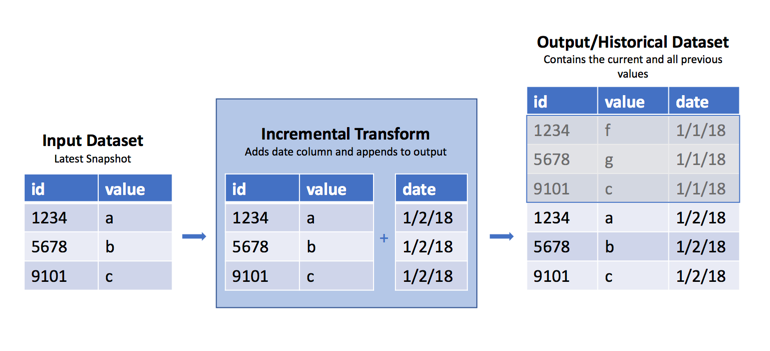
Occasionally, you may encounter a raw dataset where a new SNAPSHOT import replaces the previous view with the dataset's current data each day, week, or hour. However, it is often useful to have the previous data available to determine what has changed from the previous view. As mentioned above, it is best practice to handle this as part of ingestion by using APPEND transactions and adding a column with the import date. However, in cases where this is not possible, you can use the incremental decorator in Python transforms to append these regular snapshots into a historical version of that dataset. See the warnings below for caveats and the potential fragility of this approach.
Sample code
Below are examples of how to create historical datasets using the incremental decorator.
```python tab="Polars" import polars as pl from transforms.api import transform, incremental, Input, Output
@incremental(snapshot_inputs=['input_data']) @transform.using( input_data=Input("/path/to/snapshot/input"), history=Output("/path/to/historical/dataset"), ) def my_compute_function(input_data, history): input_df = input_data.polars()
# Note that you can also use current_timestamp() below
# if the input will change > 1x/day
input_df = input_df.with_columns(pl.lit(pl.date.today()).alias('date'))

history.write_table(input_df)
python tab="DuckDB"
from transforms.api import transform, incremental, Input, Output
@incremental(snapshot_inputs=['input_data'])
@transform.using(
input_data=Input("/path/to/snapshot/input"),
history=Output("/path/to/historical/dataset"),
)
def my_compute_function(ctx, input_data, history):
duckdb = ctx.duckdb()
# Note that you can also use current_timestamp() below
# if the input will change > 1x/day
query = duckdb.conn.sql(f"""
SELECT *, CURRENT_DATE AS date
FROM input_data
""")
history.write_table(query)
```
```python tab="Pandas" import pandas as pd from transforms.api import transform, incremental, Input, Output
@incremental(snapshot_inputs=['input_data']) @transform.using( input_data=Input("/path/to/snapshot/input"), history=Output("/path/to/historical/dataset"), ) def my_compute_function(input_data, history): input_df = input_data.pandas()
# Note that you can also use current_timestamp() below
# if the input will change > 1x/day
input_df['date'] = pd.Timestamp.now().date()

history.write_table(input_df)
python tab="PySpark"
from transforms.api import transform, incremental, Input, Output
@incremental(snapshot_inputs=['input_data'])
@transform.spark.using(
input_data=Input("/path/to/snapshot/input"),
history=Output("/path/to/historical/dataset"),
)
def my_compute_function(input_data, history):
input_df = input_data.dataframe()
# Note that you can also use current_timestamp() below
# if the input will change > 1x/day
input_df = input_df.withColumn('date', current_date())
history.write_dataframe(input_df)
```
Why this works
The incremental decorator applies additional logic to the read/write modes on the inputs and output. In the example above, we use the default read/write modes for the input and output.
Read mode
When using a SNAPSHOT input, the default read mode is current, which means it takes the entire input DataFrame, and not just the rows added since the last transaction. If the input dataset was created from an APPEND transaction, we could use the incremental decorator to use the added read mode to only access rows added since the last build. The transform obtains schema information from the current output, so there is no need to pass schema information like you would if you were reading a previous version of the DataFrame, for example, dataframe('previous', schema=input.schema).
Write mode
When we say a transform is run incrementally, it means that the default write mode for the output is set to modify. This mode modifies the existing output with data written during the build. For example, calling write_dataframe() when the output is in modify mode will append the written DataFrame to the existing output. This is exactly what is happening in this case.
Warnings
Because this transform uses SNAPSHOT datasets as inputs, there is no way to recover a snapshot that your build may have missed due to build failures or other reasons. If this is a concern, do not use this method. Instead, contact the owner of the input datasets to see if it is possible to convert it to an APPEND dataset so you can access the dataset's previous transaction. This is the way incremental computation was designed to work.
This approach will fail under the following conditions:
- Columns are added to the input dataset
- The column number of the existing table doesn't match the input data schema
- Columns on the input datasets change datatype, for example from
integertodecimal - You change the input dataset, even if that dataset has an identical schema. In this case, it will completely replace the output with the input rather than append.
Increased resource consumption
Using this pattern can cause an accumulation of small files in the historical dataset. File accumulation is not a desired outcome and will lead to increased build times and resource consumption in downstream transforms or analyses that use this historical dataset. Batch and interactive compute time may increase, as there is an overhead associated with reading each file. Disk usage may increase because compression is done on a per-file basis, and not across files within a dataset. It is possible to build logic to periodically cause a re-snapshot of the data and prevent this behavior from happening.
By inspecting the number of output files, we can determine an optimal incremental write mode. This mode allows us to read in the previous transaction's output as a DataFrame, union it to the incoming data, and coalesce the data files together. This turns many small files into one larger file.
Inspect the number of files in the output dataset's file system and use an if statement to set the write_mode, as in the following example:
```python tab="Polars" import polars as pl from transforms.api import transform, Input, Output, incremental
FILE_COUNT_LIMIT = 100
Be sure to insert your desired output schema here
schema = { 'Value': pl.Float64, 'Time': pl.Datetime, 'DataGroup': pl.Utf8 }
def compute_logic(df): """ This is your transforms logic """ return df.filter(pl.lit(True))
@incremental(semantic_version=1) @transform.using( output=Output("/Org/Project/Folder1/Output_dataset_incremental"), input_df=Input("/Org/Project/Folder1/Input_dataset_incremental"), ) def compute(input_df, output): df = input_df.polars('added') df = compute_logic(df)
# Fetches a list of the files that are in the dataset
files = list(output.filesystem(mode='previous').ls())

if (len(files) > FILE_COUNT_LIMIT):
    # Incremental merge and replace
    previous_df = output.polars('previous', schema)
    df = pl.concat([df, previous_df])
    mode = 'replace'
else:
    # Standard incremental mode
    mode = 'modify'

output.set_mode(mode)
output.write_table(df)
python tab="DuckDB"
import polars as pl
from transforms.api import transform, Input, Output, incremental
FILE_COUNT_LIMIT = 100
Be sure to insert your desired output schema here
schema = { 'Value': pl.Float64, 'Time': pl.Datetime, 'DataGroup': pl.Utf8 } def compute_logic(conn): """ This is your transforms logic """ return conn.sql("SELECT * FROM input_df") @incremental(semantic_version=1) @transform.using( output=Output("/Org/Project/Folder1/Output_dataset_incremental"), input_df=Input("/Org/Project/Folder1/Input_dataset_incremental"), ) def compute(ctx, input_df, output): conn = ctx.duckdb().conn df = compute_logic(conn).pl() # Fetches a list of the files that are in the dataset files = list(output.filesystem(mode='previous').ls()) if (len(files) > FILE_COUNT_LIMIT): # Incremental merge and replace previous_df = output.polars('previous', schema) df = pl.concat([df, previous_df]) mode = 'replace' else: # Standard incremental mode mode = 'modify' output.set_mode(mode) output.write_table(df) ```
```python tab="Pandas" import pandas as pd from transforms.api import transform, Input, Output, incremental
FILE_COUNT_LIMIT = 100
Be sure to insert your desired output schema here
schema = { 'Value': 'float64', 'Time': 'datetime64[ns]', 'DataGroup': 'object' }
def compute_logic(df): """ This is your transforms logic """ return df[df.index >= 0] # Equivalent to filter(True)
@incremental() @transform.using( output=Output("/Org/Project/Folder1/Output_dataset_incremental"), input_df=Input("/Org/Project/Folder1/Input_dataset_incremental"), ) def compute(input_df, output): df = input_df.pandas('added') df = compute_logic(df)
# Fetches a list of the files that are in the dataset
files = list(output.filesystem(mode='previous').ls())

if (len(files) > FILE_COUNT_LIMIT):
    # Incremental merge and replace
    previous_df = output.pandas('previous', schema)
    df = pd.concat([df, previous_df], ignore_index=True)
    mode = 'replace'
else:
    # Standard incremental mode
    mode = 'modify'

output.set_mode(mode)
output.write_table(df)
python tab="PySpark"
from pyspark.sql import types as T
from transforms.api import transform, Input, Output, incremental
FILE_COUNT_LIMIT = 100
Be sure to insert your desired output schema here
schema = T.StructType([ T.StructField('Value', T.DoubleType()), T.StructField('Time', T.TimestampType()), T.StructField('DataGroup', T.StringType()) ]) def compute_logic(df): """ This is your transforms logic """ return df.filter(True) @incremental() @transform.spark.using( output=Output("/Org/Project/Folder1/Output_dataset_incremental"), input_df=Input("/Org/Project/Folder1/Input_dataset_incremental"), ) def compute(input, output): df = input.dataframe('added') df = compute_logic(df) # Fetches a list of the files that are in the dataset files = list(output.filesystem(mode='previous').ls()) if (len(files) > FILE_COUNT_LIMIT): # Incremental merge and replace previous_df = output.dataframe('previous', schema) df = df.unionByName(previous_df) mode = 'replace' else: # Standard incremental mode mode = 'modify' output.set_mode(mode) output.write_dataframe(df.coalesce(1)) ```
中文翻译
从快照创建历史数据集
:::callout{theme="warning" title="警告"}
如有可能,最佳实践是将历史数据集作为APPEND事务进行摄取。更多详情请参阅下方的警告部分。
:::
工作流概述
有时您可能会遇到这样的原始数据集:新的SNAPSHOT导入会按天、周或小时用当前数据替换之前的视图。然而,保留之前的数据以确定与上一视图相比发生了哪些变化通常非常有用。如上所述,最佳实践是在数据摄取阶段通过使用APPEND事务并添加一个包含导入日期的列来处理此问题。但在无法实现的情况下,您可以在Python转换中使用incremental装饰器,将这些定期快照追加到该数据集的历史版本中。请参阅下方的警告,了解此方法的注意事项和潜在脆弱性。
示例代码
以下是使用incremental装饰器创建历史数据集的示例。
```python tab="Polars" import polars as pl from transforms.api import transform, incremental, Input, Output
@incremental(snapshot_inputs=['input_data']) @transform.using( input_data=Input("/path/to/snapshot/input"), history=Output("/path/to/historical/dataset"), ) def my_compute_function(input_data, history): input_df = input_data.polars()
# 注意:如果输入数据每天变化超过1次,也可以使用current_timestamp()
input_df = input_df.with_columns(pl.lit(pl.date.today()).alias('date'))

history.write_table(input_df)
python tab="DuckDB"
from transforms.api import transform, incremental, Input, Output
@incremental(snapshot_inputs=['input_data'])
@transform.using(
input_data=Input("/path/to/snapshot/input"),
history=Output("/path/to/historical/dataset"),
)
def my_compute_function(ctx, input_data, history):
duckdb = ctx.duckdb()
# 注意:如果输入数据每天变化超过1次,也可以使用current_timestamp()
query = duckdb.conn.sql(f"""
SELECT *, CURRENT_DATE AS date
FROM input_data
""")
history.write_table(query)
```
```python tab="Pandas" import pandas as pd from transforms.api import transform, incremental, Input, Output
@incremental(snapshot_inputs=['input_data']) @transform.using( input_data=Input("/path/to/snapshot/input"), history=Output("/path/to/historical/dataset"), ) def my_compute_function(input_data, history): input_df = input_data.pandas()
# 注意:如果输入数据每天变化超过1次,也可以使用current_timestamp()
input_df['date'] = pd.Timestamp.now().date()

history.write_table(input_df)
python tab="PySpark"
from transforms.api import transform, incremental, Input, Output
@incremental(snapshot_inputs=['input_data'])
@transform.spark.using(
input_data=Input("/path/to/snapshot/input"),
history=Output("/path/to/historical/dataset"),
)
def my_compute_function(input_data, history):
input_df = input_data.dataframe()
# 注意:如果输入数据每天变化超过1次,也可以使用current_timestamp()
input_df = input_df.withColumn('date', current_date())
history.write_dataframe(input_df)
```
工作原理
incremental装饰器对输入和输出的读/写模式应用了额外的逻辑。在上述示例中,我们对输入和输出使用了默认的读/写模式。
读取模式
使用SNAPSHOT输入时,默认读取模式为current,这意味着它会读取整个输入DataFrame,而不仅仅是上次事务后新增的行。如果输入数据集是通过APPEND事务创建的,我们可以使用incremental装饰器配合added读取模式,仅访问上次构建后新增的行。转换从current输出获取模式信息,因此无需像读取previous版本DataFrame时那样传递模式信息(例如dataframe('previous', schema=input.schema))。
写入模式
当说一个转换以增量方式运行时,意味着输出的默认写入模式被设置为modify。此模式会用构建期间写入的数据修改现有输出。例如,当输出处于modify模式时调用write_dataframe()会将写入的DataFrame追加到现有输出中。这正是本例中发生的情况。
警告
由于此转换使用SNAPSHOT数据集作为输入,因此无法恢复因构建失败或其他原因而可能遗漏的快照。如果这是一个问题,请不要使用此方法。相反,请联系输入数据集的所有者,看是否可能将其转换为APPEND数据集,以便访问数据集的上次事务。这才是增量计算的设计初衷。
以下情况下此方法将失败:
- 向输入数据集添加了列
- 现有表的列数与输入数据模式不匹配
- 输入数据集的列数据类型发生变化,例如从
integer变为decimal - 更改了输入数据集,即使该数据集具有相同的模式。在这种情况下,它将完全用输入替换输出,而不是追加。
资源消耗增加
使用此模式会导致历史数据集中积累大量小文件。文件积累不是理想的结果,会导致构建时间增加,并增加使用此历史数据集的下游转换或分析的资源消耗。批处理和交互式计算时间可能会增加,因为读取每个文件都有开销。磁盘使用量可能会增加,因为压缩是按文件进行的,而不是跨数据集内的文件进行。可以构建逻辑定期对数据进行重新快照,以防止这种行为发生。
通过检查输出文件的数量,我们可以确定最佳的增量写入模式。此模式允许我们将上次事务的输出作为DataFrame读取,将其与传入数据合并,并将数据文件合并在一起。这样可以将许多小文件合并为一个较大的文件。
检查输出数据集文件系统中的文件数量,并使用if语句设置write_mode,如下例所示:
```python tab="Polars" import polars as pl from transforms.api import transform, Input, Output, incremental
FILE_COUNT_LIMIT = 100
请务必在此处插入您期望的输出模式
schema = { 'Value': pl.Float64, 'Time': pl.Datetime, 'DataGroup': pl.Utf8 }
def compute_logic(df): """ 这是您的转换逻辑 """ return df.filter(pl.lit(True))
@incremental(semantic_version=1) @transform.using( output=Output("/Org/Project/Folder1/Output_dataset_incremental"), input_df=Input("/Org/Project/Folder1/Input_dataset_incremental"), ) def compute(input_df, output): df = input_df.polars('added') df = compute_logic(df)
# 获取数据集中文件的列表
files = list(output.filesystem(mode='previous').ls())

if (len(files) > FILE_COUNT_LIMIT):
    # 增量合并并替换
    previous_df = output.polars('previous', schema)
    df = pl.concat([df, previous_df])
    mode = 'replace'
else:
    # 标准增量模式
    mode = 'modify'

output.set_mode(mode)
output.write_table(df)
python tab="DuckDB"
import polars as pl
from transforms.api import transform, Input, Output, incremental
FILE_COUNT_LIMIT = 100
请务必在此处插入您期望的输出模式
schema = { 'Value': pl.Float64, 'Time': pl.Datetime, 'DataGroup': pl.Utf8 } def compute_logic(conn): """ 这是您的转换逻辑 """ return conn.sql("SELECT * FROM input_df") @incremental(semantic_version=1) @transform.using( output=Output("/Org/Project/Folder1/Output_dataset_incremental"), input_df=Input("/Org/Project/Folder1/Input_dataset_incremental"), ) def compute(ctx, input_df, output): conn = ctx.duckdb().conn df = compute_logic(conn).pl() # 获取数据集中文件的列表 files = list(output.filesystem(mode='previous').ls()) if (len(files) > FILE_COUNT_LIMIT): # 增量合并并替换 previous_df = output.polars('previous', schema) df = pl.concat([df, previous_df]) mode = 'replace' else: # 标准增量模式 mode = 'modify' output.set_mode(mode) output.write_table(df) ```
```python tab="Pandas" import pandas as pd from transforms.api import transform, Input, Output, incremental
FILE_COUNT_LIMIT = 100
请务必在此处插入您期望的输出模式
schema = { 'Value': 'float64', 'Time': 'datetime64[ns]', 'DataGroup': 'object' }
def compute_logic(df): """ 这是您的转换逻辑 """ return df[df.index >= 0] # 等同于 filter(True)
@incremental() @transform.using( output=Output("/Org/Project/Folder1/Output_dataset_incremental"), input_df=Input("/Org/Project/Folder1/Input_dataset_incremental"), ) def compute(input_df, output): df = input_df.pandas('added') df = compute_logic(df)
# 获取数据集中文件的列表
files = list(output.filesystem(mode='previous').ls())

if (len(files) > FILE_COUNT_LIMIT):
    # 增量合并并替换
    previous_df = output.pandas('previous', schema)
    df = pd.concat([df, previous_df], ignore_index=True)
    mode = 'replace'
else:
    # 标准增量模式
    mode = 'modify'

output.set_mode(mode)
output.write_table(df)
python tab="PySpark"
from pyspark.sql import types as T
from transforms.api import transform, Input, Output, incremental
FILE_COUNT_LIMIT = 100
请务必在此处插入您期望的输出模式
schema = T.StructType([ T.StructField('Value', T.DoubleType()), T.StructField('Time', T.TimestampType()), T.StructField('DataGroup', T.StringType()) ]) def compute_logic(df): """ 这是您的转换逻辑 """ return df.filter(True) @incremental() @transform.spark.using( output=Output("/Org/Project/Folder1/Output_dataset_incremental"), input_df=Input("/Org/Project/Folder1/Input_dataset_incremental"), ) def compute(input, output): df = input.dataframe('added') df = compute_logic(df) # 获取数据集中文件的列表 files = list(output.filesystem(mode='previous').ls()) if (len(files) > FILE_COUNT_LIMIT): # 增量合并并替换 previous_df = output.dataframe('previous', schema) df = df.unionByName(previous_df) mode = 'replace' else: # 标准增量模式 mode = 'modify' output.set_mode(mode) output.write_dataframe(df.coalesce(1)) ```