Troubleshooting guide(故障排除指南)
Follow the steps in this guide to debug the most common Python environment creation issues:
- Troubleshooting guide
- Checks fail during package resolution
- New Mamba error messages
- Dependency trees
- Direct conflicts
- Direct dependency conflicts
- Transitive dependency conflicts
- Interpreting the new error messages
- Legacy Mamba error messages
- Package not found
- Dependency not found
- Duplicate package error
- Debugging permission errors
- Package conflict
- Failure with no changes to requested packages
- Debugging slowness if there was no change to your
meta.yml - Jobs timing out if there was a change to your
meta.yml - Build failures with Conda errors
- Build failure with Entry Point Error
- Packages which require both a Conda package and a JAR
- Best practices for avoiding dependency conflicts
- Other issues
Checks fail during package resolution
For the following check failures, you can view the check logs in the 'Checks' tab within code repositories. Using these logs, you can discover why checks failed.
New Mamba error messages
Palantir contributed ↗ to the open-source Mamba community by providing better formatting of environment initialization error messages. As of February 2023, Foundry services benefit from errors that more closely represent the dependency tree being infringed by environment failures.
Dependency trees
In the following example:
packageA
   ├─ packageB
   └─ packageC
        └─ packageD
the packages packageB and packageC are direct dependencies of packageA. packageD is a direct dependency of packageC, but a transitive dependency of packageA. While packageA does not have direct constraints on packageD, packageA’s direct requirements on packageC indirectly forces constraints on packageD. Find below a real example of such a concept:
statsmodels
├─ numpy
├─ scipy
├─ matplotlib
│  │  ├─ libpng
│  │  ├─ setuptools
│  │  ├─ cycler
│  │  ├─ dateutil
│  │  └─ kiwisolver
While it may not be at first apparent that statsmodels enforces constraints on libpng, it does so transitively by having constraints on matplotlib.
Direct conflicts
Direct conflicts occur when different versions of the same package are requested in the same environment. Imagine requesting a simple environment with both python 3.7 and python 3.8. This is a direct conflict that will cause the environment to fail. The new error messages will provide the following information:
  Could not solve for environment specs
  The following packages are incompatible
  ├─ python 3.7**  is requested and can be installed;
  └─ python 3.8**  is uninstallable because it conflicts with any installable
   versions previously reported.
The message above correctly explains that python 3.7 can indeed be installed. However, if that version were to be installed, any attempt to install an additional, different version will cause a conflict. This environment can be solved by removing either version constraint of python from the environment.
Direct conflicts are however quite rare, as opposed to conflicts created by dependencies and transitive dependencies.
Direct dependency conflicts
NumPy documentation ↗ specifically mentions that numpy >=1.22.0 requires python >=3.8. As a result, attempting to create an environment requesting both python 3.7.* and numpy 1.22.0 would lead to a direct dependency conflict. The following error message would ensue:
Could not solve for environment specs
The following packages are incompatible
├─ numpy 1.22.0**  is installable with the potential options
│  ├─ numpy 1.22.0 would require
│  │  ├─ python >=3.9,<3.10.0a0 , which can be installed;
│  │  └─ python_abi 3.9.* *_cp39, which can be installed;
│  ├─ numpy 1.22.0 would require
│  │  ├─ python >=3.10,<3.11.0a0 , which can be installed;
│  │  └─ python_abi 3.10.* *_cp310, which can be installed;
│  └─ numpy 1.22.0 would require
│     ├─ python >=3.8,<3.9.0a0 , which can be installed;
│     └─ python_abi 3.8.* *_cp38, which can be installed;
└─ python 3.7**  is uninstallable because there are no viable options
   ├─ python [3.7.10|3.7.11|...|3.7.9] conflicts with any installable versions previously reported;
   ├─ python [3.7.0|3.7.1|3.7.2|3.7.3|3.7.6] would require
   │  └─ python_abi * *_cp37m, which conflicts with any installable versions previously reported;
   └─ python [3.7.10|3.7.12|...|3.7.9] would require
      └─ python_abi 3.7.* *_cp37m, which conflicts with any installable versions previously reported.
This error message informs that numpy 1.22.0 would be installable with either Python 3.8, 3.9, or 3.10, which conflicts with the requested 3.7.* version. This environment can be solved by relaxing the constraint either on Python or NumPy. For example, python 3.8.* and numpy 1.22.0, or python 3.7.* and numpy 1.* would both lead to successful environments.
:::callout{theme="neutral"}
You may assume, for the sake of troubleshooting environments, that python and python_abi versions go hand-in-hand. You can adjust your python_abi version by adjusting your python version instead of specifying python_abi in your environment.
:::
Transitive dependency conflicts
Similarly, package conflicts could occur because of a transitive dependency. Due to the nature of transitive dependencies, requesting only a handful of packages could lead to hundreds of constraints added to the environment solving operation. Consider the statsmodels package:
statsmodels
├─ numpy
├─ scipy
├─ matplotlib
│  │  ├─ libpng
│  │  ├─ setuptools
│  │  ├─ cycler
│  │  ├─ dateutil
│  │  └─ kiwisolver
Requesting a specific statsmodels version would put constraints on the allowed version of setuptools due to the package’s dependency on matplotlib. As a result, a transitive dependency conflict could occur if an environment requests incompatible versions of statsmodels and setuptools, due to how statsmodels itself imposes restrictions on setuptools.
For example, take the following environment requesting huggingface-adapter 0.1.1* and transforms 1.645.0:
The following packages are incompatible
  ├─ huggingface-adapter 0.1.1** * is installable and it requires
  │  └─ palantir_models >=0.551.0 *, which requires
  │     └─ pyspark-src >=3.2.1,<3.3.0a0 *, which can be installed;
  └─ transforms 1.645.0 * is uninstallable because it requires
     └─ pyspark-src 3.2.1_palantir.36 *, which conflicts with any installable versions previously reported
It may not be obvious at first why those two packages are incompatible. The error message helps identify that the problem comes from huggingface-adapter’s transitive dependency conflicting with transforms’ direct dependency on pyspark-src. This environment can be resolved by relaxing the constraints on either transforms or huggingface-adapter so that Mamba can identify a pair of versions that lead to compatible pyspark-src requirements.
Interpreting the new error messages
Find below a list of all the possible wordings that the new mamba error messages could provide, how to interpret them, and some guidance on how to remediate them:
The following packages are incompatibleorThe following package could not be installed: Either of these will usually be the first sentence of the detailed error message. This indicates whether the overall issue is a package conflict caused by incompatible versions or an issue in the installation itself of the necessary packages.- How to remediate: Read the necessary information directly below the statement.
can be installed: This sentence will typically appear at the top of a tree dependency and means that the package itself can be installed with no additional constraints. However, assuming that this specific version was installed, a set of conflicts could arise due to other package dependencies conflicting with that installed version. For example,python 3.7** is requested and can be installedmeans that Python 3.7 could be installed on the environment. Every other conflict listed directly under this statement assumes that Python 3.7 is installed in the environment.no viable options: None of the versions that are installable can fit within the constraints imposed by other specifications in the requested environment. For example, the messagepython 3.7** is uninstallable because there are no viable optionsindicates that versions ofpython 3.7.*could be installed if not for another package or constraint specifically requesting a different Python version.- How to remediate: Relax the constraints of the package causing an allowable version range outside of this package’s viable options.
does not exist, perhaps a (typo or a) missing channel: The package to install was not found. This likely means that either the package was incorrectly specified, or none of the configured channels (Settings > Libraries in Code Repositories or environment configuration in Code Workbook) contain the package. For example, requesting an environment withpython 3.423.*(a version that does not exist) andpthon 3.8.*(an obvious typographical error) would lead to the following error message:
 Could not solve for environment specs
  The following packages are incompatible
  ├─ pthon 3.8**  does not exist (perhaps a typo or a missing channel);
  └─ python 3.423** does not exist (perhaps a typo or a missing channel).
-
How to remediate: Ensure that packages do not contain any typographical errors, or ensure that all the requested packages are available for the environment to use. See Discover Python libraries for advice on how you can search for the existence of a package in Foundry.
-
is installable and it requires: The package and its attached version could be installed on the environment, but it would introduce a set of additional constraints to the environment. -
is uninstallable because it requires: The package and its attached version could not be installed, because some of its dependencies generate a conflict in the environment. -
How to remediate: Inspect the offending requirements of the dependencies listed below the message and relax either their constraints, or the constraints of this specific package.
-
is installable with the potential options: The package has a series of available, non-conflicting versions that could be installed on the environment. Choosing one of these versions could lead to further constraints. -
conflicts with any installable versions previously reported: Usually contrasted with the versions mentioned in lines above, this states that an already assumed version thatcan be installedof that package has been determined elsewhere and this version will therefore not be satisfiable. -
How to remediate: Ensure that the same environment does not request two different versions of the same package, either directly or transitively.
-
is missing on the system: This refers specifically to a missing virtual package ↗. Some packages can only run on specific OS environments. For example, the cudatoolkit ↗ package requires specific versions of__cuda, a system-level feature, to be present on the environment as a virtual package to ensure that the package can run on the existing architecture. -
which cannot be installed (as previously explained): The package cannot be installed either because of conflicts that have already been described earlier, or because another package contains the exact same constraints which have been described earlier.
Legacy Mamba error messages
Find below a list of common error messages from the legacy error messages, before the new Mamba error messages were introduced.
Package not found
In this case, no configured channel provides the package A dependency.
Problem: nothing provides requested A.a.a.a
This can happen if the pinned version of your package does not exist. If this is the case, try relaxing or removing the versioning from your package within the meta.yml; for example, matplotlib 1.1.1 could become matplotlib.
:::callout{theme="neutral"} Conda labels ↗ are not supported in external repositories. Packages found in labels are not discoverable by Palantir repositories. :::
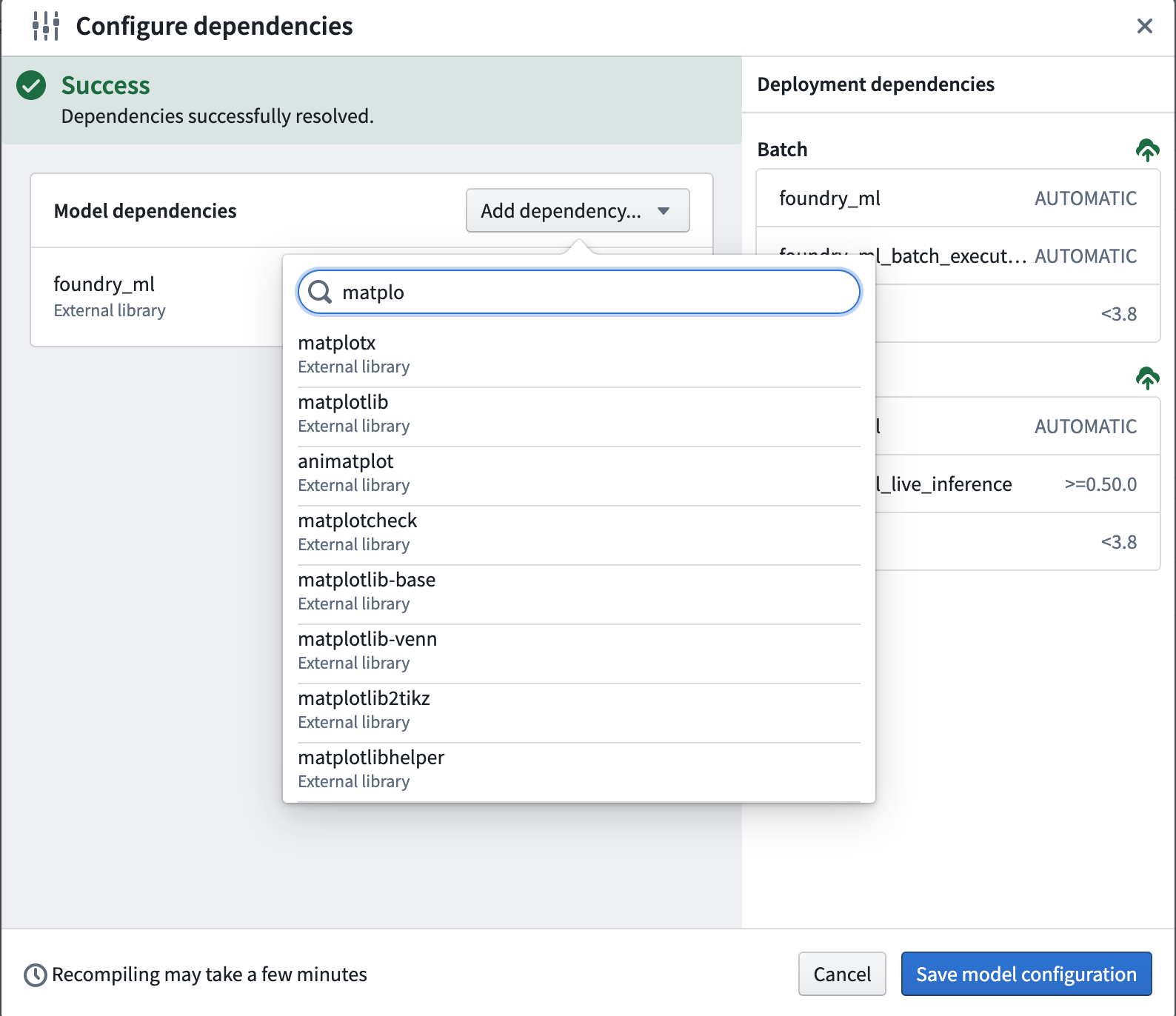
If you receive this error, then you can add your package by following the application-specific instructions below:
- Learn more about how to add a package in Code Repositories.
- Learn more about how to add a package in Code Workbook.
Dependency not found
In this case, package A contains a required dependency B which was not provided by any channel.
Problem: nothing provides B-b.b.b needed by A-a.a.a:
Note that B can be a package the user requested explicitly (in meta.yml/foundry-ml/vector profiles) or it can be a transitive dependency.
This may occur if B is not available for installation on your enrollment; for example, B may have been recalled and therefore is not available for install.
If this is the case, try removing the pinned version of A in case there is a version of A that has all its dependencies available, or contact your Palantir representative to import the necessary package into Foundry.
Duplicate package error
cannot install both X.a.b.c and X.d.e.f
This error occurs if you try to install the same package X and have two different version pinnings for both. For example, you might receive this error if you try to pin both python 3.9.* and python 3.10.* in your meta.yml. You can resolve this issue by removing one of the duplicate package pinnings.
Debugging permission errors
CondaService:ReadRepositoryPermissionDenied
If you receive this error, it may be because all the assets and packages you need are not available in your enrollment. Once they are all installed on your enrollment, make sure to redeploy.
Package conflict
In this case, package A has a requirement on the version of package B but this version of B conflicts with other packages:
Problem: package A-a.a.a requires B >=2.2.5,<2.3.0a0, but none of the providers can be installed
Note that the package B could refer to a transitive dependency of A, which you have not explicitly listed as a requirement in your meta.yaml file. See Introduction to Environment Creation for more on transitive dependencies.
Debugging a package conflict
- Create a minimal example of a failing solve. Remove packages until the environment successfully solves, and then add packages back in until you have determined which packages are the blockers.
- Try relaxing constraints (remove package pins).
- You can open up multiple repositories or multiple branches of the same repository in different windows to make this process faster (in Code Repositories) or profiles (in Code Workbook).
:::callout
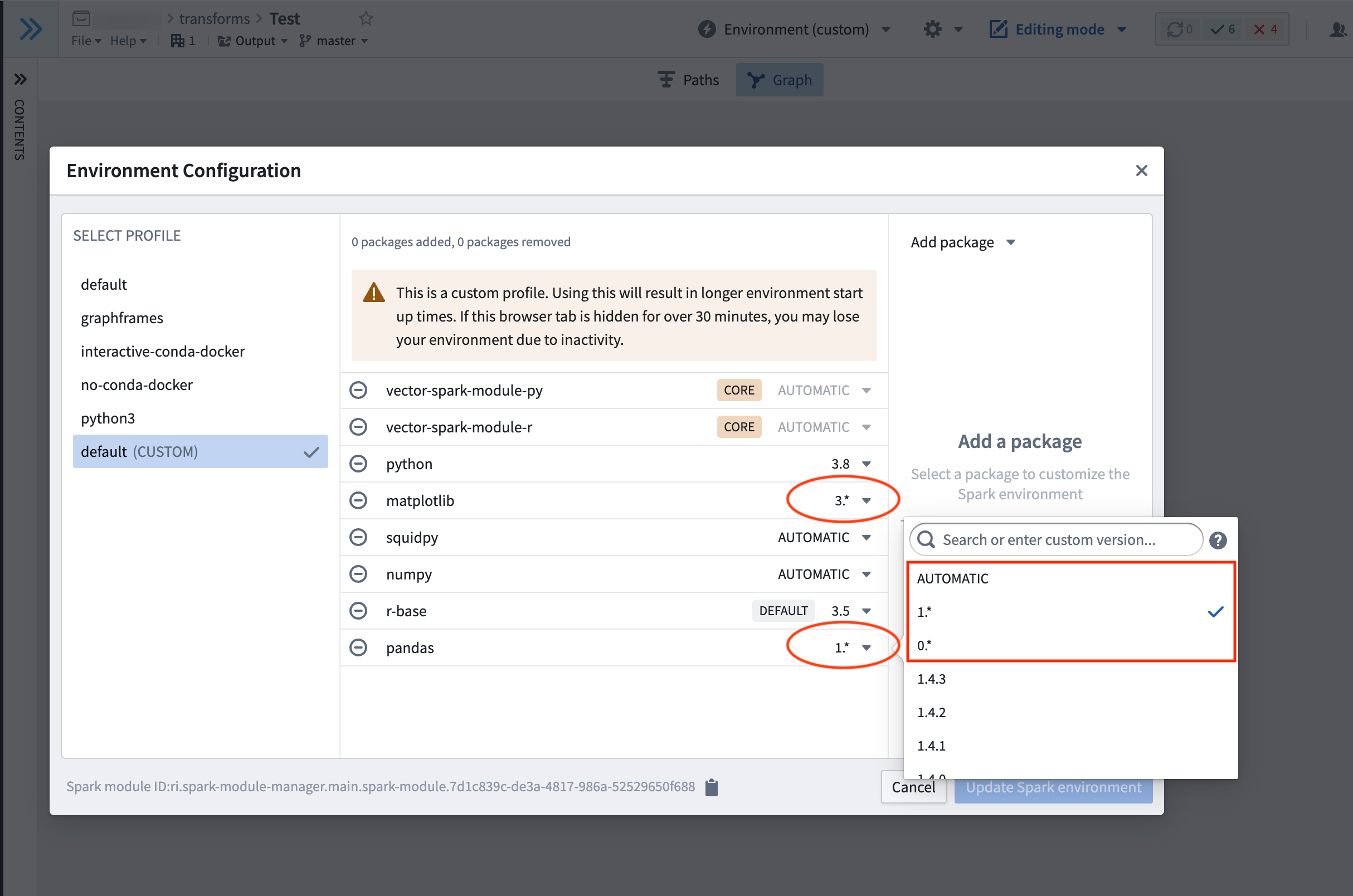
In Code Workbook you can add minimum versioning for
pandas,matplotlib, andnumpyto prevent it from defaulting topandas=0,matplotlib=2, andnumpy<1.20. If you need higher versions than these defaults, navigate to Environment > Customize Spark environment > Customize Profile, and choose a version from the dropdown menu for each package to satisfy your version requirements. :::
* We recommend using binary search to discover issues. Try removing all constraints in one repository, removing half of the constraints in another repository, then the other half in another repository, and so on.
- You can also add extra verbosity to logs produced by Mamba, which can be helpful in tracking down transitive dependencies further down the tree (note: this will cause a slow down in checks). To add verbosity, find the task during which checks fail in the CI logs for the line
Execution failed for task ':transforms-python:<task-name>'.. If the task which failed for example wascondaPackRun, add the following block to the bottom of the innertransforms-python/build.gradlefile:
tasks.condaPackRun {
    additionalArguments "-vvv"
}
Why is unpinning versions not fixing resolve failures?
It may be the case that even with completely relaxed constraints, the packages or package versions required for the list of requirements are either:
- Not available. You can check the packages and versions available using the package tab. If necessary, you can request these packages are added by contacting your Palantir representative.
- Not compatible. These package definitions may never be compatible, even if we had access to all the possible published versions. For example, one of the Conda packages you rely on may have upgraded (see upgrade PRs) to a new version which is broken.
- Are incompatible with the version of Python in your
meta.yml.
In order to check for this scenario you can compare the Conda lock files associated with the successful checks against those of the failed checks. To access Conda lock files, select the option to Show hidden files and folders in the Settings cog, and navigate to transforms-python/conda-versions.run.linux-64.lock. Pin the versions of the libraries that changed between the successful and failing runs to different versions in the meta.yaml file.
Failure with no changes to requested packages
There are two main reasons why this may happen:
- As your transform may rely on external packages (see publicly managed Conda channels), unfortunately it can be susceptible to failures if something upstream has broken.
- Merging in an upgrade PR will trigger a re-resolution of the environment when Checks run and in rare cases could cause package resolution to fail, especially if you have an over-constrained environment. This is because upgrade PRs can bring in new dependencies, causing the environment to require recalculation. You can confirm that the upgrade PR was the cause by testing whether Checks pass if you revert the Commit on which the upgrade PR was applied. You can then work through the section above to reapply the upgrade PR.
Debugging slowness if there was no change to your meta.yml
In Code Repositories:
- Upgrade your branch (see manual branch upgrade for more information).
- If you are still experiencing slowness and you have made a code change that is outside of the
@transform_dftag, then this code may have slowed down the checks. Evaluate the performance of this code (if applicable).
Jobs timing out if there was a change to your meta.yml
If you are receiving out of memory (OOM) errors on long-running jobs, this may be caused by incompatible versioning of packages leading to unsolvable environments. To resolve this, first upgrade your branch and then proceed to perform the debugging steps listed above.
Build failures with Conda errors
CondaEnvironmentSetupError
If you get a build error, the solution steps are as follows:
- Check your driver logs for errors.
- If you made changes to your code/
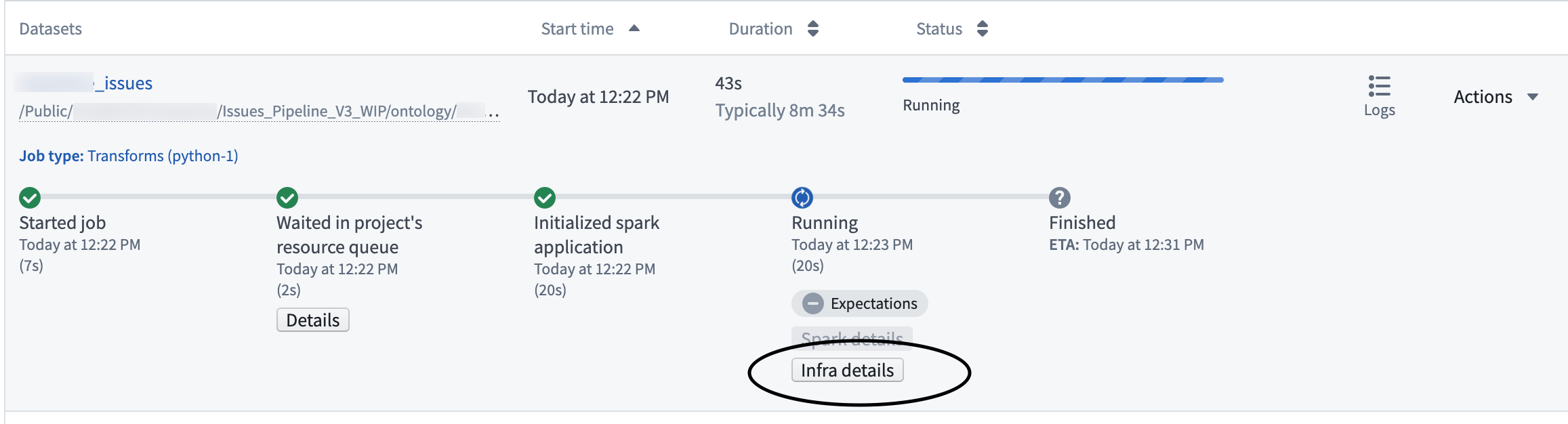
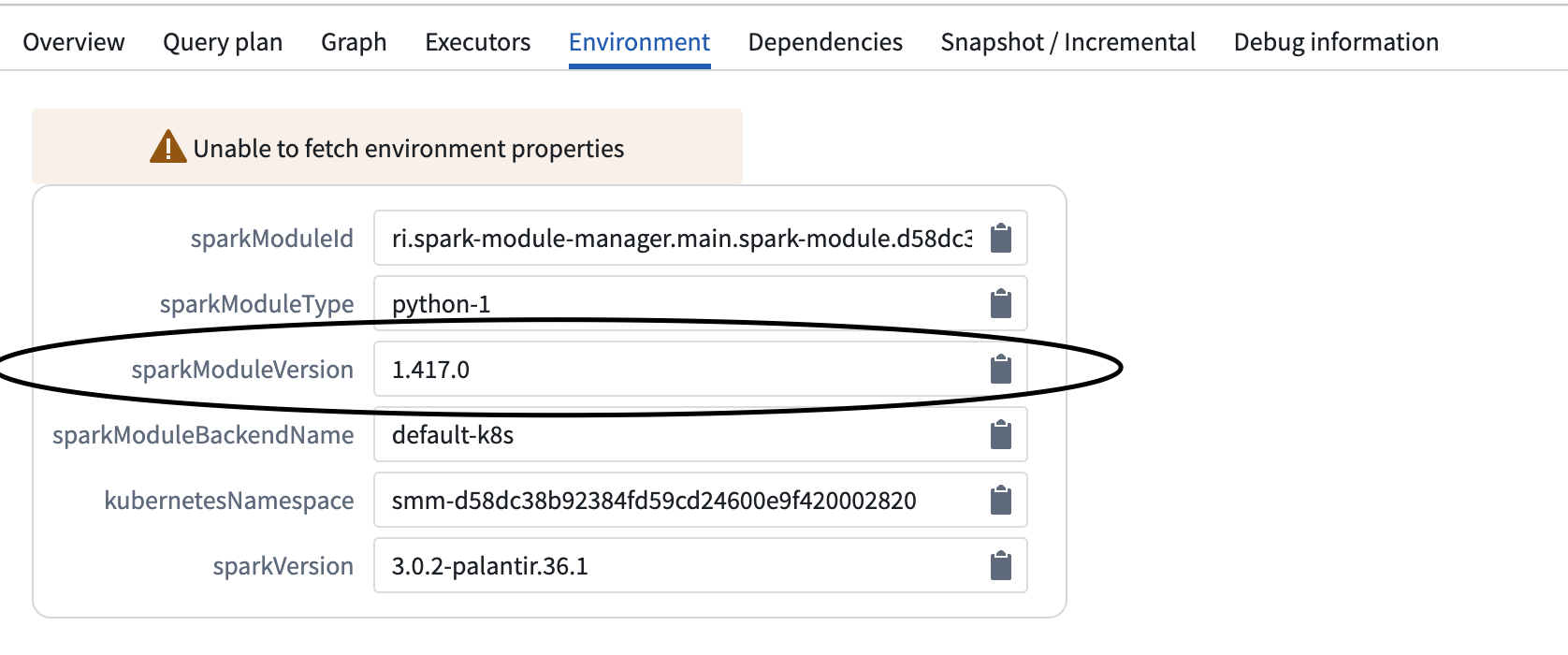
meta.yml(to observe this use the job comparison tool) then revert them to see if that fixes the build. If a revertedmeta.ymlchange fixes the issue, then there is probably a package conflict which can be debugged as described above. If you didn't change your meta.yml, then check the Python module versions of your builds (as mentioned in the following step). If that doesn't resolve the build, then a resolution due to a branch upgrade or underlying upgrade (see upgrade PRs) may have caused an insolvable environment. In which case you should check the debugging steps mentioned above. - If you made no changes, is there a different Python module version that ran the successful build when compared to the failed build? Check "Infra details", "Environment" then "SparkModuleVersion". Contact your Palantir representative about reverting to this version.
Multi-download failures
RuntimeError: Multi-download failed
This error means either that you do not have access to the artifacts channel from which packages are downloaded, or that the artifact is not available on the enrollment. The actual failure can be seen in the driver logs.
If you are trying to template this repository, navigate to your list of Conda channels and check to see if there are any warnings on the listed channels. If there are warnings on a listed channel, follow these steps:
- Remove the broken channel (ask your Palantir representative for permissions if applicable).
- Retrigger the checks.
- Retrigger the build.
Build failure with Entry Point Error
transforms._errors.EntryPointError: "Key {name} was not found, please check your repo's meta.yaml and setup.py files"
This error means something is missing from the root files that are required to trigger builds. You might be able to use Dataset Preview, but the builds will fail.
To debug this issue, check if any essential information is missing from meta.yaml or setup.py. As a reference, you can create a new Python code repository and examine the meta.yaml and the setup.py files in the new repository.
After adding any missing information to meta.yaml and/or setup.py, commit the changes, wait for the checks to be successful, and retrigger the build.
Packages which require both a Conda package and a JAR
Some packages require both a Conda package and a JAR in order to be available. A common example is the graphframes package (where the Conda package contains the Python API and the JAR contains the actual implementation). If you only add the Conda package, but you do not add the necessary JAR, you may run into the following error:
o257.loadClass.: java.lang.ClassNotFoundException:<Class>
Alternatively, you may encounter this error:
Java classpath reference error - A Python dependency you are using is attempting to reference a Java jar not in the classpath. Check recently added Python dependencies, and add a dependency on the necessary Java packages (JARs) in the build.gradle file.
Such packages require a two-step process to be added:
- Add the Conda package to the repository in the normal way through the package tab.
- Select the option to
Show hidden files and foldersin the Settings cog, and select the innertransforms-python/build.gradlefile. At the bottom of the file, add the following block:
dependencies {
    condaJars '<group_name>:<name>:<version>'
}
If these packages are also required for unit testing, they will need to be made available at test time. To do so, add the following block to your gradle file (note that the testing plugin must be declared before the sparkJars dependencies):
// Apply the testing plugin
apply plugin: 'com.palantir.transforms.lang.pytest-defaults'

dependencies {
    condaJars '<group_name>:<name>:<version>'
    sparkJars '<group_name>:<name>:<version>'
}
Another example of an external library that requires both a Conda Package and a JAR is the Spark-NLP ↗ package. Note that Spark-NLP's JAR dependency needs to be added in the build.gradle file.
To start, add Spark-NLP as an external library.
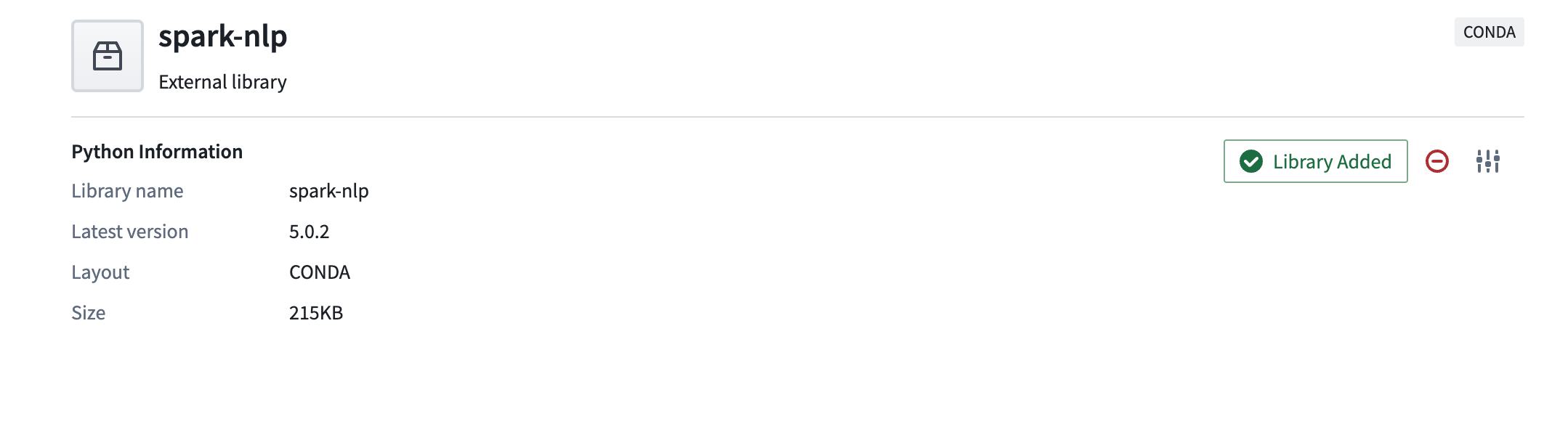
Add the JAR compatible with the library version you added above into the build.gradle file inside the subproject, usually transforms-python/build.gradle. For example, the library version of Spark-NLP above is 5.0.2 so in the step below, we will add a JAR that meets version expectations. By using the format <group_name>:<name>:<version>, we can add the JAR to our build.gradle script with the following code:
dependencies {
     condaJars 'com.johnsnowlabs.nlp:spark-nlp_2.12:5.0.2'
 }
If you are unsure about the target version specified in the name, visit Maven ↗, search for the desired library and find the compatible target version for the library version you observe in Foundry.
Best practices for avoiding dependency conflicts
From the errors mentioned above, the most frequent cause of errors are dependency conflicts. To reduce dependency conflicts, follow these best practices.
Best practices for avoiding dependency conflicts: Python
Uphold a major.minor versioning for Python.
- In Code Repositories, Python
3.9.*,3.10.*, and3.11.*are available. It is preferred that you leave the Python version unpinned and simply specify the package namepython. However, if your code needs to run on a specific version of Python, the chosen version should be pinned for both the build and run sections. Python3.8.*is now deprecated; it can still be used, but it will not be supported after January 2025. Python3.6.*and3.7.*are no longer supported.
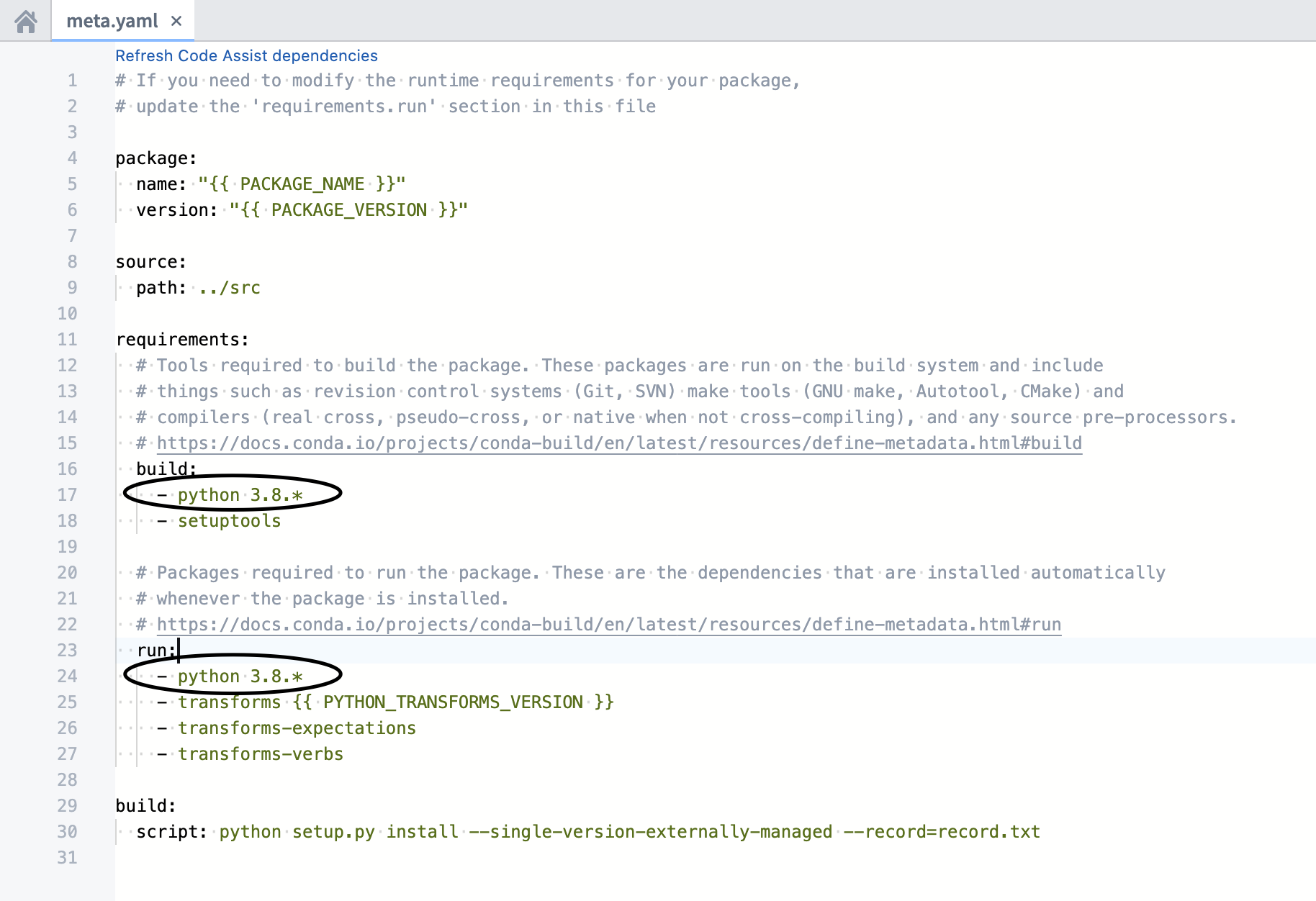
:::callout{theme="neutral"} Be sure that the Python dependencies in the build and run sections are identical. Mismatches between the Python dependencies can lead to undesired outcomes and failures.
Ranges such as python >=3.9 or python >3.9,<=3.10.11 are not supported for Python versions. If an unsupported Python version is used, we will default to Python 3.6.*. Note that Python 3.6.* is deprecated, so make sure you have a valid pin in your meta.yaml for a supported Python version.
:::
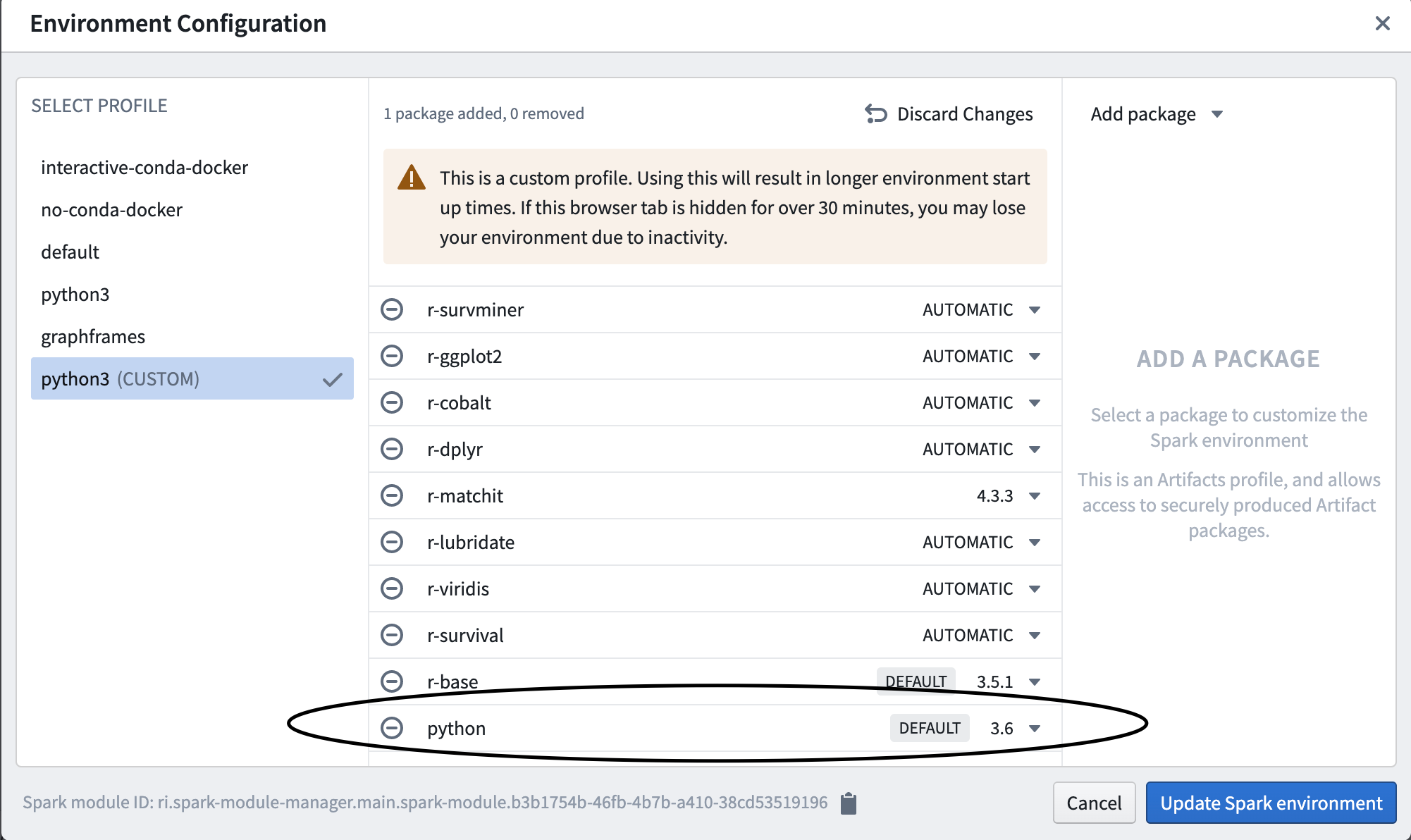
- In Code Workbook, you can toggle the versioning by changing automatic to the versioning you require.
Python version support
Starting from Python 3.9, Foundry will follow the timelines defined by Python End Of Life ↗, meaning that a python version won't be supported in platform if it's declared as end of life. Check out the Python versions page for more details.
Best practices for avoiding dependency conflicts: Packages other than Python
Avoid explicitly pinning versions as this can cause dependency conflicts. Even major.minor versions can cause conflicts.
:::callout
Note that in Code Workbook, you can add minimum versioning for pandas, matplotlib, and numpy as Code Workbook will default to pandas=0, matplotlib=2, and numpy<1.20 on the automatic setting.
:::
Other issues
If the guidance above is insufficient to resolve your issue, or if you encounter an issue outside the scope of this guide, contact your Palantir representative and include details of any debugging steps you tried.
中文翻译
故障排除指南
按照本指南中的步骤调试最常见的Python环境创建问题:
- 故障排除指南
- 包解析期间检查失败
meta.yml无变更时环境构建缓慢的调试meta.yml有变更时任务超时- 带Conda错误的构建失败
- 带入点错误的构建失败
- 同时需要Conda包和JAR包的依赖
- 避免依赖冲突的最佳实践
- 其他问题
包解析期间检查失败
如果遇到下述检查失败的情况,你可以在代码仓库的「检查(Checks)」标签页中查看检查日志,通过日志定位检查失败的原因。
新版Mamba错误消息
Palantir向开源Mamba社区贡献了↗代码,优化了环境初始化错误消息的展示格式。自2023年2月起,Foundry服务的错误消息可以更清晰地展示环境失败涉及的依赖树(dependency tree)违规情况。
依赖树
如下例所示:
packageA
   ├─ packageB
   └─ packageC
        └─ packageD
packageB和packageC是packageA的直接依赖(direct dependency),packageD是packageC的直接依赖,但属于packageA的传递性依赖(transitive dependency)。虽然packageA没有对packageD设置直接约束,但它对packageC的直接要求会间接对packageD产生约束。以下是该概念的真实示例:
statsmodels
├─ numpy
├─ scipy
├─ matplotlib
│  │  ├─ libpng
│  │  ├─ setuptools
│  │  ├─ cycler
│  │  ├─ dateutil
│  │  └─ kiwisolver
statsmodels似乎不会对libpng设置约束,但它通过对matplotlib的约束实现了传递性限制。
直接冲突
当同一个环境中请求了同一依赖包的不同版本时,就会发生直接冲突。比如要创建一个同时包含python 3.7和python 3.8的简单环境,这就是典型的直接冲突(direct conflict),会导致环境创建失败。新版错误消息会展示如下信息:
  Could not solve for environment specs
  The following packages are incompatible
  ├─ python 3.7**  is requested and can be installed;
  └─ python 3.8**  is uninstallable because it conflicts with any installable
   versions previously reported.
python 3.7本身可以安装,但如果安装了该版本,再尝试安装其他版本的Python就会产生冲突。你可以移除环境中任意一个Python版本约束来解决该问题。
不过与依赖、传递性依赖导致的冲突相比,直接冲突非常少见。
直接依赖冲突
NumPy官方文档↗明确说明numpy >=1.22.0要求python >=3.8。因此如果尝试创建同时包含python 3.7.*和numpy 1.22.0的环境,就会触发直接依赖冲突(direct dependency conflict),会返回如下错误消息:
Could not solve for environment specs
The following packages are incompatible
├─ numpy 1.22.0**  is installable with the potential options
│  ├─ numpy 1.22.0 would require
│  │  ├─ python >=3.9,<3.10.0a0 , which can be installed;
│  │  └─ python_abi 3.9.* *_cp39, which can be installed;
│  ├─ numpy 1.22.0 would require
│  │  ├─ python >=3.10,<3.11.0a0 , which can be installed;
│  │  └─ python_abi 3.10.* *_cp310, which can be installed;
│  └─ numpy 1.22.0 would require
│     ├─ python >=3.8,<3.9.0a0 , which can be installed;
│     └─ python_abi 3.8.* *_cp38, which can be installed;
└─ python 3.7**  is uninstallable because there are no viable options
   ├─ python [3.7.10|3.7.11|...|3.7.9] conflicts with any installable versions previously reported;
   ├─ python [3.7.0|3.7.1|3.7.2|3.7.3|3.7.6] would require
   │  └─ python_abi * *_cp37m, which conflicts with any installable versions previously reported;
   └─ python [3.7.10|3.7.12|...|3.7.9] would require
      └─ python_abi 3.7.* *_cp37m, which conflicts with any installable versions previously reported.
python 3.8.*搭配numpy 1.22.0,或者python 3.7.*搭配numpy 1.*都可以成功创建环境。
:::callout{theme="neutral"}
在调试环境问题时,你可以默认python和python_abi版本是一一对应的。你可以通过调整python版本来修改python_abi版本,无需在环境中单独指定python_abi。
:::
传递性依赖冲突
同理,包冲突也可能由传递性依赖引发。受传递性依赖的特性影响,仅请求少量包就可能给环境解析操作增加数百条约束。以之前的statsmodels包为例:
statsmodels
├─ numpy
├─ scipy
├─ matplotlib
│  │  ├─ libpng
│  │  ├─ setuptools
│  │  ├─ cycler
│  │  ├─ dateutil
│  │  └─ kiwisolver
statsmodels会通过其依赖的matplotlib对setuptools的允许版本产生约束。因此如果环境中请求的statsmodels和setuptools版本不兼容,就会发生传递性依赖冲突,根源是statsmodels本身对setuptools的版本限制。
比如以下环境请求了huggingface-adapter 0.1.1*和transforms 1.645.0:
The following packages are incompatible
  ├─ huggingface-adapter 0.1.1** * is installable and it requires
  │  └─ palantir_models >=0.551.0 *, which requires
  │     └─ pyspark-src >=3.2.1,<3.3.0a0 *, which can be installed;
  └─ transforms 1.645.0 * is uninstallable because it requires
     └─ pyspark-src 3.2.1_palantir.36 *, which conflicts with any installable versions previously reported
huggingface-adapter的传递性依赖和transforms对pyspark-src的直接依赖存在冲突。你可以放宽transforms或huggingface-adapter的版本约束,让Mamba可以找到一对满足兼容pyspark-src要求的版本来解决该问题。
解读新版错误消息
以下是新版Mamba错误消息可能出现的所有表述、对应的含义以及修复建议:
* The following packages are incompatible 或 The following package could not be installed:这两条通常是详细错误消息的第一句,用于说明整体问题是版本不兼容导致的包冲突,还是必要包本身安装过程中出现问题。
* 修复方案:直接阅读该语句下方的详细信息。
* can be installed:该语句通常出现在依赖树的顶部,说明该包本身没有额外约束可以正常安装,但如果安装了该特定版本,其他包的依赖可能和该版本产生冲突。比如python 3.7** is requested and can be installed说明Python 3.7可以安装在环境中,该语句下方列出的所有冲突都是基于「环境中已安装Python 3.7」的假设。
* no viable options:没有任何可安装的版本能够满足请求环境中其他规范施加的约束。比如python 3.7** is uninstallable because there are no viable options说明如果没有其他包或约束要求不同的Python版本,python 3.7.*本可以安装。
* 修复方案:放宽导致冲突的包的约束,使其允许的版本范围覆盖该包的可用版本。
* does not exist, perhaps a (typo or a) missing channel:未找到要安装的包。可能原因是包名填写错误,或者配置的渠道(代码仓库的设置 > 依赖库,或者代码工作簿的环境配置)中没有包含该包。比如请求包含python 3.423.*(不存在的版本)和pthon 3.8.*(明显拼写错误)的环境会返回如下错误:
 Could not solve for environment specs
  The following packages are incompatible
  ├─ pthon 3.8**  does not exist (perhaps a typo or a missing channel);
  └─ python 3.423** does not exist (perhaps a typo or a missing channel).
-
is installable and it requires:对应版本的包可以安装在环境中,但会给环境引入一系列额外约束。 -
is uninstallable because it requires:对应版本的包无法安装,因为它的部分依赖和环境存在冲突。 -
修复方案:检查该消息下方列出的有问题的依赖要求,放宽这些依赖的约束,或者放宽当前包的版本约束。
-
is installable with the potential options:该包有一系列可用、无冲突的版本可以安装在环境中,选择其中任意一个版本都会引入进一步的约束。 -
conflicts with any installable versions previously reported:通常和上文提到的版本形成对比,说明其他位置已经确定了该包can be installed的版本,当前版本无法满足要求。 -
修复方案:确保同一个环境不会直接或间接请求同一个包的两个不同版本。
-
is missing on the system:特指缺少虚拟包(virtual package)↗。部分包仅能在特定操作系统环境中运行,比如cudatoolkit↗包要求环境中存在系统级特性__cuda对应的虚拟包,才能保证包在现有架构上正常运行。 -
which cannot be installed (as previously explained):该包无法安装,要么是因为之前已经描述过的冲突,要么是因为其他包有完全相同的约束(已在之前说明)。
旧版Mamba错误消息
以下是新版Mamba错误消息上线前,旧版错误消息中常见的报错类型。
未找到包
这种情况是指所有已配置的渠道(channel)都没有提供依赖包A。
Problem: nothing provides requested A.a.a.a
meta.yml中该包的版本限制,比如将matplotlib 1.1.1改为matplotlib。
:::callout{theme="neutral"} 外部仓库不支持Conda标签(label)↗,标签中的包无法被Palantir仓库发现。 :::
如果遇到该错误,你可以按照对应应用的说明添加包: * 了解如何在代码仓库中添加包 * 了解如何在代码工作簿中添加包
未找到依赖
这种情况是指包A依赖的包B没有任何渠道提供。
Problem: nothing provides B-b.b.b needed by A-a.a.a:
B可能是用户在meta.yml/foundry-ml/vector配置文件中显式请求的包,也可能是传递性依赖。
该错误可能是因为你的租户(enrollment)中没有提供B的安装源,比如B可能已被下架,因此无法安装。
你可以尝试移除A的版本锁定,看看是否存在依赖全部可用的A版本,或者联系Palantir对接人将需要的包导入Foundry。
重复包错误
cannot install both X.a.b.c and X.d.e.f
X的两个不同锁定版本,就会触发该错误。比如你在meta.yml中同时锁定了python 3.9.*和python 3.10.*就会收到该报错。你可以移除其中一个重复的包版本锁定来解决问题。
权限错误调试
CondaService:ReadRepositoryPermissionDenied
包冲突
这种情况是指包A对包B的版本有要求,但B的对应版本和其他包冲突:
Problem: package A-a.a.a requires B >=2.2.5,<2.3.0a0, but none of the providers can be installed
B可能是A的传递性依赖,你可能没有在meta.yaml文件中将其显式列为依赖。你可以参考环境创建简介了解更多传递性依赖的信息。
调试包冲突问题
- 创建最小可复现的解析失败示例。先移除依赖直到环境可以成功解析,再逐步添加依赖,直到找到导致阻塞的包。
- 尝试放宽约束(移除包版本锁定)。
- 你可以在不同窗口打开多个仓库或同一仓库的多个分支(代码仓库场景)或多个配置文件(代码工作簿场景)来加快调试速度。
:::callout
在代码工作簿中,你可以为
pandas、matplotlib和numpy设置最低版本,避免默认使用pandas=0、matplotlib=2和numpy<1.20。如果你需要高于默认值的版本,可以前往环境 > 自定义Spark环境 > 自定义配置文件,在下拉菜单中为每个包选择满足要求的版本。 :::
* 我们推荐使用二分法定位问题。尝试在一个仓库中移除所有约束,在另一个仓库中移除一半约束,再在第三个仓库中移除另一半约束,以此类推快速定位问题。
- 你也可以为Mamba生成的日志增加详细程度,有助于追踪依赖树更深层的传递性依赖(注意:这会降低检查运行速度)。要增加日志详细程度,先在CI日志(CI log)的检查失败任务中找到
Execution failed for task ':transforms-python:<task-name>'.这一行。如果失败的任务是condaPackRun,就将以下代码块添加到内层transforms-python/build.gradle文件的底部:tasks.condaPackRun { additionalArguments "-vvv" }
为什么解除版本锁定还是无法解决解析失败?
即使完全放宽了约束,依然解析失败可能有以下几个原因:
* 包不可用。你可以通过依赖包标签页检查可用的包和版本。如有必要,你可以联系Palantir对接人请求添加这些包。
* 包本身不兼容。即使可以访问所有已发布的版本,这些包的定义本身可能永远无法兼容。比如你依赖的某个Conda包升级后(参考升级PR)的新版本本身存在问题。
* 和meta.yml中的Python版本不兼容。
要排查该场景,你可以对比检查成功和检查失败对应的Conda锁定文件(conda lock file)。要访问Conda锁定文件,先在设置齿轮中选择显示隐藏文件和文件夹,再导航到transforms-python/conda-versions.run.linux-64.lock。将成功和失败运行之间发生变更的库版本在meta.yaml文件中锁定为其他可用版本即可。
请求的包无变更但解析失败
出现该问题主要有两个原因: 1. 你的转换任务可能依赖外部包(参考公共托管Conda渠道),如果上游出现问题,就可能导致环境解析失败。 2. 合并升级PR会触发检查运行时重新解析环境,极少数情况下会导致包解析失败,尤其是如果你的环境约束过多时。这是因为升级PR会引入新的依赖,需要重新计算环境。你可以测试回滚升级PR对应的提交后检查是否能通过,确认是否是升级PR导致的问题,之后再参考上述章节的步骤重新应用升级PR。
meta.yml无变更时环境构建缓慢的调试
在代码仓库中:
1. 升级你的分支(参考手动分支升级了解更多信息)。
2. 如果依然存在缓慢问题,且你修改了@transform_df标签之外的代码,那么可能是这部分代码拖慢了检查速度,请评估该代码的性能(如适用)。
meta.yml有变更时任务超时
如果长时间运行的任务出现内存不足(OOM)错误,可能是因为包版本不兼容导致环境无法解析。要解决该问题,请先升级你的分支,再执行上述调试步骤。
带Conda错误的构建失败
CondaEnvironmentSetupError
meta.yml(可以使用任务对比工具确认),请回滚修改,看看是否能修复构建。如果回滚meta.yml的变更解决了问题,那么很可能是存在包冲突,可以按照上述说明调试。如果你没有修改meta.yml,请检查构建对应的Python模块版本(下一步说明)。如果依然无法解决问题,那么可能是分支升级或底层升级(参考升级PR)导致环境无法解析,此时请参考上述调试步骤处理。
3. 如果你没有做任何修改,检查成功构建和失败构建运行的Python模块版本是否有差异?查看「基础设施详情」->「环境」->「SparkModuleVersion」。联系你的Palantir对接人请求回滚到该版本。
多文件下载失败
RuntimeError: Multi-download failed
如果你正在尝试模板化该仓库,请前往Conda渠道列表,检查列出的渠道是否有警告。如果某个渠道存在警告,请按照以下步骤处理: 1. 移除失效的渠道(如有需要请联系Palantir对接人申请权限)。 2. 重新触发检查。 3. 重新触发构建。
带入点错误的构建失败
transforms._errors.EntryPointError: "Key {name} was not found, please check your repo's meta.yaml and setup.py files"
要调试该问题,请检查meta.yaml或setup.py中是否缺少必要信息。你可以新建一个Python代码仓库,参考新仓库中的meta.yaml和setup.py文件内容。
将缺失的信息补充到meta.yaml和/或setup.py后,提交变更,等待检查通过后重新触发构建即可。
同时需要Conda包和JAR包的依赖
部分依赖需要同时安装Conda包和JAR包才能正常使用,常见的例子是graphframes包(Conda包包含Python API,JAR包包含实际实现逻辑)。如果你只添加了Conda包,没有添加必要的JAR包,可能会遇到以下错误:
o257.loadClass.: java.lang.ClassNotFoundException:<Class>
Java类路径引用错误 - 你使用的Python依赖尝试引用类路径中不存在的Java Jar包。请检查最近添加的Python依赖,在build.gradle文件中添加必要的Java包(JAR)依赖。
添加这类依赖需要两个步骤:
1. 按照常规方式通过依赖包标签页将Conda包添加到仓库。
2. 在设置齿轮中选择显示隐藏文件和文件夹,打开内层的transforms-python/build.gradle文件,在文件底部添加如下代码块:
dependencies {
    condaJars '<group_name>:<name>:<version>'
}
// Apply the testing plugin
apply plugin: 'com.palantir.transforms.lang.pytest-defaults'

dependencies {
    condaJars '<group_name>:<name>:<version>'
    sparkJars '<group_name>:<name>:<version>'
}
首先,将Spark-NLP添加为外部库。
将和你上面添加的库版本兼容的JAR添加到子项目的build.gradle文件中,通常是transforms-python/build.gradle。比如上面的Spark-NLP版本是5.0.2,那么下一步需要添加符合版本要求的JAR。使用<group_name>:<name>:<version>的格式,我们可以通过以下代码将JAR添加到build.gradle脚本中:
dependencies {
     condaJars 'com.johnsnowlabs.nlp:spark-nlp_2.12:5.0.2'
 }
避免依赖冲突的最佳实践
从上述错误可以看出,最常见的错误原因就是依赖冲突。要减少依赖冲突,请遵循以下最佳实践。
避免依赖冲突的最佳实践:Python版本
Python版本请遵循「主版本.次版本」的格式锁定。
* 在代码仓库中,提供了Python 3.9.*、3.10.*和3.11.*版本。建议你不要锁定Python版本,仅指定包名python即可。但如果你的代码需要在特定Python版本上运行,应该在构建和运行部分都锁定所选版本。Python 3.8.*目前已弃用,依然可以使用,但2025年1月后将不再支持。Python 3.6.*和3.7.*已不再支持。
:::callout{theme="neutral"} 请确保构建和运行部分的Python依赖完全一致,Python依赖不匹配会导致意外结果和失败。
不支持python >=3.9或python >3.9,<=3.10.11这类Python版本范围。如果使用了不支持的Python版本,我们会默认使用Python 3.6.*。注意Python 3.6.*已弃用,因此请确保你在meta.yaml中锁定了受支持的Python版本。
:::
- 在代码工作簿中,你可以将版本设置从「自动」切换为你需要的版本。
Python版本支持政策
从Python 3.9开始,Foundry将遵循Python生命周期终止(Python End Of Life)↗定义的时间表,也就是说如果某个Python版本被宣布终止支持,平台也将不再支持该版本。你可以访问Python版本页面了解更多详情。
避免依赖冲突的最佳实践:非Python类依赖包
尽量避免显式锁定版本,因为这会导致依赖冲突,即使是「主版本.次版本」的锁定也可能引发冲突。
:::callout
注意在代码工作簿中,你可以为pandas、matplotlib和numpy设置最低版本,因为自动设置下代码工作簿会默认使用pandas=0、matplotlib=2和numpy<1.20。
:::